Page 328 of 660
328 3-2. Using the audio system
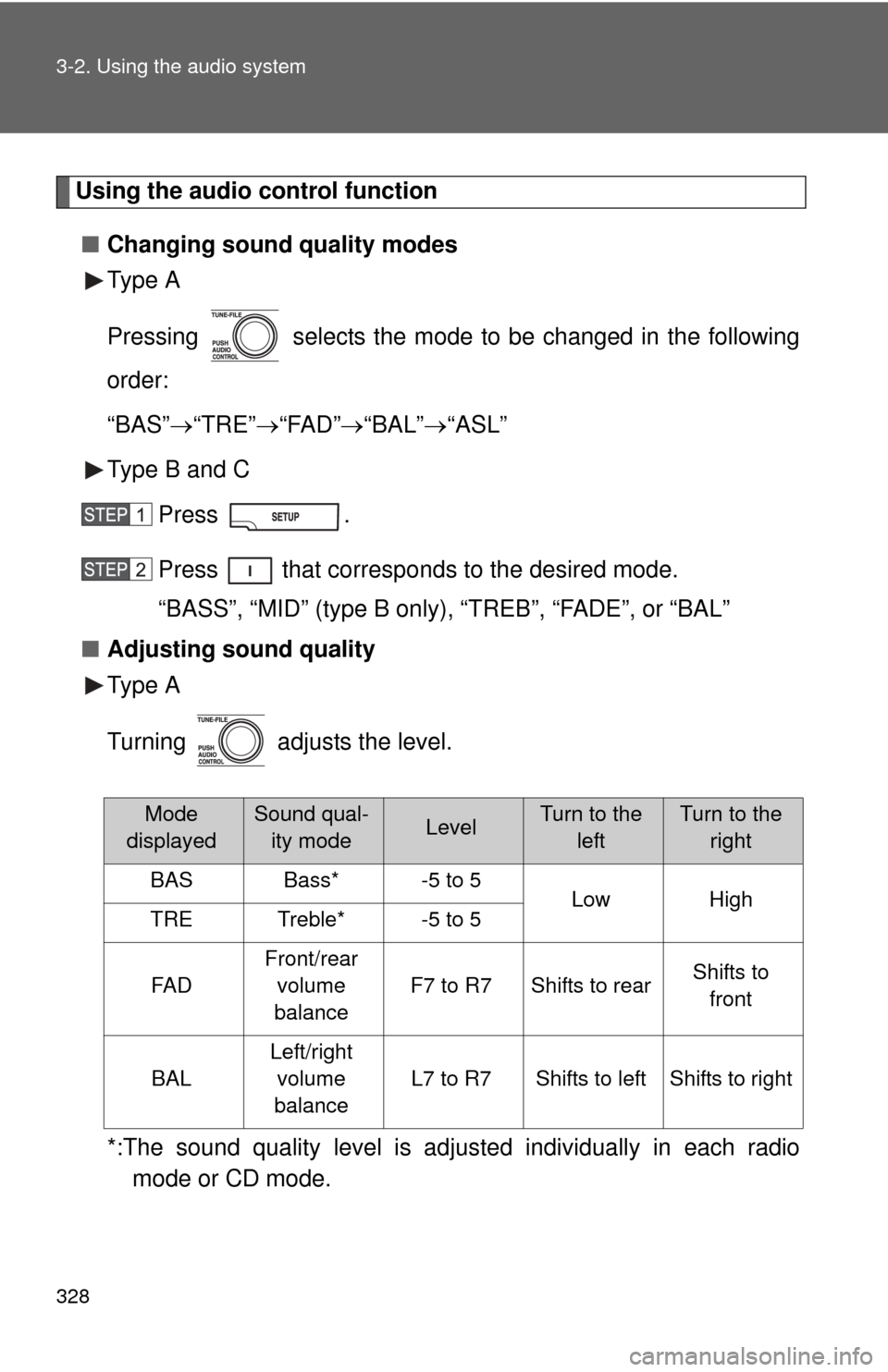
Using the audio control function■ Changing sound quality modes
Type A
Pressing selects the mode to be changed in the following
order:
“BAS” “TRE” “FAD” “BAL” “ASL”
Type B and C
Press .
Press that corresponds to the desired mode.
“BASS”, “MID” (type B only), “TREB”, “FADE”, or “BAL”
■ Adjusting sound quality
Type A
Turning adjusts the level.
*:The sound quality level is adjusted individually in each radio
mode or CD mode.
Mode
displayedSound qual- ity modeLevelTurn to the leftTurn to the right
BASBass*-5 to 5LowHighTRETreble*-5 to 5
FA D
Front/rear
volume
balance
F7 to R7Shifts to rearShifts to front
BAL
Left/right volume
balance
L7 to R7Shifts to leftShifts to right
Page 333 of 660
333
3-2. Using the audio system
3
Interior features
Using the steering wheel audio switches
: If equipped
Some audio features can be controlled using the switches on the
steering wheel.
Increases/decreases vol-
ume
Radio mode: Selects radio
station
CD mode: Selects track/file,
folder and disc
iPod
® player mode: Selects
a song
USB memory player mode:
Selects a file and folder
Bluetooth
® audio mode:
Selects a track and album
RSE mode: Selects track/
file and chapter
Turns the power on, selects
an audio source
Page 334 of 660
334 3-2. Using the audio system
Turning the power onPress when the audio system is turned off.
The audio system can be turned off by holding the switch down until you
hear a beep.
Changing the audio sourcePress when the audio system is turned on. The audio source
changes as follows each time the switch is pressed.
If no discs are inserted in the player, that mode will be skipped.
Type B:
FM SAT CD changer RSE*Bluetooth® audio AUX
USB/iPod®AM
Type C:
FM SAT CDBluetooth® audio AUXUSB/iPod®AM
*: Vehicles with rear seat entertainment system
Adjusting the volume
Press “+” on to increase the volume and “-” to decrease the
volume.
Press and hold the switch to continue increasing or decreasing the vol-
ume.
Selecting a radio station Press to select the radio mode.
Press “” or “ ” on to select a radio station.
To scan for receivable stations, press and hold “ ” or “ ” on
until you hear a beep.
Page 338 of 660
338 3-3. Using the Bluetooth® audio system
CAUTION
■FCC WARNING
Changes or modifications in construction not expressly approved by the
party responsible for compliance could void the user’s authority to operate
the equipment.
Radio frequency exposure. This device is approved for Mobile Application
only and, to comply with applicable FCC radio frequency exposure regula-
tions, must be used with a distance of at least 7.9 in. (20 cm) between the
antenna and the body of any person at all time during use.
■ Caution while driving
Do not connect portable players or operate the controls.
NOTICE
■To prevent damage to portable players
Do not leave portable players in the vehicle. The temperature inside the
vehicle may become high, resulting in damage to the player.
Page 390 of 660
390 3-5. Using the hands-free phone system (for cellular phone)
CAUTION
■FCC WARNING
Changes or modifications in construction not expressly approved by the
party responsible for compliance could void the user’s authority to operate
the equipment.
Radio frequency exposure. This device is approved for Mobile Application
only and, to comply with applicable FCC radio frequency exposure regula-
tions, must be used with a distance of at least 7.9 in. (20 cm) between the
antenna and the body of any person at all times during use.
■ Caution while driving
Do not use a cellular phone, or connect the Bluetooth
® phone.
NOTICE
■To prevent damage to a cellular phone
Do not leave a cellular phone in the vehicle. The temperature inside may
become high resulting in damage to the phone.
Page 571 of 660

5
When trouble arises
571
5-2. Steps to take in an emergency
The light will go off after taking several driving trips.
If the light does not go off even after several trips, contact your Toyota dealer
as soon as possible.
■ Front passenger detection sensor and passenger seat belt reminder
If luggage or other load is placed on the front passenger seat, depending on
its weight, the reminder light to flash and buzzer to sound.
■
When the tire pressure warning light comes on
Check the tire inflation pressure and adjust to the appropriate level.
Pushing the tire pressure warning reset switch does not turn off the tire
pressure warning light.
■The tire pressure warning light may turn on due to natural causes
The tire pressure warning light may turn on due to natural causes such
as natural air leaks or tire inflation pressure changes caused by temper-
ature. In this case, adjusting the ti re inflation pressure will turn off the
warning light (after several minutes).
■When a tire is replaced with a spare tire
The temporary spare tire is not equipped with the tire pressure warning
valve and transmitter. If a tire goes flat, the tire pressure warning light will
not turn off even though the flat tire is replaced with the temporary spare
tire. Replace the temporary spare tire with the repaired tire and adjust
the proper tire inflatio n pressure. The tire pres sure warning light will turn
off after several minutes.
■If the tire pressure warning system is inoperative
The tire pressure warning system will be disabled in the following condi-
tions:
(When the condition be comes normal, the system will work properly.)
●If tires not equipped with tire pressure warning valves and transmit-
ters are used.
●If the ID code on the tire pressure warning valves and transmitters is
not registered in the tire pressure warning computer.
The tire pressure warning system may be disabled in the following condi-
tions:
(When the condition be comes normal, the system will work properly.)
●If electronic devices or facilities using similar radio wave frequencies
are nearby.
Page 572 of 660

572 5-2. Steps to take in an emergency
●If a radio set at similar frequencies is in use in the vehicle.
●If a window tint that affects the radio wave signals is installed.
●If there is a lot of snow or ice on the vehicle, in particular around the
wheels or wheel housings.
●If non-genuine Toyota wheels are used. (Even if you use Toyota
wheels, the tire pressu re warning system may not work properly with
some types of tires.)
●If tire chains are used.
■If the tire pressure warning light comes on after blinking for 1
minute frequently
If the tire pressure warning light comes on after blinking for 1 minute fre-
quently when the engine switch is turned to the ON position, have it
checked by your Toyota dealer.
■ After changing the engine oil (U.S.A. only)
Make sure to reset the oil maintenance data. ( P. 501)
■ Customization that can be co nfigured at Toyota dealer
The vehicle speed linked seat belt reminder buzzer can be disabled.
(Customizable features P. 632)
CAUTION
■If the tire pressure warning light comes on
Be sure to observe the following precautions. Failure to do so could
cause loss of vehicle control and re sult in death or serious injury.
●Stop your vehicle in a safe place as soon as possible. Adjust the tire
inflation pressure immediately.
●If the tire pressure warning light comes on even after tire inflation pres-
sure adjustment, it is pr obable that you have a flat tire. Check the tires.
If the tire is flat, change to the spare tire and have the flat tire repaired
by the nearest Toyota dealer.
●Avoid abrupt maneuvering and braking. If the vehicle tires deteriorate,
you could lose control of the steering wheel or the brakes.
■If a blowout or sudden air leakage should occur
The tire pressure warning syste m may not activate immediately.
Page 626 of 660

626 6-1. Specifications
Warning: The temperature grades for this tire are established for a
tire that is properly inflated and not overloaded.
Excessive speed, underinflation, or excessive loading, either
separately or in combination, can cause heat buildup and possible
tire failure.
Glossary of tire terminology
Tire related termMeaning
Cold tire inflation
pressure
Tire pressure when the vehicle has been
parked for three hours or more, or has not
been driven more than 1 mile or 1.5 km under
that condition
Maximum inflation
pressureThe maximum cold inflated pressure to which a
tire may be inflated, s hown on the sidewall of
the tire
Recommended
inflation pressureCold tire inflation pressure recommended by a
manufacturer
Accessory weight
The combined weight (in excess of those
standard items which may be replaced) of
transmission, power steering, power brakes,
power windows, power seats, radio and heater,
to the extent that these items are available as
factory-installed equipment (whether installed
or not)
Curb weight
The weight of a motor vehicle with standard
equipment, including the maximum capacity of
fuel, oil and coolant, and if so equipped, air
conditioning and additional weight optional
engine
Maximum loaded
vehicle weight
The sum of:
(a) Curb weight
(b) Accessory weight
(c) Vehicle capacity weight
(d) Production options weight