Page 147 of 513
147
2-1. Driving procedures
2
When driving
Engine (ignition) switch (vehicles without smart key system)
■Starting the engine
Check that the parking brake is set.
Check that the shift lever is set in P.
Sit in the driver’s seat and firmly depress the brake pedal.
Turn the engine switch to the “START” position to start the
engine.
■ Engine (ignition) switch
“LOCK”
The steering wheel is locked
and the key can be removed.
(The key can be removed only
when the shift lever is in “P”.)
“ACC”
Some electrical components
such as the audio system can
be used.
“ON”
All electrical components can
be used.
“START”
For starting the engine.
STEP 1
STEP 2
STEP 3
STEP 4
Page 148 of 513

148 2-1. Driving procedures
■Turning the key from “ACC” to “LOCK”
■ Steering lock release
■ If the engine does not start
The engine immobilizer system may not have been deactivated. ( P. 92)
■ Key reminder function
A buzzer sounds if the driver’s door is opened, while the engine switch is in
the “LOCK” or “ACC” position to remind you to remove the key.
CAUTION
■When starting the engine
Always start the engine while sitting in the driver's seat. Do not press the
accelerator while starting the engine under any circumstances.
Doing so may cause an accident resulting in death or serious injury.
■ Caution when driving
Do not turn the engine switch to the “LOCK” position while driving. If, in an
emergency, you must turn the engine off while the vehicle is moving, turn the
key only to the “ACC” position.
Shift the shift lever to P.
(P. 150)
Push in the key and turn to the
“LOCK” position.STEP 1
STEP 2
When starting the engine, the engine
switch may seem stuck in the “LOCK”
position. To free it, turn the key while turn-
ing the steering wheel slightly in either
direction.
Page 150 of 513
150
2-1. Driving procedures
Automatic transmission
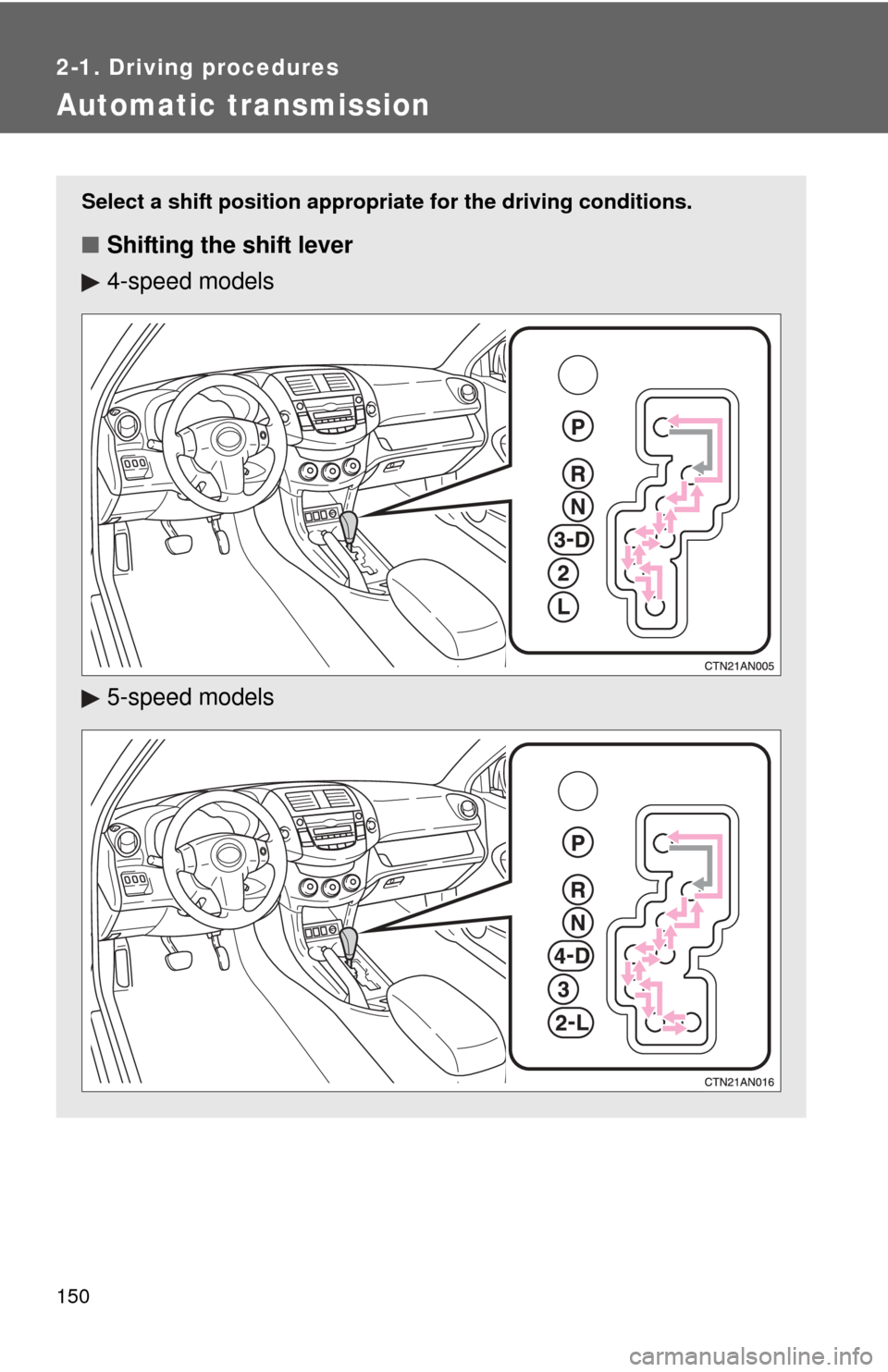
Select a shift position appropriate for the driving conditions.
■Shifting the shift lever
4-speed models
5-speed models
Page 151 of 513
151
2-1. Driving procedures
2
When driving
Vehicles without
smart key system:
While the engine switch is in the “ON” position, depress the
brake pedal and move the shift lever.
Vehicles with smart key system:
While the “ENGINE START STOP” switch is in IGNITION
ON mode, depress the brake pedal and move the shift
lever.
■ Shift position uses
*: Shifting to the D position allows the system to select a gear suitable
for the driving conditions.
Setting the shift lever to the D position is recommended for normal
driving.
Shift positionFunction
4-speed models5-speed models
PParking the vehicle/starting the engine
RReversing
NNeutral
DNormal driving*
4Position for engine braking
3,2Position for more powerful engine braking
LPosition for maximum engine braking
Page 152 of 513
152 2-1. Driving procedures
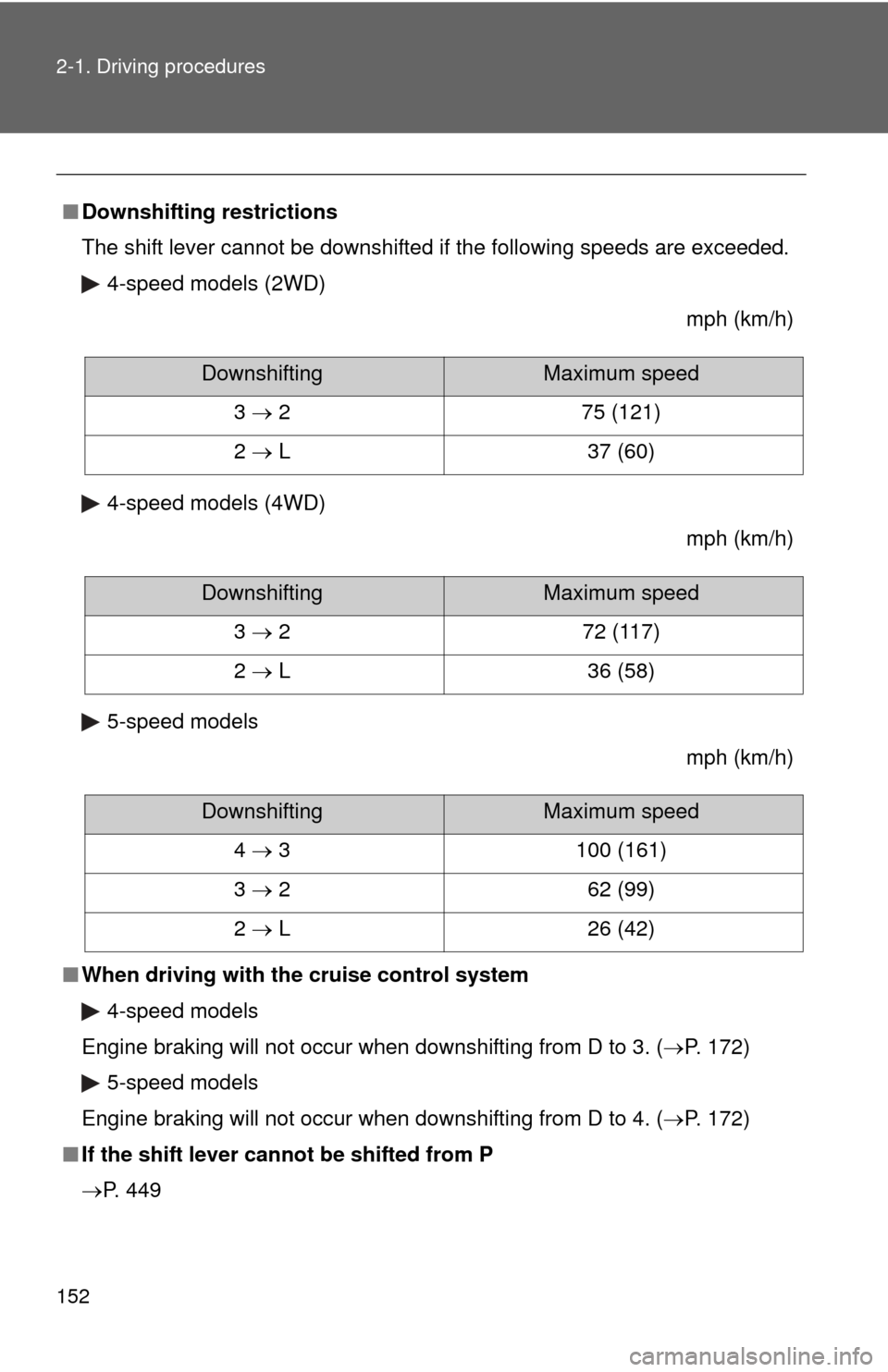
■Downshifting restrictions
The shift lever cannot be downshifted if the following speeds are exceeded.
4-speed models (2WD)
mph (km/h)
4-speed models (4WD) mph (km/h)
5-speed models mph (km/h)
■ When driving with the cruise control system
4-speed models
Engine braking will not occur when downshifting from D to 3. (P. 172) 5-speed models
Engine braking will not occur when downshifting from D to 4. (P. 172)
■ If the shift lever cannot be shifted from P
P. 449
DownshiftingMaximum speed
3 2 75 (121)
2 L 37 (60)
DownshiftingMaximum speed
3 2 72 (117)
2 L 36 (58)
DownshiftingMaximum speed
4 3 100 (161)
3 2 62 (99)
2 L 26 (42)
Page 157 of 513
157
2-2. Instrument cluster
2
When driving
Instrument panel light control
The brightness of the instrument panel lights can be adjusted.
Brighter
Darker
When the headlight switch is
turned on, the brightness will
be reduced slightly unless the
control dial is turned fully up.
Trip information display
P. 162
Automatic transmission shift position indicator lights
P. 150
Odometer/trip meterOdometer
Displays the total distance the vehicle has been driven.
Trip meter
Displays the distance the vehi cle has been driven since the
meter was last reset. Trip meters A and B can be used to
record and display different distances independently.
Odometer/trip meter switching and trip meter resetting button
Switches between odometer and trip meter displays. Pushing and hold-
ing the button will reset the trip meter when the trip meter is being dis-
played.
Page 173 of 513
173
2-4. Using other
driving systems
2
When driving
■Cruise control can be set when
●The shift lever is in D or 3 (4-speed models), or D or 4 (5-speed models).
● Vehicle speed is above approximately 25 mph (40 km/h). Within the limits
of the engine’s capabilities, cruising speed can be maintained up or down
grades.
■ Accelerating
The vehicle can be accelerated normally. After acceleration, the set speed
resumes.
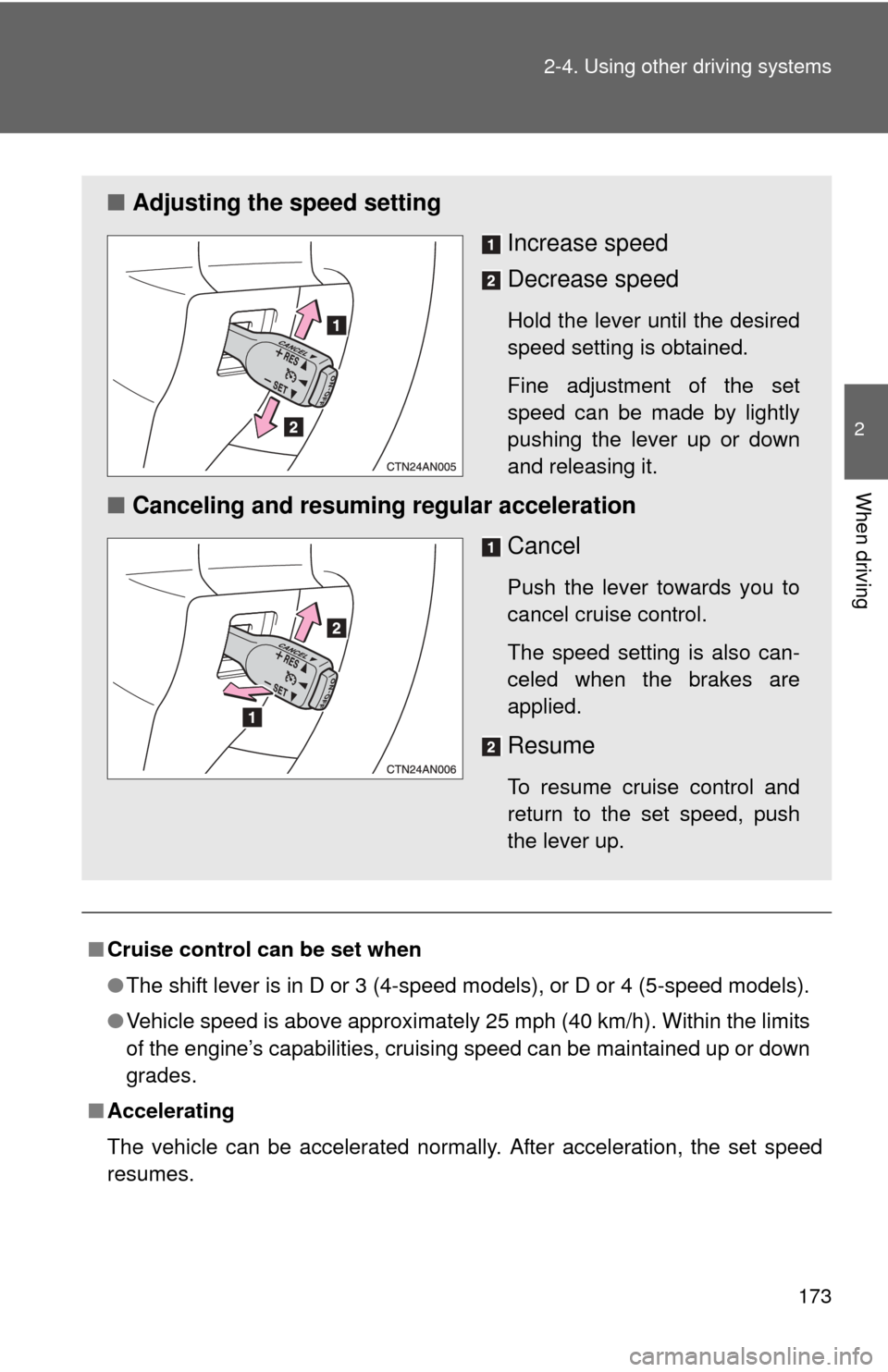
■ Adjusting the speed setting
Increase speed
Decrease speed
Hold the lever until the desired
speed setting is obtained.
Fine adjustment of the set
speed can be made by lightly
pushing the lever up or down
and releasing it.
■Canceling and resuming regular acceleration
Cancel
Push the lever towards you to
cancel cruise control.
The speed setting is also can-
celed when the brakes are
applied.
Resume
To resume cruise control and
return to the set speed, push
the lever up.
Page 175 of 513
175
2-4. Using other driving systems
2
When driving
Rear view monitor system (vehicles with auto anti-glare inside rear view mirror)
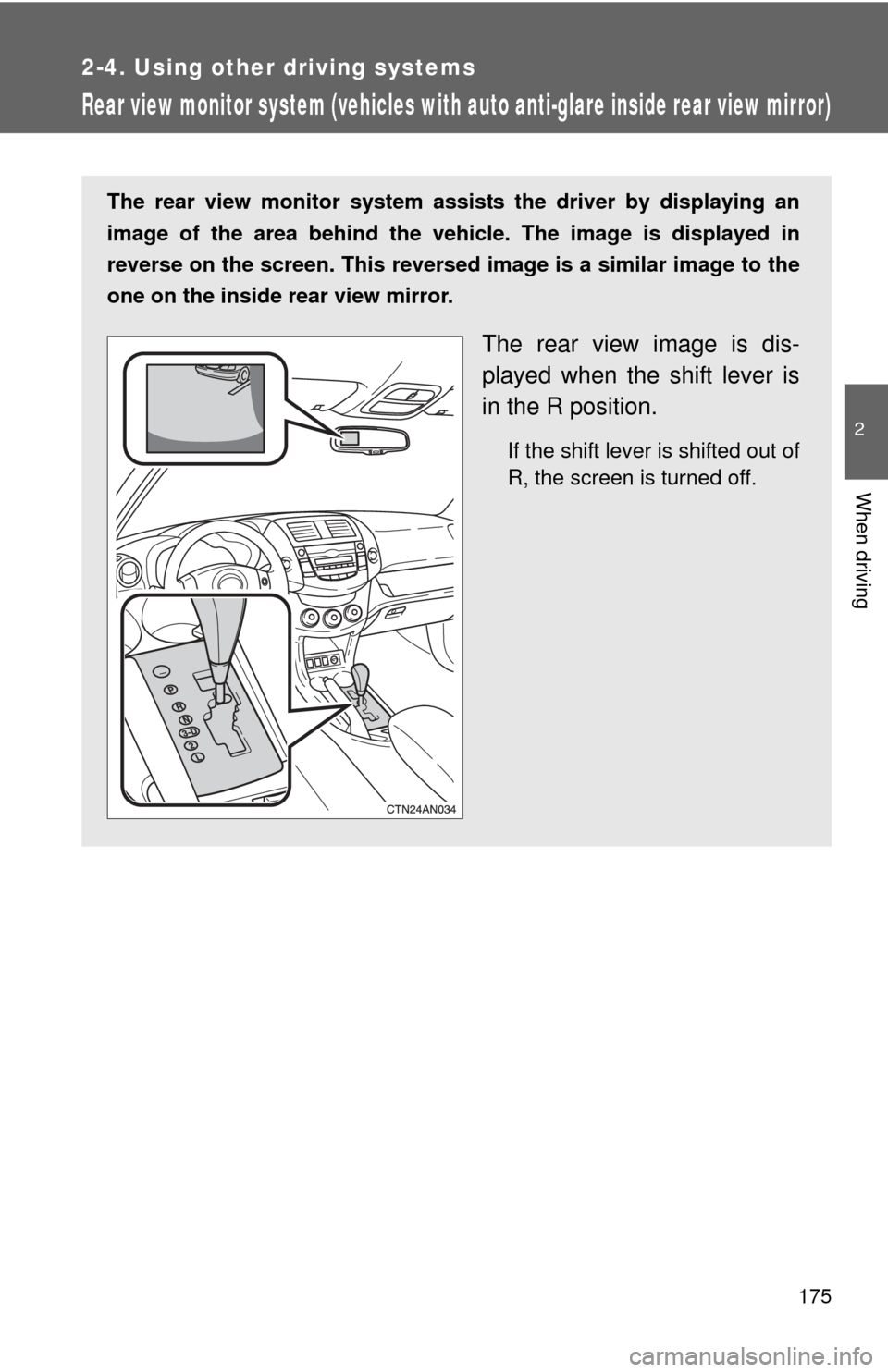
The rear view monitor system assists the driver by displaying an
image of the area behind the vehicle. The image is displayed in
reverse on the screen. This reversed im age is a similar image to the
one on the inside rear view mirror.
The rear view image is dis-
played when the shift lever is
in the R position.
If the shift lever is shifted out of
R, the screen is turned off.