Page 1 of 360

1
Introduction
This manual explains the operation of the Navigation System.
Please read this manual carefully to ensure proper use. Keep this
manual in your vehicle at all times.
The Navigation System is one of the most technologically advanced
vehicle accessories ever developed. The system receives satellite sig-
nals from the Global Positioning System (GPS) operated by the U.S.
Department of Defense. Using these signals and other vehicle sen-
sors, the system indicates your present position and assists in locating
a desired destination.
The navigation system is designed to select efficient routes from your
present starting location to your destination. The system is also designed
to direct you to a destination that is unfamiliar to you in an ef ficient manner.
The system uses DENSO maps. The calculated routes may not be the
shortest nor the least traffic congested. Your own personal local knowl-
edge or “short cut” may at times be faster than the calculated rou\
tes.
The navigation system’s database includes Point of Interest categories to
allow you to easily select destinations such as restaurants and hotels. If
a destination is not in the database, you can enter the street address o\
r
a major intersection close to it and the system will guide you there.
The system will provide both a visual map and audio instructions. The au-
dio instructions will announce the distance remaining and the direction to
turn in approaching an intersection. These voice instructions will help you
keep your eyes on the road and are timed to provide enough time to allow
you to maneuver, change lanes or slow down.
Page 10 of 360
10
No.NameFunctionPage
1
Northup or
headingup
symbolThis symbol indicates a map view with
north−up or heading−up. Touching this
symbol changes the map orientation.
43
2Scale indicatorThis figure indicates the map scale.42
3
“GPS” mark
(Global
Positioning
System)Whenever the vehicle is receiving sig-
nals from the GPS, this mark is dis-
played.
340
4XM � NavTraffic
markThis mark is displayed when XM � Nav-
Traffic information is received.96
5
Distance and
time to
destinationDisplays the distance, the estimated
travel time to the destination, and the
estimated arrival time at the destination.
81
Quick guide —
— Overview buttons and guidance screen
Page 22 of 360

22
The items shown on the “Setup” screen can be set. To display the “Setup” screen, push
the “SETUP” button.
1“General”
Settings are available for language selec-
tion, operation sounds, automatic screen
change, etc. 268 . . . . . . . . . . . . . . . . . . . .
2“Clock”
Used for changing settings for time zones,
daylight saving time, etc. 273 . . . . . . . . .
3“Voice”
Voice guidance can be set. 275 . . . . . . .
4“Navi.”
Settings are available for average cruising
speed, displayed screen contents, POI
icon categories, etc. 278 . . . . . . . . . . . . .
5“Vehicle”
Settings are available for vehicle informa-
tion such as maintenance information. 333
. . . . . . . . . . . . . . . . . . . . . . . . . . . . . . . .
6“Audio”
Settings are available for portable audio
devices, Bluetooth � audio devices etc.
326
. . . . . . . . . . . . . . . . . . . . . . . . . . . . . . . .
7“Phone”
Bluetooth � phones and phone numbers
can be registered, and the receiver volume
can be adjusted. 287 . . . . . . . . . . . . . . . .
Quick reference (“Setup” screen)
Page 93 of 360

NAVIGATION SYSTEM: ROUTE GUIDANCE
93
“Near Here” : When “Near Here” is
touched, the list of Points of Interest near
the current position will be displayed.
“Along My Route” : When “Along My
Route” is touched, the list of Points of In-
terest along the route will be displayed.
�To set a POI as a destination
You can select one of the Points of Interest
icons on the map screen as a destination
and use it for route guidance.
1. Directly touch the Point of Interest
icon that you want to set as a destina-
tion.
The map will shift so that the icon is cen-
tered on the screen and overlaps with the
cursor
. At this time, the distance from
the current position is displayed on the
screen. The distance shown is measured
as a straight line from the current vehicle
position to the POI.
2. When the desired Point of Interest
overlaps with the cursor, touch “Enter
”.
The screen changes and displays the map
location of the selected destination and
route preference. (See
“Starting route
guidance” on page 70.)
Page 139 of 360
TELEPHONE AND INFORMATION
139
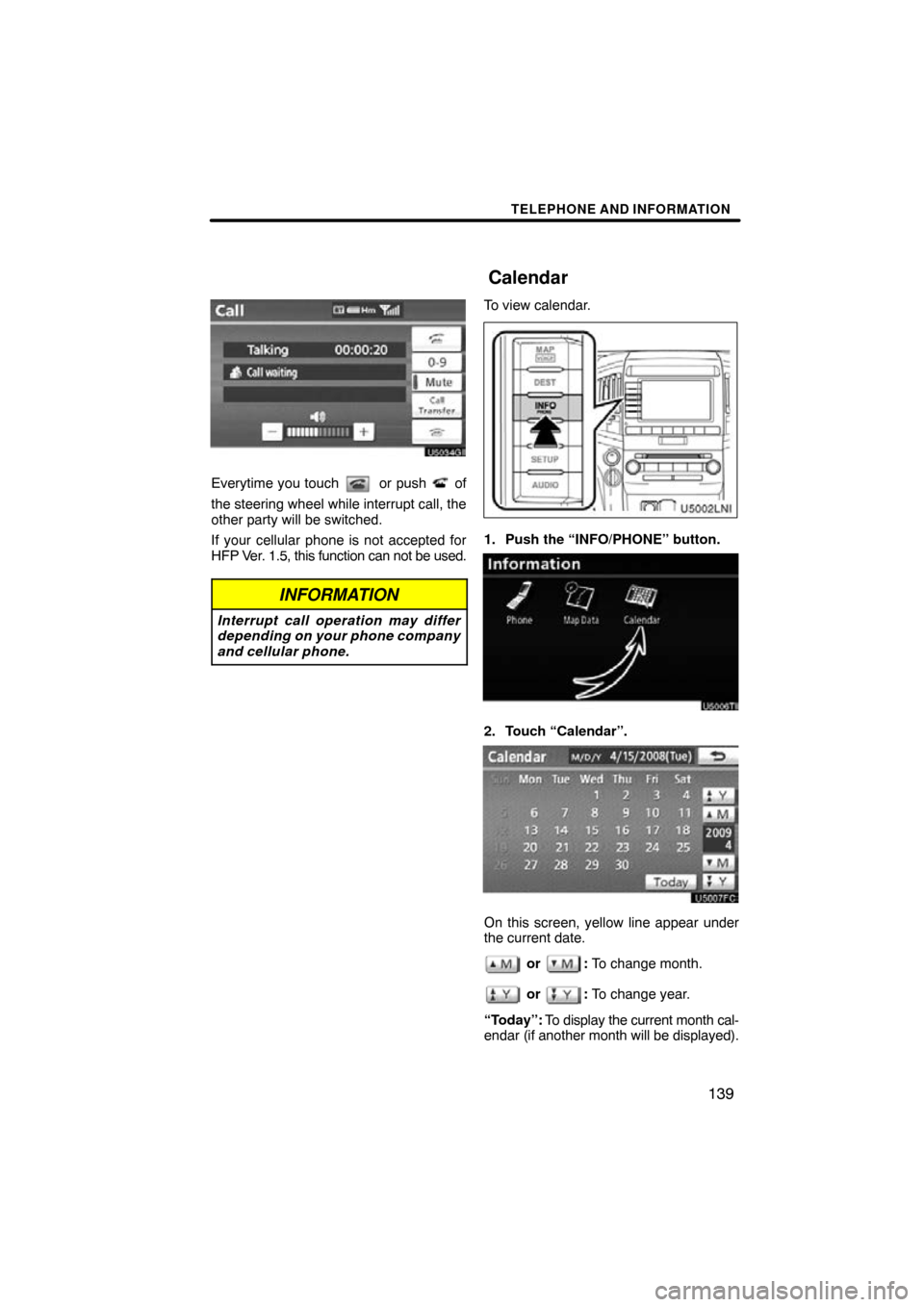
Everytime you touch or push of
the steering wheel while interrupt call, the
other party will be switched.
If your cellular phone is not accepted for
HFP Ver. 1.5, this function can not be used.
INFORMATION
Interrupt call operation may differ
depending on your phone company
and cellular phone.
To view calendar.
1. Push the “INFO/PHONE” button.
2. Touch “Calendar”.
On this screen, yellow line appear under
the current date.
or : To change month.
or : To change year.
“Today”: To display the current month cal-
endar (if another month will be displayed).
Calendar
Page 150 of 360
AUDIO/VIDEO SYSTEM
150
5. Touch the desired button.
“Normal”:Displays a 3 : 4 screen, with
either side in black.
“Wide 1”: Widens the 3 : 4 screen hori-
zontally to fill the screen.
“Wide 2”: Widens the 3 : 4 screen ver-
tically and horizontally, in
the same ratio, to fill the screen.
When you touch
, the previous
screen returns.
6. Touch “Save”. (g) Your DVD changer
When
you insert a disc, push the “LOAD”
button and gently push the disc in with the
label side up. This DVD changer can store
up to six discs.
The changer is intended for use with 4.7 in.
(12 cm) discs only.
NOTICE
�Do not stack up two discs for inser-
tion, or it will cause damage to the
changer. Insert only one disc into
the slot at a time.
�Never try to disassemble or oil any
part of the changer. Do not insert
anything other than a disc into the
slot.
Page 154 of 360
AUDIO/VIDEO SYSTEM
154
“Type � � ”
Each time you touch “� Type ” or “Type
� ”, the program type changes as in the
following:
�ROCK
�MISC (Miscellaneous)
�INFORM (Information)
�EASY LIS (Easy listening)
�CLS/JAZZ (Classical music and Jazz)
�R & B (Rhythm and Blues)
�RELIGION
�ALART (Emergency message)
“TypeSeek”
When a program is set, “Type Seek” ap-
pears. Touch the button and the system
starts to seek the station in the relevant
program type.
If any type program station is not found,
“Nothing” appears on the display.
Page 158 of 360

AUDIO/VIDEO SYSTEM
158
(e) Presetting a channel
1. Tune in the desired channel.
2. Touch one of the channel selector
buttons (1 — 6) and hold it until a beep
is heard.
This sets the channels to the touch −
screen button and the name and number
of the channel appears on the touch −
screen button.
Each touch− screen button can store three
SAT channels. To change the preset chan-
nel to a different one, follow the same pro-
cedure.
The preset channel memory is cancelled
when the power source is interrupted by
battery disconnection or a blown fuse. (f) Selecting a channel
Tune in the desired channel using one of
the following methods.
Preset tuning:
Touch the channel selec-
tor button (1 — 6) or push the “
” or “”
button of “CH·DISC” for the channel you
want. The button (1 — 6) is hig hlighted and
channel number appears on the display.
To select channel within the current
category: Push the “
” or “” button of
“SEEK·TRACK” . The radio will step up or
down the channel within the current chan-
nel category. Touch “TypeSeek”. The ra-
dio will step up the channel within the cur-
rent channel category.
To scan the currently selected channel
category: Touch “SCAN” briefly. “SCAN”
appears on the display. The radio will find
the next channel in the same channel cate-
gory, stay there for a few seconds, and
then scan again. To select a channel,
touch “SCAN” a second time.
To scan the preset channels: Touch
“SCAN” and hold it until you hear a beep.
“P.SCAN” appears on the display. The ra-
dio will find the next preset channel, stay
there for a few seconds, and then move to
the next preset channel. To select a chan-
nel, touch “SCAN” a second time.