Page 3 of 592

1
2
3
4
5
6
7
3
2-2. Instrument clusterGauges and meters ............ 191
Indicators and warning lights ................................. 193
Multi-information display ..... 197
2-3. Operating the lights and wipers
Headlight switch .................. 207
Fog light switch ................... 211
Windshield wipers and washer .............................. 212
Rear window wiper and washer .............................. 214
2-4. Using other driving systems
Cruise control ...................... 215
Rear view monitor system .............................. 218
Driving assist systems ........ 222
Hill-start assist control ......... 226
2-5. Driving information Utility vehicle precautions ....................... 228
Cargo and luggage ............. 233
Vehicle load limits ............... 237
Winter driving tips ............... 238
Trailer towing ...................... 242
Dinghy towing ..................... 252 3-1. Using the air
conditioning system
and defogger
Front manual air conditioning system.......... 256
Front automatic air conditioning system.......... 262
Rear manual air conditioning system.......... 271
Rear automatic air conditioning system.......... 274
Rear window and outside rear view mirror
defoggers ......................... 277
Windshield wiper de-icer .............................. 279
Using the steering wheel climate remote control
switches ........................... 280
3-2. Using the audio system Audio system ...................... 281
Using the radio ................... 284
Using the CD player ........... 290
Playing back MP3 and WMA discs ....................... 297
Optimal use of the audio system .............................. 304
Using the AUX adapter....... 307
Using the steering wheel audio switches.................. 309
3Interior features
Page 169 of 592

When driving2
169
2-1. Driving proceduresDriving the vehicle............ 170
Power (ignition) switch ..... 180
EV-Drive Mode................. 184
Transmission.................... 186
Turn signal lever .............. 188
Parking brake ................... 189
Horn ................................. 190
2-2. Instrument cluster Gauges and meters ......... 191
Indicators and warning lights .............................. 193
Multi-information display............................ 197
2-3. Operating the lights and wipers
Headlight switch ............... 207
Fog light switch ................ 211
Windshield wipers and washer ........................... 212
Rear window wiper and washer ........................... 214 2-4. Using other driving
systems
Cruise control ................... 215
Rear view monitor system ........................... 218
Driving assist systems ..... 222
Hill-start assist control ...... 226
2-5. Driving information Utility vehicle precautions .................... 228
Cargo and luggage .......... 233
Vehicle load limits ............ 237
Winter driving tips ............ 238
Trailer towing ................... 242
Dinghy towing .................. 252
Page 191 of 592
191
2
When driving
2-2. Instrument cluster
Gauges and meters
The following gauges and meters illuminate when the “POWER”
switch is in ON mode.Power meter
Displays the instantaneous output from the hybrid system in approxi-
mate kilowatts.
Engine coolant temperature gauge
Displays the engine coolant temperature.
Fuel gauge
Displays the quantity of fuel remaining in the tank.
Speedometer
Displays the vehicle speed.
Odometer/trip meter switching and trip meter resetting button
Switches between odometer and trip meter displays. Pushing and hold-
ing the button will reset the trip meter when the trip meter is being dis-
played.
Page 192 of 592

192 2-2. Instrument cluster
Instrument panel light controlThe brightness of the instrument panel lights can be adjusted.
Brighter
Darker
When the headlight switch is
turned on, the brightness will
be reduced slightly unless the
control dial is turned fully up.
Odometer/Trip meterOdometer
Displays the total distance the vehicle has been driven.
Trip meter
Displays the distance the vehi cle has been driven since the
meter was last reset. Trip meters A and B can be used to
record and display different distances independently.
■ Power meter “CHARGE” zone
The “CHARGE” zone indicates r egeneration* status. Regenerated energy
will be used to charge the battery.
*: When used in this manual, “regeneration” refers to the conversion of energy created by the movement of the vehicle into electrical energy.
NOTICE
■To prevent damage to the engine and its components
The gasoline engine may be overheating if the temperature gauge is in the
red zone (H). In this case, immediately stop the vehicle in a safe place, and
check the engine after it has cooled completely. (
P. 534)
Page 193 of 592
193
2-2. Instrument cluster
2
When driving
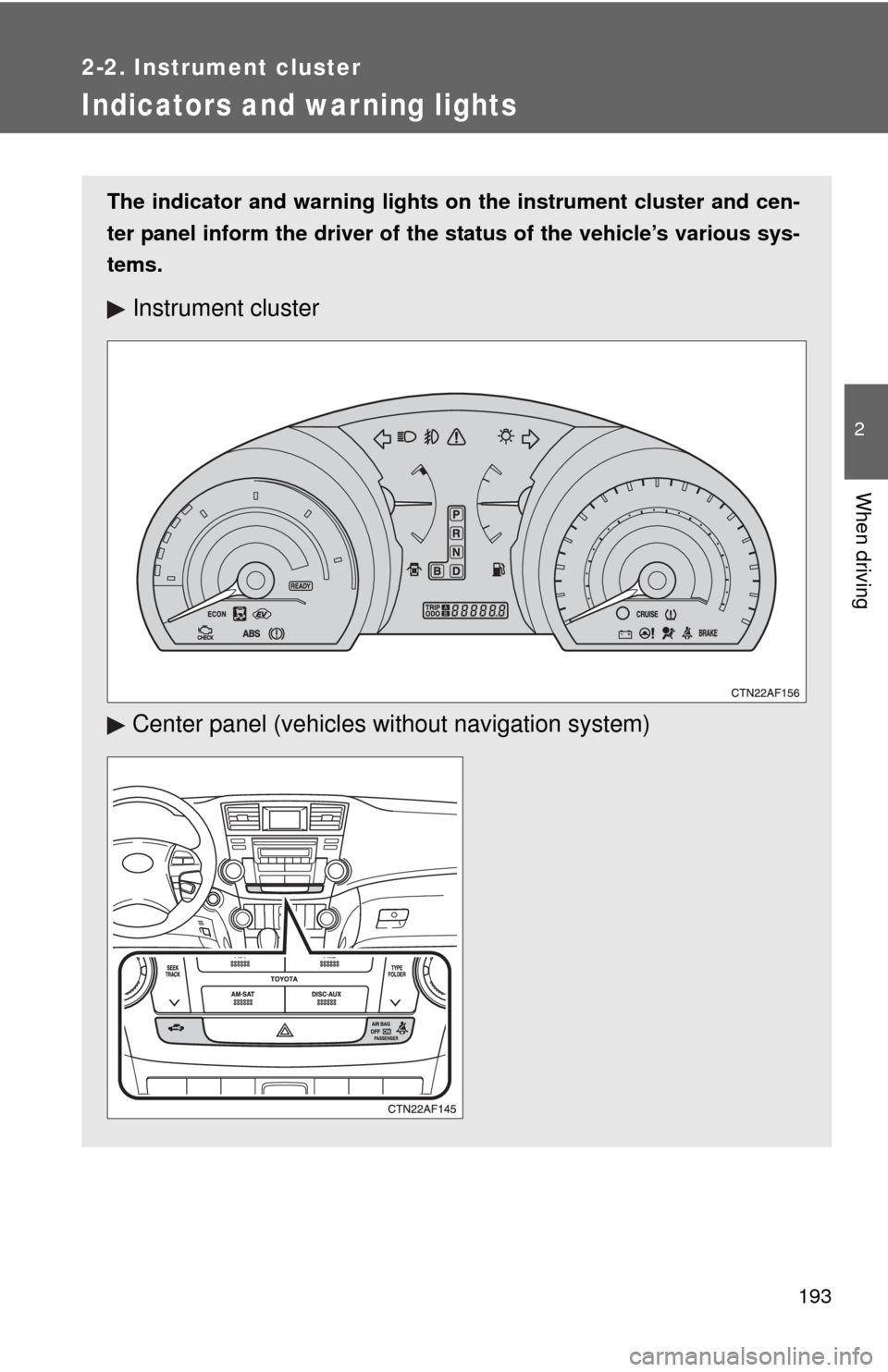
Indicators and war ning lights
The indicator and warning lights on the instrument cluster and cen-
ter panel inform the driver of the status of the vehicle’s various sys-
tems.
Instrument cluster
Center panel (vehicles without navigat ion system)
Page 194 of 592
194 2-2. Instrument cluster
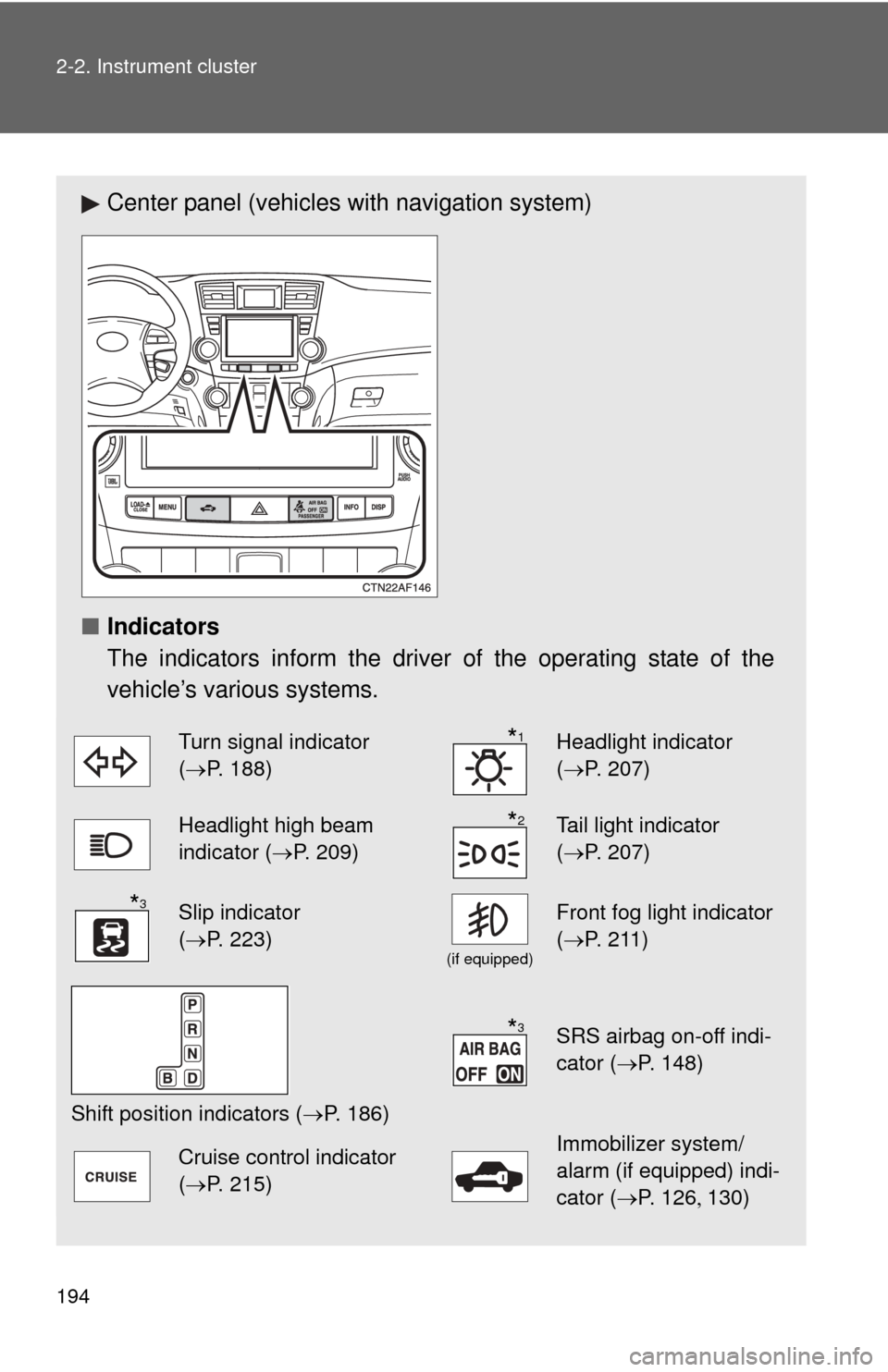
Center panel (vehicles with navigation system)
■ Indicators
The indicators inform the driver of the operating state of the
vehicle’s various systems.
Turn signal indicator
(P. 188)Headlight indicator
( P. 207)
Headlight high beam
indicator ( P. 209)Tail light indicator
(P. 207)
Slip indicator
(P. 223)
(if equipped)
Front fog light indicator
( P. 211)
Shift position indicators ( P. 186)
SRS airbag on-off indi-
cator (P. 148)
Cruise control indicator
(P. 215)Immobilizer system/
alarm (if equipped) indi-
cator (P. 126 130)
*1
*2
*3
*3
Page 195 of 592
195
2-2. Instrument cluster
2
When driving
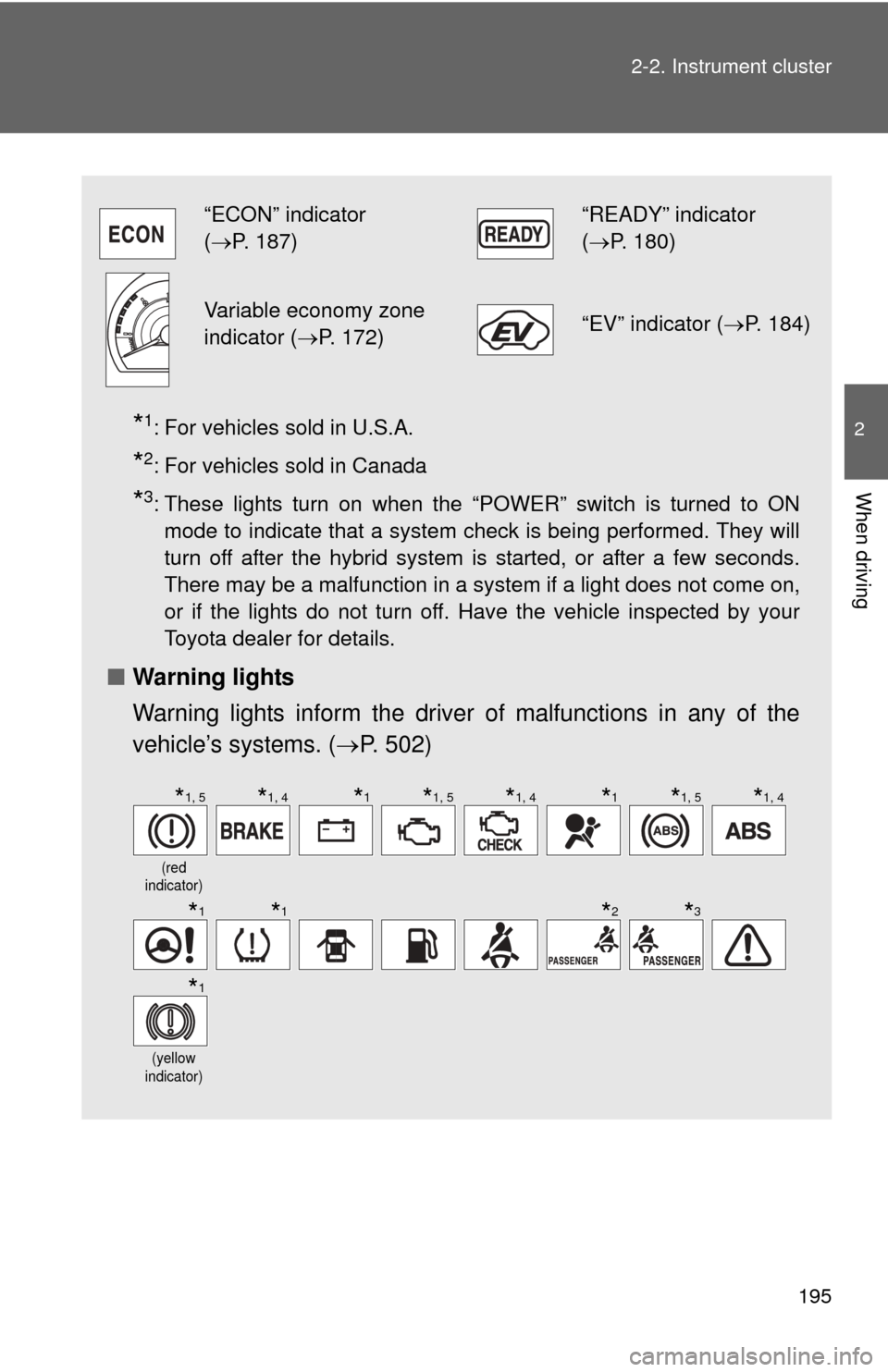
*1: For vehicles sold in U.S.A.
*2: For vehicles sold in Canada
*3: These lights turn on when the “POWER” switch is turned to ON
mode to indicate that a system check is being performed. They will
turn off after the hybrid system is started, or after a few seconds.
There may be a malfunction in a system if a light does not come on,
or if the lights do not turn off. Have the vehicle inspected by your
Toyota dealer for details.
■ Warning lights
Warning lights inform the driver of malfunctions in any of the
vehicle’s systems. ( P. 502)
“ECON” indicator
(P. 187)“READY” indicator
( P. 180)
Variable economy zone
indicator ( P. 172)“EV” indicator ( P. 184)
(red
indicator)
(yellow
indicator)
*1, 5*1, 4*1*1, 5*1, 4*1*1, 5*1, 4
*1*1*2*3
*1
Page 196 of 592
196 2-2. Instrument cluster
CAUTION
■If a safety system warning light does not come on
Should a safety system light such as the ABS and SRS airbag warning light
not come on when you start the hybrid system, this could mean that these
systems are not available to help protect you in an accident, which could
result in death or serious injury. Have the vehicle inspected by your Toyota
dealer immediately if this occurs.
*1: These lights turn on when the “POWER” switch is turned to ON mode to indicate that a system check is being performed. They will
turn off after the hybrid system is started, or after a few seconds.
There may be a malfunction in a system if a light does not come on,
or if the lights do not turn off. Have the vehicle inspected by your
Toyota dealer for details.
*2: Vehicles without navigation system
*3: Vehicles with navigation system
*4: For vehicles sold in U.S.A.
*5: For vehicles sold in Canada