Page 149 of 476
149
2-2. Instrument cluster
2
When driving
■
Indicators
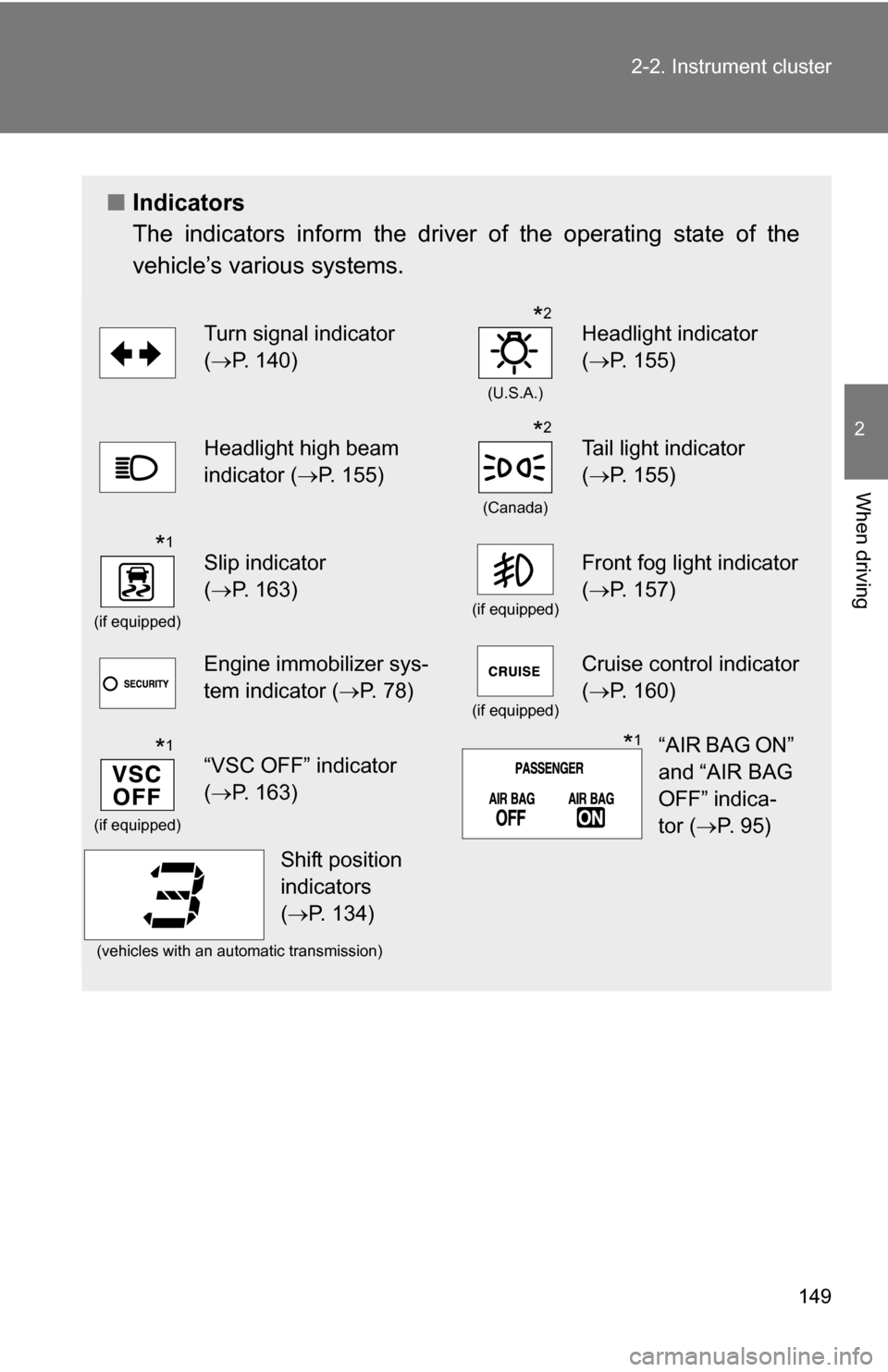
The indicators inform the driver of the operating state of the
vehicle’s various systems.
Turn signal indicator
(P. 140)
(U.S.A.)
Headlight indicator
( P. 155)
Headlight high beam
indicator ( P. 155)
(Canada)
Tail light indicator
(P. 155)
(if equipped)
Slip indicator
(P. 163)
(if equipped)
Front fog light indicator
( P. 157)
Engine immobilizer sys-
tem indicator ( P. 78)
(if equipped)
Cruise control indicator
(P. 160)
(if equipped)
“VSC OFF” indicator
(P. 163)
(vehicles with an automatic transmission)
*2
*2
*1
*1“AIR BAG ON”
and “AIR BAG
OFF” indica-
tor ( P. 9 5 )*1
Shift position
indicators
(P. 134)
Page 150 of 476
150 2-2. Instrument cluster
CAUTION
■If a safety system warning light does not come on
Should a safety system light such as the ABS or the SRS airbag warning
light not come on when you start the engine, this could mean that these sys-
tems are not available to help protect you in an accident, which could result
in death or serious injury. Have the vehicle inspected by your Toyota dealer
immediately if this occurs.
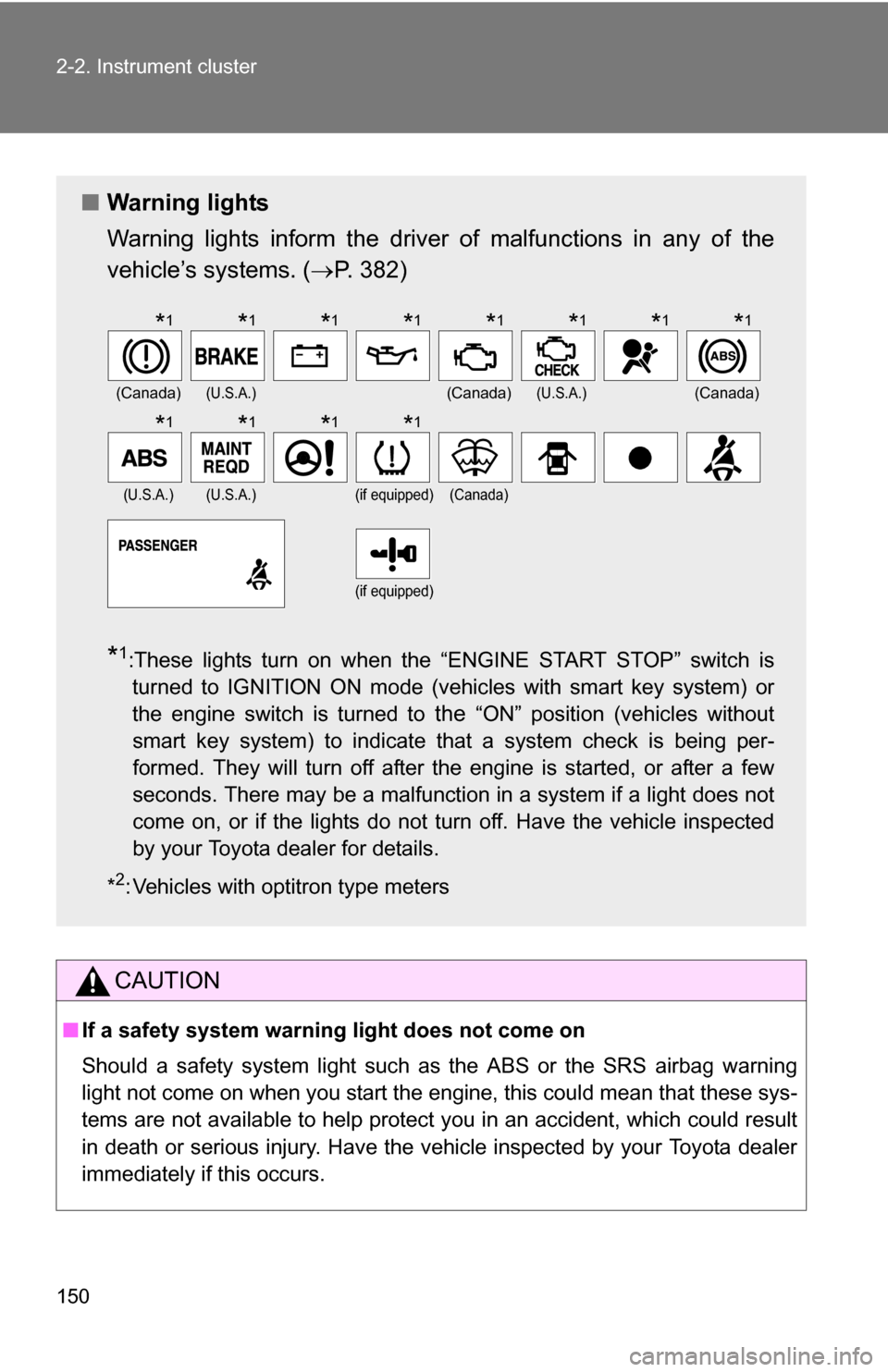
■ Warning lights
Warning lights inform the driver of malfunctions in any of the
vehicle’s systems. ( P. 382)
*1:These lights turn on when the “ENGINE START STOP” switch is
turned to IGNITION ON mode (vehicles with smart key system) or
the engine switch is turned to
the “ON” position (vehicles without
smart key system) to indicate that a system check is being per-
formed. They will turn off after the engine is started, or after a few
seconds. There may be a malfunction in a system if a light does not
come on, or if the lights do not turn off. Have the vehicle inspected
by your Toyota dealer for details.
*
2: Vehicles with optitron type meters
(Canada)(U.S.A.)(Canada)(U.S.A.)(Canada)
(U.S.A.)(U.S.A.)(if equipped)(Canada)
(if equipped)
*1*1*1*1*1*1*1*1
*1*1*1*1
Page 151 of 476
151
2-2. Instrument cluster
2
When driving
Multi-information display
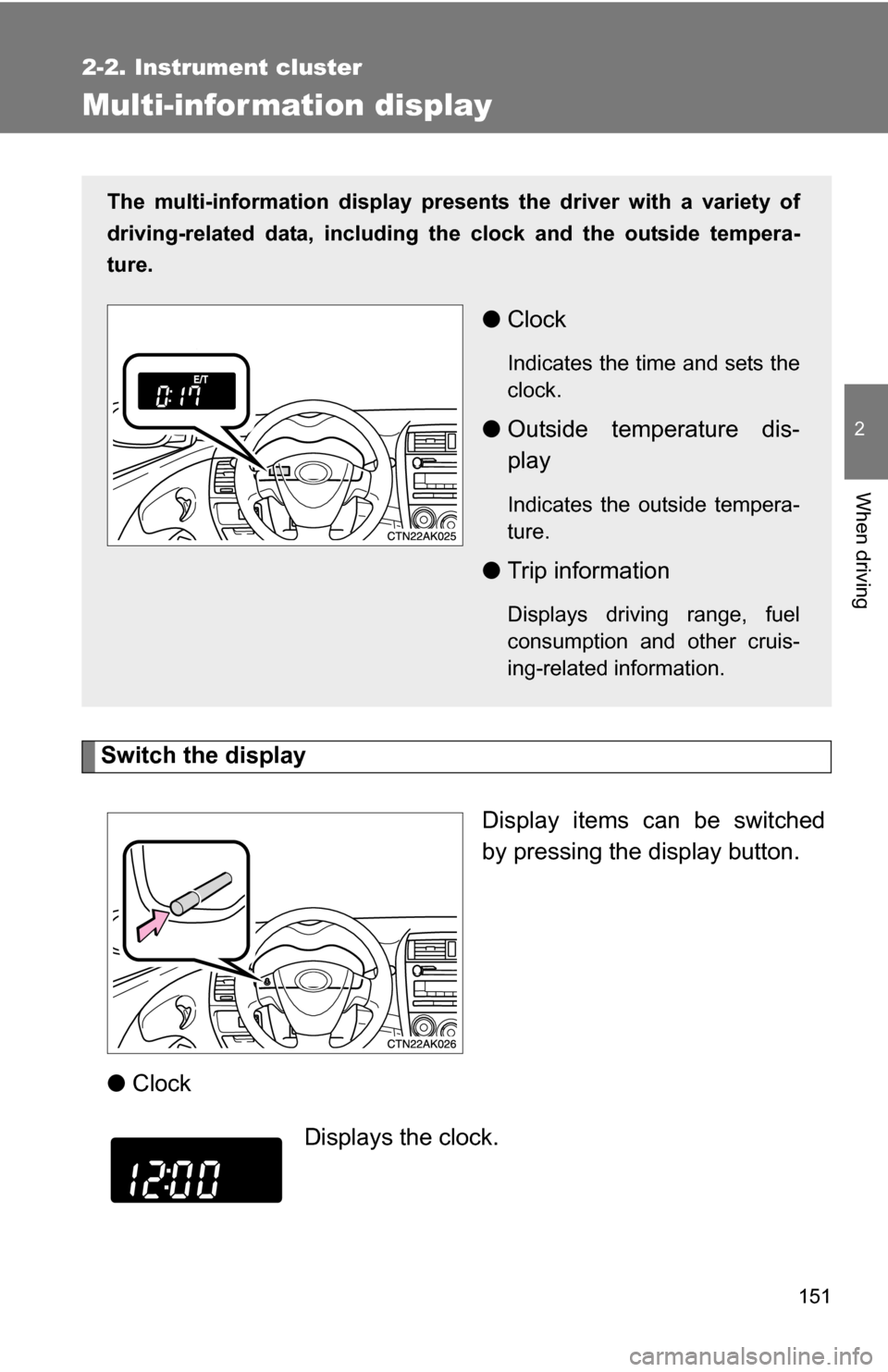
Switch the displayDisplay items can be switched
by pressing the display button.
● Clock
The multi-information display presen ts the driver with a variety of
driving-related data, including the clock and the outside tempera-
ture.
● Clock
Indicates the time and sets the
clock.
●Outside temperature dis-
play
Indicates the outside tempera-
ture.
●Trip information
Displays driving range, fuel
consumption and other cruis-
ing-related information.
Displays the clock.
Page 152 of 476
152 2-2. Instrument cluster
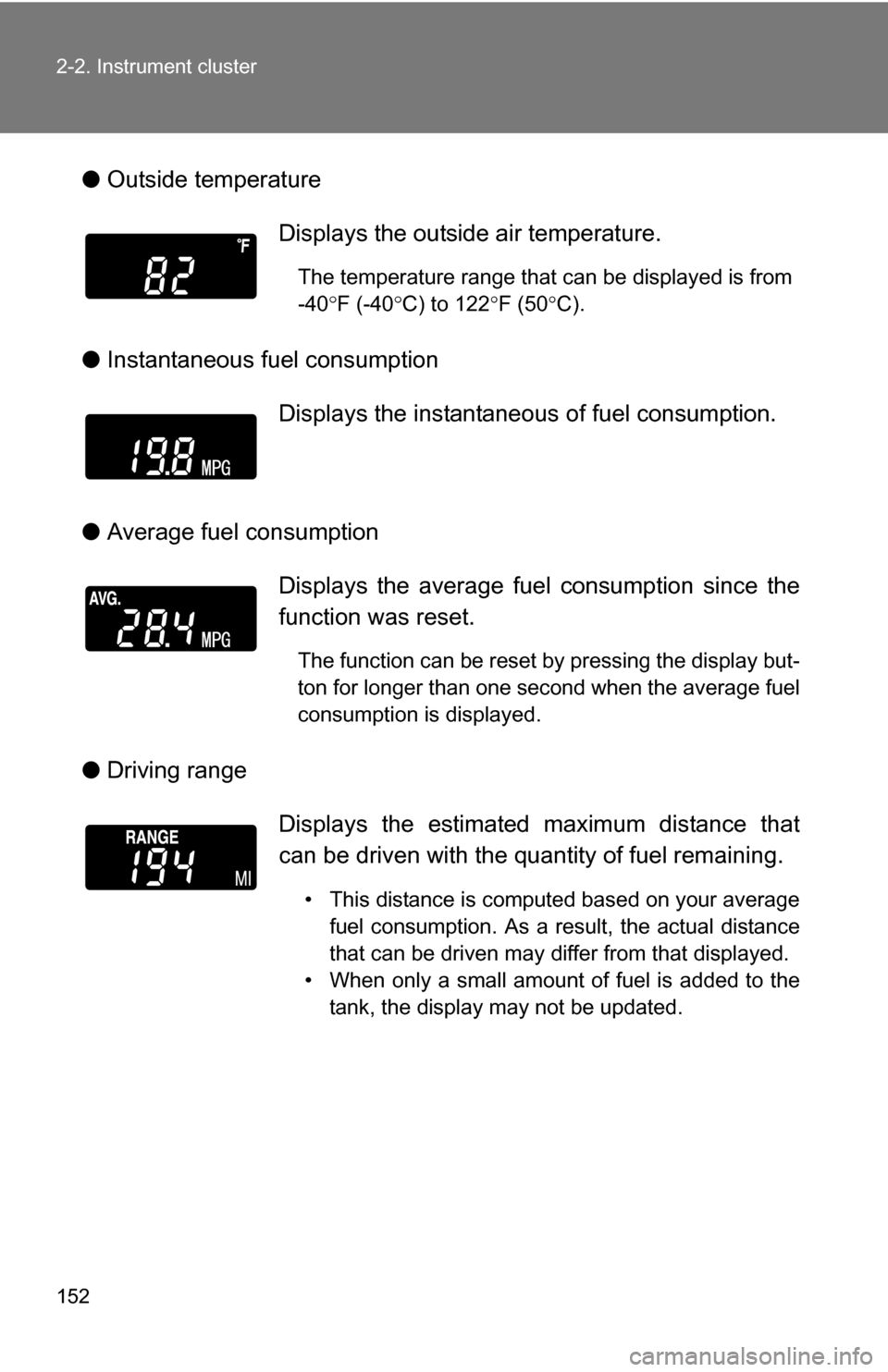
●Outside temperature
● Instantaneous fuel consumption
● Average fuel consumption
● Driving range Displays the outside air temperature.
The temperature range that can be displayed is from
-40
F (-40 C) to 122 F (50 C).
Displays the instantaneous of fuel consumption.
Displays the average fuel consumption since the
function was reset.
The function can be reset by pressing the display but-
ton for longer than one second when the average fuel
consumption is displayed.
Displays the estimated maximum distance that
can be driven with the quantity of fuel remaining.
• This distance is computed based on your average fuel consumption. As a result, the actual distance
that can be driven may differ from that displayed.
• When only a small amount of fuel is added to the tank, the display may not be updated.
Page 153 of 476
153
2-2. Instrument cluster
2
When driving
●
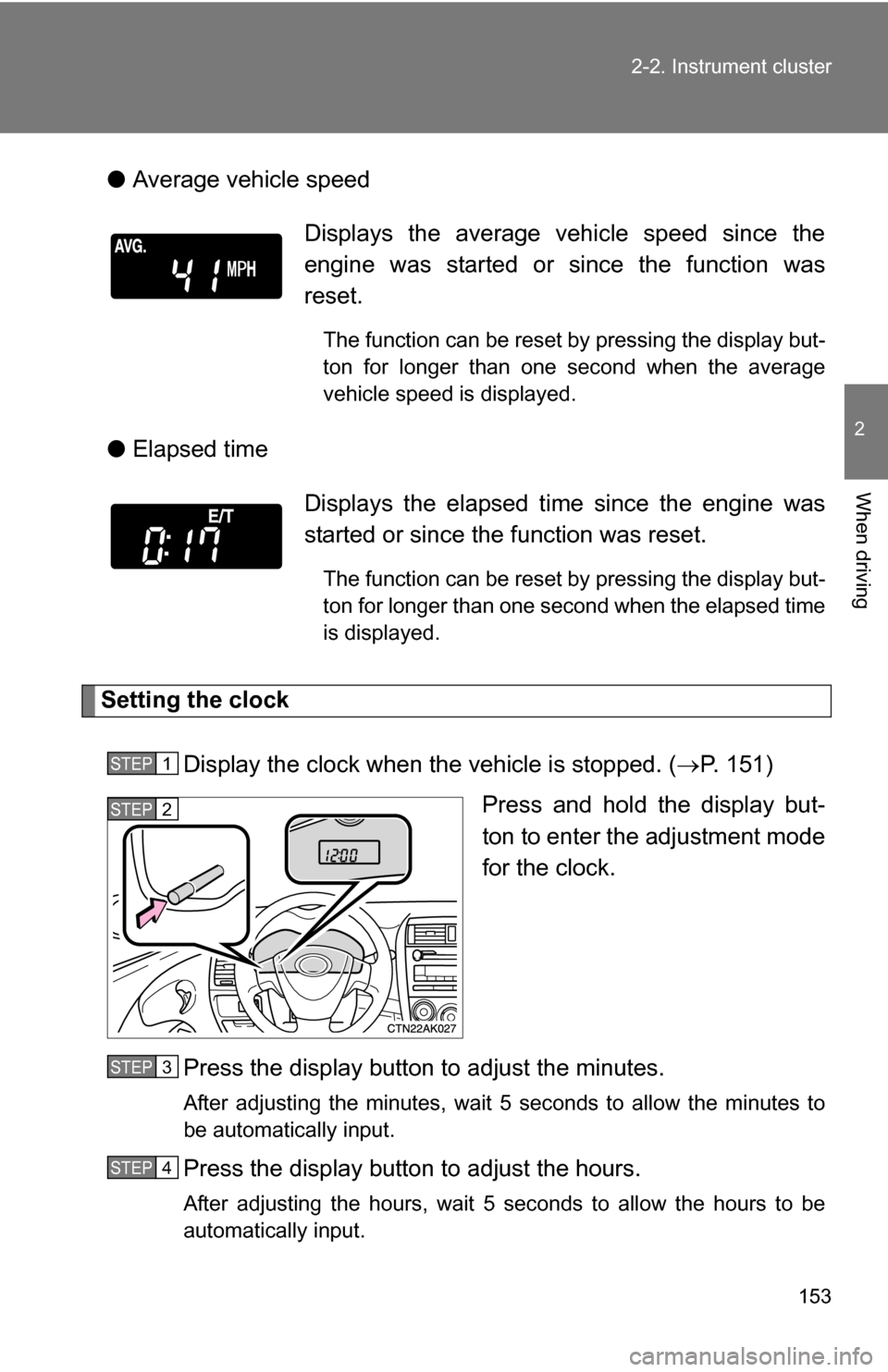
Average vehicle speed
● Elapsed time
Setting the clock
Display the clock when the vehicle is stopped. ( P. 151)
Press and hold the display but-
ton to enter the adjustment mode
for the clock.
Press the display button to adjust the minutes.
After adjusting the minutes, wait 5 seconds to allow the minutes to
be automatically input.
Press the display button to adjust the hours.
After adjusting the hours, wait 5 seconds to allow the hours to be
automatically input.
Displays the average vehicle speed since the
engine was started or since the function was
reset.
The function can be reset by pressing the display but-
ton for longer than one second when the average
vehicle speed is displayed.
Displays the elapsed ti me since the engine was
started or since the function was reset.
The function can be reset by pressing the display but-
ton for longer than one second when the elapsed time
is displayed.
STEP 1
STEP 2
STEP 3
STEP 4
Page 154 of 476
154 2-2. Instrument cluster
■When disconnecting and reco nnecting battery terminals
The following information data will be reset.
● Clock
● Average fuel consumption
● Driving range
● Average vehicle speed
● Elapsed time
■ Display
In the following situations, the correct outside temperature may not be dis-
played, or the display may take longer than normal to change.
●When stopped, or driving at low speeds (less than 12 mph [20 km/h])
● When the outside temperature has changed suddenly (at the entrance/
exit of a garage, tunnel, etc.)
NOTICE
■The multi-information disp lay at low temperatures
Allow the interior of the vehicle to warm up before using the liquid crystal
information display. At extremely low temperatures, the information display
monitor may respond slowly, and display changes may be delayed.
Page 357 of 476
357
4-3. Do-it-yourself maintenance
4
Maintenance and care
■
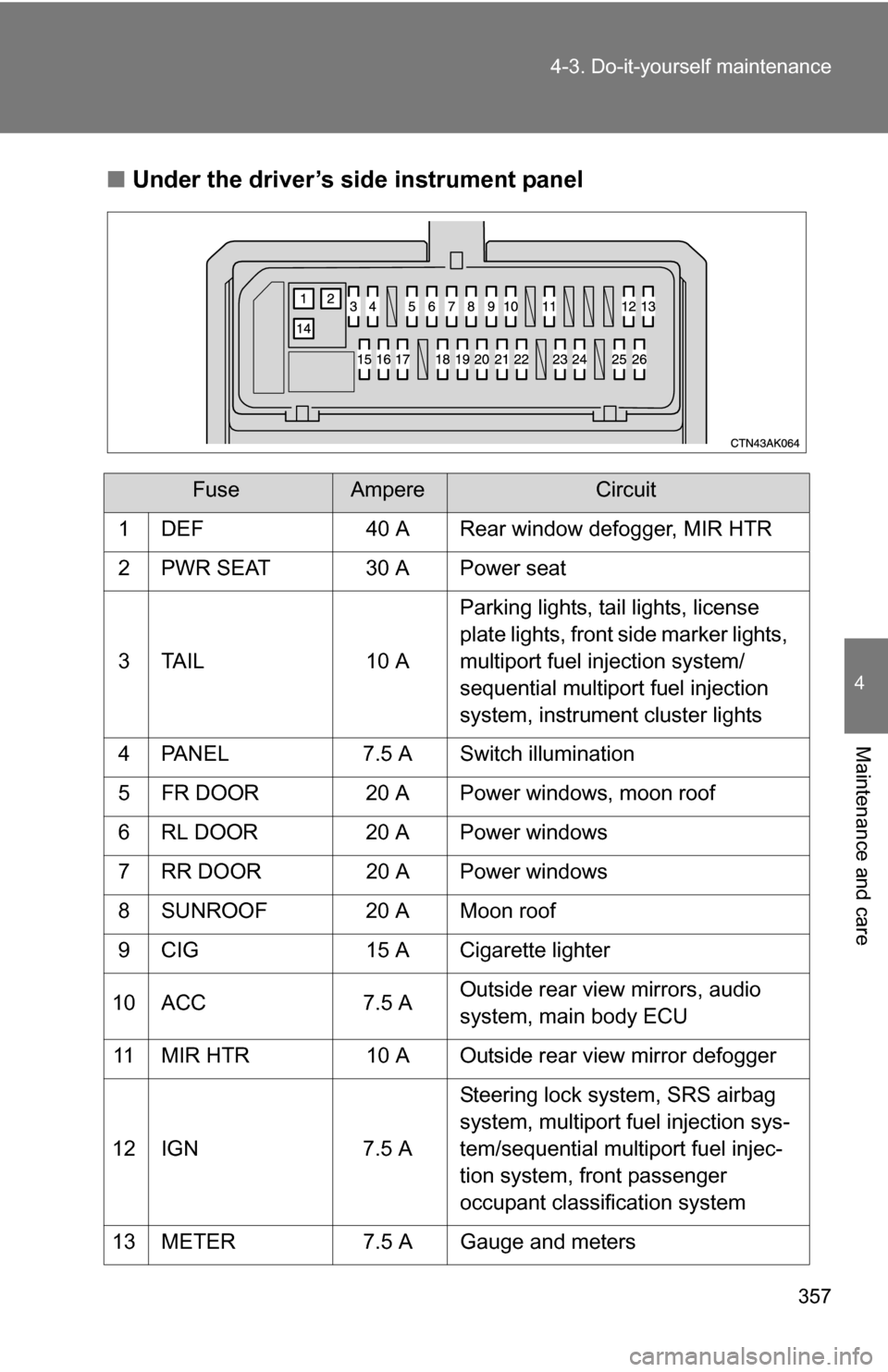
Under the driver’s side instrument panel
FuseAmpereCircuit
1 DEF 40 A Rear window defogger, MIR HTR
2 PWR SEAT 30 A Power seat
3 TAIL 10 A Parking lights, tail lights, license
plate lights, front side marker lights,
multiport fuel injection system/
sequential multiport fuel injection
system, instrument cluster lights
4 PANEL 7.5 A Switch illumination
5 FR DOOR 20 A Power windows, moon roof
6 RL DOOR 20 A Power windows
7 RR DOOR 20 A Power windows
8 SUNROOF 20 A Moon roof
9 CIG 15 A Cigarette lighter
10 ACC 7.5 A Outside rear view mirrors, audio
system, main body ECU
11 MIR HTR 10 A Outside rear view mirror defogger
12 IGN 7.5 A Steering lock system, SRS airbag
system, multiport fuel injection sys-
tem/sequential multiport fuel injec-
tion system, front passenger
occupant classification system
13 METER 7.5 A Gauge and meters
Page 416 of 476
416
5-2. Steps to take in an emergency
If your vehicle overheats
If your engine overheats:
Stop the vehicle in a safe place and turn off the air condi-
tioning system.
Check to see if steam is coming out from under the hood.
If you see steam: Stop the engine. Carefully lift the hood after the steam
subsides and then restart the engine.
If you do not see steam: Leave the engine running and carefully lift the hood.
Check to see if the cooling fans are operating.
If the fans are operating: Wait until the temperature of the engine (shown on the
instrument cluster) begins to fall and then stop the
engine.
If the fans are not operating: Stop the engine and call your Toyota dealer.
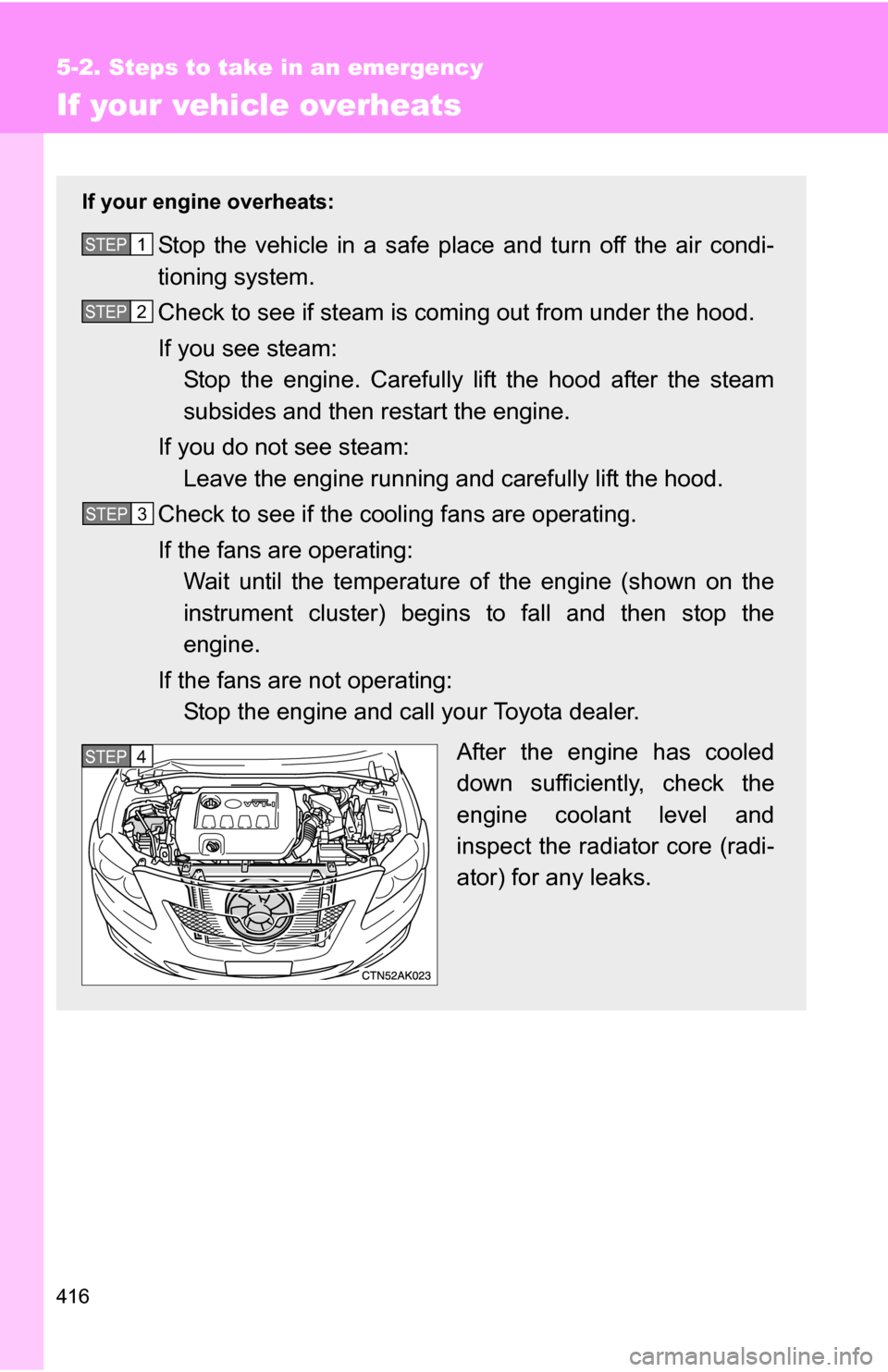
After the engine has cooled
down sufficiently, check the
engine coolant level and
inspect the radiator core (radi-
ator) for any leaks.STEP 1
STEP 2
STEP 3
STEP 5 STEP 4