Page 154 of 538

154 2-2. Instrument cluster
CAUTION
■If a safety system warning light does not come on
Should a safety system light such as the ABS or the SRS airbag warning
light not come on when you start the engine, this could mean that these sys-
tems are not available to help protect you in an accident, which could result
in death or serious injury. Have the vehicle inspected by your Toyota dealer
immediately if this occurs.
■ Warning lights
Warning lights inform the driver of malfunctions in any of the
vehicle’s systems. ( P. 432)
*: These lights turn on when the “ENGINE START STOP” switch is
turned to IGNITION ON mode (vehicles with smart key system) or
the engine switch is turned to the “ON” position (vehicles without
smart key system) to indicate that a system check is being per-
formed. They will turn off after the engine is started, or after a few
seconds. There may be a malfunction in a system if a light does not
come on, or if the lights do not turn off. Have the vehicle inspected
by your Toyota dealer for details.
(CANADA)(U.S.A.)(if equipped)(CANADA)(U.S.A.)(CANADA)
(U.S.A.)(U.S.A.)(U.S.A.)(if equipped)(if equipped)
(if equipped)
********
****
Page 155 of 538
155
2-2. Instrument cluster
2
When driving
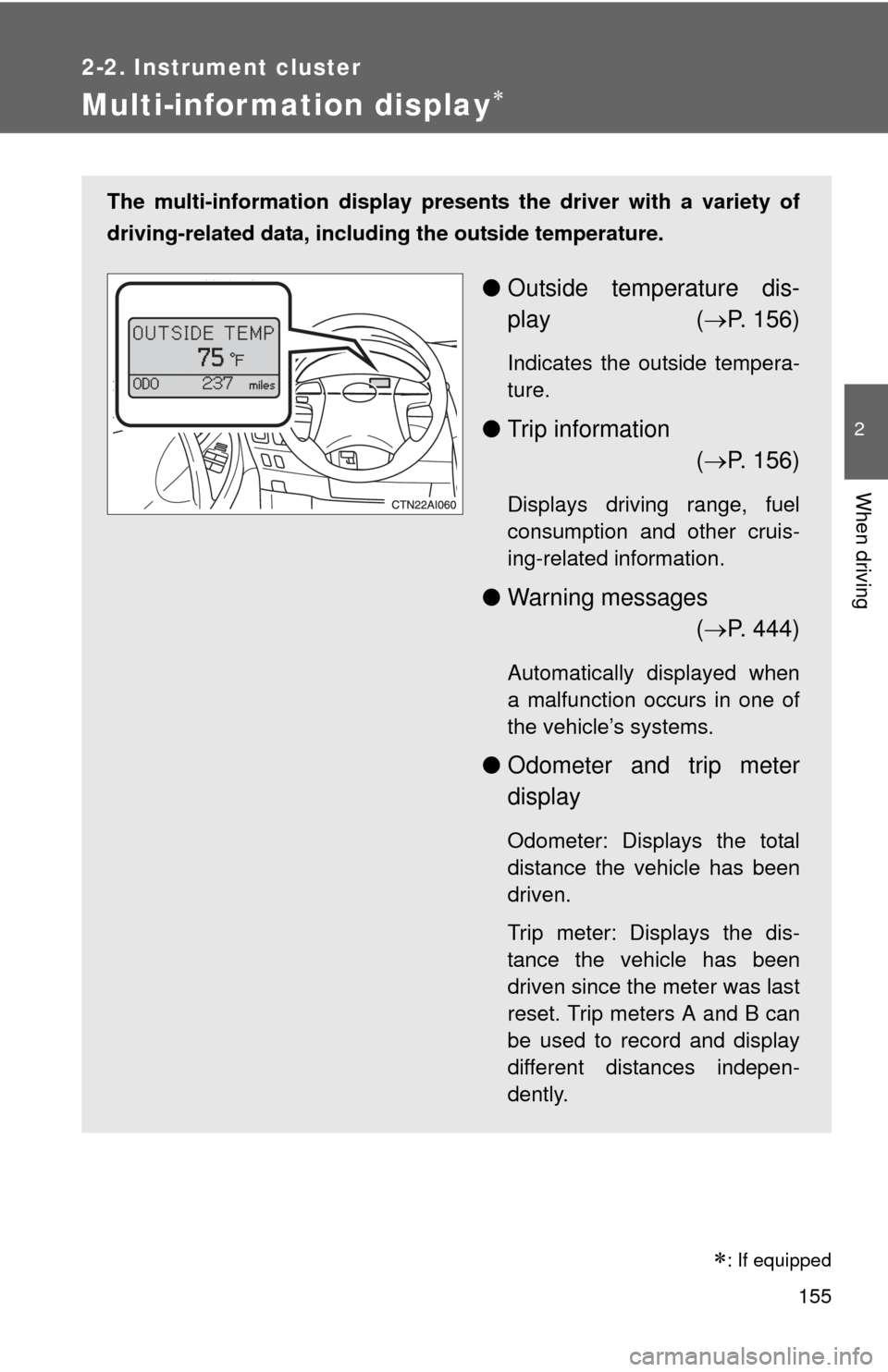
Multi-information display
The multi-information display presents the driver with a variety of
driving-related data, includ ing the outside temperature.
●Outside temperature dis-
play ( P. 156)
Indicates the outside tempera-
ture.
● Trip information
( P. 156)
Displays driving range, fuel
consumption and other cruis-
ing-related information.
● Warning messages
( P. 444)
Automatically displayed when
a malfunction occurs in one of
the vehicle’s systems.
● Odometer and trip meter
display
Odometer: Displays the total
distance the vehicle has been
driven.
Trip meter: Displays the dis-
tance the vehicle has been
driven since the meter was last
reset. Trip meters A and B can
be used to record and display
different distances indepen-
dently.
: If equipped
Page 174 of 538
174 2-4. Using other driving systems
CAUTION
■When VSC is activated
The slip indicator light flashes and a warning buzzer sounds. Always drive
carefully. Reckless driving may cause an accident. Exercise particular care
when the indicator light flashes and a buzzer sounds.
■ When TRAC and VSC are off
Be especially careful and drive at a speed appropriate to the road condi-
tions. As these are systems to ensure vehicle stability and driving force, do
not turn off TRAC and VSC unless necessary.
■ Replacing tires
Make sure that all tires are of the same size, brand, tread pattern and total
load capacity. In addition, make sure that the tires are inflated to the recom-
mended tire pressure level.
The ABS and VSC system will not function correctly if different tires are fitted
on the vehicle.
Contact your Toyota dealer for further information when replacing tires or
wheels.
■ Handling of tires and suspension
Using tires with any kind of problem or modifying the suspension will affect
the driving assist systems, and may cause the system to malfunction.
Page 182 of 538
182 2-5. Driving information
NOTICE
■Repairing or replacing snow tires
Request repairs of and obtain replacement snow tires from Toyota dealers or
legitimate tire retailers.
This is because the removal and attachment of snow tires affects the opera-
tion of the tire pressure warning valves and transmitters.
■ Fitting tire chains
The tire pressure warning valves and transmitters may not function correctly\
when tire chains are fitted.
Page 216 of 538

214 3-2. Using the audio system
CAUTION
■For vehicles sold in U.S.A. and Canada
●Part 15 of the FCC Rules
FCC Warning:
Any unauthorized changes or modifications to this equipment will void the
user’s authority to operate this device.
● Laser products
• Do not take this unit apart or attempt to make any changes yourself.
This is an intricate unit that uses a laser pickup to retrieve information
from the surface of compact discs. The laser is carefully shielded so
that its rays remain inside the cabinet. Therefore, never try to disas-
semble the player or alter any of its parts since you may be exposed to
laser rays and dangerous voltages.
• This product utilizes a laser. Use of controls or adjustments or performance of procedures other
than those specified herein may result in hazardous radiation expo-
sure.
NOTICE
■ To prevent battery discharge
Do not leave the audio system on longer than necessary with the engine o\
ff.
■ To avoid damaging the audio system
Take care not to spill drinks or other fluids over the audio system.
Page 267 of 538
265
3-3. Using the Bluetooth
® audio system
3
Interior features
CAUTION
■
FCC WARNING
Changes or modifications in construction not expressly approved by the
party responsible for compliance could void the user's authority to operate
the equipment.
Radio frequency exposure. This device is approved for Mobile Application
only and, to comply with applicable FCC radio frequency exposure regula-
tions, must be used with a distance of at least 7.9 in. (20 cm) between the
antenna and the body of any person at all time during use.
■ Caution while driving
Do not connect portable players or operate the controls.
NOTICE
■To prevent damage to portable players
Do not leave portable players in the vehicle. The temperature inside the
vehicle may become high, resulting in damage to the player.
Page 284 of 538
282 3-4. Using the hands-free phone system (for cellular phone)
■Certification for the hands-free phone system
Type B
FCC ID: BABFT0001A
IC ID: 2024B-FT0001A
MADE IN JAPAN
Type C
FCC ID: ACJ932C5ZZZ035
IC ID: 216J-C5ZZZ035
MADE IN JAPAN
This device complies with Part 15 of the FCC Rules and RSS-210 Rules.
Operation is subject to the following two conditions; (1) This device may not
cause harmful interference, and (2) This device must accept any interfer-
ence received, including interference that may cause undesired operation\
.
CAUTION
■FCC WARNING
Changes or modifications in construction not expressly approved by the
party responsible for compliance could void the user's authority to operate
the equipment.
Radio frequency exposure. This device is approved for Mobile Application
only and, to comply with applicable FCC radio frequency exposure regula-
tions, must be used with a distance of at least 7.9 in. (20 cm) between the
antenna and the body of any person at all time during use.
■ Caution while driving
Do not use a cellular phone, or connect the Bluetooth
® phone.
NOTICE
■To prevent damage to a cellular phone
Do not leave a cellular phone in the vehicle. The temperature inside may
become high resulting in damage to the phone.
Page 344 of 538
342 3-7. Other interior features
■Before programming
●Install a new battery in the transmitter.
● The battery side of the transmitter must be pointed away from
HomeLink
.
■ Certification for the garage door opener
This device complies with Part 15 of the FCC Rules and with RSS-210 of the
IC Rules.
Operation is subject to the following two conditions: (1) This device may not
cause harmful interference, and (2) this device must accept any interference
received, including interference that may cause undesired operation.
WARNING: This transmitter has been tested and complies with FCC and IC
rules. Changes or modifications not expressly approved by the party respon-
sible for compliance could void the user's authority to operate the device.
CAUTION
■When programming a garage door or other remote control device
The garage door may operate, so ensure people and objects are out of dan-
ger to prevent potential harm.
■ Conforming to federal safety standards
Do not use the HomeLink
compatible transceiver with any garage door
opener or device that lacks safety stop and reverse features as required by
federal safety standards.
This includes any garage door that cannot detect an obstruction object. A
door or device without these features increases the risk of death or serious
injury.