Page 148 of 476
148
AVALON_U (OM41437U)
2-2. Instrument cluster
Gauges and meters
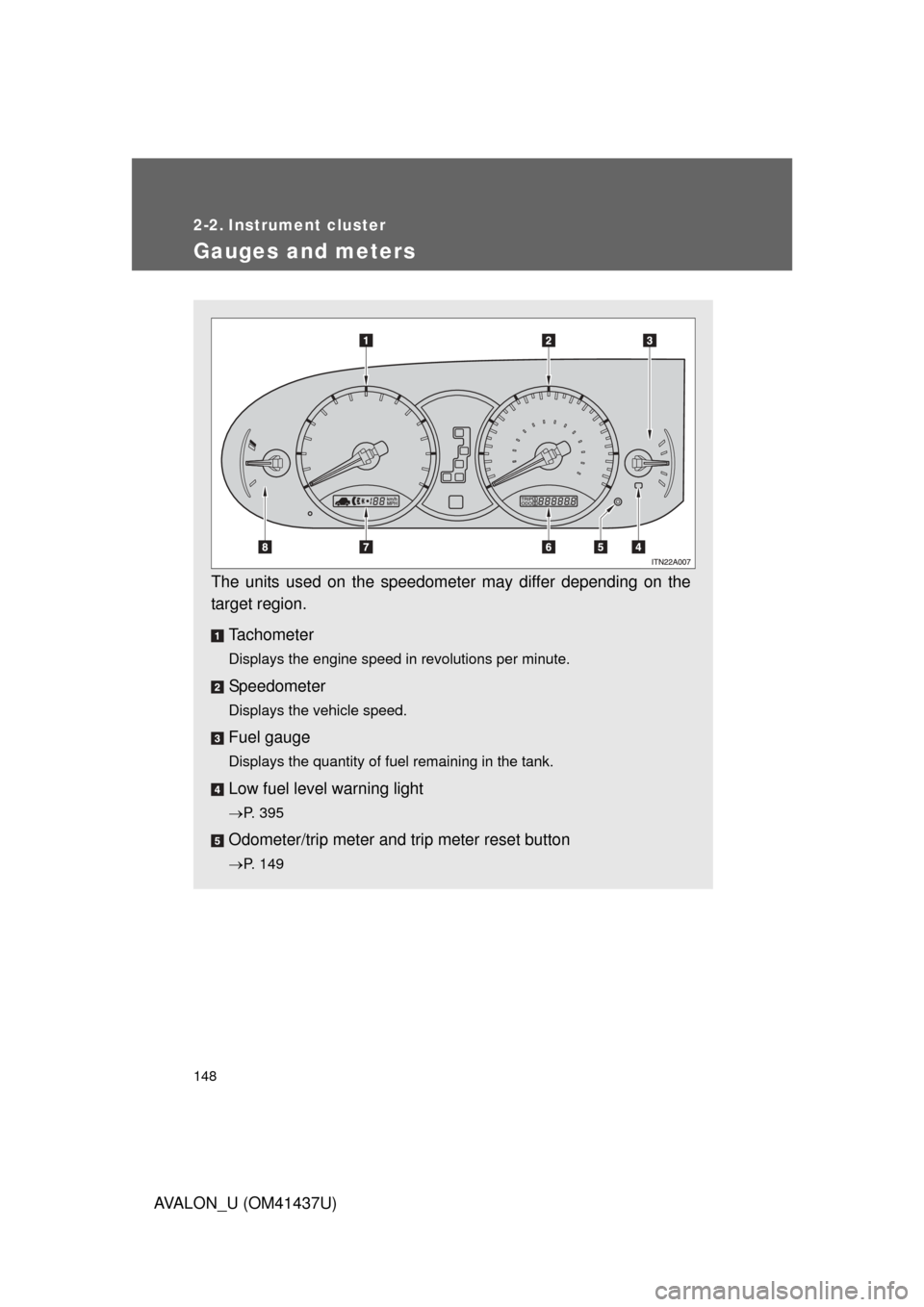
The units used on the speedometer may differ depending on the
target region.Tachometer
Displays the engine speed in revolutions per minute.
Speedometer
Displays the vehicle speed.
Fuel gauge
Displays the quantity of fuel remaining in the tank.
Low fuel level warning light
P. 395
Odometer/trip meter and trip meter reset button
P. 149
Page 151 of 476
151
2-2. Instrument cluster
2
When driving
AVALON_U (OM41437U)
Indicators and warning lights
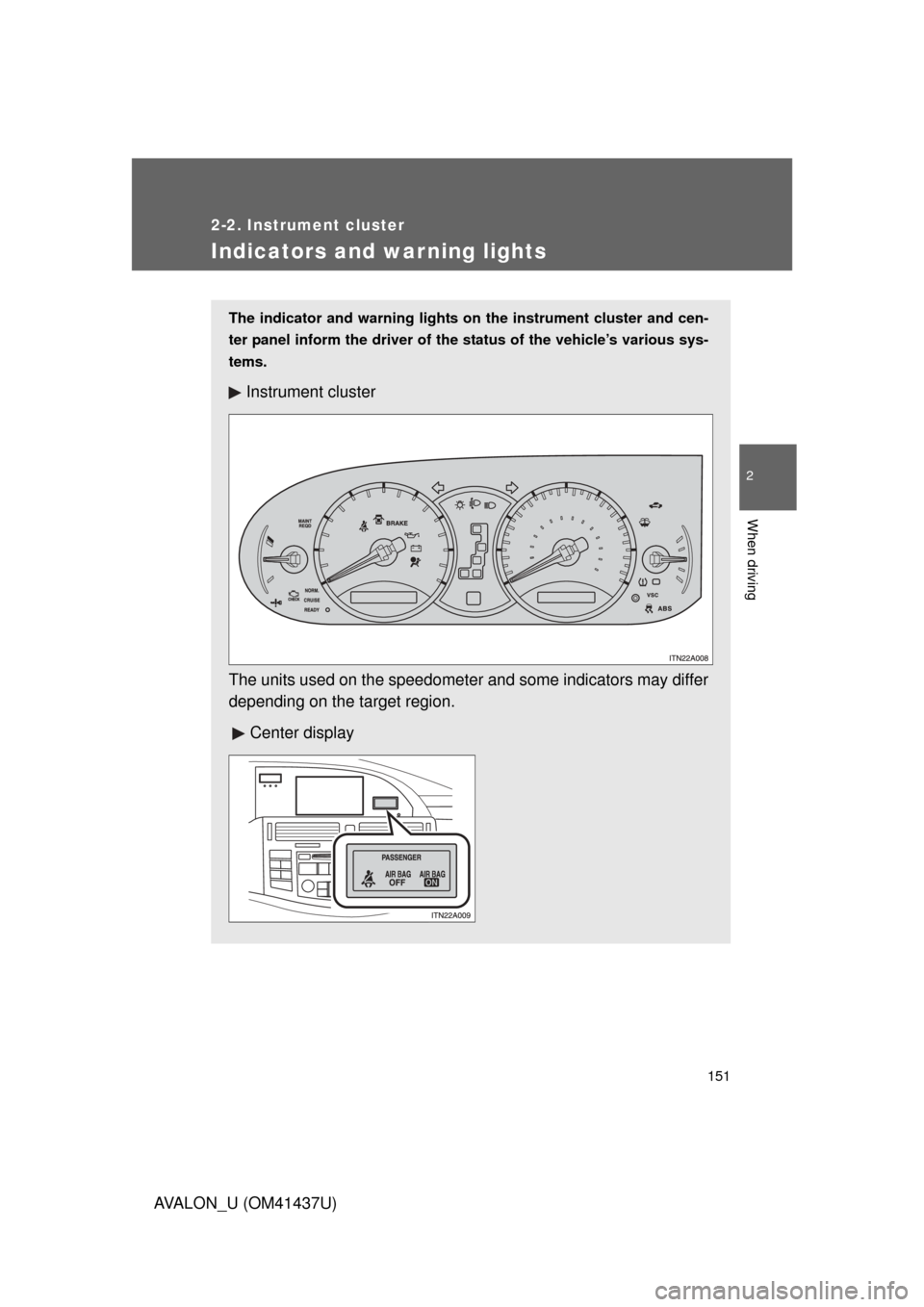
The indicator and warning lights on the instrument cluster and cen-
ter panel inform the driver of the status of the vehicle’s various sys-
tems.
Instrument cluster
The units used on the speedometer and some indicators may differ
depending on the target region.
Center display
Page 153 of 476

153
2-2. Instrument cluster
2
When driving
AVALON_U (OM41437U)
CAUTION
■
If a safety system warning light does not come on
Should a safety system light such as ABS and the SRS airbag warning light
not come on when you start the engine, this could mean that these systems
are not available to help protect you in an accident, which could result in
death or serious injury. Have the vehicle inspected by your Toyota dealer
immediately if this occurs.
■ Warning lights
Warning lights inform the driver of malfunctions in the indicated
vehicle’s systems. ( P. 393)
*: These lights turn on when the “ENGINE START STOP” switch is
turned to IGNITION ON mode (vehicles with smart key system) or the
engine switch is turned to the “ON” position (vehicles without smart
key system) to indicate that a system check is being performed. They
will turn off after the engine is started, or after a few seconds. There
may be a malfunction in a system if the lights do not come on, or turn
off. Have the vehicle inspected by your Toyota dealer.
(U.S.A.)(Canada)(U.S.A.)(Canada)(if equipped)
(U.S.A.)(Canada)
(U.S.A.)(if equipped)(if equipped)
*******
*****
****
Page 173 of 476

173
2-4. Using other
driving systems
2
When driving
AVALON_U (OM41437U)
Cruising in vehicle-to-veh icle distance control mode
This mode employs a laser radar sensor to detect the presence of
vehicles within 400 ft. (120 m) ahead and to judge the distance
between your vehicle and those vehicles.
Note that vehicle-to-vehicle distance will close when traveling on long
downhill slopes.
Example of constant speed cruising
When there are no vehicles ahead
The vehicle travels at the speed set by the driver. The desired vehicle-to-
vehicle distance can also be set by operating the vehicle-to-vehicle dis-
tance switch.
Example of deceleration cruising
When the vehicle ahead is driving slower than the set speed
When a vehicle is detected running ahead of you, in the same lane, the
system automatically decelerates your vehicle. When a greater reduction
in vehicle speed is necessary, the system applies the brakes. A warning
tone warns you when the system cannot decelerate sufficiently to prevent
your vehicle from closing on the vehicle ahead.
Page 174 of 476
174 2-4. Using other driving systems
AVALON_U (OM41437U)Example of follow-up cruising
When following a vehicle drivi
ng slower than the set speed
The system continues follow-up cruising while adjusting for changes in the
speed of the vehicle ahead in order to maintain the vehicle-to-vehicle dis-
tance set by the driver.
Example of acceleration
When there are no longer vehicles driving slower than the set
speed in the lane ahead
When the vehicle ahead of you executes a lane change, the system
slowly accelerates until the set vehicle speed is reached. The system then
returns to fixed speed cruising.
Approach warning
When your vehicle is too close to a vehicle ahead, and sufficient
automatic deceleration via the cruise control is not possible, the dis-
play will flash and buzzer will sound to alert the driver. An example of
this would be if another driver cuts in front of you while you are follow-
ing a vehicle. Apply the brake to ensure an appropriate vehicle-to-
vehicle distance.
Page 175 of 476

175
2-4. Using other
driving systems
2
When driving
AVALON_U (OM41437U)
■Dynamic laser cruise control warning lights, display and buzzers
Warning lights, display and buzzers are used to indicate a system malfunc-
tion or to alert you to the need for caution while driving.
The warning codes indicate the following.
If the same code appears again after implementing the correction procedure,
or if the cruise control cannot be set, contact your Toyota dealer.
“CRUISE” indicator light
Master warning light
Warning code
Warning codeDetailsCorrection procedures
C1 Indicates that the laser
radar sensor is dirty or
covered with ice. Clean the sensor.
C2 Indicates that the system
is unable to judge the vehi-
cle-to-vehicle distance. • Stop the wiper or switch
the wiper to variable inter-
mittent operation.
• Avoid direct sunlight.
• Wait until the weather becomes clear.
E3 (Flashing) Indicates that a system
malfunction has been
detected. Turn off and restart the
“ENGINE START STOP”
switch or the engine
switch.
Page 177 of 476

177
2-4. Using other
driving systems
2
When driving
AVALON_U (OM41437U)
■Vehicle-to-vehicle distance settings
Select a distance from the table below. Note that the distances shown corre-
spond to a vehicle speed of 55 mph (90 km/h). Vehicle-to-vehicle distance
increases/decreases in accordance with vehicle speed.
■ Laser radar sensor
■ Approach warning
In the following instances, there is a possibility that the warning will not
occur.
● When the speed of the vehicle ahead matches or exceeds your vehicle’s
speed
● When the vehicle ahead is traveling at an extremely slow speed
● Immediately after the cruise control speed has been set
● At the instant the accelerator is applied
■ Certification
Distance optionsVehicle-to-vehicle distance
Long Approximately 245 ft. (75 m)
Medium Approximately 165 ft. (50 m) Short Approximately 100 ft. (30 m)
Always keep the sensor clean to ensure
that the vehicle-to-vehicle distance con-
trol operates properly. (Some obstruc-
tions, such as snow, ice or plastic objects,
cannot be detected by the obstruction
sensor.)
Dynamic laser cruise control is canceled
if an obstruction is detected.
This product is a class l laser product complied with 21 C.F.R part
1040.10 and 1040.11.
Page 178 of 476
178 2-4. Using other driving systems
AVALON_U (OM41437U)
CAUTION
■Before using dynamic laser cruise control
Do not overly rely on vehicle-to-vehicle distance control.
Be aware of the set vehicle speed. If automatic deceleration/acceleration is
not appropriate, adjust the vehicle speed, as well as the distance between
your vehicle and vehicles ahead by applying the brakes, etc.
■ To avoid operating the dynamic laser cruise control by mistake
Keep the “ON-OFF” button off when not in use.
■ Situations unsuitable for dynamic laser cruise control
Do not use dynamic laser cruise control in any of the following situations.
Doing so may result in inappropriate control of speed and could cause seri-
ous or fatal accident.
● In heavy traffic
● On roads with sharp bends
● On winding roads
● On slippery roads, such as those covered with rain, ice or snow
● Where there are sudden changes between sharp up and down gradients
● At entrances to expressways
● When weather conditions are bad enough that they may prevent the sen-
sors from functioning correctly (fog, snow, sandstorm, heavy rain, etc.)
● When the approach warning buzzer can be heard often