Page 218 of 476
218 3-2. Using the audio system
AVALON_U (OM41437U)
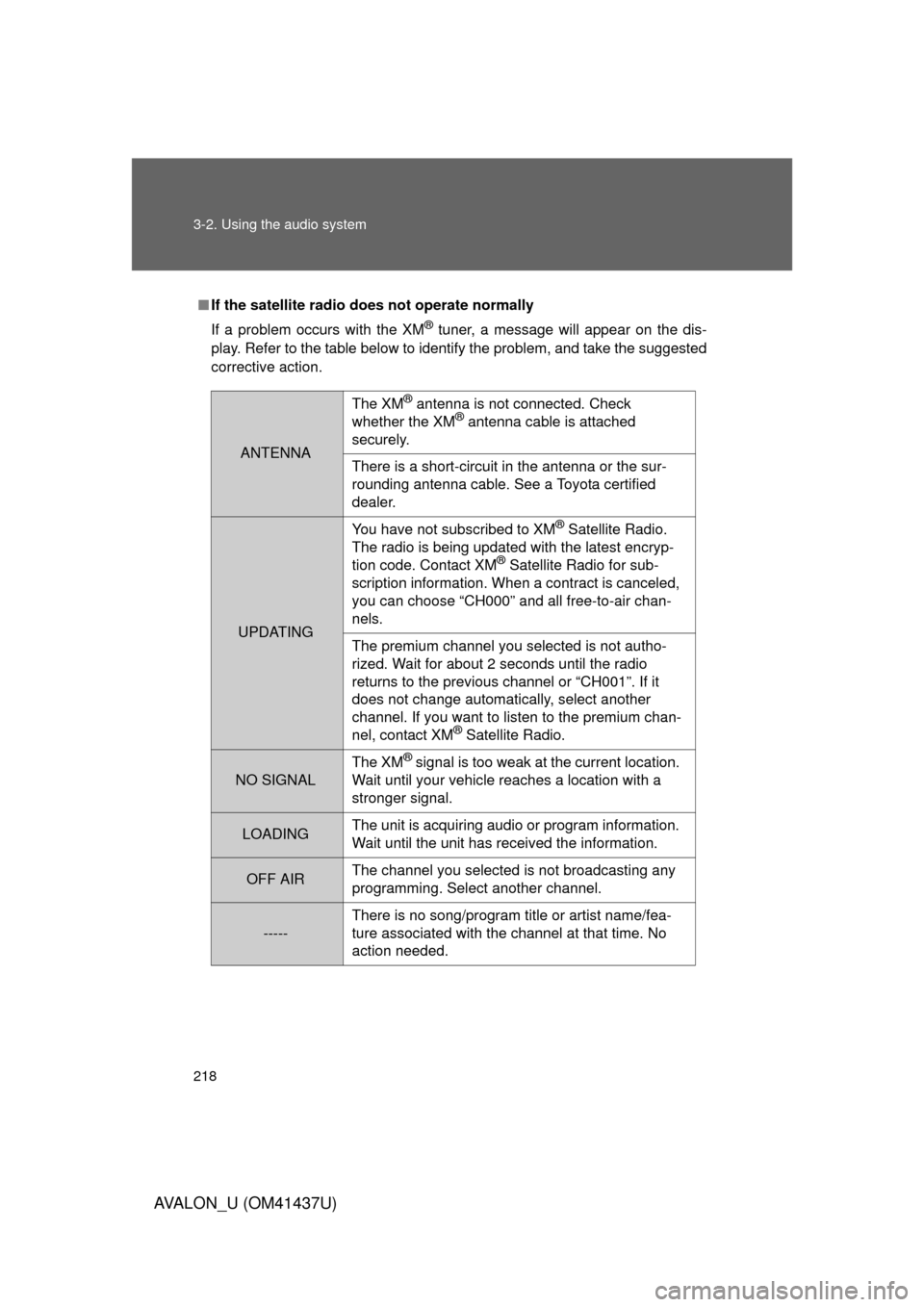
■If the satellite radio does not operate normally
If a problem occurs with the XM
® tuner, a message will appear on the dis-
play. Refer to the table below to identify the problem, and take the suggested
corrective action.
ANTENNA
The XM® antenna is not connected. Check
whether the XM® antenna cable is attached
securely.
There is a short-circuit in the antenna or the sur-
rounding antenna cable. See a Toyota certified
dealer.
UPDATING You have not subscribed to XM
® Satellite Radio.
The radio is being updated with the latest encryp-
tion code. Contact XM
® Satellite Radio for sub-
scription information. When a contract is canceled,
you can choose “CH000” and all free-to-air chan-
nels.
The premium channel you selected is not autho-
rized. Wait for about 2 seconds until the radio
returns to the previous channel or “CH001”. If it
does not change automatically, select another
channel. If you want to listen to the premium chan-
nel, contact XM
® Satellite Radio.
NO SIGNAL The XM
® signal is too weak at the current location.
Wait until your vehicle reaches a location with a
stronger signal.
LOADING The unit is acquiring audio or program information.
Wait until the unit has received the information.
OFF AIRThe channel you selected is not broadcasting any
programming. Select another channel.
-----There is no song/program title or artist name/fea-
ture associated with the channel at that time. No
action needed.
Page 223 of 476
223
3-2. Using the audio system
3
Interior features
AVALON_U (OM41437U)
Random playback
■ Current CD
Press .
Tracks are played in random order until the button is pressed again.
■All CDs
Press and hold until you hear a beep.
Tracks on all loaded CDs are played in random order until the button is
pressed again.
Repeat play
■ To repeat a track
Press .
■ To repeat all of the tracks on a CD
Press and hold until you hear a beep.
Switching the display
Press .
Each time the button is pressed, the display changes in the order of
“Track no./Elapsed time” “CD title” “Track name”.
Page 230 of 476
230 3-2. Using the audio system
AVALON_U (OM41437U)
Random playback■ To play files from a partic ular folder in random order
Press .
■ To play all the files on a disc in random order
Press and hold until you hear a beep.
Repeat play ■ To repeat a file
Press .
■ To repeat all of the files on a folder
Press and hold until you hear a beep.
Switching the display
Press .
Each time the button is pressed, the display changes in the order of
“Folder no./File no./Elapsed time” “Folder name” “File name”
“Album title” (MP3 only) “Track title” “Artist name”.
Page 239 of 476
239
3-2. Using the audio system
3
Interior features
AVALON_U (OM41437U)
Using the steering wheel audio switches
Turning on the powerPress when the audio system is turned off.
The audio system can be turned off by holding the switch down for 1 sec-
ond or more.
Changing the audio sourcePress when the audio system is turned on. The audio source
changes as follows each time the bu tton is pressed. If a CD is not
inserted, that mode will be skipped.
“FM1” “FM2” “CD player” “AUX” “AM” “SAT1”
“SAT2” “SAT3”
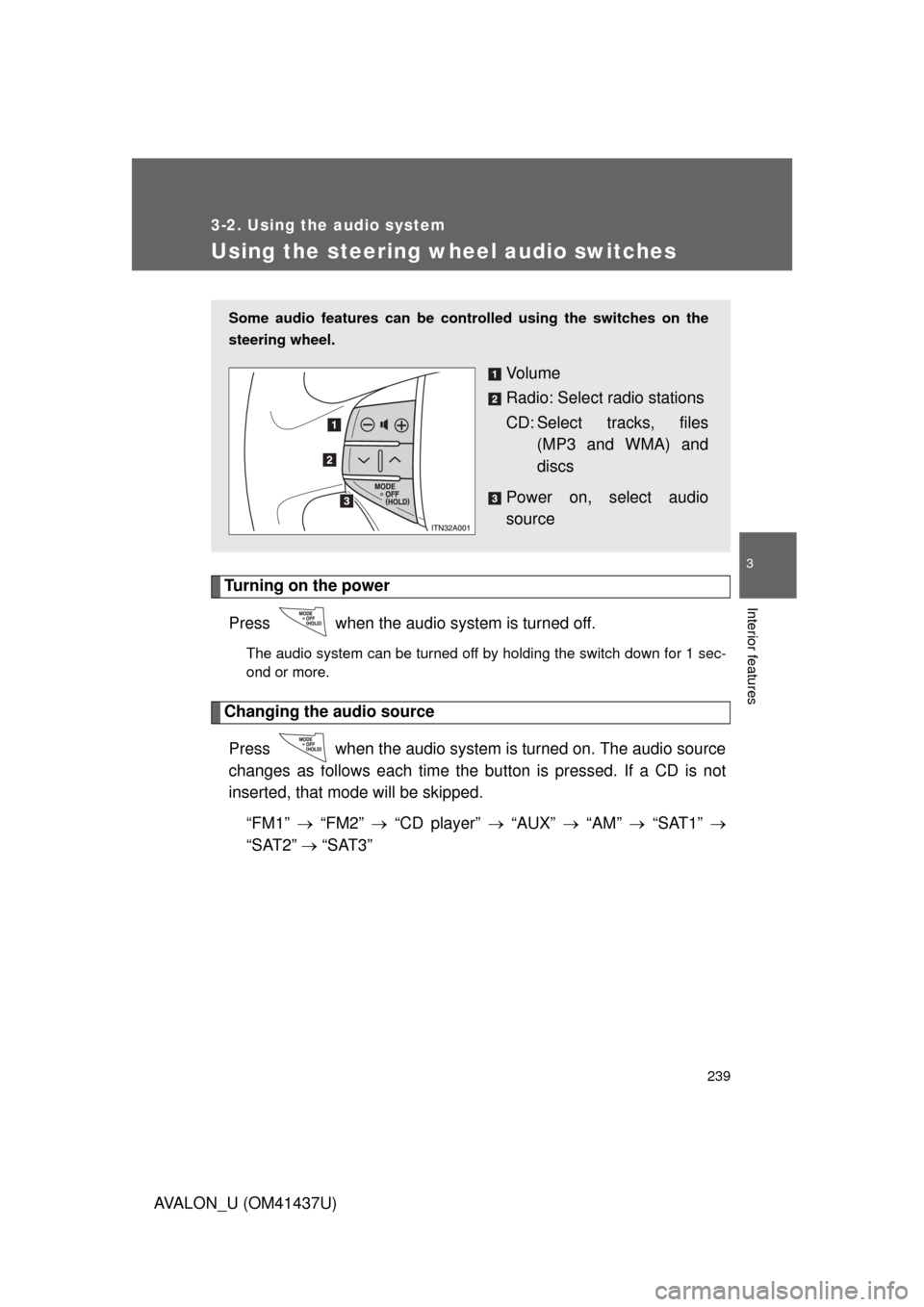
Some audio features can be cont rolled using the switches on the
steering wheel.
Vo l u m e
Radio: Select radio stations
CD: Select tracks, files (MP3 and WMA) and
discs
Power on, select audio
source
Page 276 of 476
276 3-4. Using the interior lights
AVALON_U (OM41437U)
■To prevent battery discharge
If the interior lights, personal lights and engine switch light (if equipped)
remain on when the door is not fully closed or the interior light switch in
“DOOR” position, the lights will go off automatically after 20 minutes.
■ Customization that can be co nfigured at Toyota dealer
Setting (e.g. The time elapsed before lights turn off) can be changed.
(Customizable features
P. 457)
Page 411 of 476
5
When trouble arises
411
5-2. Steps to take in an emergency
AVALON_U (OM41437U)
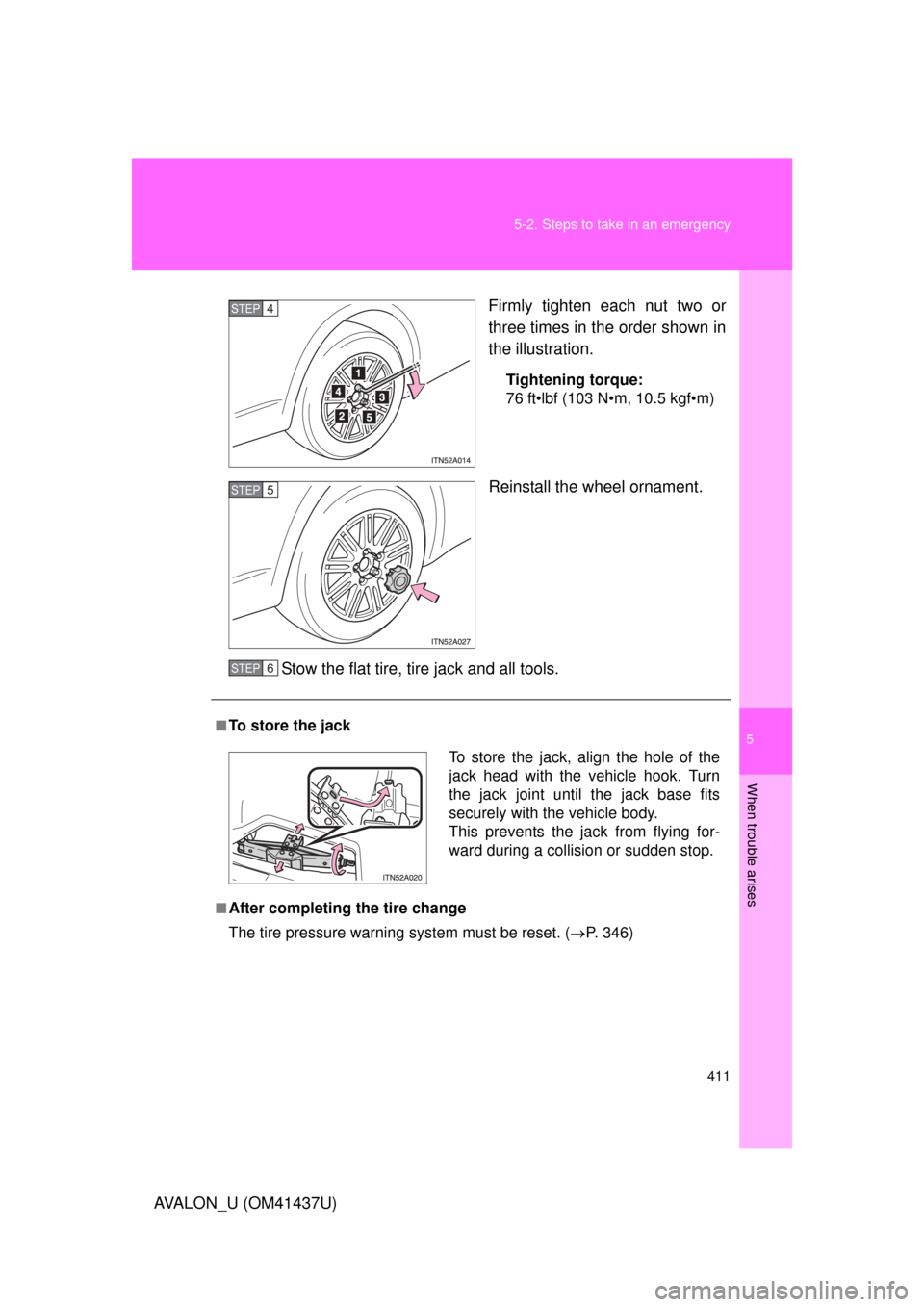
Firmly tighten each nut two or
three times in the order shown in
the illustration.
Tightening torque:
76 ft•lbf (103 N•m, 10.5 kgf•m)
Reinstall the wheel ornament.
Stow the flat tire, tire jack and all tools.
STEP4
STEP5
■To store the jack
■After completing the tire change
The tire pressure warning system must be reset. (P. 346)
STEP6
To store the jack, align the hole of the
jack head with the vehicle hook. Turn
the jack joint until the jack base fits
securely with the vehicle body.
This prevents the jack from flying for-
ward during a collisio n or sudden stop.
Page 419 of 476
5
When trouble arises
419
5-2. Steps to take in an emergency
AVALON_U (OM41437U)
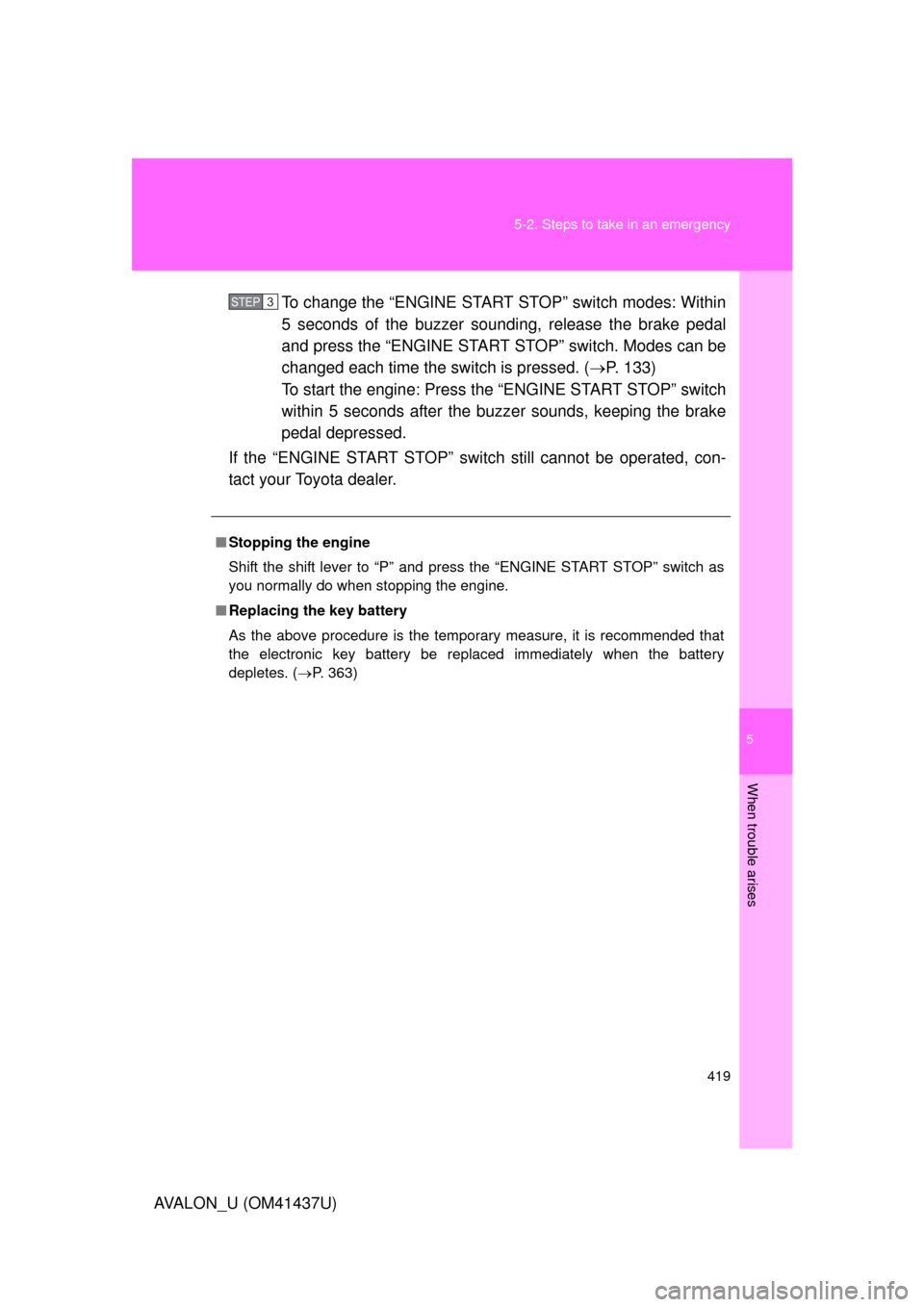
To change the “ENGINE START STOP” switch modes: Within
5 seconds of the buzzer soundi
ng, release the brake pedal
and press the “ENGINE START STOP” switch. Modes can be
changed each time the sw itch is pressed. (P. 133)
To start the engine: Press the “ENGINE START STOP” switch
within 5 seconds after the buzz er sounds, keeping the brake
pedal depressed.
If the “ENGINE START STOP” switch still cannot be operated, con-
tact your Toyota dealer.
■ Stopping the engine
Shift the shift lever to “P” and press the “ENGINE START STOP” switch as
you normally do when stopping the engine.
■ Replacing the key battery
As the above procedure is the temporary measure, it is recommended that
the electronic key battery be replaced immediately when the battery
depletes. ( P. 363)
STEP3
Page 454 of 476
454
AVALON_U (OM41437U)AVALON_U (OM41437U)
6-2. Customization
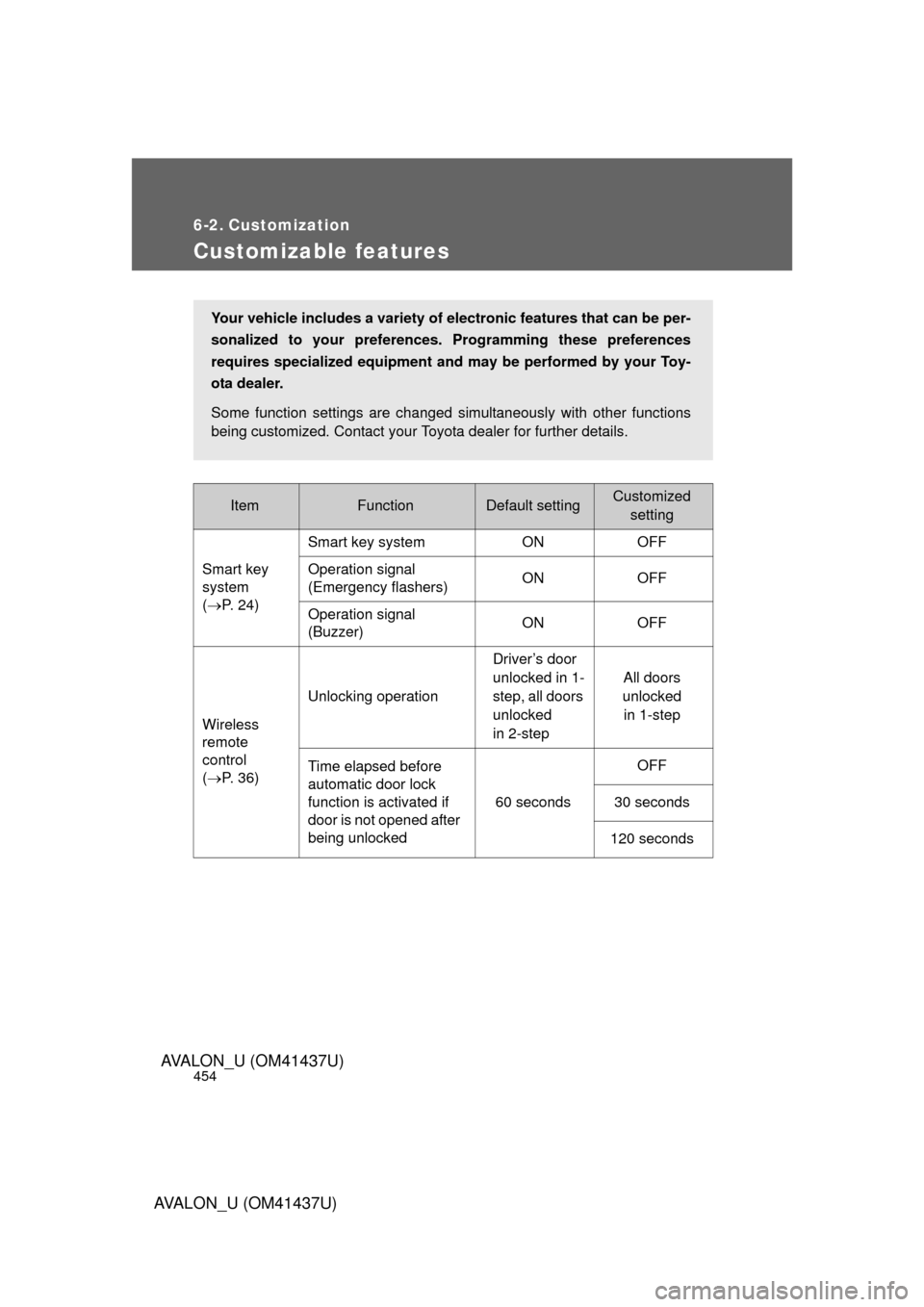
Customizable features
ItemFunctionDefault settingCustomized
setting
Smart key
system
( P. 24) Smart key system ON OFF
Operation signal
(Emergency flashers)
ON OFF
Operation signal
(Buzzer) ON OFF
Wireless
remote
control
( P. 36) Unlocking operation
Driver’s door
unlocked in 1-
step, all doors
unlocked
in 2-stepAll doors
unlocked in 1-step
Time elapsed before
automatic door lock
function is activated if
door is not opened after
being unlocked 60 secondsOFF
30 seconds
120 seconds
Your vehicle includes a variety of electronic features that can be per-
sonalized to your preferences. Programming these preferences
requires specialized equipment and may be performed by your Toy-
ota dealer.
Some function settings are changed simultaneously with other functions
being customized. Contact your Toyota dealer for further details.