Page 103 of 476
103
1
1-7. Safety information
Before driving
AVALON_U (OM41437U)
Front passenger occupant classification system
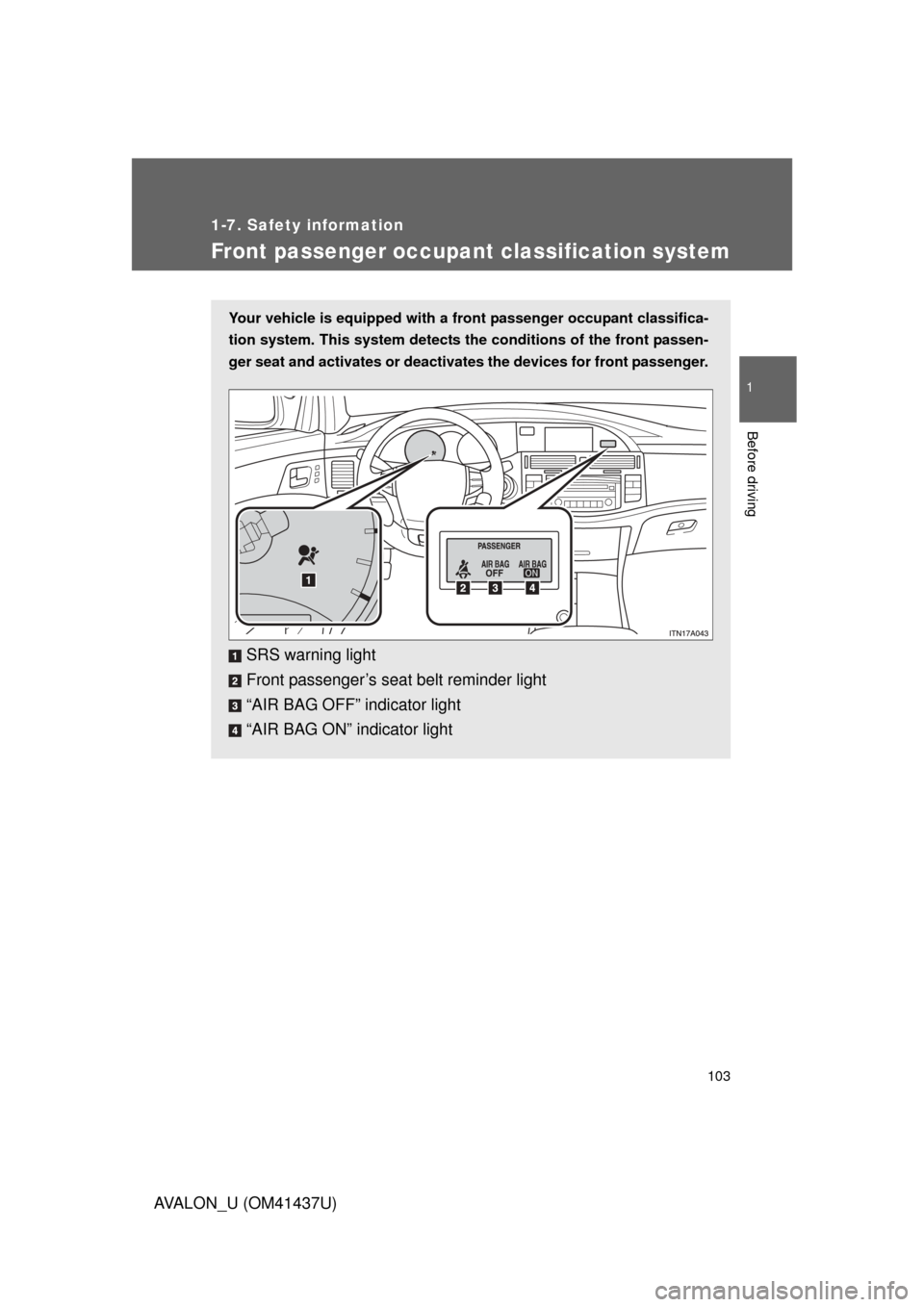
Your vehicle is equipped with a front passenger occupant classifica-
tion system. This system detects the conditions of the front passen-
ger seat and activates or deactivates the devices for front passenger.
SRS warning light
Front passenger’s seat belt reminder light
“AIR BAG OFF” indicator light
“AIR BAG ON” indicator light
Page 104 of 476
104 1-7. Safety information
AVALON_U (OM41437U)
Condition and operation in the front passenger occupant classi-
fication system■ Adult
*1
■Child*3 or child restraint system*4
Indicator/
warning light “AIR BAG ON” and “AIR BAG OFF”
indicator lights “AIR BAG
ON”
SRS warning light Off
Front passenger’s seat belt reminder light Flashing
*2
Devices Front passenger airbag
Activated
Side airbag on the front passenger seat
Curtain shield airbag in the front passenger side
Front passenger’s seat belt pretensioner
Indicator/
warning light “AIR BAG ON” and “AIR BAG OFF”
indicator lights “AIR BAG
OFF”*5
SRS warning light Off
Front passenger’s seat belt reminder light Flashing
*2
Devices Front passenger airbag
Deactivated
Side airbag on the front passenger seat
Curtain shield airbag in the front passenger side Activated
Front passenger’s seat belt pretensioner Activated
Page 154 of 476
154
2-2. Instrument cluster
AVALON_U (OM41437U)
Center display
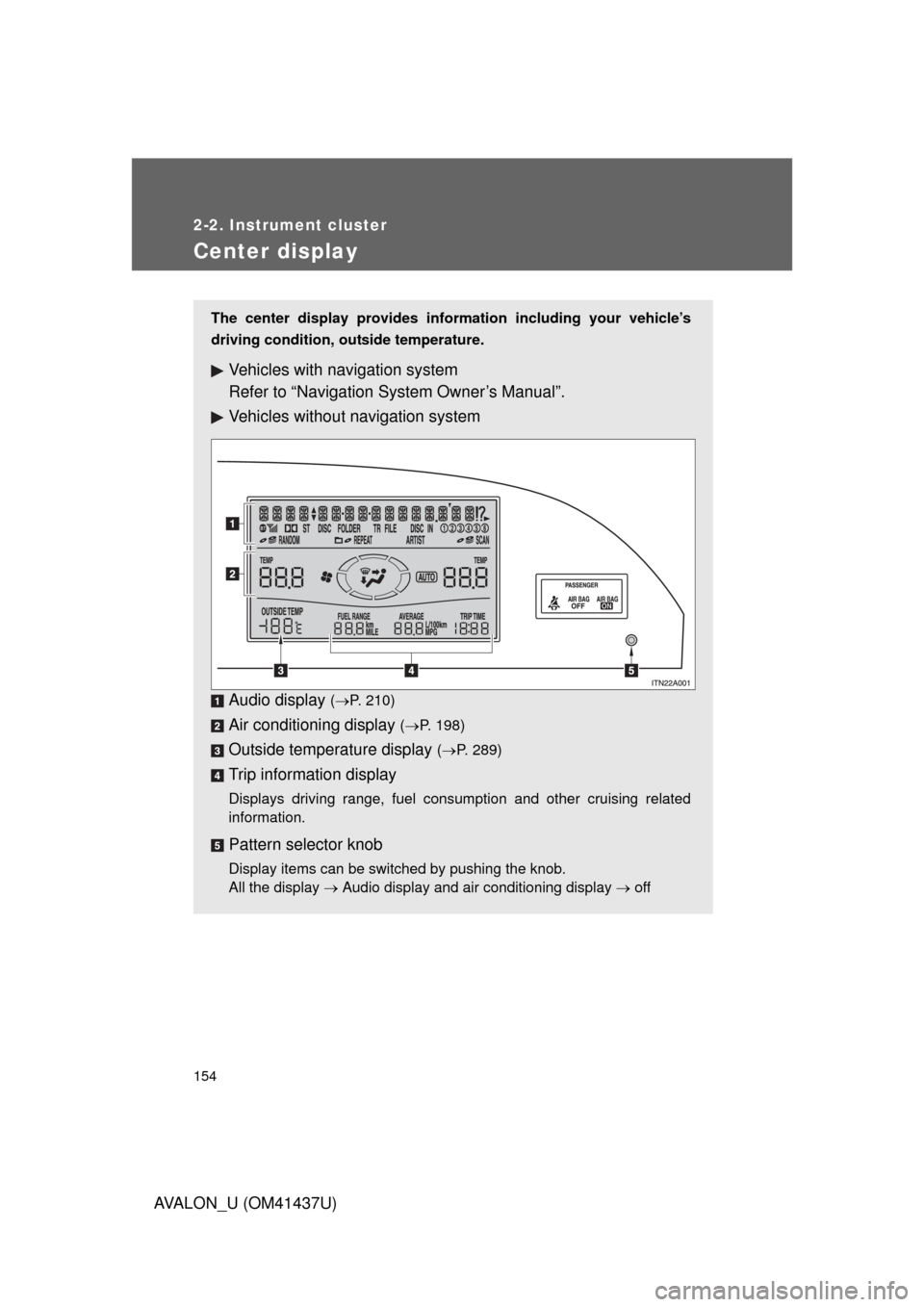
The center display provides information including your vehicle’s
driving condition, outside temperature.
Vehicles with navigation system
Refer to “Navigation System Owner’s Manual”.
Vehicles without navigation system
Audio display
(P. 210)
Air conditioning display ( P. 198)
Outside temperature display ( P. 289)
Trip information display
Displays driving range, fuel consumption and other cruising related
information.
Pattern selector knob
Display items can be switched by pushing the knob.
All the display Audio display and air conditioning display off
Page 190 of 476
190 2-5. Driving information
AVALON_U (OM41437U)
■Before driving the vehicle
Perform the following according to the driving conditions.
●Do not try to forcibly open a window or move a wiper that is
frozen. Pour warm water over the frozen area to melt the ice.
Wipe away the water immediately to prevent it from freezing.
● To ensure proper operation of th e climate control system fan,
remove any snow that has accumulated on the air inlet vents
in front of the windshield.
● Remove any ice that has accumu lated on the vehicle chassis.
● Periodically check for and remove any excess ice or snow
that may have accumulated in the wheel well or on the
brakes.
■ When driving the vehicle
Accelerate the vehicle slowly and drive at a reduced speed suit-
able to road conditions.
■ When parking the vehicle
Park the vehicle and move the shift lever to “P” without setting
the parking brake. The parking brake may freeze up, preventing
it from being released.
Page 197 of 476
Interior features3
197
AVALON_U (OM41437U)
3-1. Using the air conditioning system and defogger
Automatic air conditioning system ........................... 198
Using the steering wheel climate control
switches ......................... 206
Rear window and outside rear view mirror
defoggers ....................... 208
3-2. Using the audio system Audio system type............ 210
Audio cover ...................... 212
Using the radio ................. 213
Using the CD player ......... 220
Playing MP3 and WMA discs ..................... 228
Optimal use of the audio system ........................... 236
Using the AUX adapter........................... 238
Using the steering wheel audio switches ............... 239
3-3. Using the hands-free system (for cellular phone)
Hands-free system (for cellular phone) ......... 242
Using the hands-free system ........................... 246 Making a phone call ......... 254
Setting a cellular
phone ............................. 259
Security and system setup .............................. 264
Using the phone book ...... 267
3-4. Using the interior lights Interior lights list ............... 275
3-5. Using the storage features List of storage features .......................... 278
3-6. Other interior features Sun visors ........................ 286
Vanity mirrors ................... 287
Clock ................................ 288
Outside temperature display............................ 289
Ashtrays ........................... 290
Power outlets ................... 291
Seat heaters/ventilators ......... 293
Armrest ............................ 295
Rear sunshade................. 296
Floor mats ........................ 298
Trunk features .................. 299
Garage door opener......... 301
Compass .......................... 306
Page 198 of 476
198
AVALON_U (OM41437U)
3-1. Using the air conditioning system and defogger
Automatic air conditioning system
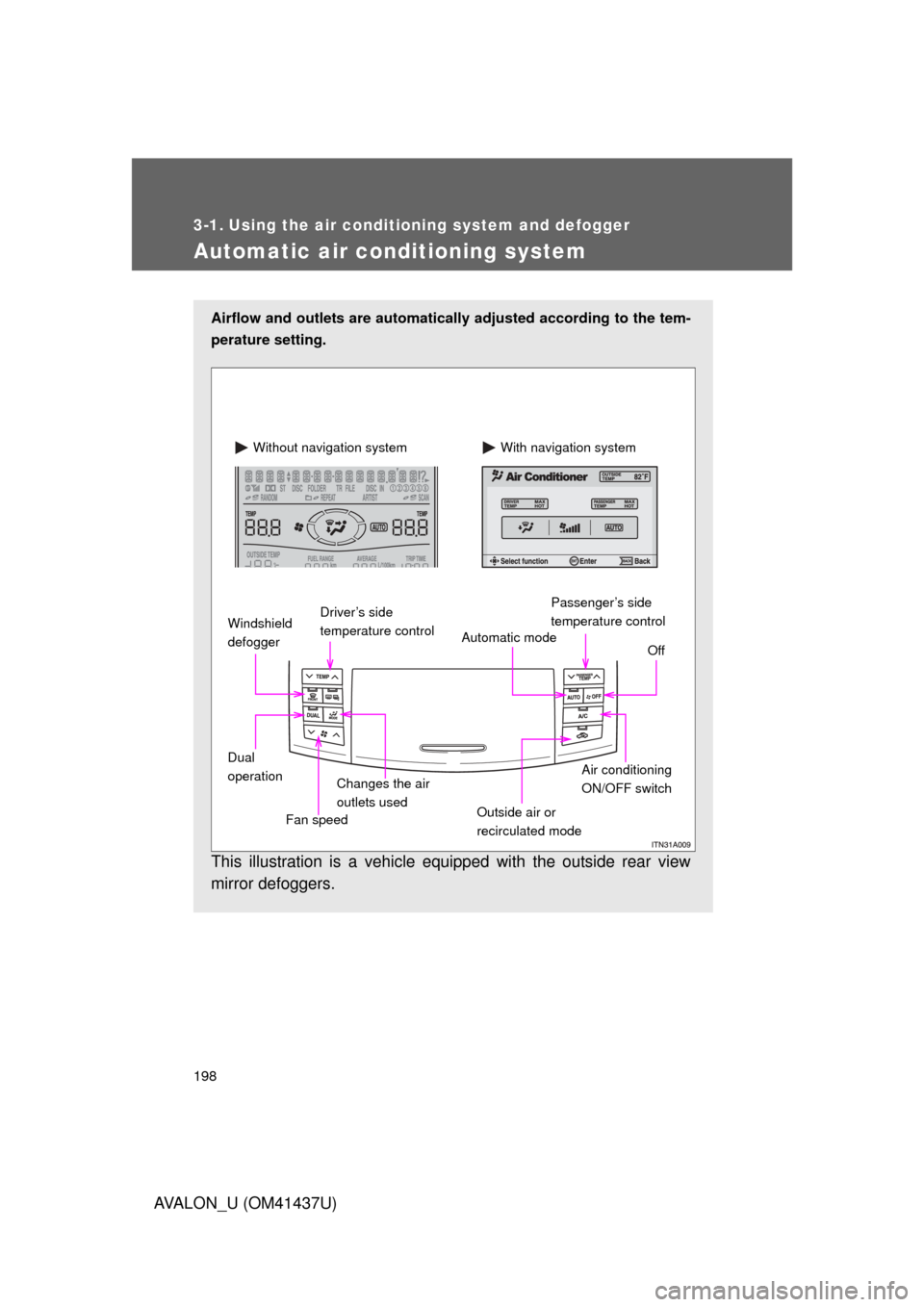
Airflow and outlets are automatically adjusted according to the tem-
perature setting.
This illustration is a vehicle equipped with the outside rear view
mirror defoggers.
Automatic mode Off
Driver’s side
temperature control
Air conditioning
ON/OFF switch
Outside air or
recirculated mode Passenger’s side
temperature control
Dual
operation With navigation system
Without navigation system
Windshield
defogger
Fan speedChanges the air
outlets used
Page 199 of 476
199
3-1. Using the air conditioning system
and defogger
3
Interior features
AVALON_U (OM41437U)
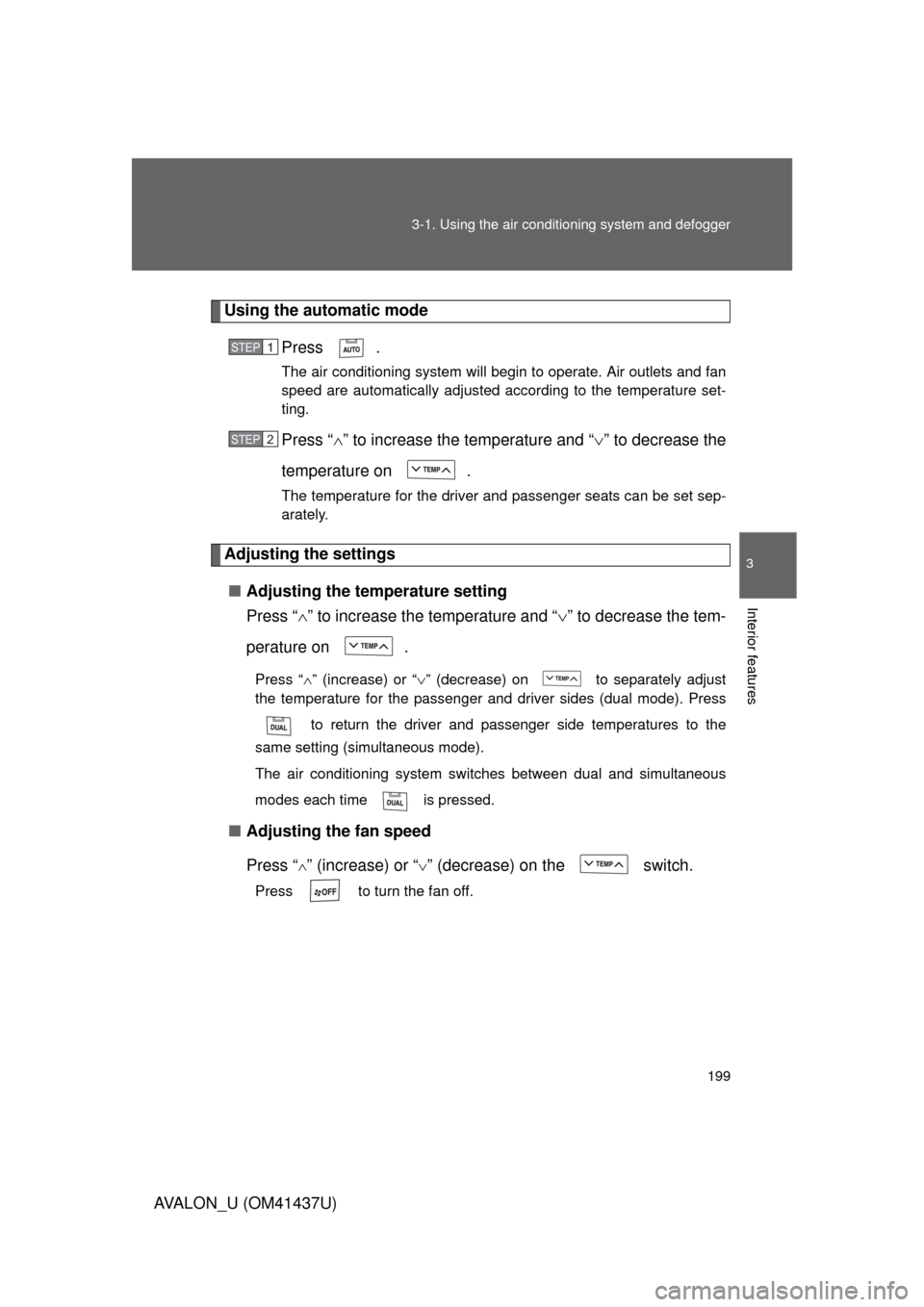
Using the automatic mode
Press .
The air conditioning system will begin to operate. Air outlets and fan
speed are automatically adjusted according to the temperature set-
ting.
Press “” to increase the temperature and “ ” to decrease the
temperature on .
The temperature for the driver and passenger seats can be set sep-
arately.
Adjusting the settings
■ Adjusting the temperature setting
Press “ ” to increase the temperature and “ ” to decrease the tem-
perature on .
Press “ ” (increase) or “ ” (decrease) on to separately adjust
the temperature for the passenger and driver sides (dual mode). Press
to return the driver and passenger side temperatures to the
same setting (simultaneous mode).
The air conditioning system switches between dual and simultaneous
modes each time is pressed.
■ Adjusting the fan speed
Press “
” (increase) or “” (decrease) on the switch.
Press to turn the fan off.
STEP1
STEP2
Page 200 of 476
200 3-1. Using the air conditioning system and defogger
AVALON_U (OM41437U)■
Changing the air outlets
Press .
The air outlets switch each time
the button is pressed. The air flow
shown on the display indicate the
following.
Air flows to the upper body.
Air flows to the upper body and
feet.