Page 3 of 665
1
2
3
4
5
6
7
4RUNNER_U
3
2-2. Instrument clusterGauges and meters ............ 182
Indicators and warning lights ................................. 189
Accessory meter ................. 194
2-3. Operating the lights and wipers
Headlight switch .................. 198
Fog light switch ................... 204
Windshield wipers and washer .............................. 205
Rear window wiper and washer .............................. 207
2-4. Using other driving systems
Cruise control ...................... 209
Intuitive parking assist......... 213
Rear view monitor system (rear view mirror-attached
type) .................................. 218
Four-wheel drive system (part-time 4WD models).... 223
Four-wheel drive system (full-time 4WD models) ..... 226
Active traction control system .............................. 230
AUTO LSD system (2WD models) ................... 232
Rear differential lock system .............................. 235
Downhill assist control system .............................. 238
Crawl Control ...................... 241
Multi-terrain Select .............. 245
Driving assist systems ........ 253 2-5. Driving information
Off-road precautions........... 262
Cargo and luggage ............. 267
Vehicle load limits............... 273
Winter driving tips ............... 275
Trailer towing ...................... 280
Dinghy towing ..................... 293
3-1. Using the air conditioning system and defogger
Manual air conditioning system .............................. 296
Automatic air conditioning system .............................. 302
Rear window and outside rear view
mirror defoggers ............... 310
Windshield wiper de-icer .... 312
3-2. Using the audio system Audio system types ............ 313
Using the radio ................... 317
Using the CD player ........... 324
Playing MP3 and WMA discs ................................. 333
Operating an iPod
®............ 341
Operating a USB memory ............................ 348
Optimal use of the audio system .............................. 355
Using the AUX adapter....... 360
Using the steering wheel audio switches.................. 361
3Interior features
Page 153 of 665
When driving2
153
4RUNNER_U
2-1. Driving proceduresDriving the vehicle............ 154
Engine (ignition) switch (vehicles without a
smart key system).......... 164
Engine (ignition) switch (vehicles with a smart
key system).................... 167
Automatic transmission .... 173
Turn signal lever .............. 179
Parking brake ................... 180
Horn ................................. 181
2-2. Instrument cluster Gauges and meters ......... 182
Indicators and warning lights .............................. 189
Accessory meter .............. 194
2-3. Operating the lights and wipers
Headlight switch ............... 198
Fog light switch ................ 204
Windshield wipers and washer ........................... 205
Rear window wiper and washer ........................... 207 2-4. Using other driving
systems
Cruise control ................... 209
Intuitive parking assist...... 213
Rear view monitor system (rear view
mirror-attached type) ..... 218
Four-wheel drive system (part-time 4WD
models) .......................... 223
Four-wheel drive system (full-time 4WD
models) .......................... 226
Active traction control system ........................... 230
AUTO LSD system (2WD models) ................ 232
Rear differential lock system ........................... 235
Downhill assist control system ........................... 238
Crawl Control ................... 241
Multi-terrain Select ........... 245
Driving assist systems ..... 253
2-5. Driving information Off-road precautions ........ 262
Cargo and luggage .......... 267
Vehicle load limits ............ 273
Winter driving tips ............ 275
Trailer towing ................... 280
Dinghy towing .................. 293
Page 182 of 665
182
4RUNNER_U
2-2. Instrument cluster
Gauges and meters
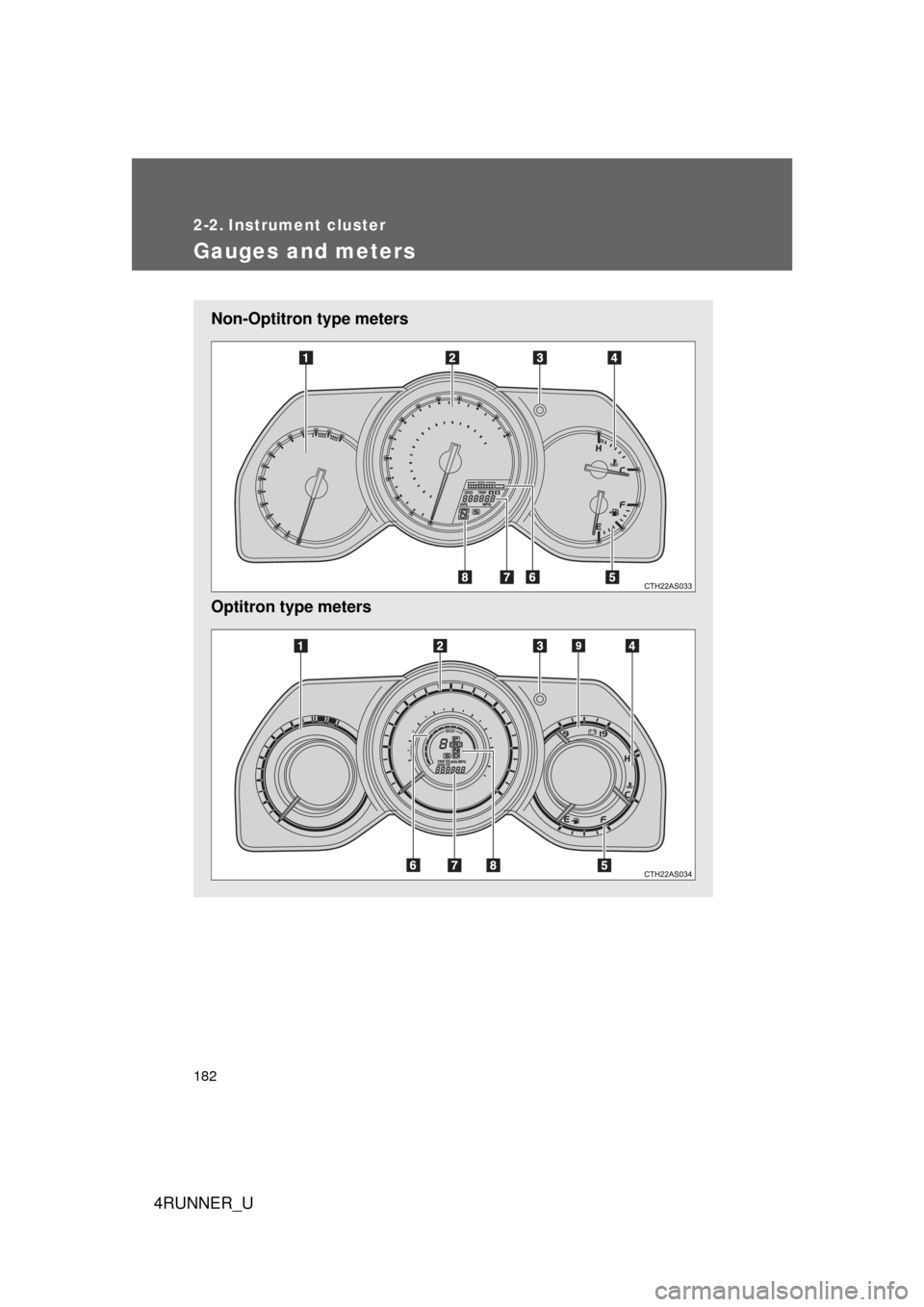
Non-Optitron type meters
Optitron type meters
Page 183 of 665
183
2-2. Instrument cluster
2
When driving
4RUNNER_U
Tachometer
Displays the engine speed in revolutions per minute
Speedometer
Displays the vehicle speed
Display change button
P. 184
Engine coolant temperature gauge
Displays the engine coolant temperature
Fuel gauge
Displays the quantity of fuel remaining in the tank
Eco Driving Indicator Zone Display
P. 185
Odometer, trip meter and average fuel consumption display
P. 184
Shift position and shift range indicators
P. 173
Vo l t m e t e r
Displays the charge state
Page 184 of 665
184 2-2. Instrument cluster
4RUNNER_U
Switching the displayItems displayed can be switched
by pressing the display change
button.
■ Odometer
Displays the total distance the vehicle has been driven.
■ Tr i p m e t e r
Displays the distance the vehicl e has been driven since the meter
was last reset. Trip meters “A” and “B” can be used to record and
display different distances independently.
Pressing and holding the display change button will reset the trip meter
that is currently displayed.
Page 185 of 665
185
2-2. Instrument cluster
2
When driving
4RUNNER_U
■
Eco Driving Indicator and average fuel consumption
Non-Optitron type meter
Eco Driving Indicator Light
During environment-friendly
acceleration operation (Eco driv-
ing), Eco Driving Indicator Light
will turn on.
Eco Driving Indicator Zone
Display
Suggests Zone of Eco driving
with current Eco driving ratio
based on accelerator pedal oper-
ation.
Zone of Eco driving
Eco driving ratio based on
accelerator pedal operation
In case over-use of the accelera-
tor causes the vehicle to exceed
Zone of Eco driving, the right of
Eco Driving Indicator Zone Dis-
play will blink and Eco Driving
Indicator Light will turn off.
Average fuel consumption
Displays the average fuel con-
sumption since the function was
reset.
Pressing and holding the display
change button will reset the aver-
age fuel consumption.
CTH22AS054
Page 186 of 665
186 2-2. Instrument cluster
4RUNNER_UOptitron type meter
Eco Driving Indicator Light
During environment-friendly
acceleration operation (Eco driv-
ing), Eco Driving Indicator Light
will turn on.
Eco Driving Indicator Zone
Display
Suggests Zone of Eco driving
with current Eco driving ratio
based on accelerator pedal oper-
ation.
Zone of Eco driving
Eco driving ratio based on
accelerator pedal operation
In case over-use of the accelera-
tor causes the vehicle to exceed
Zone of Eco driving, the right of
Eco Driving Indicator Zone Dis-
play will blink and Eco Driving
Indicator Light will turn off.
Average fuel consumption
Displays the average fuel con-
sumption since the function was
reset.
Pressing and holding the display
change button will reset the aver-
age fuel consumption.
CTH22AS055
Page 187 of 665
187
2-2. Instrument cluster
2
When driving
4RUNNER_U
■
Eco Driving Indicator Light on/off
Non-Optitron type meter
Eco Driving Indicator Light can
be switched on or off by pressing
and holding the display change
button.
Optitron type meter Eco Driving Indicator Light can
be switched on or off by pressing
and holding the display change
button.
Instrument panel light control
The brightness of the instrument panel lights can be adjusted.
Brighter
Darker
CTH22AS010