Page 40 of 665

40 1-2. Opening, closing and locking the doors
4RUNNER_U
■Security feature
If a door is not opened within approximately 60 seconds after the vehicle is
unlocked, the security feature automatically locks the vehicle again.
■ Battery-saving function
In the following circumstances, the entry function is disabled in order to pre-
vent the vehicle battery from discharging and the electronic key battery from
depleting.
● When the entry function has not been used for 5 days or more
● When the electronic key has been left within approximately 6 ft. (2 m) of
the vehicle for 10 minutes or more
● If the entry function has not been used for 14 days or more, the vehicle
cannot be unlocked by a door other than the driver's door. To unlock the
vehicle, grip the driver's door handle or use the wireless remote control
or the mechanical key.
The system will resume operation when
● The vehicle is locked using the door handle lock switch when carrying the
electronic key on your person.
● The vehicle is locked/unlocked using the wireless remote control.
(P. 4 7 )
● The vehicle is locked/unlocked using the mechanical key. ( P. 596)
AlarmSituationCorrection procedure
Interior alarm
sounds once. The “ENGINE START
STOP” switch was pressed
after the doors were
unlocked with the mechan-
ical key.
Touch the electronic
key to the “ENGINE
START STOP” switch
while depressing the
brake pedal.
The “ENGINE START
STOP” switch was pressed
two consecutive times
without the electronic key
being present.
Page 44 of 665

44 1-2. Opening, closing and locking the doors
4RUNNER_U
■Electronic key battery depletion
● The standard battery life is 1 to 2 years.
● As the electronic key always transmits radio waves, the battery will
become depleted even if the electronic key is not used. The following
symptoms indicate that the electronic key battery may be depleted.
Replace the battery when necessary. ( P. 528)
• The smart key system or the wireless remote control does not operate.
• The detection area becomes smaller.
• The LED indicator on the key surface does not turn on.
● To avoid serious deterioration, do not leave the electronic key within 3 ft.
(1 m) of the following electrical appliances that produce a magnetic field:
•TVs
• Personal computers
• Cellular phones, cordless phones and battery chargers
• Recharging cellular phones or cordless phones
• Glass top ranges
• Table lamps
■ Precautions when disc onnecting the battery
● In some cases, it may not be possible to unlock the doors using the smart
key system immediately after the battery has been disconnected. Use
the wireless remote control or the mechanical key to lock or unlock the
doors.
● The engine may not start on the first attempt after reconnecting the bat-
tery but will start normally after the second attempt. This is not a malfunc-
tion.
● The “ENGINE START STOP” switch mode is memorized by the vehicle.
When the battery is reconnected, the system will return to the mode it
was in before the battery was disconnected. Before disconnecting the
battery, turn the “ENGINE START STOP” switch off.
If you are unsure what mode the “ENGINE START STOP” switch was in
when the battery was disconnected, be especially careful when reconnect-
ing the battery.
Page 510 of 665
509
4-3. Do-it-yourself maintenance
4
Maintenance and care
4RUNNER_U
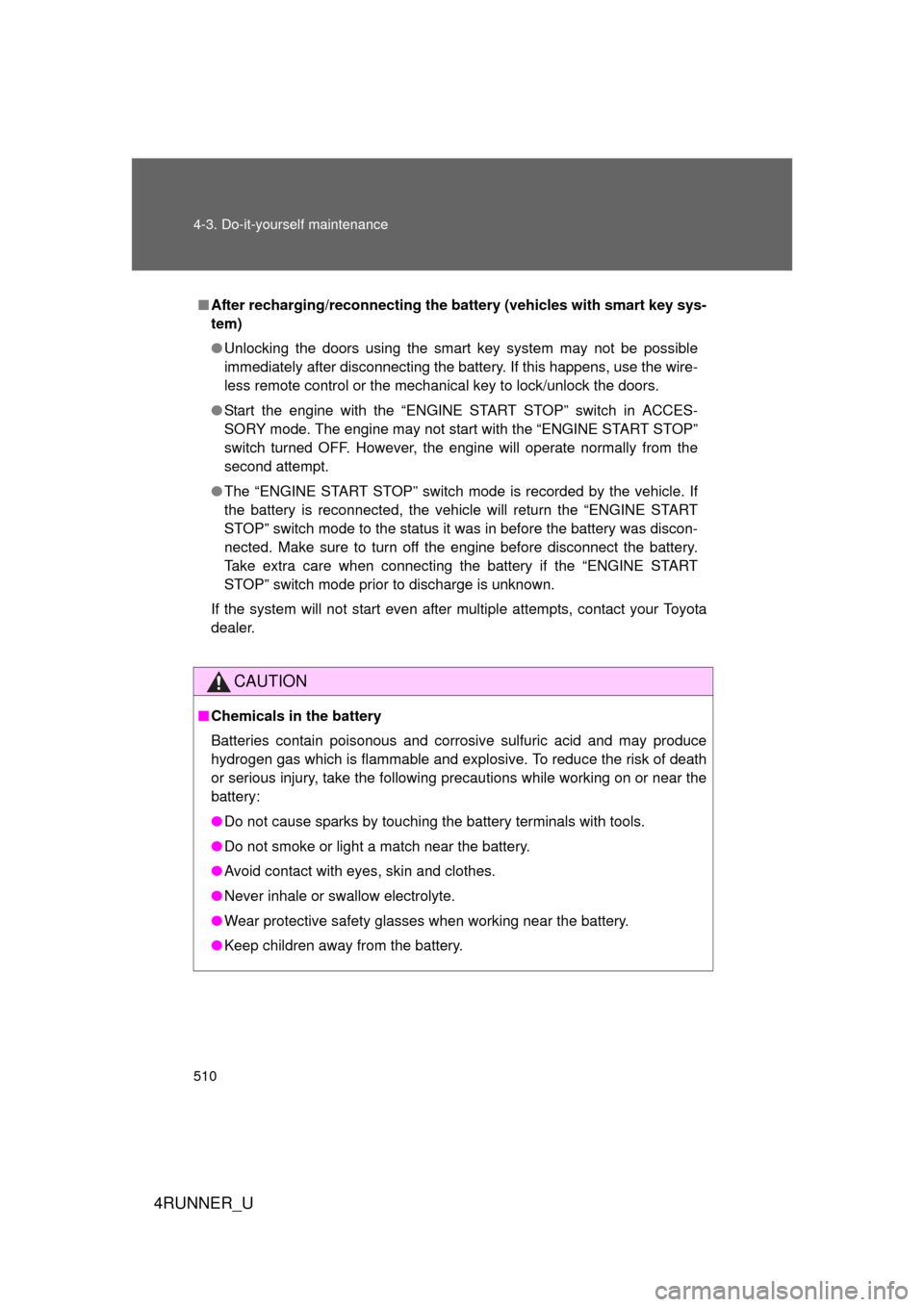
Battery
Check the battery as follows:
Make sure that the battery terminals are not corroded and that there
are no loose connections, cracks, or loose clamps.
Te r m i n a l s
Hold-down clamp
CTH43AS118
■Before recharging
When recharging, the battery produces hydrogen gas which is flammable
and explosive. Therefore, observe the following before recharging:
● If recharging with the battery installed on the vehicle, be sure to discon-
nect the ground cable.
● Make sure the power switch on the charger is off when connecting and
disconnecting the charger cables to the battery.
Page 511 of 665
510 4-3. Do-it-yourself maintenance
4RUNNER_U
■After recharging/reconnecting the battery (vehicles with smart key sys-
tem)
● Unlocking the doors using the smart key system may not be possible
immediately after disconnecting the battery. If this happens, use the wire-
less remote control or the mechanical key to lock/unlock the doors.
● Start the engine with the “ENGINE START STOP” switch in ACCES-
SORY mode. The engine may not start with the “ENGINE START STOP”
switch turned OFF. However, the engine will operate normally from the
second attempt.
● The “ENGINE START STOP” switch mode is recorded by the vehicle. If
the battery is reconnected, the vehicle will return the “ENGINE START
STOP” switch mode to the status it was in before the battery was discon-
nected. Make sure to turn off the engine before disconnect the battery.
Take extra care when connecting the battery if the “ENGINE START
STOP” switch mode prior to discharge is unknown.
If the system will not start even after multiple attempts, contact your Toyota
dealer.
CAUTION
■ Chemicals in the battery
Batteries contain poisonous and corrosive sulfuric acid and may produce
hydrogen gas which is flammable and explosive. To reduce the risk of death
or serious injury, take the following precautions while working on or near the
battery:
● Do not cause sparks by touching the battery terminals with tools.
● Do not smoke or light a match near the battery.
● Avoid contact with eyes, skin and clothes.
● Never inhale or swallow electrolyte.
● Wear protective safety glasses when working near the battery.
● Keep children away from the battery.
Page 512 of 665
511
4-3. Do-it-yourself maintenance
4
Maintenance and care
4RUNNER_U
CAUTION
■
Where to safely charge the battery
Always charge the battery in an open area. Do not charge the battery in a
garage or closed room where there is insufficient ventilation.
■ How to recharge the battery
Only perform a slow charge (5 A or less). The battery may explode if
charged at a quicker rate.
■ Emergency measures regarding electrolyte
● If electrolyte gets in your eyes
Flush your eyes with clean water for at least 15 minutes and get immedi-
ate medical attention. If possible, continue to apply water with a sponge or
cloth while traveling to the nearest medical facility.
● If electrolyte gets on your skin
Wash the affected area thoroughly. If you feel pain or burning, get medical
attention immediately.
● If electrolyte gets on your clothes
It can soak through clothing on to your skin. Immediately take off the cloth-
ing and follow the procedure above if necessary.
● If you accidentally swallow electrolyte
Drink a large quantity of water or milk. Get emergency medical attention
immediately.
NOTICE
■When recharging the battery
Never recharge the battery while the engine is running. Also, be sure all
accessories are turned off.
Page 537 of 665

536 4-3. Do-it-yourself maintenance
4RUNNER_U
15H-LP RH-HI10 ARight-hand headlight (high
beam)
16H-LP LH-HI10 ALeft-hand headlight (high
beam)
17HTR50 A
Air conditioning system
18400W INV 80 APower outlets
19ST30 AStarter system
20H-LP HI20 A
H-LP RH-HI, H-LP LH-HI fuses
21ALT-S7.5 A Charging system
22TURN&HAZ15 ATurn signal lights, emergency
flashers
23ETCS10 AMultiport fuel injection system/
sequential multiport fuel injec-
tion system
24TOWING30 A
Trailer stop/turn lights
25SHORT PIN
No circuit
26RAD NO.1 10 A Audio system
27AM27.5 A Starter system
28MAYDAY 7.5 ASafety connect
29AMP30 A
Audio system
30ABS NO.150 AABS, VSC
31ABS NO.230 AABS, VSC
32AIR PMP50 AMultiport fuel injection system/
sequential multiport fuel injec-
tion system
33DOME10 A
Interior lights, vanity lights
34ECU-B10 AMultiplex communication sys-
tem, meter and gauge
35H-LP RH-LO10 ARight-hand headlight (low
beam)
36H-LP LH-LO10 A
Left-hand headlight (low beam)
37INJ10 AMultiport fuel injection system/
sequential multiport fuel injec-
tion system
FuseAmpereCircuit
Page 567 of 665
566 5-2. Steps to take in an emergency
4RUNNER_U
Stop the vehicle immediately.The following warnings indicate the possibility of damage to the vehi-
cle that may lead to an accident. Immediately stop the vehicle in a
safe place and contact your Toyota dealer.
Have the vehicle inspected by your Toyota dealer immediately.Failure to investigate the cause of the following warnings may lead to
the system operating abnormally and possibly cause an accident.
Have the vehicle inspected by your Toyota dealer immediately.
Warning lightWarning light/Details
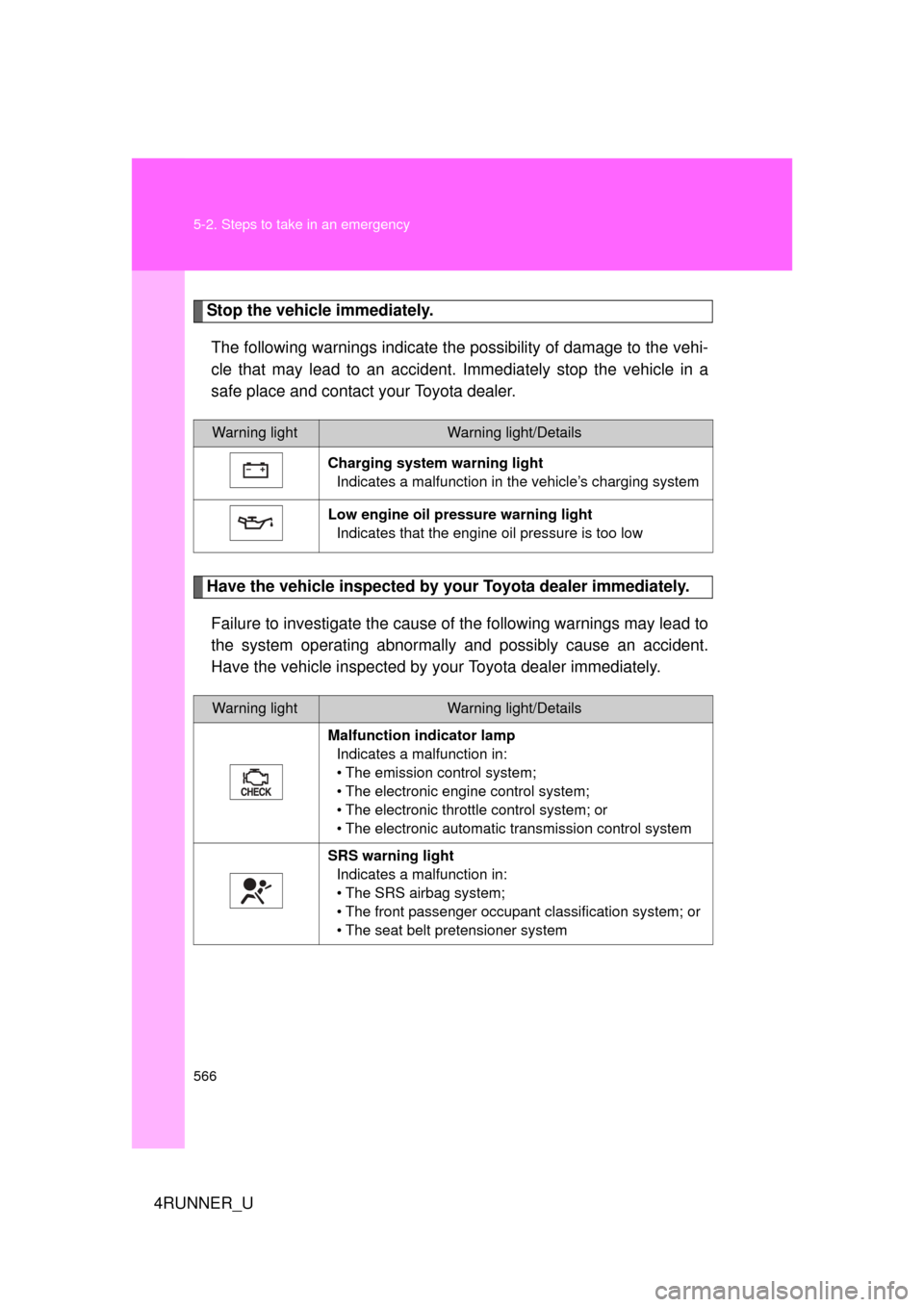
Charging system warning light Indicates a malfunction in the vehicle’s charging system
Low engine oil pressure warning light Indicates that the engine oil pressure is too low
Warning lightWarning light/Details
Malfunction indicator lamp Indicates a malfunction in:
• The emission control system;
• The electronic engine control system;
• The electronic throttle control system; or
• The electronic automatic transmission control system
SRS warning light Indicates a malfunction in:
• The SRS airbag system;
• The front passenger occupant classification system; or
• The seat belt pretensioner system
Page 618 of 665
617
6-1. Specifications
6
Vehicle specifications
4RUNNER_U
Electrical system
Transfer (4WD models)
*: “Toyota Genuine Transfer Gear oil LF
” is filled in your Toyota vehicle
at factory fill. Use Toyota approved “Toyota Genuine Transfer Gear oil
LF” or an equivalent of matching quality to satisfy the above specifi-
cation. Please contact your Toyo ta dealer for further details.
Battery
Open voltage* at
68 F (20 C):12.6 12.8 V Fully charged
12.2 12.4 V Half charged
11 . 8 12.0 V Discharged
(
*: Voltage checked 20 minutes after the
engine and all the lights are turned off.)
Charging rates5 A max.
Oil capacity
Part-time 4WD models
1.1 qt. (1.0 L, 0.9 Imp. qt.)
Full-time 4WD models
1.5 qt. (1.4 L, 1.2 Imp. qt.)
Oil type*Toyota Genuine Transfer gear oil LF or
equivalent
Recommended oil viscositySAE 75W