Page 432 of 665
432 3-7. Other interior features
4RUNNER_U
■For quicker adjustment of the clock
To advance the minutes and hours quickly, press and hold the “M” or “H” but-
ton.
The time can be adjusted back or forth by following the procedure below:
■ The clock is displayed when
Vehicles without a smart key system
The engine switch is in the “ACC” or “ON” position.
Vehicles with a smart key system
The “ENGINE START STOP” switch is in ACCESSORY or IGNITION ON
mode.
■ When disconnecting and reco nnecting battery terminals
The clock data will be reset.
The hour or minute can be moved for-
ward or backward by pressing the
“MODE/ ” or “SET/ ” button while
pressing and holding the “H” or “M” but-
ton. If the “MODE/ ” or “SET/ ” but-
ton is also pressed and held in the above
operation, the hour or minute will move
faster.
Page 453 of 665
453
3-7. Other interior features
3
Interior features
4RUNNER_U
Referring to the map above, press the “MODE/ ” or “SET/
” button to select the number of the zone you are in.
Press and hold the “SET/ ” button to confirm the number
and to exit deviation calibration mode. (If no buttons are
pressed for more than 6 seco nds, the number will automati-
cally be confirmed and the display returned to normal.)
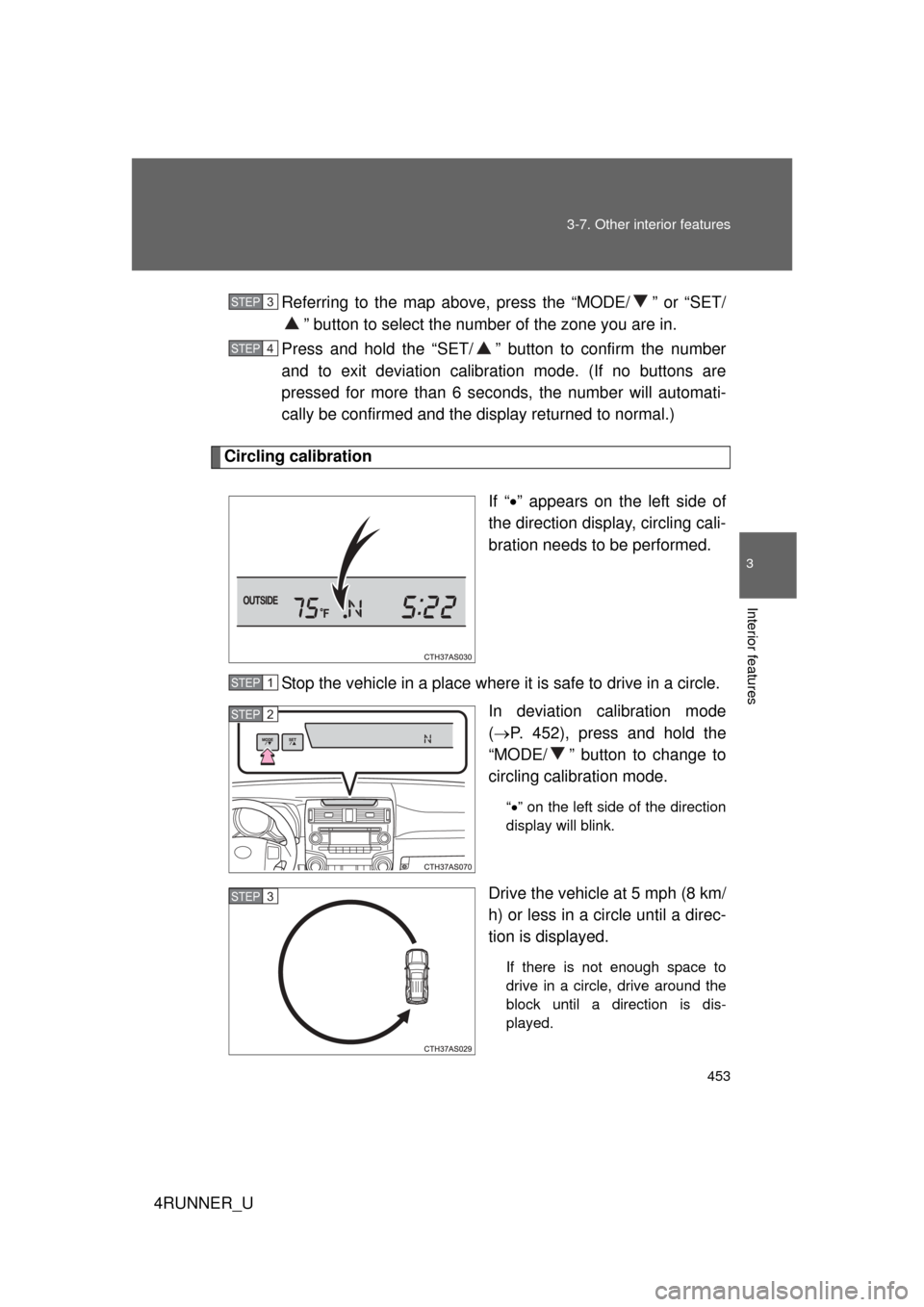
Circling calibration
If “” appears on the left side of
the direction display, circling cali-
bration needs to be performed.
Stop the vehicle in a place where it is safe to drive in a circle. In deviation calibration mode
( P. 452), press and hold the
“MODE/ ” button to change to
circling calibration mode.
“ ” on the left side of the direction
display will blink.
Drive the vehicle at 5 mph (8 km/
h) or less in a circle until a direc-
tion is displayed.
If there is not enough space to
drive in a circle, drive around the
block until a direction is dis-
played.
STEP 3
STEP 4
STEP 1
STEP 2
STEP 3
Page 459 of 665
459
3-7. Other interior features
3
Interior features
4RUNNER_U
■
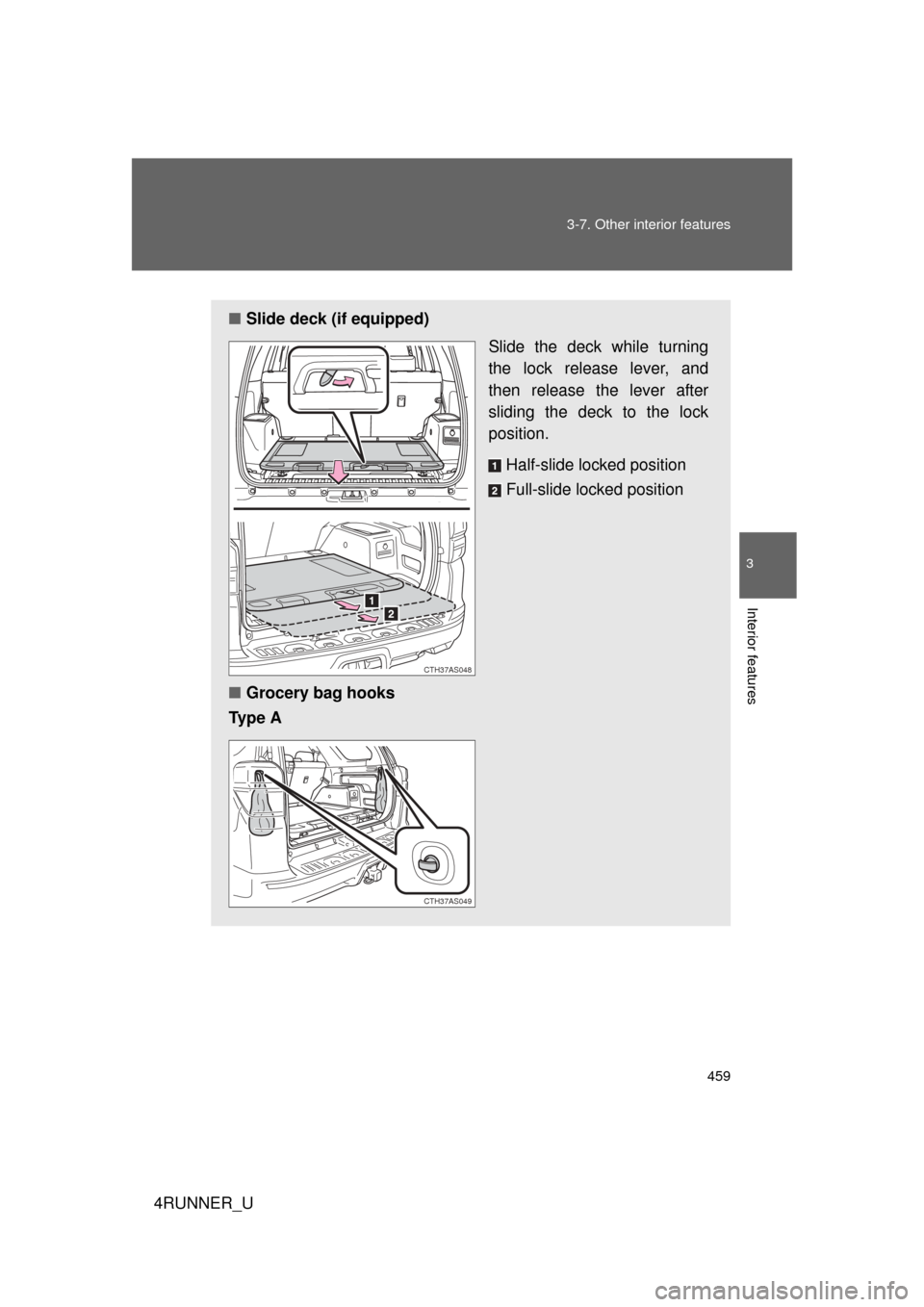
Slide deck (if equipped)
Slide the deck while turning
the lock release lever, and
then release the lever after
sliding the deck to the lock
position.
Half-slide locked position
Full-slide locked position
■ Grocery bag hooks
Ty p e A
CTH37AS048
CTH37AS049
Page 460 of 665
460 3-7. Other interior features
4RUNNER_U
CAUTION
■When the cargo hooks are not in use
To avoid injury, always return the cargo hooks to their stowed positions.
■ Slide deck operating precaution (if equipped)
● Be careful not to get hands or feet pinched by the slide deck.
● Be careful not to allow the slide deck to hit any persons or luggage while
sliding the deck.
● Do not operate the slide deck while someone is on it.
Doing so may cause an accident.
● If operating the slide deck when the vehicle is stopped on an incline, the
slide deck may move faster. Be careful not to allow the slide deck to hit
you or pinch your fingers etc.
● After sliding the deck, make sure it is securely locked in position.
● Do not close the back door while any person is sitting on the slide deck or
any person is between the slide deck and back door.
● Do not stow any objects into the space between the slide deck rails.
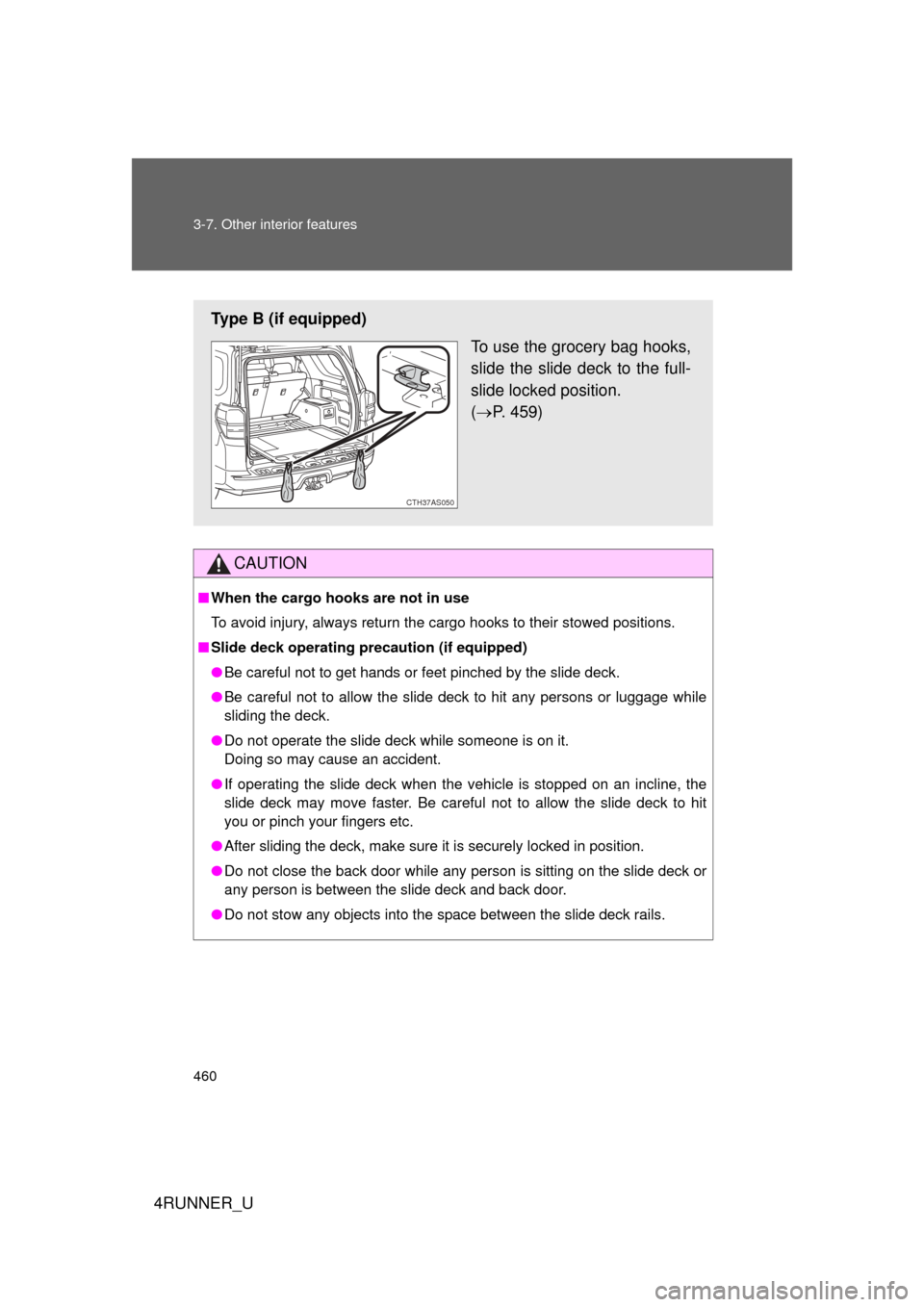
Type B (if equipped)
To use the grocery bag hooks,
slide the slide deck to the full-
slide locked position.
( P. 459)
CTH37AS050
Page 462 of 665
462
3-7. Other interior features
4RUNNER_U
Garage door opener
The garage door opener (HomeLink Universal Transceiver) is manufac-
tured under license from HomeLink.
Programming HomeLink (for U.S. owners)
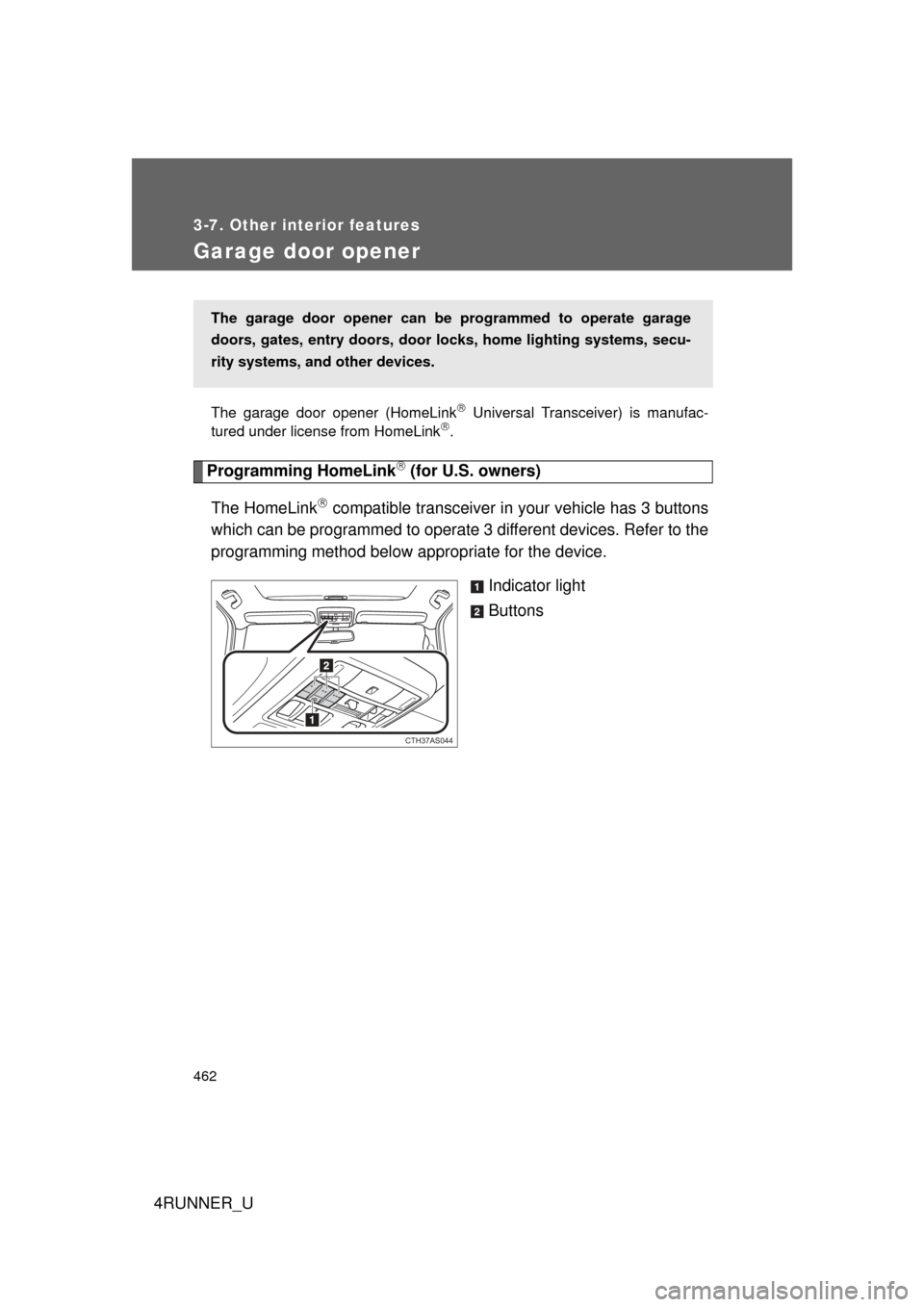
The HomeLink
compatible transceiver in your vehicle has 3 buttons
which can be programmed to operate 3 different devices. Refer to the
programming method below appropriate for the device.
Indicator light
Buttons
The garage door opener can be programmed to operate garage
doors, gates, entry doors, door locks, hom e lighting systems, secu-
rity systems, and other devices.
CTH37AS044
Page 466 of 665
466 3-7. Other interior features
4RUNNER_U■
Programming an entry gate (for U.S. owners)/Programming a
device in the Canadian market
Place the remote control transmitter 1 to 3 in. (25 to 75 mm)
away from the HomeLink
buttons.
Keep the HomeLink indicator light in view while programming.
Press and hold the selected HomeLink button.
Repeatedly press and release (cycle) the remote control
transmitter for 2 seconds each until step 4 is completed.
When the HomeLink
indicator light starts to flash rapidly,
release the buttons.
Test the HomeLink
operation by pressing the newly pro-
grammed button. Check to see if the gate/device operates
correctly.
Repeat the steps above to program another device for any of
the remaining HomeLink
buttons.
■ Programming other devices
To program other devices such as home security systems, home
door locks and lighting, contact your Toyota dealer for assistance.
■ Reprogramming a button
The individual HomeLink
buttons cannot be erased but can be
reprogrammed. To reprogram a button, follow the “Reprogramming
a HomeLink
button” instructions.
STEP 1
STEP 2
STEP 3
STEP 4
STEP 5
STEP 6
Page 488 of 665
488 4-2. Maintenance
4RUNNER_U
Vehicle interior
ItemsCheck points
Accelerator pedal • The accelerator pedal should
move smoothly (without uneven
pedal effort or catching).
Automatic transmission “Park”
mechanism • When parked on a slope and the
shift lever is in P, is the vehicle
securely stopped?
Brake pedal • Does the brake pedal move
smoothly?
• Does the brake pedal have appro- priate clearance from the floor?
• Does the brake pedal have the correct amount of free play?
Brakes • The vehicle should not pull to one
side when the brakes are applied.
• The brakes should work effec- tively.
• The brake pedal should not feel spongy.
• The brake pedal should not get
too close to the floor when the
brakes are applied.
Head restraints • Do the head restraints move
smoothly and lock securely?
Indicators/buzzers • Do the indicators and buzzers
function properly?
Lights • Do all the lights come on?
Page 490 of 665
490
4-2. Maintenance
4RUNNER_U
Vehicle exterior
ItemsCheck points
Doors • Do the doors operate smoothly?
Engine hood • Does the engine hood lock sys-
tem work properly?
Fluid leaks • There should not be any signs of
fluid leakage after the vehicle has
been parked.
Tires • Is the tire inflation pressure cor-
rect?
• The tires should not be dam- aged or excessively worn.
• Have the tires been rotated according to the maintenance
schedule?
• The wheel nuts should not be loose.
CAUTION
■ If the engine is running
Turn the engine off and ensure that there is adequate ventilation before per-
forming maintenance checks.