2010 SUBARU FORESTER turn signal
[x] Cancel search: turn signalPage 6 of 402

Vehicle symbols
There are some of the symbols you may
see on your vehicle.
For warning and indicator lights, refer to “Warning and indicator lights ”F 18.
Mark Name
WARNING
CAUTION
Power door lock and unlock
Passengers ’windows lock
and unlock
Fuel
Front fog lights
Hazard warning flasher
Engine hood Mark Name
Seat heater
Child restraint top tether an- chorages
Child restraint lower an- chorages
Horn
Windshield wiper deicer
Wiper intermittent
Windshield wiper and washer
Windshield wiper mist (for
single wipe)
Rear window wiper
Rear window washer
LightsMark Name
Tail lights, license plate light
and instrument panel illumi-nation
Headlights
Turn signal
Illumination brightness
Fan speed
Instrument panel outlets
Instrument panel outlets and
foot outlets
Foot outlets
Windshield defroster and foot outlets
Windshield defroster
Rear window defogger/Out-
side mirror defogger3
– CONTINUED –
Page 14 of 402
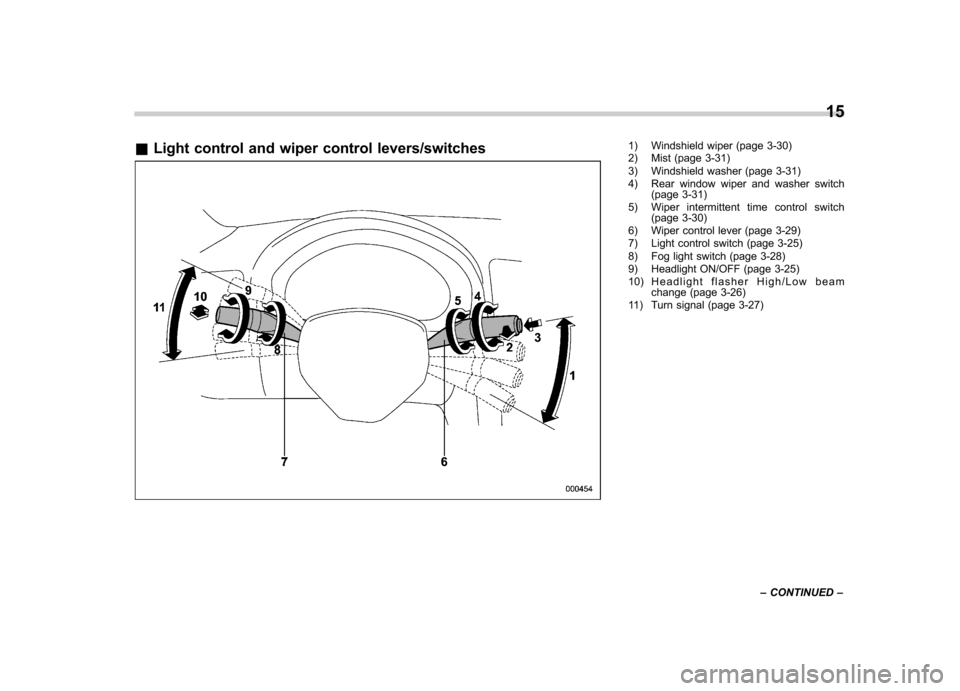
&Light control and wiper control levers/switches1) Windshield wiper (page 3-30)
2) Mist (page 3-31)
3) Windshield washer (page 3-31)
4) Rear window wiper and washer switch
(page 3-31)
5) Wiper intermittent time control switch (page 3-30)
6) Wiper control lever (page 3-29)
7) Light control switch (page 3-25)
8) Fog light switch (page 3-28)
9) Headlight ON/OFF (page 3-25)
10) Headlight flasher High/Low beam change (page 3-26)
11) Turn signal (page 3-27) 15
– CONTINUED –
Page 17 of 402

18
&Warning and indicator lights
Mark Name Page
Seatbelt warning light 3-10
Front passenger ’s seat-
belt warning light 3-10
SRS airbag system
warning light 3-11
/Front passenger
’s fron-
tal airbag ON indicator 3-12
/Front passenger
’s fron-
tal airbag OFF indicator 3-12
CHECK ENGINE
warning light/Malfunction
indicator lamp3-12
Coolant temperature low
indicator light/Coolant
temperature high warn-
ing light3-13
Charge warning light 3-14
Oil pressure warning light
3-14
AT OIL TEMP warning
light (AT models)
3-14Mark Name Page
/ABS warning light 3-16
/Brake system warning light
3-17
Door open warning light 3-18
AWD warning light
(AT models)
3-18
Hill start assist warning
light (MT models)
3-18
Vehicle Dynamics Con-
trol operation indicator light3-19
Vehicle Dynamics Con-
trol warning light/Vehicle
Dynamics Control OFF
indicator light3-19
Turn signal indicator lights
3-21
High beam indicator light 3-21
Automatic headlight
beam leveler warning
light (models with HID headlights)3-18Mark Name Page
Front fog light indicator
light (if equipped)
3-21
Security indicator light 3-20
Headlight indicator light 3-21
Cruise control indicator light3-21
Cruise control set indi-
cator light
3-21
Low fuel warning light 3-18
Low tire pressure warn-
ing light
(U.S.-spec. models)3-15
SPORT mode indicator
light (AT models)
3-20
Page 93 of 402

2-8Keys and doors
to the following two conditions: (1) This
device may not cause harmful inter-
ference, and (2) this device must
accept any interference received, in-
cluding interference that may cause
undesired operation.
Changes or modifications not ex-
pressly approved by the party respon-
sible for compliance could void theuser ’s authority to operate the equip-
ment.
Two transmitters are provided for your vehicle.
The keyless entry system has the follow-
ing functions. . Locking and unlocking the doors and
rear gate without a key. Unlocking the rear gate without a key
. Sounding a panic alarm
. Arming and disarming the alarm sys-
tem. For detailed information, refer to “ Alarm system ”F 2-14.
The operable distance of the keyless entry
system is approximately 30 feet (10
meters). However, this distance will vary
depending on environmental conditions.
The system ’s operable distance will be
shorter in areas near a facility or electronic
equipment emitting strong radio waves
such as a power plant, broadcast station, TV tower, or remote controller of home
electronic appliances.
The keyless entry system does not oper-
ate when the key is inserted in the ignitionswitch.
: Rear gate unlock button: Unlock/disarm button: Lock/arm button
A: Panic button
1) Front
2) Back &
Locking the doors
Press the “”button to lock all doors and
the rear gate. An electronic chirp will
sound once and the turn signal lights will
flash once.
If any of the doors or the rear gate is not
fully closed, an electronic chirp will sound
five times and the turn signal lights will
flash five times to alert you that the doors
or the rear gate are not properly closed.
When you close the door, it will automa-
tically lock and then an electronic chirp will
sound once and the turn signal lights will
flash once.
Page 94 of 402

&Unlocking the doors
Press the “”button to unlock the driver ’s
door. An electronic chirp will sound twice
and the turn signal lights will flash twice.
To unlock all doors and the rear gate,
briefly press the “
”button a second time
within 5 seconds. NOTE
If the interval between the first and
second presses of the “
”button (for
unlocking of all of the doors and the
rear gate) is extremely short, the sys-
tem may not respond. &
Unlocking the rear gate
Pressing the “”button opens the rear
gate.
An electronic chirp will sound twice and
the turn signal lights will flash twice. & Illuminated entry
The interior (dome) light and the map light
will illuminate when the “
”button is
pressed. These lights stay illuminated for
approximately 30 seconds if any of the
doors or the rear gate is not opened.
If the “
”button is pressed before 30
seconds have elapsed, these lights will
turn off. The dome light must be set to the
DOOR position in order for this function
to operate.
A SUBARU dealer can change the illumi- nation period setting of the interior light in
accordance with your preference. Contact
the nearest SUBARU dealer for details. &
Vehicle finder function
Use this function to find your vehicle
parked among many vehicles in a large
parking lot. Provided you are within 30 feet
(10 meters) of the vehicle, pressing the “
”
button three times in a 5-second period
will cause your vehicle ’s horn to sound
once and its turn signal lights to flash threetimes. NOTE
If the interval between presses is too
short when you press the “
”button
three times, the system may not re-
spond to the signals from the remote
transmitter. Keys and doors
2-9
– CONTINUED –
Page 95 of 402

2-10Keys and doors
&Sounding a panic alarm
A“PANIC ”button is located on the back of
the transmitter.
To activate the alarm, press the “PANIC ”
button once.
The horn will sound and the turn signal
lights will flash.
To deactivate the panic alarm, press any
button on the remote transmitter. Unless a
button on the remote is pressed, the alarm
will be deactivated after approximately 30seconds. & Selecting audible signal op- eration
Using an electronic chirp, the system will
give you an audible signal when the doors
lock and unlock. If desired, you may turn the audible signal off.
Do the following to deactivate the audible
signal. You can also use the same steps
to restore the function.
1. Sit in the driver
’s seat and shut all
doors and the rear gate.
2. Hold down the UNLOCK side of the
power door locking switch.
3. While holding down the “UNLOCK ”
side of the power door locking switch, pull
the key out and re-insert it into the ignition
switch at least 6 times within 10 seconds
after Step 2.
4. Open and close the driver ’s door once
within 10 seconds after Step 3.
5. The turn signal lights flash 3 times to
indicate completion of the setting.
You may have the above settings done by
your SUBARU dealer.
& Replacing the battery
CAUTION
. Do not let dust, oil or water get on
or in the transmitter when repla-
cing the battery.
. Be careful not to damage the
printed circuit board in the trans-
mitter when replacing the battery.
. Be careful not to allow children to touch the battery and any re-
moved parts; children could
swallow them.
. There is a danger of explosion if
an incorrect replacement battery
is used. Replace only with the
same or equivalent type of bat-
tery.
. Batteries should not be exposed
to excessive heat such as sun-
shine, fire or the like.
When the transmitter battery begins to get
weak, transmitter range will begin to
decrease. Replace the battery as soon
as possible.
To replace the battery:
1. Open the transmitter case using a flat-
Page 99 of 402

2-14Keys and doors
11. Test every registered transmitter to
confirm correct operation. !Deleting old transmitter codes
The control unit of the keyless entry
system has four memory locations to store
transmitter codes, giving it the ability to
operate with up to four transmitters. When
you lose a transmitter, the lost transmit-ter ’s code remains in the memory. For
security reasons, lost transmitter codes
should be deleted from the memory.
To delete old transmitter codes, program
four transmitter codes into the system. If
you have only one current transmitter,
program it four times. If you have two
current transmitters, program each one
twice. If you have three current transmit-
ters, program two of them once and the
third one twice. This process will leave
only current transmitter codes in thesystem ’s memory.
NOTE
Make sure no one else is operating
their keyless entry system within range
of your vehicle when programming
transmitters. If someone else were to
operate their remote transmitter while
you are programming your transmit-
ters, it is possible that their transmitter
code will be programmed into your system, allowing them unauthorized
access to your vehicle.
Alarm system
The alarm system helps to protect your
vehicle and valuables from theft. The horn
sounds and the turn signal lights flash if
someone attempts to break into your
vehicle. The starter motor is also inter-
rupted to prevent starting the vehicle
without a key.
The system can be armed and disarmed
with the remote transmitter.
The system does not operate when the
key is inserted into the ignition switch.
Your vehicle
’s alarm system has been set
for activation at the time of shipment from
the factory. You can set the system for
deactivation yourself or have it done by
your SUBARU dealer.
& System operation
The alarm system will give the following
alarms when triggered. . The vehicle ’s horn will sound for 30
seconds.. The turn signal lights will flash for 30
seconds.
If any of the doors or the rear gate remains
open after the 30-second period, the horn
will continue to sound for a maximum of 3
minutes. If the door or the rear gate is
Page 101 of 402
2-16Keys and doors
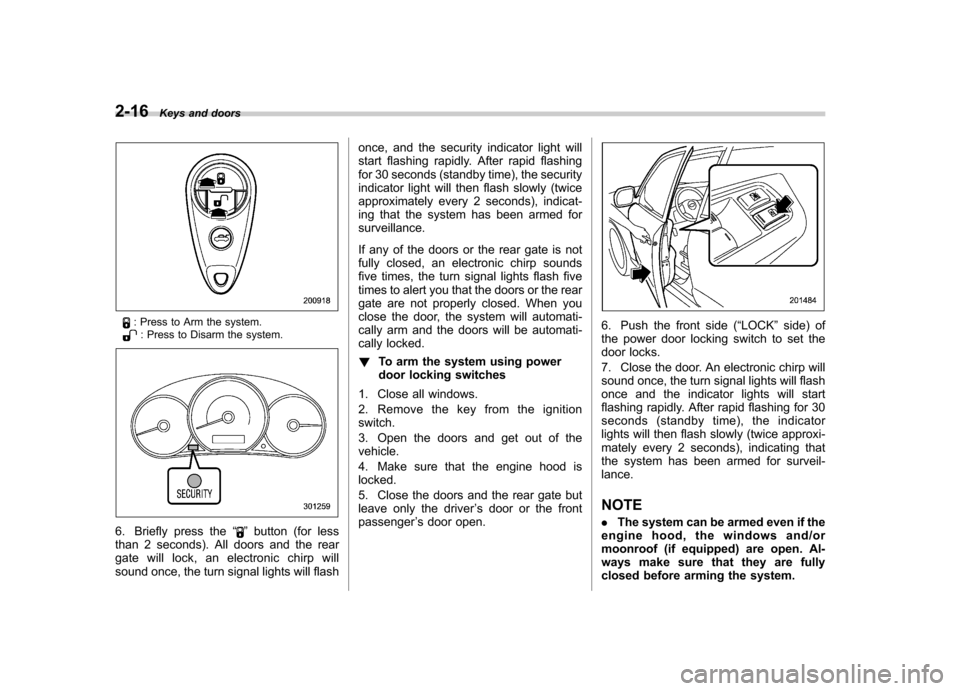
: Press to Arm the system.: Press to Disarm the system.
6. Briefly press the “”button (for less
than 2 seconds). All doors and the rear
gate will lock, an electronic chirp will
sound once, the turn signal lights will flash once, and the security indicator light will
start flashing rapidly. After rapid flashing
for 30 seconds (standby time), the security
indicator light will then flash slowly (twice
approximately every 2 seconds), indicat-
ing that the system has been armed forsurveillance.
If any of the doors or the rear gate is not
fully closed, an electronic chirp sounds
five times, the turn signal lights flash five
times to alert you that the doors or the rear
gate are not properly closed. When you
close the door, the system will automati-
cally arm and the doors will be automati-
cally locked. !
To arm the system using power
door locking switches
1. Close all windows.
2. Remove the key from the ignition switch.
3. Open the doors and get out of the vehicle.
4. Make sure that the engine hood is locked.
5. Close the doors and the rear gate but
leave only the driver ’s door or the front
passenger ’s door open.
6. Push the front side ( “LOCK ”side) of
the power door locking switch to set the
door locks.
7. Close the door. An electronic chirp will
sound once, the turn signal lights will flash
once and the indicator lights will start
flashing rapidly. After rapid flashing for 30
seconds (standby time), the indicator
lights will then flash slowly (twice approxi-
mately every 2 seconds), indicating that
the system has been armed for surveil-lance. NOTE . The system can be armed even if the
engine hood, the windows and/or
moonroof (if equipped) are open. Al-
ways make sure that they are fully
closed before arming the system.