2010 SKODA YETI key battery
[x] Cancel search: key batteryPage 4 of 271

Contents3
Using the system
Safety
Driving Tips
General Maintenance
Breakdown assistance
Technical Data
ContentsLayout of this Owner's Manual
(explanations)
. . . . . . . . . . . . . . . . . . . . . . . . . .
Using the system
. . . . . . . . . . . . . . . . . . . . . .
Cockpit
. . . . . . . . . . . . . . . . . . . . . . . . . . . . . . . . . . . . . . . .
Overview . . . . . . . . . . . . . . . . . . . . . . . . . . . . . . . . . . . .
The brief instruction
. . . . . . . . . . . . . . . . . . . . . . . . . .
Basic functions and important information . . . . .
Instruments and warning lights
. . . . . . . . . . . . . . .
Overview of the instrument cluster . . . . . . . . . . . . .
Engine revolutions counter . . . . . . . . . . . . . . . . . . . .
Speedometer . . . . . . . . . . . . . . . . . . . . . . . . . . . . . . . .
Coolant temperature gauge . . . . . . . . . . . . . . . . . . .
Fuel gauge . . . . . . . . . . . . . . . . . . . . . . . . . . . . . . . . . . .
Counter for distance driven . . . . . . . . . . . . . . . . . . .
Service Interval Display . . . . . . . . . . . . . . . . . . . . . . .
Digital clock . . . . . . . . . . . . . . . . . . . . . . . . . . . . . . . . . .
Shift recommendation for changing gears* . . . . .
Multi-functional indicator (onboard computer)* .
Information display* . . . . . . . . . . . . . . . . . . . . . . . . . . Auto Check Control* . . . . . . . . . . . . . . . . . . . . . . . . . .
Warning lights . . . . . . . . . . . . . . . . . . . . . . . . . . . . . . . .
Unlocking and locking
. . . . . . . . . . . . . . . . . . . . . . . .
Key . . . . . . . . . . . . . . . . . . . . . . . . . . . . . . . . . . . . . . . . . .
Changing the battery in the remote control key .
Electronic immobiliser . . . . . . . . . . . . . . . . . . . . . . . .
Child safety lock . . . . . . . . . . . . . . . . . . . . . . . . . . . . . .
Central locking system . . . . . . . . . . . . . . . . . . . . . . . .
Remote control* . . . . . . . . . . . . . . . . . . . . . . . . . . . . . .
Synchronisation of the remote control . . . . . . . . . .
Anti-theft alarm system* . . . . . . . . . . . . . . . . . . . . . .
Power windows* . . . . . . . . . . . . . . . . . . . . . . . . . . . . .
Panoramic sliding roof* . . . . . . . . . . . . . . . . . . . . . . .
Lights and Visibility
. . . . . . . . . . . . . . . . . . . . . . . . . . . .
Lights . . . . . . . . . . . . . . . . . . . . . . . . . . . . . . . . . . . . . . . .
Interior lighting . . . . . . . . . . . . . . . . . . . . . . . . . . . . . . .
Visibility . . . . . . . . . . . . . . . . . . . . . . . . . . . . . . . . . . . . . .
Windshield wiper and wash system . . . . . . . . . . . . .
Rear-view mirror . . . . . . . . . . . . . . . . . . . . . . . . . . . . . .
Seats and Stowage
. . . . . . . . . . . . . . . . . . . . . . . . . . . . .
Front seats . . . . . . . . . . . . . . . . . . . . . . . . . . . . . . . . . . . .
Adjusting front seats electrically* . . . . . . . . . . . . . . .
Head restraints . . . . . . . . . . . . . . . . . . . . . . . . . . . . . . . .
Middle rear head restraint* . . . . . . . . . . . . . . . . . . . .
Rear seats . . . . . . . . . . . . . . . . . . . . . . . . . . . . . . . . . . . .
Pedals . . . . . . . . . . . . . . . . . . . . . . . . . . . . . . . . . . . . . . . .
luggage compartment . . . . . . . . . . . . . . . . . . . . . . . . .
Variable loading floor in the luggage compartment*
Variable loading floor* with spare wheel* . . . . . . .
Roof rack . . . . . . . . . . . . . . . . . . . . . . . . . . . . . . . . . . . . .
Cup holder . . . . . . . . . . . . . . . . . . . . . . . . . . . . . . . . . . .
Note holder . . . . . . . . . . . . . . . . . . . . . . . . . . . . . . . . . .
Ashtray* . . . . . . . . . . . . . . . . . . . . . . . . . . . . . . . . . . . . . .
Cigarette lighter*, power sockets . . . . . . . . . . . . . . .
Storage compartments . . . . . . . . . . . . . . . . . . . . . . . .
Overview . . . . . . . . . . . . . . . . . . . . . . . . . . . . . . . . . . . . .
Storage compartment on the front passenger side
Cooling of storage compartment on front passenger
side* . . . . . . . . . . . . . . . . . . . . . . . . . . . . . . . . . . . . . . . . .
Storage compartment on the dash panel* . . . . . . .
Storage compartment in front centre console . . .
Storage compartment for spectacles* . . . . . . . . . . .
Storage compartment in the front and rear doors
Storage compartment below front passenger seat*
Front seat armrest with storage compartment* . .
Storage compartment in rear centre console* . . .
Storage compartments in the luggage compartment*
Flexible storage compartment* . . . . . . . . . . . . . . . . Clothes hooks . . . . . . . . . . . . . . . . . . . . . . . . . . . . . . . .
Removeable through-loading bag* . . . . . . . . . . . .
Heating and air conditioning system
. . . . . . . . .
Introduction . . . . . . . . . . . . . . . . . . . . . . . . . . . . . . . . . .
Air outlet vents . . . . . . . . . . . . . . . . . . . . . . . . . . . . . . .
Heating . . . . . . . . . . . . . . . . . . . . . . . . . . . . . . . . . . . . . .
Climatic* (semi-automatic air conditioning system)
Climatronic* (automatic air conditioning) . . . . . .
Auxiliary heating (auxiliary heating and ventilation)*
Starting-off and Driving
. . . . . . . . . . . . . . . . . . . . . . .
Setting steering wheel position . . . . . . . . . . . . . . . .
Ignition lock . . . . . . . . . . . . . . . . . . . . . . . . . . . . . . . . . .
Starting the engine . . . . . . . . . . . . . . . . . . . . . . . . . . . .
Switching off the engine . . . . . . . . . . . . . . . . . . . . . . .
Shifting (manual gearbox) . . . . . . . . . . . . . . . . . . . . .
Handbrake . . . . . . . . . . . . . . . . . . . . . . . . . . . . . . . . . . .
Rear parking aid* . . . . . . . . . . . . . . . . . . . . . . . . . . . . .
Front and rear parking aid* . . . . . . . . . . . . . . . . . . . .
Park Assist* . . . . . . . . . . . . . . . . . . . . . . . . . . . . . . . . . .
Cruise control system (CCS)* . . . . . . . . . . . . . . . . . .
Automatic gearbox DSG*
. . . . . . . . . . . . . . . . . . . . .
Automatic gearbox DSG* . . . . . . . . . . . . . . . . . . . . . .
Communication
. . . . . . . . . . . . . . . . . . . . . . . . . . . . . . .
Multifunction steering wheel* . . . . . . . . . . . . . . . . .
Universal telephone preinstallation GSM II* . . . . .
Voice control . . . . . . . . . . . . . . . . . . . . . . . . . . . . . . . . .
Music playback via Bluetooth® . . . . . . . . . . . . . . . .
Multimedia . . . . . . . . . . . . . . . . . . . . . . . . . . . . . . . . . .
Safety
. . . . . . . . . . . . . . . . . . . . . . . . . . . . . . . . . . . . . . .
Passive Safety
. . . . . . . . . . . . . . . . . . . . . . . . . . . . . . . . .
Basic information . . . . . . . . . . . . . . . . . . . . . . . . . . . . .
Correct seated position . . . . . . . . . . . . . . . . . . . . . . .
6
7
9
9
11
11
16
16
17
17
17
17
18
18
19
20
20
24
25
28
38
38
38
39
39
39
44
45
45
47
49 53
53
60
62
63
66
69
69
70
72
73
74
77
78
82
83
84
85
86
86
87
88
88
89
89
90
90
90
91
91
91
92
93
93
93949595969799102105108108108109110111111112113114118120120125125128133134135137137137138
s2ug.6.book Page 3 Friday, April 9, 2010 2:24 PM
Page 20 of 271

Instruments and warning lights19
Using the system
Safety
Driving Tips
General Maintenance
Breakdown assistance
Technical Data
Display regarding the distance and days until the following service interval
You can use the button to display the remaining distance driven and the days until
the next service interval
page 16.
A key symbol
and a display regarding the remaining kilometers appear for 10
second in the display. At the same time, a display appears regarding the remaining days
until the next service interval.
On vehicles which are equipped with inform ation display*, you can call up this infor-
mation in the following menu on page 24:
SETUP
Service Interval (Service)
Info
The following will be displayed in the information display* for 10 seconds: Service in ... km or ... days
Resetting Service Interval Display
It is only possible to reset the Service Interval Display, if a service message or at least a
pre-warning is shown on the display of the instrument cluster.
We recommend having this resetting performed by a specialist garage.
The specialist garage:
resets the memory of the display after the appropriate inspection;
makes an entry in the Service schedule;
affix the sticker with the entry of the following service interval to the side of the
dash panel on the driver's side.
Reset the service interval displays by using the reset button page 16 on the trip
counter.
On vehicles which are equipped with inform ation display*, you can call up this infor-
mation in the following menu on page 24:
SETUP
Service Interval (Service)
Reset
Caution
We recommend that you do not reset the Se rvice Interval Display yourself otherwise
this can result in the service interval displa y being incorrectly set, which may also result
in problems with operation of your vehicle.
Note
Never reset the display between service intervals otherwise this may result in
incorrect readouts.
information is retained in the Service Inte rval Display also after the battery of the
vehicle is disconnected.
If the instrument cluster is exchanged after a repair, the correct values must be
entered in the counter for the Service Interval Display. This work is carried out by a
specialist garage.
The data displayed is the same after resetting the display with flexible service inter-
vals (QG1) using the reset button as that for a vehicle with fixed service intervals (QG2).
We therefore recommend having the Service In terval Display reset only by an author-
ised Škoda Service Partner who is familiar with the procedure for resetting the display
with a vehicle system tester.
Please refer to the brochure Service schedule for extensive information about the
service intervals.
Digital clockThe time is set with the buttons page 16, fig. 15 and .
Select the display which you wish to ch ange with the button and carry out the
change with the button .
On vehicles which are fitted out with the information display*, it is possible to set the
time in the menu Time page 26.
WARNING
The clock should not be adjusted while driving for safety reasons but only when
the vehicle is stationary!
A3
A7
A3
A7A3
A7
s2ug.6.book Page 19 Friday, April 9, 2010 2:24 PM
Page 39 of 271

Unlocking and locking
38
Unlocking and lockingKeyFig. 22 Set of keys without remote control / set of keys with remote control keyTwo keys are provided with the vehicle. Depending on the equipment, your vehicle can
be equipped with keys without radio remote control or with radio remote control keys*
fig. 22 .
WARNING
Always withdraw the key whenever you leave the vehicle - even if it is only
for a short time. This is particularly important if children are left in the vehicle.
The children might otherwise start the en gine or operate electrical equipment
(e.g. power windows) - risk of injury!
Do not withdraw the ignition key from the ignition lock until the vehicle has
come to a stop. The steerin g lock might otherwise enga ge unintentionally - risk
of accident!Caution
Each key contains electronic components; therefore protect them against moisture
and severe shocks.
Keep the groove of the keys absolutely clean as impurities (textile fibres, dust etc.)
have a negative effect on the proper operation of the locking cylinder and the ignition
lock.
Note
Please approach a specialist garage if you lose a key since he can obtain a new one for
you.Changing the battery in the remote control keyFig. 23 Disconnect key with radio remote control / change batteryEach remote control key contains a ba ttery which is housed in the cover fig. 23
of the transmitter housing. If the battery is discharged, the red indicator light
fig. 22 does not light up after pressing a button on the remote control key. We
recommend that you have the batteries of the key replaced by an authorised Škoda
Service Partner. You should, however, proceed as follows if you wish to replace the
battery yourself:
– Fold open the key.
– Press off the battery cover with your thumb or using a flat screwdriver at the points of the arrows fig. 23 .
– Remove the discharged battery from the key by pressing the battery downwards at the point of the arrow fig. 23 .
– Insert the new battery. Ensure that the “+” symbol on the battery is facing upwards. The correct polarity is shown on the battery cover.
– Position the battery cover on the key and pres s on it until it is heard to lock in place.
AB
AA
A1
A2
s2ug.6.book Page 38 Friday, April 9, 2010 2:24 PM
Page 40 of 271

Unlocking and locking39
Using the system
Safety
Driving Tips
General Maintenance
Breakdown assistance
Technical Data
For the sake of the environment
Dispose of a used battery in accord ance with environmental regulations.
Note
Pay attention to the correct pola rity when changing the battery.
The replacement battery must have the same specification as the original battery.
If it is still not be possible to unlock or lock the vehicle with the remote control key
even after replacing the battery, this means that the system has to be synchronised
page 45.
Electronic immobiliserThe electronic immobiliser prevents the vehicle being operated by an
unauthorised person.An electronic chip is integrated in the he ad of the key. The immobiliser is deactivated
with the aid of this chip when the key is in serted in the ignition lock. The electronic
immobiliser is automatically activated when you withdraw the ignition key from the
lock.
Note
It is only possible to start the engine of your car with a Genuine Škoda key with the
matching code.
Child safety lockThe child safety lock prev ents the rear door from being opened from the
inside.The rear doors are equipped with a child safe ty lock. You can switch the child safety
lock on and off using the vehicle key.Switching child safety lock on– Use the vehicle key to turn the slit in the rear door to the left in the direction of the
arrow fig. 24 .Switching child safety lock off– Use the vehicle key to turn the slit to the right against the direction of the arrow.
So long as the child safety lock is switched on it is not possible to open the door from
the inside with the door opening lever. In this case the door can be opened only from
the outside.Central locking systemDescriptionWhen using the central locking and unlocking system, all the doors and the fuel filler
flap* are locked or unlocked at the same time (if it was not set differently in the menu
point Setup - Convenience of the information display*). The boot lid is unlocked
Fig. 24 Child safety locks on the rear
doors
s2ug.6.book Page 39 Friday, April 9, 2010 2:24 PM
Page 44 of 271
Unlocking and locking43
Using the system
Safety
Driving Tips
General Maintenance
Breakdown assistance
Technical Data
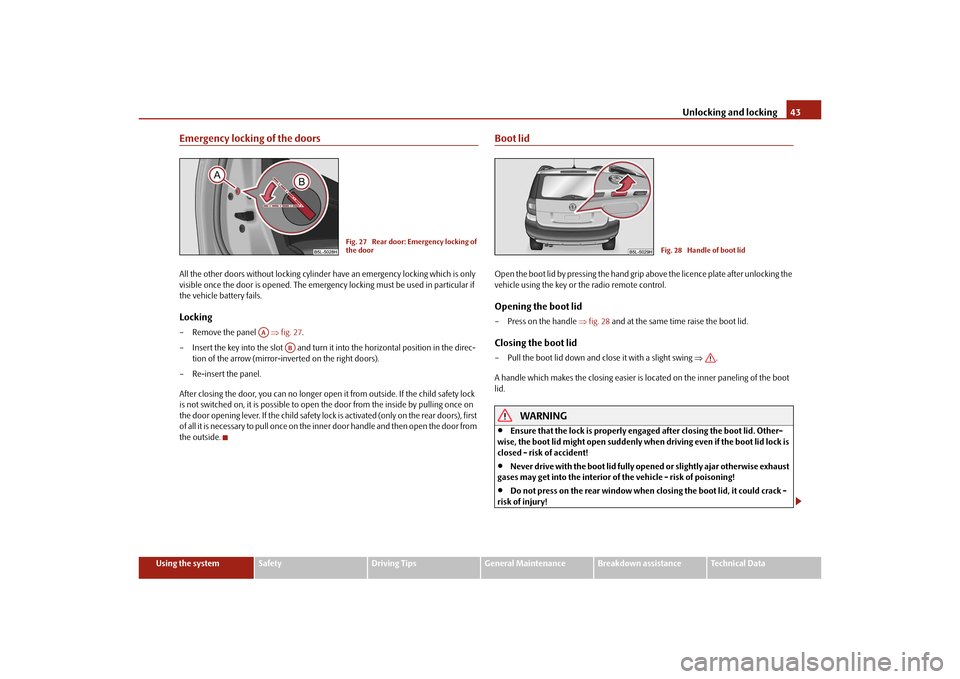
Emergency locking of the doorsAll the other doors without locking cylinder have an emergency locking which is only
visible once the door is opened. The emergency locking must be used in particular if
the vehicle battery fails.Locking– Remove the panel fig. 27 .
– Insert the key into the slot and turn it into the horizontal position in the direc-
tion of the arrow (mirror-inverted on the right doors).
– Re-insert the panel.
After closing the door, you can no longer open it from outside. If the child safety lock
is not switched on, it is possible to open the door from the inside by pulling once on
the door opening lever. If the child safety lock is activated (only on the rear doors), first
of all it is necessary to pull once on the i nner door handle and then open the door from
the outside.
Boot lidOpen the boot lid by pressing the hand grip above the licence plate after unlocking the
vehicle using the key or the radio remote control.Opening the boot lid– Press on the handle fig. 28 and at the same time raise the boot lid.Closing the boot lid– Pull the boot lid down and close it with a slight swing .
A handle which makes the closing easier is located on the inner paneling of the boot
lid.
WARNING
Ensure that the lock is properly enga ged after closing the boot lid. Other-
wise, the boot lid might open suddenly when driving even if the boot lid lock is
closed - risk of accident!
Never drive with the boot lid fully open ed or slightly ajar otherwise exhaust
gases may get into the interior of the vehicle - risk of poisoning!
Do not press on the rear window when closing the boot lid, it could crack -
risk of injury!
Fig. 27 Rear door: Emergency locking of
the door
AA
AB
Fig. 28 Handle of boot lid
s2ug.6.book Page 43 Friday, April 9, 2010 2:24 PM
Page 45 of 271

Unlocking and locking
44Note
After closing the boot lid, it is automatically locked within 2 seconds and the
anti-theft alarm sy stem* is activated. This applies only if the vehicle was locked
before closing the boot lid.
The function of the hand grip above the li cence plate is deactivated when starting
off or as of a speed of more than 5 km/hour for vehicles with central locking. The func-
tion of the hand grip is activated again when the vehicle has stopped and a door is
opened.
Emergency unlocking of the boot lidIf there is a fault in the central lockin g, you can open the boot lid as follows:
– Fold one of the outer rear seats forwards.
– Move the operating lever with the aid of a narrow object, e.g. a screwdriver, up to
the stop in the direction of arrow and then unlock the boot lid in the direction
of arrow .
– Open the boot lid from the outside.Remote control*DescriptionYou can use the remote control:
to unlock and lock the car,
unlocking boot lid,
electrically open and close the windows.
The transmitter with the battery is incorporated in the handle of the remote control
key. The receiver is located in the interior of the car. The operating range of the remote
control key is approx. 10 m. But this range can be reduced if the batteries are weak.
The remote control key has a fold-open key bit which can be used for unlocking and
locking the car manually and also for starting the engine.
If a lost key is replaced or if the receiver unit has been repaired or a new unit installed,
it is then necessary for a specialist garage to adapt the system. Only after this is it
possible to again use the remote control.Note
The remote control is automatically deacti vated when the ignition is switched on.
The operation of the remote control may temporarily be affected by interference
from transmitters close to the car and which operate in the same frequency range (e.g.
mobile phone, TV transmitter).
The battery must be replaced, ideally by a specialist garage, if the central locking or
anti-theft alarm system does react to the remote control at less than 3 metres away.
If the driver door is opened, the vehicle cannot be locked using the remote
control.
Unlocking and locking car
Fig. 29 Emergency unlocking of the boot
lid
A1
A2
Fig. 30 Remote control key
s2ug.6.book Page 44 Friday, April 9, 2010 2:24 PM
Page 46 of 271

Unlocking and locking45
Using the system
Safety
Driving Tips
General Maintenance
Breakdown assistance
Technical Data
Unlocking the vehicle
– Press the button page 44, fig. 30 for about 1 second.Locking the vehicle
– Press button for about 1 second.Deactivating safe securing system– Press button twice in 2 seconds. Further information page 41.Boot lid remote release
– Press button for about 2 second. Further information page 43.Folding out of the key– Press button .Folding up of the key– Press button and collapse the key bit in the housing.
The turn signal lights flash twice as confir mation that the vehicle has been unlocked.
The vehicle will lock again automatically if you unlock the vehicle using button but
do not open a door or the boot lid within th e next 30 seconds. This function is intended
to prevent the car being unlocked unintentionally.
In addition, when the car is unlocked, the el ectrically adjustable seats and exterior
mirrors* move into the position assigned to this key. The stored setting of driver seat
and exterior mirrors is retrieved.
Display of the locking
The turn signal lights flash once to confir m that the vehicle has been correctly locked.
If the vehicle is locked by pressing the bu tton and some doors or the boot lid are
not closed, the turn signal lights flash only after closing.
WARNING
If the vehicle is locked from the outside and the safe securing system is acti-
vated, there must not be any person in the vehicle as it is then not possible to open either a door or a window from th
e inside. The locked doors make it more
difficult for rescuers to get into th e vehicle in an emergency - hazard!
Note
Operate the radio remote control only when the doors and boot lid are closed and
you have visual cont act with the vehicle.
Once in the car, you must not press the lock button
of the radio remote control
before inserting the key into the ignition lock in order to avoid the car being inadvert-
ently locked and the alarm system* being sw itched on. Should this happen, press the
unlock button
of the radio remote control.
Synchronisation of the remote controlIf the vehicle cannot be unlocked by actuating the remote control system then it is
possible that the code in the key and the control unit in the vehicle are no longer
synchronised. This can occur when the button s on the radio-operated key are actuated
a number of times outside of the operative range of the equipment or the battery on
the remote control was replaced.
This means it is necessary to synchronise the code as follows:
Press any button on the remote control.
pressing of the button means that the door will unlock with the key within 1
minute.
Anti-theft alarm system*DescriptionThe anti-theft alarm system increases the level of protection against people seeking to
break into the vehicle. The system triggers audible and visual warning signals if an
attempt is made to break into the vehicle.
A1
A3A3A2A4A4
A1
A3
WARNING (continued)
s2ug.6.book Page 45 Friday, April 9, 2010 2:24 PM
Page 47 of 271

Unlocking and locking
46
How is the alarm system activated?
The anti-theft alarm system is activated automatically when the vehi cle is locked with
the key on the driver's door or by using th e radio remote control. It is activated 30
seconds after locking the door.
How is the alarm system deactivated?
The anti-theft alarm system is deactivated if the vehicle is unlocked by only using the
radio remote control. The anti-theft alarm system is reactivated if the vehicle is not
opened within 30 seconds after transmitting the radio signal.
Once you unlock the vehicle by inserting the ke y into the driver door you then have to
insert the key into the ignition lock and switch the ignition on within 15 seconds after
opening the door in order to deactiva te the anti-theft alarm system. The alarm will be
triggered if you do not switch on the ignition within 15 seconds.
When is the alarm triggered?
The following security areas of the locked vehicle are monitored:
Bonnet,
Boot lid,
Doors,
Ignition lock,
Angle of the vehicle* page 46,
Vehicle interior* page 46,
A drop in voltage of the on-board power supply,
Socket of the factory-fitted towing device*.
An alarm is immediately triggered if either of the two battery terminals is disconnected
while the anti-theft alarm system is activated.
How is the alarm switched off?
You switch the alarm off if you unlock the vehi cle with the radio remote control or if you
switch the ignition on.Note
The working life of the alarm siren is 6 years. More detailed information is available
by a specialist garage.
Before leaving the car, check that all the doors, windows and the electric
sliding/tilting roof* are properly closed in order to ensure that the anti-theft alarm
system is fully operational.
Coding of the radio remote control and the receiver unit precludes the use of the
radio remote control from other vehicles.
Interior monitor* and Towing protection monitoring*
Switch off the interior monitor and towing protection monitoring– Switch off the ignition.
– Open the driver door.
–Press the button
at the centre column on the driver side fig. 31 , the symbol
which lights up in the button changes from red to orange.
– Lock the vehicle within 30 seconds.
The interior monitor and the towing protec tion monitoring are switched on again
automatically the next ti me the car is locked.Note
You can switch the interior monitor and the towing protection monitoring off if
there is a possibility that movements from (e.g. children or animals) inside the vehicle
interior or if the vehicle must be transported (e.g. by train or ship) or towed, might
trigger the alarm.
Fig. 31 Button for interior monitor and
towing protection monitoring
s2ug.6.book Page 46 Friday, April 9, 2010 2:24 PM