2010 SKODA YETI lights
[x] Cancel search: lightsPage 132 of 271
Communication131
Using the system
Safety
Driving Tips
General Maintenance
Breakdown assistance
Technical Data
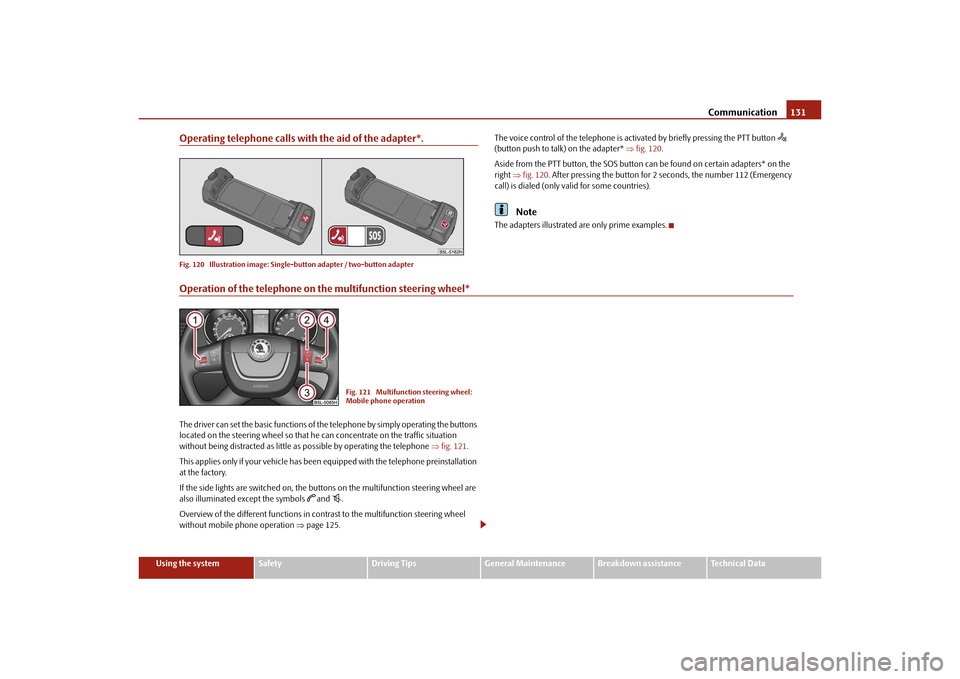
Operating telephone calls with the aid of the adapter*.Fig. 120 Illustration image: Single -button adapter / two-button adapter
The voice control of the telephone is acti vated by briefly pressing the PTT button
(button push to talk) on the adapter* fig. 120 .
Aside from the PTT button, the SOS button can be found on certain adapters* on the
right fig. 120 . After pressing the button for 2 seconds, the number 112 (Emergency
call) is dialed (only valid for some countries).
Note
The adapters illustrated are only prime examples.
Operation of the telephone on the multifunction steering wheel*The driver can set the basic functions of the telephone by simply operating the buttons
located on the steering whee l so that he can concentrate on the traffic situation
without being distracted as little as possible by operating the telephone fig. 121 .
This applies only if your vehicle has been equipped with the telephone preinstallation
at the factory.
If the side lights are switched on, the butt ons on the multifunction steering wheel are
also illuminated except the symbols
and
.
Overview of the different functions in contrast to the multifunction steering wheel
without mobile phone operation page 125.Fig. 121 Multifunction steering wheel:
Mobile phone operation
s2ug.6.book Page 131 Friday, April 9, 2010 2:24 PM
Page 137 of 271

Communication
136
Ejecting all CDs
– Hold the button pressed for more than 2 seconds, in order to eject the CDs. All CDs in the CD-changer are ejected consecutively.
Note
Always guide the CD into the CD-case with the printed side pointing upwards.
Never push the CD with force into the CD-case as the insertion is performed auto-
matically.
After loading a CD into the CD-changer, yo u must wait until the LED of the corre-
sponding button lights up. Then the CD -case is free to load the next CD.
If you have selected a position, on which a CD is already located, this CD will be
ejected. Take out the ejected CD and load the desired CD.
AC
AB
AD
AB
s2ug.6.book Page 136 Friday, April 9, 2010 2:24 PM
Page 156 of 271

Airbag system155
Using the system
Safety
Driving Tips
General Maintenance
Breakdown assistance
Technical Data
Deactivating an airbag– Switch off the ignition.
– Turn the slot of the airbag switch using the key in the position (OFF ) fig. 137 .
– Check whether the yellow airbag indicator light in display
in the middle of the dash panel lights up when the ignition is turned on fig. 137
- right.
Switching on an airbag– Switch off the ignition.
– Turn the slot of the airbag switch using the key in the position ( ON) fig. 137 .
– Check whether the yellow airbag indicator light in display
in the middle of the dash panel lights up when the ignition is turned on fig. 137
- right. The warning light
goes out 65 seconds after the ignition is switched
on.
The airbag should only be switched off under exceptional circumstances page 154.
Indicator light in display
(airbag switched off)
The airbag indicator ligh t is located in the middle of the dash panel page 154,
fig. 137 - right.
If the front passenger airbag is switched off, the warning light comes on about 4
seconds after the ignition is switched on.
There is a system fault present in the airbag switch off if the indicator light
flashes. Please have the car inspected immediately by a specialist garage.
WARNING
The driver is responsible for whether the airbag is switched on or switched
off.
Only switch off the airbag when the ignition is switched off! Otherwise a
fault can occur in the system for the airbag deactivation.
If the yellow indicator light in display
(airbag
switched off) flashes:
Front passenger airbag is not deployed in the event of an accident!
It is also important to have the system inspected without delay by a
specialist garage.
A2A1
WARNING (continued)
s2ug.6.book Page 155 Friday, April 9, 2010 2:24 PM
Page 164 of 271

Intelligent Technology163
Using the system
Safety
Driving Tips
General Maintenance
Breakdown assistance
Technical Data
Driving TipsIntelligent TechnologyElectronic stability programme (ESP)*GeneralGeneral
The ESP aids you in maintaining control of your vehicle in situations in which the
vehicle is driving at its dynamic limits, such as entering a curve fast. The risk of skidding
is reduced and your vehicle thus offers greater driving stability depending on the
conditions of the road surface. The system operates at all speeds.
The following systems are integrated into the electronic stability programme:
Electronic Differential Lock (EDL),
Traction control system (TCS),
active driver-steering recommendation (DSR),
Antilock brake system (ABS),
Brake Assist,
Uphill Start Assist
The ESP system cannot be switched off, only the TCS system can be switched off by
pressing the button fig. 146 , the warning light
lights up. Operating principle
The ESP switches on automatically when the engine is started and then conducts a
self-test. The ESP control unit processes data from the individual systems. It also proc-
esses additional measurement data which are supplied by highly sensitive sensors: the
rotational velocity of the vehicle about its ve
rtical axis, the lateral acceleration of the
vehicle, the braking pressure and the steering angle.
The direction which the driver wishes to take is determined based on the steering
angle and the speed of the vehicle and is co nstantly compared with the actual behav-
iour of the vehicle. If differences exist, such as the vehi cle beginning to skid, the ESP will
automatically brake the appropriate wheel.
The car is stabilised again by the forces wh ich take effect when the wheel is braked.
Intervention into the brake system takes place primarily on the outer front wheel of a
vehicle which tends to oversteer (tendency for the rear of the vehicle to break away)
while occurs this is on the inner rear wh eel of a vehicle which tends to understeer
(tendency to shift out of the curve). This braking control cycle is accompanied by
noises.
During an intervention of the system, the warning light
flashes in the instrument
cluster page 34.
The ESP operates in combination with the ABS page 167, “Antilock brake system
(ABS)”. If there is a fault in the ABS system, the ESP also does not operate.
The ESP warning light lights up in the instrument cluster when there is a fault on the
ESP
page 34.WARNING
It is also not possible for the ESP to overcome the physical limits of the vehicle.
Even if a vehicle fitted with ESP you should still always adapt your style of
driving to the condition of the road surfac e and the traffic situation. This partic-
ularly applies when driving on slippery and wet roads. The increased safety
Fig. 146 ESP switch
s2ug.6.book Page 163 Friday, April 9, 2010 2:24 PM
Page 166 of 271

Intelligent Technology165
Using the system
Safety
Driving Tips
General Maintenance
Breakdown assistance
Technical Data
Traction control system (TCS)
The traction control system prevents the driven wheels from spinning
when accelerating.General
The TCS makes it much easier, and sometimes at all possible, to start off, accelerate and
climb a steep hill when th e conditions of the road surface are unfavourable.
Operating principle
The TCS switches on automatically when th e engine is started and then conducts a
self-test. The system monitors the speeds of the driven wheels with the aid of the ABS
sensors. If the wheels are spinning, the force transmitted to the road surface is auto-
matically adapted by reducing the engine speed. The system operates at all speeds.
The TCS operates in combination with the ABS page 167, “Antilock brake system
(ABS)”. The TCS will not function if a fault exists in the ABS system.
The TCS warning light lights up in the instru ment cluster when there is a fault on the
TCS
page 33.
During an intervention of the system, the TCS warning light
flashes in the instru-
ment cluster page 33.
Switching off
You can switch the TCS off and on again as yo u wish. On vehicles fitted with ABS, you
can switch off the TCS by pressing the button fig. 147 , on vehicles fi tted with ESP*,
you can switch off the TCS wi th the aid of the button page 163, fig. 146 . The TCS warning light lights up in the instrument cluster when the system is switched off
page 33.
The TCS should normally always be switched on. It may be good practice in certain
exceptional cases, such as when you wish to have wheel slip, to switch off the system.
Examples:
when driving with snow chains
when driving in deep snow or on a loose surface
when it is necessary to rock a vehicle when it has become stuck.
then you should switch on the TCS again.
TCS Off-road*
After switching on the Off-road mode page 170, TCS Off-road is activated.
TCS Off-road provides a more effective a cceleration of the vehicle on an unfirm
ground, as it allows higher traction be tween the slipping wheels and the ground.
The system operates when starting off or at low speeds.
WARNING
You should always adjust your style of driving to the conditions of the road
surface and the traffic situation. The increased safety offered must not tempt
you to take greater risks than otherwise - risk of an accident!
Note
All four wheels must be fitted with the same tyres in order to achieve problem-free
operation of the TCS. Differing rolling circumferences of the tyres can lead to an unde-
sirable reduction in the engine output.
Changes to vehicle (e.g. on engine, on the brakes, on chassis or another combina-
tion of tyres and wheels) can influence the function of the TCS page 222, “Accesso-
ries, changes and replacement of parts”.
Fig. 147 TCS switch
s2ug.6.book Page 165 Friday, April 9, 2010 2:24 PM
Page 169 of 271

Intelligent Technology
168
offered by the ABS must not tempt you to take greater risks than otherwise -
risk of an accident!
The normal braking system is still fully functional if there is an ABS fault.
Visit a specialist garage as quickly as poss ible and adjust your style of driving to
take account of the ABS fault in the meantime since you will not know the extent
of the fault and in how far the braking efficiency is affected.Note
A warning light comes on if a fault occurs in the ABS system
page 34.
Changes to vehicle (e.g. on engine, on th e brakes, on chassis or another combina-
tion of tyres and wheels) can in fluence the function of the ABS page 222, “Accesso-
ries, changes and replacement of parts”.
Brake Assist*During a severe brake application (e.g. if a hazard exists), the Brake Assist increases the
braking force and thus makes it possible to rapidly produce the pressure required in
the brake system.
The majority of drivers do apply the brakes in good time in dangerous situations, but
do not depress the brake pedal with sufficient pressure. Consequently, it is not possible
for the vehicle to achieve its maximum deceleration and the vehicle covers a greater
distance than necessary.
The Brake Assist is activated by the very quick operation of the brake pedal. In such
cases, a much greater braking pressure exists than during a normal brake application.
This makes it possible, even with a relative ly low resistance of the brake pedal, to
produce an adequate pressure in the brake system in the shortest possible time, which
is required for maximum deceleration of th e vehicle. You must apply the brake pedal
firmly and hold it in this position in order to achieve the shortest possible braking
distance.
The Brake Assist is able to help you achieve a shorter braking distance in emergency
situations by rapidly producing the pressure required in the brake system. It fully
exploits the attributes of the ABS. After you release the brake pedal, the function of the
Brake Assist is automatically switched off and the brakes operate in the normal way. The Brake Assist is part of the ESP system. If a fault occurs in the ESP, the Brake Assist
function is also not available.
Further information on the ESP page 163.
WARNING
The Brake Assist is also not able to overcome the physical limits of your
vehicle in terms of the braking distance required.
Adapt your speed to the conditions of th e road surface and to the traffic situ-
ation.
The increased safety offered by the Brake Assist must not tempt you to take
a greater safety risk than otherwise.
Uphill Start Assist*The uphill start assist makes it easier to start off on steep hills. The system assists a start
off by holding the brake pressure produced by the brake pedal actuation for approx. 2
seconds after releasing the brake pedal. The driver can therefore move his foot from
the brake pedal to the accelerator pedal and start off on the slope, without having to
actuate the handbrake. The brake pressure drops gradually the more you operate the
accelerator pedal. If the vehicle does not start off within 2 seconds, it starts to roll back.
The uphill start assist is active as of a 3% slope, if the driver door is closed. It is always
active on slopes when in forward or reverse start off. When driving downhill, it is
inactive.Electromechanical power steeringThe power steering enables you to steer the vehicle with less physical force.
With the electromechanical power steering, the steering assist is automatically
adapted to the speed and to the steering angle.
It is still possible to fully steer the vehicle if the power steering fails or if the engine is
not running (vehicle being towed in). The only difference is that greater physical effort
is required.
If there is a fault in the power steering, the warning light
or lights up in the instru-
ment cluster page 31.
WARNING (continued)
s2ug.6.book Page 168 Friday, April 9, 2010 2:24 PM
Page 170 of 271

Intelligent Technology169
Using the system
Safety
Driving Tips
General Maintenance
Breakdown assistance
Technical Data
WARNING
Contact your specialist garage if the power steering is defective.Tyre pressure monitoring system*The tyre pressure monitoring system compares with the aid of the ABS sensors the
speed and also the rolling circumference of the individual wheels. If the rolling circum-
ference of a wheel is changed, the warning light
lights up in the instrument cluster
page 34 and an audible sign al sounds. The rolling circumference of the tyre can
change if:
the tyre inflation pressure is too low,
the structure of the tyre is damaged,
the vehicle is loaded on one side,
the wheels of an axle are loaded heavily (e.g. when towing a trailer or when driving
uphill or downhill),
snow chains are mounted,
the temporary spare wheel is mounted,
one wheel per axle was changed.
Basic setting of the system
After changing the tyre inflation pressures, after changing one or several wheels, the
position of a wheel on the vehicle (e.g. exch anging the wheels between the axles) or when the warning light lights up while drivin
g, a basic setting of the system must be
carried out as follows.
Inflate all tyres to the specified inflation pressure page 216.
Switch on the ignition.
Press button fig. 148 for more than 2 seconds. While pressing the button,
the warning light
lights up. At the same time the memory of the system is erased
and the new calibration is started, which is confirmed with an audible signal and then
the warning light goes out.
If the warning light
does not go out after the basic setting, there is a fault in the
system. Have the vehicle inspected by your nearest specialist garage.
Warning light
lights up
If the tyre inflation pressure of at least one wheel is insufficiently inflated in comparison
to the stored basic va lue, the warning light
lights up.
Warning light
flashes
If the warning light flashes, there is a system fault. Have the vehicle inspected by your
nearest specialist garage.
WARNING
When the warning light
lights up, immediately reduce the speed and
avoid sudden steering and brake manoeuvr es. Please stop the vehicle without
delay at the nearest possible stop and in spect the tyres and their inflation pres-
sures.
The driver is responsible for the correc t tyre inflation pressures. For this
reason, the tyre inflation pressures must be checked regularly.
Under certain circumstances (e.g. sporty style of driving, wintry or unpaved
roads) the warning light
can be delayed or does not light up at all.
The tyre pressure monitoring system do es not take away the responsibility
from the driver for the correct tyre inflation pressure.Note
The tyre pressure monitoring system:
Fig. 148 Button for setting the tyre infla-
tion pressure control value
s2ug.6.book Page 169 Friday, April 9, 2010 2:24 PM
Page 172 of 271
Intelligent Technology171
Using the system
Safety
Driving Tips
General Maintenance
Breakdown assistance
Technical Data
TCS Off-road page 165,
ABS Off-road page 167.
Switch on Off-road
The Off-road mode is switched on by pressing the button page 170, fig. 150 . The
warning light in the button lights up. The warning light lights up in the instrument
cluster if the system is switched on
page 37.
Switch off Off-road
The Off-road mode is switched off by repe ated pressing of the button. The warning
light in the button goes out. When switching off the ignition, the Off-road mode is also
switched off and can be switched on again, if necessary, after switching on the ignition.
If the engine is switched off by accident an d restarted within 30 seconds, the Off-road
mode remains switched on.
All four wheels must be fitted with the same tyres in order to achieve proper operation
of the Off-road mode. Differing rolling circum ferences of the tyres can lead to an unde-
sirable reduction in the engine output.
WARNING
Always adjust your speed to suit weat her, road and traffic conditions. The
increased safety must not tempt you to take a greater safety risk than otherwise
- risk of accident!
The Off-road equipment can also not overcome the physical limits of your
vehicle.
The effect of the Off-road equipment depends as well on the tyres.
The Off-road equipment is not designed for the use on common roads.
Start-Off Assist*The Start-Off Assist enhances the driving comfort and can be used when starting off, in
particular on a slope. When the vehicle is stationary, the Start-Off Assist is activated
after switching it on using the button for the Off-road mode page 170, fig. 150 .Operating principle
When depressing the accelerator pedal fully, the engine speed required for the start-
up procedure of the stationary vehicle is restricted. The overspeed trip unit is automat-
ically deactivated after terminating the start-up procedure. As part of the Assist System,
the accelerator pedal is adapted in its characteristics for an easier start-off on slippery
and loose soil.
Downhill Drive Support*Operating principle
The Downhill Drive Support maintains a cons
tant speed on a steep downhill section
when driving forwards and backwards by automatically intervening in the brake
system of all wheels. It prevents the wheels locking because the ABS remains active.
The warning light
in the information display of the instrument cluster indicates that
the Downhill Drive Support is available page 37.
The vehicle speed, which is maintained by the Assist System, is selected by the driver
while driving on a downhill section as of the moment the first intervention of the Assist
System is performed or else, while driving on a downhill section, the driver must
control the vehicle speed until the Assist System intervenes for the first time. When the
Assist System actively intervenes, this is indicated by the warning light flashing or by a
pulsating movement of the brake pedal, similar to the intervention of the ABS.
You can increase or reduce the speed, even when no gear is engaged, by operating the
accelerator or brake pedal. Thus the function is always interrupted and is reactivated
afterwards.
The Downhill Drive Support is activated auto matically if the following conditions are
met:
the Off-road mode is switched on and the warning light
lights up in the instru-
ment cluster,
the engine of the vehicle is running and either the 1st, 2nd, 3rd gear, the reverse
gear or no gear is engaged,
the engine of the vehicle is running, the selector lever of the automatic gearbox is
in the position R, N, D, S or Tiptronic,
the speed is less than 30 km/h,
s2ug.6.book Page 171 Friday, April 9, 2010 2:24 PM