2010 SKODA OCTAVIA lock
[x] Cancel search: lockPage 49 of 275
Unlocking and locking
48
Window convenience operationYou can open and close the electrically po wered windows as follows when unlocking
and locking the vehicle (only close the sliding/tilting roof):Opening a window– Hold the key in the locking cylinder of the driver's door in the unlock position or
press the unlock button of the radio remote control until all the windows are
opened.Closing a window– Hold the key in the locking cylinder of the dr iver's door in the lock position or press
the lock button of the radio remote control until all the windows are closed.
You can interrupt the opening or closing operation of the windows immediately by
releasing the key or the lock button.
WARNING
The system is fitted with a force limiter page 47. If there is an obstacle, the
closing process is stopped and the window goes down by several centimeters.
You should then take particular care when closing the windows! You may
otherwise suffer severe injuries as a re sult of getting an arm, for example,
jammed in the window!
Note
On vehicles fitted with an ti-theft alarm system the co nvenience window opening is
possible by means of the key in the locking cylinder only 45 seconds after deactivating
the warning system or after activating the anti-theft alarm system.Operational faultsElectrically operated power windows do not operate
If the battery of the car has been disconne cted and then reconnected, the electrically
operated power windows do not operate. The system must be activated. Proceed as
follows in order to re-establish the function:
Switch on the ignition.
Press the relevant switch top and hold it pressed as lo ng as necessary until the
window is closed.
Release the switch.
Press once again the relevant switch top and hold it pressed for approx. 3 seconds.
Operation in winter
Ice accumulating on the surface of the wi ndows during the winter may result in a
greater resistance when closing the windows and the window may stop and go down
several centimetres
It is necessary to put the force limiter out of operation in order to close the window
page 47, “Force limiter of the power windows”.
WARNING
The system is fitted with a force limiter page 47. If there is an obstacle, the
closing process is stopped and the window goes down by several centimeters.
You should then take particular care when closing the windows! You may
otherwise suffer severe injuries as a re sult of getting an arm, for example,
jammed in the window!Electric sliding/tilting roof*Description
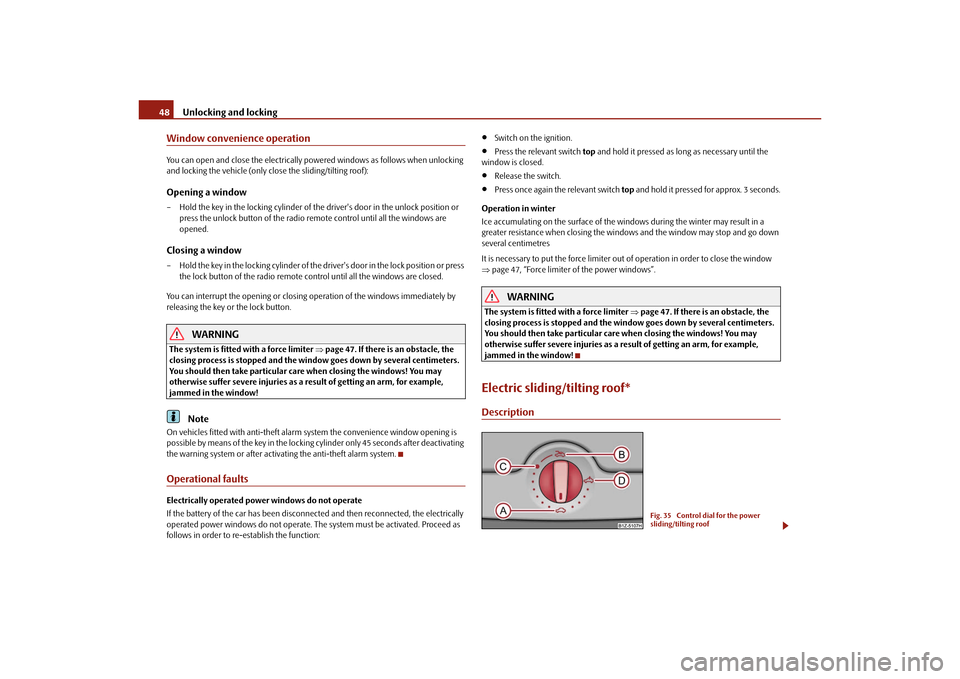
Fig. 35 Control dial for the power
sliding/tilting roof
s43s.1.book Page 48 Thursday, May 13, 2010 1:21 PM
Page 50 of 275

Unlocking and locking49
Using the system
Safety
Driving Tips
General Maintenance
Breakdown assistance
Technical Data
The sliding/tilting roof is operated by means of the control dial
page 48, fig. 35 and
only functions when the ignition is switched on. The control dial has several positions.
After switching the ignition off, it is still possible to open, close and tilt the sliding/tilting
roof for approx. 10 minutes. It is no longer possible to operate the sliding/tilting roof
after opening one of the front doors, however.
Note
If the battery has been disconnected an d reconnected, it is possible that the
sliding/tilting roof does not close fully. Here you have to set the control dial to the
switch position and press it forward for about 10 seconds.Opening and tiltingComfort position– Turn the switch to position page 48, fig. 35 .Opening fully– Turn the switch to position and hold it in this position (spring-tensioned posi-
tion).Tilting roof– Turn the switch to position .
When the sliding/tilting roof is in the comfort position, the intensity of the wind noise
is much less.
The sun screen is also opened automatically when the roof slides open. You can slide
the sun screen into the opened or closed position by hand when the sliding/tilting roof
is closed.
Caution
It may be necessary during winter to remo ve any ice and snow in the area of the
sliding/tilting roof before opening it in order to prevent damaging the opening
mechanism.
ClosingSliding closed/closing the sliding/tilting roof– Turn the switch to position page 48, fig. 35 .
Safety closing
The sliding/tilting roof is fitted with a force limiter. If an obstacle (e.g. ice) prevents
closing, the sliding/tilting roof stops and opens completely. You can close the
sliding/tilting roof completely without forc e limiter by pressing the switch to the
position page 48, fig. 35 at the front for as long as it takes for the sliding/tilting roof
to close completely .
WARNING
Close the sliding/tilting roof carefully - risk of injury!Convenience operationYou can also close an open sliding/tilting roof from the outside.
– Hold the key in the locking cylinder of the driver's door in the lock position or press
the lock button of the remote control until the sliding/tilting roof is closed .
The closing operation stops when one releases the key or the lock button.
WARNING
Close the sliding/tilting roof carefully - ri sk of injury! The force limiter does not
operate with the convenience closing.
AA
ACABAD
AA
AA
s43s.1.book Page 49 Thursday, May 13, 2010 1:21 PM
Page 51 of 275

Unlocking and locking
50
Emergency operationFig. 36 Detail of the headliner: Points for positioning screwdriver - left / emergency opera-
tion - rightYou can close and/or open the sliding/tilting roof by hand if the system is defect.
– Position the flat blade of a screwdriver ca refully against the rear edge of the cover
of the electrical drive at the points of the arrows fig. 36 .
– Pull the cover down.
– Insert an Allen key, Group 4, up to the stop into the opening fig. 36 and close
or open the sliding/tilting roof.
– Press on the cover again by first of all inserting the plastic lugs and then pushing the cover up.
– Have the malfunction rectified by a specialist garage.
Note
It is necessary after each emergency operation to move the sliding/tilting roof into the
basic position. Here you have to turn the co ntrol dial forward to the switch position
page 48, fig. 35 and press for about 10 seconds.
A1
A2
AA
s43s.1.book Page 50 Thursday, May 13, 2010 1:21 PM
Page 55 of 275

Lights and Visibility
54
You can change the illumination period for the Coming Home Function by means
of the information display*.
Leaving Home FunctionThis function makes it possible to switch on the lights when approaching the vehicle.Switching on Leaving Home Function– The light switch is in the position automatic driving lamp control
.
– Unlock the vehicle with the radio remote control - the lights come on.
Depending on equipment fitted the function Leaving Home switches on the following
lights:
Parking lights,
Low beam,
Entry lighting in the exterior mirrors,
Licence plate light.
Leaving Home Function
The function Leaving Home is controlled with the light sensor in the mount of the inte-
rior rear mirror. If the light intensity is higher than the set value of the light sensor, the
Leaving Home Function is not switched on after unlocking the vehicle with the radio
remote control.
After unlocking the vehicle with the radio remote control, the lights come on for 10
seconds. The Leaving Home Function is also switched off after the ignition is switched
on and after locking the vehicle.
If no door is opened within 30 seconds, the lights go out and the vehicle is locked auto-
matically.Note
If the Leaving Home Function is switched on constantly, the battery will be heavily
discharged particularly in short-haul traffic.
The switching on of the described lights should only be undertaken in accordance
with the legal requirements.
You can change the illumination period for the Leaving Home Function by means
of the information display*.
Tourist light*This mode makes it possible to drive in countries with opposing traffic system, driving
on the left/right, without dazzling the oncoming vehicles. When the mode “tourist
light” is active, the side to side swivel of the headlights is deactivated.
The mode “tourist light” is activated / deactivated via the information display* in the
menu:
SETUP
Lights & Vision
Tra v e l m o d e
Off
Switched on
Fog lights*
Switching on the fog lights– First of all turn the light switch into position
or fig. 39 .
– Pull the light switch into position .
The warning light
lights up in the instrument cluste r when the fog lights are switched
on page 27.
Fig. 39 Dash panel: Light switch
A1
s43s.1.book Page 54 Thursday, May 13, 2010 1:21 PM
Page 59 of 275

Lights and Visibility
58
Interior lightingVehicle interior lighting front and rear*The same principles apply for the lighting of the front and rear part of the vehicle.Switching the interior light on– Press the switch to the left, the symbol
fig. 44 appears.
Switching the interior light off– Press the switch into the middle position O.
– On the version without reading lights press the switch to the right, the symbol O appears.Door contact setting– Press the switch to the right, the symbol
appears.
– On the version without reading lights press the switch into the middle position
.
Reading lights*– Press on one of the switches in order to switch the right or left reading light on
or off.
The interior light comes on as soon as you unlock the car or open a door or when the
ignition key has been removed. The light go es out again about 30 seconds after all the doors have been closed. The interior lighting
is switched off when you lock the car or
switch the ignition on. This only applies wh en the switch for the corresponding interior
lights is standing n the door contact setting.
The interior lighting goes off after about 10 minutes when a door has been left open in
order to avoid discharging the battery of the vehicle.
If the switch is in the position
(permanent lights), the interior lighting goes off at the
latest after 10 minutes in order to avoid discharging the battery of the vehicle.
Note
We recommend having these bulbs re placed by a specialist garage.Rear interior lightingThe rear interior lighting fig. 45 is actuated by moving the switch to the symbol
,
O or to the middle position
.
The same principles apply for th e interior lighting at the rear as for the for the interior
lighting at the front page 58.
Note
We recommend having the bulb re placed by a specialist garage.
Fig. 44 Detail of the headliner: Front
and rear interior lighting
AAAA
AA
AA
AA
AB
Fig. 45 Roof liner light at the rear
s43s.1.book Page 58 Thursday, May 13, 2010 1:21 PM
Page 60 of 275

Lights and Visibility59
Using the system
Safety
Driving Tips
General Maintenance
Breakdown assistance
Technical Data
Lighting of the storage compartment on front passenger side*– When opening the flap of the storage comp artment on the front passenger side the
lighting in the storage compartment comes on.
– The light switches on automatically when the parking light is switched on and goes out when the flap is closed.Front door warning light*The warning light is located in the door trim panel below fig. 46 .
The warning light goes on every time the door is opened. The light goes out about 10
minutes after opening the door in order to avoid discharging the battery of the vehicle.
There is a reflector installed on some vehicles instead of the warning light.Luggage compartment light*The lighting comes on automatically when th e boot lid is opened. If the lid remains
open for more than about 10 minutes, the luggage compartment lighting switches off
automatically.Entry lighting*The lighting is positioned on the bottom edge of the exterior mirror.
The light beam is directed towards the entry area of the front door. The light comes on after the doors have been
locked or on opening the boot lid. The
light goes out after switching on the ignition or up to 30 seconds after closing all the
doors and the boot lid.
If a door or the boot lid remains open, the light goes out within 2 minutes if the ignition
is switched off.
WARNING
If the entry light comes on, do not touch its cover - risk of burns!VisibilityRear window heater– You can switch the rear window heater on or off by pressing the switch
fig. 47 - the indicator light in the switch comes on or goes out.
The rear window heater only operates when the engine is running.
The rear window heater switches off automatically after 10 minutes.
For the sake of the environment
As soon as the window is de-iced or free from mist, the heating should be switched off.
The reduced current consumption will have a favourable effect on fuel economy
page 179, “Saving electricity”.
Fig. 46 Front door: Warning light
Fig. 47 Switch for rear window heater
s43s.1.book Page 59 Thursday, May 13, 2010 1:21 PM
Page 61 of 275

Lights and Visibility
60Note
The position and the shape of the swit ch can differ depending on equipment
installed in the vehicle.
If the on-board voltage drops, the rear window heater is switched off automatically,
in order to provide sufficient electrical energy for the engine control.
Sun visorsFig. 48 Sun visor: Swivelling out / double sun visorYou can pull the sun visor for the driver or front passenger out of the fixture and swivel
it toward the door in the direction of the arrow fig. 48 .
The vanity mirrors* in the sun visors are provided with covers. Push the cover in direc-
tion of arrow .
On vehicles which are equipped with double sun visor*, you can also unfold the auxil-
iary visor in direction of arrow after swivelling the sun visor.
WARNING
The sun visors must not be swivelled to the side windows into the deployment
area of the head airbags if any objects, such as ball-point pens etc. are attached
to them. This might result in injuries to the occupants if the head airbag is
deployed.
Sun screen*Fig. 49 Unroll / remove the sun screenThe sun screen is located in a housing on the luggage compartment cover. If required,
you can remove the housing with the sun sc reen from the luggage compartment cover.Pulling out– Pull the sun screen at the loop and hang it in the brackets fig. 49 .Folding– Take the sun screen out of the brackets and hold it at the loop so that it can
roll up slowly and without damage into the housing on the luggage compartment
cover.Removing– Unhook the fastening elements from the luggage compartment cover .
– Roll up the sun screen again into the housing on the luggage compartment cover.
– Press the locking button in the direction of arrow and take out the sun screen in
the direction or arrow .
A1
A2
A3
AA
AB
AB
AA
AC
A1
A2
s43s.1.book Page 60 Thursday, May 13, 2010 1:21 PM
Page 63 of 275

Lights and Visibility
62
The windscreen wipers and the wash system only operate if the ignition is switched on
and the bonnet is closed
10).
If the intermittent wipe is switched on, the intervals are also controlled depending on
speed.
The rain sensor* automatically regulates the break between the individual wiper
strokes depending on the intensity of the rain.
The rear window will be wiped again if the front window wipers are on when reverse
gear is selected.
The windscreen washer nozzles are heated* when the ignition is switched on.
Top up with wash liquid page 207.
Winter position
If the windscreen wipers are in rest positi on, they cannot be folded out from the wind-
screen. For this reason we recommend adjusting the windscreen wipers in winter so
that they can be folded out from the windscreen easily. You can set this rest position as
follows:
Switch on the windscreen wipers.
Switch off the ignition. The windscreen wipers remain in the position in which they
were when switching off the ignition.
You can also use the service position page 63 as a winter position.
WARNING
Properly maintained wind screen wiper blades are essential for clear visi-
bility and safe driving page 63.
Do not use the windscreen washer sy stem at low temperatures, without
heating the windscreen beforehand. Otherwise the window cleaner could
freeze on the windscreen and re strict the view to the front.
The rain sensor only operates as a support. The driver is not released from
the responsibility to set the function of the windscreen wipers manually
depending on the visibility conditions.
Caution
In frosty weather, please firs t of all check whether the windscreen wiper blades are not
frozen to the windscreen before switching them on. Switching on windscreen wipers
when the blades are frozen to the windscreen may result in damage both to the blades
and the motor of the windscreen wipers!
Note
If the slower or the faster wiper setting is switched on page 61, fig. 50 and
the vehicle speed decreases to below 4 km/h, the lower wiper step is switched on
automatically. At a speed increase of more than 8 km/h the previous wiper setting is
established again.
If there is an obstacle on the windscre en, the wiper will try to push away the
obstacle. If the obstacle continues to block the wiper, the wiper stops after 5 cycles, in
order to avoid a damage to the wiper. Re move the obstacle and and switch on the
wiper again.
Automatic rear window wiper* (Combi)If the windshield wiper lever is in the position page 61, fig. 50 or , the rear
window wiper carries out a wi ping process every 30 seconds or 10 seconds at a speed
above 5 km/h.
When the rain sensor* is active (the lever is in the position ) the function is only
active if the front window wipers continue to operate (no break between each wiping
process).
Activation/deactivation
The function of the automatic rear window wiper is activated/deactivated in the infor-
mation display* in the menu:
Setup
Lights & Vision
Rear wiper
10)On vehicles which do not have a contact switch for the bonnet, the windshield wiper and wash
system operates also when the bonnet is opened.
A2
A3
A2
A3
A1
s43s.1.book Page 62 Thursday, May 13, 2010 1:21 PM