2010 SKODA OCTAVIA light
[x] Cancel search: lightPage 142 of 275

Passive Safety141
Using the system
Safety
Driving Tips
General Maintenance
Breakdown assistance
Technical Data
SafetyPassive SafetyBasic informationDriving the safe way
Passive safety measures reduce the risk of injury in accident situations.In this section you will find important info rmation, tips and notes on the subject of
passive safety in your vehicle. We have combined everything here which you should
be familiar with, for example, regarding seat belts, airbags, child seats and safety of
children. It is therefore important, in partic ular, to comply with the notes and warnings
in this section for your own interest and in the interest of those travelling with you.
WARNING
This chapter contains important information on how to use the vehicle for
the driver and his occupants. You will find further information on safety, which
concerns you and those travelling with you, in the following chapters of this
Owner's Manual.
The complete on-board literature should always be in the vehicle. This
applies in particular, if you rent out or sell the vehicle.
Safety equipment
The safety equipment is part of the occupant protection and it can
reduce the risk of injuries in accident situations.“Do not put at risk” your safety and the safety of those travelling with you . In the event
of an accident, the safety equipment can redu ce the risk of injuries. The following list
contains part of the safety equipment in your vehicle:
Three-point seat belts for all the seats,
belt force limiter for front and outer rear seats*,
belt tensioner for front seats,
seat belt height adjuster for front seats,
front airbag for the driver and the front seat passenger*,
side airbags*,
head airbags*,
anchoring points for child seat using the “ISOFIX” system,
anchoring points for child seat using the “Top Tether” system,
head restraint adjustable for height,
adjustable steering column.
The specified safety equipment works togeth er, in order to optimally protect you and
those travelling with you in accident situat ions. The safety equipment does not protect
you or the people travelling with you, if you or your occupants adopt an incorrect
seated position or the equipment is not correctly adjusted or used.
For this reason you will be provided with information on why this equipment is very
important, how it protects you and the occupants, what should be observed when
using the equipment and how you and the peop le travelling with you can make full use
of the existing safety equipment. This Owner's Manual contains important warning
notes, which you and those travelling with you should pay attention to in order to
reduce a risk of injury.
Safety concerns everybody!
Before setting off
The driver is always fully responsibl e for his occupants and for the oper-
ating safety of the vehicle.For your own safety and the safety of the pe ople travelling with you, please pay atten-
tion to the following points before setting off:
Ensure that the lighting and the turn signal system are functioning properly.
Inspect the tyre inflation pressure.
s43s.1.book Page 141 Thursday, May 13, 2010 1:21 PM
Page 143 of 275

Passive Safety
142
Ensure that all the windows offer a good visibility to the outside.
Safely attach the items of luggage page 74, “Loading the luggage compartment”.
Ensure that no objects can obstruct the pedal.
Adjust the mirror, the front seat and the head restraint to match your body size.
Point out to your occupants that the head restraints must be adjusted to match
their body size.
Protect the children in suitable child seats with correctly fastened seat belts
page 159, “Transporting children safely”.
Adopt the correct seated position page 142, “Correct seated position”. Also
inform your occupants to adopt the correct seated position.
Fasten the seat belt correctly. Also inform your occupants to properly fasten the
seat belts page 147, “How are seat belts correctly fastened?”.
What influences the driving safety?
The driving safety is primarily determined by the style of driving and the
personal behaviour of all the occupants.The driver is fully responsible for himself an d his occupants. If your driving safety is
effected, you place yourself and the oncomi ng traffic at risk. Please refer to the
following guidelines.
Do not get distracted from concentrating on the traffic situation, e.g. by your occu-
pants or mobile phone calls.
Never drive when your driving ability is impaired, e.g. through medication, alcohol,
drugs.
Keep to the traffic regulations and the permissible speed limit.
Adjust the driving speed at all times to the road condition as well as to the traffic
and weather conditions.
Take regular breaks on long journe ys - at the latest every two hours.
Correct seated positionCorrect seated position for the driver
Correct seated position for the driver is important for safe and relaxed
driving.Fig. 127 The correct distance of the driver from the steering wheelFor your own safety and to reduce the risk of injury in the event of an accident, we
recommend the following setting:
Adjust the steering wheel so that the distance between the steering wheel and your
chest is at least 25 cm fig. 127 - left.
Position the driver seat in the forward/back direction so that you are able to fully
press the pedals with your legs at a slight angle.
Adjust the seat backrest so that you are able to reach the highest point of the
steering wheel with your arms at a slight angle.
Adjust the head restraint so that the top edge of the head restraint is at the same
level as the upper part of your head fig. 127 - right.
Fasten the seat belt correctly page 147, “How are seat belts correctly fastened?”.
Manual driver se at adjustment page 11, “Adjusting the front seats”.
Electrical driver seat adjustment page 68, “Adjusting front seats electrically*”.
s43s.1.book Page 142 Thursday, May 13, 2010 1:21 PM
Page 151 of 275

Airbag system
150
Airbag systemDescription of the airbag systemGeneral information on the airbag systemThe front airbag system is complementary to the three-point seat belts and offers addi-
tional protection for the head and chest area of the driver and passenger in the event
of a frontal collision.
In the case of a violent side cr ash, the side* and head airbags* reduce the risk of inju-
ries to the occupants on the side of the collision .
The airbag system is only functional af ter the ignition has been switched on.
The operational readiness of the airbag syst em is monitored electronically. The airbag
indicator light comes on for a few seconds each time the ignition is switched on.
The airbag system (according to vehicle equipment) consists of:
an electronic control unit,
front airbag for the driver and the front seat passenger*,
side airbags*,
head airbags*,
an airbag indicator light in the instrument cluster,
a front passenger airbag switch* page 157,
an indicator light for a switched off fron t seat passenger airbag* in the middle of
the dash panel page 157.
A fault in the airbag system exists if:
the airbag indicator light does not light up when the ignition is switched on,
the warning light does not go out after about 4 seconds after the ignition is
switched on,
the airbag indicator light goes out and come s on again after the ignition is switched
on,
the airbag indicator light comes on or flickers when driving,
an airbag indicator light showing a switched-off front passenger airbag* in the
middle of the dash panel flashes.
WARNING
To enable the occupants of a vehicle to be protected with the greatest
possible effect when the airbag is deployed, the front seats must be
page 142, “Correct seated position” correctly adjusted to match the body
size of the occupant.
If you do not fasten the seat belts when driving, lean too far forward or
adopt an incorrect seated position, you are exposing yourself to increased risk
of injury in the event of an accident.
Have the airbag system checked immediat ely by a specialist garage if a fault
exists. Otherwise, there is a risk of the airbag not being activated in the event of
an accident.
No modifications of any kind may be made to parts of the airbag system.
It is prohibited to manipulate individual parts of the airbag system as this
might result in the airbag being deployed.
The protective function of the airbag system is sufficient for only one acci-
dent. The airbag system must then be re placed if the airbag has been deployed.
The airbag system needs no maintenance during its working life.
If you sell your car, please hand over the complete vehicle documentation to
the new owener. Please note that the documents relating to the possibility of
deactivating the front passenger airbag are also part of the vehicle documents!
If the vehicle or individual parts of the airbag system are scrapped, it is
essential to observe the relevant safety precautions. The authorised Škoda
Service Partners are familiar with these regulations.
When disposing of vehicle or parts of the airbag system, it is important to
comply with the national legal requirements.
s43s.1.book Page 150 Thursday, May 13, 2010 1:21 PM
Page 152 of 275

Airbag system151
Using the system
Safety
Driving Tips
General Maintenance
Breakdown assistance
Technical Data
When are the airbags deployed?The airbag system is designed in such a wa y that the driver and front passenger airbag
are deployed in the event of a violent frontal collision.
In the case of a violent side collision , the side airbag* on the side of the vehicle at
which the collision occurs, is deployed to gether with the relevant head airbag*.
In special cases, the front as well as th e relevant side and head airbags may be
deployed together.
The airbags are not deployed in the case of minor frontal and side collisions, in the
case of rear-end collisi ons and vehicle rollover.
Deployment factors
It is not possible to state globally which deployment conditions apply to the airbag
system in every situation as the circumstances which exist in the case of accidents vary
greatly. An important role in this case is played by factors such as the type of object
against which the vehicle impacts (hard, soft ), the angle of impact, the relative speed
during the accident etc.
A decisive factor for the deployment of the airbags is the deceleration which occurs
during a collision. The control unit analyses the nature of the collision and activates the
relevant restraint system. If the vehicle deceleration which occurs and is measured
during the collision remains below the prescribed reference values specified in the
control unit, the airbags are no t deployed although the vehicle may well suffer severe
damage to the bodywork as a consequence of the accident.
The airbags are not deployed if:
ignition off,
a minor frontal collision,
a minor side collision,
a rear-end collision,
Rollover of the vehicle.Note
A grey white, non harmful gas is released when airbag is inflated. This is perfectly
normal and is not an indicati on of a fire in the vehicle.
In the event of an accident in which the airbags are deployed:
The interior lighting comes on (if the switch for the interior light is in the door
contact position),
The hazard warning light is switched on,
All the doors are unlocked,
the fuel supply to the engine is interrupted.
Front airbagsDescription of the front airbags
The airbag system is not a su bstitute for the seat belt!Fig. 133 Driver airbag in th e steering wheel / front passenger airbag in the dash panelThe front airbag for the driver is housed in the steering wheel fig. 133 - left. The front
airbag for the front passenger* is housed in the dash panel above the storage compart-
ment fig. 133 - right. The installation positions are each marked with the “AIRBAG”
logo.
The front airbag system, in combination with three-point safety belts, offers additional
protection for the head and chest area of the driver and front passenger in the event of
a frontal collision of major severity page 152.
The airbag is not a substitute for the seat belt, but is part of the complete passive
vehicle safety concept. Please note that an airbag can only offer you optimal
protection in combination with a seat belt which is fastened .
s43s.1.book Page 151 Thursday, May 13, 2010 1:21 PM
Page 156 of 275
Airbag system155
Using the system
Safety
Driving Tips
General Maintenance
Breakdown assistance
Technical Data
Always work with an authorised Škoda dealer or have it carried out by a
competent specialist workshop.
Only hang light items of clothing on the clothes hooks to the vehicle. Never
leave any heavy or sharp-edged objects in the pockets of the items of clothing.
Ensure that there are no excessive forc es, such as violent knocks, kicks etc.,
impact on the backrests of the seats otherwise the system may be damaged.
The side airbags would not be deployed in such a case!
Any seat or protective covers which you fit to the driver or front passenger
seats must only be of the type expressly authorised by Škoda Auto. In view of
the fact that the airbag inflates out of the backrest of the seat, use of non-
approved seat or protective covers would considerably impair the protective
function of the side airbag.
Any damage to the original seat covers in the area of the side airbag module
must be repaired without dela y by your specialist garage.
The airbag modules in the front seats must not display any damage, cracks
or deep scratches. It is not permissible to use force in order to open the
modules.
Any work on the side airbag system including removing and installing
system components because of other repair work (e.g. removing seats) must
only be carried out by a specialist garage.
Head airbags*Description of the head airbags
The head airbag together with the side airbag offers enhanced occu-
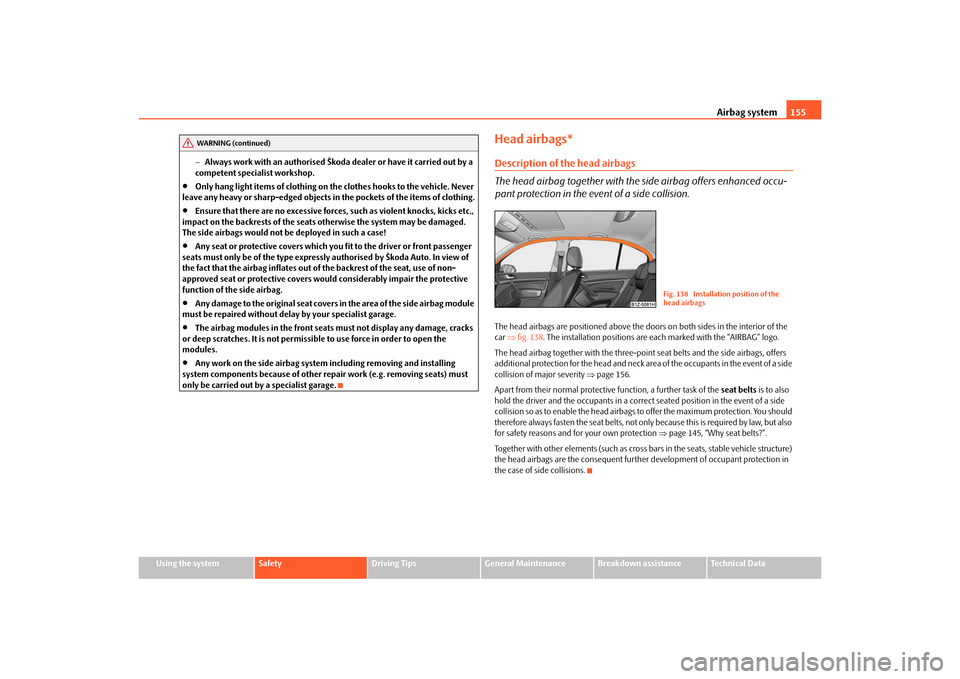
pant protection in the event of a side collision.The head airbags are positioned above the door s on both sides in the interior of the
car fig. 138 . The installation positions are each marked with the “AIRBAG” logo.
The head airbag together with the three-poin t seat belts and the side airbags, offers
additional protection for the head and neck ar ea of the occupants in the event of a side
collision of major severity page 156.
Apart from their normal protective function, a further task of the seat belts is to also
hold the driver and the occupants in a correct seated position in the event of a side
collision so as to enable the head airbags to offer the maximum protection. You should
therefore always fasten the seat belts, not only because this is required by law, but also
for safety reasons and for your own protection page 145, “Why seat belts?”.
Together with other elements (such as cross bars in the seats, stable vehicle structure)
the head airbags are the consequent further development of occupant protection in
the case of side collisions.
WARNING (continued)
Fig. 138 Installation position of the
head airbags
s43s.1.book Page 155 Thursday, May 13, 2010 1:21 PM
Page 157 of 275

Airbag system
156
Function of the head airbags
The risk of injury to the head and neck area is reduced in the event of a
side collision by fully inflated head airbags.In the case of a side collision the head airbag is deployed together with the relevant
side airbag fig. 139 and the belt tensioner on the side of the car on which the acci-
dent occurs.
If the system is deployed, the airbags are filled with propellant gas and extend over the
entire area of the side wind ow including the door pillar fig. 139 .
The protection offered by the head airbags is thus available simultaneously both to the
front occupants of the car seated on the side on which the accident occurs, as well as
to the rear occupants. Any impact of the head against parts of the interior or objects
outside of the car, is cushioned by the in flated head airbag. The reduction in any
impact to the head and the resultant minimi zing of any movements of the head addi-
tionally reduce the risk of injuries to the neck area. The head airbag also offers addi-
tional protection in the case of an offset impact by covering the front door pillar.
In certain accident situations, the front, side and head airbag are simultaneously
deployed.
The airbags inflate in fractions of a second an d at a high speed in order to be able to
offer that additional protection in the even t of an accident. A grey white, non harmful
gas is released when airbag is inflated. This is perfectly normal and is not an indication
of a fire in the vehicle.
Important safety information on the head airbag
Correct use of the airbag system cons iderably reduces the risk of injury!
WARNING
It is essential to always switch off page 157, “Deactivating an airbag” the
front passenger airbag when attaching a child safety seat on the front
passenger seat where the child is seated with its back facing in direction of
travel (in some countries also when the chil d is facing the direction of travel). If
this is not done, there is a risk of the ch ild suffering severe or even fatal injuries
if the front passenger airbag is deploy ed. In certain countries national legal
provisions also require that the side or head passenger airbags be deactivated.
When transporting a child on the front passenger seat, please comply with the
appropriate national regulations regarding the use of child safety seats.
There must not be any objects in the deployment area of the head airbags
which might prevent the airbags from inflating properly.
Only hang light items of clothing on the clothes hooks to the vehicle. Never
leave any heavy or sharp-edged objects in the pockets of the items of clothing.
In addition, it is not permitted to use clothes hangers for hanging up items of
clothing.
The airbag control unit operates to gether with the sensors, which are
attached in the front doors. For this reason no adjustments must be carried out
at the doors as well as at the door panels (for example additional installation of
loudspeakers). Resulting damages can have a negative affect on the operation
of the airbag system. All work on the front doors and their panels must only be
carried out by a specialist garage.
There must not be any other persons (e.g. children) or animals between the
car occupant and the deployment area of the head airbag. In addition, none of
the occupants should lean their head out of the window when driving, or
extend their arms and hands out of the window.
The sun visors must not be swivelled to the side windows into the deploy-
ment area of the head airbags if any objects, such as ball-point pens etc. are
attached to them. This might result in injuries to the occupants if the head
airbag is deployed.
Installing impermissible accessories in the area of the head airbags may
considerably impair the protection offered by the head airbag in the event of it
Fig. 139 Inflated head airbag
s43s.1.book Page 156 Thursday, May 13, 2010 1:21 PM
Page 158 of 275

Airbag system157
Using the system
Safety
Driving Tips
General Maintenance
Breakdown assistance
Technical Data
being deployed. When the deployed head airbag is inflated, parts of the acces-
sories fitted may in certain circumstances be thrown into the interior of the car
and cause injuries to the occupants
page 214, “Accessories, changes and
replacement of parts”.
Any work on the head airbag system including installing and removing
system components because of other repair work (e.g. removing headliner)
must only be carried out by a specialist garage.
Deactivating an airbagDeactivating airbags
If any airbags have been deactivated, switch them on again as soon as
possible so that they are able to again provide their proper protection.There is the technical means installed within your vehicle to switch off the front, side*
or head* airbag (take out of commission).
This is why you should have the deactivation of the airbags carried out by a specialist
garage.
On vehicles equipped with the switch for de activation of the airbags, you can deacti-
vate the front passenger airbag by means of this switch page 157.
Deactivation of airbags is envisaged only for particular instances, such as if:
you must in exceptional cases use a child seat on the front passenger seat where
the child has its back to the direction of tr avel of the vehicle (in some countries this
must be in the direction of travel due to other legal regulations applying) page 159,
“Important safety information regarding the use of child safety seats”,
you are not able to maintain the distan ce of at least 25 cm between middle of
steering wheel and chest, despite the driver seat being correctly adjusted,
special attachments are required in the ar ea of the steering wheel because of a
physical disability,
you have installed other seats (e.g. orthopaedic seats without side airbags). Monitoring the airbag system
The functionality of the airbag system is al
so monitored electronically when one airbag
has been switched off.
If the airbag was switched off using diagnostic equipment:
The warning light for the airbag system li ghts up for 4 seconds after switching on
the ignition and then flashes for 12 seconds afterwards in 2 second intervals.
The following situation applies if the ai rbag has been switched off using the
switch for the airbag* in the storage compartment:
the airbag indicator light in the instrume nt cluster comes on for about 4 seconds
each time the igniti on is switched on,
if the airbags are switched off, this is in dicated in the middle of the dash panel by
the lighting up of the indicator light
fig. 140 - right.
Note
Your authorised Škoda Service Partner will be able to advise you whether national
legislation in your country allows airbags in your vehicle to be deactivated, and which
ones.Switch for the front passenger airbag*Fig. 140 Storage compartment: Switch for the front passenger airbag / indicator light for a
switched off front seat passenger airbagThe front passenger airbag is deactivated with the switch.
WARNING (continued)
s43s.1.book Page 157 Thursday, May 13, 2010 1:21 PM
Page 159 of 275

Airbag system
158
Deactivating an airbag
– Switch off the ignition.
– Turn the slot of the airbag switch using the key in the position ( OFF) fig. 140 .
– Check whether the indicator light
in the middle of the dash panel lights
up when the ignition is switched on fig. 140 - right.
Switching on an airbag– Switch off the ignition.
– Turn the slot of the airbag switch using the key in the position ( ON) fig. 140 .
– Check whether the airbag indicator light
in the middle of the dash panel
lights up when the ignition is switched on fig. 140 - right.
The airbag should only be switched off under exceptional circumstances page 157.
Indicator light
(airbag switched off)
The airbag indicator ligh t is located in the middle of the dash panel fig. 140 - right.
If the front passenger airbag is switched off, the warning light comes on about 4
seconds after the ignition is switched on.
There is a system fault present in the airbag switch off if the indicator light
flashes. Please have the car inspected immediately by a specialist garage.
WARNING
The driver is responsible for whether the airbag is switched on or switched
off.
Only switch off the airbag when the ignition is switched off! Otherwise a
fault can occur in the system for the airbag deactivation.
If the warning light
(airbag switched off) flashes:
Front passenger airbag is not deployed in the event of an accident!
It is also important to have the system inspected without delay by a
specialist garage.
A2A1
s43s.1.book Page 158 Thursday, May 13, 2010 1:21 PM