2010 Seat Leon 5D phone
[x] Cancel search: phonePage 98 of 309

Steering wheel controls
96Radio navigation systemSteering wheel Audio + Telephone controls
Fig. 55 Controls on the
steering wheel
Fig. 56 Steering wheel
controls (depending on
version of model)
Button
Radio
CD/MP3/USB*/iPod*
AUX
NAVIGATOR
TELEPHONE
Volume up
Vol um e up
Volu m e up
Volu m e up
Volu m e up
Vol u m e dow n
Volume down
Vol um e d own
Vol um e d own
Vol um e d own
Search for next station
Next track
Hold down: Fast forward
No specific function
No specific function
No specific function
Search for last station
Previous track
Hold down: Rewind
No specific function
No specific function
No specific function
AAABACAD
Leon_EN.book Seite 96 Mittwoch, 1. September 2010 6:16 18
Page 99 of 309

Steering wheel controls97
Safety First
Operating Instructions
Practical Tips
Technical Specifications
No specific function
No specific function
No specific function
No specific function
Accept incoming call
(press briefly)
Reject incoming call
(press and hold down)
End ongoing call /estab-
lish call (press briefly)
Switch to private mode (press and hold down)
Redial last number (press
and hold down)
a)
Activation of voice recogni-tion for mobile telephone
connected to the system (if
the telephone has this func- tion) / MUTE
Activation of voice recognition for mobile telephone con-
nected to the system (if the tel-
ephone has this function) / MUTE
Activation of voice recog-nition for mobile tele-
phone connected to the
system (if the telephone
has this function) / MUTE
Activation of voice recog- nition for mobile tele-
phone connected to the
system (if the telephone
has this function) / MUTE
Activation of voice recog- nition for mobile tele-
phone connected to the
system (if the telephone
has this function) / MUTE
Next preset
b)
Next track
b)
No specific function
Operates on instrument
panel
Operates on instrument
panel / No specific func-
tion
Previous preset
b)
Previous track
b)
No specific function
Operates on instrument panel
Operates on instrument
panel / No specific func- tion
Change menu on instrument panel
Change menu on instrument panel
Change menu on instru-ment panel
No specific function
Change menu on instru-ment panel
AEAFAGAHAI
Leon_EN.book Seite 97 Mittwoch, 1. September 2010 6:16 18
Page 214 of 309

Accessories, parts replacement and modifications
212Accessories, parts replacement and modificationsAccessories and spare partsAlways consult an Authorised Service Centre before
purchasing accessories and parts.Your vehicle is designed to offer a high standard of active and passive safety.
Before purchasing accessories and parts, and before making technical
changes to your vehicle, we recommend you to consult your Authorised
Service Centre.
SEAT dealerships will be happy to provide you with the latest information
about the use, legal requirements and recommendations from the manufac-
turer regarding accessories and parts.
We recommend you use only SEAT Approved Accessories
® and SEAT
Approved Spare Parts
®. This way, SEAT can guarantee that the product in
question is suitable, reliable and safe. SEAT Authorised Service Centres have
the necessary experience and facilities to ensure that parts are correctly and
professionally installed.
Despite a continuous observation of the market, SEAT is not able to assess
the reliability, safety and suitability of those parts SEAT has not approved. For
this reason, SEAT cannot assume responsibility for any non-genuine parts
used, even if these parts have been approved by an official testing agency or
are covered by an official approval certificate.
Any equipment subsequently installed which has a direct effect on the
driver’s control of the vehicle (e.g. cruise control system or electronically-
controlled suspension) must be approved by SEAT and bear the e mark (the
European Union’s authorisation symbol). Any
additional electrical components that do not affect the control of the
vehicle itself (e.g. refrigerator box, laptop, ventilator fan, etc.), must bear the
CE mark (European Union manufacturer conformity declaration).
WARNING
Accessories, for example telephone holders or cup holders, should never
be fitted on the covers, or within the working range, of the airbags. Other-
wise, there is a danger of injury if the airbag is triggered in an accident.Technical modificationsModifications must always be carried out according to our
specifications.Unauthorised modifications to the electronic components or software in the
vehicle may cause malfunctions. Due to the way the electronic components
are linked together in networks, other indirect systems may be affected by the
faults. This can seriously impair safety, lead to excessive wear of compo-
nents, and also invalidate your vehicle registration documents.
SEAT Authorised Service Centres cannot be held liable for any damage
caused by modifications and/or work incorrectly performed.
For this reason, we recommend that all work should be performed by an
Authorised Service Centre using Genuine SEAT
® approved parts and acces-
sories .
Leon_EN.book Seite 212 Mittwoch, 1. September 2010 6:16 18
Page 215 of 309

Accessories, parts replacement and modifications213
Safety First
Operating Instructions
Practical Tips
Technical Specifications
WARNING
Incorrectly performed modifications or other kind of work on your vehicle
can lead to malfunctions and cause accidents.Roof aerial*The vehicle may be fitted with a foldable* and anti-theft* aerial that may be
positioned parallel to the roof.
To f o l d d o w n
Unscrew the rod, position parallel to the roof and tighten once again.
To return to working position
Continue in the reverse order to the previous instruction.
Caution
If an automatic car wash tunnel is used, before entering the tunnel, put the
aerial down parallel to the roof and do not tighten to avoid damage.Mobile phones and two-way radiosFirst consult your Authorised Service Centre if you wish to use a mobile tele-
phone or a two-way radio with a transmitting power output in excess of
10watts. Here you will receive information concerning the technical possibil-
ities for retrofitting this equipment.
Mobile telephones and two-way radios should be only fitted by a specialised
workshop, for example an Authorised Service Centre.
WARNING
•Always concentrate primarily on driving. If you are distracted while
driving you could have an accident.•Never attach the telephone mountings to the surfaces covering the
airbag units or within the range of the airbags. There is a high danger of
injury if the airbag is triggered.Note
Please observe the operating instructions of your mobile telephone / two-way
radio.
Leon_EN.book Seite 213 Mittwoch, 1. September 2010 6:16 18
Page 219 of 309

Checking and refilling levels217
Safety First
Operating Instructions
Practical Tips
Technical Specifications
– Screw on the cap of the gas filler neck .
– Close the tank flap.When the hose is removed from the tank, a small amount of LPG may spill out
⇒.
The LPG tank ⇒fig. 140 in the spare wheel well has a capacity of 39 litres. If
the outside temperatures are very low, it may not be possible to completely
fill the LPG tank.
Pump attachments
There are a variety of types of LPG pump, and the methods of use may vary.
Therefore, let the pump operator fill the tank when refuelling for the first time
or fill from another pump.
Noises when refuelling with LPG
When refuelling with LPG, noises may be heard. These noises are insignifi-
cant.
WARNING
Failure to refuel or handle LPG in the correct way could result in a fire, cause
an explosion or lead to injuries.•LPG is a highly explosive and inflammable substance. It may cause
severe burns and other injury.•Switch off the engine before refuelling.•Always disconnect mobile phones and any other radiophony appli-
ances, as electromagnetic waves may produce sparks and cause a fire.•Do not remain in the vehicle while refuelling. If it is absolutely neces-
sary to enter the vehicle, close the door and touch a metal surface before
touching the attachment again. This will prevent the generation of static
electricity and any possible fires while refuelling.
•Small quantities of LPG may leak out after refuelling. If LPG comes into
contact with skin, there is a risk of freezing.•Do not smoke and always keep bare flames away from the tank during
refuelling. Failure to do so may lead to an explosion.
A1
WARNING (continued)
Leon_EN.book Seite 217 Mittwoch, 1. September 2010 6:16 18
Page 259 of 309

If and when257
Safety First
Operating Instructions
Practical Tips
Technical Specifications
Fuses on left side of dash panelFusesNumber
Consumer
Amps
1
Diagnosis Switchboard/ Instrument lighting/
Headlight control switchboard/ Flow meter/
Heated wipers/ Engine management/ AFS Head-
lamps
10
2
Engine control unit/ ABS-ESP switchboard/ Auto-
matic gearbox/ Instrument panel/ Trailer switch-
board/ Light switch / Brake sensor/ Power
steering/ Right and left headlights
10
3
Airbag
5
4
Heating/ Reverse switch/ ASR-ESP switch/ Elec-
trochrome mirror/ Park Pilot/ Oil level sensor
5
5
Right xenon headlight
10
6
Left xenon headlight
10
7
Vaca n t
8
Trailer hook pre-installation assistant
5
9
Vaca n t
10
Vaca n t
11
Vaca n t
12
Central locking
15
13
Diagnosis/ Light switch/ Rain sensor/ Heated rear
window
10
14
Automatic gearbox / Heating/ Automatic gearbox
lever
10
15
Vaca n t
16
Vaca n t
17
Alarm
5
18
Kombi / levers with START STOP
5
19
Fog light aid
20
20
Navigation/radio with START STOP
15
21
Engine management
10
22
Fan switch
40
23
Electric windows (front)
30
24
Body Control Unit
20
25
Heated rear window
25
26
Rear electric windows
30
27
Engine (fuel control unit/pump relay)
15
28
Convenience controls
30
29
Vaca n t
30
Vaca n t
31
Vacu um pu m p
20
32
Vaca n t
33
Sunroof
25
34
Comfort switchboard/Central locking system
25
35
Vaca n t
36
Headlight washer system
20
37
Heated seats
30
38
Engine management
10
39
Telephone with START STOP
10
Number
Consumer
Amps
Leon_EN.book Seite 257 Mittwoch, 1. September 2010 6:16 18
Page 260 of 309
If and when
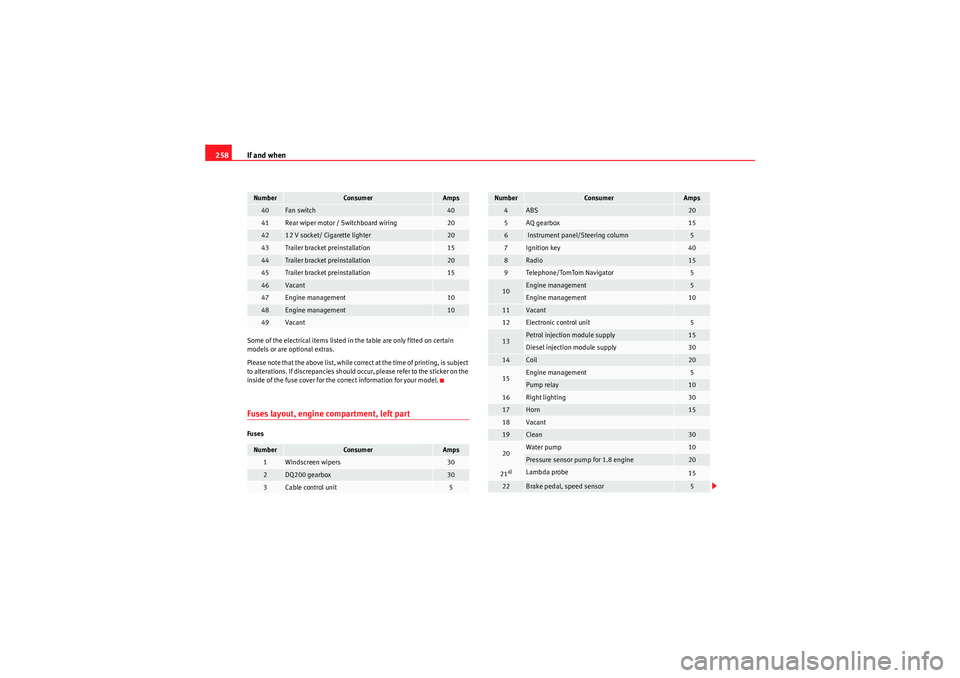
258Some of the electrical items listed in the table are only fitted on certain
models or are optional extras.
Please note that the above list, while correct at the time of printing, is subject
to alterations. If discrepancies should occur, please refer to the sticker on the
inside of the fuse cover for the correct information for your model.Fuses layout, engine compartment, left partFuses
40
Fan switch
40
41
Rear wiper motor / Switchboard wiring
20
42
12 V socket/ Cigarette lighter
20
43
Trailer bracket preinstallation
15
44
Trailer bracket preinstallation
20
45
Trailer bracket preinstallation
15
46
Vacant
47
Engine management
10
48
Engine management
10
49
Vacant
Number
Consumer
Amps
1
Windscreen wipers
30
2
DQ200 gearbox
30
3
Cable control unit
5
Number
Consumer
Amps
4
ABS
20
5
AQ gearbox
15
6
Instrument panel/Steering column
5
7
Ignition key
40
8
Radio
15
9
Telephone/TomTom Navigator
5
10
Engine management
5
Engine management
10
11
Vacant
12
Electronic control unit
5
13
Petrol injection module supply
15
Diesel injection module supply
30
14
Coil
20
15
Engine management
5
Pump relay
10
16
Right lighting
30
17
Horn
15
18
Vacant
19
Clean
30
20
Water pump
10
Pressure sensor pump for 1.8 engine
20
21a)
Lambda probe
15
22
Brake pedal, speed sensor
5
Number
Consumer
Amps
Leon_EN.book Seite 258 Mittwoch, 1. September 2010 6:16 18
Page 303 of 309

Index301
Headlights
Driving abroad . . . . . . . . . . . . . . . . . . . . . . . 198
Fog lights . . . . . . . . . . . . . . . . . . . . . . . . . . . 117
Headlight washer system* . . . . . . . . . . . . . 131
Heated front seats . . . . . . . . . . . . . . . . . . . . . . . 139
Heated rear window 2C-Climatronic . . . . . . . . . . . . . . . . . . . . . . . 155
Heating element wires . . . . . . . . . . . . . . . . 207
Heating . . . . . . . . . . . . . . . . . . . . . . . . . . . . . . . . 148
High pressure cleaners . . . . . . . . . . . . . . . . . . . 205
Hill-start aid . . . . . . . . . . . . . . . . . . . . . . . . . . . . 177
Horn . . . . . . . . . . . . . . . . . . . . . . . . . . . . . . . . . . . 55
How to jump start description . . . . . . . . . . . . . 268
Hydraulic Brake Assist . . . . . . . . . . . . . . . . . . . . 185IIdentification number . . . . . . . . . . . . . . . . . . . . 274
Identification plate . . . . . . . . . . . . . . . . . . . . . . 274
Ignition key . . . . . . . . . . . . . . . . . . . . . . . . . . . . 162
Ignition lock . . . . . . . . . . . . . . . . . . . . . . . . . . . . 162
Information in the multifunction display Memory displays . . . . . . . . . . . . . . . . . . . . . . 64
Information messages in the display . . . . . . . . . 66
Instrument and switch lighting . . . . . . . . . . . . . 121
Instrument lighting . . . . . . . . . . . . . . . . . . . . . . . 55
Instrument panel menus Configuration menu . . . . . . . . . . . . . . . . . . . . 74
Example of menu use . . . . . . . . . . . . . . . . . . 68
Lights and visibility menu . . . . . . . . . . . . . . . 76 Main menu . . . . . . . . . . . . . . . . . . . . . . . . . . . 68
Vehicle status menu . . . . . . . . . . . . . . . . . . . 73
Instruments . . . . . . . . . . . . . . . . . . . . . . . . . . . . . 57
Interior lights . . . . . . . . . . . . . . . . . . . . . . . . . . . 125
Interior mirror . . . . . . . . . . . . . . . . . . . . . . . . . . . 131
ISOFIX system . . . . . . . . . . . . . . . . . . . . . . . . . . . 52
JJump leads . . . . . . . . . . . . . . . . . . . . . . . . . . . . . 267
Jump-starting . . . . . . . . . . . . . . . . . . . . . . . . . . . 267KKeys . . . . . . . . . . . . . . . . . . . . . . . . . . . . . . . . . . 105LLeather cleaning . . . . . . . . . . . . . . . . . . . . . . . . 210
Lights . . . . . . . . . . . . . . . . . . . . . . . . . . . . . . . . . 117
Load compartment in the luggage compartment See Loading the luggage compartment . . . . 16
Loading the luggage compartment . . . . . . . . . . 16
Locker . . . . . . . . . . . . . . . . . . . . . . . . . . . . . . . . . 141
Locks . . . . . . . . . . . . . . . . . . . . . . . . . . . . . . . . . 207
LPG . . . . . . . . . . . . . . . . . . . . . . . . . . . 60, 166, 216
LPG system Driving . . . . . . . . . . . . . . . . . . . . . . . . . . . . . 166
Filler neck adapter . . . . . . . . . . . . . . . . . . . . 218
Level indicator . . . . . . . . . . . . . . . . . . . . . . . . 60
Refuelling . . . . . . . . . . . . . . . . . . . . . . . . . . . 216 Luggage compartment . . . . . . . . . . . . . . . . . . . 146
See also Loading the luggage compartment 16
MMain beam . . . . . . . . . . . . . . . . . . . . . . . . 117, 124
Main beam headlights
Indicator lamp . . . . . . . . . . . . . . . . . . . . . . . . 84
Main headlight bulbs . . . . . . . . . . . . . . . . . . . . 260
Maintenance Airbags . . . . . . . . . . . . . . . . . . . . . . . . . . . . . . 32
Maintenance and cleaning . . . . . . . . . . . . . . . . 203
Manual gearbox . . . . . . . . . . . . . . . . . . . . . . . . . 170
Manual mode 2C-Climatronic . . . . . . . . . . . . . . . . . . . . . . . 157
MEDIA-IN connector . . . . . . . . . . . . . . . . . . . . . . 145
MFI . . . . . . . . . . . . . . . . . . . . . . . . . . . . . . . . . . . . 63
Mirrors Exterior mirrors . . . . . . . . . . . . . . . . . . . . . . 132
Interior mirror . . . . . . . . . . . . . . . . . . . . . . . . 131
Vanity mirrors . . . . . . . . . . . . . . . . . . . . . . . 127
Mobile phones and two-way radios . . . . . . . . . 213
Multifunction display . . . . . . . . . . . . . . . . . . . . . 63NNumber of seats . . . . . . . . . . . . . . . . . . . . . . . . . 19OObservations . . . . . . . . . . . . . . . . . . . . . . . . . . . 198
Leon_EN.book Seite 301 Mittwoch, 1. September 2010 6:16 18