2010 SATURN AURA ignition
[x] Cancel search: ignitionPage 135 of 428

The PUSH PARK PEDAL message will also appear in
the Driver Information Center (DIC) to remind you
to release the parking brake. SeeDIC Warnings and
Messages on page 4-42.
Notice:Driving with the parking brake on can
overheat the brake system and cause premature
wear or damage to brake system parts. Make sure
that the parking brake is fully released and the brake
warning light is off before driving.
If you are towing a trailer and are parking on a hill, see
Towing a Trailer on page 5-27.Shifting Into Park
{WARNING:
It can be dangerous to get out of the vehicle if the
shift lever is not fully in P (Park) with the parking
brake firmly set. The vehicle can roll. If you have
left the engine running, the vehicle can move
suddenly. You or others could be injured. To be
sure the vehicle will not move, even when you are
on fairly level ground, use the steps that follow. If
you are pulling a trailer, seeTowing a Trailer on
page 5-27.
1. Hold the brake pedal down and set the parking
brake. SeeParking Brake on page 3-26for more
information.
2. Move the shift lever into P (Park) by holding in the
button on the shift lever and pushing the shift lever
all the way toward the front of the vehicle.
3. Turn the ignition key to LOCK/OFF.
4. Remove the key and take it with you. If you can
leave the vehicle with the ignition key in your
hand, the vehicle is in P (Park).
3-27
ProCarManuals.com
Page 136 of 428

Leaving the Vehicle with the Engine
Running
{WARNING:
It can be dangerous to leave the vehicle with the
engine running. The vehicle could move suddenly
if the shift lever is not fully in P (Park) with the
parking brake firmly set. And, if you leave the
vehicle with the engine running, it could overheat
and even catch fire. You or others could be
injured. Do not leave the vehicle with the engine
running.
If you have to leave the vehicle with the engine running,
be sure the vehicle is in P (Park) and the parking
brake is firmly set before you leave it. After you have
moved the shift lever into P (Park), hold the regular
brake pedal down. Then, see if you can move the shift
lever away from P (Park) without first pushing the
button.
If you can, it means that the shift lever was not fully
locked in P (Park).
Torque Lock
Torque lock is when the weight of the vehicle puts too
much force on the parking pawl in the transmission.
This happens when parking on a hill and shifting
the transmission into P (Park) is not done properly and
then it is difficult to shift out of P (Park). To prevent
torque lock, set the parking brake and then shift
into P (Park). To find out how, see “Shifting Into Park”
listed previously.
If torque lock does occur, your vehicle may need to be
pushed uphill by another vehicle to relieve the parking
pawl pressure, so you can shift out of P (Park).
Shifting Out of Park
The vehicle is equipped with an electronic shift lock
release system. The shift lock release is designed to:
•Prevent ignition key removal unless the shift
lever is in P (Park) with the shift lever button fully
released, and
•Prevent movement of the shift lever out of P (Park),
unless the ignition is in ON/RUN or
ACC/ACCESSORY and the regular brake pedal is
applied.
The shift lock release is always functional except in
the case of an uncharged or low voltage (less than
9 volt) battery.
3-28
ProCarManuals.com
Page 141 of 428

Compass
Compass Operation
There is a compass display in the upper right corner of
the mirror.
Press
Oto turn the compass display on or off.
When the ignition and the compass feature are on, the
compass displays the current compass direction,
after a few seconds.
Compass Calibration
The compass can be calibrated by driving the vehicle in
circles at 5 mph (8 km) or less until the display reads
a direction.
If after a few seconds the display does not show a
compass direction, (N for North for example), there may
be a strong magnetic field interfering with the compass.
Interference can be caused by a magnetic antenna
mount, note pad holder, or similar object. If the letter C
appears in the compass window, the compass may
need to be reset or calibrated.
Compass Variance
The mirror is set to zone eight. If you do not live in zone
eight or drive out of the area, the compass variance
needs to be changed to the appropriate zone.To adjust for compass variance:
1. Find your current location and variance zone
number on the following zone map.
2. Press and hold
Ountil the zone number displays.
The number shown is the current zone number.
3. Scroll through the zone numbers that appear in the
window on the mirror by pressing the
Obutton.
Once you find your zone number, release the
button. After about four seconds, the mirror returns
3-33
ProCarManuals.com
Page 150 of 428
Convenience Net
Use the convenience net, located in the rear, to store
small loads as far forward as possible. The net
should not be used to store heavy loads.
Sunroof
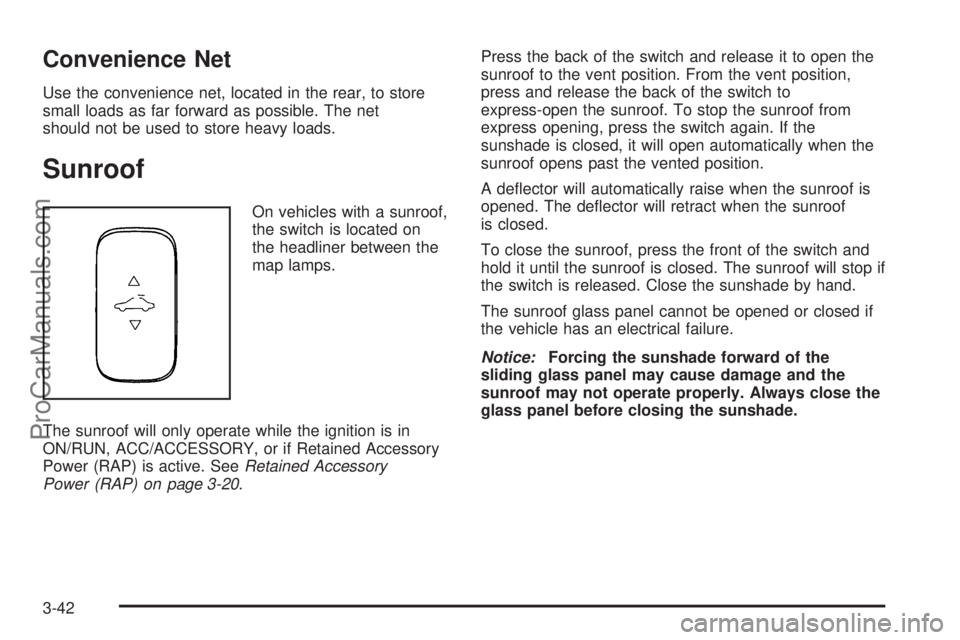
On vehicles with a sunroof,
the switch is located on
the headliner between the
map lamps.
The sunroof will only operate while the ignition is in
ON/RUN, ACC/ACCESSORY, or if Retained Accessory
Power (RAP) is active. SeeRetained Accessory
Power (RAP) on page 3-20.Press the back of the switch and release it to open the
sunroof to the vent position. From the vent position,
press and release the back of the switch to
express-open the sunroof. To stop the sunroof from
express opening, press the switch again. If the
sunshade is closed, it will open automatically when the
sunroof opens past the vented position.
A deflector will automatically raise when the sunroof is
opened. The deflector will retract when the sunroof
is closed.
To close the sunroof, press the front of the switch and
hold it until the sunroof is closed. The sunroof will stop if
the switch is released. Close the sunshade by hand.
The sunroof glass panel cannot be opened or closed if
the vehicle has an electrical failure.
Notice:Forcing the sunshade forward of the
sliding glass panel may cause damage and the
sunroof may not operate properly. Always close the
glass panel before closing the sunshade.
3-42
ProCarManuals.com
Page 157 of 428

Headlamp High/Low-Beam Changer
To change the headlamps from low beam to high
beam, push the turn signal/multifunction lever away
from you.
This instrument panel cluster light
3comes on if the
high beam lamps are turned on while the ignition is
in ON/RUN.
To change the headlamps from high beam to low beam,
pull the turn signal lever toward you.
Flash-to-Pass
This feature lets the high-beam headlamps be used to
signal a driver in front of you that you want to pass.
Pull the turn signal/multifunction lever toward you until
the high-beam headlamps come on, then release
the lever to turn them off.
Windshield Wipers
The windshield wiper lever is on the right side of the
steering column.
Move the lever to control the windshield wipers.
9(Off):Turns the windshield wipers off.
&(Intermittent; Speed Sensitive Wipers):For
intermittent or speed sensitive operation. The amount of
delay time varies between wiping cycles due to the
delay setting selected or the speed of the vehicle. As
vehicle speed is increased or decreased, the wiper
interval also increases or decreases.
4-5
ProCarManuals.com
Page 161 of 428

Reducing Speed While Using Cruise
Control
If the cruise control system is already engaged:
•Press and hold the SET−until the desired lower
speed is reached, then release it.
•To slow down in very small amounts, briefly push
the SET−. Each time this is done, the vehicle
goes about 1.6 km/h (1 mph) slower.
Passing Another Vehicle While Using
Cruise Control
Use the accelerator pedal to increase the vehicle’s
speed. When you take your foot off the pedal, the
vehicle slows down to the previously set cruise
control speed.
Using Cruise Control on Hills
How well the cruise control works on hills depends upon
the vehicle’s speed, load, and the steepness of the
hills. When going up steep hills, you might have to step
on the accelerator pedal to maintain the vehicle’s
speed. When going downhill, you might have to brake
or shift to a lower gear to keep the vehicle at a
lower speed. When the brakes are applied this ends the
cruise control.
Ending Cruise Control
There are two ways to disengage the cruise control:
•Step lightly on the brake pedal; when cruise control
disengages, the cruise symbol in the instrument
panel cluster goes out.
•Press theIbutton, to turn off the cruise control
system.
Erasing Speed Memory
The cruise control set speed memory is erased when
the cruise control or the ignition is turned off.
4-9
ProCarManuals.com
Page 162 of 428

Headlamps
The band on the lever located on the left side of the
steering column, operates the exterior lamps.
The exterior lamp control has the following four
positions:
2(Headlamps):Turns on the headlamps, parking
lamps, and taillamps.
;(Parking Lamps):Turns on the parking lamps and
taillamps only.
AUTO (Automatic Headlamp System):Automatically
turns on the Daytime Running Lamps during daytime,
and the headlamps, parking lamps, and taillamps
at night.
P(Off/On):Turn the band to this position to turn on
the Automatic Headlamp System. In Canada, this
position only works when a vehicle is in the P (Park)
position.
To turn on the Automatic Headlamp System, turn the
switch to off/on. To turn them off, turn the switch to off/on
again. This is a momentary control switch that springs
back when released. The Automatic Headlamp System
always turns on at the beginning of an ignition cycle.
Headlamps on Reminder
If the driver’s door is opened and the ignition is turned
off while leaving the lamps on, a warning chime will
sound.
Headlamps Off in Park
This feature works when the ignition is in the ON/RUN
position and it is dark outside. To turn the headlamps
off when it is dark outside but keep other exterior lights
on, turn the exterior lamp control to the parking lamp
position.
To turn on the headlamps along with the other lamps
when it is dark outside, turn the exterior lamp control to
the AUTO or headlamp position.
This function does not work for vehicles first sold in
Canada.
4-10
ProCarManuals.com
Page 163 of 428

Delayed Headlamps
The delayed headlamps feature keeps the headlamps
on for 20 seconds after the key is turned to LOCK/OFF,
then the headlamps automatically turn off.
To override the 20 second delayed headlamp feature
while it is active turn the turn signal/multifunction
lever up one position and then back to AUTO.
Daytime Running Lamps (DRL)
Daytime Running Lamps (DRL) can make it easier for
others to see the front of your vehicle during the
day. Fully functional DRL are required on all vehicles
first sold in Canada. The vehicle has a light sensor
on top of the instrument panel that controls the DRL.
Do not cover this sensor or the head lamps will be
on when they are not needed.
The DRL system makes the low-beam headlamps come
on at a reduced brightness when the following
conditions are met:
•The ignition is on.
•The exterior lamps control is in AUTO.
•The exterior lamps control is in the parking lamps
only position (This applies only to vehicles that
are first sold in Canada).
•The light sensor detects daytime light.
•The parking brake is released or the vehicle is not
in P (Park).
When the DRL system is on, the taillamps, sidemarker
lamps, parking lamps, and instrument panel lights
are not on unless you turn the exterior lamps control to
the parking lamp position.
The regular headlamp system should be turned on
when they are needed.
Automatic Headlamp System
When it is dark enough outside, the automatic headlamp
system turns on the headlamps at the normal brightness
along with other lamps such as the taillamps,
sidemarker, parking lamps, and the instrument panel
lights. The radio lights will also be dim.
The vehicle has a light sensor on top of the instrument
panel that controls the automatic headlamp system.
Do not cover the sensor or the automatic headlamp
system will turn on when it is not needed.
There is a delay in the transition between the daytime
and nighttime operation of the DRL and the automatic
headlamp systems so that driving under bridges or
bright overhead street lights does not affect the system.
4-11
ProCarManuals.com