2010 SATURN AURA turn signal
[x] Cancel search: turn signalPage 235 of 428

c(End):Press to reject an incoming call, or end a
current call.
bg(Mute / Voice Recognition):Press to silence
the vehicle speakers only. Press again to turn the
sound on.
For vehicles with Bluetooth
®or OnStar®systems press
and hold
bgfor longer than two seconds to interact
with those systems. SeeBluetooth®on page 4-68
and the OnStar Owner’s Guide for more information.
Radio Reception
Frequency interference and static can occur during
normal radio reception if items such as cell phone
chargers, vehicle convenience accessories, and external
electronic devices are plugged into the accessory
power outlet. If there is interference or static, unplug the
item from the accessory power outlet.
AM
The range for most AM stations is greater than for FM,
especially at night. The longer range can cause
station frequencies to interfere with each other. For
better radio reception, most AM radio stations boost the
power levels during the day, and then reduce these
levels during the night. Static can also occur when thingslike storms and power lines interfere with radio
reception. When this happens, try reducing the treble on
the radio.
FM Stereo
FM signals only reach about 10 to 40 miles
(16 to 65 km). Although the radio has a built-in electronic
circuit that automatically works to reduce interference,
some static can occur, especially around tall buildings or
hills, causing the sound to fade in and out.
XM™ Satellite Radio Service
XM Satellite Radio Service gives digital radio reception
from coast-to-coast in the 48 contiguous United
States, and in Canada. Just as with FM, tall buildings or
hills can interfere with satellite radio signals, causing
the sound to fade in and out. In addition, traveling
or standing under heavy foliage, bridges, garages, or
tunnels may cause loss of the XM signal for a period
of time.
Cellular Phone Usage
Cellular phone usage may cause interference with the
vehicle’s radio. This interference may occur when
making or receiving phone calls, charging the phone’s
battery, or simply having the phone on. This interference
causes an increased level of static while listening to
the radio. If static is received while listening to the radio,
unplug the cellular phone and turn it off.
4-83
ProCarManuals.com
Page 267 of 428

Driving with a Trailer
Towing a trailer requires a certain amount of experience.
Get to know the rig before setting out for the open
road. Get acquainted with the feel of handling and
braking with the added weight of the trailer. And always
keep in mind that the vehicle you are driving is now
longer and not as responsive as the vehicle is by itself.
Before starting, check all trailer hitch parts and
attachments, safety chains, electrical connectors, lamps,
tires and mirror adjustments. If the trailer has electric
brakes, start the vehicle and trailer moving and
then apply the trailer brake controller by hand to be sure
the brakes are working. This checks the electrical
connection at the same time.
During the trip, check occasionally to be sure that the
load is secure, and that the lamps and any trailer brakes
are still working.
Following Distance
Stay at least twice as far behind the vehicle ahead as
you would when driving the vehicle without a trailer. This
can help to avoid situations that require heavy braking
and sudden turns.
Passing
More passing distance is needed when towing a trailer.
Because the rig is longer, it is necessary to go much
farther beyond the passed vehicle before returning to
the lane.
Backing Up
Hold the bottom of the steering wheel with one hand.
Then, to move the trailer to the left, move that hand
to the left. To move the trailer to the right, move your
hand to the right. Always back up slowly and, if possible,
have someone guide you.
Making Turns
Notice:Making very sharp turns while trailering
could cause the trailer to come in contact with the
vehicle. The vehicle could be damaged. Avoid
making very sharp turns while trailering.
When turning with a trailer, make wider turns than
normal. Do this so the trailer will not strike soft
shoulders, curbs, road signs, trees or other objects.
Avoid jerky or sudden maneuvers. Signal well in
advance.
5-31
ProCarManuals.com
Page 268 of 428

Turn Signals When Towing a Trailer
The arrows on the instrument panel flash whenever
signaling a turn or lane change. Properly hooked up, the
trailer lamps also flash, telling other drivers the vehicle
is turning, changing lanes or stopping.
When towing a trailer, the arrows on the instrument
panel flash for turns even if the bulbs on the trailer are
burned out. For this reason you may think other
drivers are seeing the signal when they are not. It is
important to check occasionally to be sure the
trailer bulbs are still working.
Driving on Grades
Notice:Do not tow on steep continuous grades
exceeding 6 miles (9.6 km). Extended, higher
than normal engine and transmission temperatures
may result and damage the vehicle. Frequent
stops are very important to allow the engine and
transmission to cool.
Reduce speed and shift to a lower gearbeforestarting
down a long or steep downgrade. If the transmission is
not shifted down, the brakes might have to be used so
much that they would get hot and no longer work well.On a long uphill grade, shift down and reduce the
vehicle’s speed to around 45 mph (70 km/h) to reduce
the possibility of the engine and the transmission
overheating. If the engine does overheat, seeEngine
Overheating on page 6-28.
Parking on Hills
{WARNING:
Parking the vehicle on a hill with the trailer
attached can be dangerous. If something goes
wrong, the rig could start to move. People can be
injured, and both the vehicle and the trailer can be
damaged. When possible, always park the rig on a
flat surface.
If parking the rig on a hill:
1. Press the brake pedal, but do not shift into P (Park)
yet. Turn the wheels into the curb if facing downhill
or into traffic if facing uphill.
2. Have someone place chocks under the trailer
wheels.
3. When the wheel chocks are in place, release the
brake pedal until the chocks absorb the load.
5-32
ProCarManuals.com
Page 271 of 428

Service............................................................6-3
Accessories and Modifications..........................6-3
California Proposition 65 Warning.....................6-4
California Perchlorate Materials Requirements.....6-4
Doing Your Own Service Work.........................6-4
Adding Equipment to the Outside of the
Vehicle......................................................6-5
Fuel................................................................6-5
Gasoline Octane............................................6-6
Gasoline Specifications....................................6-6
California Fuel...............................................6-6
Additives.......................................................6-7
Fuel E85 (85% Ethanol)..................................6-8
Fuels in Foreign Countries...............................6-9
Filling the Tank............................................6-10
Filling a Portable Fuel Container.....................6-12
Checking Things Under the Hood....................6-12
Hood Release..............................................6-13
Engine Compartment Overview.......................6-14
Engine Oil...................................................6-17
Engine Oil Life System..................................6-20
Engine Air Cleaner/Filter................................6-21
Automatic Transmission Fluid.........................6-23
Cooling System............................................6-24
Engine Coolant.............................................6-25
Engine Overheating.......................................6-28Overheated Engine Protection
Operating Mode........................................6-30
Power Steering Fluid.....................................6-30
Windshield Washer Fluid................................6-32
Brakes........................................................6-33
Battery........................................................6-35
Jump Starting...............................................6-36
Headlamp Aiming...........................................6-40
Bulb Replacement..........................................6-41
Halogen Bulbs..............................................6-41
Taillamps, Turn Signal, Sidemarker, Stoplamps
and Back-up Lamps...................................6-41
License Plate Lamp......................................6-43
Replacement Bulbs.......................................6-43
Windshield Wiper Blade Replacement..............6-44
Tires..............................................................6-44
Tire Sidewall Labeling...................................6-45
Tire Terminology and Definitions.....................6-48
Inflation - Tire Pressure.................................6-51
High-Speed Operation...................................6-52
Tire Pressure Monitor System.........................6-53
Tire Pressure Monitor Operation.....................6-54
Tire Inspection and Rotation...........................6-57
When It Is Time for New Tires.......................6-59
Buying New Tires.........................................6-60
Different Size Tires and Wheels......................6-61
Section 6 Service and Appearance Care
6-1
ProCarManuals.com
Page 311 of 428

Bulb Replacement
For the proper type of replacement bulbs, see
Replacement Bulbs on page 6-43.
For any bulb changing procedure not listed in this
section, contact your dealer/retailer.
Halogen Bulbs
{WARNING:
Halogen bulbs have pressurized gas inside and
can burst if you drop or scratch the bulb. You or
others could be injured. Be sure to read and follow
the instructions on the bulb package.
Taillamps, Turn Signal, Sidemarker,
Stoplamps and Back-up Lamps
A. Turn Signal Lamp
B. Stoplamp/TaillampC. Backup Lamp
D. Sidemarker Lamp
If a stoplamp or a taillamp needs to be replaced, see
your dealer/retailer.
6-41
ProCarManuals.com
Page 312 of 428

To replace a sidemarker lamp, turn signal lamp, or a
back-up lamp:
1. Open the trunk. SeeTrunk on page 3-11.
2. Remove the convenience net.
3. Remove the wing nuts holding the trunk trim and
pull the trunk trim straight back.
4. Turn the three wing nuts counterclockwise that hold
the taillamp assembly counterclockwise.5. Remove the taillamp assembly.
6. Remove the wiring harness from the taillamp
assembly by lifting the release tab.
7. Turn the bulb socket counterclockwise to remove it.
8. Pull the bulb from the socket.
9. Install a new bulb.
10. Turn the bulb socket clockwise to reinstall.
11. Reinstall the wiring harness and press down on the
release tab.
12. Reinstall the taillamp assembly and turn the
three wing nuts clockwise.
13. Reinstall the trunk trim and wing nuts.
6-42
ProCarManuals.com
Page 313 of 428
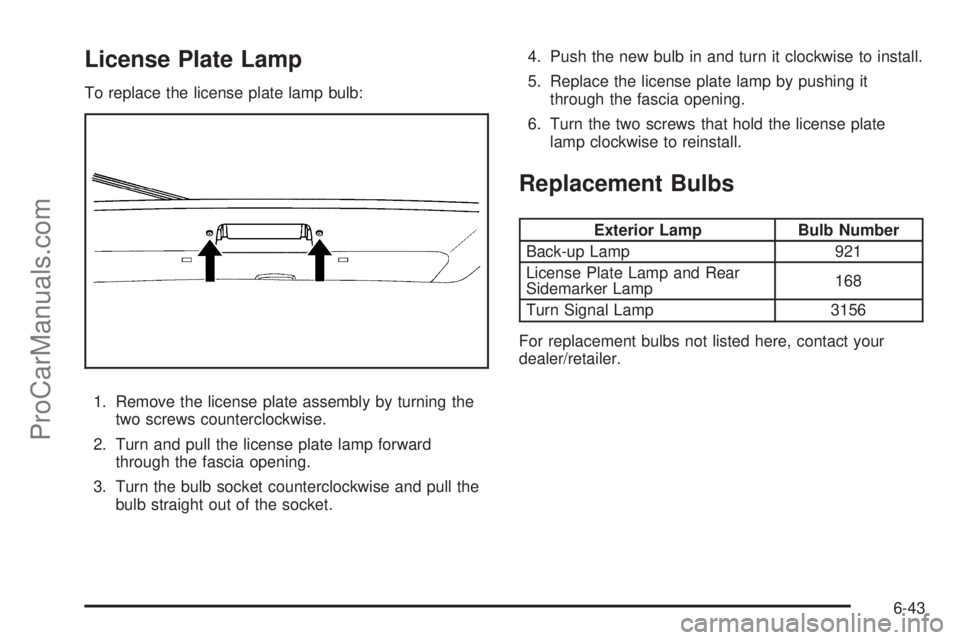
License Plate Lamp
To replace the license plate lamp bulb:
1. Remove the license plate assembly by turning the
two screws counterclockwise.
2. Turn and pull the license plate lamp forward
through the fascia opening.
3. Turn the bulb socket counterclockwise and pull the
bulb straight out of the socket.4. Push the new bulb in and turn it clockwise to install.
5. Replace the license plate lamp by pushing it
through the fascia opening.
6. Turn the two screws that hold the license plate
lamp clockwise to reinstall.
Replacement Bulbs
Exterior Lamp Bulb Number
Back-up Lamp 921
License Plate Lamp and Rear
Sidemarker Lamp168
Turn Signal Lamp 3156
For replacement bulbs not listed here, contact your
dealer/retailer.
6-43
ProCarManuals.com
Page 324 of 428

When the malfunction indicator is illuminated, the
system may not be able to detect or signal low tire
pressure as intended. TPMS malfunctions may occur for
a variety of reasons, including the installation of
replacement or alternate tires or wheels on the vehicle
that prevent the TPMS from functioning properly.
Always check the TPMS malfunction telltale after
replacing one or more tires or wheels on your vehicle to
ensure that the replacement or alternate tires and
wheels allow the TPMS to continue to function properly.
SeeTire Pressure Monitor Operation on page 6-54
for additional information.
Federal Communications Commission
(FCC) and Industry and Science
Canada
SeeRadio Frequency Statement on page 8-17for
information regarding Part 15 of the Federal
Communications Commission (FCC) Rules and
RSS-210/211 of Industry and Science Canada.
Tire Pressure Monitor Operation
This vehicle may have a Tire Pressure Monitor System
(TPMS). The TPMS is designed to warn the driver
when a low tire pressure condition exists. TPMS sensors
are mounted onto each tire and wheel assembly,
excluding the spare tire and wheel assembly. The TPMS
sensors monitor the air pressure in the vehicle’s tires
and transmits the tire pressure readings to a receiver
located in the vehicle.
When a low tire pressure
condition is detected, the
TPMS turns on the low tire
pressure warning light
located on the instrument
panel cluster.
At the same time a message to check the pressure in a
specific tire appears on the Driver Information Center
(DIC) display. The low tire pressure warning light
and the DIC warning message come on at each ignition
cycle until the tires are inflated to the correct inflation
pressure. Using the DIC, tire pressure levels can
be viewed by the driver. For additional information and
details about the DIC operation and displays see
DIC Operation and Displays on page 4-40andDIC
Warnings and Messages on page 4-42.
6-54
ProCarManuals.com