2010 SATURN AURA lights
[x] Cancel search: lightsPage 201 of 428

AUTO UNLK (Unlock)
This feature, which allows the vehicle to automatically
unlock certain doors, can be enabled or disabled. When
AUTO UNLK appears on the display, press and hold
the reset button for at least one second to scroll through
the available settings:
ALL (default):All of the doors will automatically unlock.
DRIVER:The driver’s door will automatically unlock.
NONE:None of the doors will automatically unlock. You
will need to manually unlock the doors.
SeeProgrammable Automatic Door Locks on page 3-9
for more information.
To select a setting and move on to the next feature,
press the information button while the desired setting is
displayed on the DIC.
UNLK (Unlock)
This screen displays only if DRIVER or ALL is selected
for the AUTO UNLK feature. This feature determines
when the automatic door unlocking will occur. When
UNLK appears on the display, press and hold the reset
button for at least one second to scroll through the
available settings:
KEY OFF:The door(s) will unlock when the key is
turned off.SHIFT TO P (Park) (default):The door(s) will unlock
when the vehicle is shifted into P (Park).
SeeProgrammable Automatic Door Locks on page 3-9
for more information.
To select a setting and move on to the next feature,
press the information button while the desired setting is
displayed on the DIC.
EXT (Exterior) LIGHTS
This feature, which allows the vehicle’s exterior
perimeter lighting to turn on each time the unlock button
on the Remote Keyless Entry (RKE) transmitter is
pressed, can be enabled or disabled. When EXT
LIGHTS appears on the display, press and hold the
reset button for at least one second to scroll through the
available settings:
OFF:The exterior perimeter lighting will not turn on
when the unlock button on the RKE transmitter is
pressed.
ON (default):The exterior perimeter lighting will turn on
when the unlock button on the RKE transmitter is
pressed.
SeeRemote Keyless Entry (RKE) System Operation on
page 3-3for more information.
4-49
ProCarManuals.com
Page 244 of 428

To turn the system off or
on, press and release this
button located on the
center console.
The DIC will display the appropriate message as
described previously when the button is pressed.
Traction Control Operation
Traction control limits wheel spin by reducing engine
power to the wheels (engine speed management)
and by applying brakes to each individual wheel
(brake-traction control) as necessary.
The traction control system is enabled automatically
when the vehicle is started, and it will activate and flash
the ESC/TCS light and display the LOW TRACTION
message if it senses either of the front wheels are
spinning or beginning to lose traction while driving. For
more information on the LOW TRACTION message,
seeDriver Information Center (DIC) on page 4-39.
Notice:If the wheel(s) of one axle are allowed to
spin excessively while the ESC/TCS, ABS and Brake
warning lights and the SERVICE ESC and/or
SERVICE TRACTION messages are displayed, thedifferential could be damaged. The repairs would
not be covered by the vehicle warranty. Reduce
engine power and do not spin the wheel(s)
excessively while these lights and this message
are displayed.
Notice:When traction control is turned off, it is
possible to lose traction. If you attempt to shift with
the front wheels spinning with a loss of traction,
it is possible to cause damage to the transmission.
Do not attempt to shift when the front wheels do
not have traction. Damage caused by misuse of the
vehicle is not covered. See your warranty book
for additional information.
The traction control system may activate on dry or
rough roads or under conditions such as heavy
acceleration while turning or abrupt upshifts/downshifts
of the transmission. When this happens, a reduction
in acceleration may be noticed, or a noise or vibration
may be heard. This is normal.
If the vehicle is in cruise control when the system
activates, the ESC/TCS light will flash and the cruise
control will automatically disengage. The cruise control
may be re-engaged when road conditions allow.
SeeCruise Control on page 4-7.
Adding non-dealer/non-retailer accessories can affect
the vehicle’s performance. SeeAccessories and
Modications on page 6-3for more information.
5-8
ProCarManuals.com
Page 369 of 428
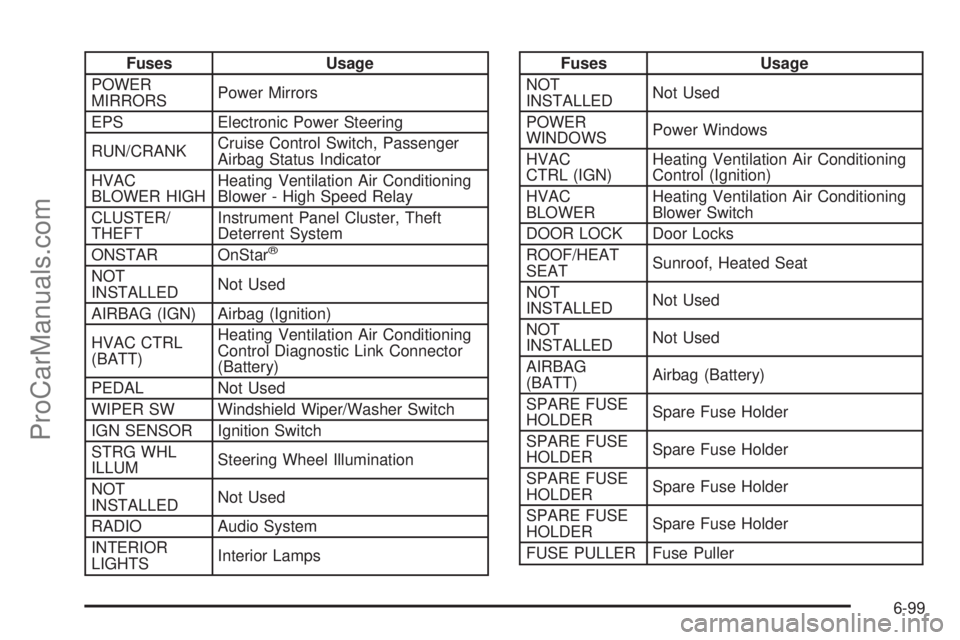
Fuses Usage
POWER
MIRRORSPower Mirrors
EPS Electronic Power Steering
RUN/CRANKCruise Control Switch, Passenger
Airbag Status Indicator
HVAC
BLOWER HIGHHeating Ventilation Air Conditioning
Blower - High Speed Relay
CLUSTER/
THEFTInstrument Panel Cluster, Theft
Deterrent System
ONSTAR OnStar
®
NOT
INSTALLEDNot Used
AIRBAG (IGN) Airbag (Ignition)
HVAC CTRL
(BATT)Heating Ventilation Air Conditioning
Control Diagnostic Link Connector
(Battery)
PEDAL Not Used
WIPER SW Windshield Wiper/Washer Switch
IGN SENSOR Ignition Switch
STRG WHL
ILLUMSteering Wheel Illumination
NOT
INSTALLEDNot Used
RADIO Audio System
INTERIOR
LIGHTSInterior Lamps
Fuses Usage
NOT
INSTALLEDNot Used
POWER
WINDOWSPower Windows
HVAC
CTRL (IGN)Heating Ventilation Air Conditioning
Control (Ignition)
HVAC
BLOWERHeating Ventilation Air Conditioning
Blower Switch
DOOR LOCK Door Locks
ROOF/HEAT
SEATSunroof, Heated Seat
NOT
INSTALLEDNot Used
NOT
INSTALLEDNot Used
AIRBAG
(BATT)Airbag (Battery)
SPARE FUSE
HOLDERSpare Fuse Holder
SPARE FUSE
HOLDERSpare Fuse Holder
SPARE FUSE
HOLDERSpare Fuse Holder
SPARE FUSE
HOLDERSpare Fuse Holder
FUSE PULLER Fuse Puller
6-99
ProCarManuals.com
Page 419 of 428

K
Keyless Entry
Remote (RKE) System................................... 3-3
Keyless Entry System....................................... 3-3
Keys............................................................... 3-2
L
Labeling, Tire Sidewall.....................................6-45
Lamps
Daytime Running (DRL)................................4-11
Dome ........................................................4-13
License Plate..............................................6-43
Malfunction Indicator....................................4-34
Reading.....................................................4-13
Lap-Shoulder Belt...........................................2-25
LATCH System for Child Restraints...................2-44
Leaving After Parking on a Hill.........................5-33
Leaving the Vehicle with the Engine Running......3-28
Lift Seat, Power............................................... 2-9
Lighting
Entry/Exit...................................................4-13
Parade Dimming..........................................4-13
Lights............................................................4-10
Airbag Readiness........................................4-28
Antilock Brake System (ABS) Warning............4-31
Brake System Warning.................................4-30Lights (cont.)
Charging System.........................................4-30
Cruise Control.............................................4-38
Engine Coolant Temperature Warning.............4-33
Flash-to-Pass............................................... 4-5
Highbeam On.............................................4-38
High/Low Beam Changer................................ 4-5
Oil Pressure...............................................4-37
On Reminder..............................................4-10
Passenger Airbag Status Indicator..................4-29
Safety Belt Reminders..................................4-26
Security.....................................................4-37
Tire Pressure..............................................4-34
Loading a CD................................................4-57
Loading Your Vehicle.......................................5-19
Locks
Delayed Locking........................................... 3-9
Door ........................................................... 3-8
Lockout Protection.......................................3-10
Power Door .................................................. 3-8
Programmable Automatic Door Locks............... 3-9
Rear Door Security Locks
.............................3-10
Loss of Control...............................................5-11
Lower Anchors and Tethers for Children.............2-44
Lumbar
Power Controls............................................. 2-5
9
ProCarManuals.com
Page 427 of 428

U
Uniform Tire Quality Grading............................6-62
Universal Home Remote System.......................3-34
Operation...................................................3-35
Used Replacement Wheels..............................6-65
Using ABS....................................................... 5-5
Using Softkeys to Control a USB Storage Device
or iPod......................................................4-65
Using the Auxiliary Input Jack...........................4-60
Using the Radio to Control a USB Storage
Device or iPod............................................4-64
Using the Tire Sealant and Compressor Kit to
Temporarily Seal and Inflate a
Punctured Tire............................................6-69
Using the Tire Sealant and Compressor Kit
without Sealant to Inflate a Tire (Not
Punctured)..................................................6-72
Using the USB Port........................................4-60
Using Universal Home Remote.........................3-40
V
Vehicle
Control........................................................ 5-3
Loading......................................................5-19
Remote Start................................................ 3-5
Running While Parked..................................3-31
Symbols......................................................... ivVehicle Data Recording and Privacy..................8-15
Vehicle Identification
Number (VIN).............................................6-95
Service Parts Identification Label...................6-96
Vehicle Personalization....................................1-19
DIC ...........................................................4-46
Vehicle Storage..............................................6-36
Ventilation Adjustment......................................4-23
Visors...........................................................3-15
Voice Pass-Thru.............................................4-77
Voice Recognition...........................................4-69
W
Warning Lights, Gages, and Indicators...............4-24
Warnings
DIC Warnings and Messages........................4-42
Hazard Flashers............................................ 4-3
Safety and Symbols......................................... iv
Weight of the Trailer........................................5-29
Weight of the Trailer Tongue.............................5-29
What Kind of Engine Oil to Use........................6-19
What to Do with Used Oil ................................6-21
What to Use ..................................6-25, 6-31, 6-32
Wheels
Alignment and Tire Balance..........................6-63
Different Size..............................................6-61
Replacement...............................................6-64
When It Is Time for New Tires..........................6-59
17
ProCarManuals.com