2010 PORSCHE 911 GT3 display
[x] Cancel search: displayPage 100 of 251

Automatic air conditioning system, Heated rear window/Door mirror heating
99
Setting temperaturefPress button F upwards or downwards
respectively.
To suit personal comfort, the interior temperature
can be adjusted between 61 °F and 85 °F/16 °C
and 29.5 °C.
Recommendation: 72 °F/22 °C.
If “LO” or “HI” appears on the display, the system
is operating at maximum cooling or heating
power.
Automatic control is no longer active.
Note
If the preselected temperature is changed, the
blower speed can increase automatically in
automatic mode.
The desired temperature is reached more quickly
this way.
Sensors
To avoid affecting the performance of the air-
conditioning system:
fDo not cover the sun sensor on the instrument
panel or the temperature sensor C.fPress button A (switch on or off).
The windshield is defogged or defrosted as
quickly as possible.
Air flows to the windshield only.
The light-emitting diode in the button lights up.
AC OFF – switching compressor for air-
conditioning system on and offThe air-conditioning compressor switches off
automatically at temperatures below approx.
37 °F/3 °C and cannot be switched on, even
manually.
Whenever outside temperatures exceed approx.
37 °F/3 °C, the air-conditioning compressor is
always switched on in automatic mode.
The compressor can be switched off to save fuel,
but control comfort is then limited:
fPress AC OFF button D.
The compressor is switched off.
The light-emitting diode in the button lights up.
fIf the interior temperature is too high, switch
compressor back on or press AUTO button.
To dry incoming air in damp weather, do not
switch off the air-conditioning compressor.
This prevents fogging of windows.fPress button K upwards or downwards respec-
tively.
The preset blower speed is increased or decre-
ased.
The speed stages are indicated by a bar display.
If the button is pressed downwards at the lowest
blower stage, the blower and automatic control
are switched off. “OFF” will appear on the display
field.
Pressing the button upwards or pressing the
AUTO button switches the blower and automatic
control back on again.
Warning!
Risk of accident due to impaired vision,
resulting in serious personal injury or death.
In recirculating-air setting, the windows may
fog up.
fOnly select recirculating-air setting for short
periods.
fIf the windows fog up, switch recirculating-air
setting off immediately by pressing the
circulating-air button again and select the “Defrost windshield” function.
Defrosting the windshield
Adjusting blower speed
Recirculating-air setting
10_GT3_21.book Seite 99 Donnerstag, 4. Juni 2009 12:48 12
Page 101 of 251

100
Automatic air conditioning system, Heated rear window/Door mirror heating Switching recirculating-air setting on or off
fPress button E.
The outside-air supply is interrupted and only
the inside air is circulated.
The light-emitting diode in the button lights up.
Over approx. 37 °F/3 °C
If the air-conditioning compressor was off, it
switches on automatically. The duration of recircu-
lating-air setting is not limited.
Below approx. 37 °F/3 °C
The air-conditioning compressor is switched off.
Recirculating-air setting is automatically ended
after approx. 3 minutes.
Air distributionThe individual air distributions can be combined as
desired.
Recommended setting in Summer:
Air distribution to central and side vents.
Recommended setting in Winter:
Air distribution to footwell and windshield.fPress button H.
The air flows to the footwell.
The selection appears on the display panel.
fPress button I.
The air flows from the central and side vents.
Vents must be open.
The selection appears on the display panel.
fPress button J.
The air flows to the windshield.
The selection appears on the display panel.
Note on operation
fOn vehicles with the Sport Chrono Package
Plus, individual air conditioning settings can be
stored on your vehicle key.
Please see the chapter “Individual Memory” in
the separate PCM Owner’s Manual.
General instructions for air-conditioning
compressor– Can switch off briefly if engine is under an
extreme load to ensure sufficient engine
cooling.
– Switches off automatically at temperatures
below approx. 37 °F/3 °C and cannot be
switched on, even manually.
– Operates most effectively with windows
closed.
If the car has been in the sun for a long time, it
is a good idea to ventilate the interior briefly
with the windows open.
– Depending on the outside temperature and
humidity, condensation can drip from the
evaporator and form a pool under the vehicle.
This is normal and not a sign of leakage.
– If uncooled air flows out when the lowest
temperature has been set, switch off the air-
conditioning compressor and have the fault
repaired at an authorized Porsche dealer. Air distribution to footwell
Air distribution to central and side
vents
Air distribution to windshield
10_GT3_21.book Seite 100 Donnerstag, 4. Juni 2009 12:48 12
Page 105 of 251

104
Instruments, On-Board Computer
Instrument Panel USA Models Also refer to the corresponding chapters in
the Owner’s Manual.
1.Engine oil temperature gauge
2.Speedometer with analogue display
3.Tire pressure warning light
4.Turn signal indicator light, left
5.Tachometer
6.High beam indicator light
7.Turn signal indicator light, right
8.Upshift indicator
9.Cooling system
Temperature gauge, warning light
10.Fuel
Level gauge, warning light
11.Engine oil pressure gauge
12.Adjustment button for instrument illumination
and trip counter
13.Odometer and daily trip mileage display
14.Automatic speed control indicator light15.Light sensor for instrument illumination
16.Airbag warning light
17.Check Engine warning light
(Emission control warning light)
18.Central warning light
19.On-board computer display
20.Porsche Stability Management
PSM Multifunctional light
21.Brake warning light
22.Safety belt warning light
23.ABS warning light
24.Clock and outside temperature display
25.Adjustment button for clockWhen the ignition is switched on, the warning
lights light up for a lamp check.
Note
Warnings that have been given are stored in the
appropriate control unit memory and can be read
out at an authorized Porsche dealer.
This information can help to warn you about situa-
tions which may be hazardous to you or your car. 10_GT3_21.book Seite 104 Donnerstag, 4. Juni 2009 12:48 12
Page 107 of 251

106
Instruments, On-Board Computer
Instrument Panel Canada Models Also refer to the corresponding chapters in
the Owner’s Manual.
1.Engine oil temperature gauge
2.Speedometer with analogue display
3.Tire pressure warning light
4.Turn signal indicator light, left
5.Tachometer
6.High beam indicator light
7.Turn signal indicator light, right
8.Upshift indicator
9.Cooling system
Temperature gauge, warning light
10.Fuel
Level gauge, warning light
11.Engine oil pressure gauge
12.Adjustment button for instrument illumination
and trip counter
13.Odometer and daily trip mileage display
14.Automatic speed control indicator light15.Light sensor for instrument illumination
16.Airbag warning light
17.Check Engine warning light
(Emission control warning light)
18.Central warning light
19.On-board computer display
20.Porsche Stability Management
PSM Multifunctional light
21.Brake warning light
22.Safety belt warning light
23.ABS warning light
24.Clock and outside temperature display
25.Adjustment button for clockWhen the ignition is switched on, the warning
lights light up for a lamp check.
Note
Warnings that have been given are stored in the
appropriate control unit memory and can be read
out at an authorized Porsche dealer.
This information can help to warn you about situa-
tions which may be hazardous to you or your car. 10_GT3_21.book Seite 106 Donnerstag, 4. Juni 2009 12:48 12
Page 110 of 251

Instruments, On-Board Computer
109
Dimming instrument illumination
fTurn adjustment button A in the appropriate
direction and hold it until the desired bright-
ness has been reached.
The chosen level of brightness is indicated by a
bar display in the display field of the on-board
computer.
Trip Odometer
Warning!
Risk of loss of control or accident, resulting
in serious personal injury or death.
fDo not reach through the steering-wheel spokes while driving.
Resetting to zero fPress adjustment button A for approximately
one second or
fReset the distance in the “SET” menu of the on-
board computer.
Please see the chapter “SET BASIC SETTING
ON ON-BOARD COMPUTER” on Page 145.
After exceeding 6,213 miles or 9,999 kilometers,
the counter returns to “0”.
10_GT3_21.book Seite 109 Donnerstag, 4. Juni 2009 12:48 12
Page 111 of 251

110
Instruments, On-Board Computer
Speedometer The digital speedometer is integrated in the on-
board computer.
The indication changes from mph to km/h when
the units are changed from miles to kilometers.
Changing over between
Miles / Kilometers The units of the distance and speed displays can
be changed in the “SET” menu of the on-board
computer.
fPlease see the chapter “SET BASIC SETTING
ON ON-BOARD COMPUTER” on Page 145.
10_GT3_21.book Seite 110 Donnerstag, 4. Juni 2009 12:48 12
Page 112 of 251
Instruments, On-Board Computer
111
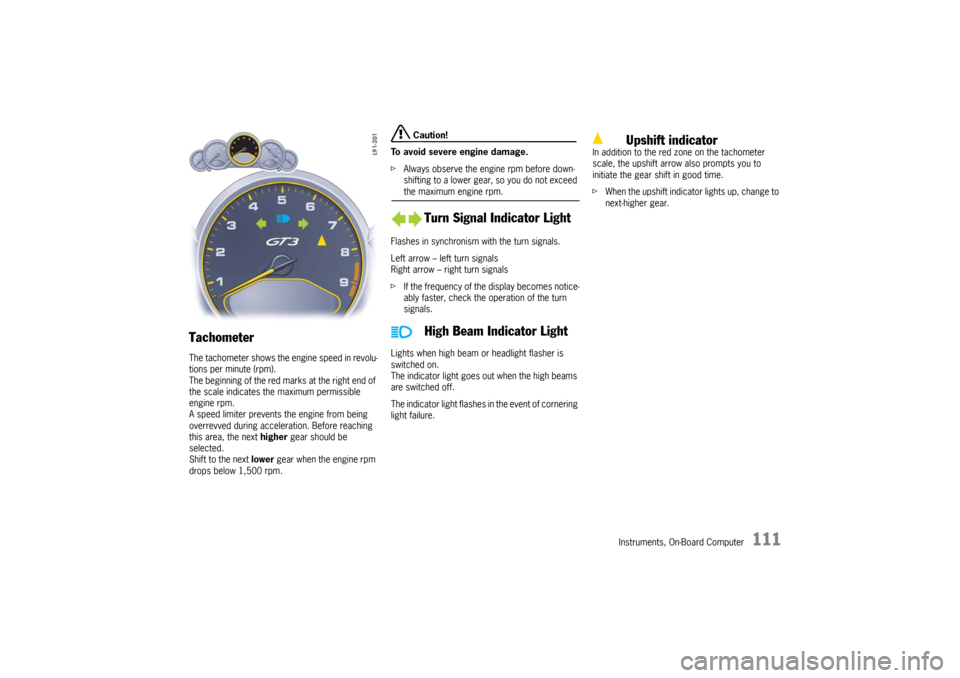
Tachometer The tachometer shows the engine speed in revolu-
tions per minute (rpm).
The beginning of the red marks at the right end of
the scale indicates the maximum permissible
engine rpm.
A speed limiter prevents the engine from being
overrevved during acceleration. Before reaching
this area, the next higher gear should be
selected.
Shift to the next lower gear when the engine rpm
drops below 1,500 rpm.
Caution!
To avoid severe engine damage.
fAlways observe the engine rpm before down-
shifting to a lower gear, so you do not exceed the maximum engine rpm.
Flashes in synchronism with the turn signals.
Left arrow – left turn signals
Right arrow – right turn signals
fIf the frequency of the display becomes notice-
ably faster, check the operation of the turn
signals.
Lights when high beam or headlight flasher is
switched on.
The indicator light goes out when the high beams
are switched off.
The indicator light flashes in the event of cornering
light failure.In addition to the red zone on the tachometer
scale, the upshift arrow also prompts you to
initiate the gear shift in good time.
fWhen the upshift indicator lights up, change to
next-higher gear.
Turn Signal Indicator Light
High Beam Indicator Light
Upshift indicator
10_GT3_21.book Seite 111 Donnerstag, 4. Juni 2009 12:48 12
Page 113 of 251

112
Instruments, On-Board Computer
Temperature gauge (ignition on) USA: Display in °F
Canada: Display in °C
Pointer to the left – engine cold
fAvoid high engine speeds and heavy engine
loading. Pointer in the middle – normal operating tempe-
rature
The pointer may move up to the red area when
engine is heavily loaded and outside temperature
is high, but should return to “normal” when engine
load is reduced.
Warning light “A” If the coolant temperature is too high, the
warning light comes on.
Additionally, a warning is displayed in the on-board
computer.
fPull off the road, turn off the engine and allow
to cool.
fCheck radiator and air passages in front end of
car for obstructions.
fCheck coolant level.
If necessary, add coolant and have fault
remedied at an authorized Porsche dealer.
Please see the chapter “COOLANT LEVEL” on
Page 158.
Note
To prevent excessive temperatures, the cooling-
air passages must not be restricted by coverings
(e.g. films, “stone guards”). If the coolant level is too low, the warning light
flashes.
Additionally, a warning is displayed in the on-board
computer.
fSwitch engine off and allow to cool.
fAdd coolant after the engine has cooled to the
touch.
fHave the cause of the fault remedied at an
authorized Porsche dealer.
Please see the chapter “COOLANT LEVEL” on
Page 158.
Caution!
Risk of engine damage.
fIf the warning lights come on even though
coolant level is correct, do not continue
driving.
fHave the fault remedied at the nearest authorized Porsche dealer.
Engine compartment blower fan In addition, this warning light flashes to indicate a
fault in the engine compartment blower fan.
fHave the cause of the fault remedied at an
authorized Porsche dealer.
Cooling System
10_GT3_21.book Seite 112 Donnerstag, 4. Juni 2009 12:48 12