Page 2749 of 3745
GW-32
< SERVICE INFORMATION >
POWER WINDOW SYSTEM
BCM Power Supply and Ground Circuit Inspection
INFOID:0000000005396751
Refer to BCS-16, "BCM Power Supply and Ground Circuit Inspection" .
Main Power Window and Door Lock/Unlock Switch Po wer Supply and Ground Circuit
Inspection
INFOID:0000000005396752
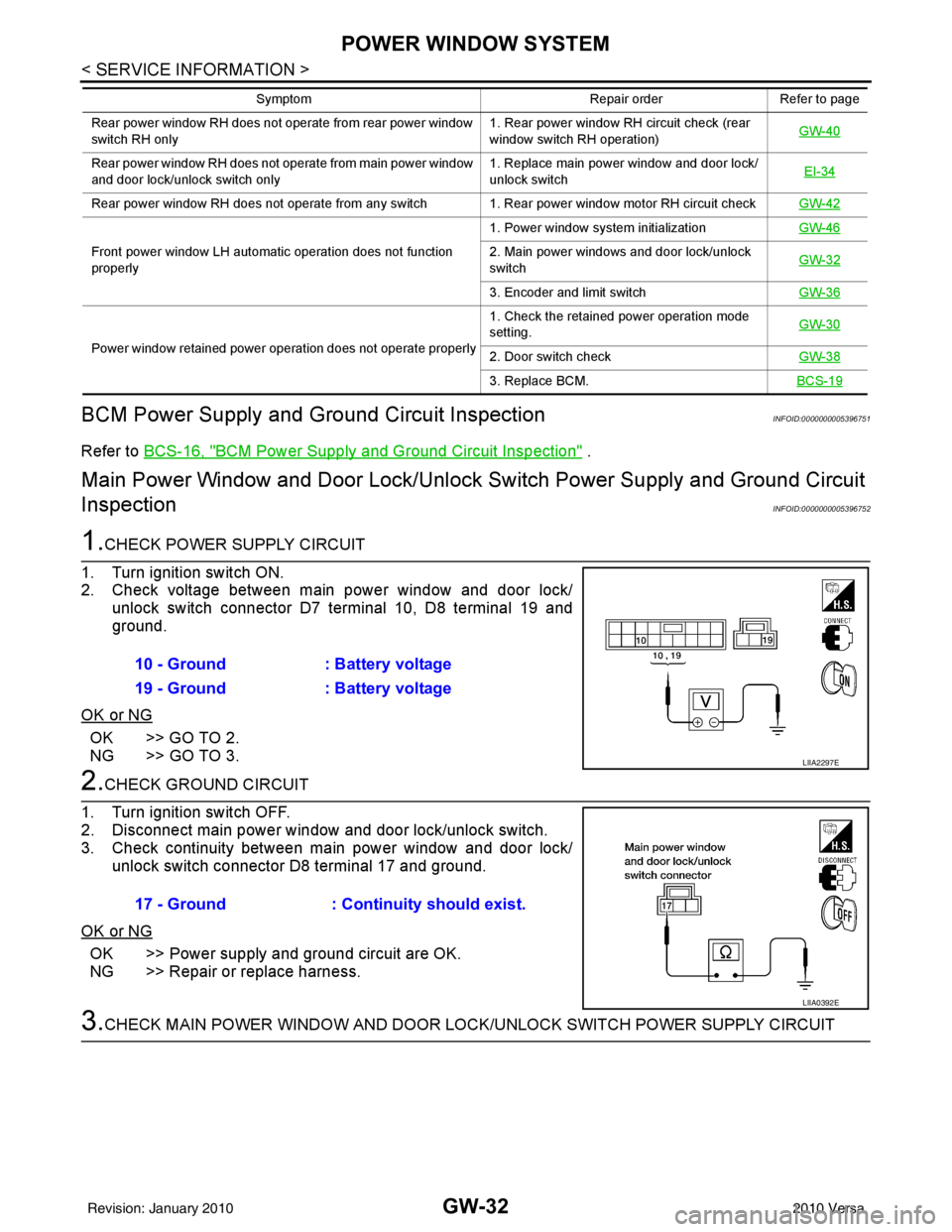
1.CHECK POWER SUPPLY CIRCUIT
1. Turn ignition switch ON.
2. Check voltage between main power window and door lock/ unlock switch connector D7 terminal 10, D8 terminal 19 and
ground.
OK or NG
OK >> GO TO 2.
NG >> GO TO 3.
2.CHECK GROUND CIRCUIT
1. Turn ignition switch OFF.
2. Disconnect main power window and door lock/unlock switch.
3. Check continuity between main power window and door lock/ unlock switch connector D8 terminal 17 and ground.
OK or NG
OK >> Power supply and ground circuit are OK.
NG >> Repair or replace harness.
3.CHECK MAIN POWER WINDOW AND DOOR LO CK/UNLOCK SWITCH POWER SUPPLY CIRCUIT
Rear power window RH does not operate from rear power window
switch RH only 1. Rear power window RH circuit check (rear
window switch RH operation)
GW-40
Rear power window RH does not operate from main power window
and door lock/unlock switch only 1. Replace main power window and door lock/
unlock switch
EI-34
Rear power window RH does not operate from any switch 1. Rear power window motor RH circuit check
GW-42
Front power window LH automatic operation does not function
properly1. Power window system initialization
GW-462. Main power windows and door lock/unlock
switchGW-32
3. Encoder and limit switch
GW-36
Power window retained power operation does not operate properly 1. Check the retained power operation mode
setting.
GW-302. Door switch check
GW-38
3. Replace BCM.BCS-19
Symptom Repair orderRefer to page
10 - Ground: Battery voltage
19 - Ground : Battery voltage
LIIA2297E
17 - Ground : Continuity should exist.
LIIA0392E
Revision: January 20102010 Versa
Page 2763 of 3745
GW-46
< SERVICE INFORMATION >
FRONT DOOR GLASS AND REGULATOR
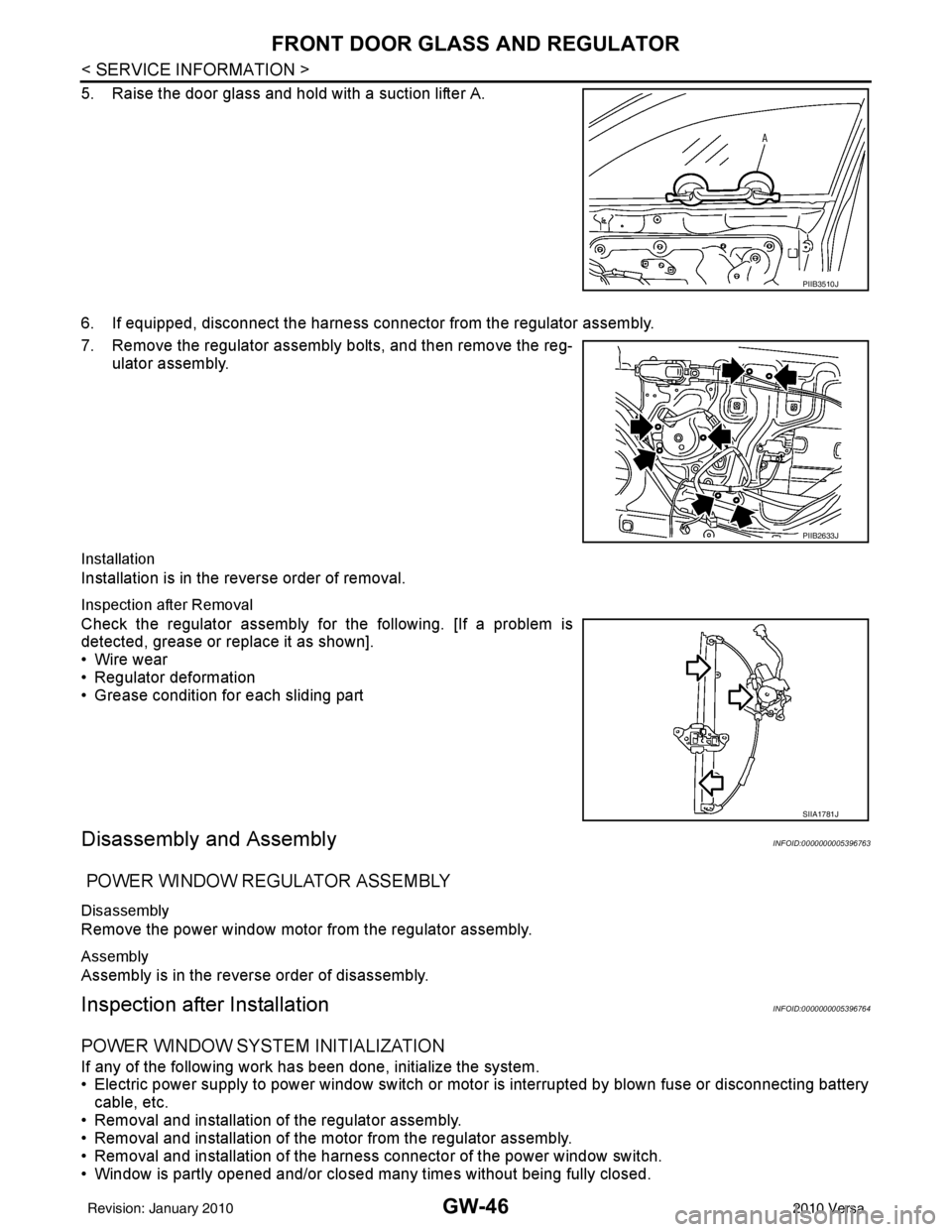
5. Raise the door glass and hold with a suction lifter A.
6. If equipped, disconnect the harness connector from the regulator assembly.
7. Remove the regulator assembly bolts, and then remove the reg-ulator assembly.
Installation
Installation is in the reverse order of removal.
Inspection after Removal
Check the regulator assembly fo r the following. [If a problem is
detected, grease or replace it as shown].
• Wire wear
• Regulator deformation
• Grease condition for each sliding part
Disassembly and AssemblyINFOID:0000000005396763
POWER WINDOW REGULATOR ASSEMBLY
Disassembly
Remove the power window motor from the regulator assembly.
Assembly
Assembly is in the reverse order of disassembly.
Inspection after InstallationINFOID:0000000005396764
POWER WINDOW SYSTEM INITIALIZATION
If any of the following work has been done, initialize the system.
• Electric power supply to power window switch or moto r is interrupted by blown fuse or disconnecting battery
cable, etc.
• Removal and installation of the regulator assembly.
• Removal and installation of the motor from the regulator assembly.
• Removal and installation of the harness connector of the power window switch.
• Window is partly opened and/or closed many times without being fully closed.
PIIB3510J
PIIB2633J
SIIA1781J
Revision: January 20102010 Versa
Page 3547 of 3745
SC-8
< SERVICE INFORMATION >
BATTERY
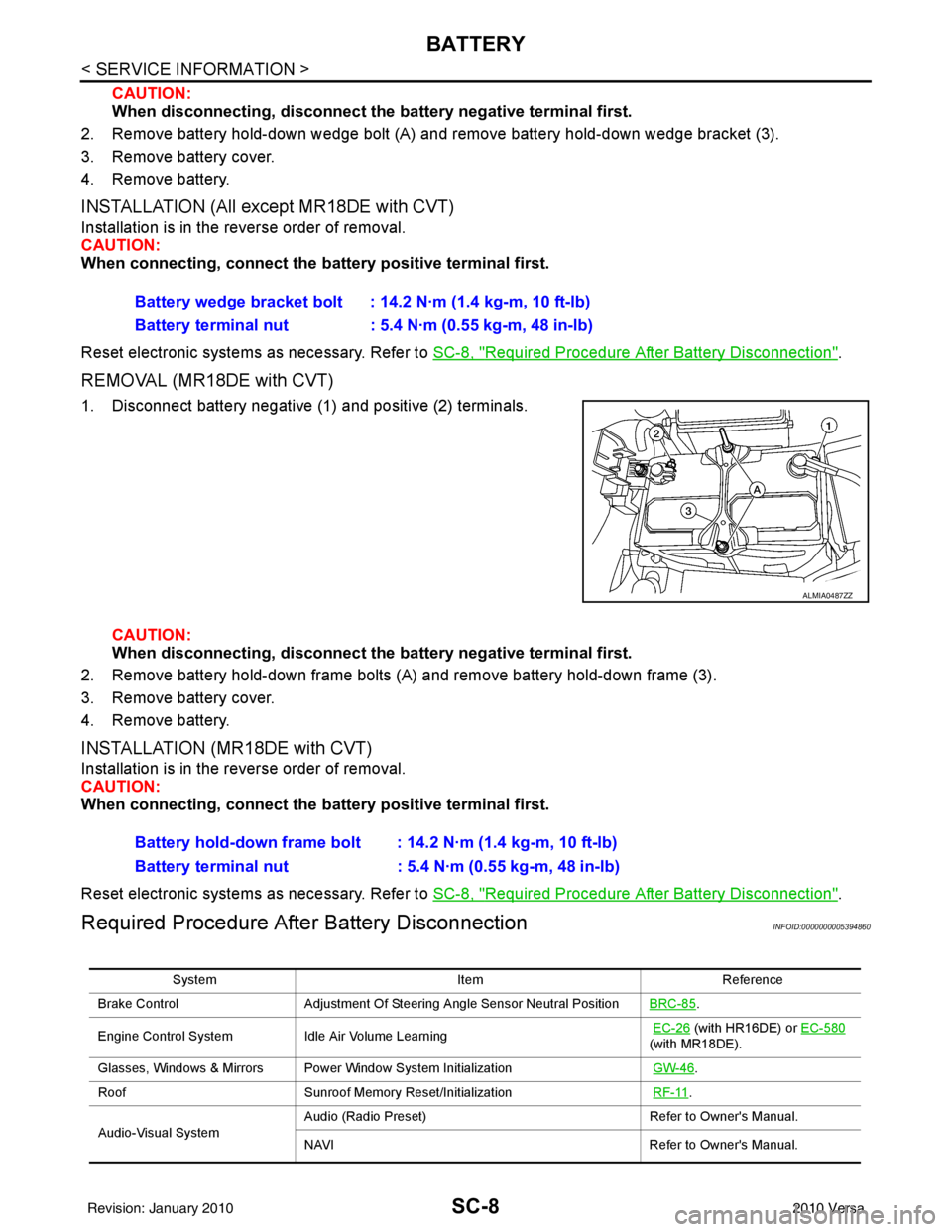
CAUTION:
When disconnecting, disconnect the battery negative terminal first.
2. Remove battery hold-down wedge bolt (A) and remove battery hold-down wedge bracket (3).
3. Remove battery cover.
4. Remove battery.
INSTALLATION (All except MR18DE with CVT)
Installation is in the reverse order of removal.
CAUTION:
When connecting, connect the battery positive terminal first.
Reset electronic systems as necessary. Refer to SC-8, "
Required Procedure After Battery Disconnection".
REMOVAL (MR18DE with CVT)
1. Disconnect battery negative (1) and positive (2) terminals.
CAUTION:
When disconnecting, disconnect th e battery negative terminal first.
2. Remove battery hold-down frame bolts (A) and remove battery hold-down frame (3).
3. Remove battery cover.
4. Remove battery.
INSTALLATION (MR18DE with CVT)
Installation is in the reverse order of removal.
CAUTION:
When connecting, connect the battery positive terminal first.
Reset electronic systems as necessary. Refer to SC-8, "
Required Procedure After Battery Disconnection".
Required Procedure After Battery DisconnectionINFOID:0000000005394860
Battery wedge bracket bolt : 14.2 N·m (1.4 kg-m, 10 ft-lb)
Battery terminal nut : 5.4 N·m (0.55 kg-m, 48 in-lb)
ALMIA0487ZZ
Battery hold-down frame bolt : 14.2 N·m (1.4 kg-m, 10 ft-lb)
Battery terminal nut : 5.4 N·m (0.55 kg-m, 48 in-lb)
System ItemReference
Brake Control Adjustment Of Steering Angle Sensor Neutral Position BRC-85
.
Engine Control System Idle Air Volume Learning
EC-26
(with HR16DE) or EC-580
(with MR18DE).
Glasses, Windows & Mirrors Power Window System Initialization GW-46
.
Roof Sunroof Memory Reset/Initialization RF-11
.
Audio-Visual System Audio (Radio Preset)
Refer to Owner's Manual.
NAVI Refer to Owner's Manual.
Revision: January 20102010 Versa