2010 NISSAN NOTE nissan note
[x] Cancel search: nissan notePage 1 of 235

10/2010 Nissan Micra ינרק יבצ
NISSAN MICRA
K13-U
NISSAN MICRA
K13-U
OM10E-0E11E0E
10/2010
לארשיב ספדנ
OM10E-0K13E0E :םוסרפמ םגרות
NOTE
Owner's Manual
MICRA
גהנ רפס
Page 2 of 235
Foreword
Welcome to the growing family of new NISSAN owners. This vehicle has been delivered to you with confidence. It has been produced using the latest techniques
and strict quality control.
This manual was prepared to help you understand the operation and maintenance of your vehicle so that you may enjoy many kilometres (miles) of driving pleasure.
Please read through this manual before operating your vehicle.
A separate Warranty Information & Maintenance Booklet explains in detail the warranty coverage that applies to your vehicle.
Your NISSAN dealer knows your vehicle best. When you require any service or have any questions, your NISSAN dealer will be glad to assist you with the extensive
resources available for you.
IMPORTANT SAFETY INFORMATION
REMINDERS FOR SAFETY!
Follow these important driving rules to help ensure a safe and complete trip for
you and your passengers!
•NEVER drive under the influence of alcohol or drugs.
•ALWAYS observe posted speed limits and never drive too fast for condi-
tions.
•ALWAYS use your seat belts and appropriate child restraint systems.
Preteen children should be seated in the rear seat.
•ALWAYS provide information about the proper use of vehicle safety fea-
tures to all occupants of the vehicle.
•ALWAYS review this Owner’s Manual for important safety information.
WHEN READING THE MANUAL
This manual includes information for all options available on this model. There-
fore, you may find some information that does not apply to your vehicle.
All information, specifications and illustrations in this manual are those in effect
at the time of printing. NISSAN reserves the right to change specifications or
designs at any time without notice and without obligation.
MODIFICATION OF YOUR VEHICLE
This vehicle should not be modified. Modifications could affect its performance,
safety or durability, and may even violate governmental regulations. In addition,
damage or performance problems resulting from modifications may not be cov-
ered under NISSAN warranties.
READ FIRST — THEN DRIVE SAFELY
Before driving your vehicle, read this Owner’s Manual carefully. This will ensure
familiarity with controls and maintenance requirements, assisting you in the safe
operation of your vehicle.
Throughout this manual the following symbols and words are used:
WARNING
Indicates the presence of a hazard that could cause death or serious per-
sonal injury. To avoid or reduce the risk, the procedures described must be
followed precisely.
CAUTION
Indicates the presence of a hazard that could cause minor or moderate per-
sonal injury, or damage to your vehicle. To avoid or reduce the risk, the pro-
cedures described must be followed carefully.
NOTE
Indicates additional helpful information.
Page 24 of 235
NOTE
The front passenger seat belt warning will not
light up if the seat is unoccupied.
PRECAUTIONS ON SEAT BELT
USAGE
Your chances of being injured in an accident and/or
the severity of injury may be greatly reduced if you
are wearing your seat belt and it is properly ad-
justed. NISSAN strongly encourages you and all of
your passengers to buckle up every time you drive,
even if your seating position is equipped with an air
bag.
WARNING
Be sure to observe the following warnings when
using seat belts. Failure to do so could increase
the chance and/or severity of injury in an acci-
dent.
•Seat belts are designed to bear upon the bony
structure of the body, and should be worn low
across the front of the pelvis or the pelvis,
chest and shoulders, as applicable; wearing
the lap section of the belt across the abdomi-
nal area must be avoided. Serious injury can
occur if the seat belt is not worn properly.
•No modifications or additions should be made
by the user which will either prevent the seat
belt adjusting devices from operating to re-
move slack, or prevent the seat belt assembly
from being adjusted to remove slack.
•Seat belts should be adjusted as firmly as
possible, consistent with comfort to provide
the protection for which they have been de-
signed. A slack belt will greatly reduce the
protection afforded to the wearer.
•Care should be taken to avoid contamination
of the webbing with polishes, oils and chemi-
cals, and particularly battery acid. Cleaning
may safely be carried out using mild soap and
water. The belt should be replaced if webbing
becomes frayed, contaminated or damaged.
•It is essential to replace the entire assembly
after it has been worn in a severe impact even
if damage to the assembly is not obvious.
•Belts should not be worn with straps twisted.
•Each seat belt assembly must only be used by
one occupant; it is dangerous to put a belt
around a child being carried on the occupant’s
lap.
•Every occupant in this vehicle should wear a
seat belt at all times.
•Your vehicle has seating positions and seat
belts for five (5) occupants; two (2) in the front
seats and three (3) in the rear. Never carry
more people in the vehicle than there are seat
belts.
•All seat belt assemblies, including retractors
and attaching hardware, should be inspected
by a NISSAN dealer or qualified workshop af-
ter any collision. NISSAN recommends that
all seat belt assemblies in use during a colli-sion should be replaced unless the collision
was minor and the belts show no damage and
continue to operate properly. Seat belt assem-
blies not in use during a collision should also
be inspected and replaced if either damage
or improper operation is noted.
•Once the pre-tensioner seat belt has been ac-
tivated, it cannot be re-used. It must be re-
placed together with the retractor. See a
NISSAN dealer or qualified workshop.
•Removal and installation of the pre-tensioner
seat belt system components should be done
by a NISSAN dealer or qualified workshop
ONLY.
•If the seat belt warning light glows continu-
ously while the ignition switch is in the ON
position, all doors are closed and seat belts
is/are fastened, it may indicate a malfunction
in the system. Have the system checked by a
NISSAN dealer or qualified workshop.
•Always route the shoulder belt over your
shoulder and across your chest. Never run
the belt under your arm. Serious injury can
occur if the seat belt is not worn properly.
•Position the lap belt as low as possible
AROUND THE HIPS, NOT THE WAIST.
1-6Safety — seats, seat belts and supplemental restraint system
Page 31 of 235

Note that the above illustration is for LHD models.
AIR BAG WARNING LABELS
Warning labels about the air bag system are placed
in the vehicle. Warning labels are for your safety and
the safety of your passengers; do not remove them.
1.SRS Front passenger air bag warning label/
stickerThe warning label/sticker is located on the
outer side of the passenger’s side instrument
panel.
2.SRS Air bag warning label
The warning label is located on the surface of
the sun visor.
Child restraint on front passenger seat
(front passenger air bag equipped
models)
Vehicles equipped with a front passenger air bag,
will have an air bag warning label attached to the
passenger’s side of the instrument panel as (previ-
ously) illustrated.
This label mentions:
“Extreme Hazard! Do not use a rearward facing
child restraint on a seat protected by an airbag in
front of it!”
This label warns you not to fit a rear facing child
restraint on the front passenger seat without first
deactivating the front passenger air bag.
NISSAN recommends that infants or small children
be seated in a child restraint system on the rear seat
if available. According to accident statistics, chil-
dren are safer when properly restrained in the rear
seat than in the front seat.
When installing child restraints in your vehicle, al-
ways carefully observe the manufacturer’s instruc-
tions. For more details on the installation of child
restraints, see “Child restraints” later in this section.
Children on front passenger seat (side
air bag equipped models)
Vehicles equipped with side air bags, will have a
side air bag warning label attached to the vehicle’s
interior as shown in the (previous) illustration.
This label warns you not to let infants or small chil-
dren sit on the front passenger’s seat as the air bag
may cause serious injury in case of deployment dur-
ing a collision.
NISSAN recommends that infants or small children
be seated in a child restraint system on the rear seat
if available. According to accident statistics, chil-
dren are safer when properly restrained in the rear
seat than in the front seat.
AIR BAG WARNING LIGHT
The Supplemental Restraint System (SRS) air bag
warning light, displayingin the instrument
panel, monitors the circuits of the front air bag sys-
tem, side and curtain air bag systems (where fitted)
and pre-tensioner seat belt system. The circuits
NPA1073
SPA1097Z
Safety — seats, seat belts and supplemental restraint system1-13
Page 32 of 235

monitored by the SRS air bag warning light are: all
sensors, air bag modules and all related wiring, and
the pre-tensioner seat belt.
After turning the ignition switch to the ON or
START position, the supplemental air bag warn-
ing light illuminates. The air bag warning light will
turn off after approximately 7 seconds if the sys-
tem is operational.
If any of the following conditions occurs, the front air
bag, side and curtain air bag systems (where fitted)
and pre-tensioner seat belt need servicing and
should be taken to the nearest NISSAN dealer or
qualified workshop:
•The SRS air bag warning light remains on after
approximately 7 seconds.
•The SRS air bag warning light flashes intermit-
tently.
•The SRS air bag warning light does not come on
at all.
Under these conditions, the front air bags, side and
curtain air bags (where fitted) and/or pre-tensioner
seat belt will not operate properly. They must be
checked and repaired.
Repair and replacement procedure
The front air bags, side air bags (where fitted), cur-
tain air bags (where fitted) and pre-tensioner seat
belt are designed to activate on a one-time-only ba-
sis. As a reminder, unless it is damaged, the air bag
warning light will remain illuminated after inflationhas occurred. Repair and replacement of the air bag
system should be done only by a NISSAN dealer or
qualified workshop.
When maintenance work is required on the vehicle,
the air bag systems, related parts and pre-tensioner
seat belt should be pointed out to the person con-
ducting the maintenance. The ignition switch should
always be in the LOCK position when working un-
der the bonnet or inside the vehicle.
WARNING
•Once the air bag has inflated or the pre-ten-
sioner seat belt has been activated, the air
bag module and pre-tensioner seat belt will
not function again and must be replaced. The
air bag module should be replaced by a
NISSAN dealer or qualified workshop. The air
bag module cannot be repaired.
•All air bag systems should be inspected by a
NISSAN dealer or qualified workshop if there
is any damage to the front end portion of the
vehicle.
•When selling your vehicle, we request that you
inform the buyer about the air bag system and
guide the buyer to the appropriate sections in
this Owner’s Manual.
•If you need to dispose of an air bag or scrap
the vehicle, contact a NISSAN dealer or quali-
fied workshop. Correct air bag disposal pro-
cedures are set forth in the appropriate
NISSAN Service Manual. Incorrect disposal
procedures could cause personal injury.Note that the above illustration is for LHD models.
FRONT PASSENGER AIR BAG
INDICATOR LIGHT
WARNING
•Since your vehicle is equipped with a front
passenger air bag, it is not permitted to install
a rear facing child restraint on the front pas-
senger seat unless the front passenger air bag
has been previously deactivated.
•Do not fit a rear facing child seat on the front
passenger seat if the air bag activation/deac-
tivation system is malfunctioning. Your ve-
hicle must be immediately taken to a NISSAN
dealer or qualified workshop in such situa-
tion.
The front passenger air bag indicator light
lo-
cated on the centre console illuminates for approxi-
mately 7 seconds and then goes off. This means the
system is operational.
NPA732Z
1-14Safety — seats, seat belts and supplemental restraint system
Page 36 of 235
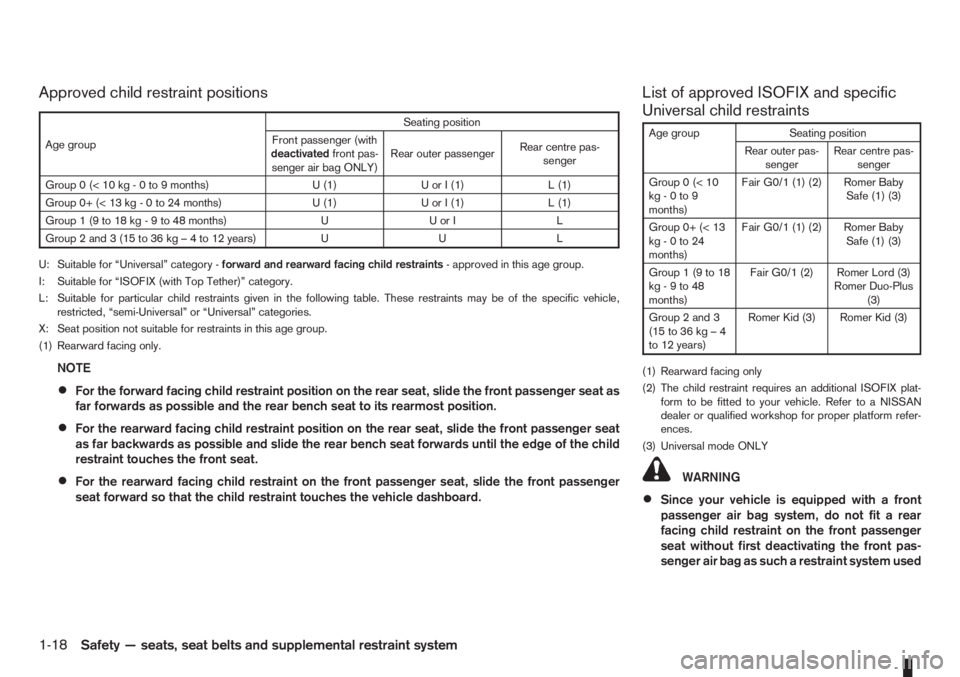
Approved child restraint positions List of approved ISOFIX and specific
Universal child restraints
Age group Seating position
Rear outer pas-
sengerRear centre pas-
senger
Group0(<10
kg - 0 to 9
months)Fair G0/1 (1) (2) Romer Baby
Safe (1) (3)
Group 0+ (< 13
kg - 0 to 24
months)Fair G0/1 (1) (2) Romer Baby
Safe (1) (3)
Group1(9to18
kg - 9 to 48
months)Fair G0/1 (2) Romer Lord (3)
Romer Duo-Plus
(3)
Group 2 and 3
(15to36kg–4
to 12 years)Romer Kid (3) Romer Kid (3)
(1) Rearward facing only
(2) The child restraint requires an additional ISOFIX plat-
form to be fitted to your vehicle. Refer to a NISSAN
dealer or qualified workshop for proper platform refer-
ences.
(3) Universal mode ONLY
WARNING
•Since your vehicle is equipped with a front
passenger air bag system, do not fit a rear
facing child restraint on the front passenger
seat without first deactivating the front pas-
senger air bag as such a restraint system used
Age groupSeating position
Front passenger (with
deactivatedfront pas-
senger air bag ONLY)Rear outer passengerRear centre pas-
senger
Group 0 (< 10 kg - 0 to 9 months) U (1) U or I (1) L (1)
Group 0+ (< 13 kg - 0 to 24 months) U (1) U or I (1) L (1)
Group 1 (9 to 18 kg - 9 to 48 months) U U or I L
Group2and3(15to36kg–4to12years) U U L
U: Suitable for “Universal” category -forward and rearward facing child restraints- approved in this age group.
I: Suitable for “ISOFIX (with Top Tether)” category.
L: Suitable for particular child restraints given in the following table. These restraints may be of the specific vehicle,
restricted, “semi-Universal” or “Universal” categories.
X: Seat position not suitable for restraints in this age group.
(1) Rearward facing only.
NOTE
•For the forward facing child restraint position on the rear seat, slide the front passenger seat as
far forwards as possible and the rear bench seat to its rearmost position.
•For the rearward facing child restraint position on the rear seat, slide the front passenger seat
as far backwards as possible and slide the rear bench seat forwards until the edge of the child
restraint touches the front seat.
•For the rearward facing child restraint on the front passenger seat, slide the front passenger
seat forward so that the child restraint touches the vehicle dashboard.
1-18Safety — seats, seat belts and supplemental restraint system
Page 37 of 235

in this position could cause serious injury to
the infant in case of air bag deployment dur-
ing a collision.
•In vehicles equipped with a side air bag sys-
tem, do not let any infants or small children sit
in the front passenger’s seat as the air bag
may cause serious injury in case of deploy-
ment during a collision.
NOTE
Universal child restraints approved to ECE Regu-
lation No. 44.03 are clearly marked “Universal”.
INSTALLATION OF A CHILD
RESTRAINT SYSTEM ON THE FRONT
PASSENGER SEAT
WARNING
•Never install a rear facing child restraint sys-
tem in the front seat without first deactivating
the front passenger air bag. Inflating supple-
mental front-impact air bags inflate with greatforce. A child restraint system could be struck
by the supplemental front-impact air bags in
an accident and could seriously injure or kill
your child.
•NISSAN recommends that infants or small
children be seated in a child restraint system
in the rear seat. According to accident statis-
tics, children are safer when properly
restrained in the rear seat than in the front
seat.
Rear facing
If you install a child restraint system in the front seat,
follow these steps:
1. Deactivate the front passenger air bag. See
“Supplemental Restraint System (air bag
system)” earlier in this section for further details.
2. Move the seat to the rearmost position.
3. Adjust the head restraint to its highest position.
Remove it if it interferes with the child restraint
installation. In such situation, securely store the
head restraint in the luggage compartment so
that it does not become a dangerous projectile
during a sudden stop or in an accident.
4. Position the child restraint system in the front
passenger’s seat.
Always follow the child restraint system manu-
facturer’s instructions for installation and use.5. Route the seat belt tongue through the child re-
straint system and insert it into the buckle until
you hear and feel the latch engage.
To prevent slack in the lap belt, it will be neces-
sary to secure the shoulder belt in place with a
locking clip
jA . Use a locking clip attached to
the child restraint system, or one which is equiva-
lent in dimensions and strength.
Be sure to follow the child restraint system
manufacturer’s instructions for belt routing.
6. Slide the seat forward so that the seat belt fully
tightens the child restraint system and the child
restraint reaches the vehicle dashboard.
7. Test the child restraint system before you place
the child in it. Tilt it from side to side. Try to tug it
forward and check if it is held securely in place.
NPA679Z
Front passenger air bag left active
SSS0513Z
Safety — seats, seat belts and supplemental restraint system1-19
Page 47 of 235

puter (where fitted) mode that was displayed before
the ignition switch was turned to the Acc, “OFF” or
LOCK position.
HR16DE or K9K engine oil level status
The Oil level status provides specific information
regarding the engine oil level.
If the oil level is sufficient, “Oil Good” is displayed
for approximately 10 seconds. If the oil level is low,
“Oil Lo” blinks for approximately 30 seconds in or-
der to draw your attention on necessary action.
G.Oil level 5 (Max)
H.Oil level 1 (Min)
A short press on the TRIP button/Steering wheel
switch during the “Oil Good” or “Oil Lo” mode
displays an approximate oil level indication between
jG /Max orjH /Min.
In the case of a low engine oil level, see “Engine oil”
in the “8. Maintenance and do-it-yourself” section
for the proper engine oil refilling procedure.
Oil change schedule set-up
It is possible to adjust the interval distance to oil
change by pressing the Clock setting/Oil change
schedule setting switch
j2 for 3 seconds while the
wrench symboland the distance to oil change
are displayed. The symbol and distance display will
start flashing and the display shows the current in-
terval. Press the switch
j2 again to increase the
interval distance. Each step increases the interval
distance by 1,000 km (500 miles). The interval dis-
tance can be set up to 63,000 km (31,500 miles)
after which the display returns to zero.
If no further action is made, the display returns to oil
level status mode and the new interval is set.
If the interval distance is set to 0, the display will
skip the distance to oil change information and
wrench symbol display mode and will directly dis-
play the oil level status (“Oil Good” or “Oil Lo” –
HR16DE or K9K engine equipped models only). In
order to return to the distance to oil change informa-
tion and wrench symbol display mode, press the
Clock setting/Oil change schedule setting switch
j2 for approximately 3 seconds after the ignition
switch has been turned to the ON position, and
adjust the distance to oil change schedule as previ-
ously described.
See the Warranty Information & Maintenance Book-
let for the appropriate interval distance to oil change.CAUTION
•The oil level should be checked regularly. Op-
erating with an insufficient oil level can dam-
age the engine and such damage is not cov-
ered by the warranty.
•NISSAN recommends checking the oil level
every 5,000 km (3,000 miles).
DIGITAL CLOCKjA
The clock function at the top of the LCD displayj2
provides a clock display when the ignition switch is
in the ON position.
12/24 hour setting
Briefly pressing the Clock setting/Oil change sched-
ule setting* switchj2 will toggle between the 12
and 24 hour modes. Note that when the clock dis-
plays 0:01 in the 24 hour mode and is changed to
the 12 hour mode, the display will show 12.01 AM.
Hour setting
Pressing the Clock setting/Oil change schedule set-
ting switchj2 for 3 seconds or more will initialise
the clock adjustment procedure.
The hour setting mode is indicated by the hour dig-
it(s), the colon and AM or PM (in the 12 hour mode)
flashing at a certain frequency. Each activation of
the switch
j2 changes the time by 1 hour.
The display will show AM or PM in the 12 hour
mode and will change at midday and midnight. If the
j2 switch is not pressed for 5 seconds or more, the
clock changes to minutes setting mode.
NIC1486
Oil level detail examples:
Instruments and controls2-5