2010 NISSAN MAXIMA climate control
[x] Cancel search: climate controlPage 253 of 457
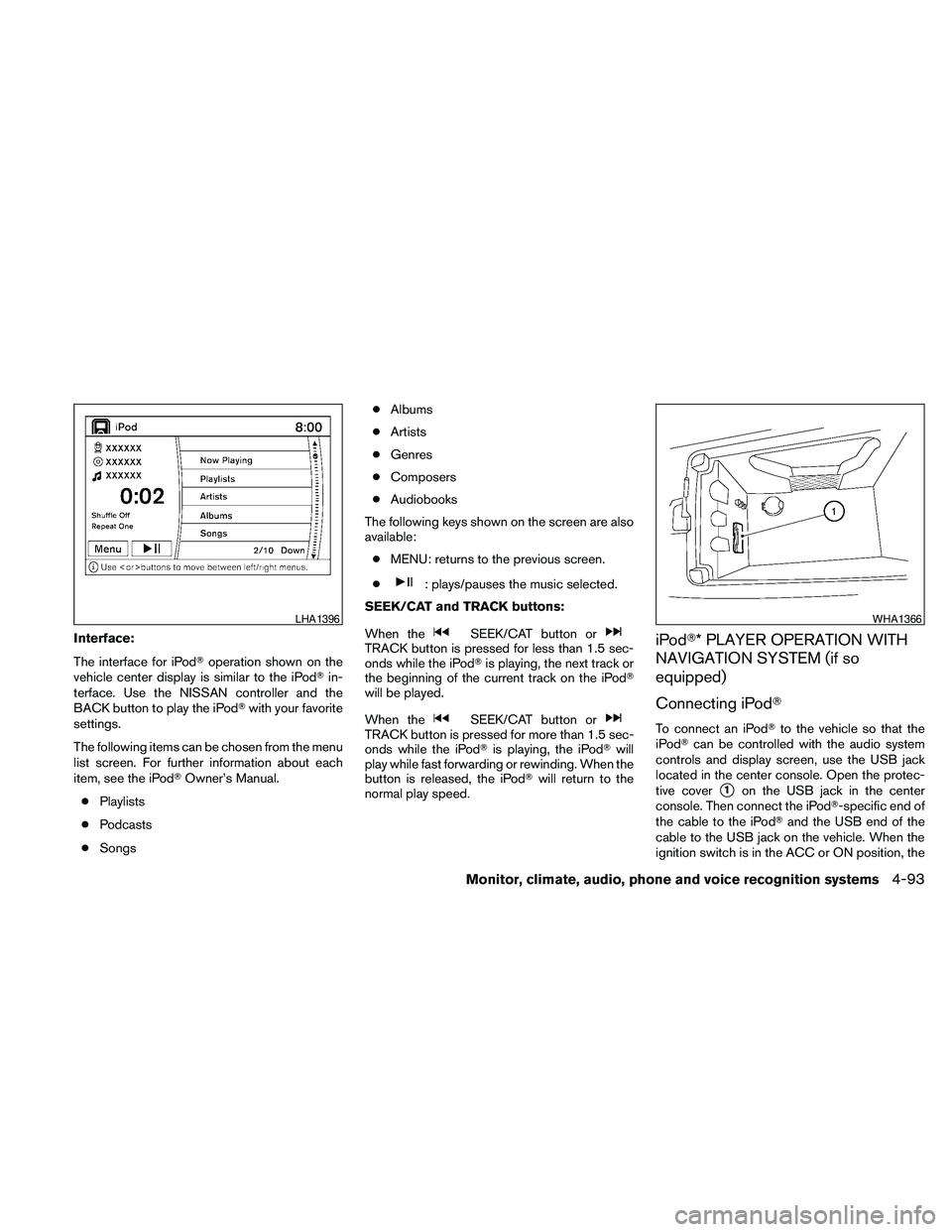
Interface:
The interface for iPodToperation shown on the
vehicle center display is similar to the iPodTin-
terface. Use the NISSAN controller and the
BACK button to play the iPodTwith your favorite
settings.
The following items can be chosen from the menu
list screen. For further information about each
item, see the iPodTOwner’s Manual.
cPlaylists
cPodcasts
cSongscAlbums
cArtists
cGenres
cComposers
cAudiobooks
The following keys shown on the screen are also
available:
cMENU: returns to the previous screen.
c
: plays/pauses the music selected.
SEEK/CAT and TRACK buttons:
When the
SEEK/CAT button orTRACK button is pressed for less than 1.5 sec-
onds while the iPodTis playing, the next track or
the beginning of the current track on the iPodT
will be played.
When the
SEEK/CAT button orTRACK button is pressed for more than 1.5 sec-
onds while the iPodTis playing, the iPodTwill
play while fast forwarding or rewinding. When the
button is released, the iPodTwill return to the
normal play speed.
iPodT* PLAYER OPERATION WITH
NAVIGATION SYSTEM (if so
equipped)
Connecting iPodT
To connect an iPodTto the vehicle so that the
iPodTcan be controlled with the audio system
controls and display screen, use the USB jack
located in the center console. Open the protec-
tive cover
s1on the USB jack in the center
console. Then connect the iPodT-specific end of
the cable to the iPodTand the USB end of the
cable to the USB jack on the vehicle. When the
ignition switch is in the ACC or ON position, the
LHA1396WHA1366
Monitor, climate, audio, phone and voice recognition systems4-93
Page 254 of 457

battery of your iPodT(if compatible) is charged
during the connection to the vehicle.
While connected to the vehicle, the iPodTcan
only be operated by the vehicle audio controls.
To disconnect the iPodTfrom the vehicle, remove
the USB end of the cable from the USB jack on
the vehicle, then remove the cable from the
iPodT.
*iPodTis a trademark of Apple Inc., registered in
the U.S. and other countries.
Compatibility
The following models are available:
ciPodTClassic - 1st through 6th generation
ciPodTMini - 1st and 2nd generation
ciPodTNano - 1st through 3rd generation
ciPodTTouch - 1st generation
ciPhoneT- 1st generation
Make sure that your iPodTfirmware is updated.
Audio main operation
Place the ignition switch in the ACC or ON
position. Press the DISC·AUX button repeatedly
to switch to the iPodTmode.
If the system has been turned off while the iPodT
was playing, pressing the VOL/ON·OFF control
knob will start the iPodT.DISC·AUX button:
When the DISC·AUX button is pressed with the
system off and the iPodTconnected, the system
will turn on. If another audio source is playing and
the iPodTis connected, press the DISC·AUX
button repeatedly until the center display
changes to the iPodTmode.
LHA1397
4-94Monitor, climate, audio, phone and voice recognition systems
Page 255 of 457

Interface:
The interface for iPodToperation shown on the
vehicle center display is similar to the iPodTin-
terface. Use the NISSAN controller and the
BACK button to play the iPodTwith your favorite
settings. The touchscreen can also be used to
control your favorite settings.
The following items can be chosen from the menu
list screen. For further information about each
item, see the iPodTOwner’s Manual.
cNow Playing
cPlaylists
cArtistscAlbums
cSongs
cPodcasts
cGenres
cComposers
cAudiobooks
cShuffle Songs
The following keys shown on the screen are also
available:
cMENU: returns to the previous screen.
c: plays/pauses the music selected.
Play mode:
While the iPodTis playing, touch the “Menu” key
to display the iPodTmenu. Touch the “Play
Mode” key to display the Play Mode screen and
adjust the settings for Shuffle, Repeat and Audio-
books. For further information about each item,
see the iPodTOwner’s Manual.
SEEK/CAT and TRACK buttons:
When the
SEEK/CAT button orTRACK button is pressed for less than 1.5 sec-
onds while the iPodTis playing, the next track or
the beginning of the current track on the iPodT
will be played.
LHA1398LHA1315
Monitor, climate, audio, phone and voice recognition systems4-95
Page 256 of 457

When theSEEK/CAT button orTRACK button is pressed for more than 1.5 sec-
onds while the iPodTis playing, the iPodTwill
play while fast forwarding or rewinding. When the
button is released, the iPodTwill return to the
normal play speed.
The NISSAN controller can also be used to se-
lect tracks when the iPodTis playing.
Scrolling menus:
While navigating long lists of artists, albums or
songs in the music menu, it is possible to scroll
the list by the first letter. To activate letter index-
ing, perform one of the following:
cTurn the NISSAN controller quickly.
cPress and hold the up/down directional ar-
rows on the NISSAN controller.
cTouch and hold the page up/down arrows
on the touchscreen.To exit the scrolling by letter mode, perform one of
the following:
cPress the ENTER button on the NISSAN
controller.
cPush the ENTER switch on the steering
wheel.
cDo not touch the controls for 2 seconds.
MUSIC BOX™ HARD DRIVE AUDIO
SYSTEM WITHOUT NAVIGATION
SYSTEM (if so equipped)
The Music Box Hard Drive audio system can
store songs from CDs being played. The system
has an 800 megabyte (MB) storage capacity and
can record up to 24 hours (approximately 360
songs) .
The following CDs can be recorded in the Music
Box Hard Drive audio system:
cCDs without MP3/WMA files.
cHybrid Compact Disc Digital Audio (Hybrid
CD-DA) specification in Super Audio CDs.
cCompact Disc Digital Audio (CD-DA) speci-
fication in CD-Extras.
cFirst session of multisession disc.LHA1399
4-96Monitor, climate, audio, phone and voice recognition systems
Page 258 of 457

The Music Box audio system cannot perform
recording under the following conditions:
cThere is not enough space in the Music Box.
cThe number of albums reaches the maximum
of 99.
cThe number of tracks reaches the maximum
of 2,000.
Automatic recording:
If the “Automatic Recording” function is turned to
ON, recording starts when a CD is inserted and
any previous CD “converting” is finished. For
more information, see “Music Box settings” in this
section.
Stopping recording:
To stop the recording, select the “Stop REC” key
on the screen. If the CD is ejected, the audio
system is turned off or the ignition switch is
placed in the OFF position, the recording also
stops.
Playing recorded songs
Select the Music Box audio system by using one
of the following methods:
cPress the SOURCE select switch on the
steering wheel.
For information, see “Steering wheel switch
for audio control” in this section.
cPress the DISC button repeatedly until the
center display changes to the Music Box
mode.Stopping playback:
The system stops playing when:
cAnother mode (radio, CD, USB memory,
iPodTor AUX) is selected.
cThe audio system is turned off.
cThe ignition switch is placed in the OFF
position.
SEEK/CAT and TRACK buttons:
Press the
SEEK/CAT button while a track
is playing to return to the beginning of the current
track. Press the
TRACK button while a
track is playing to skip to the beginning of the next
track.
If you press and hold the
SEEK/CAT (re-
wind) button or the
TRACK (fast forward)
button for more than approximately 1.5 seconds;
the track will play while rewinding or fast forward-
ing. When the
SEEK/CAT (rewind) button
or the
TRACK (fast forward) button is re-
leased, the track will return to the normal playing
speed.
The NISSAN controller can also be used to se-
lect tracks.
WHA1369
4-98Monitor, climate, audio, phone and voice recognition systems
Page 259 of 457
For more information on how to use the NISSAN
controller, see “How to use the NISSAN control-
ler” in this section.
Play mode selection:
To change to another album or artist, turn the
TUNE/FOLDER knob.
RPT/RDM button:
Press the RPT/RDM button while a track is play-
ing to change the play pattern as follows:
Repeat All!1 Folder Repeat!1 Track Repeat
!All Random!1 Folder Random!Repeat All
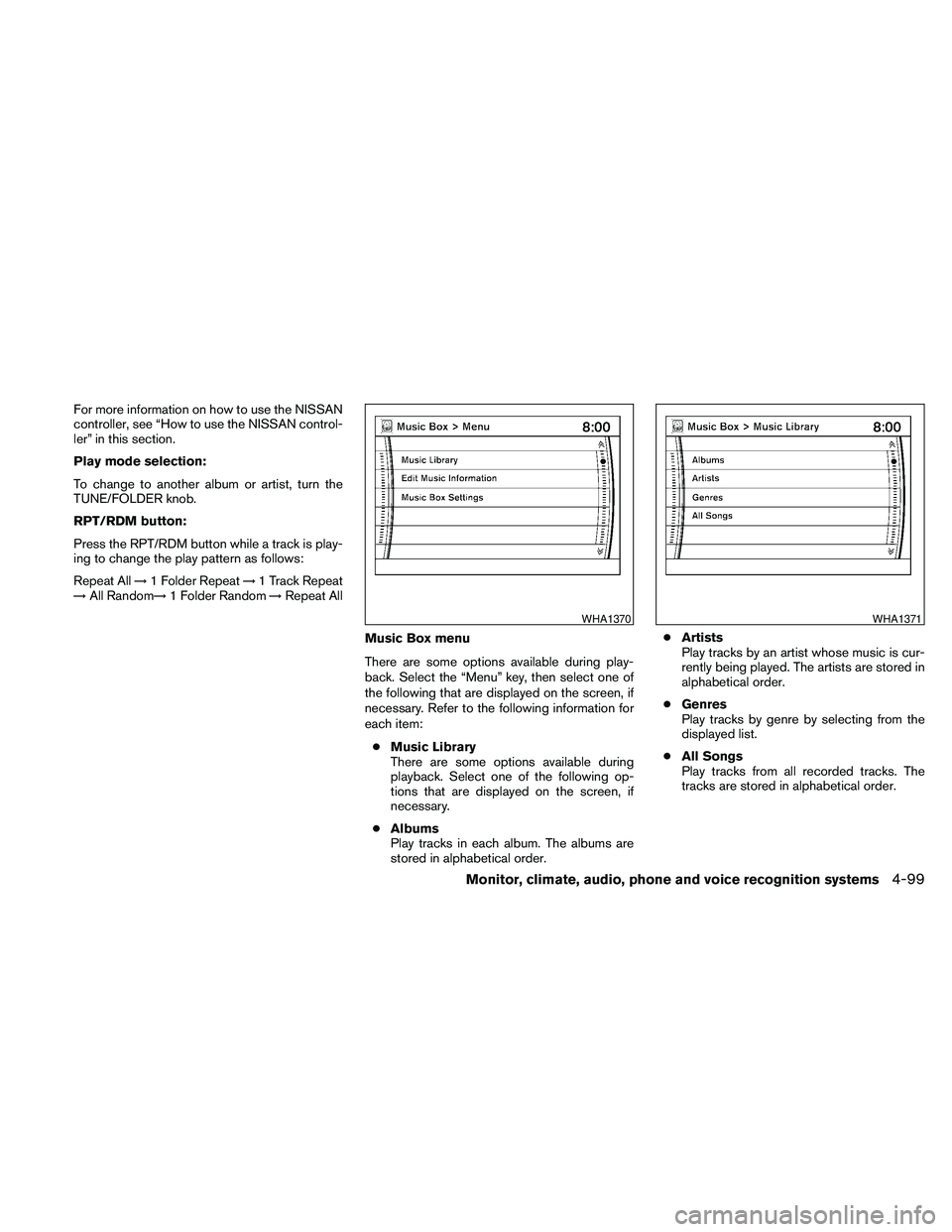
Music Box menu
There are some options available during play-
back. Select the “Menu” key, then select one of
the following that are displayed on the screen, if
necessary. Refer to the following information for
each item:
cMusic Library
There are some options available during
playback. Select one of the following op-
tions that are displayed on the screen, if
necessary.
cAlbums
Play tracks in each album. The albums are
stored in alphabetical order.cArtists
Play tracks by an artist whose music is cur-
rently being played. The artists are stored in
alphabetical order.
cGenres
Play tracks by genre by selecting from the
displayed list.
cAll Songs
Play tracks from all recorded tracks. The
tracks are stored in alphabetical order.
WHA1370WHA1371
Monitor, climate, audio, phone and voice recognition systems4-99
Page 260 of 457

cTransfer Titles from USB
Update the in-vehicle GracenoteTDatabase
using a USB memory device. Search the title
from information acquired on the Internet.
Visit www.nissanusa.com/gracenote/ for
details.
cTransfer Missing Titles to USB
Transfer the information of an album re-
corded without titles to the USB memory.
Visit www.nissanusa.com/gracenote/ for
details.
cUpdate Missing Titles
Search the title using the database in the
hard-disk.Music Box settings
To set up the Music Box Hard Drive audio system
to your preferred settings, select the “Menu” key
with the NISSAN controller during playback.
Then select the “Music Box Settings” key with the
NISSAN controller.
cMusic Box Used/Free Space:
Information about “Saved Album”, “Saved
Track” and “Remaining Time” is displayed.
cDelete Songs from the Music Box:
Delete the current song, selected songs or
albums by choosing from the list, or all
songs/albums in the Music Box.cAutomatic Recording:
When this item is turned to ON, the Music
Box Hard Drive audio system automatically
starts recording when a CD is inserted.
cRecording Quality:
Set the recording quality of 105 kbps or 132
kbps. The default is set to 105 kbps.
cGracenote Database Version:
The version of the built-in GracenoteTData-
base is displayed.
GracenoteT
NOTE:
cThe information contained in the
GracenoteTDatabase is not fully guaran-
teed.
cThe service of the GracenoteTDatabase on
the Internet may be stopped without prior
notice for maintenance.WHA1372WHA1373
4-100Monitor, climate, audio, phone and voice recognition systems
Page 263 of 457

cIndividual tracks from a CD cannot be se-
lected to be recorded to the Music Box hard
drive.
cThe skip, fast forward and rewind features
are disabled while the CD is recording.
cThe recording process can be stopped at
any time. All tracks that were played before
the CD was stopped are stored.
cIndividual tracks can be deleted from the
hard drive after the CD is recorded.
cThe system records faster than it plays.If the title information of the track being recorded
is stored either in the hard drive or in the CD, the
title is automatically displayed on the screen. For
title acquisition from the hard drive, music recog-
nition technology and related data are provided
by GracenoteT.
To view the details of the track, touch the “Text”
key on the screen or use the NISSAN controller.
The track name and album title are displayed on
the screen.
If a track is not recorded successfully due to
skipping sounds, the
symbol is displayed
behind the track number.
The Music Box audio system cannot perform
recording under the following conditions:
cThere is not enough space in the hard drive.
cThe number of albums reaches the maximum
of 500.
cThe number of tracks reaches the maximum
of 3,000.
Automatic recording:
If the “Automatic Recording” function is turned to
ON, recording starts when a CD is inserted. For
more information, see “Music Box settings” in this
section.Stopping recording:
To stop the recording, touch the “Stop REC” key
on the screen. If the CD is ejected, the audio
system is turned off or the ignition switch is
placed in the OFF position, the recording also
stops.
LHA1282
Monitor, climate, audio, phone and voice recognition systems4-103