Page 310 of 438
WARNING
Do not operate the push-button ignition
switch while driving the vehicle except in
an emergency. (The engine will stop when
the ignition switch is pushed 3 consecu-
tive times in quick succession or the igni-
tion switch is pushed and held for more
than 2 seconds.) If the engine stops while
the vehicle is being driven, this could lead
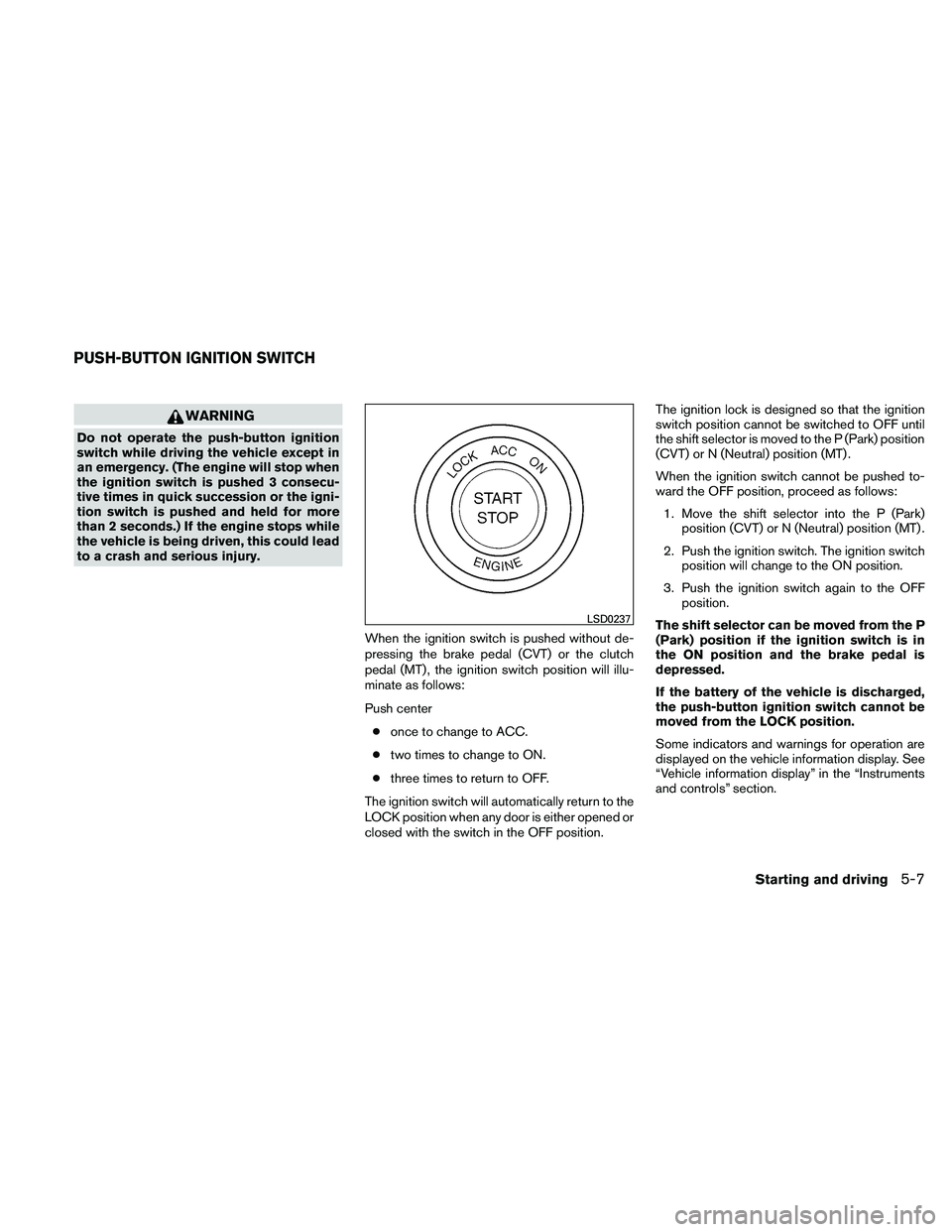
to a crash and serious injury.When the ignition switch is pushed without de-
pressing the brake pedal (CVT) or the clutch
pedal (MT) , the ignition switch position will illu-
minate as follows:
Push center● once to change to ACC.
● two times to change to ON.
● three times to return to OFF.
The ignition switch will automatically return to the
LOCK position when any door is either opened or
closed with the switch in the OFF position. The ignition lock is designed so that the ignition
switch position cannot be switched to OFF until
the shift selector is moved to the P (Park) position
(CVT) or N (Neutral) position (MT) .
When the ignition switch cannot be pushed to-
ward the OFF position, proceed as follows:
1. Move the shift selector into the P (Park) position (CVT) or N (Neutral) position (MT) .
2. Push the ignition switch. The ignition switch position will change to the ON position.
3. Push the ignition switch again to the OFF position.
The shift selector can be moved from the P
(Park) position if the ignition switch is in
the ON position and the brake pedal is
depressed.
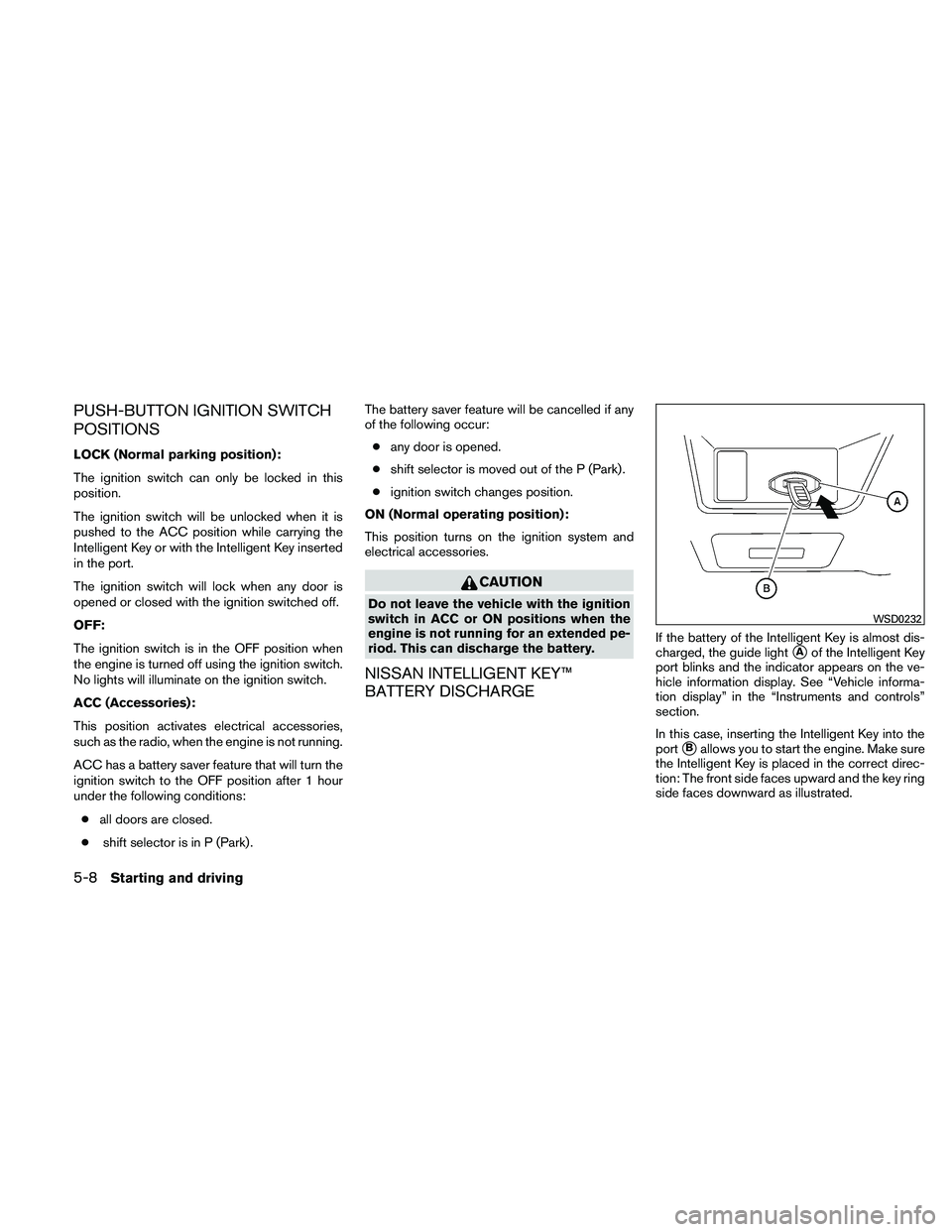
If the battery of the vehicle is discharged,
the push-button ignition switch cannot be
moved from the LOCK position.
Some indicators and warnings for operation are
displayed on the vehicle information display. See
“Vehicle information display” in the “Instruments
and controls” section.
Page 311 of 438
PUSH-BUTTON IGNITION SWITCH
POSITIONS
LOCK (Normal parking position):
The ignition switch can only be locked in this
position.
The ignition switch will be unlocked when it is
pushed to the ACC position while carrying the
Intelligent Key or with the Intelligent Key inserted
in the port.
The ignition switch will lock when any door is
opened or closed with the ignition switched off.
OFF:
The ignition switch is in the OFF position when
the engine is turned off using the ignition switch.
No lights will illuminate on the ignition switch.
ACC (Accessories):
This position activates electrical accessories,
such as the radio, when the engine is not running.
ACC has a battery saver feature that will turn the
ignition switch to the OFF position after 1 hour
under the following conditions:● all doors are closed.
● shift selector is in P (Park) . The battery saver feature will be cancelled if any
of the following occur:
● any door is opened.
● shift selector is moved out of the P (Park) .
● ignition switch changes position.
ON (Normal operating position):
This position turns on the ignition system and
electrical accessories.
Page 312 of 438
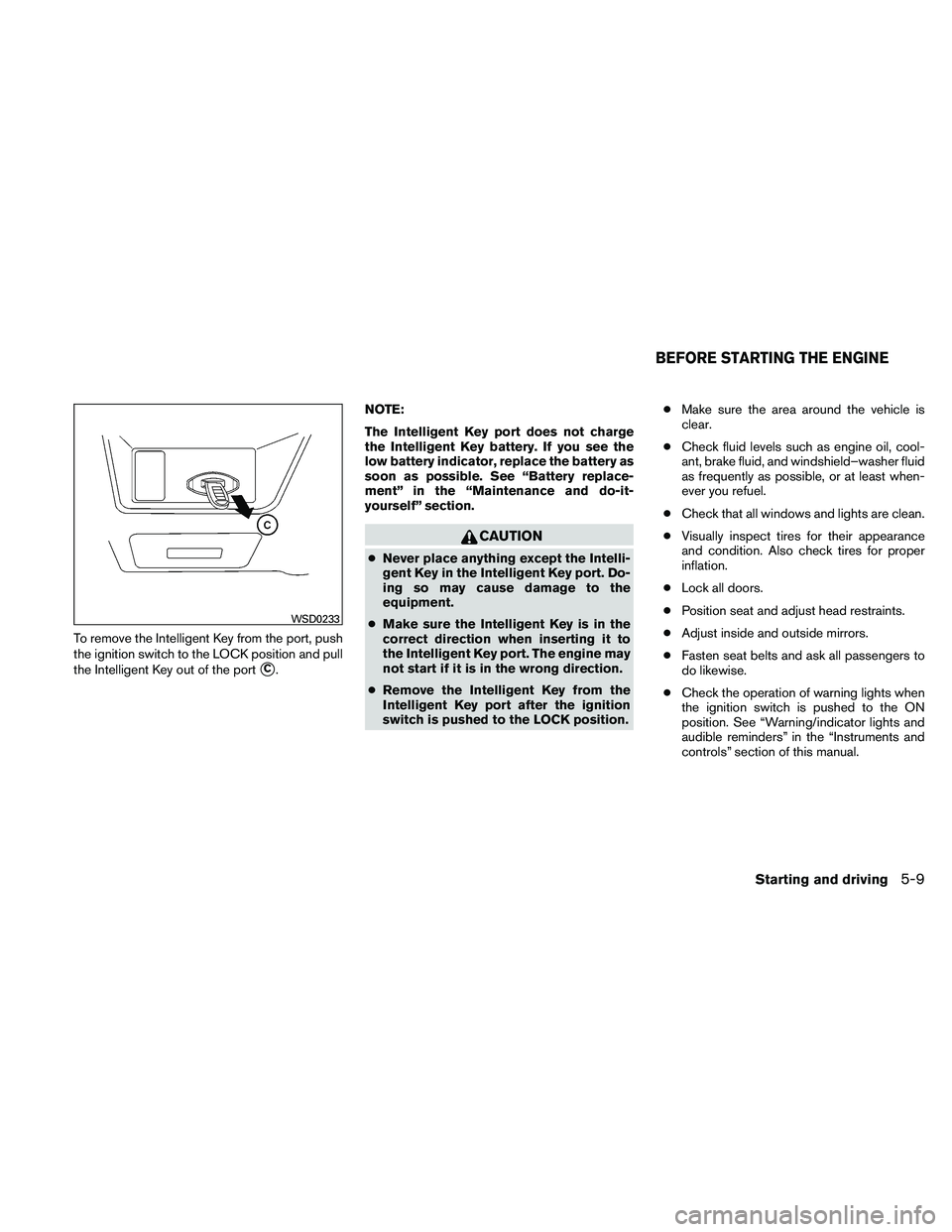
To remove the Intelligent Key from the port, push
the ignition switch to the LOCK position and pull
the Intelligent Key out of the port
�C.NOTE:
The Intelligent Key port does not charge
the Intelligent Key battery. If you see the
low battery indicator, replace the battery as
soon as possible. See “Battery replace-
ment” in the “Maintenance and do-it-
yourself” section.
Page 313 of 438
1. Apply the parking brake.
2.Continuously Variable Transmission
(CVT) model:
Move the shift selector to P (Park) or N
(Neutral) . P (Park) is recommended.
The starter is designed not to operate if
the shift selector is in any of the driving
positions.
Manual transmission:
Move the shift selector to N (Neutral) . De-
press the clutch pedal to the floor.
The starter is designed not to operate
unless the clutch pedal is fully de-
pressed.
3. Push the ignition switch to the ON position. Depress the brake pedal and the clutch
pedal (if so equipped) and push the ignition
switch to start the engine.
To start the engine immediately, push and
release the ignition switch while depressing
the brake pedal with the ignition switch in
any position. ●
If the engine is very hard to start in ex-
tremely cold weather or when restarting,
depress the accelerator pedal a little (ap-
proximately 1/3 to the floor) and while
holding, crank the engine. Release the
accelerator pedal when the engine starts.
● If the engine is very hard to start because
it is flooded, depress the accelerator
pedal all the way to the floor and hold it.
Push the ignition switch to the ON posi-
tion to start cranking the engine. After 5 or
6 seconds, stop cranking by pushing the
ignition switch to LOCK. After cranking
the engine, release the accelerator pedal.
Crank the engine with your foot off the
accelerator pedal by depressing the
brake pedal and pushing the push-button
ignition switch to start the engine. If the
engine starts, but fails to run, repeat the
above procedure.
Page 315 of 438
The CVT can operate in two different automatic
drive modes:● D (Drive) mode - Move the shift selector to D
(Drive) , the transmission is in the normal
forward automatic driving mode. The posi-
tion indicator in the meter shows a “D”. The
D (Drive) mode does not produce a gear
change sensation like a traditional automatic
transmission.
● Ds (Drive Sport) mode - Move the shift se-
lector over from D (Drive) to the left into the
manual shift gate. The position indicator in
the meter shows a “Ds”. In Ds (Drive Sport)
mode, transmission operation changes to
�Sporty” driving shift operation, creating a
more aggressive acceleration feeling than
the D (Drive) mode and a gear change sen-
sation when the driver accelerates quickly.
When the driver selects M (Manual) mode
ratio with shift selector during Ds (Drive
Sport) mode operation, the driver must move
the shift selector from Ds mode to D mode
and back again to re-select Ds (Drive Sport)
mode.
● To cancel the Ds mode, return the shift se-
lector to the D (Drive) position. The trans-
mission returns to the automatic drive mode. The CVT can operate in a manual drive mode:
● M (Manual) mode - With the shift selector in
the manual shift gate Ds (Drive Sport) mode,
M (Manual) mode can be selected by mov-
ing the shift selector up (+) or down (–) . In M
mode, the transmission will produce notice-
able upshifts and downshifts. The position
indicator in the meter shows a “M”.
Follow these procedures for maximum vehicle
performance and driving enjoyment.
NOTE:
Engine power may be automatically re-
duced to protect the CVT if the engine
speed increases quickly when driving on
slippery roads or while being tested on
some dynamometers.
Starting the vehicle
1. After starting the engine, fully depress the foot brake pedal before moving the shift
selector out of the P (Park) position.
2. Keep the foot brake pedal depressed and move the shift selector into a driving gear.
3. Release the foot brake, then gradually start the vehicle in motion.
4. Stop the vehicle completely before shifting the shift selector to the P (Park) position. The CVT is designed so the foot brake
pedal MUST be depressed before shifting
from P (Park) to any drive position while
the ignition switch is in the ON position.
The shift selector cannot be moved out of P
(Park) and into any of the other gear posi-
tions if the ignition switch is pushed to the
LOCK or ACC position.
5-12Starting and driving
Page 318 of 438
●In the manual shift mode, the transmis-
sion may shift up automatically to a
higher range than selected if the en-
gine speed is too high. When the ve-
hicle speed decreases, the transmis-
sion automatically shifts down and
shifts to 1st gear before the vehicle
comes to a stop.
● CVT operation is limited to automatic drive
mode when CVT fluid temperature is ex-
tremely low even if manual shift mode is
selected. This is not a malfunction. When
CVT fluid warms up, manual mode can be
selected.
● When the CVT fluid temperature is high, the
shift range may upshift in lower rpm than
usual. This is not a malfunction.
Shift lock release
If the battery charge is low or discharged, the
shift selector may not be moved from the P (Park)
position even with the brake pedal depressed
and the shift selector button pushed.
It will be necessary to jump start or have your
battery charged, see “Jump starting” in the “In
case of emergency” section. Contact your
NISSAN dealer or a professional towing service.
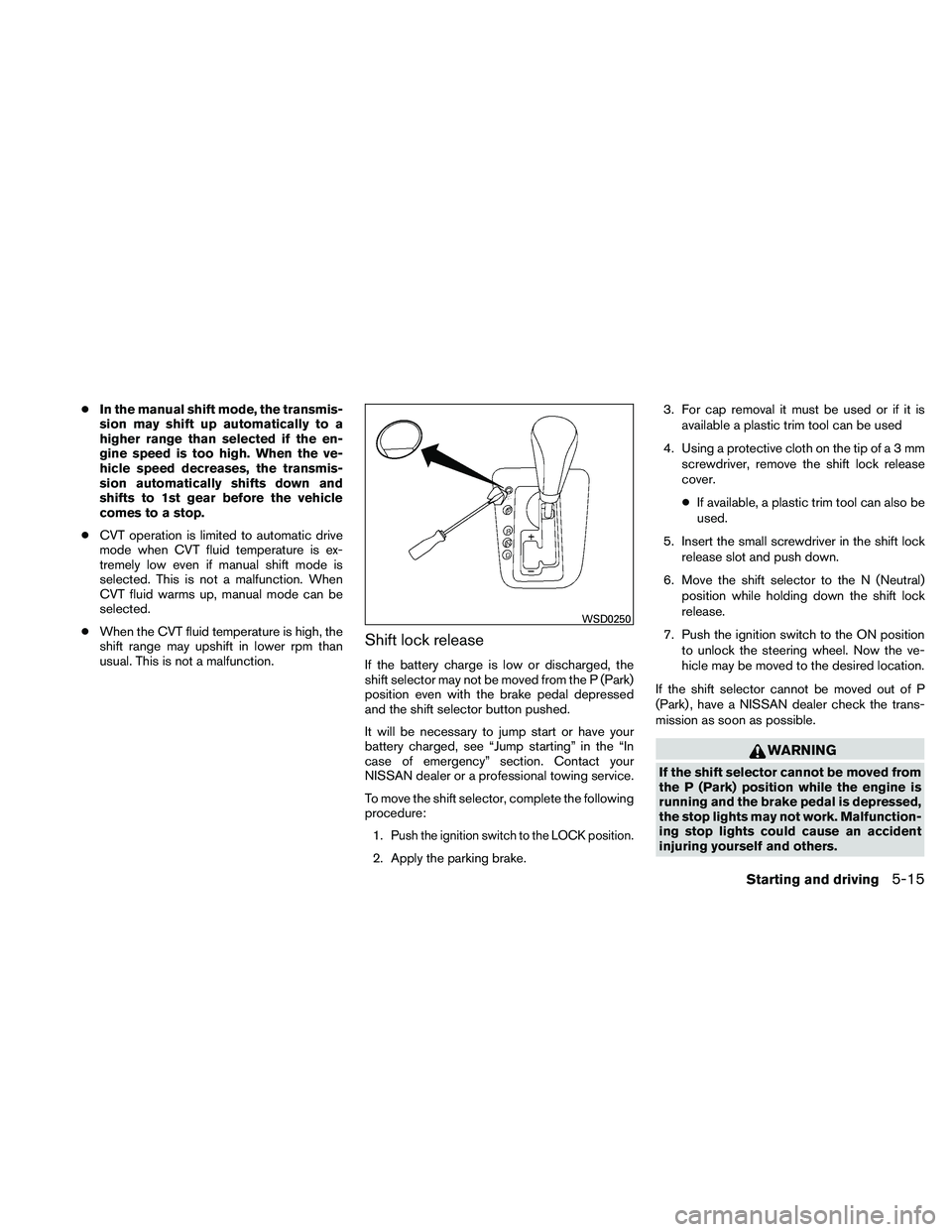
To move the shift selector, complete the following
procedure:
1.
Push the ignition switch to the LOCK position.
2. Apply the parking brake. 3. For cap removal it must be used or if it is
available a plastic trim tool can be used
4. Using a protective cloth on the tip ofa3mm screwdriver, remove the shift lock release
cover.
● If available, a plastic trim tool can also be
used.
5. Insert the small screwdriver in the shift lock release slot and push down.
6. Move the shift selector to the N (Neutral) position while holding down the shift lock
release.
7. Push the ignition switch to the ON position to unlock the steering wheel. Now the ve-
hicle may be moved to the desired location.
If the shift selector cannot be moved out of P
(Park) , have a NISSAN dealer check the trans-
mission as soon as possible.
Page 325 of 438
WARNING
●Do not stop or park the vehicle over
flammable materials such as dry grass,
waste paper or rags. They may ignite
and cause a fire.
● Safe parking procedures require that
both the parking brake be set and the
transmission placed into P (Park) for
CVT models or in an appropriate gear
for manual transmission models. Fail-
ure to do so could cause the vehicle to
move unexpectedly or roll away and re-
sult in an accident. Make sure the shift selector has been pushed as far for-
ward as it can go and cannot be moved
without depressing the foot brake
pedal.
● Never leave the engine running while
the vehicle is unattended.
● Do not leave children unattended inside
the vehicle. They could unknowingly ac-
tivate switches or controls. Unattended
children could become involved in seri-
ous accidents.
1. Firmly apply the parking brake. 2.
Manual transmission models:
Place the shift selector in the R (Reverse)
position. When parking on an uphill grade,
place the shift selector in 1st gear.
Continuously Variable Transmission
(CVT) models:
Move the shift selector to the P (Park) position.
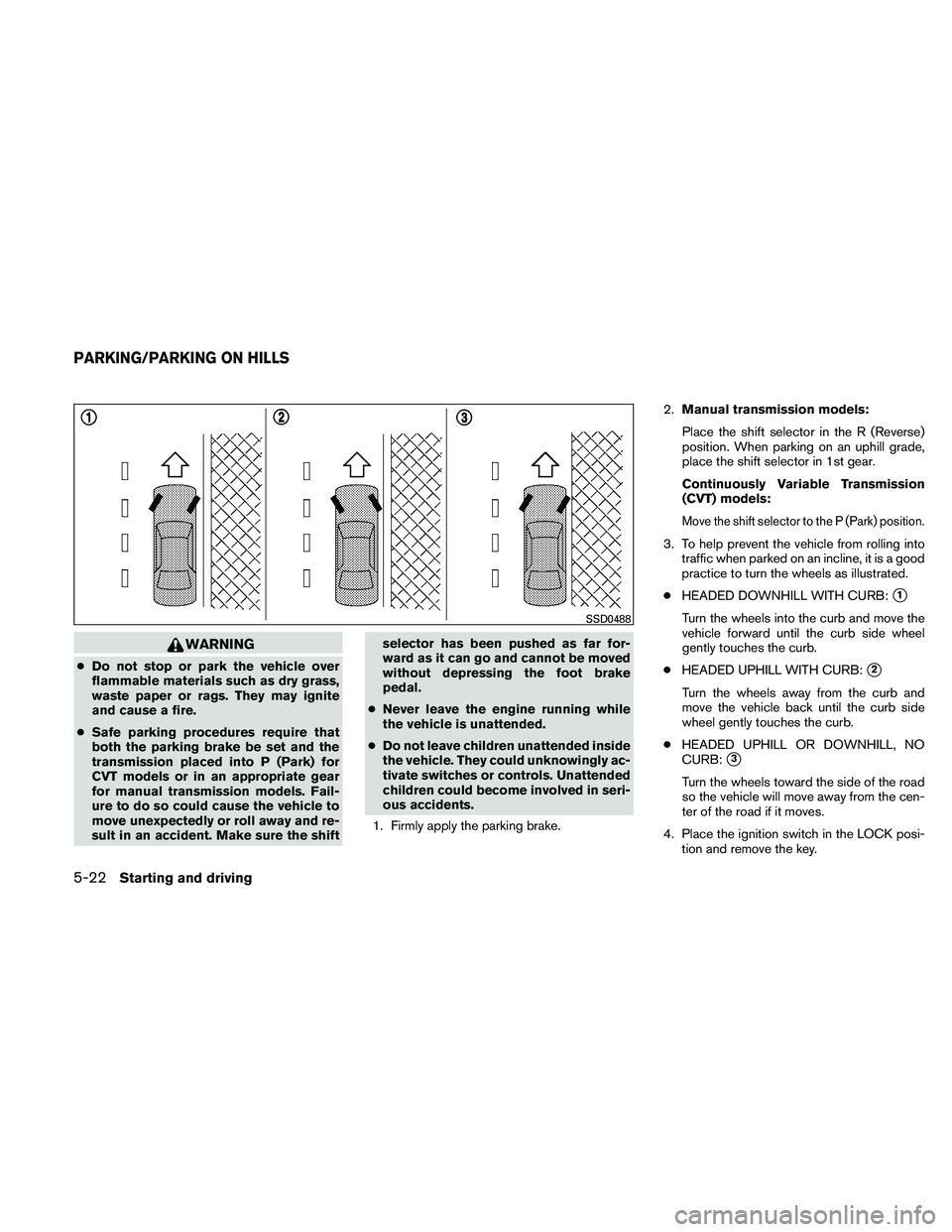
3. To help prevent the vehicle from rolling into traffic when parked on an incline, it is a good
practice to turn the wheels as illustrated.
● HEADED DOWNHILL WITH CURB:
�1
Turn the wheels into the curb and move the
vehicle forward until the curb side wheel
gently touches the curb.
● HEADED UPHILL WITH CURB:
�2
Turn the wheels away from the curb and
move the vehicle back until the curb side
wheel gently touches the curb.
● HEADED UPHILL OR DOWNHILL, NO
CURB:
�3
Turn the wheels toward the side of the road
so the vehicle will move away from the cen-
ter of the road if it moves.
4. Place the ignition switch in the LOCK posi- tion and remove the key.
Page 327 of 438
To dry the brakes, drive the vehicle at a safe
speed while lightly pressing the brake pedal to
heat up the brakes. Do this until the brakes return
to normal. Avoid driving the vehicle at high
speeds until the brakes function correctly.
ANTI-LOCK BRAKING SYSTEM
(ABS)