2010 NISSAN 370Z COUPE bluetooth
[x] Cancel search: bluetoothPage 4 of 409

Black plate (4,1)
Model "Z34-D" EDITED: 2009/ 9/ 10
BLUETOOTH
®is a trademark
owned by Bluetooth SIG, Inc.,
U.S.A. and licensed to Visteon
and Xanavi Informatics Corpora-
tion.
Gracenote
®is a registered tra-
demark of Gracenote, Inc. The
Gracenote logo and logo type,
and the “Powered by Gracenote”
logo are trademarks of Grace-
note.
XM Radio
®requires a subscrip-
tion, sold separately after the first
90 days. It is not available in
Alaska, Hawaii or Guam. For
more information, visit
www.xmradio.com.
*C2009 NISSAN MOTOR CO., LTD. TOKYO, JAPAN
All rights reserved. No part of this Owner’s
Manual may be reproduced or stored in a
retrieval system, or transmitted in any form, or
by any means, electronic, mechanical, photo-
copying, recording or otherwise, without the
prior written permission of Nissan Motor Co.,
Ltd.
Page 17 of 409

Black plate (13,1)
Model "Z34-D" EDITED: 2009/ 9/ 10
SSI0653
1. Ventilator (P.4-17)
2. Center display and multi-function control panel(P.4-2)/Instrument pocket (P.2-38)
— Navigation system* (if so equipped)
— Vehicle information and setting buttons
(if so equipped) (P.4-6)
— Bluetooth
®Hands-Free Phone System
(if so equipped) (P.4-74) 3. Front passenger air bag status light (P.1-32)
4. Front passenger supplemental air bag (P.1-27)
5. Fuse box cover (P.8-20)
6. Push-button ignition switch (P.5-7)
7. Hazard warning flasher switch (P.2-33) 8. Seat heater switch (if so equipped) (P.2-34) or
Climate controlled seat switch (if so equipped)
(P.2-36)
9. Soft top operating switch (for Roadster models) (P.3-21)
10. SynchroRev Match mode (S-MODE) switch (if so equipped) (P.5-16)
11. Heater and air conditioner (P.4-17) — Rear window defroster switch (P.2-29)
12. Audio system (P.4-24)
13. Power outlet (P.2-37)
14. Glove box (P.2-39)
*: Refer to the separate Navigation System Owner’s Manual.
INSTRUMENT PANEL
Illustrated table of contents
0-11
Page 65 of 409

Black plate (63,1)
Model "Z34-D" EDITED: 2009/ 9/ 10
SSI0653
1. Ventilator (P.4-17)
2. Center display and multi-function control panel(P.4-2)/Instrument pocket (P.2-38)
— Navigation system* (if so equipped)
— Vehicle information and setting buttons
(if so equipped) (P.4-6)
— Bluetooth
®Hands-Free Phone System
(if so equipped) (P.4-74) 3. Front passenger air bag status light (P.1-32)
4. Front passenger supplemental air bag (P.1-27)
5. Fuse box cover (P.8-20)
6. Push-button ignition switch (P.5-7)
7. Hazard warning flasher switch (P.2-33) 8. Seat heater switch (if so equipped) (P.2-34) or
Climate controlled seat switch (if so equipped)
(P.2-36)
9. Soft top operating switch (for Roadster models) (P.3-21)
10. SynchroRev Match mode (S-MODE) switch (if so equipped) (P.5-16)
11. Heater and air conditioner (P.4-17) — Rear window defroster switch (P.2-29)
12. Audio system (P.4-24)
13. Power outlet (P.2-37)
14. Glove box (P.2-39)
*: Refer to the separate Navigation System Owner’s Manual.
INSTRUMENT PANEL
Instruments and controls
2-3
Page 152 of 409

Black plate (13,1)
4
Center display, heater, air conditioner,
audio, phone and voice recognition systems
Model "Z34-D" EDITED: 2009/ 9/ 10
Safety note....................................................... 4-2
Center multi-function control panel
(models with navigation system) ............................ 4-2
How to use multi-function controller ................... 4-3
How to use touch screen ................................. 4-3
Menu options ................................................ 4-5
How to select menus on the screen ................... 4-6
Vehicle information and settings
(models with navigation system) ............................ 4-6
How to use STATUS button .............................. 4-6
How to use brightness control and display ON/
OFF button ................................................... 4-6
How to use INFO button. ................................. 4-6
How to use SETTING button .......................... 4-10
Ventilators ...................................................... 4-17
Center ventilators ......................................... 4-17
Side ventilators ............................................ 4-17
Heater and air conditioner .................................. 4-17
Automatic air conditioner (Type A) .................... 4-18
Automatic air conditioner (Type B/Type C) ......... 4-21
Operating tips ............................................. 4-23
In-cabin microfilter ........................................ 4-23
Servicing air conditioner ................................ 4-24
Audio system .................................................. 4-24
Audio operation precautions ........................... 4-24
FM-AM radio with Compact Disc (CD) player ..... 4-36FM-AM-SAT radio with Compact Disc (CD)
changer (models without navigation system) . . .
.... 4-41
FM-AM-SAT radio with Compact Disc (CD)
player (models with navigation system) .............. 4-45
DVD (DIGITAL VERSATILE DISC) player
operation (models with navigation system). ......... 4-49
USB memory operation
(models with navigation system) ...................... 4-52
Bluetooth
®streaming audio
(models with navigation system) ...................... 4-56
iPod
®player operation
(models with navigation system) ...................... 4-61
Music box hard-disk drive
(models with navigation system) ...................... 4-63
Auxiliary input jacks
(models with navigation system) ...................... 4-69
CD/DVD/USB memory care and cleaning .......... 4-70
Steering-wheel-mounted controls for audio ........ 4-71
Antenna ..................................................... 4-73
Car phone or CB radio ...................................... 4-74
Bluetooth®Hands-Free Phone System
(models with navigation system) .......................... 4-74
Regulatory information ................................... 4-75
Voice commands. ......................................... 4-76
Control buttons ........................................... 4-76
Connecting procedure ................................... 4-77
Phone selection ........................................... 4-77
Page 153 of 409
Black plate (14,1)
Model "Z34-D" EDITED: 2009/ 9/ 10
Vehicle phonebook....................................... 4-77
Making a call ............................................... 4-80
Receiving a call ........................................... 4-81
During a call ............................................... 4-82
Phone setting .............................................. 4-82
Troubleshooting guide ................................... 4-84
Bluetooth
®Hands-Free Phone System
(models without navigation system) ...................... 4-85
Regulatory information ................................... 4-86
Using the system ......................................... 4-87
Control buttons ........................................... 4-89
Getting started ............................................ 4-89 List of voice commands
................................. 4-91
Speaker Adaptation (SA) mode ....................... 4-94
Troubleshooting guide ................................... 4-97
NISSAN Voice Recognition System
(models with navigation system) .......................... 4-98
NISSAN voice recognition standard mode .......... 4-98
Using the system ....................................... 4-100
NISSAN voice recognition alternate command
mode ...................................................... 4-110
Using the system ....................................... 4-116
Troubleshooting guide ................................. 4-121
Page 154 of 409
Black plate (154,1)
Model "Z34-D" EDITED: 2009/ 9/ 10
WARNING
.Do not disassemble or modify this
system. If you do, it may result in
accidents, fire, or electric shock.
. Do not use this system if you notice
any abnormality, such as a frozen
screen or lack of sound. Continued
use of the system may result in
accident, fire or electric shock.
. In case you notice any foreign
object in the system hardware, spill
liquid on it, or notice smoke or smell
coming from it, stop using the
system immediately and contact
your nearest NISSAN dealer. Ignor-
ing such conditions may lead to
accidents, fire, or electric shock.
. Park the vehicle in a safe location
and apply the parking brake to view
the images on the front center dis-
play screen using devices connected
to the auxiliary input jacks.
Do not attempt to operate the system in
extreme temperature conditions [below
48F( 208 C) and above 158 8F(70 8C)].
Operating this system under these condi-
tions may result in system malfunctions.
SAA2273
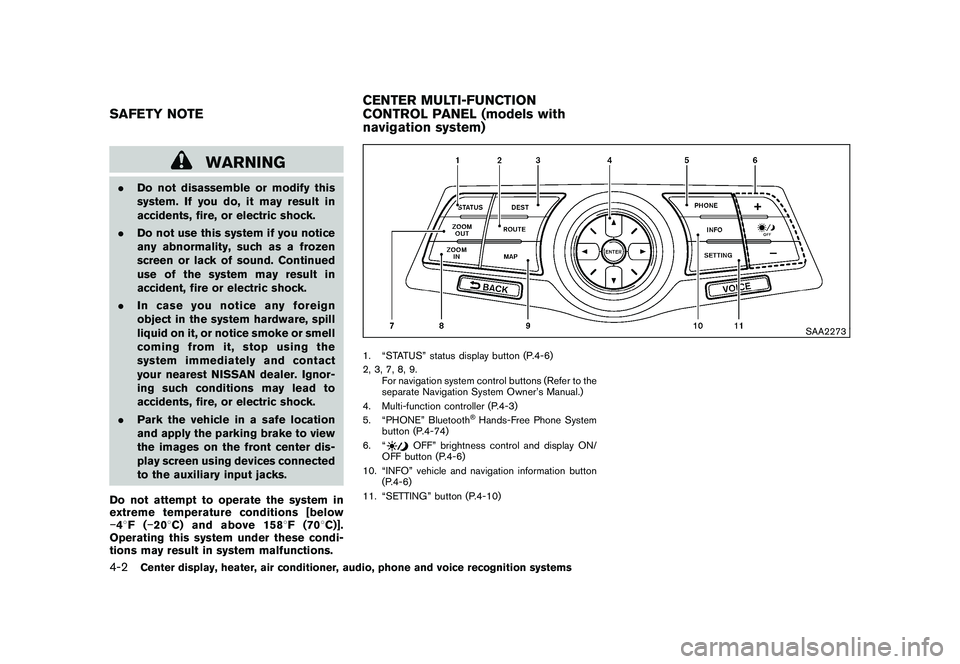
1. “STATUS” status display button (P.4-6)
2, 3, 7, 8, 9.
For navigation system control buttons (Refer to the
separate Navigation System Owner’s Manual.)
4. Multi-function controller (P.4-3)
5. “PHONE” Bluetooth
®Hands-Free Phone System
button (P.4-74)
6. “
OFF” brightness control and display ON/
OFF button (P.4-6)
10. “INFO” vehicle and navigation information button (P.4-6)
11. “SETTING” button (P.4-10)
SAFETY NOTE CENTER MULTI-FUNCTION
CONTROL PANEL (models with
navigation system)4-2
Center display, heater, air conditioner, audio, phone and voice recognition systems
Page 163 of 409

Black plate (163,1)
Model "Z34-D" EDITED: 2009/ 9/ 10
Speed Sensitive Vol.:
The audio system’s volume is increased with the
vehicle speed. Select the “Speed Sensitive Vol.”
and adjust the effect level with the multi-function
controller. The Speed Sensitive Volume function
is turned off when the level is set to “OFF”.
Increasing the value will cause the volume to
increase faster with vehicle speed.
DivX
®Registration Code:
The registration code for a device that is used to
download DivX
®files will be displayed on the
screen. If a disc is loaded or a USB memory is
connected to the audio system, this function will
not be activated.
Display Album Cover Art:
When this item is turned to ON, the album cover
image is displayed when playing iPod
®or MP3
music files through a CD, DVD or USB memory.
When the image is not properly embedded in
the file or device, the image will not be
displayed.
Phone settingsFor details of the “Phone” settings, see “BLUE-
TOOTH
®HANDS-FREE PHONE SYSTEM
(models with navigation system)” later in this
section.
Bluetooth
®settings (for models with
navigation system)
For details of the “Bluetooth” settings, see
“BLUETOOTH
®HANDS-FREE PHONE SYS-
TEM (models with navigation system)” later in
this section.
SAA2554
Example
Volume and Beeps settingsThe display as illustrated will appear when
pushing the SETTING button, selecting the
“Volume & Beeps” key.
Audio Volume:
To increase or decrease the audio volume,
select the “Audio Volume” and adjust it with
the multi-function controller. You can also adjust
the audio volume by turning the VOLUME
control knob.
Guidance Volume:
To adjust the guidance voice volume louder or
softer, select the “Guidance Volume” and adjust
Center display, heater, air conditioner, audio, phone and voice recognition systems
4-11
Page 187 of 409
Black plate (187,1)
Model "Z34-D" EDITED: 2009/ 9/ 10
Bluetooth
®Audio player (models with
navigation system)
. Some Bluetooth
®audio devices may not be
recognized by the in-vehicle audio system.
. It is necessary to set up the wireless
connection between a compatible Blue-
tooth
®audio device and the in-vehicle
Bluetooth®module before using the Blue-
tooth
®audio player.
. Operating procedure of the Bluetooth
®
audio player will vary depending on the
device. Make sure it is understood how to
operate an audio device before using it with
this system.
. The Bluetooth
®audio player may be stopped
under the following conditions:
— Receiving a hands-free call.
— Checking the connection to the hands- free phone.
. Do not place a Bluetooth
®audio device in an
area surrounded by metal or far away from
the in-vehicle Bluetooth®module to prevent
tone quality degradation and wireless con-
nection disruption.
. While an audio device is connected through
a Bluetooth
®wireless connection, the bat-
tery power of the device may discharge quicker than usual.
. This system supports the Bluetooth
®Audio
Distribution Profile (A2DP, AVRCP) .
. BLUETOOTH
®is a trademark owned by
Bluetooth SIG, Inc. and licensed to Clarion
Co., Ltd.
Music Box hard driveRecording:
. Note that data that is lost and not stored to
the hard disk drive due to system damage,
improper operation or malfunction is not
under warranty.
. Vehicle owners are not permitted to record
music without permission of the owner of
the copyright except for personal use.
. Check if the music is appropriately recorded
to the hard disk drive after recording when
the compact disc cannot be rerecorded.
. Some music cannot be recorded depending
on the disc condition due to high-speed
recording.
. Jumping sounds may be recorded when a
compact disc is recorded while driving on
rough roads and excessive vibration occurs. .
A mark indicating jumping sounds is dis-
played if jumping sounds are recorded.
. No sounds may be recorded if jumping
sounds occurs or the disc is in poor
condition.
. Tracks that include Serial Copy Manage-
ment System (SCMS) are not recorded.
. If a compact disc is scratched or dirty, it may
not be recorded, jumping sounds may occur
or it may take a long time to record.
Automatic title download:
. The title information that is automatically
downloaded may differ from the actual title.
. When newly released compact discs are
recorded, their title information may not be
downloaded.
. The title information in the hard disk can be
updated. (See “Playing recorded songs”
later in this section.)
Center display, heater, air conditioner, audio, phone and voice recognition systems
4-35