Page 442 of 594
Comfort controls
5-73
5
To listen to a CD
N00735501003
The compact disc (CD) can be loaded or ejected by pressing
the LOAD button (5) or the eject button (15) even if the audio
system power is OFF.
1. Press the PWR switch (3) to turn the audio system ON and
OFF. The system turns on in the last mode used.
2. Press the CD button (2) to enter CD mode. The
autochanger will start playback if the CD is already in the
autochanger.
3. To stop the CD, turn off the power by pressing the PWR
switch (3) or change over to radio mode by pressing the
RADIO button (1), or eject the disc by pressing the eject
button (15).NOTE�
For information concerning the adjustment of volume and
tone, refer to “To adjust the volume” on page 5-55 and
“To adjust the tone” on page 5-55.
�
As many as 6 CDs can be inserted into the CD
autochanger.
�
For information concerning the handling of the compact
discs, refer to “Handling of compact discs” on page 5-91.
To set discsTo set a single disc
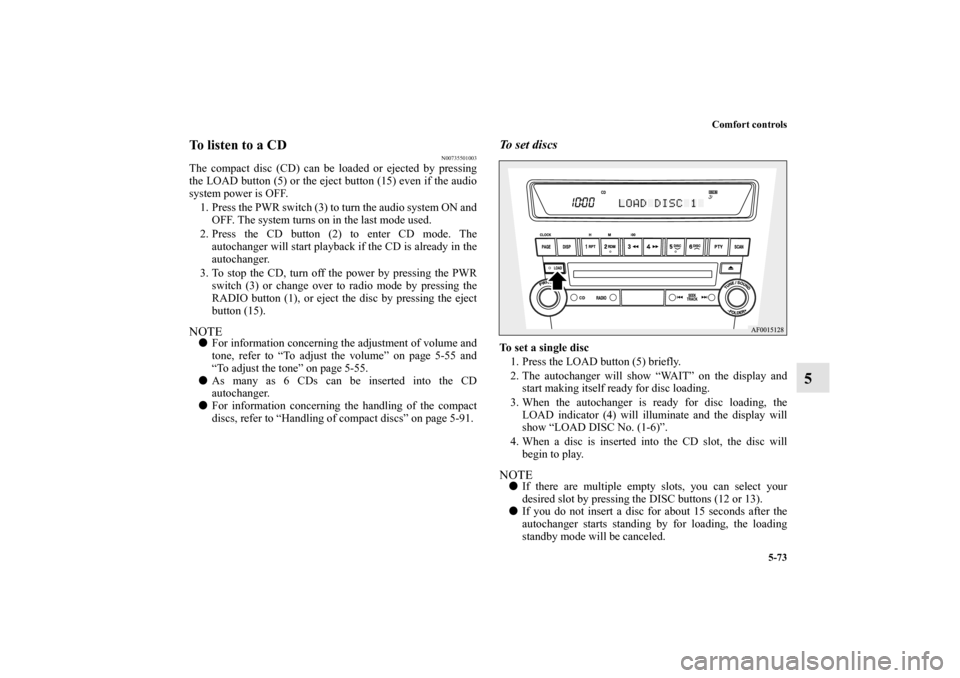
1. Press the LOAD button (5) briefly.
2. The autochanger will show “WAIT” on the display and
start making itself ready for disc loading.
3. When the autochanger is ready for disc loading, the
LOAD indicator (4) will illuminate and the display will
show “LOAD DISC No. (1-6)”.
4. When a disc is inserted into the CD slot, the disc will
begin to play.NOTE�
If there are multiple empty slots, you can select your
desired slot by pressing the DISC buttons (12 or 13).
�
If you do not insert a disc for about 15 seconds after the
autochanger starts standing by for loading, the loading
standby mode will be canceled.
BK0105501US.book 73 ページ 2009年8月10日 月曜日 午前10時32分
Page 449 of 594

5-80 Comfort controls
5
Random playback for all folders on a disc (MP3 CDs only)
Press the RDM button (9) for 2 seconds or longer (until you
hear a beep). “D-RDM” will appear on the display. Tracks
from all the folders on the currently selected disc will be
played in a random sequence. To exit the random mode, briefly
press the RDM button again.NOTE�
In the all discs random mode, if an MP3 CD has been
loaded in the autochanger, the autochanger will skip over
it to the next music CD.
�
With a disc that contains both CD-DA and MP3 files, the
random mode causes only files of the same format (CD-
DA only or MP3 files only) to be played in a random
sequence.
To find the start of each track on a disc for playbackPress the SCAN button (14). “SCAN” will appear on the dis-
play and the autochanger will play back the first 10 seconds of
each track on the selected disc.
The track number will blink while the scan mode is selected.
To stop the scan mode, press the SCAN button again.NOTE�
Once all tracks on the disc have been scanned, playback
of the disc will restart from the beginning of the track that
was playing when scanning started.
�
The scan mode will be canceled when radio or CD opera-
tion is selected.
�
With a disc that contains both CD-DA and MP3 files, the
scan mode causes only files of the same format (CD-DA
only or MP3 files only) to be played.
CD text and MP3 title display
N00752100094
This autochanger can display CD text and MP3 titles including
ID3 tag information.
CD text
The autochanger can display disc and track titles for discs with
converted disc and track title information. Press the DISP but-
ton (7) repeatedly to make selections in the following
sequence: disc name → track name → normal display mode.
BK0105501US.book 80 ページ 2009年8月10日 月曜日 午前10時32分
Page 452 of 594

Comfort controls
5-83
5
You can listen to commercially available audio equipment,
such as a portable audio system, from your vehicle’s speakers,
by connecting the audio equipment to the audio input connec-
tors, which are external input connectors (pin jacks).NOTE�
For information on using the video input connector (C),
refer to the separate owner’s manual for a Mitsubishi
Multi-Communication System.
To activate the external audio input mode1. Use a commercially available audio cable to connect the
audio equipment to the internal audio input connector.
2. Press and hold the CD button (D) for more than 2 seconds.
The display (E) will show “AUX” and then the external
audio input mode will be activated.
3. To deactivate the external audio input mode, press the
RADIO button (F) or the CD button (D) to switch to
another mode.
Auxiliary Audio connector (RCA)
A- Left audio input connector (white)
B- Right audio input connector (red)
Auxiliary Video connector (RCA)
A- Left audio input connector (white)
B- Right audio input connector (red)
C- Video input connector (yellow)
Auxiliary Audio connector
(RCA)
Auxiliary Video connector
(RCA) Ty p e 2
CAUTION
!�
Do not operate the connected audio equipment while
driving.
This could distract you and an accident might occur.
BK0105501US.book 83 ページ 2009年8月10日 月曜日 午前10時32分
Page 454 of 594
Comfort controls
5-85
5
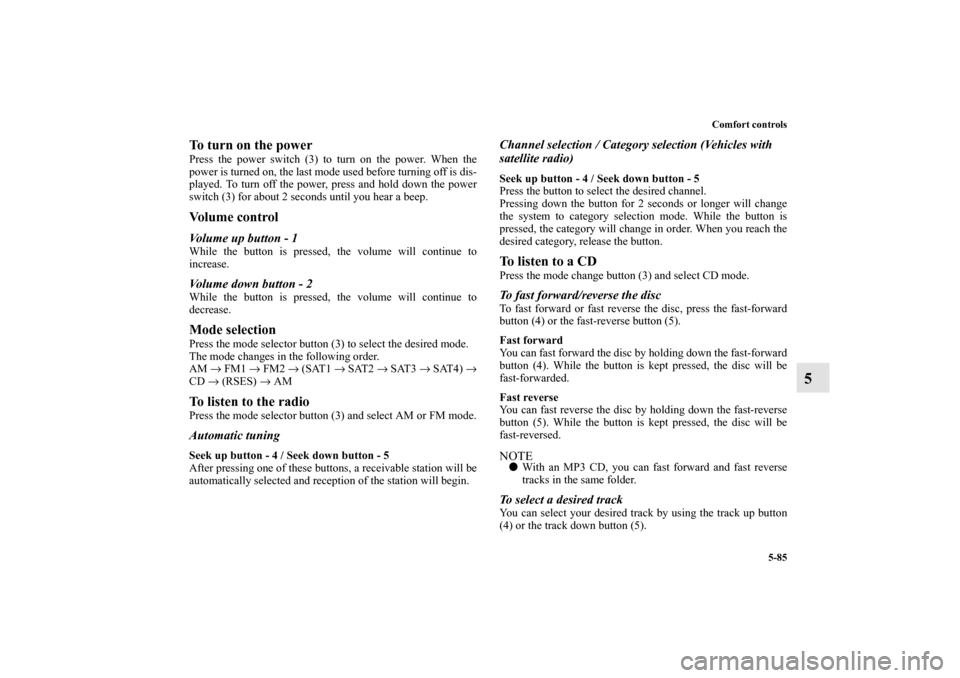
To turn on the powerPress the power switch (3) to turn on the power. When the
power is turned on, the last mode used before turning off is dis-
played. To turn off the power, press and hold down the power
switch (3) for about 2 seconds until you hear a beep.Vo l u m e c o n t r o lVolume up button - 1While the button is pressed, the volume will continue to
increase.Volume down button - 2While the button is pressed, the volume will continue to
decrease.Mode selectionPress the mode selector button (3) to select the desired mode.
The mode changes in the following order.
AM → FM1 → FM2 → (SAT1 → SAT2 → SAT3 → SAT4) →
CD → (RSES) → AMTo listen to the radioPress the mode selector button (3) and select AM or FM mode.Automatic tuningSeek up button - 4 / Seek down button - 5
After pressing one of these buttons, a receivable station will be
automatically selected and reception of the station will begin.
Channel selection / Category selection (Vehicles with
satellite radio)Seek up button - 4 / Seek down button - 5
Press the button to select the desired channel.
Pressing down the button for 2 seconds or longer will change
the system to category selection mode. While the button is
pressed, the category will change in order. When you reach the
desired category, release the button.To listen to a CDPress the mode change button (3) and select CD mode.To fast forward/reverse the discTo fast forward or fast reverse the disc, press the fast-forward
button (4) or the fast-reverse button (5).
Fast forward
You can fast forward the disc by holding down the fast-forward
button (4). While the button is kept pressed, the disc will be
fast-forwarded.
Fast reverse
You can fast reverse the disc by holding down the fast-reverse
button (5). While the button is kept pressed, the disc will be
fast-reversed.NOTE�
With an MP3 CD, you can fast forward and fast reverse
tracks in the same folder.
To select a desired trackYou can select your desired track by using the track up button
(4) or the track down button (5).
BK0105501US.book 85 ページ 2009年8月10日 月曜日 午前10時32分
Page 457 of 594
5-88 Comfort controls
5
ERROR HOTInside of audio system
is hot.Internal protection against high temperatures.Allow radio to cool by waiting about 30 min-
utes.
ERRORCommunication or
power supply errorCommunication error between external device
and audio equipment. Power supply error of
external device.Consult an authorized Mitsubishi Motors
dealer.Error display
Problem
Item
Repair
BK0105501US.book 88 ページ 2009年8月10日 月曜日 午前10時32分
Page 458 of 594
Comfort controls
5-89
5 Error codes (SIRIUS Satellite Radio)
(if so equipped)
N00760300079
If an error code (1) appears in the display, take action in accordance with the table below.
Error display
Problem
Description
Repair
ANTENNA ↔ ERROR Antenna errorThe antenna may be faulty, not securely
connected, or open-circuited.Take the vehicle to your authorized
Mitsubishi Motors dealer or a repair
facility of your choice.
ACQUIRING Cannot pick up signal. The signal is too weak to be received.Move to a place where the signal is
easy to receive.
CALL ↔ 888-539-SIRIUS Unauthorized channelContract does not include reception of this
channel.Contact SIRIUS Satellite Radio and
obtain a contract.
NO CHANNELThere is no selectable
channel.There is no selectable channel. Cancel SKIP settings.
BK0105501US.book 89 ページ 2009年8月10日 月曜日 午前10時32分
Page 459 of 594

5-90 Comfort controls
5
NOTE�
Reception may not be possible in a place where the signal is interrupted by a tunnel, by the roof of a garage or other structure,
by woods, or by a tall building. At such times, the audio is muted. This behavior does not indicate a fault.
�
Reception conditions may vary according to the angle of the satellite used for the satellite radio service.
�
Reception may deteriorate if a luggage carrier is attached to the roof or snow collects on the antenna.
�
Satellite radio reception may not be possible in certain regions.
INVALID ↔ CHANNEL Channel is invalidNo program is currently being broadcast
on this channel; or reception is not possi-
ble with this channel.Consult SIRIUS Satellite Radio at
888-539-SIRIUS.
SAT ERRORMechanical fault or bad
connectionThere is a mechanical fault or a bad con-
nection.Take the vehicle to your authorized
Mitsubishi Motors dealer or a repair
facility of your choice.
OFF AIR OFF AIRThis channel is not broadcasting at the
present time; or satellite radio broadcast-
ing is suspended.Check the broadcast times with
SIRIUS Satellite Radio.
NOT ACTIVATED ID not registeredThe ID code in the receiver has not been
registered with SIRIUS Satellite Radio.Contact your authorized Mitsubishi
Motors dealer or a repair facility of
your choice.
READING Data reading in progress Reading of received data is in progress.Received data are being read. Please
wait.
UPDATINGChannel data updating
in progressSIRIUS Satellite Radio is presently updat-
ing the channel data.Wait until updating is complete.
SUB UPDATEDContract status updating
completeThe contract status has been updated. Press any audio key.
Error display
Problem
Description
Repair
BK0105501US.book 90 ページ 2009年8月10日 月曜日 午前10時32分
Page 463 of 594
5-94 Comfort controls
5Antenna
N00734200413
Roof antenna (except for vehicles with SIRIUS
satellite radio)When listening to the radio, fold the antenna toward the rear of
the vehicle until you hear it click.
To r e m o v eTurn the pole (A) counterclockwise.To i n s t a l lScrew the pole (A) clockwise into the base (B) until it is
securely retained.NOTE�
Be sure to remove the roof antenna in the following cases:
When using an automatic car wash
When covering your vehicle with a car cover
�
Before driving into a structure that has a low ceiling, fold
down the antenna toward the front of the vehicle to pre-
vent it from hitting the ceiling.
BK0105501US.book 94 ページ 2009年8月10日 月曜日 午前10時32分


