Page 179 of 594
3-94 Features and controls
3
Gearshift lever operation
N00539800063
As an additional safety precaution, models equipped with a
Twin Clutch SST have a shift-lock device that holds the gear-
shift lever in the “P” (PARK) position. To move the gearshift
lever from the “P” (PARK) position to another position, follow
the steps below.
1. Press and hold the brake pedal down.
2. Move the gearshift lever to the desired position.NOTE�
The gearshift lever cannot be moved from “P” (PARK) to
another position if the ignition switch is at the “LOCK” or
“ACC” position, or the key has been removed, or if the
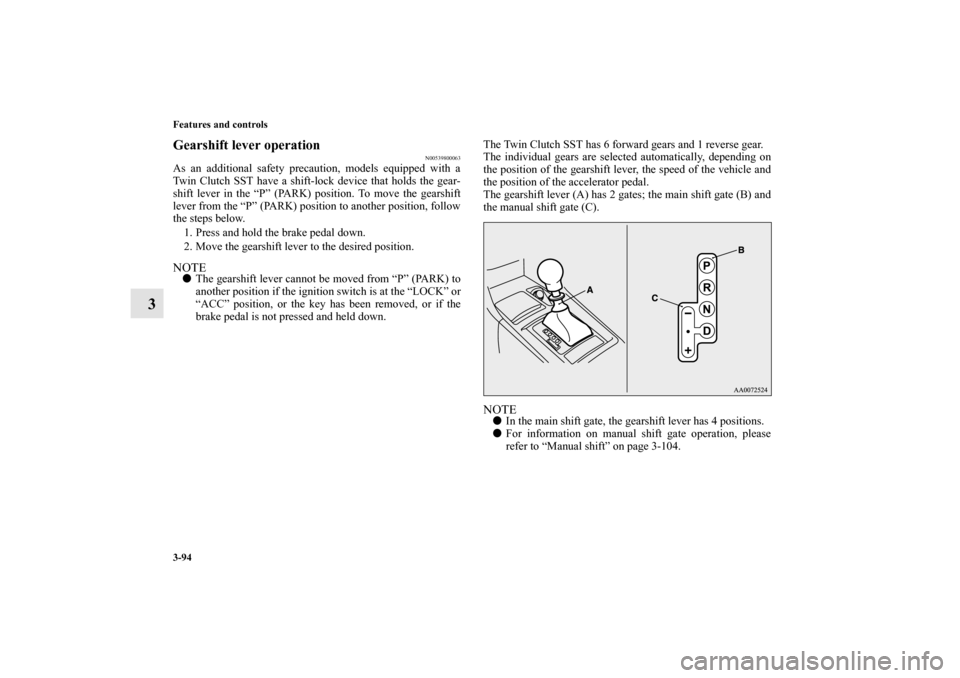
brake pedal is not pressed and held down.The Twin Clutch SST has 6 forward gears and 1 reverse gear.
The individual gears are selected automatically, depending on
the position of the gearshift lever, the speed of the vehicle and
the position of the accelerator pedal.
The gearshift lever (A) has 2 gates; the main shift gate (B) and
the manual shift gate (C).
NOTE�
In the main shift gate, the gearshift lever has 4 positions.
�
For information on manual shift gate operation, please
refer to “Manual shift” on page 3-104.
BK0105501US.book 94 ページ 2009年8月10日 月曜日 午前10時32分
Page 241 of 594
3-156 Features and controls
3
Interrupt display screen (With ignition switch in
the “OFF” position)
N00559600139
When there is information to be announced, such as a key
reminder, the buzzer sounds and switches to the warning dis-
play screen. Refer to the appropriate page and take the neces-
sary measures.
When the cause of the warning display is eliminated, the warn-
ing display goes out automatically.
Refer to “Warning display list (With ignition switch in the
“OFF” position)” on page 3-185.
Returning to the display screen from before the warn-
ing displayEven if the cause of the warning display is not eliminated, you
can return to the screen that was displayed before the warning
display.
If you press the multi-information meter switch, the display
screen switches to the screen display from before the warning
and the “!” warning is displayed.
1- Information generated
2- Cause eliminated
A- “!” warning
BK0105501US.book 156 ページ 2009年8月10日 月曜日 午前10時32分
Page 270 of 594
Features and controls
3-185
3
Warning display list (With ignition switch in the “OFF” position)
N00558000149
Screen
Cause
Do this (Reference)
�You have forgotten to remove the key
from the ignition switch.�Remove the key.
Refer to “Key reminder system” on
page 3-55.
�You have forgotten to turn off the
lights.Refer to “Light auto-cutout function (head-
lights and other lights)” on page 3-203.
�The theft-alarm is operating. Refer to “Security alarm” on page 3-63.
�Immobilizer is registered. Refer to “Electronic immobilizer (Anti-theft
starting system)” on page 3-7, 3-42.
BK0105501US.book 185 ページ 2009年8月10日 月曜日 午前10時32分
Page 272 of 594
Features and controls
3-187
3
�There is a fault in the F. A. S. T. -key. Refer to “F. A. S. T. -key” on page 3-27.
Screen
Cause
Do this (Reference)
BK0105501US.book 187 ページ 2009年8月10日 月曜日 午前10時32分
Page 273 of 594
3-188 Features and controls
3
Warning display list (With ignition switch in the “ON” position)
N00558100166
Screen
Cause
Do this (Reference)
�There is a fault in the F.A.S.T.-key. Refer to “F.A.S.T.-key” on page 3-27.
BK0105501US.book 188 ページ 2009年8月10日 月曜日 午前10時32分
Page 280 of 594

Features and controls
3-195
3 Indicators
N00519900127
Turn signal indicators/Hazard warning lights
N00520000216
The arrows will flash in time with the corresponding exterior
turn signals when the turn signal lever is used.
Both arrows will flash when the hazard warning flasher switch
is pressed.NOTE�
If the indicator flashes faster than usual or if the indicator
stays on without flashing, check for a malfunctioning turn
signal light bulb or turn signal connection.
High beam indicator
N00520100086
A blue light comes on when the headlights are on high beam.Front fog light indicator
N00520200191
This indicator comes on while the front fog lights are on.Position indicator
N00551300026
This indicator light illuminates while the position lights are on.
Warning lights
N00520300147
Brake warning light
N00520400412
This light comes on when the key is turned to the “ON” posi-
tion (engine off).
When the engine is started, the light should go off a few sec-
onds later. A warning is also displayed in the multi-information
display.
The warning light also illuminates after starting the engine
under the following conditions.�
When the parking brake is still applied.
�
When the brake fluid level is low.
�
When the brake system circuit is not working properly.
Before driving, be sure that the parking brake is fully released
and brake warning light is off.
NOTE�
Under conditions such as sporty driving, the brake fluid in
the tank may move and the warning light may come on
temporarily.
If the warning light goes out after a while, there is not a
problem with the brake system and the vehicle can be
driven normally.
BK0105501US.book 195 ページ 2009年8月10日 月曜日 午前10時32分
Page 288 of 594

Features and controls
3-203
3
Light auto-cutout function (headlights and other
lights)
N00532600440
�
With the combination headlights and dimmer switch in
the “ ” or “ ” position, if the key is turned to the
“LOCK” or “ACC” position or removed from the ignition
switch and the driver’s door is opened, the lights automat-
ically turn off.
[When using a key to start the engine]
If the driver’s door is opened after the key is removed
from the ignition switch, a high-pitched constant tone
will sound to remind you to turn off the lights.
If the driver’s door is opened with the key in the ignition
switch, a low-pitched beep will sound to remind you to
remove the key.
[When using the F.A.S.T.-key to start the engine]
If the ignition switch is turned to the “LOCK” position
and the driver’s door is opened, a high-pitched constant
buzzer will sound to remind you to turn off the lights.
If the ignition switch is turned to any position other than
“LOCK” and the driver’s door is opened, a low-pitched
constant buzzer will sound to remind you to return the
ignition switch.
�
With the combination headlights and dimmer switch in
the “ ” or “ ” position, if the key is turned to the
“LOCK” or “ACC” position or removed from the ignition
switch and the driver’s door is not opened, the lights auto-
matically turn off after about 3 minutes.
NOTE�
The light auto-cutout function can be deactivated.
See your authorized Mitsubishi Motors dealer for details.
For vehicles equipped with the Mitsubishi Multi-Commu-
nication System, adjustments can be made using screen
operations. For further details, refer to the separate
owner’s manual.
When you want to keep the lights on:If the combination headlights and dimmer switch is turned to
the “ ” or “ ” position again after the engine is turned off,
the about 3-minute auto-cutout function described above will
not work. The lights (the parking lights, tail lights and license
plate lights) will stay on and will not turn off automatically.NOTE�
When the engine is started using the key, if the driver’s
door is opened and the key is removed, the headlight
reminder buzzer intermittently emits a high-pitched
sound. If the key is still in the ignition switch the key
reminder buzzer intermittently emits a low-pitched sound.
The buzzer stops when the driver’s door is closed. (A
warning is also displayed in the multi-information dis-
play.)
�
When the engine is started using the F.A.S.T.-key, if the
driver’s door is opened and the ignition switch is in the
“LOCK” position, the headlight reminder buzzer intermit-
tently emits a high-pitched sound. If the ignition switch is
in any position other than “LOCK”, the ignition switch on
reminder buzzer intermittently emits a low-pitched sound.
The buzzer stops when the driver’s door is closed. (A
warning is also displayed in the multi-information dis-
play.)
BK0105501US.book 203 ページ 2009年8月10日 月曜日 午前10時32分
Page 289 of 594
![MITSUBISHI LANCER EVOLUTION 2010 10.G Owners Manual 3-204 Features and controls
3
Headlight reminder buzzer
N00549800183
[When using a key to start the engine]
If the driver’s door is opened with the key in the “LOCK” or
“ACC” position or rem](/manual-img/19/7466/w960_7466-288.png "MITSUBISHI LANCER EVOLUTION 2010 10.G Owners Manual 3-204 Features and controls
3
Headlight reminder buzzer
N00549800183
[When using a key to start the engine]
If the driver’s door is opened with the key in the “LOCK” or
“ACC” position or rem")
3-204 Features and controls
3
Headlight reminder buzzer
N00549800183
[When using a key to start the engine]
If the driver’s door is opened with the key in the “LOCK” or
“ACC” position or removed from the ignition switch while the
lights are on, the tone will sound to remind you to turn off the
lights.
[When using the F.A.S.T.-key to start the engine]
If the driver’s door is opened with the ignition switch in the
“LOCK” or “ACC” position, or if the ignition switch is moved
to the “LOCK” position while the lights are on, the tone will
sound to remind you to turn off the lights.
In either case, the lights will turn off automatically and so will
the tone.
Or you can turn the light switch to the “OFF” position to stop
the tone.
Dimmer (high/low beam change)
N00549900142
To change the headlights from high beam to low beam and vice
versa, pull the turn signal lever to (1). Switch the headlights to
low beam as a courtesy whenever there are oncoming vehicles,
or when there is traffic moving ahead of you. An illuminated
blue light in the instrument cluster indicates when the head-
lights are on high beam.
BK0105501US.book 204 ページ 2009年8月10日 月曜日 午前10時32分


