2010 MITSUBISHI L200 turn signal
[x] Cancel search: turn signalPage 203 of 369
NOTE
l If
the TUNE/SEEK button (3 or 4) is pressed
for more than 1 second, the radio will try to
find out another broadcast of the same pro-
gram type as currently selected.
l If no station is found with your desired PTY,
the display will show “EMPTY” for about
5 seconds and the radio will return to the pre-
vious station.
How to enter PTYs in the memory E00721400135
As many as 6 PTYs can be entered in the memory.
Follow the steps described below.
1. Press
either the TUNE/SEEK button (3 or 4)
to tune the PTY to be entered in the memory.
2. Press one of the memory select buttons (2) for 2 seconds or longer. The number of the
button corresponding to the entry into the
memory and the PTY are displayed.
3. The preset memory setting is retrieved by pressing the button and then releasing it with-
in about 2 seconds.
Traffic information E00721600254
The radio will automatically tune in to traffic infor-
mation
broadcasts while receiving FM broadcasts
or playing compact discs etc.
To select this function, follow the instructions below. 1. Press the TP button (6). The display willshow “TP” (13). If the RDS data can be read,
the display will show “RDS” (9). If not, the
display will show “NO RDS” for about 5 sec-
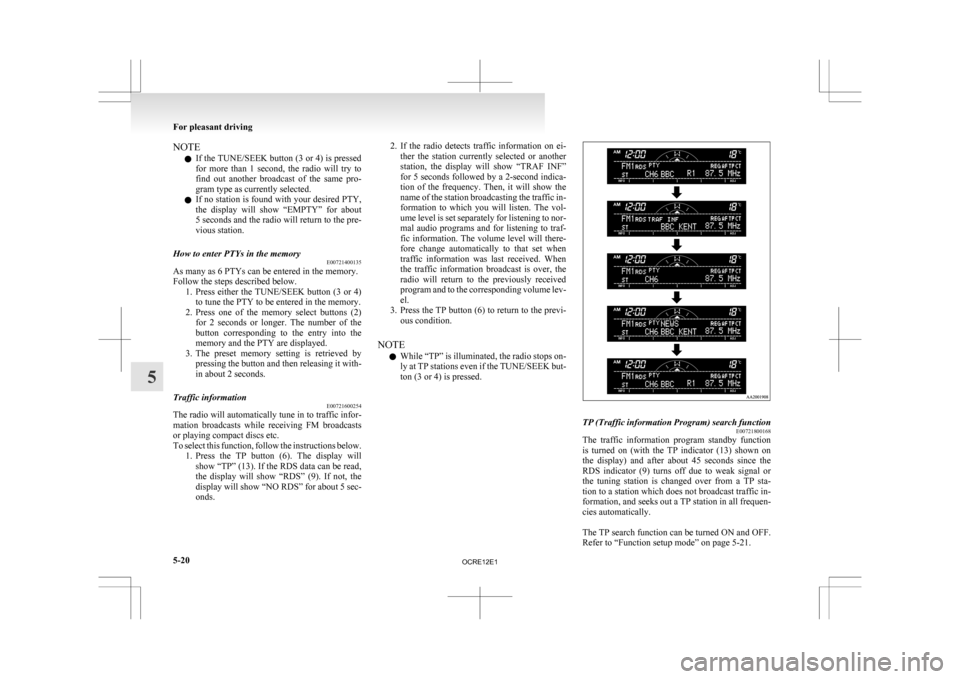
onds. 2. If
the radio detects traffic information on ei-
ther the station currently selected or another
station, the display will show “TRAF INF”
for 5 seconds followed by a 2-second indica-
tion of the frequency. Then, it will show the
name of the station broadcasting the traffic in-
formation to which you will listen. The vol-
ume level is set separately for listening to nor-
mal audio programs and for listening to traf-
fic information. The volume level will there-
fore change automatically to that set when
traffic information was last received. When
the traffic information broadcast is over, the
radio will return to the previously received
program and to the corresponding volume lev-
el.
3. Press the TP button (6) to return to the previ- ous condition.
NOTE l While “TP” is illuminated, the radio stops on-
ly at TP stations even if the TUNE/SEEK but-
ton (3 or 4) is pressed. TP (Traffic information Program) search function
E00721800168
The traffic information program standby function
is
turned on (with the TP indicator (13) shown on
the display) and after about 45 seconds since the
RDS indicator (9) turns off due to weak signal or
the tuning station is changed over from a TP sta-
tion to a station which does not broadcast traffic in-
formation, and seeks out a TP station in all frequen-
cies automatically.
The TP search function can be turned ON and OFF.
Refer to “Function setup mode” on page 5-21. For pleasant driving
5-20
5
OCRE12E1
Page 236 of 369
l
If this button is pressed in the voice recogni-
tion mode, the voice recognition mode will
be deactivated.
NOTE l When you press the SPEECH button to enter
voice recognition mode with a cellular phone
paired to the system, current information on
the cellular phone, such as “remaining bat-
tery life,” “signal strength” or “roaming,”
will be displayed on the audio display.*
*: Some cellular phones will not send this in-
formation to the Bluetooth ®
2.0 interface.
l Call waiting and three-way calls can be used
by the Bluetooth ®
2.0 interface, only if it is
possible to use those services with your cellu-
lar phone.
Voice recognition function E00727300471
The Bluetooth ®
2.0 interface is equipped with a
voice recognition function.
Simply say voice commands and you can perform
various operations and make or receive hands-free
calls.
With the Bluetooth ®
2.0 interface, voice recogni-
tion is possible for English, French, Spanish, Ital-
ian, German, Dutch, Portuguese and Russian. The
factory setting is English. NOTE
l If
the voice command that you say differs
from the predefined command or cannot be
recognised due to ambient noise or some oth-
er reason, the Bluetooth ®
2.0 interface will
ask you for the voice command again up to 3
times.
l For best performance and further reduction
of ambient noise, the vehicle windows
should be closed while engaging the voice rec-
ognition function.
l Depending on the selected language, some
functions may not be available.
Selecting the Language 1. Press the SPEECH button.
2. Say “Setup”.
3. Say “Language.”
4. The voice guide will say “Select a language:English, French, Spanish, Italian, German,
Dutch, Portuguese or Russian” Say the de-
sired language. (Example: Say “English.”)
5. The voice guide will say “English (French, Spanish, Italian, German, Dutch, Portuguese
or Russian) selected. Is this correct?” Say
“Yes.”
Answer “No” to return to Step 4.
NOTE l The voice guide will repeat the same mes-
sage twice. The first message is in the cur-
rent language, and the second message is in
the selected language.
l If many entries are registered in the vehicle
phone book, changing the language will take
longer. l
Changing the language deletes the mobile
phone book imported to the Bluetooth ®
2.0
interface. If you wish to use it, you will have
to import it again.
6. When the voice guide says “English (French, Spanish, Italian, German, Dutch, Portuguese
or Russian) selected,” the language change
process will be completed and the system
will return to the main menu.
Useful voice commands E00760000019
Help function E00760100010
The Bluetooth ®
2.0 interface is equipped with a
help function. If you say “Help” when the system
is waiting for a voice command input, the system
will tell you a list of the commands that can be
used under the circumstances.
Cancelling E00760200011
There are two cancel functions.
If
you are at the main menu, say “Cancel” to exit
from the Bluetooth ®
2.0 interface.
If you are anywhere else within the system, say
“Cancel” to return to the main menu.
Confirmation function setting E00760400013
The Bluetooth ®
2.0 interface is equipped with a con-
firmation function.
With the confirmation function activated, you are
given more opportunities than normal to confirm a
command when making various settings to the Blue-
tooth ®
2.0 interface. This allows you to decrease
the possibility that a setting is accidentally changed.
The confirmation function can be turned on or off
by following the steps below. For pleasant driving
5-53 5
OCRE12E1
Page 278 of 369
Jacking up the vehicle
E00801001436
1.
Park the vehicle on level and stable ground.
2. Set the parking brake firmly.
3. On vehicles with manual transmission, turn the ignition key to the “LOCK” position,
move the gearshift lever to the “R” (Reverse)
position.
On vehicles with automatic transmission,
move the selector lever to the “P” (PARK) po-
sition, turn the ignition key to the “LOCK”
position.
4. Turn on the hazard warning flashers and set up a warning triangle, flashing signal lamp,
etc., at an adequate distance from the vehi-
cle, and have all your passengers leave the ve-
hicle.
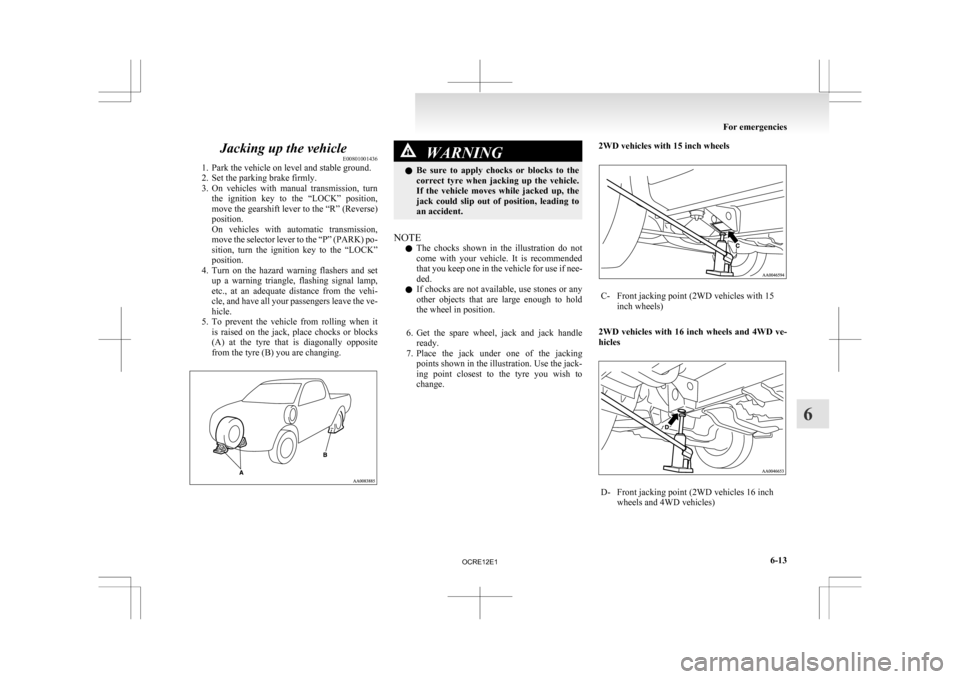
5. To prevent the vehicle from rolling when it is raised on the jack, place chocks or blocks
(A) at the tyre that is diagonally opposite
from the tyre (B) you are changing. WARNING
l Be
sure to apply chocks or blocks to the
correct tyre when jacking up the vehicle.
If the vehicle moves while jacked up, the
jack could slip out of position, leading to
an accident.
NOTE l The
chocks shown in the illustration do not
come with your vehicle. It is recommended
that you keep one in the vehicle for use if nee-
ded.
l If chocks are not available, use stones or any
other objects that are large enough to hold
the wheel in position.
6. Get the spare wheel, jack and jack handle ready.
7. Place the jack under one of the jacking points shown in the illustration. Use the jack-
ing point closest to the tyre you wish to
change. 2WD vehicles with 15 inch wheels C- Front jacking point (2WD vehicles with 15
inch wheels)
2WD vehicles with 16 inch wheels and 4WD ve-
hicles D- Front jacking point (2WD vehicles 16 inch
wheels and 4WD vehicles) For emergencies
6-13 6
OCRE12E1
Page 282 of 369
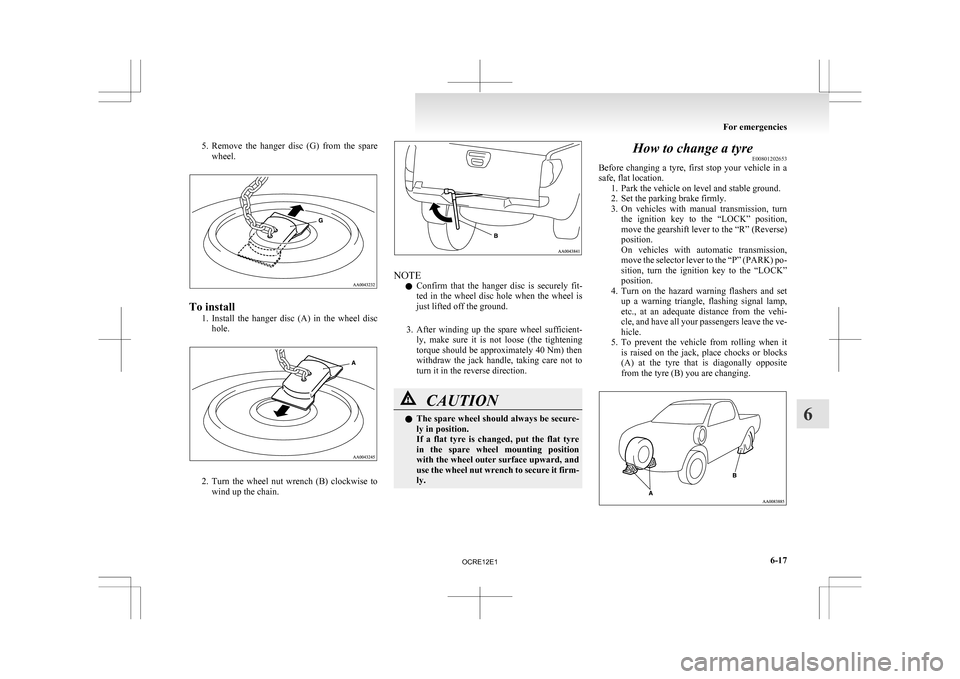
5. Remove the hanger disc (G) from the spare
wheel. To install
1. Install
the hanger disc (A) in the wheel disc
hole. 2. Turn
the wheel nut wrench (B) clockwise to
wind up the chain. NOTE
l Confirm
that the hanger disc is securely fit-
ted in the wheel disc hole when the wheel is
just lifted off the ground.
3. After winding up the spare wheel sufficient- ly, make sure it is not loose (the tightening
torque should be approximately 40 Nm) then
withdraw the jack handle, taking care not to
turn it in the reverse direction. CAUTION
l
The
spare wheel should always be secure-
ly in position.
If a flat tyre is changed, put the flat tyre
in the spare wheel mounting position
with the wheel outer surface upward, and
use the wheel nut wrench to secure it firm-
ly. How to change a tyre
E00801202653
Before
changing a tyre, first stop your vehicle in a
safe, flat location. 1. Park the vehicle on level and stable ground.
2. Set the parking brake firmly.
3. On vehicles with manual transmission, turnthe ignition key to the “LOCK” position,
move the gearshift lever to the “R” (Reverse)
position.
On vehicles with automatic transmission,
move the selector lever to the “P” (PARK) po-
sition, turn the ignition key to the “LOCK”
position.
4. Turn on the hazard warning flashers and set up a warning triangle, flashing signal lamp,
etc., at an adequate distance from the vehi-
cle, and have all your passengers leave the ve-
hicle.
5. To prevent the vehicle from rolling when it is raised on the jack, place chocks or blocks
(A) at the tyre that is diagonally opposite
from the tyre (B) you are changing. For emergencies
6-17 6
OCRE12E1
Page 321 of 369
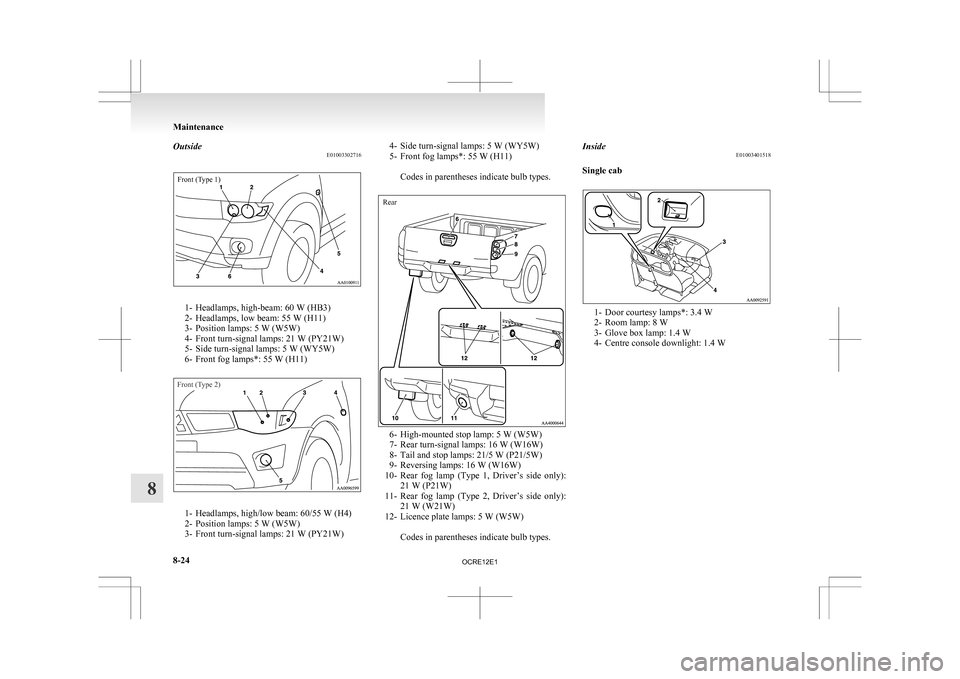
Outside
E01003302716Front (Type 1)1- Headlamps, high-beam: 60 W (HB3)
2-
Headlamps, low beam: 55 W (H11)
3- Position lamps: 5 W (W5W)
4- Front turn-signal lamps: 21 W (PY21W)
5- Side turn-signal lamps: 5 W (WY5W)
6- Front fog lamps*: 55 W (H11)
Front (Type 2) 1- Headlamps, high/low beam: 60/55 W (H4)
2-
Position lamps: 5 W (W5W)
3- Front turn-signal lamps: 21 W (PY21W) 4- Side turn-signal lamps: 5 W (WY5W)
5-
Front fog lamps*: 55 W (H11)
Codes in parentheses indicate bulb types.
Rear 6- High-mounted stop lamp: 5 W (W5W)
7-
Rear turn-signal lamps: 16 W (W16W)
8- Tail and stop lamps: 21/5 W (P21/5W)
9- Reversing lamps: 16 W (W16W)
10- Rear fog lamp (Type 1, Driver’s side only): 21 W (P21W)
11- Rear fog lamp (Type 2, Driver’s side only): 21 W (W21W)
12- Licence plate lamps: 5 W (W5W)
Codes in parentheses indicate bulb types. Inside
E01003401518
Single cab 1- Door courtesy lamps*: 3.4 W
2-
Room lamp: 8 W
3- Glove box lamp: 1.4 W
4- Centre console downlight: 1.4 W Maintenance
8-24
8
OCRE12E1
Page 324 of 369
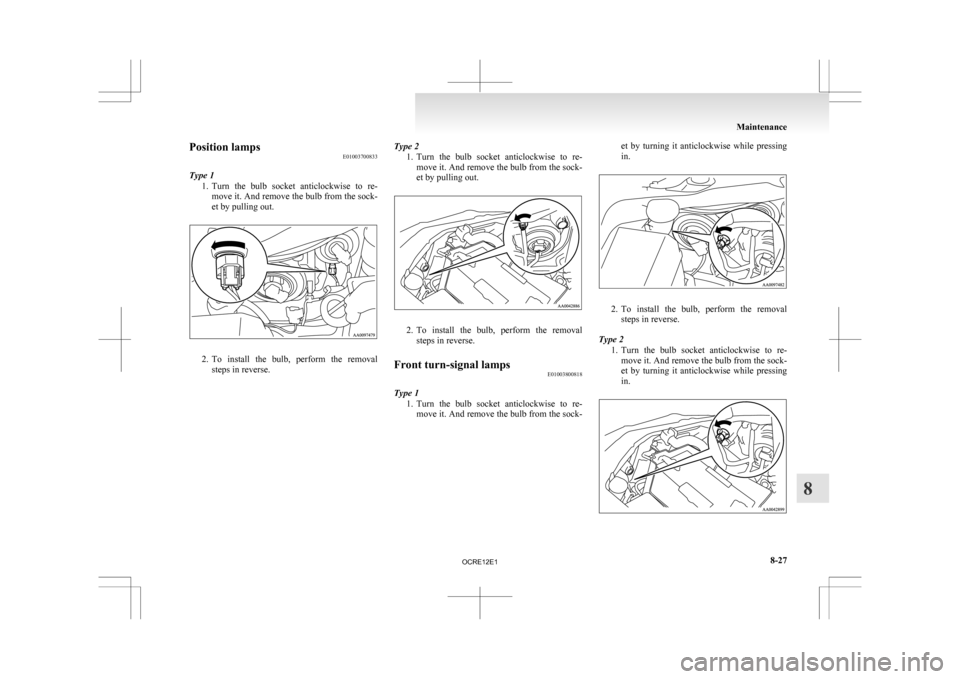
Position lamps
E01003700833
Type 1 1. Turn
the bulb socket anticlockwise to re-
move it. And remove the bulb from the sock-
et by pulling out. 2. To
install the bulb, perform the removal
steps in reverse. Type 2
1. Turn
the bulb socket anticlockwise to re-
move it. And remove the bulb from the sock-
et by pulling out. 2. To
install the bulb, perform the removal
steps in reverse.
Front turn-signal lamps E01003800818
Type 1 1. Turn
the bulb socket anticlockwise to re-
move it. And remove the bulb from the sock- et by turning it anticlockwise while pressing
in.
2. To
install the bulb, perform the removal
steps in reverse.
Type 2 1. Turn the bulb socket anticlockwise to re-move it. And remove the bulb from the sock-
et by turning it anticlockwise while pressing
in. Maintenance
8-27 8
OCRE12E1
Page 325 of 369
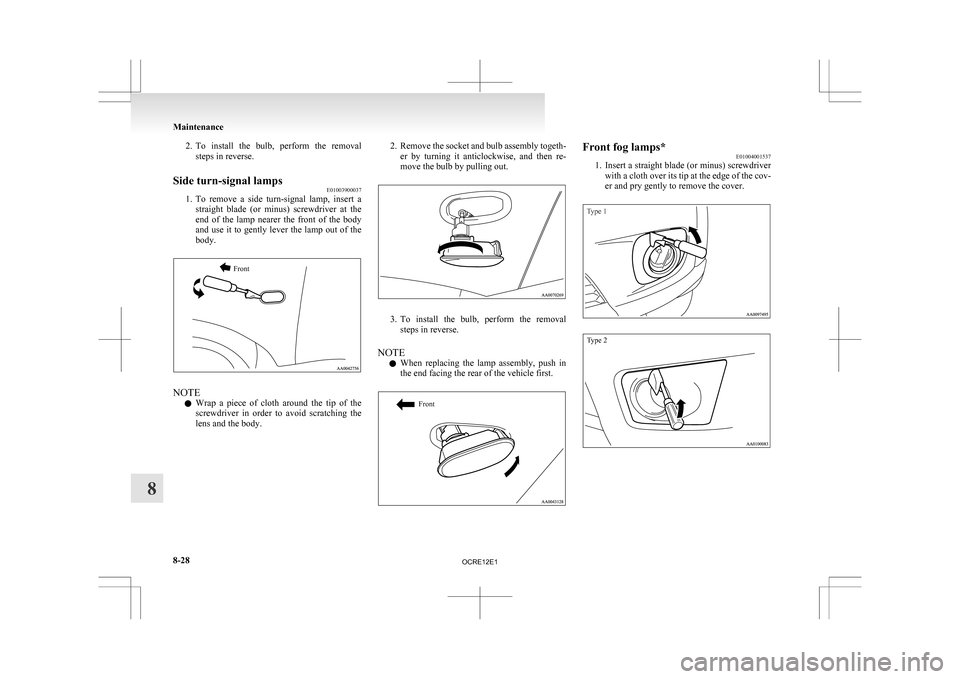
2. To install the bulb, perform the removal
steps in reverse.
Side turn-signal lamps E01003900037
1. To
remove a side turn-signal lamp, insert a
straight blade (or minus) screwdriver at the
end of the lamp nearer the front of the body
and use it to gently lever the lamp out of the
body.
Front NOTE
l Wrap
a piece of cloth around the tip of the
screwdriver in order to avoid scratching the
lens and the body. 2. Remove
the socket and bulb assembly togeth-
er by turning it anticlockwise, and then re-
move the bulb by pulling out. 3. To
install the bulb, perform the removal
steps in reverse.
NOTE l When replacing the lamp assembly, push in
the end facing the rear of the vehicle first.
Front Front fog lamps*
E01004001537
1. Insert
a straight blade (or minus) screwdriver
with a cloth over its tip at the edge of the cov-
er and pry gently to remove the cover.
Type 1
Type 2 Maintenance
8-28
8
OCRE12E1
Page 327 of 369
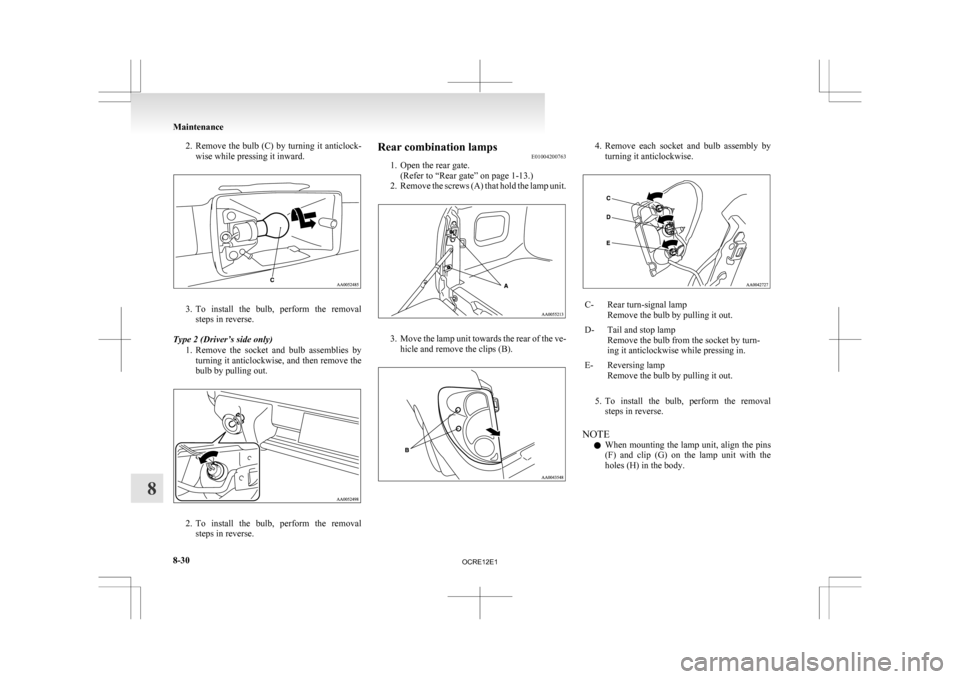
2. Remove the bulb (C) by turning it anticlock-
wise while pressing it inward. 3. To
install the bulb, perform the removal
steps in reverse.
Type 2 (Driver’s side only) 1. Remove the socket and bulb assemblies byturning it anticlockwise, and then remove the
bulb by pulling out. 2. To
install the bulb, perform the removal
steps in reverse. Rear combination lamps
E01004200763
1.
Open the rear gate.(Refer to “Rear gate” on page 1-13.)
2. Remove the screws (A) that hold the lamp unit. 3. Move
the lamp unit towards the rear of the ve-
hicle and remove the clips (B). 4. Remove
each socket and bulb assembly by
turning it anticlockwise. C- Rear turn-signal lamp
Remove the bulb by pulling it out.
D- Tail and stop lamp Remove the bulb from the socket by turn-
ing it anticlockwise while pressing in.
E- Reversing lamp Remove the bulb by pulling it out.
5. To
install the bulb, perform the removal steps in reverse.
NOTE l When mounting the lamp unit, align the pins
(F) and clip (G) on the lamp unit with the
holes (H) in the body. Maintenance
8-30
8
OCRE12E1