2010 MITSUBISHI L200 lock
[x] Cancel search: lockPage 237 of 369
1. Press the SPEECH button.
2.
Say “Setup”.
3. Say “Confirmation prompts”.
4. The voice guide will say “Confirmation prompts are
confirmation prompts
Answer “Yes” to change the setting or an-
swer “No” to keep the current setting.
5. The voice guide will say “Confirmation prompts are
will return to the main menu.
Security function E00760500131
It is possible to use a password as a security func-
tion
by setting a password of your choice for the
Bluetooth ®
2.0 interface.
When the security function is turned on, it is neces-
sary to make a voice input of a 4-digit password in
order to use all functions of the Bluetooth ®
2.0 in-
terface, except for reception.
Setting the password
Use the following procedure to turn on the security
function by setting a password. 1. Press the SPEECH button.
2. Say “Setup”.
3. Say “Password.”
4. The voice guide will say “Password is disa-bled. Would you like to enable it?” Answer
“Yes.”
Answer “No” to cancel the setting of the pass-
word and return to the main menu.
5. The voice guide will say “Please say a 4-dig- it password. Remember this password. It will
be required to use this system”.
Say a 4-digit number which you want to set
as a password. 6. For
confirmation purposes, the voice guide
will say “Password <4-digit password>. Is
this correct?” Answer “Yes.”
Answer “No” to return to the password input
in Step 5.
7. When the registration of the password is com- pleted, the voice guide will say “Password is
enabled” and the system will return to the
main menu.
NOTE l Password will be required to access the sys-
tem after the next ignition cycle.
l It is required for a little time after engine
stop that the entered password is actually re-
corded in the system.
If the ignition switch is made to “ACC” or
“ON” or the engine is started immediately af-
ter engine stop, there is a case when the en-
tered password is not recorded in the system.
At this time, please try to enter the password
again.
Entering the password
If a password has been set and the security function
is enabled, the voice guide will say “Hands-free sys-
tem is locked. State the password to continue”
when the SPEECH button is pressed to enter voice
recognition mode. Say the 4-digit password num-
ber to enter the password.
If the entered password is wrong, the voice guide
will say “<4- digit password>, Incorrect password.
Please try again”. Enter the correct password.
NOTE l You can re-enter the password as many times
as you want. l
If you have forgotten your password, say
“Cancel” to quit the voice input mode and
then check with a MITSUBISHI MOTORS
Authorized Service Point.
Disabling the password
Use the following procedure to turn off the security
function by disabling the password.
NOTE l System must be unlocked to disable the pass-
word.
1. Press the SPEECH button.
2. Say “Setup”.
3. Say “Password.”
4. The voice guide will say “Password is ena- bled. Would you like to disable it?”
Answer “Yes.” Answer “No” to cancel the
disabling of the password and return to the
main menu.
5. When the disabling of the password is com- pleted, the voice guide will say “Password is
disabled” and the system will return to the
main menu.
Speaker enrollment function E00727400209
The Bluetooth ®
2.0 interface can use the speaker en-
rollment function to create a voice model for one
person per language.
This makes it easier for the Bluetooth ®
2.0 inter-
face to recognise voice commands said by you.
You can turn a voice model registered with the
speaker enrollment function on and off whenever
you want. For pleasant driving
5-54
5
OCRE12E1
Page 250 of 369

USB input terminal*
E00761900015
You
can connect your USB memory device or
iPod* to play music files stored in the USB memo-
ry device or iPod.
The following explains how to connect and remove
a USB memory device or iPod.
Refer to the following sections for details on how
to play music files:
Refer to “To play tracks from USB device” on
page 5-27.
*: “iPod” is a registered trademark of Apple Inc. in
the United States and other countries.
How to connect a USB memory device E00762000202
To connect 1. Park
your vehicle in a safe place and turn the
ignition switch to the “LOCK” position.
2. Open the glove box and remove the connec- tor cable (A) from clips (B). 3. Connect
the USB memory device (C) to the
connector cable (A). Be sure to hold the terminal part (D) of the
connector cable as shown in the illustration.
CAUTION
l
Keep
the lid of the glove box closed while
driving the vehicle. A lid or the contents
of the glove box could otherwise cause in-
juries.
NOTE l When
closing the glove box, be careful not
to trap the connector cable and USB memory
device.
To remove 1. Turn the ignition switch to the “LOCK” posi-tion.
2. Remove the USB memory device (C). Be sure to hold the terminal part (D) of the
connector cable as shown in the illustration.
3. Fix
the connector cable on the clips and
close the glove box.
How to connect an iPod E00762100186
To connect 1. Park
your vehicle in a safe place and turn the
ignition switch to the “LOCK” position.
2. Open the glove box and remove the connec- tor cable (A) from clips (B). For pleasant driving
5-67 5
OCRE12E1
Page 251 of 369
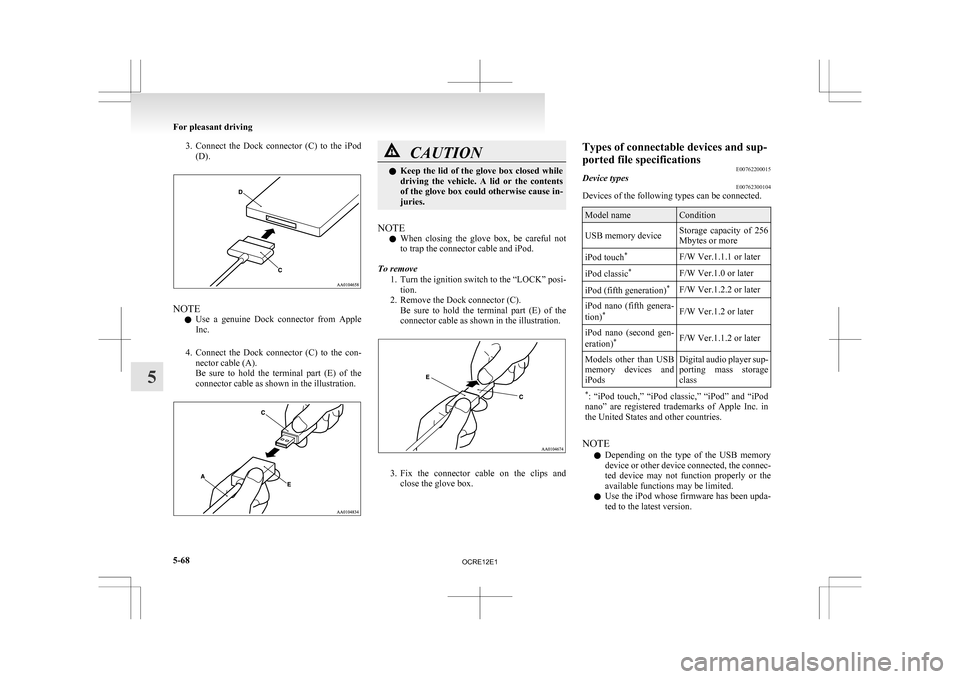
3. Connect the Dock connector (C) to the iPod
(D). NOTE
l Use
a genuine Dock connector from Apple
Inc.
4. Connect the Dock connector (C) to the con- nector cable (A).
Be sure to hold the terminal part (E) of the
connector cable as shown in the illustration. CAUTION
l
Keep
the lid of the glove box closed while
driving the vehicle. A lid or the contents
of the glove box could otherwise cause in-
juries.
NOTE l When
closing the glove box, be careful not
to trap the connector cable and iPod.
To remove 1. Turn the ignition switch to the “LOCK” posi-tion.
2. Remove the Dock connector (C). Be sure to hold the terminal part (E) of the
connector cable as shown in the illustration. 3. Fix
the connector cable on the clips and
close the glove box. Types of connectable devices and sup-
ported file specifications
E00762200015
Device types E00762300104
Devices of the following types can be connected. Model name Condition
USB memory device Storage capacity of 256
Mbytes or more
iPod touch *
F/W Ver.1.1.1 or later
iPod classic *
F/W Ver.1.0 or later
iPod (fifth generation) *
F/W Ver.1.2.2 or later
iPod nano (fifth genera-
tion) *
F/W Ver.1.2 or later
iPod nano (second gen-
eration) *
F/W Ver.1.1.2 or later
Models other than USB
memory
devices and
iPods Digital audio player sup-
porting
mass storage
class
* :
“iPod touch,” “iPod classic,” “iPod” and “iPod
nano” are registered trademarks of Apple Inc. in
the United States and other countries. NOTE
l Depending
on the type of the USB memory
device or other device connected, the connec-
ted device may not function properly or the
available functions may be limited.
l Use the iPod whose firmware has been upda-
ted to the latest version. For pleasant driving
5-68
5
OCRE12E1
Page 252 of 369
l
You can charge your iPod by connecting it to
the
USB input terminal when the ignition
switch is in the “ACC” or “ON” position.
l Do not keep your USB memory device or
iPod in your vehicle.
l It is recommended that you back up files in
case of data damage.
l Do not connect to the USB input terminal
any device (hard disk, card reader, memory
reader, etc.) other than the connectable devi-
ces specified in the previous section. The de-
vice and/or data may be damaged. If any of
these devices was connected by mistake, re-
move it after turning the ignition switch to
the “LOCK” position.
File specifications E00762400017
You can play music files of the following specifica-
tions
that are saved in a USB memory device or oth-
er device supporting mass storage class. Item Condition
File format MP3, WMA, AAC,
WAV
Maximum number of
levels
(including the
root) Level 8
Number of folders 700
Number of files 65,535 Sun visors
E00711200693 1- To eliminate front glare
2-
To eliminate side glare
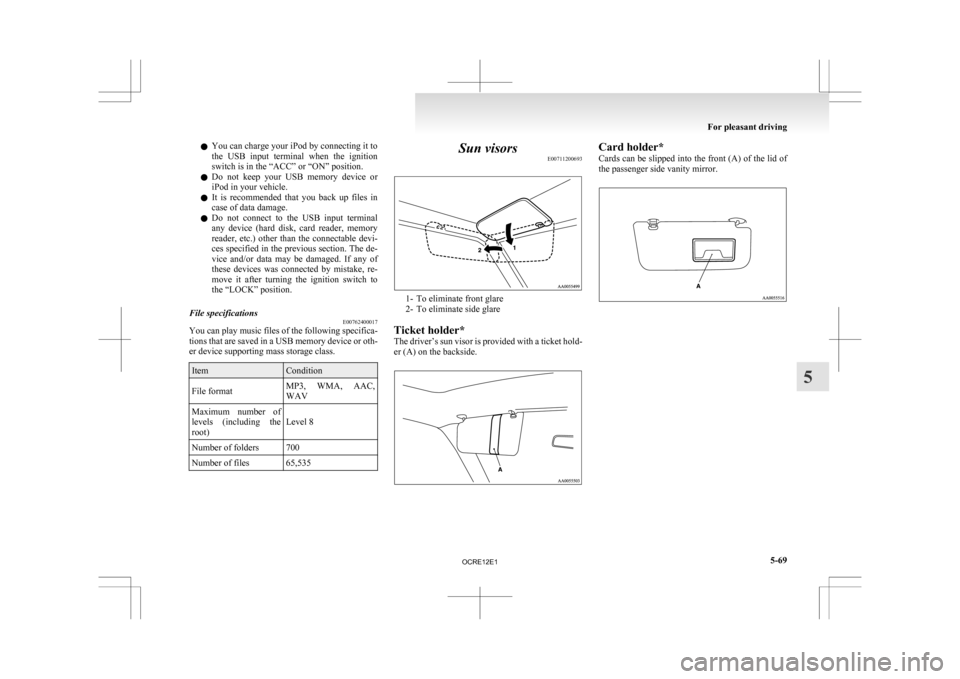
Ticket holder*
The driver’s sun visor is provided with a ticket hold-
er (A) on the backside. Card holder*
Cards
can be slipped into the front (A) of the lid of
the passenger side vanity mirror. For pleasant driving
5-69 5
OCRE12E1
Page 256 of 369
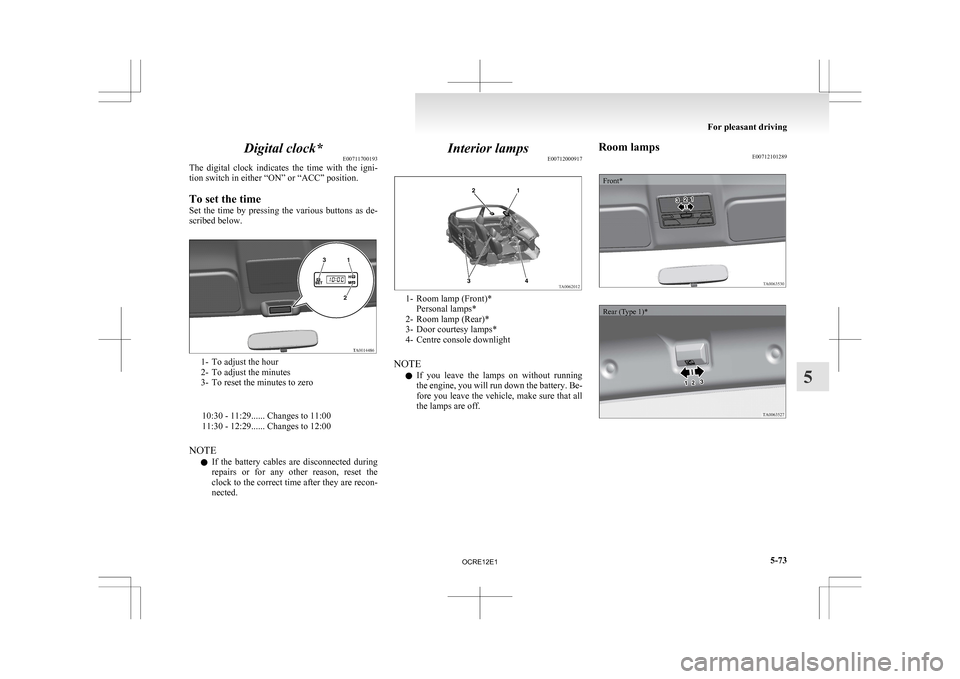
Digital clock*
E00711700193
The
digital clock indicates the time with the igni-
tion switch in either “ON” or “ACC” position.
To set the time
Set the time by pressing the various buttons as de-
scribed below. 1- To adjust the hour
2-
To adjust the minutes
3- To reset the minutes to zero
10:30 - 11:29...... Changes to 11:00
11:30 - 12:29...... Changes to 12:00
NOTE l If the battery cables are disconnected during
repairs or for any other reason, reset the
clock to the correct time after they are recon-
nected. Interior lamps
E00712000917 1- Room lamp (Front)*
Personal lamps*
2-
Room lamp (Rear)*
3- Door courtesy lamps*
4- Centre console downlight
NOTE l If you leave the lamps on without running
the engine, you will run down the battery. Be-
fore you leave the vehicle, make sure that all
the lamps are off. Room lamps
E00712101289
Front*
Rear (Type 1)* For pleasant driving
5-73 5
OCRE12E1
Page 257 of 369
![MITSUBISHI L200 2010 4.G Owners Manual Rear (Type 2)*1
(ON/
) - The lamp illuminates.
2
( ) -
[Vehicles without central door locks
system]
The room lamp goes on when a door
is opened. When all doors are
closed, the room lamp is ill](/manual-img/19/7568/w960_7568-256.png "MITSUBISHI L200 2010 4.G Owners Manual Rear (Type 2)*1
(ON/
) - The lamp illuminates.
2
( ) -
[Vehicles without central door locks
system]
The room lamp goes on when a door
is opened. When all doors are
closed, the room lamp is ill")
Rear (Type 2)*1
(ON/
) - The lamp illuminates.
2
( ) -
[Vehicles without central door locks
system]
The room lamp goes on when a door
is opened. When all doors are
closed, the room lamp is illuminated
and dimmed gradually for 7 seconds
then goes out.
However, the lamp goes out immedi-
ately without being dimmed when
the ignition switch is turned to the
“ON” position.
[Vehicles with central door locks sys-
tem]
The room lamp goes on when a door
is opened. When all doors are
closed, the room lamp is illuminated
and dimmed gradually for 15 sec-
onds then goes out.
However, the lamp goes out immedi-
ately without being dimmed in case
of the followings:
l All doors are closed and the ig-
nition switch is turned to the
“ON” position.
l All doors are locked using the
key mechanism of the driver’s
door, the lock knob of the driv-
er’s door, or the remote con-
trol switch of the keyless entry
system (if so equipped).
NOTE
l On
vehicles with keyless entry
system, when the ignition key
is removed with the doors
closed, the lamp is illuminated
and after about 15 seconds it
goes off.
The dimming period is also ad-
justable.
For further information, we
recommend you to consult a
MITSUBISHI MOTORS Au-
thorized Service Point.
3
(OFF/ ) - The lamp goes off.
Personal lamps* E00712500156
Push the switch (A) to turn on the lamp. Push it
again to turn it off. For pleasant driving
5-74
5
OCRE12E1
Page 259 of 369
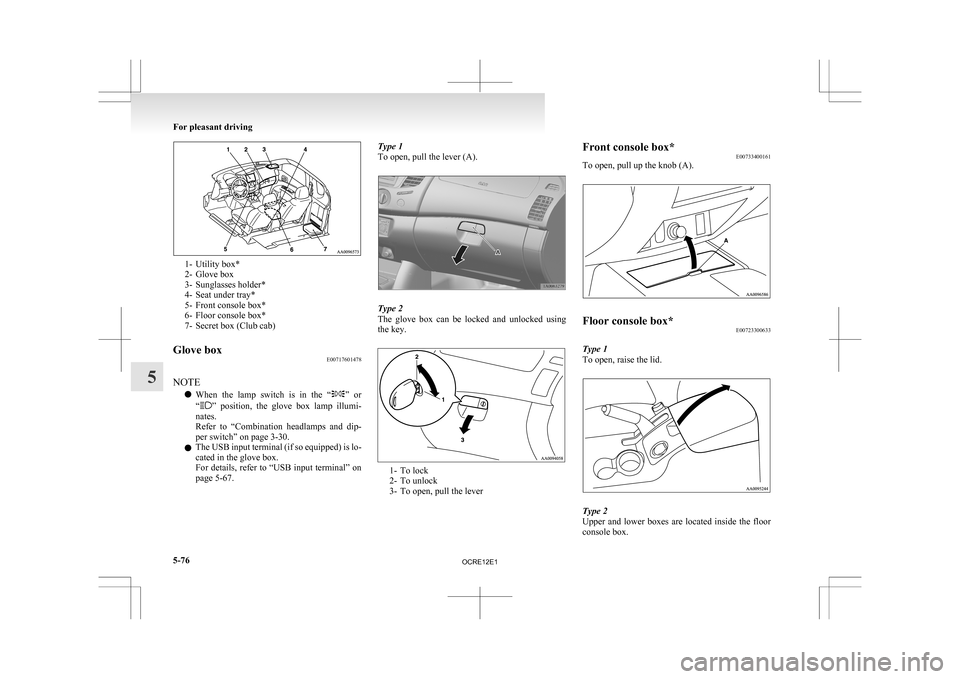
1- Utility box*
2-
Glove box
3- Sunglasses holder*
4- Seat under tray*
5- Front console box*
6- Floor console box*
7- Secret box (Club cab)
Glove box E00717601478
NOTE l When
the lamp switch is in the “ ”
or
“ ” position, the glove box lamp illumi-
nates.
Refer to “Combination headlamps and dip-
per switch” on page 3-30.
l The USB input terminal (if so equipped) is lo-
cated in the glove box.
For details, refer to “USB input terminal” on
page 5-67. Type 1
To open, pull the lever (A).
Type 2
The
glove box can be locked and unlocked using
the key. 1- To lock
2-
To unlock
3- To open, pull the lever Front console box*
E00733400161
To open, pull up the knob (A). Floor console box*
E00723300633
Type 1
To open, raise the lid. Type 2
Upper
and lower boxes are located inside the floor
console box. For pleasant driving
5-76
5
OCRE12E1
Page 261 of 369
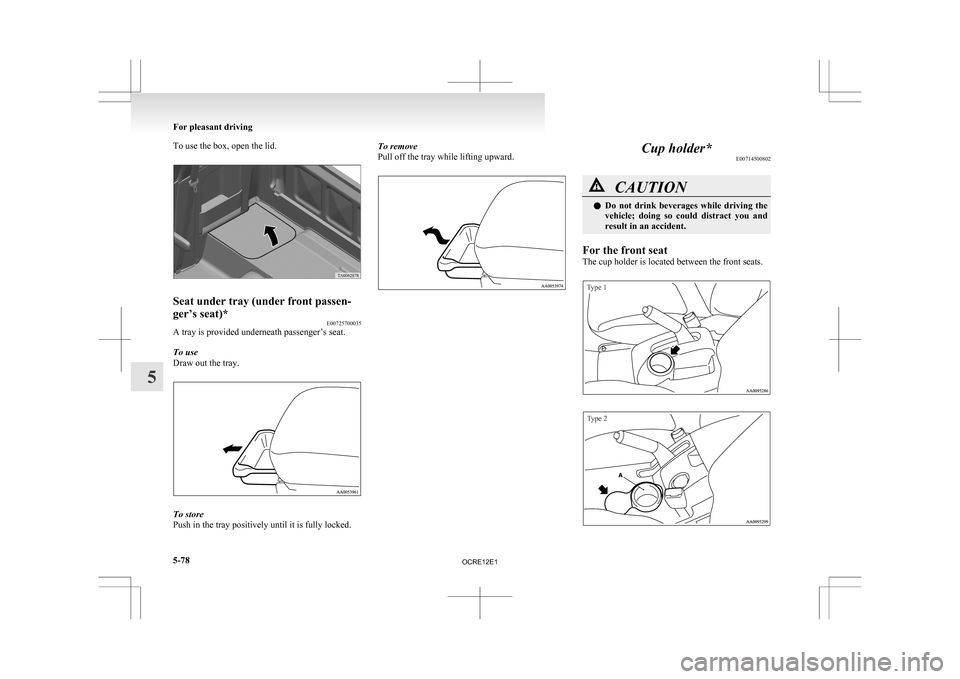
To use the box, open the lid.
Seat under tray (under front passen-
ger’s seat)*
E00725700035
A tray is provided underneath passenger’s seat.
To use
Draw out the tray. To store
Push in the tray positively until it is fully locked. To remove
Pull off the tray while lifting upward. Cup holder*
E00714500802 CAUTION
l
Do not drink beverages while driving the
vehicle; doing so could distract you and
result in an accident.
For the front seat
The cup holder is located between the front seats.
Type 1
Type 2 For pleasant driving
5-78
5
OCRE12E1