2010 MINI COOPER service
[x] Cancel search: servicePage 127 of 174

REFERENCEAT A GLANCE CONTROLS DRIVING TIPS MOBILITY
125
Replacing components
Onboard vehicle tool kit
Your vehicle comes with an onboard vehicle tool
kit that varies with the equipment version; it is
stored underneath the level load floor.
>Mobility System with onboard vehicle tool
kit and tire change set
*130
>Tire change set with onboard vehicle tool kit
for space-saver spare tire132
Wiper blades
Changing the front wiper blades
1.Fold up the wiper arm.
2.Position the wiper blade horizontally.
3.Press the securing spring, arrow.
4.Unhook the wiper blade toward the wind-
shield.
5.Pull the wiper blade past the wiper arm
toward the top.
6.Insert the new wiper blade.7.Press into position until you hear it engage.
8.Fold down the wiper arm.
To avoid damage, make sure that the
wiper arms are against the windshield
before you open the bonnet.<
MINI: Changing the rear wiper blade
1.Fold up the wiper arm.
2.Rotate the wiper blade toward the back as
far as it will go, arrow.
3.Press the wiper blade against the limit and
thus out of the mounting.
4.Press the new wiper blade into the fixture
until it engages audibly.
Lamps and bulbs
Lamps and bulbs make an essential contribution
to vehicle safety. They should, therefore, be
handled carefully. The manufacturer of your
MINI recommends having your MINI dealer per-
f o r m a n y w o r k t h a t y o u d o n o t f e e l c o m p e t e n t t o
perform yourself or that is not described here.
Never touch the glass of new bulbs with
your bare fingers, as even minute
amounts of contamination will burn into the
bulb's surface and reduce its service life. Use a
clean tissue, cloth or something similar, or hold
the bulb by its base.<
You can obtain a selection of replacement bulbs
at your MINI dealer.
Page 128 of 174

Replacing components
126
When working on electrical systems,
always begin by switching off the con-
sumer in question; otherwise, short circuits
could result. To avoid possible injury or equip-
ment damage when replacing bulbs, observe
any instructions provided by the bulb manufac-
turer.<
Caring for headlamps, refer to page122.
For any bulb replacement not described
below, contact a MINI dealer or a work-
shop that has specially trained personnel work-
ing in accordance with the specifications of the
MINI manufacturer.<
For checking and adjusting headlamp aim,
please contact your MINI dealer.<
Light-emitting diodes LEDs
Light-emitting diodes installed behind translu-
cent lenses serve as the light sources for many of
the controls and displays in your vehicle. These
light-emitting diodes are related to conven-
tional laser diodes, and legislation defines them
as Class 1 light-emitting diodes.
Do not remove the covers or expose the
eyes directly to the unfiltered light source
for several hours; otherwise, this could cause
irritation of the retina.<
Xenon lamps*
The service life of these bulbs is very long and
the probability of failure very low, provided that
they are not switched on and off an excessive
number of times. If a xenon lamp fails neverthe-
less, switch on the fog lamps and continue the
journey with great care, provided that local leg-
islation does not prohibit this.
Have any work on the xenon lamp system,
including bulb replacement, carried out
only by a MINI dealer or a workshop that has
specially trained personnel working in accor-
dance with the specifications of the MINI manu-
facturer. Due to high voltage, there is a risk of
fatal injury if work on the xenon lamps is carried
out improperly.<
Halogen low beams and high beams
H13 bulb, 60/55 watts
The H13 bulb is pressurized. Therefore,
wear safety glasses and protective gloves.
Otherwise, there is a risk of injury if the bulb is
damaged.<
Be careful when installing the cover; oth-
erwise, leaks could occur and cause dam-
age to the headlamp system.<
Accessing the lamp from the engine
compartment
The low-beam/high-beam bulb can be changed
from the engine compartment.
Removing the cover:
1.Press the tab.
2.Flip open the cover and take it out of the
holder.
Follow the same steps in reverse order to reat-
tach the cover.
Be careful when installing the cover; oth-
erwise, leaks could occur and cause dam-
age to the headlamp system.<
Page 138 of 174

Giving and receiving assistance
136
Giving and receiving assistance
Roadside Assistance
The Roadside Assistance service is there to assist
you around the clock in the event of a break-
down, including on weekends and public
holidays.
The phone numbers of the Roadside Assistance
in your home country can be found in the Con-
tact brochure.
First aid pouch*
Some of the articles contained in the first aid
pouch have a limited service life. Therefore,
check the expiration dates of the contents regu-
larly and replace any items in good time, if nec-
essary.
By way of example, the illustration shows the
cargo bay in the MINI.
The first aid pouch is located on the cargo bay
floor by the left side trim panel.
Warning triangle*
MINI
On the inside of the tailgate.
Press the tab to take it out.
MINI Convertible
The warning triangle is located at the bottom of
the luggage compartment floor.
Jump-starting
If the car's own battery is flat, your MINI's engine
can be started by connecting two jumper cables
to another vehicle's battery. You can also use
the same method to help start another vehicle.
Only use jumper cables with fully-insulated
clamp handles.
Do not touch any electrically live parts
when the engine is running, or a fatal acci-
dent may occur. Carefully adhere to the follow-
ing sequence, both to prevent damage to one or
both vehicles, and to guard against possible per-
sonal injuries.<
Preparation
1.Check whether the battery of the other vehi-
cle has a voltage of 12 volts and approxi-
mately the same capacitance in Ah. This
information can be found on the battery.
2.Switch off the engine of the support vehicle.
3.Switch off any consumers in both vehicles.
Page 144 of 174

Indicator and warning lamps
142
Sliding/tilting sunroof or soft top of
MINI ConvertibleExcessive vehicle speed, activation
not possible, reduce speed and con-
tinue activation.
Lights up in red:
Control system for convertible top
failed!Position of convertible top and locking
mechanism not recognized. If con-
vertible top securely locked, drive
may be continued. Manually close
convertible top/sliding roof, refer to
page34. Have your MINI Service
inspect the system.
Lights up in yellow:
Drive of convertible top overheated! Let drive of convertible top cool down,
refer to page34.
Sliding/tilting sunroof or soft top of
MINI ConvertibleControl system of convertible top/tilt
roof malfunctioning. Close convertible
top/tilt roof manually, refer to
page34. Contact your MINI Service.
Tailgate of MINI Convertible not
closedClose the tailgate.
Gas cap missing or loose Make sure that the gas cap is correctly
positioned and close it until it audibly
clicks. Do not jam the strap between
the gas cap and the vehicle.
Window washer fluid level too low Add washer fluid as soon as possible,
page53.
Lights up in red:
Service due Arrange a service appointment.
Check service requirements,
page119.
Lights up in yellow:
The engine will start the next time the
start/stop button is touched, possibly
without the brake or clutch being
depressed
12Cause What to do
Page 152 of 174

Indicator and warning lamps
150
Selector lever position P not engaged.
Ignition cannot be switched offEngage selector lever position P when
you wish to switch off the ignition,
page46.
Cruise control system failed Have the system checked.
Park Distance Control failed Have the system checked.
Bulb of exterior lighting system failed Have the exterior lighting checked as
soon as possible.
Low-beam headlamp or fog lamp
failedHave the lamps checked as soon as
possible.
High-beam headlamp failed Have the high-beam headlamps
checked.
Rear fog lamp failed Have the rear fog lamp checked.
Headlamp beam throw adjustment
system failedHave the headlamp beam throw
adjustment system checked.
Coolant level too low Add coolant immediately, page118.
Engine oil pressure too low Stop immediately and switch off the
engine. You cannot continue your
journey. Contact your MINI dealer.
Lights up in red:
Service appointment overdue Arrange a service appointment.
Check service requirements, page60.
Lights up in yellow:
Service due Arrange a service appointment.
Check service requirements, page60.
12Cause What to do
Page 153 of 174
REFERENCEAT A GLANCE CONTROLS DRIVING TIPS MOBILITY
151
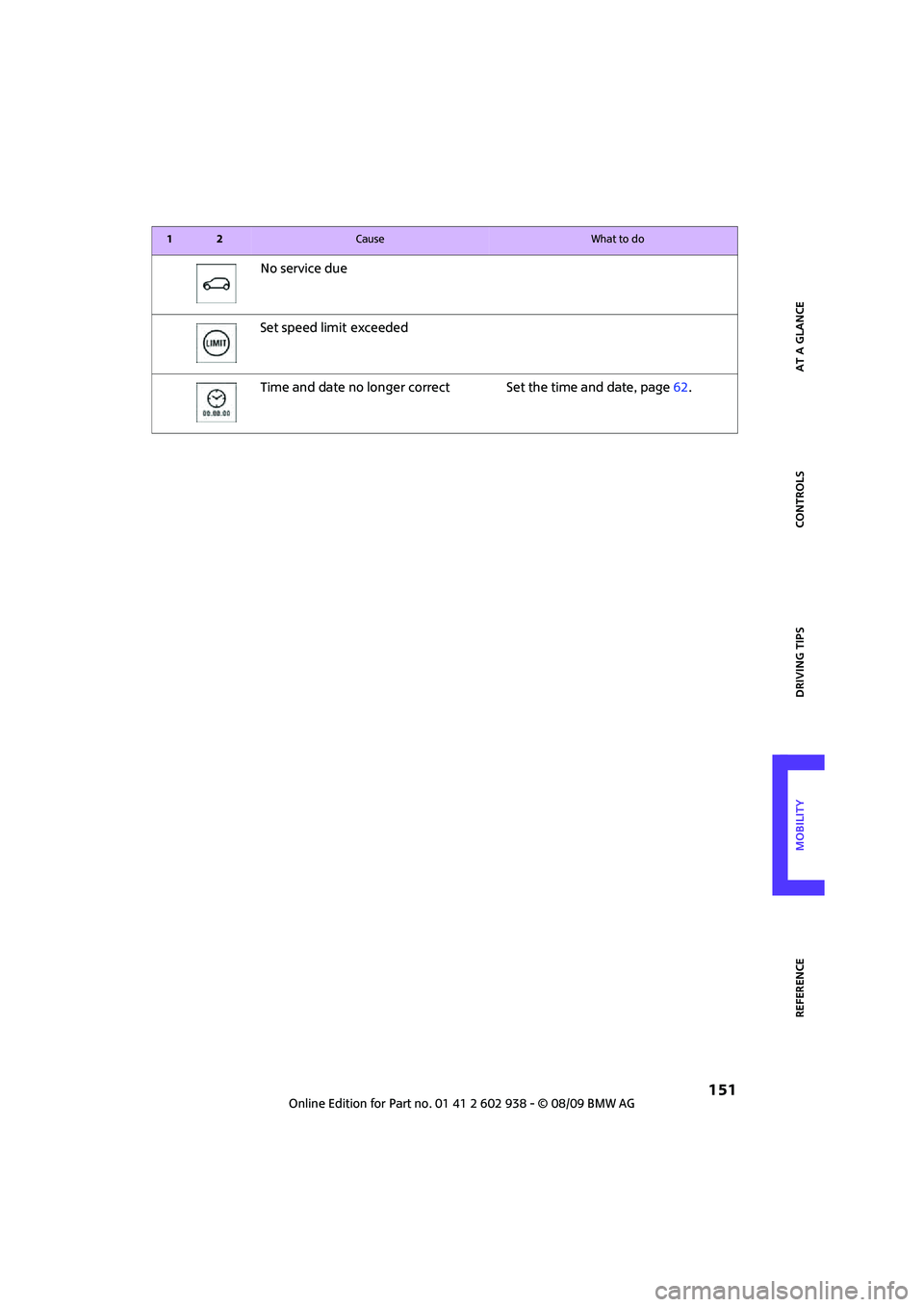
No service due
Set speed limit
exceeded
Time and date no longer correct Set the time and date, page62.
12Cause What to do
Page 163 of 174

REFERENCEAT A GLANCE CONTROLS DRIVING TIPS MOBILITY
161
Bottle holders, refer to
Cupholders89
Brake Assist65
Brake fluid, refer to Service
requirements60
Brake lamps
– replacing bulbs129
Brake pads, breaking in92
Brake rotors93
– brakes92
– breaking in92
Brake system92
– breaking in92
– disc brakes93
– MINI Maintenance
System119
Brakes
– ABS65
– breaking in92
– MINI Maintenance
System119
– parking brake47
– service requirements60
Brakes, refer to Braking
safely93
Breakdown service, refer to
Roadside Assistance136
Break-in period92
Breaking in the clutch92
Bulb changing, refer to Lamps
and bulbs125
Button for starting the
engine46
Buttons on the steering
wheel11
C
California Proposition 65
warning5
Can holders, refer to
Cupholders89
Capacities158
Car battery, refer to Vehicle
battery135
Car care121
Car key, refer to Keys/remote
controls20Car phone
– installation location, refer to
Center armrest87
– refer to separate Owner's
Manual
Car wash, care121
Car washes121
Care121
– car washes121
– car-care products121
– CD/DVD drives124
– external121
– high-pressure washers122
– internal123
– leather123
– manual washing122
– upholstery and fabrics123
– windows122
– wiper blades122
Cargo area
– capacity157
Cargo bay94
– Comfort Access29
– cover94
– lamp78
– opening from outside26
Cargo bay, expanding94
Cargo bay lamp78
Cargo bay lid, refer to
Tailgate26
Cargo loading95
– securing cargo96
– stowing cargo96
– vehicle94
Cargo, securing96
Carpets, care123
Catalytic converter, refer to
Hot exhaust system92
Center armrest87
Center brake lamp129
Center console, refer to
Around the center
console14
Central locking system21
– Comfort Access28
– from inside25
– from outside21
Changing bulbs
125
Changing wheels132Chassis number, refer to
Engine compartment117
Check Control62
Child restraint systems43
Child seats43
Child-restraint fixing system
LATCH44
Chock, folding
– space-saver spare tire132
Chrome parts, care123
Chrome parts, refer to
Care121
Cigarette lighter89
Cleaning headlamps52
– washer fluid53
Clock55
– 12h/24h mode59
– setting time62
Closing
– from inside25
– from outside21
Clothes hooks88
Cockpit10
Cold start, refer to Starting the
engine47
Comfort Access28
– replacing the battery30
– what to observe before
entering a car wash29
Comfort area, refer to Around
the center console14
Compartment for remote
control, refer to Ignition
lock46
Computer56
Condensation, refer to When
the vehicle is parked93
Condition Based Service
CBS119
Configuring settings, refer to
Personal Profile20
Confirmation signals for
vehicle locking/unlocking23
Connecting vacuum cleaner,
refer to Connecting electrical
appliances89
Consumption indicator
– average fuel consumption56
Page 164 of 174

From A to Z
162
Consumption, refer to Average
fuel consumption56
Control Display
– settings58
Controls and displays10
Convenient access, refer to
Comfort Access28
Convenient operation
– convertible top24
– windows22
Convenient start, refer to
Starting the engine47
Convertible top32
Coolant118
– checking level118
– filling118
Coolant temperature55
Cooling fluid, refer to
Coolant118
Cooling, maximum83
Copyright2
Cruising range56
Cupholders89
Curb weight, refer to
Weights157
Current fuel consumption56
D
Dashboard instruments, refer
to Displays12
Dashboard lighting, refer to
Instrument lighting78
Dashboard, refer to Cockpit10
Data154
– capacities158
– dimensions155
– engine154
– weights157
Data recorders120
Date
– setting62
Daytime running lights76
DBC Dynamic Brake Control,
refer to Brake Assist65
Deactivating front passenger
airbags73Deadlocking, refer to
Locking22
Defect
– door lock24
– fuel filler flap102
Defogging windows82,83
Defrost position, refer to
Defrosting windows82,83
Defrosting windows82,83
Defrosting windows and
removing condensation
– air conditioner82
– automatic climate control83
Differential, breaking in92
Digital clock55
Dimensions155
Dipstick, engine oil117
Directional indicators, refer to
Turn signals50
Displacement, refer to Engine
data154
Display lighting, refer to
Instrument lighting78
Displays12
– instrument combination12
Displays and controls10
Displays, care124
Disposal
– of coolant118
– remote control battery30
– vehicle battery135
Distance remaining to service,
refer to Service
requirements60
Distance warning, refer to Park
Distance Control PDC64
Diving stability control
systems64
Door key, refer to Integrated
key/remote control
20
Door lock24
Door lock, confirmation
signals23
Doors, manual operation24
DOT Quality Grades112
Drinks holders, refer to
Cupholders89Drive-off assistant, refer to Hill
Assist66
Driving dynamics control, refer
to Sport button67
Driving lamps, refer to Parking
lamps/low beams75
Driving notes92
Driving off on inclines, refer to
Hill Assist66
Driving through water93
Driving tips, refer to Driving
notes92
Dry air, refer to Cooling
function84
DTC Dynamic Traction Control
DTC66
Dynamic Brake Control DBC,
refer to Brake Assist65
Dynamic Stability Control
DSC65
Dynamic Traction Control66
E
Electric power windows
– initializing31
Electrical malfunction
– convertible top34
– door lock24
– fuel filler flap102
– trunk lid26
Electronic brake-force
distribution65
Electronic Stability Program
ESP, refer to Dynamic
Stability Control DSC65
Emergency operation, refer to
Manual operation
– convertible top34
– door lock24
– fuel filler flap102
– transmission lock, automatic
transmission50
– trunk lid26
Emergency services, refer to
Roadside Assistance136