2010 MERCEDES-BENZ S65AMG seats
[x] Cancel search: seatsPage 61 of 548
injured or even killed if the front passenger
front air bag inflates.
RIf you have to place a child in a forward-
facing child restraint on the front passenger
seat, move the seat as far back as possible,
use the proper child restraint
recommended for the age, size and weight
of the child, and secure child restraint with
the vehicle’s seat belt according to the child
seat manufacturer’s instructions. For
children larger than the typical 12-month-
old child, the front passenger front air bag
may or may not be activated.
GWarning!
Infants and small children should never share
a seat belt with another occupant. During an
accident, they could be crushed between the
occupant and seat belt.
A child’s risk of serious or fatal injuries is
significantly increased if the child restraints
are not properly secured in the vehicle and/
or the child is not properly secured in the child
restraint.
Children too big for a toddler restraint must
ride in seats using regular seat belts. Position
shoulder belt across chest and shoulder, not
face or neck. A booster seat may be
necessary to achieve proper seat belt
positioning for children over 41 lb (18 kg) until
they reach a height where a lap/shoulder belt
fits properly without a booster.
When the child restraint is not in use, remove
it from the vehicle or secure it with the seat
belt to prevent the child restraint from
becoming a projectile in the event of an
accident.
Installation of infant and child restraint
systems
GObserve Safety notes, see page 56.
This vehicle is equipped with tether
anchorages for a top tether strap at each of
the rear seating positions.
Top tether straps enable an additional
connection to be made between child
restraint systems secured with LATCH-type
(ISOFIX) anchors and rear seats. This can
further reduce the risk of injury.
XVehicles with rear power seats: Bring the
rear power seat backrest to a fully upright
position (Y page 287).
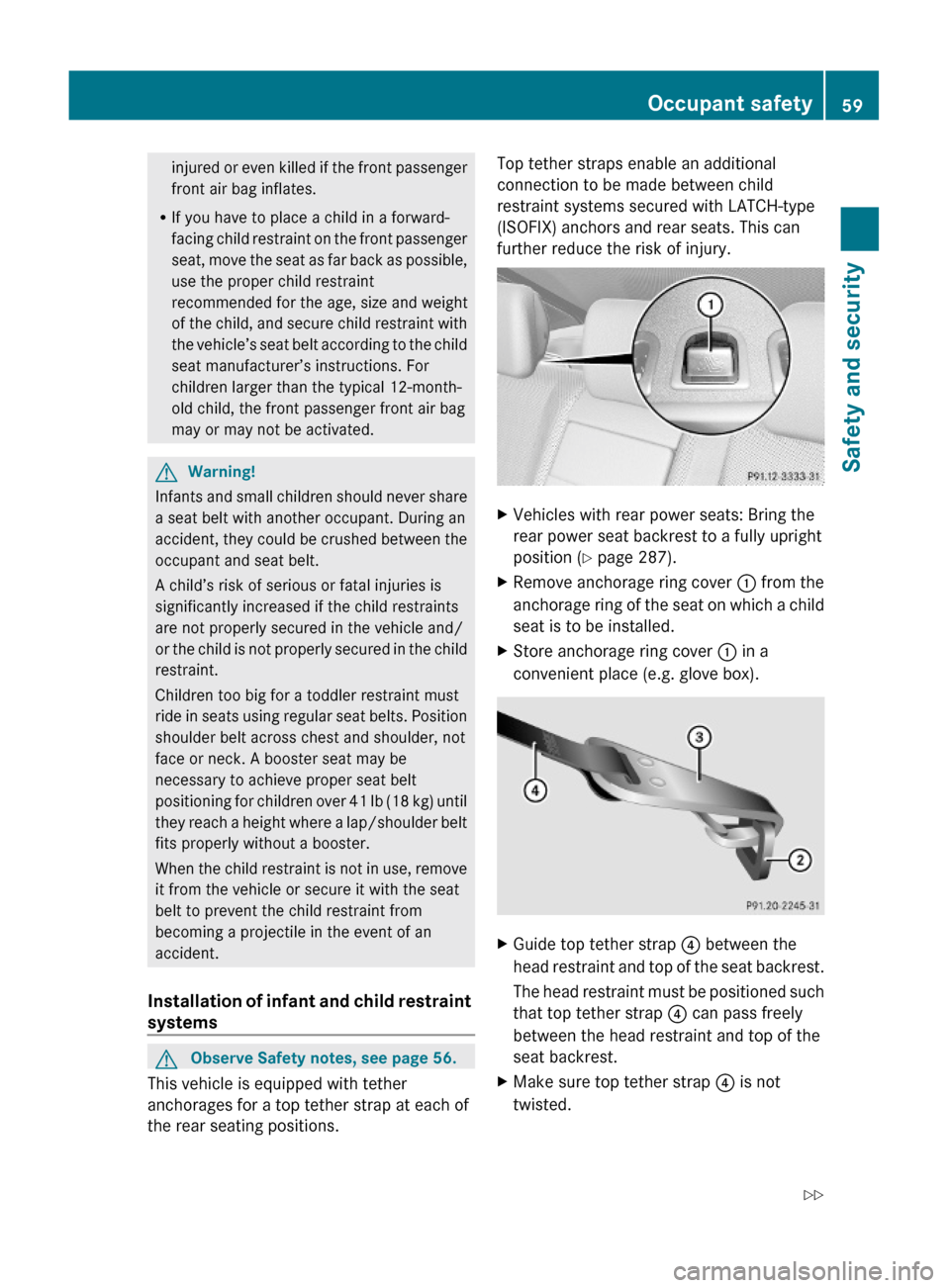
XRemove anchorage ring cover : from the
anchorage ring of the seat on which a child
seat is to be installed.
XStore anchorage ring cover : in a
convenient place (e.g. glove box).
XGuide top tether strap ? between the
head restraint and top of the seat backrest.
The head restraint must be positioned such
that top tether strap ? can pass freely
between the head restraint and top of the
seat backrest.
XMake sure top tether strap ? is not
twisted.
Occupant safety59Safety and security221_AKB; 6; 20, en-USd2ugruen,Version: 2.11.8.12009-09-24T13:28:17+02:00 - Seite 59Z
Page 62 of 548
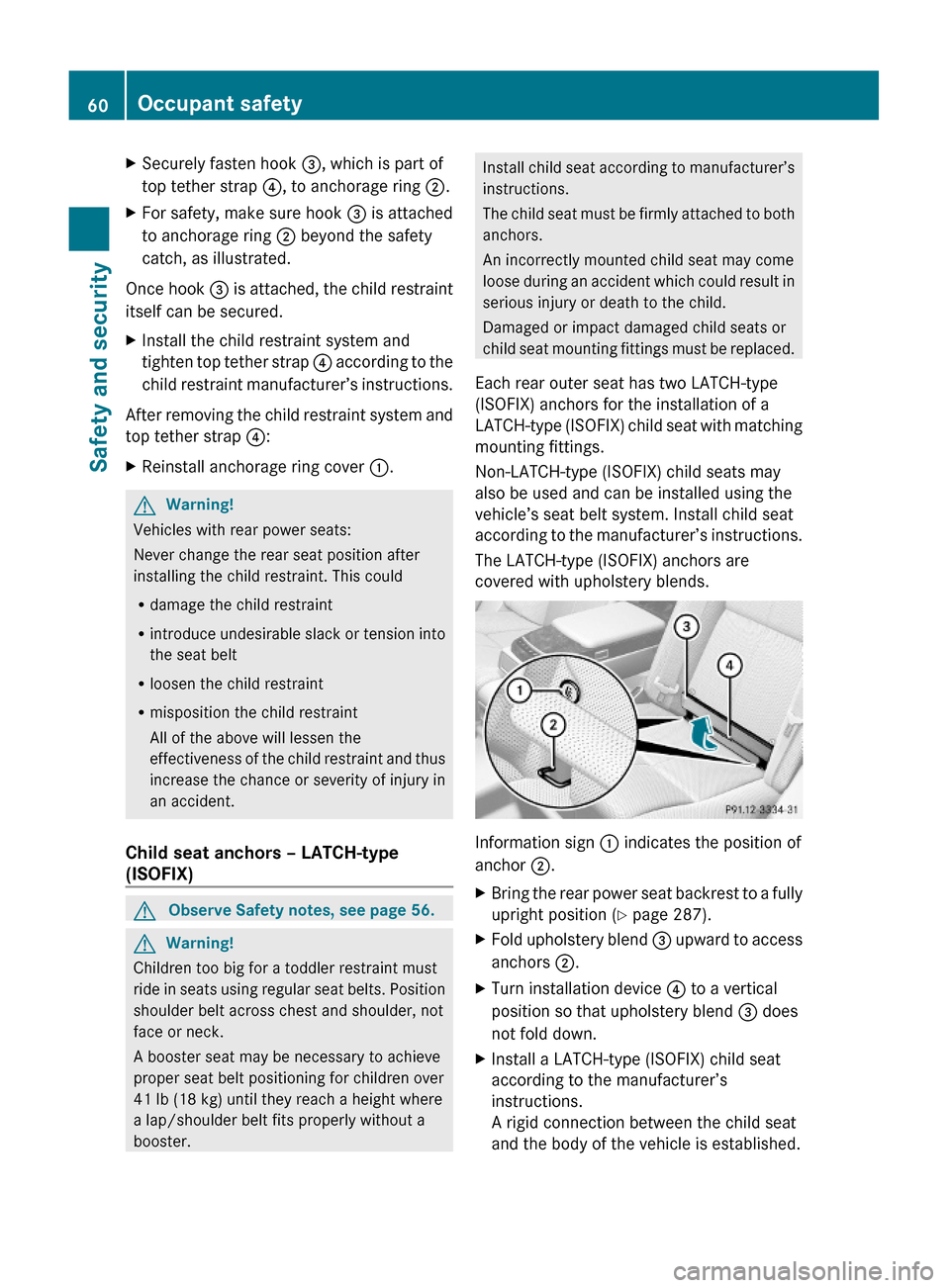
XSecurely fasten hook =, which is part of
top tether strap ?, to anchorage ring ;.
XFor safety, make sure hook = is attached
to anchorage ring ; beyond the safety
catch, as illustrated.
Once hook = is attached, the child restraint
itself can be secured.
XInstall the child restraint system and
tighten top tether strap ? according to the
child restraint manufacturer’s instructions.
After removing the child restraint system and
top tether strap ?:
XReinstall anchorage ring cover :.GWarning!
Vehicles with rear power seats:
Never change the rear seat position after
installing the child restraint. This could
Rdamage the child restraint
Rintroduce undesirable slack or tension into
the seat belt
Rloosen the child restraint
Rmisposition the child restraint
All of the above will lessen the
effectiveness of the child restraint and thus
increase the chance or severity of injury in
an accident.
Child seat anchors – LATCH-type
(ISOFIX)
GObserve Safety notes, see page 56.GWarning!
Children too big for a toddler restraint must
ride in seats using regular seat belts. Position
shoulder belt across chest and shoulder, not
face or neck.
A booster seat may be necessary to achieve
proper seat belt positioning for children over
41 lb (18 kg) until they reach a height where
a lap/shoulder belt fits properly without a
booster.
Install child seat according to manufacturer’s
instructions.
The child seat must be firmly attached to both
anchors.
An incorrectly mounted child seat may come
loose during an accident which could result in
serious injury or death to the child.
Damaged or impact damaged child seats or
child seat mounting fittings must be replaced.
Each rear outer seat has two LATCH-type
(ISOFIX) anchors for the installation of a
LATCH-type (ISOFIX) child seat with matching
mounting fittings.
Non-LATCH-type (ISOFIX) child seats may
also be used and can be installed using the
vehicle’s seat belt system. Install child seat
according to the manufacturer’s instructions.
The LATCH-type (ISOFIX) anchors are
covered with upholstery blends.
Information sign : indicates the position of
anchor ;.
XBring the rear power seat backrest to a fully
upright position (Y page 287).
XFold upholstery blend = upward to access
anchors ;.
XTurn installation device ? to a vertical
position so that upholstery blend = does
not fold down.
XInstall a LATCH-type (ISOFIX) child seat
according to the manufacturer’s
instructions.
A rigid connection between the child seat
and the body of the vehicle is established.
60Occupant safetySafety and security
221_AKB; 6; 20, en-USd2ugruen,Version: 2.11.8.12009-09-24T13:28:17+02:00 - Seite 60
Page 63 of 548
XVehicles with rear center seat: Make sure
that the seat belt for the rear center seat
can operate freely with a child seat
installed.
GWarning!
Vehicles with rear power seats:
Never change the rear seat position after
installing the child restraint. This could
Rdamage the child restraint
Rintroduce undesirable slack or tension into
the seat belt
Rloosen the child restraint
Rmisposition the child restraint
All of the above will lessen the
effectiveness of the child restraint and thus
increase the chance or severity of injury in
an accident.
Child safety
Child safety locks
GObserve Safety notes, see page 56.GWarning!
Children could open a rear door from the
inside. This may cause serious personal injury
or an accident. Therefore, secure the rear
doors with the child safety locks whenever
children are riding in the back seats of the
vehicle.
The child safety locks on the rear doors
enable you to secure each rear door
individually. You cannot open a secured rear
door from the inside. You can open the rear
door from the outside when the vehicle is
unlocked.
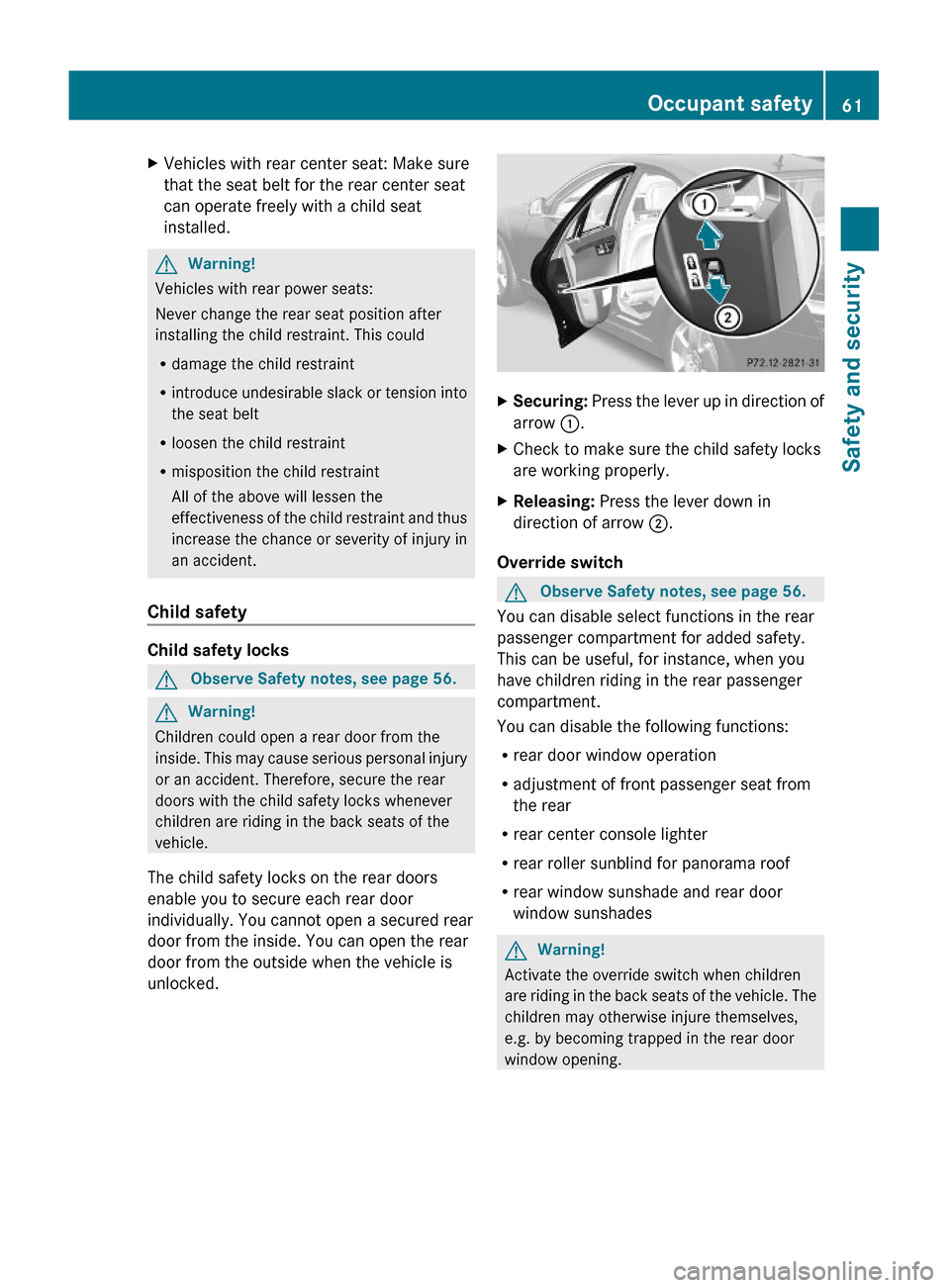
XSecuring: Press the lever up in direction of
arrow :.
XCheck to make sure the child safety locks
are working properly.
XReleasing: Press the lever down in
direction of arrow ;.
Override switch
GObserve Safety notes, see page 56.
You can disable select functions in the rear
passenger compartment for added safety.
This can be useful, for instance, when you
have children riding in the rear passenger
compartment.
You can disable the following functions:
Rrear door window operation
Radjustment of front passenger seat from
the rear
Rrear center console lighter
Rrear roller sunblind for panorama roof
Rrear window sunshade and rear door
window sunshades
GWarning!
Activate the override switch when children
are riding in the back seats of the vehicle. The
children may otherwise injure themselves,
e.g. by becoming trapped in the rear door
window opening.
Occupant safety61Safety and security221_AKB; 6; 20, en-USd2ugruen,Version: 2.11.8.12009-09-24T13:28:17+02:00 - Seite 61Z
Page 77 of 548

Vehicle equipment ..............................76
COMAND introduction ........................76
COMAND system settings .................91
COMAND navigation (introduction) ...95
COMAND navigation system
(entering a destination) ....................106
COMAND navigation system (Point
of interest entry) ...............................124
COMAND navigation system (route
guidance) ...........................................129
COMAND navigation system (dur-
ing route guidance) ...........................135
COMAND navigation system (real-
time traffic) .......................................138
COMAND navigation system (des-
tination memory) ..............................143
COMAND navigation system (last
destinations) .....................................147
COMAND telephone ..........................148
COMAND FM/AM radio ....................165
COMAND satellite radio ...................170
COMAND audio CD/audio DVD/
MP3 ....................................................176
Audio AUX and video AUX ................186
Rear Seat Entertainment System ....189
COMAND video DVD .........................191
Music Register ..................................196
Media Interface .................................200
COMAND vehicle menu ....................206
COMAND automatic climate control 211
COMAND seats ..................................216
Instrument cluster control system .220
Voice Control System introduction .237
Voice Control System navigation ....240
Voice Control System telephone .....245
Voice Control System address book 249
Voice Control System radio .............252
Voice Control System CD/DVD
changer/MP3 ....................................255
Voice Control System external
devices ...............................................257
Voice Control System command list 257
Voice Control System trouble-
shooting .............................................267
Voice Control System individuali-
zation .................................................271
75Control systems221_AKB; 6; 20, en-USd2ugruen,Version: 2.11.8.12009-09-24T13:28:17+02:00 - Seite 75
Page 82 of 548
SymbolHow to use the COMAND
controller
ZVÆXSlide
Rto move through vertical
menus
Rto exit horizontal menus
XSlide and hold
Rto move through a navigation
map
XVYXSlide
Rto move through horizontal
menus
Rto exit vertical menus
XSlide and hold
Rfor fast forward or reverse for
audio CD or audio DVD
playback
Rto move through a navigation
map
aVbXSlide and hold
Rto move through a navigation
map
USB socket
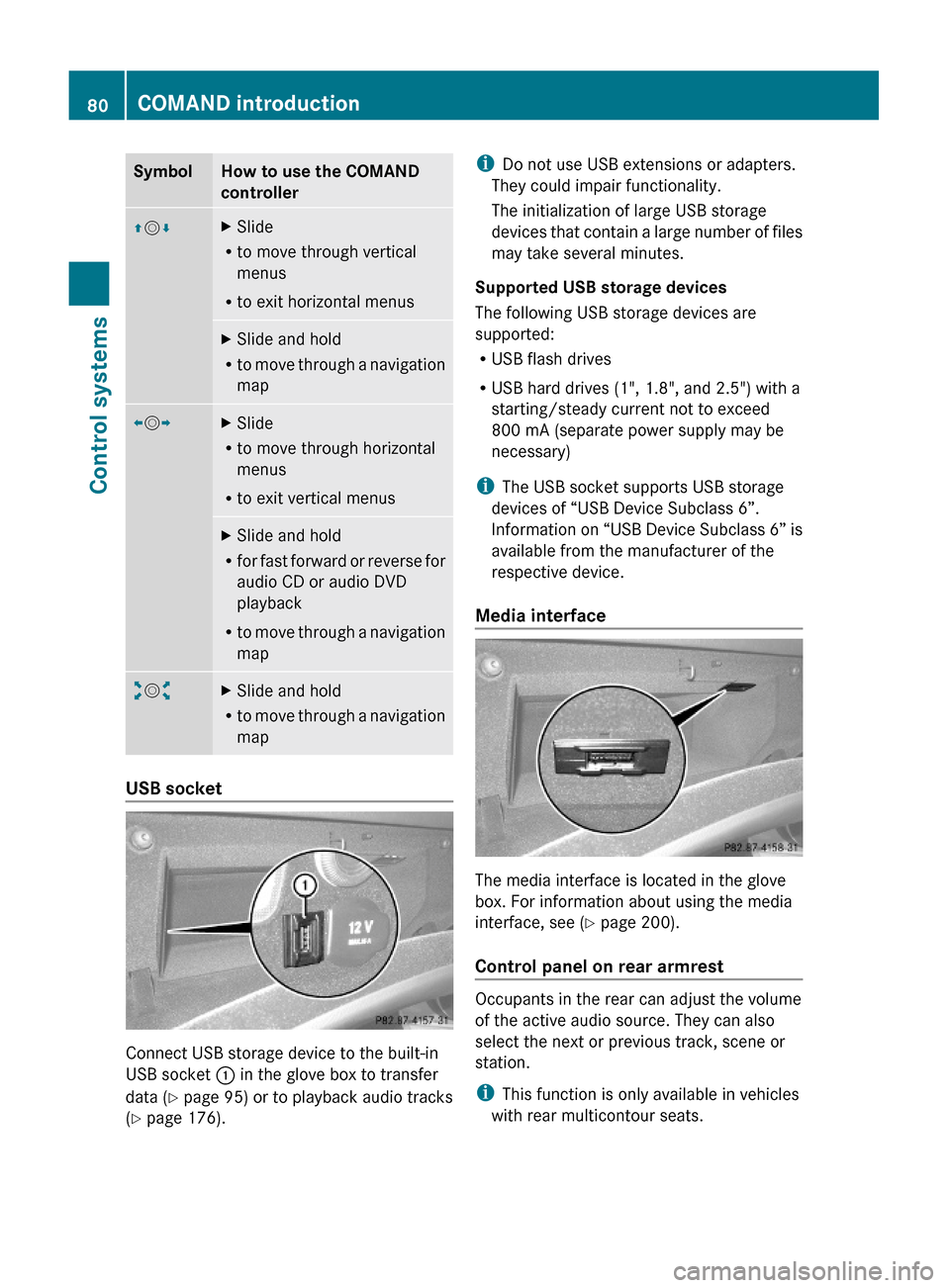
Connect USB storage device to the built-in
USB socket : in the glove box to transfer
data (Y page 95) or to playback audio tracks
(Y page 176).
iDo not use USB extensions or adapters.
They could impair functionality.
The initialization of large USB storage
devices that contain a large number of files
may take several minutes.
Supported USB storage devices
The following USB storage devices are
supported:
RUSB flash drives
RUSB hard drives (1", 1.8", and 2.5") with a
starting/steady current not to exceed
800 mA (separate power supply may be
necessary)
iThe USB socket supports USB storage
devices of “USB Device Subclass 6”.
Information on “USB Device Subclass 6” is
available from the manufacturer of the
respective device.
Media interface
The media interface is located in the glove
box. For information about using the media
interface, see (Y page 200).
Control panel on rear armrest
Occupants in the rear can adjust the volume
of the active audio source. They can also
select the next or previous track, scene or
station.
iThis function is only available in vehicles
with rear multicontour seats.
80COMAND introductionControl systems
221_AKB; 6; 20, en-USd2ugruen,Version: 2.11.8.12009-09-24T13:28:17+02:00 - Seite 80
Page 90 of 548
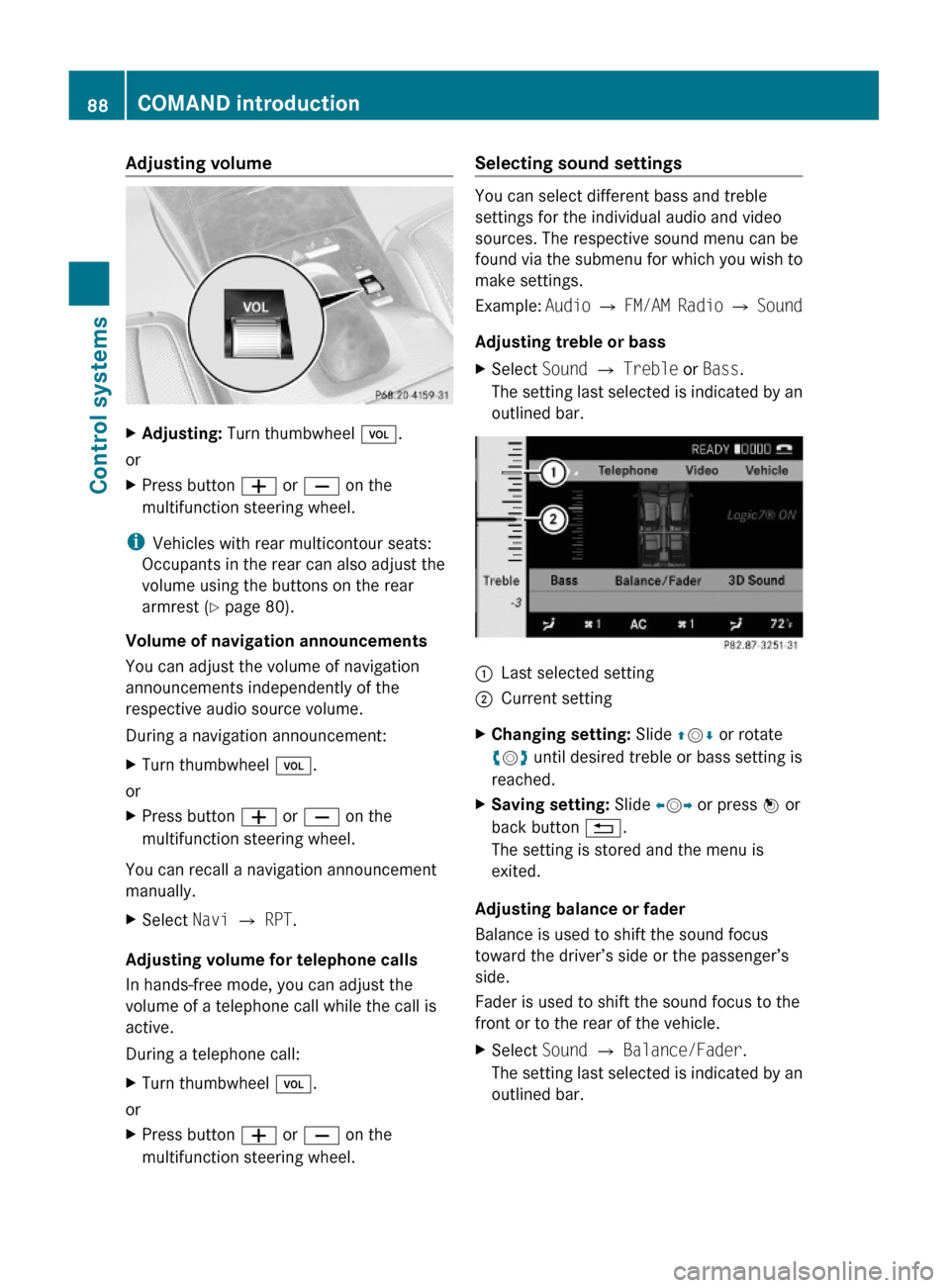
Adjusting volumeXAdjusting: Turn thumbwheel H.
or
XPress button W or X on the
multifunction steering wheel.
iVehicles with rear multicontour seats:
Occupants in the rear can also adjust the
volume using the buttons on the rear
armrest (Y page 80).
Volume of navigation announcements
You can adjust the volume of navigation
announcements independently of the
respective audio source volume.
During a navigation announcement:
XTurn thumbwheel H.
or
XPress button W or X on the
multifunction steering wheel.
You can recall a navigation announcement
manually.
XSelect Navi Q RPT.
Adjusting volume for telephone calls
In hands-free mode, you can adjust the
volume of a telephone call while the call is
active.
During a telephone call:
XTurn thumbwheel H.
or
XPress button W or X on the
multifunction steering wheel.
Selecting sound settings
You can select different bass and treble
settings for the individual audio and video
sources. The respective sound menu can be
found via the submenu for which you wish to
make settings.
Example: Audio Q FM/AM Radio Q Sound
Adjusting treble or bass
XSelect Sound Q Treble or Bass.
The setting last selected is indicated by an
outlined bar.
:Last selected setting;Current settingXChanging setting: Slide ZVÆ or rotate
cVd until desired treble or bass setting is
reached.
XSaving setting: Slide XVY or press W or
back button %.
The setting is stored and the menu is
exited.
Adjusting balance or fader
Balance is used to shift the sound focus
toward the driver’s side or the passenger’s
side.
Fader is used to shift the sound focus to the
front or to the rear of the vehicle.
XSelect Sound Q Balance/Fader.
The setting last selected is indicated by an
outlined bar.
88COMAND introductionControl systems
221_AKB; 6; 20, en-USd2ugruen,Version: 2.11.8.12009-09-24T13:28:17+02:00 - Seite 88
Page 91 of 548
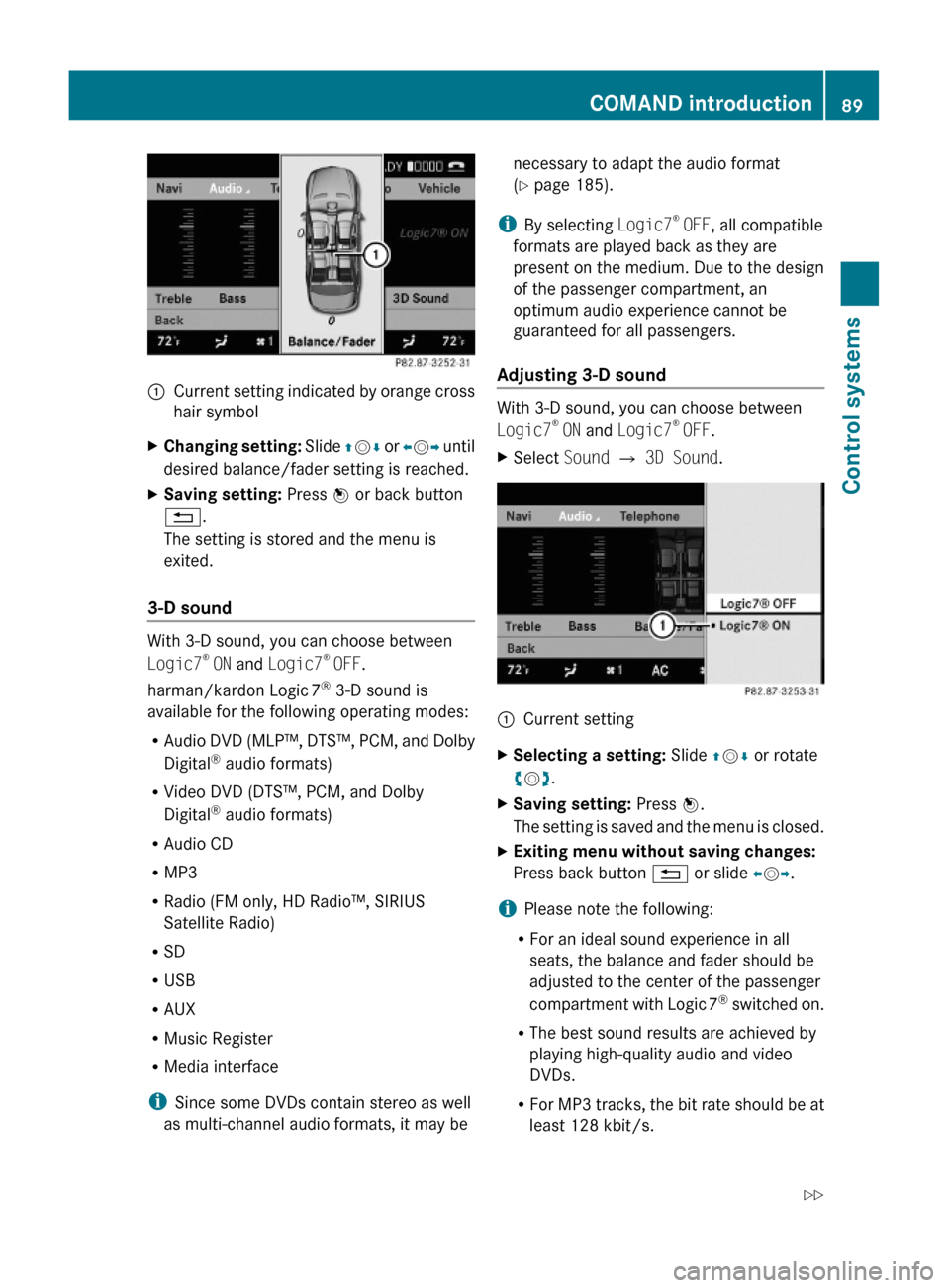
:Current setting indicated by orange cross
hair symbol
XChanging setting: Slide ZVÆ or XVY until
desired balance/fader setting is reached.
XSaving setting: Press W or back button
%.
The setting is stored and the menu is
exited.
3-D sound
With 3-D sound, you can choose between
Logic7® ON and Logic7® OFF.
harman/kardon Logic 7® 3-D sound is
available for the following operating modes:
RAudio DVD (MLP™, DTS™, PCM, and Dolby
Digital® audio formats)
RVideo DVD (DTS™, PCM, and Dolby
Digital® audio formats)
RAudio CD
RMP3
RRadio (FM only, HD Radio™, SIRIUS
Satellite Radio)
RSD
RUSB
RAUX
RMusic Register
RMedia interface
iSince some DVDs contain stereo as well
as multi-channel audio formats, it may be
necessary to adapt the audio format
(Y page 185).
iBy selecting Logic7® OFF, all compatible
formats are played back as they are
present on the medium. Due to the design
of the passenger compartment, an
optimum audio experience cannot be
guaranteed for all passengers.
Adjusting 3-D sound
With 3-D sound, you can choose between
Logic7® ON and Logic7® OFF.
XSelect Sound Q 3D Sound.:Current settingXSelecting a setting: Slide ZVÆ or rotate
cVd.
XSaving setting: Press W.
The setting is saved and the menu is closed.
XExiting menu without saving changes:
Press back button % or slide XVY.
iPlease note the following:
RFor an ideal sound experience in all
seats, the balance and fader should be
adjusted to the center of the passenger
compartment with Logic 7® switched on.
RThe best sound results are achieved by
playing high-quality audio and video
DVDs.
RFor MP3 tracks, the bit rate should be at
least 128 kbit/s.
COMAND introduction89Control systems221_AKB; 6; 20, en-USd2ugruen,Version: 2.11.8.12009-09-24T13:28:17+02:00 - Seite 89Z
Page 170 of 548
Selecting stations/channels using the
search functionXSlide XV Y or rotate cV d when the main
area is selected.
Depending on the direction in which the
controller is being slid or rotated, the
system searches upward or downward and
stops at the next receivable station/
channel.
or
XPress and hold button 9 or : on the
multifunction steering wheel 24
.
Selecting stations using station presets
i This function is not available for Weather
Band.
XSelect Audio Q FM/AM Radio Q FM or
AM .XSelect Presets .
or
XPress W when the main area is selected.
The preset menu appears. The dot # in
front of a preset position indicates that the
currently selected station is saved there.XSelect station preset by rotating cV d or
sliding ZV Æ and press W.
or
XEnter a position number with the telephone
keypad using buttons ´ - Ã
( Y page 79).
or
XPress button 9 or : on the
multifunction steering wheel briefly 24
.
i Vehicles with rear multicontour seats:
Rear occupants can also select a station
using the buttons on the rear armrest
( Y page 80).
Selecting stations by entering the
frequency manually
i This function is not available for Weather
Band.
XSelect Audio Q FM/AM Radio Q FM or
AM .
Entering the frequency using the
COMAND controller
XSelect Radio Q Enter Frequency .
The menu for manual frequency entry
appears.XExiting menu without making an entry:
Press back button % in the center
console ( Y page 87).XIncreasing or decreasing number: Slide
Z V Æ or rotate cV d.
i
You can only select available frequencies.
XSelecting the next number: Slide VY.XConfirming frequency entry: Press W.
COMAND tunes in to the frequency
entered.
i If you enter a frequency which is outside
the frequency range, COMAND tunes in to
the next lowest frequency.
Entering the frequency using the
telephone keypad
XPress button à on the telephone
keypad ( Y page 79).XEnter frequency using buttons Å -
à .
COMAND tunes in to the frequency
entered.
Selecting channels using the WB
channel
i This function is only available for Weather
Band.
24 Function is only available if the Audio menu is selected in the instrument cluster.168COMAND FM/AM radioControl systems
221_AKB; 6; 20, en-USd2ugruen,Version: 2.11.8.12009-09-24T13:28:17+02:00 - Seite 168