2010 MERCEDES-BENZ S65AMG radio
[x] Cancel search: radioPage 98 of 548
COMAND may give incorrect navigation
commands if the data in the digital map does
not correspond with the actual road or traffic
situation. Maps do not cover all areas nor all
routes within an area. For example, if the
traffic routing has been changed or the
direction of a one-way road has been
reversed.
For this reason, you must always observe
applicable road and traffic rules and
regulations during your journey. Road and
traffic rules and regulations always have
priority over the navigation commands
generated by the system.GWarning!
Navigation announcements are intended to
direct you while driving without diverting your
attention from the road and driving.
Please always use navigation announcements
instead of consulting the map display for
directions. Consulting the symbols or map
display for directions may cause you to divert
your attention from driving and increase your
risk of an accident.
Map software
The digital maps generated by the map
software become outdated in the same way
as conventional road maps. Optimum route
guidance can only be provided by the
navigation system in conjunction with the
latest map software. Information about new
map software versions can be obtained from
an authorized Mercedes-Benz Center.
Displaying installed map version
XNavi Q Map Version
The installed map version is displayed.
For information on installing new map
software see ( Y page 96).
Installing the map software
Your vehicle is factory-equipped with map
software for the USA (including Alaska and
Hawaii), Canada, the U.S. Virgin Islands, and
Puerto Rico.
You can install new map software from one or
more DVDs, depending on the size of the map
software.
Copy protection of map software
COMAND map software is subject to charges.
The map software requires an activation
code. The map software can be used for one
individual vehicle only and is
non-transferrable. The six-digit activation
code is available at any authorized Mercedes-
Benz Center. Contact an authorized
Mercedes-Benz Center in case you have lost
your activation code or when the COMAND
system does not accept the activation code
you have received.
When reinstalling a map software that has
been installed in that vehicle already, an
activation code is not required.
Installation process
i The installation process can take
between 10 and 120 minutes, depending
on the size of the map software. If the radio
is switched on when you start the
installation process, you can still adjust the
volume. During the installation process,
some COMAND functions are suspended.
Still available are the COMAND functions
for automatic air conditioning operation
and canceling the installation process.
If possible, carry out the installation when
the vehicle is stationary. When the vehicle
is stationary, the reading rate of the DVD
drive is higher than in a moving vehicle and
the installation process requires less time.
GObserve Safety notes, see page 76.
i COMAND may switch off during the
installation process automatically in order
96COMAND navigation (introduction)Control systems
221_AKB; 6; 20, en-USd2ugruen,Version: 2.11.8.12009-09-24T13:28:17+02:00 - Seite 96
Page 140 of 548

:Blocked route section;Current vehicle position; the triangle
indicates the vehicle’s direction of travel
=Information about the blocked route
section
iBlocked route section : is always
highlighted in red/white. The information
about blocked route section = shows
which section of the route is blocked and
the length of the blocked section.
XStarting route calculation: Select Start,
see also (Y page 120).
XDeleting blockage: Select Navi Q
Route Q Detour Q Delete.
Alternative Route
You can calculate and display alternative
routes in addition to the route that COMAND
displays automatically. The original route is
displayed in light blue while the alternative
route is dark blue.
XWith the menu system displayed
(Y page 102), select Route Q
Alternative Route.
:Route distance, time, and time of arrival
for the currently selected alternative
route marked in deep blue
;On the Route: Symbols indicate special
parts, such as tunnels, ferries or toll
roads, on the displayed alternative route.
=Mode: Current settings for the displayed
alternative route
Avoid: Symbols of route parts to avoid,
for example tunnels, ferries or toll roads
XDisplaying/selecting other alternative
routes: Select Previous or Next.
XAccepting the currently selected, deep
blue route for route guidance: Select
Start.
COMAND navigation system (real-
time traffic)
Traffic messages
iA subscription to SIRIUS XM Satellite
Radio service provider is required for the
satellite radio reception referred to here.
You can find more information on satellite
radio in chapter “Satellite Radio”
(Y page 170).
COMAND can receive and incorporate traffic
messages via satellite radio into the
navigation system. Traffic report messages
and map symbols can then be viewed in the
COMAND display.
138COMAND navigation system (real-time traffic)Control systems
221_AKB; 6; 20, en-USd2ugruen,Version: 2.11.8.12009-09-24T13:28:17+02:00 - Seite 138
Page 143 of 548

SymbolDescriptionTraffic notifications in map displayTraffic
report
lists
Traffic
report
message
Traffic jam
(red car)
Traffic congestion, average speed
5 – 20 mph (8 – 32 km/h).
Could appear repeatedly to indicate
length of traffic congestion.
(Not
possible)
(Not
possible)
XXXXBlocked
section
Road impassable.
Could appear repeatedly to indicate
length of blocked area
(Not
possible)
(Not
possible)
Displaying real-time traffic reportsXIf necessary, switch to navigation mode
and show the menu system (Y page 102).
XSelect Traffic.
COMAND searches for satellite radio
channels sending traffic messages.
The message No traffic reports are
currently available for this area.
may appear for the following reasons:RMessages were not yet received.
RThere are no messages available.
XCancelling the search: Select Cancel.XClosing the message: Select OK
If there are traffic reports, you will see a list
or a submenu, depending on whether route
guidance is active or not.
iA traffic message may also concern an
area or region rather than a road, e.g.
impaired visibility due to fog.
List when route guidance is not active
The list shows all the roads, areas or regions
for which messages are available.
1Country, state or province indicator
(optional)
2Road concernedXDisplaying a traffic message: Select an
item from the list.
The traffic message appears, see “Example
of a traffic message” (Y page 142).
XClosing the list: Slide XVY once or
repeatedly.
XDisplaying traffic symbol information:
Select Traffic Symbol Info
(Y page 142).
COMAND navigation system (real-time traffic)141Control systems221_AKB; 6; 20, en-USd2ugruen,Version: 2.11.8.12009-09-24T13:28:17+02:00 - Seite 141Z
Page 167 of 548
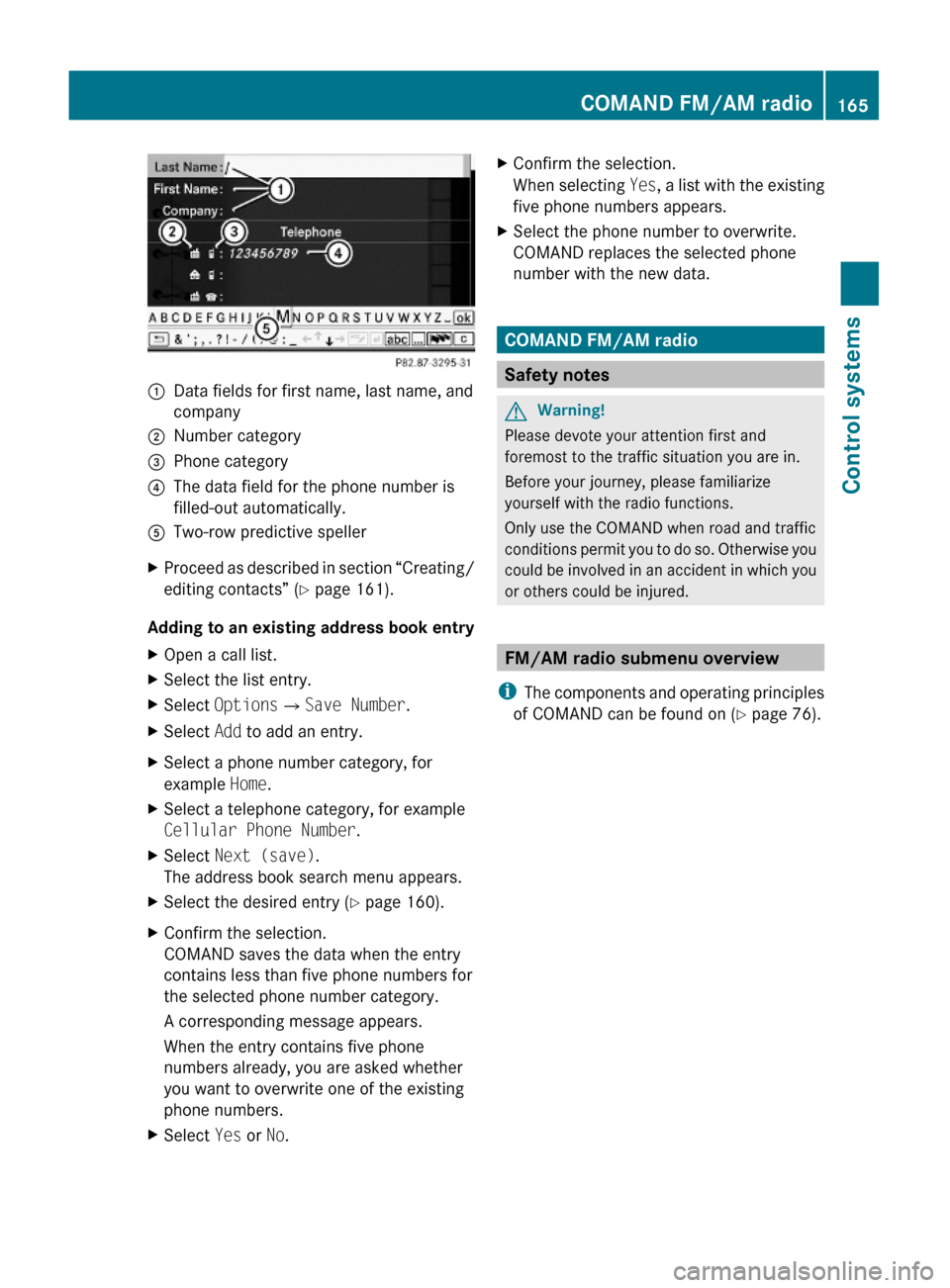
:Data fields for first name, last name, and
company
;Number category=Phone category?The data field for the phone number is
filled-out automatically.
ATwo-row predictive spellerXProceed as described in section “Creating/
editing contacts” (Y page 161).
Adding to an existing address book entry
XOpen a call list.XSelect the list entry.XSelect OptionsQSave Number.XSelect Add to add an entry.XSelect a phone number category, for
example Home.
XSelect a telephone category, for example
Cellular Phone Number.
XSelect Next (save).
The address book search menu appears.
XSelect the desired entry (Y page 160).XConfirm the selection.
COMAND saves the data when the entry
contains less than five phone numbers for
the selected phone number category.
A corresponding message appears.
When the entry contains five phone
numbers already, you are asked whether
you want to overwrite one of the existing
phone numbers.
XSelect Yes or No.XConfirm the selection.
When selecting Yes, a list with the existing
five phone numbers appears.
XSelect the phone number to overwrite.
COMAND replaces the selected phone
number with the new data.
COMAND FM/AM radio
Safety notes
GWarning!
Please devote your attention first and
foremost to the traffic situation you are in.
Before your journey, please familiarize
yourself with the radio functions.
Only use the COMAND when road and traffic
conditions permit you to do so. Otherwise you
could be involved in an accident in which you
or others could be injured.
FM/AM radio submenu overview
iThe components and operating principles
of COMAND can be found on (Y page 76).
COMAND FM/AM radio165Control systems221_AKB; 6; 20, en-USd2ugruen,Version: 2.11.8.12009-09-24T13:28:17+02:00 - Seite 165Z
Page 168 of 548
Radio
(except
Weather Band)
Presets
(except
Weather
Band)
Channel
(only
Weather
Band)
InfoFM or AM
or WB
SoundSave StationAutostoreChannel listProgram
Information
Switch to
FM wave
band
TrebleFrequency EntryPreset
station list
Switch to
AM wave
band
BassShow Station
Info
Switch to
Weather
Band
Balance/
Fader
ª¥Radio3D SoundActive Source
for Rear
Rear OFFSwitching to radio modeXSelect Audio Q FM/AM Radio.
or
XPress shortcut button R (Y page 77)
once or twice.
The radio display appears once you have
switched to radio mode. You will hear the
last tuned station/channel in the
previously selected wave band, provided
that the station/channel can be received.
iThe number of times you have to press
shortcut button R depends on the
operating mode currently selected.
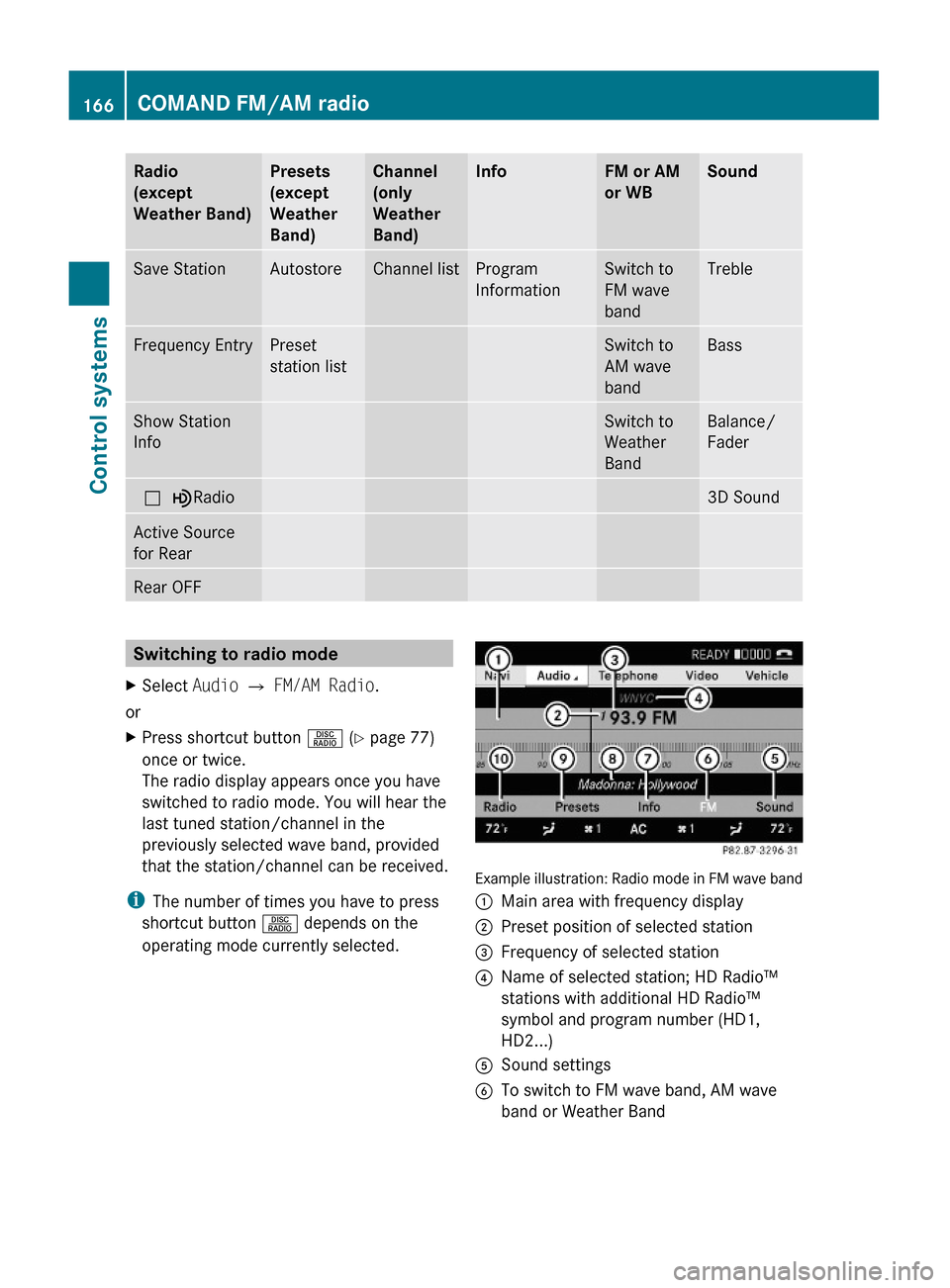
Example illustration: Radio mode in FM wave band
:Main area with frequency display;Preset position of selected station=Frequency of selected station?Name of selected station; HD Radio™
stations with additional HD Radio™
symbol and program number (HD1,
HD2...)
ASound settingsBTo switch to FM wave band, AM wave
band or Weather Band
166COMAND FM/AM radioControl systems
221_AKB; 6; 20, en-USd2ugruen,Version: 2.11.8.12009-09-24T13:28:17+02:00 - Seite 166
Page 169 of 548
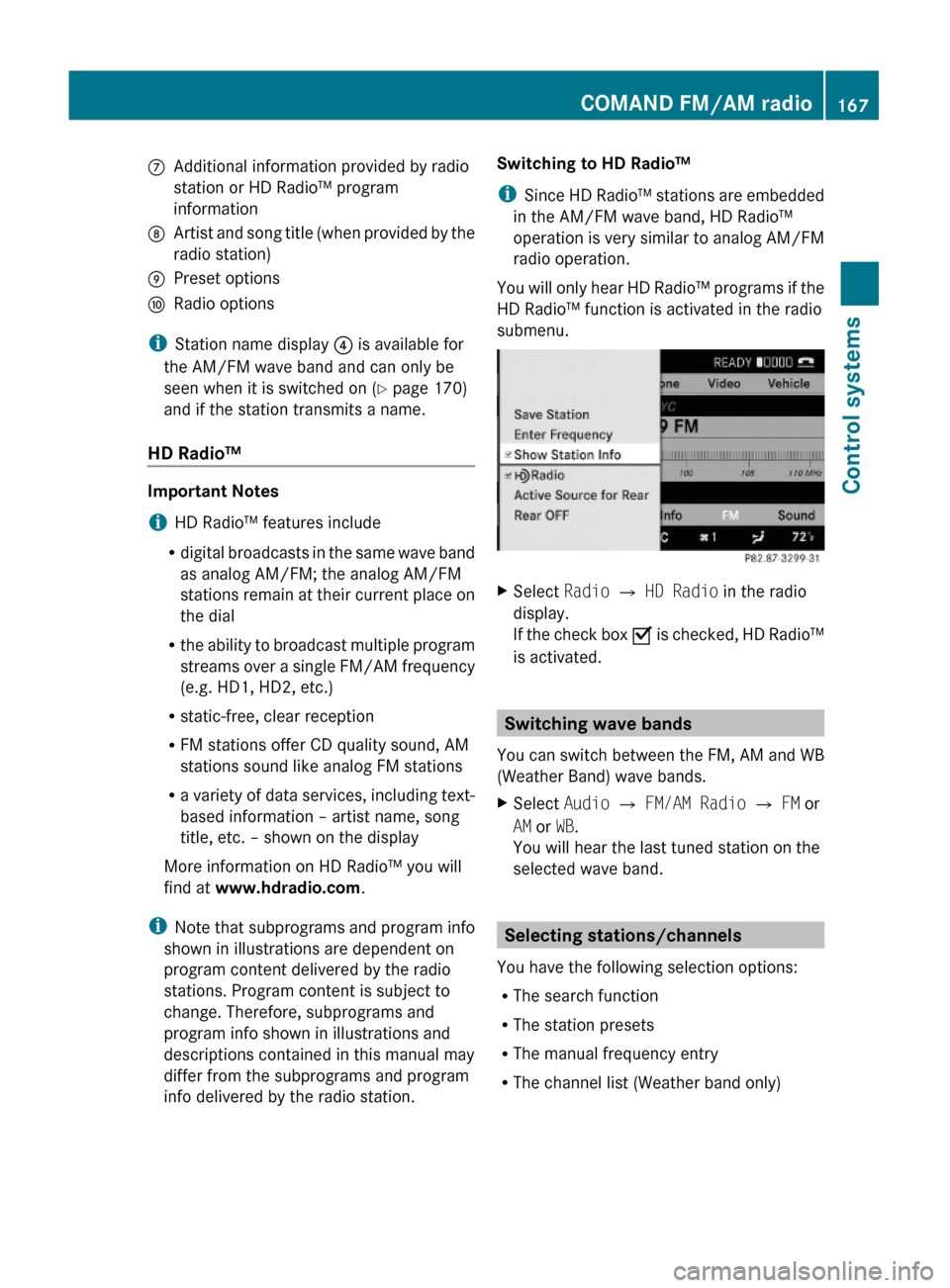
CAdditional information provided by radio
station or HD Radio™ program
information
DArtist and song title (when provided by the
radio station)
EPreset optionsFRadio options
iStation name display ? is available for
the AM/FM wave band and can only be
seen when it is switched on (Y page 170)
and if the station transmits a name.
HD Radio™
Important Notes
iHD Radio™ features include
Rdigital broadcasts in the same wave band
as analog AM/FM; the analog AM/FM
stations remain at their current place on
the dial
Rthe ability to broadcast multiple program
streams over a single FM/AM frequency
(e.g. HD1, HD2, etc.)
Rstatic-free, clear reception
RFM stations offer CD quality sound, AM
stations sound like analog FM stations
Ra variety of data services, including text-
based information – artist name, song
title, etc. – shown on the display
More information on HD Radio™ you will
find at www.hdradio.com.
iNote that subprograms and program info
shown in illustrations are dependent on
program content delivered by the radio
stations. Program content is subject to
change. Therefore, subprograms and
program info shown in illustrations and
descriptions contained in this manual may
differ from the subprograms and program
info delivered by the radio station.
Switching to HD Radio™
iSince HD Radio™ stations are embedded
in the AM/FM wave band, HD Radio™
operation is very similar to analog AM/FM
radio operation.
You will only hear HD Radio™ programs if the
HD Radio™ function is activated in the radio
submenu.
XSelect Radio £ HD Radio in the radio
display.
If the check box Ç is checked, HD Radio™
is activated.
Switching wave bands
You can switch between the FM, AM and WB
(Weather Band) wave bands.
XSelect Audio Q FM/AM Radio Q FM or
AM or WB.
You will hear the last tuned station on the
selected wave band.
Selecting stations/channels
You have the following selection options:
RThe search function
RThe station presets
RThe manual frequency entry
RThe channel list (Weather band only)
COMAND FM/AM radio167Control systems221_AKB; 6; 20, en-USd2ugruen,Version: 2.11.8.12009-09-24T13:28:17+02:00 - Seite 167Z
Page 170 of 548
Selecting stations/channels using the
search functionXSlide XV Y or rotate cV d when the main
area is selected.
Depending on the direction in which the
controller is being slid or rotated, the
system searches upward or downward and
stops at the next receivable station/
channel.
or
XPress and hold button 9 or : on the
multifunction steering wheel 24
.
Selecting stations using station presets
i This function is not available for Weather
Band.
XSelect Audio Q FM/AM Radio Q FM or
AM .XSelect Presets .
or
XPress W when the main area is selected.
The preset menu appears. The dot # in
front of a preset position indicates that the
currently selected station is saved there.XSelect station preset by rotating cV d or
sliding ZV Æ and press W.
or
XEnter a position number with the telephone
keypad using buttons ´ - Ã
( Y page 79).
or
XPress button 9 or : on the
multifunction steering wheel briefly 24
.
i Vehicles with rear multicontour seats:
Rear occupants can also select a station
using the buttons on the rear armrest
( Y page 80).
Selecting stations by entering the
frequency manually
i This function is not available for Weather
Band.
XSelect Audio Q FM/AM Radio Q FM or
AM .
Entering the frequency using the
COMAND controller
XSelect Radio Q Enter Frequency .
The menu for manual frequency entry
appears.XExiting menu without making an entry:
Press back button % in the center
console ( Y page 87).XIncreasing or decreasing number: Slide
Z V Æ or rotate cV d.
i
You can only select available frequencies.
XSelecting the next number: Slide VY.XConfirming frequency entry: Press W.
COMAND tunes in to the frequency
entered.
i If you enter a frequency which is outside
the frequency range, COMAND tunes in to
the next lowest frequency.
Entering the frequency using the
telephone keypad
XPress button à on the telephone
keypad ( Y page 79).XEnter frequency using buttons Å -
à .
COMAND tunes in to the frequency
entered.
Selecting channels using the WB
channel
i This function is only available for Weather
Band.
24 Function is only available if the Audio menu is selected in the instrument cluster.168COMAND FM/AM radioControl systems
221_AKB; 6; 20, en-USd2ugruen,Version: 2.11.8.12009-09-24T13:28:17+02:00 - Seite 168
Page 171 of 548
XSelect Audio Q FM/AM Radio Q WB
Q Channel.
or
XPress W when the main area is selected.
The channel list appears. The dot # in
front of a list entry indicates the currently
selected channel.
XSelect channel by rotating cVd or sliding
ZVÆ and press W.
iVehicles with rear multicontour seats:
Rear occupants can also select a channel
using the buttons on the rear armrest
(Y page 80).
Saving stations
iTwenty stations can be saved in each
wave band except for Weather Band.
You have the following options:
RSaving stations manually
RSaving stations using the autostore
function
Saving stations manually
Option 1
XSelect Audio Q FM/AM Radio Q FM or
AM.
XSelect Radio Q Save Station.
Option 2
XPress W when the main area is selected.
Option 3
XSelect Audio Q FM/AM Radio Q FM or
AM.
XSelect Presets.
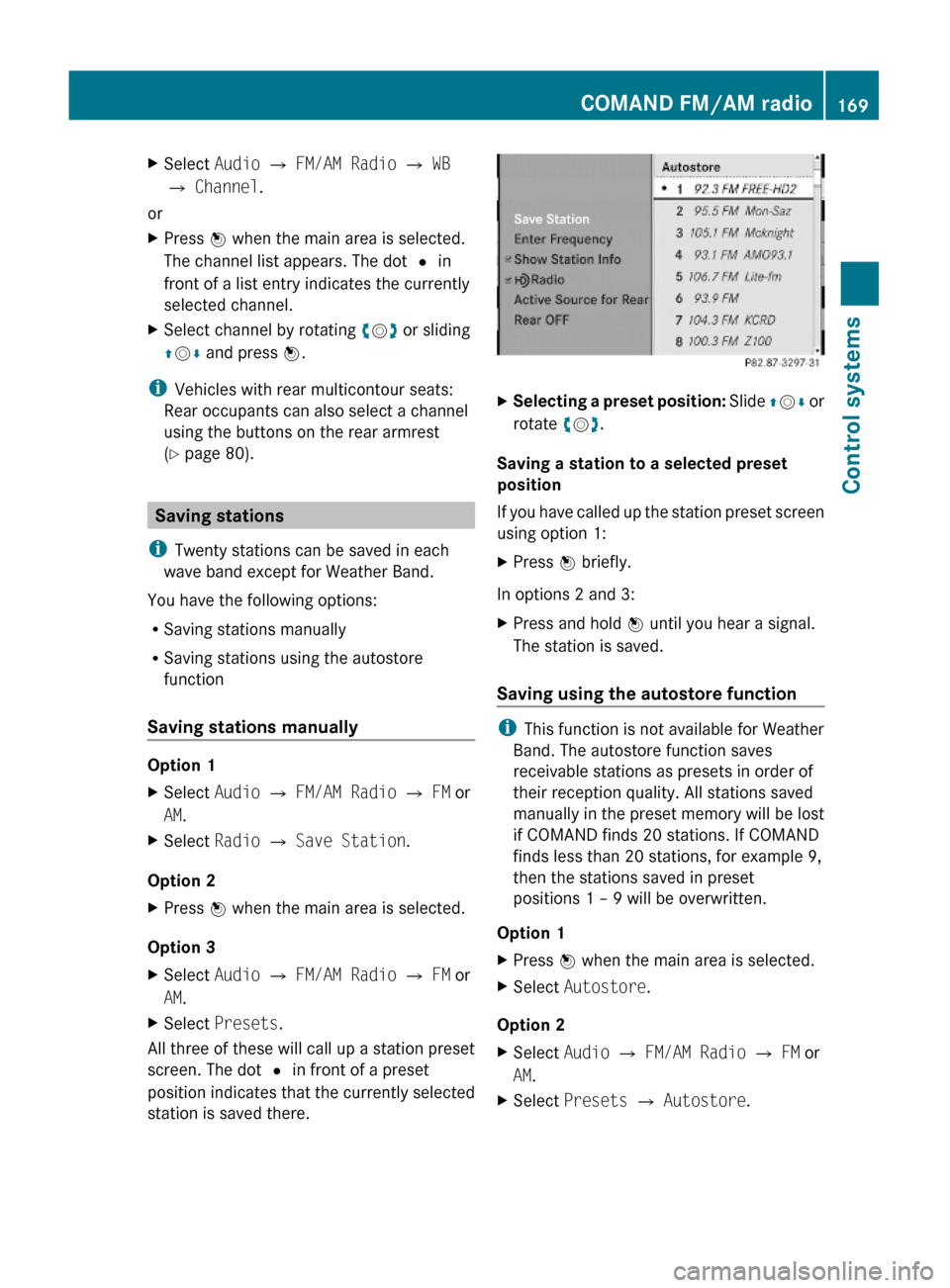
All three of these will call up a station preset
screen. The dot # in front of a preset
position indicates that the currently selected
station is saved there.
XSelecting a preset position: Slide ZVÆ or
rotate cVd.
Saving a station to a selected preset
position
If you have called up the station preset screen
using option 1:
XPress W briefly.
In options 2 and 3:
XPress and hold W until you hear a signal.
The station is saved.
Saving using the autostore function
iThis function is not available for Weather
Band. The autostore function saves
receivable stations as presets in order of
their reception quality. All stations saved
manually in the preset memory will be lost
if COMAND finds 20 stations. If COMAND
finds less than 20 stations, for example 9,
then the stations saved in preset
positions 1 – 9 will be overwritten.
Option 1
XPress W when the main area is selected.XSelect Autostore.
Option 2
XSelect Audio Q FM/AM Radio Q FM or
AM.
XSelect Presets Q Autostore.COMAND FM/AM radio169Control systems221_AKB; 6; 20, en-USd2ugruen,Version: 2.11.8.12009-09-24T13:28:17+02:00 - Seite 169Z