2010 MERCEDES-BENZ S63AMG parking sensors
[x] Cancel search: parking sensorsPage 351 of 548
signal. If the obstacle is closer than the
minimum distance, the actual distance may
no longer be indicated by the Parktronic
system.
Warning indicators
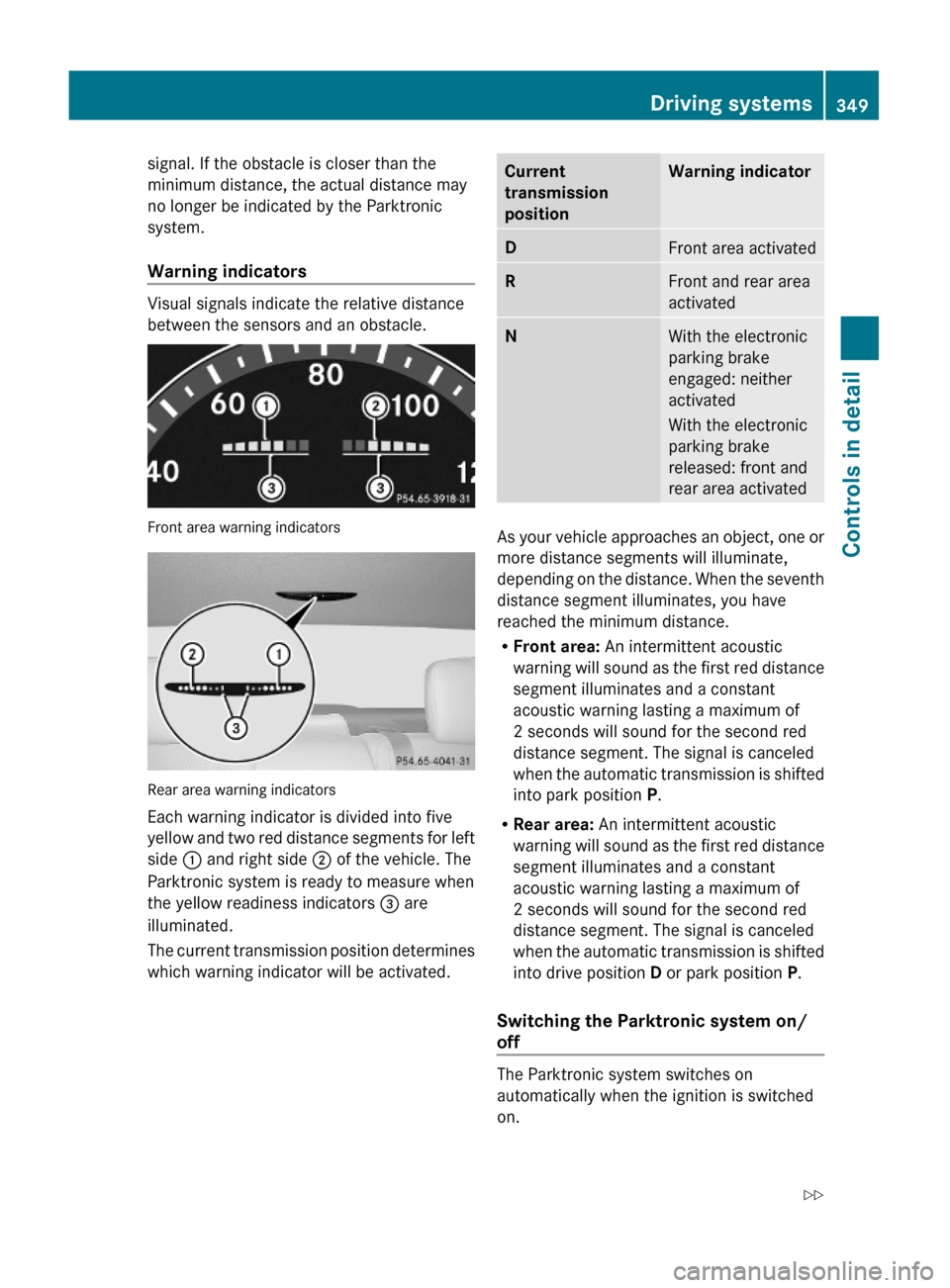
Visual signals indicate the relative distance
between the sensors and an obstacle.
Front area warning indicators
Rear area warning indicators
Each warning indicator is divided into five
yellow and two red distance segments for left
side : and right side ; of the vehicle. The
Parktronic system is ready to measure when
the yellow readiness indicators = are
illuminated.
The current transmission position determines
which warning indicator will be activated.
Current
transmission
position
Warning indicatorDFront area activatedRFront and rear area
activated
NWith the electronic
parking brake
engaged: neither
activated
With the electronic
parking brake
released: front and
rear area activated
As your vehicle approaches an object, one or
more distance segments will illuminate,
depending on the distance. When the seventh
distance segment illuminates, you have
reached the minimum distance.
RFront area: An intermittent acoustic
warning will sound as the first red distance
segment illuminates and a constant
acoustic warning lasting a maximum of
2 seconds will sound for the second red
distance segment. The signal is canceled
when the automatic transmission is shifted
into park position P.
RRear area: An intermittent acoustic
warning will sound as the first red distance
segment illuminates and a constant
acoustic warning lasting a maximum of
2 seconds will sound for the second red
distance segment. The signal is canceled
when the automatic transmission is shifted
into drive position D or park position P.
Switching the Parktronic system on/
off
The Parktronic system switches on
automatically when the ignition is switched
on.
Driving systems349Controls in detail221_AKB; 6; 20, en-USd2ugruen,Version: 2.11.8.12009-09-24T13:28:17+02:00 - Seite 349Z
Page 352 of 548
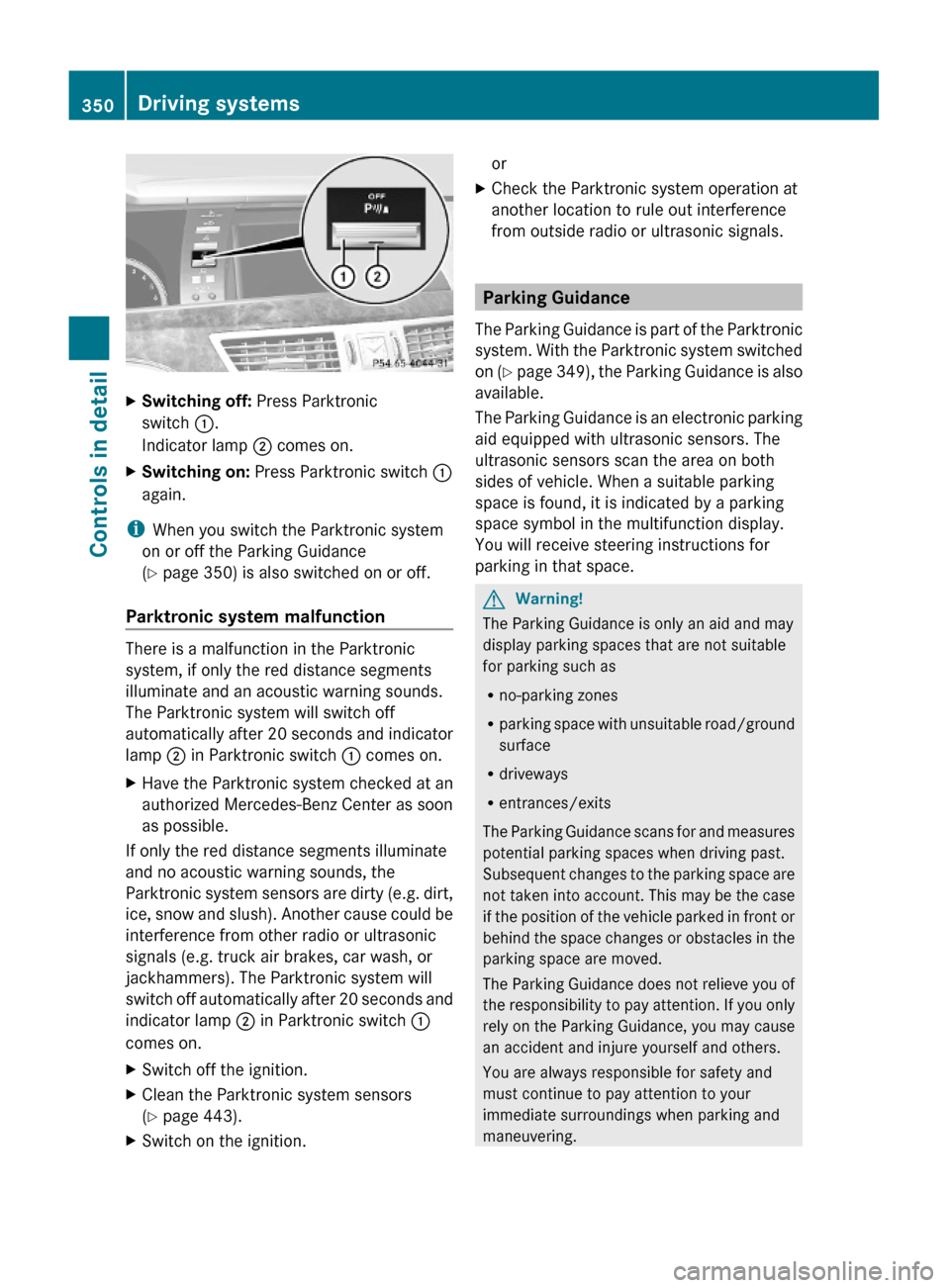
XSwitching off: Press Parktronic
switch :.
Indicator lamp ; comes on.
XSwitching on: Press Parktronic switch :
again.
iWhen you switch the Parktronic system
on or off the Parking Guidance
(Y page 350) is also switched on or off.
Parktronic system malfunction
There is a malfunction in the Parktronic
system, if only the red distance segments
illuminate and an acoustic warning sounds.
The Parktronic system will switch off
automatically after 20 seconds and indicator
lamp ; in Parktronic switch : comes on.
XHave the Parktronic system checked at an
authorized Mercedes-Benz Center as soon
as possible.
If only the red distance segments illuminate
and no acoustic warning sounds, the
Parktronic system sensors are dirty (e.g. dirt,
ice, snow and slush). Another cause could be
interference from other radio or ultrasonic
signals (e.g. truck air brakes, car wash, or
jackhammers). The Parktronic system will
switch off automatically after 20 seconds and
indicator lamp ; in Parktronic switch :
comes on.
XSwitch off the ignition.XClean the Parktronic system sensors
(Y page 443).
XSwitch on the ignition.orXCheck the Parktronic system operation at
another location to rule out interference
from outside radio or ultrasonic signals.
Parking Guidance
The Parking Guidance is part of the Parktronic
system. With the Parktronic system switched
on (Y page 349), the Parking Guidance is also
available.
The Parking Guidance is an electronic parking
aid equipped with ultrasonic sensors. The
ultrasonic sensors scan the area on both
sides of vehicle. When a suitable parking
space is found, it is indicated by a parking
space symbol in the multifunction display.
You will receive steering instructions for
parking in that space.
GWarning!
The Parking Guidance is only an aid and may
display parking spaces that are not suitable
for parking such as
Rno-parking zones
Rparking space with unsuitable road/ground
surface
Rdriveways
Rentrances/exits
The Parking Guidance scans for and measures
potential parking spaces when driving past.
Subsequent changes to the parking space are
not taken into account. This may be the case
if the position of the vehicle parked in front or
behind the space changes or obstacles in the
parking space are moved.
The Parking Guidance does not relieve you of
the responsibility to pay attention. If you only
rely on the Parking Guidance, you may cause
an accident and injure yourself and others.
You are always responsible for safety and
must continue to pay attention to your
immediate surroundings when parking and
maneuvering.
350Driving systemsControls in detail
221_AKB; 6; 20, en-USd2ugruen,Version: 2.11.8.12009-09-24T13:28:17+02:00 - Seite 350
Page 353 of 548
GWarning!
The system cannot detect objects located
above the area that the sensors scan. These
objects, e.g. protruding load, overhang, or
truck tail lifts, will be ignored when computing
the parking procedure. The Parking Guidance
might therefore provide untimely steering
instructions. This could cause a collision.
Thus, do not use the Parking Guidance in such
situations.
GWarning!
Make sure no persons or animals are in the
area in which you are maneuvering. You could
otherwise injure them.
! Special attention must be paid to objects
with smooth surfaces or low silhouettes
(e.g. trailer couplings, painted posts,
elevated crossbars or road curbs). Such
objects may not be detected by the system
and can damage the vehicle.
Use the Parking Guidance for parking spaces
that are
Rparallel to the direction of travel
Rlocated on straight streets, i.e. not in
curves
Ron the same level as the street, i.e. not on
sidewalks, for example.
Parking instructions:
ROn narrow streets, drive by the parking
space as close as possible.
RParking spaces that are dirty, overgrown or
located in front of trailers may not be
detected correctly.
RSnowfall or heavy rain may cause imprecise
measurement of the parking space.
RAlso observe the Parktronic system
warning indicator (Y page 349) while the
Parking Guidance is active.
RYou may not use the Parking Guidance
when transporting cargo that protrudes the
vehicle.
RDo not use the Parking Guidance when
driving with snow chains or when a spare
wheel is mounted.
RHow well your vehicle will be parked after
completion of the Parking Guidance
depends on the position and shape of the
vehicles parked in front of and behind the
parking space as well as the conditions of
the immediate surroundings. In certain
cases, the Parking Guidance may guide you
too far into the parking space or not far
enough. If this is the case, cancel the
parking procedure with the Parking
Guidance and correct the vehicle position
yourself.
Detecting a parking space
The Parking Guidance is active when driving
forward. The system operates at a vehicle
speed of up to 22 mph (35 km/h). It scans
automatically for and measures potential
parking spaces on both sides of the vehicle.
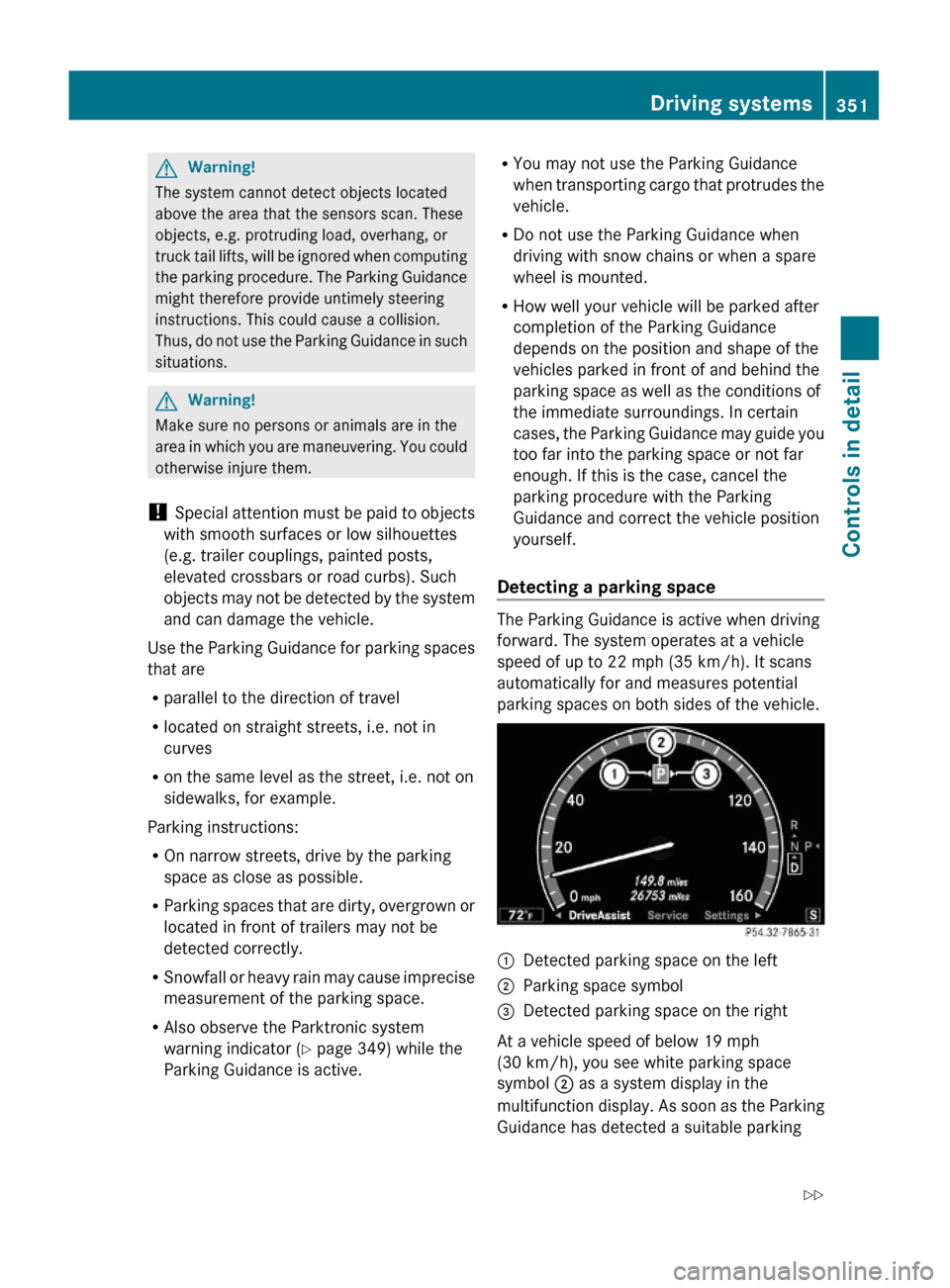
:Detected parking space on the left;Parking space symbol=Detected parking space on the right
At a vehicle speed of below 19 mph
(30 km/h), you see white parking space
symbol ; as a system display in the
multifunction display. As soon as the Parking
Guidance has detected a suitable parking
Driving systems351Controls in detail221_AKB; 6; 20, en-USd2ugruen,Version: 2.11.8.12009-09-24T13:28:17+02:00 - Seite 351Z
Page 463 of 548
Display messagesPossible causes/consequences and M SolutionsParking
GuidanceCurrently
Unavailabl
e See
Oper.
ManualThe Advanced Parking Guidance is deactivated because the
area around the sensors in the front or the rear bumper is
dirty.XClean the front and rear bumper ( Y page 443).The Advanced Parking Guidance is deactivated because the
battery voltage is insufficient.XHave the battery checked at an authorized Mercedes-Benz
Center.The Advanced Parking Guidance is switched off because the
radar sensor system is temporarily inoperative due to
electromagnetic interference near television and radio
transmitter stations, toll stations, speed measuring systems,
etc.XWait to see if the interference is temporary. Try in a location
where the interfering source might not be present.Parking
GuidanceCanceledThe Advanced Parking Guidance has been canceled because:
R the vehicle is sliding
R the bumper became dirty in the area of the sensors
R there has been a malfunctionXUse the Advanced Parking Guidance again later.
If the parking space symbol is not shown in the multifunction
display at a speed below 10 mph (16 km/h):
XClean the bumpers ( Y page 443).
or
XRestart the engine.
or
XContact an authorized Mercedes-Benz Center.Parking
GuidanceFinishedAdvanced Parking Guidance: The vehicle is in the end
position.
The display message disappears automatically.Radar
SensorsDeactivate
d See
Oper.
ManualYou have attempted to activate the DISTRONIC PLUS or the
PRE-SAFE ®
Brake even though you have switched off the
radar sensors on the vehicle.XCheck if switching on the radar sensors is permitted
( Y page 236).XSwitch on the radar sensors using the instrument cluster
control system.Vehicle status messages in the multifunction display461Practical hints221_AKB; 6; 20, en-USd2ugruen,Version: 2.11.8.12009-09-24T13:28:17+02:00 - Seite 461Z
Page 474 of 548
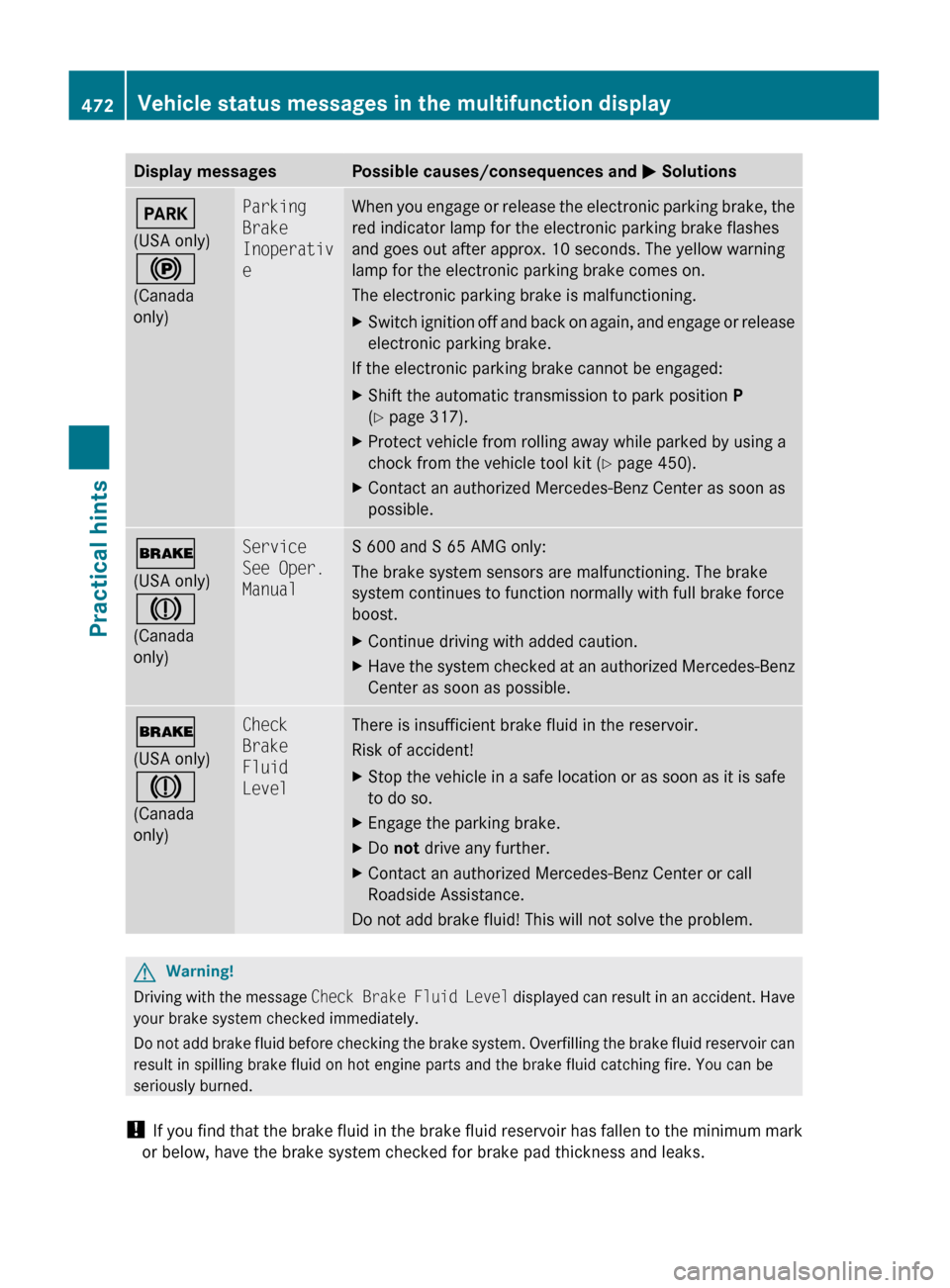
Display messagesPossible causes/consequences and M SolutionsF
(USA only)
!
(Canada
only)Parking
Brake
Inoperativ
eWhen you engage or release the electronic parking brake, the
red indicator lamp for the electronic parking brake flashes
and goes out after approx. 10 seconds. The yellow warning
lamp for the electronic parking brake comes on.
The electronic parking brake is malfunctioning.XSwitch ignition off and back on again, and engage or release
electronic parking brake.
If the electronic parking brake cannot be engaged:
XShift the automatic transmission to park position P
( Y page 317).XProtect vehicle from rolling away while parked by using a
chock from the vehicle tool kit ( Y page 450).XContact an authorized Mercedes-Benz Center as soon as
possible.$
(USA only)
J
(Canada
only)Service
See Oper.
ManualS 600 and S 65 AMG only:
The brake system sensors are malfunctioning. The brake
system continues to function normally with full brake force
boost.XContinue driving with added caution.XHave the system checked at an authorized Mercedes-Benz
Center as soon as possible.$
(USA only)
J
(Canada
only)Check
Brake
Fluid
LevelThere is insufficient brake fluid in the reservoir.
Risk of accident!XStop the vehicle in a safe location or as soon as it is safe
to do so.XEngage the parking brake.XDo not drive any further.XContact an authorized Mercedes-Benz Center or call
Roadside Assistance.
Do not add brake fluid! This will not solve the problem.
GWarning!
Driving with the message Check Brake Fluid Level displayed can result in an accident. Have
your brake system checked immediately.
Do not add brake fluid before checking the brake system. Overfilling the brake fluid reservoir can
result in spilling brake fluid on hot engine parts and the brake fluid catching fire. You can be
seriously burned.
! If you find that the brake fluid in the brake fluid reservoir has fallen to the minimum mark
or below, have the brake system checked for brake pad thickness and leaks.
472Vehicle status messages in the multifunction displayPractical hints
221_AKB; 6; 20, en-USd2ugruen,Version: 2.11.8.12009-09-24T13:28:17+02:00 - Seite 472