2010 MERCEDES-BENZ R350 remote control
[x] Cancel search: remote controlPage 9 of 364

Changing the set speed
.................144
Last stored speed .......................... 144
Lever ..............................................
143
Messages in the mutlifunction
display ........................................... 280
Resume function ............................ 144
Setting current speed .................... 143
Cup holders ........................................ 201
Curb weight ....................................... 249
Customer Assistance Center (CAC) ...23
Customer Relations Department .......23 D
Dashboard see Instrument cluster
Data recording ..................................... 23
Date, Setting ...................................... 134
Daytime running lamp mode ..............99
Switching on or off ......................... 134
Deep water
see Standing water
Defroster
Rear window .................................. 180
Windshield ............................. 168, 178
Delayed shut-off
Exterior lamps ................................ 135
Interior lighting .............................. 136
Department of Transportation
see DOT
Diesel engine
Preglow indicator lamp ....................29
Diesel fuel
see Fuel
Difficulties
While driving .................................. 113
With starting .................................. 111
Digital clock
see Clock
Digital speedometer .........................127
Dimensions (vehicle) see Vehicle specification
Direction of rotation (tires) ..............240
Displays
Digital speedometer ......................127
Distronic ........................................ 146
Maintenance service indicator .......261 Messages in the multifunction
display
........................................... 274
Multifunction display .....................125
Outside temperature .............127, 133
Symbol messages .......................... 285
Text messages ............................... 275
Trip computer ................................ 139
Vehicle status message memory ...130
Vehicle system settings ................. 130
Distronic ............................................ 145
Cleaning system sensor cover ....... 265
Control system .............................. 129
Distance warning function .............152
Distance warning
lamp ...................................... 147, 304
Driving with .................................... 151
Menu ............................................. 147
Messages in the multifunction
display ........................................... 280
Resume function ............................ 150
Sensor cover .................................. 265
Speed settings ............................... 149
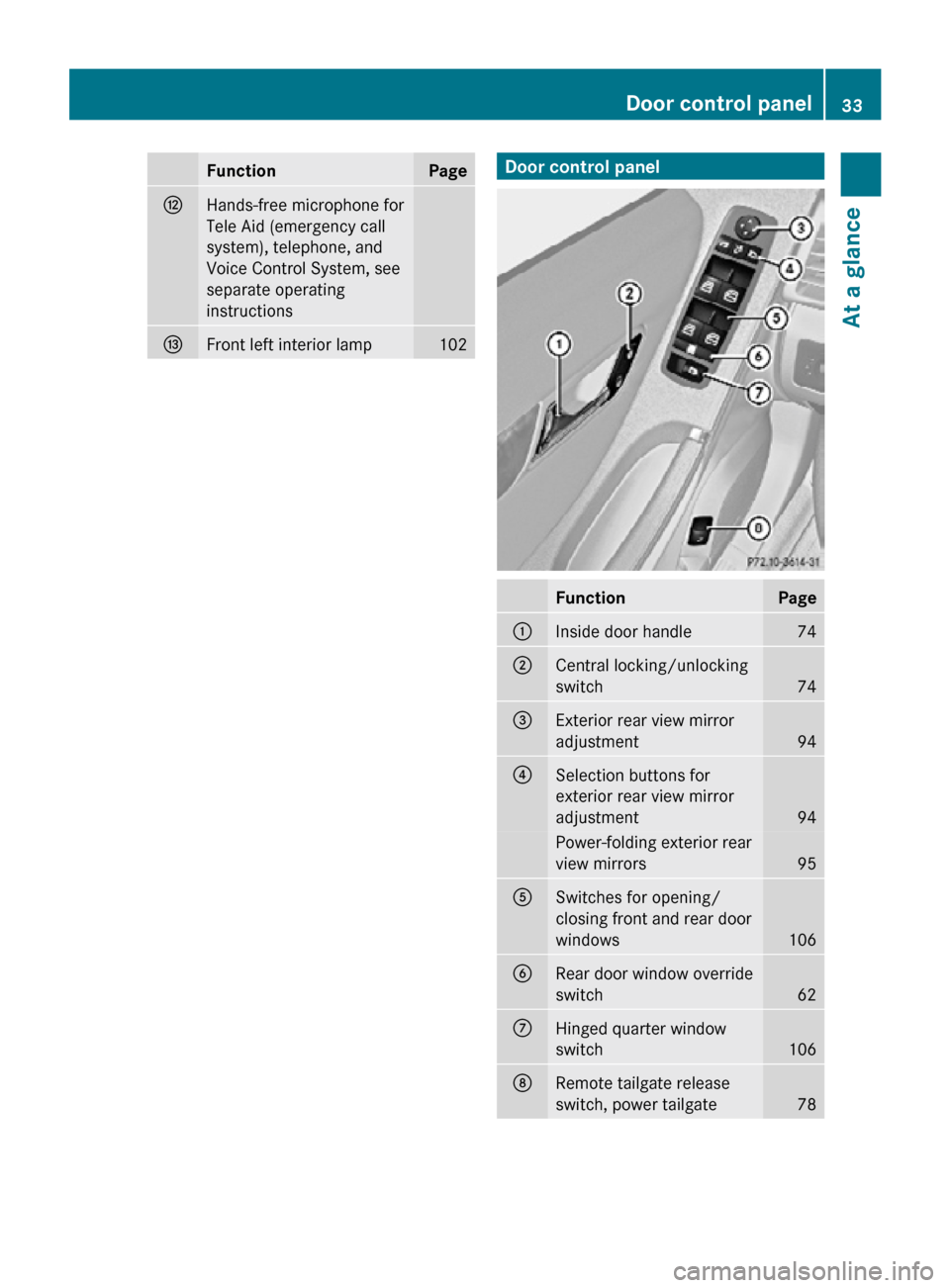
Door control panel .............................. 33
Door handles ........................................ 33
Doors
Child safety locks ............................ 61
Locking/unlocking (KEYLESS-GO) ...71
Locking/unlocking (SmartKey) ........ 70
Messages in the multifunction
display ........................................... 289
Opening from inside ......................... 74
Remote door unlock (Tele Aid) ....... 212
Unlocking (Mechanical key) ........... 308
DOT (Department of
Transportation) .................................. 249
Drinking and driving .........................253
Driving
Abroad ........................................... 259
Hydroplaning ................................. 255
Instructions ........................... 110, 253
In winter ........................................ 252
Problems ....................................... 113
Safety systems ................................ 63
Systems ......................................... 142
Through standing water .................256
With Distronic ................................ 151
Driving and parking
Safety notes .................................. 110 Index
7 251_AKB; 4; 52, en-US
d2ureepe,
Version: 2.11.8.1 2009-03-23T09:22:52+01:00 - Seite 7
Page 10 of 364

Driving off
.................................. 112, 255
Driving safety systems ....................... 63
4-ETS
............................................... 65
ABS .................................................. 63
BAS .................................................. 64
EBP .................................................. 64
ESP ®
................................................ 65
Driving systems
AIRMATIC ...................................... 153
All-wheel drive (4MATIC) ................ 156
Cruise control ................................ 142
Distronic ........................................ 145
Hill-start assist system .................. 153
Parktronic system ..........................156
Rear view camera .......................... 159
Driving tips, automatic
transmission ...................................... 119E
Easy-entry/exit feature .............. 92, 137
EBP (Electronic Brake
Proportioning) ......................................
64
Electrical system
Improper work on or
modifications ................................... 22
Power outlets ................................. 206
Electrical system (Technical data)
see Vehicle specification
Electronic Stability Program
see ESP ®
Electronic Traction System
see 4-ETS
Emergency, in case of
First aid kit ..................................... 270
Flat tire .......................................... 319
Hazard warning flasher ..................101
Roadside Assistance ................ 21, 210
Towing the vehicle .........................338
Emergency calls
Tele Aid .......................................... 209
Emergency engine shutdown ...........342
Emergency operations
Limp-home mode ........................... 121
Remote door unlock ...................... 212
Emergency Tensioning Device
see ETD Emission control
............................... 260
Information label ............................
345
System warranties ........................... 20
Engine
Break-in recommendations ............220
Cleaning ......................................... 264
Compartment ................................ 222
Malfunction indicator
lamp ........................................ 29, 305
Messages in the multifunction
display ........................................... 290
Number .......................................... 345
Starting .......................................... 110
Turning off ..................................... 114
Engine (Technical data)
see Vehicle specification
Engine compartment
Radiator ......................................... 224
Engine coolant
see Coolant
Engine oil
Adding ........................................... 225
Additives ........................................ 352
Checking level ............................... 224
Consumption ................................. 224
Messages in the multifunction
display ........................................... 293
Oil dipstick ..................................... 224
Recommended engine oils and oil
filter ............................................... 352
ESP ®
(Electronic Stability
Program) .............................................. 65
4-ETS ............................................... 65
Messages in the multifunction
display ................................... 275, 286
Trailer stabilization ........................... 66
Warning lamp ................................. 303
ETD (Emergency Tensioning
Device) ................................................. 52
Safety guidelines ............................. 39
Express operation
Panorama roof ............................... 184
Power windows .............................. 106
Tilt/sliding sunroof ........................181
Exterior lamp switch ........................... 97
Exterior rear view mirrors ..................94
Fold-in function .............................. 1388
Index 251_AKB; 4; 52, en-US
d2ureepe,
Version: 2.11.8.1 2009-03-23T09:22:52+01:00 - Seite 8
Page 13 of 364

J
Jack ..................................................... 272
Jump starting ..................................... 336K
Key, Mechanical
Loss of ............................................. 73
Unlocking/locking manually .......... 308
Key, SmartKey
Battery check lamp .......................... 73
Checking batteries ........................... 73
Factory setting
........................... 71, 72
Global locking (KEYLESS-
GO) .................................................. 73
Global locking (SmartKey) ................ 71
Global unlocking (KEYLESS-
GO) ............................................ 72, 73
Global unlocking
(SmartKey) ....................................... 71
Important notes on KEYLESS-GO .....72
Locking/unlocking ........................... 70
Loss of ............................................. 73
Messages in the multifunction
display ........................................... 289
Opening and closing the power
tilt/sliding sunroof or the
panorama roof ............................... 108
Opening and closing the windows . 108
Remote control ................................ 70
Replacing batteries ........................ 310
Restoring to factory setting ....... 71, 73
Selective setting ........................ 71, 73
Starter switch positions ................... 79
KEYLESS-GO
Starter switch positions ................... 80
Kickdown ........................................... 119
Kilopascal (air pressure unit) ...........249 L
Labels
Certification ................................... 344
Emission control information
......... 345 Tire and Loading Information
placard
........................................... 236
Tire inflation pressure ....................230
Lamps, exterior
Exterior lamp switch ........................ 97
Front .............................................. 313
Messages in the multifunction
display ........................................... 295
Rear ............................................... 313
Switching on/off .............................. 97
Lamps, indicator and warning
ABS .......................................... 28, 300
Brakes ..................................... 28, 301
Distance warning
lamp ........................ 28, 147, 152, 304
Engine malfunction .................. 29, 305
ESP ®
........................................ 28, 303
Fog lamps ........................................ 99
Front passenger front air bag off
(Canada only) .......................... 45, 307
Front passenger front air bag off
(USA only) ................................ 42, 307
Fuel tank reserve ..................... 29, 305
High-beam headlamps .............29, 100
Instrument cluster ...................28, 299
Low-beam headlamps ................ 29, 98
Low tire pressure/TPMS
malfunction telltale .................. 28, 306
Seat belt telltale ................29, 51, 302
SRS .................................... 29, 36, 303
Turn signals ..................................... 28
Language, selecting ..........................133
LATCH-type child seat anchors see Children in the vehicle
License plate lamps
Messages in the multifunction
display ........................................... 296
Replacing bulbs ............................. 314
Light alloy wheels, cleaning .............267
Lighter see Cigarette lighter
Lighting ................................................ 97
Daytime running lamp mode ............99
Exterior ............................................ 97
Interior ........................................... 102
Limp-home mode .............................. 121
Load index (tires) ......................245, 249 Index
11 251_AKB; 4; 52, en-US
d2ureepe,
Version: 2.11.8.1 2009-03-23T09:22:52+01:00 - Seite 11
Page 17 of 364
Reminder, Seat belt
see Seat belts, Telltale
Remote control
see Key, SmartKey
Remote door unlock (Tele Aid) .........212
Replacing bulbs ................................. 312
Reporting safety defects .................... 23
Research Octane Number see RON
Reserve fuel
Messages in the multifunction
display ........................................... 293
Warning lamp ................................... 29
Reset button ................................ 28, 122
Reset tool (NECK-PRO active front
head restraints) ................................. 310
Restraint systems see Occupant safety
Rims ........................................... 250, 347
Roadside Assistance ...................21, 210
Roller sunblinds ................................. 184
RON (Research Octane Number) ..... 353
Roof rack ............................................ 187
Rubber parts, cleaning ...................... 267
Run-flat tires see MOExtended tires S
Safety Driving safety systems ..................... 63
Occupant safety ...............................
36
Reporting defects ............................ 23
Safety belts
see Seat belts
Seat belt force limiter ......................... 52
Seat belts ............................................. 47
Adjustment function ........................51
Children in the vehicle .....................55
Cleaning ......................................... 267
Fastening ......................................... 49
Height adjustment ...........................50
Proper use of ................................... 48
Safety guidelines ............................. 39
Safety notes ..................................... 47
Telltale ..................................... 29, 302
Seat heating ......................................... 91
Seating capacity ................................ 237Seats .....................................................
81
Adjustment ...................................... 81
Easy-entry/exit feature ....................92
Folding (expanding cargo volume) . 189
Heating ............................................ 91
Memory function .............................. 96
Multicontour seat ............................ 90
Rear seats ........................................ 86
Ventilation ....................................... 90
Securing cargo
Cargo tie-down rings ...................... 188
Selective setting
see Key, SmartKey
Selector lever
see Gear selector lever
Self-test
BabySmart™ .................................... 47
OCS (Occupant Classification
System) ........................................... 45
Tele Aid .......................................... 208
Service
see Maintenance
Service, parts .................................... 344
Service and warranty information .....20
Service intervals see Maintenance System, Service
indicator message
Service life (tires) .............................. 241
Settings Factory setting (KEYLESS-GO) ......... 72
Factory setting (SmartKey) ..............71
Memory function .............................. 96
Menu ............................................. 130
Selective setting (KEYLESS-GO) ....... 73
Selective setting (SmartKey) ............71
Side impact air bags ...........................40
Side marker lamps
Cleaning lenses ............................. 265
Messages in the multifunction
display ........................................... 295
Sidewall (tires) .................................. 250
Side windows see Power windows
SmartKey
see Key, SmartKey
SmartKey with KEYLESS-GO
see Key, SmartKey Index
15 251_AKB; 4; 52, en-US
d2ureepe,
Version: 2.11.8.1 2009-03-23T09:22:52+01:00 - Seite 15
Page 18 of 364
Snow chains
...................................... 252
Snow tires see Winter tires
Spare wheel ....................................... 347
Mounting ....................................... 324
Storage location ............................ 272
Speedometer ............................... 28, 146
Speed settings Cruise control ................................ 143
Distronic ........................................ 149
Resume function ................... 144, 150
SRS
Indicator lamp ................... 29, 36, 303
Messages in the multifunction
display ........................................... 287
Standing water, driving through ......256
Starter switch positions KEYLESS-GO .................................... 80
SmartKey ......................................... 79
Starting difficulties (engine) ............111
Starting the engine ........................... 110
Steering column see Multifunction steering wheel,
Adjustment
Steering wheel
see Multifunction steering wheel
Steering wheel gearshift control .....121
Stolen Vehicle Recovery Services ...212
Storage compartments .....................197
Storing tires ....................................... 242
Stranded vehicle ............................... 340
Sunroof see Power tilt/sliding sunroof
Sunshade
Rear door window ..........................204
Sun visors .......................................... 203
Suspension tuning see AIRMATIC T
Tachometer ..................................
29, 123
Overspeed range ........................... 123
Tailgate
Closing ............................................. 75
Messages in the multifunction
display ........................................... 288Opening ...........................................
75
Power tailgate
.................................. 76
Tail lamps ........................................... 313
Cleaning lenses ............................. 265
Messages in the multifunction
display ........................................... 297
Tar stains ........................................... 263
Technical data Air conditioning refrigerant ............ 352
Brake fluid ..................................... 352
Capacities fuels, coolants,
lubricants etc. ................................ 350
Coolant .......................................... 355
Engine oil additives ........................352
Engine oils ..................................... 352
Fuel requirements .......................... 353
Gasoline additives .......................... 354
Identification labels .......................344
Premium unleaded gasoline ...........353
Rims and tires ................................ 347
Spare wheel ................................... 350
Vehicle specification R 350 ........... 346
Vehicle specification
R 350 BlueTEC ............................... 346
Washer and headlamp cleaning
system ................................... 351, 357
Technical data (dimensions)
see Vehicle specification
Technical data (electrical system)
see Vehicle specification
Technical data (engine)
see Vehicle specification
Technical data (weights)
see Vehicle specification
Tele Aid ............................................... 207
Emergency calls ............................. 209
Information button .........................210
Initiating an emergency call
manually ........................................ 209
Messages in the multifunction
display ........................................... 287
Remote door unlock ...................... 212
Roadside Assistance button .......... 210
Search & Send ............................... 212
SOS button .................................... 209
Stolen Vehicle Recovery Services .. 212
System self-test ............................. 20816
Index 251_AKB; 4; 52, en-US
d2ureepe,
Version: 2.11.8.1 2009-03-23T09:22:52+01:00 - Seite 16
Page 35 of 364
Function Page
H
Hands-free microphone for
Tele Aid (emergency call
system), telephone, and
Voice Control System, see
separate operating
instructions
I
Front left interior lamp 102 Door control panel
Function Page
:
Inside door handle 74
;
Central locking/unlocking
switch
74
=
Exterior rear view mirror
adjustment
94
?
Selection buttons for
exterior rear view mirror
adjustment
94
Power-folding exterior rear
view mirrors
95
A
Switches for opening/
closing front and rear door
windows
106
B
Rear door window override
switch
62
C
Hinged quarter window
switch
106
D
Remote tailgate release
switch, power tailgate
78Door control panel
33At a glance
251_AKB; 4; 52, en-US
d2ureepe, Version: 2.11.8.1 2009-03-23T09:22:52+01:00 - Seite 33 Z
Page 72 of 364
Vehicle equipment
i This Operator’s Manual describes all
features, standard or optional, potentially
available for your vehicle at the time of
purchase. Please be aware that your
vehicle might not be equipped with all
features described in this manual. Locking and unlocking
Notes
G
Observe Safety notes, see page 55.
When unlocking the vehicle, all turn signal
lamps flash once. The locking knobs in the
doors move up. The anti-theft alarm system
is disarmed.
When locking the vehicle, all turn signal lamps
flash three times. The locking knobs in the
doors move down. The anti-theft alarm
system is armed.
All doors and the tailgate must be closed.
i If you cannot lock or unlock the vehicle
with the SmartKey, the batteries in the
SmartKey are discharged, the SmartKey is
malfunctioning, or the vehicle battery is
drained.
R Check the batteries in the SmartKey and
replace them if necessary.
R Use the mechanical key to unlock the
driver’s door.
R Use the mechanical key to lock the
vehicle.
R Have the vehicle battery and the vehicle
battery connections checked at an
authorized Mercedes-Benz Center.
If the SmartKey is malfunctioning, contact
Roadside Assistance or an authorized
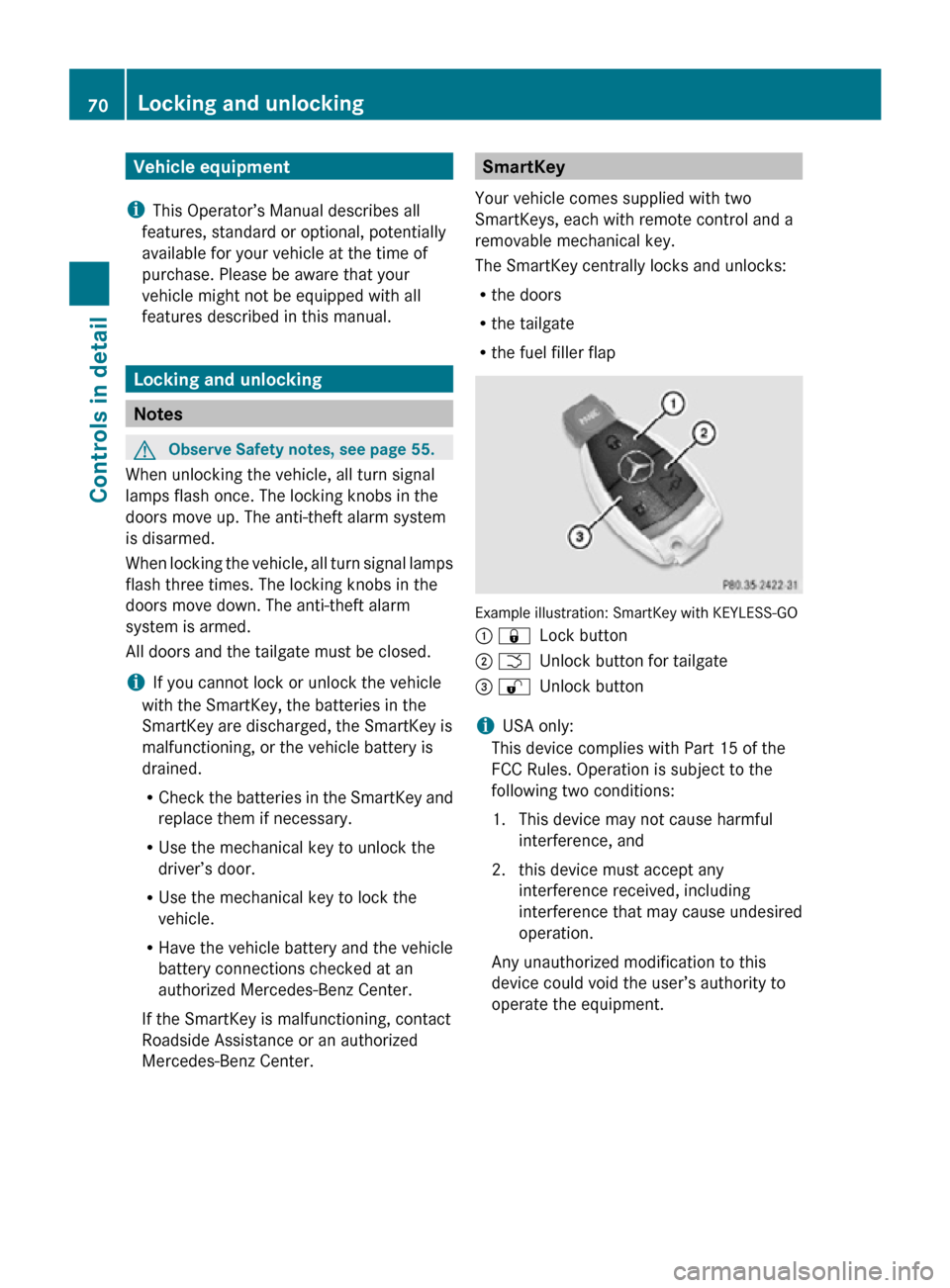
Mercedes-Benz Center. SmartKey
Your vehicle comes supplied with two
SmartKeys, each with remote control and a
removable mechanical key.
The SmartKey centrally locks and unlocks:
R the doors
R the tailgate
R the fuel filler flap Example illustration: SmartKey with KEYLESS-GO
: &
Lock button
; F Unlock button for tailgate
= % Unlock button
i USA only:
This device complies with Part 15 of the
FCC Rules. Operation is subject to the
following two conditions:
1. This device may not cause harmful interference, and
2. this device must accept any interference received, including
interference that may cause undesired
operation.
Any unauthorized modification to this
device could void the user’s authority to
operate the equipment. 70
Locking and unlockingControls in detail
251_AKB; 4; 52, en-US
d2ureepe,
Version: 2.11.8.1 2009-03-23T09:22:52+01:00 - Seite 70
Page 73 of 364
i
Canada only:
This device complies with RSS-210 of
Industry Canada. Operation is subject to
the following two conditions:
1. This
device may not cause interference,
and
2. this device must accept any interference received, including
interference that may cause undesired
operation of the device.
Any unauthorized modification to this
device could void the user’s authority to
operate the equipment.
Factory setting X
Global unlocking: Press button %.
Unless you open a door or the tailgate within
approximately 40 seconds after unlocking
the vehicle:
R The vehicle will be locked again.
R The
antitheft alarm system will be rearmed.
X Global locking: Press button &.
Selective setting If you frequently travel alone, you may wish
to reprogramm the SmartKey. Pressing
button
%
will then only unlock the driver’s
door and the fuel filler flap.
X Switching on/off:
Press and hold buttons
% and & simultaneously for
approximately 6 seconds until the battery
check lamp (Y page 73) flashes twice.
The SmartKey will then function as follows:
X Unlocking driver’s door and fuel filler
flap: Press button % once.
X Global unlocking: Press button %
twice.
X Global locking: Press button &. KEYLESS-GO
Vehicles equipped with KEYLESS-GO come
with two SmartKeys with KEYLESS-GO, each
with remote control and a removable
mechanical key.
The KEYLESS-GO function is integrated into
the
SmartKey. The validity of the SmartKey is
checked every time you grasp an outside door
handle.
When the SmartKey is valid, your vehicle
unlocks
R the doors
R the fuel filler flap
R the tailgate
i USA only:
This device complies with Part 15 of the
FCC Rules. Operation is subject to the
following two conditions:
1. This device may not cause harmful interference, and
2. this device must accept any interference received, including
interference that may cause undesired
operation.
Any unauthorized modification to this
device could void the user’s authority to
operate the equipment.
i Canada only:
This device complies with RSS-210 of
Industry Canada. Operation is subject to
the following two conditions:
1. This device may not cause interference, and
2. this device must accept any interference received, including
interference that may cause undesired
operation of the device.
Any unauthorized modification to this
device could void the user’s authority to
operate the equipment. Locking and unlocking
71
Controls in detail
251_AKB; 4; 52, en-US
d2ureepe, Version: 2.11.8.1 2009-03-23T09:22:52+01:00 - Seite 71 Z