2010 MERCEDES-BENZ R320 warning
[x] Cancel search: warningPage 270 of 364
G
Warning!
Do not bleach or dye seat belts as this may
severely weaken them. In a crash they may
not be able to provide adequate protection.
Upholstery Using aftermarket seat covers or wearing
clothing that have the tendency to give off
coloring (e.g. when wet, etc.) may cause the
upholstery to become permanently
discolored. By lining the seats with a proper
intermediate
cover, contact-discoloration will
be prevented. G
Warning!
Only use seat or head restraint covers which
have
been tested and approved by Mercedes-
Benz for your vehicle model.
Using other seat or head restraint covers may
interfere with or prevent
R deployment of the front side impact air
bags
R deployment of the rear side impact air bags
R activation of the NECK-PRO active front
head restraints
Contact an authorized Mercedes-Benz Center
for availability.
Leather upholstery
Please note that leather upholstery is a
natural product and is therefore subject to a
natural aging process. Leather upholstery
may also react to certain ambient influences
such as high humidity or high temperature by
showing wrinkles for example.
X Wipe leather upholstery with a damp cloth
and
dry thoroughly or clean with Mercedes-
Benz approved Leather Care.
! To avoid damage to leather upholstery:
R Wipe with light pressure only.
R Do not clean with abrasive cleaning
agents
such as scouring milk or powder.
R Do not soak the leather upholstery. As leather is a natural product, it could
otherwise harden or become porous.
R Exercise particular care when cleaning
perforated leather as its underside
should not become wet.
MB Tex upholstery
X Use Mercedes-Benz approved Interior Care
onto a soft, lint-free cloth and apply with
light pressure for cleaning the upholstery.
Wood trims X
Only use water and a damp cloth to clean
wood trims in your vehicle.
! Do not use solvents like tar remover or
wheel cleaner nor polishes or waxes as
these may be abrasive.
Chrome-plated exhaust tip Regular cleaning and care of chrome-plated
exhaust tips will help to maintain their shine
and the classy appearance.
X
Use Mercedes-Benz approved Chrome
Polishing Paste each time the vehicle has
been
washed, especially during the winter.
! Do not use alkaline cleaners such as
wheel cleaners as they could cause
corrosion. 268
Vehicle care
Operation
251_AKB; 4; 52, en-US
d2ureepe,
Version: 2.11.8.1 2009-03-23T09:22:52+01:00 - Seite 268
Page 274 of 364
Collapsible wheel chock
The collapsible wheel chock serves to secure
the vehicle, e.g. while changing a wheel.
X
Take the collapsible wheel chock from the
vehicle tool kit (Y page 270). X
Setting up: Tilt both plates upward :.
X Fold the lower plate outward ;.
X Guide the tabs of the lower plate all the way
into the openings of base plate =.
For information on where to place wheel
chocks when changing a wheel, see “Lifting
the vehicle” ( Y page 324).
Jack G
Warning!
Only use the jack supplied with your vehicle
to lift the vehicle briefly for wheel changes. If
you use the jack for any other purpose, you or
others could be injured, as the jack is
designed only for the purpose of changing a
wheel.
When using the jack, observe the safety notes
in the “Mounting the spare wheel” section and
the notes on the jack.
X Take the jack from the vehicle tool kit
(Y page 270). Storage position
X
Take the reversible ratchet from the vehicle
tool kit ( Y page 270). Operational position
X
Attach reversible ratchet ; to jack : in
such a way that the word UP can be seen.
Before placing the jack and the reversible
ratchet back into the vehicle tool kit:
X Fully collapse the jack (storage position).
X Remove the reversible ratchet. Spare wheel
G
Observe Safety notes, see page 319.
i The R 350 BlueTEC does not have a spare
wheel.
The spare wheel is located in the space
underneath the cargo compartment floor. 272
Where will I find ...?Practical hints
251_AKB; 4; 52, en-US
d2ureepe,
Version: 2.11.8.1 2009-03-23T09:22:52+01:00 - Seite 272
Page 276 of 364
Vehicle status messages in the
multifunction display
Notes
Warning and malfunction messages appear in
the multifunction display located in the
instrument cluster.
Certain warning and malfunction messages
are accompanied by an audible signal.
Address these messages accordingly and
follow the additional instructions given in this
Operator’s Manual.
Selecting the Vehicle status message
memory menu in the control system
(Y page 130) displays both cleared and
uncleared messages.
High-priority messages appear in the
multifunction display in red color.
Certain messages of high priority cannot be
cleared from the multifunction display using
the reset button (Y page 122) or button
&, *, U or V on the
multifunction steering wheel.
Other messages of high priority and
messages of less immediate priority can be
cleared from the multifunction display using
the reset button or button &, *,
U or V on the multifunction steering
wheel. They are then stored in the Vehicle
status message memory menu
(Y page 130). Remember that clearing a
message will only make the message
disappear. Clearing a message will not
correct the condition that caused the
message to appear. G
Warning!
All categories of messages contain important
information which should be taken note of
and, where a malfunction is indicated,
addressed as soon as possible at an
authorized Mercedes-Benz Center.
Failure to repair the condition noted may
cause
damage not covered by the Mercedes-
Benz Limited Warranty, or result in property
damage or personal injury. G
Warning!
No messages will be displayed if either the
instrument cluster or the multifunction
display is inoperative.
As a result, you will not be able to see
information about your driving conditions,
such as
R speed
R outside temperature
R warning/indicator lamps
R malfunction/warning messages
R failure of any systems
Driving characteristics may be impaired.
If
you must continue to drive, do so with added
caution. Contact an authorized Mercedes-
Benz Center as soon as possible.
On the pages that follow, you will find a
compilation of the most important warning
and malfunction messages that may appear.
For your convenience the messages are
divided into text messages ( Y page 275) and
symbol messages ( Y page 285).274
Vehicle status messages in the multifunction display
Practical hints
251_AKB; 4; 52, en-US
d2ureepe,
Version: 2.11.8.1 2009-03-23T09:22:52+01:00 - Seite 274
Page 277 of 364
Text messages
Safety systems Display messages
Possible causes/consequences and
X SolutionsABS ABS, ESP
Inoperativ
e
See
Operator’s
Manual The brake system is still functioning normally but due to a
malfunction, the ABS, the BAS, the ESP
®
, and the PRE-
SAFE ®
system are unavailable.
X Continue driving with added caution. Wheels may lock
during hard braking, reducing steering capability.
X Have the system checked at an authorized Mercedes-Benz
Center as soon as possible.
Failure to follow these instructions increases the risk of an
accident. ABS ABS, ESP
Unavailabl
e
See
Operator’s
Manual The self-diagnosis may not be completed yet.
The
display will clear after driving a short distance at a vehicle
speed of above 12 mph (20 km/h). ABS ABS, ESP
Unavailabl
e See
Operator’s
Manual The brake system still functions normally but due to
insufficient power supply, the ABS, the BAS, the ESP
®
, and
the PRE-SAFE ®
system are unavailable.
When
the voltage is above the required value again, the ABS,
the BAS, the ESP ®
, and the PRE-SAFE ®
system are
operational again and the message should disappear.
X If the message does not disappear: Have the system
checked at an authorized Mercedes-Benz Center as soon
as possible. ESP Inoperativ
e See
Operator’s
Manual
In addition, the yellow ESP
®
warning lamp d comes on.
The brake system is still functioning normally but due to a
malfunction the BAS, the ESP ®
, and the PRE-SAFE ®
system
are unavailable.
The ABS may not be operational.
X Continue driving with added caution. Wheels may lock
during hard braking, reducing steering capability.
X Have the system checked at an authorized Mercedes-Benz
Center as soon as possible.
Failure to follow these instructions increases the risk of an
accident. Vehicle status messages in the multifunction display
275
Practical hints
251_AKB; 4; 52, en-US
d2ureepe,Version: 2.11.8.1 2009-03-23T09:22:52+01:00 - Seite 275 Z
Page 278 of 364
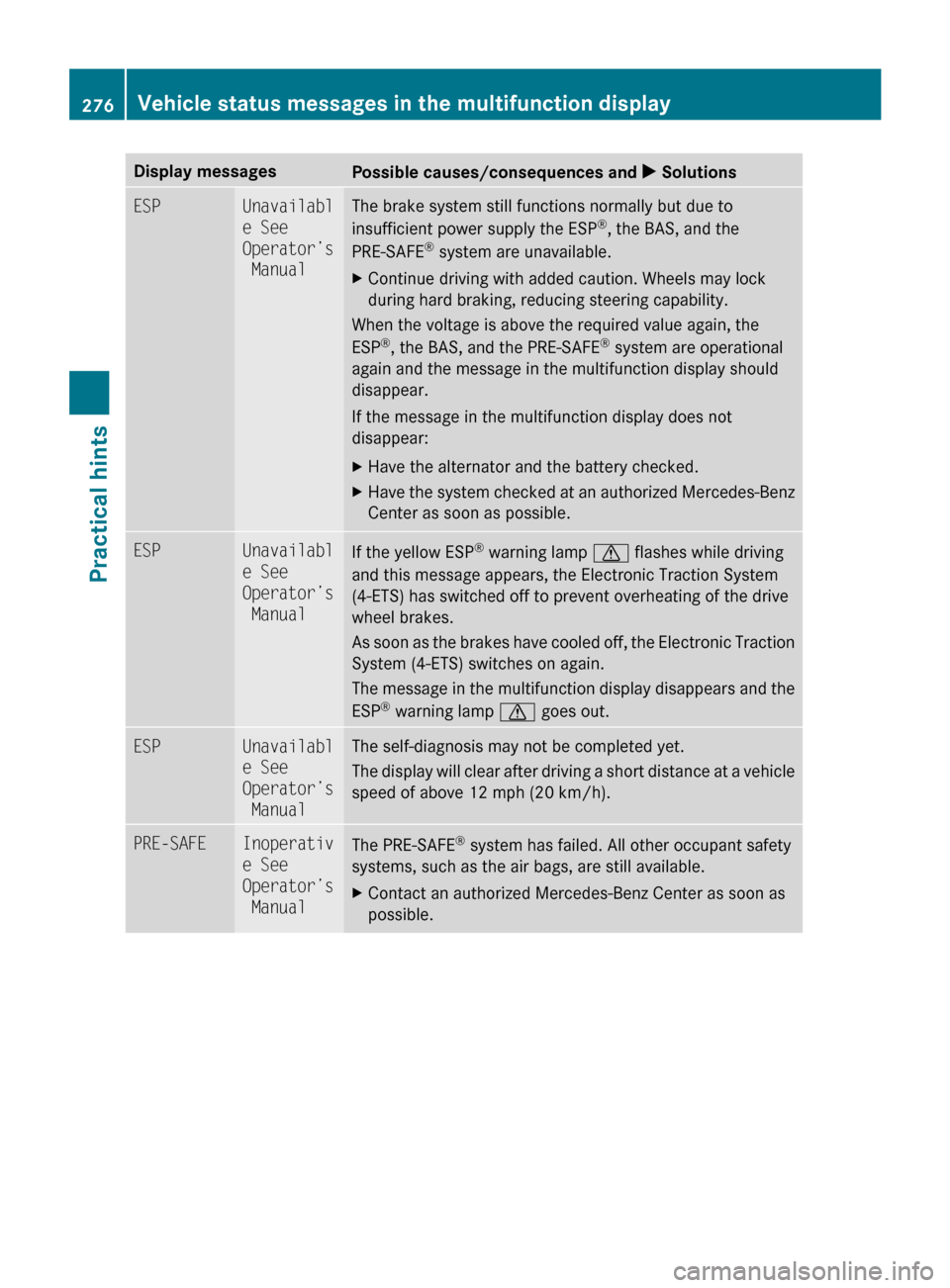
Display messages
Possible causes/consequences and
X SolutionsESP Unavailabl
e See
Operator’s
Manual The brake system still functions normally but due to
insufficient power supply the ESP
®
, the BAS, and the
PRE-SAFE ®
system are unavailable.
X Continue driving with added caution. Wheels may lock
during hard braking, reducing steering capability.
When the voltage is above the required value again, the
ESP ®
, the BAS, and the PRE-SAFE ®
system are operational
again and the message in the multifunction display should
disappear.
If the message in the multifunction display does not
disappear:
X Have the alternator and the battery checked.
X Have the system checked at an authorized Mercedes-Benz
Center as soon as possible. ESP Unavailabl
e See
Operator’s
Manual
If the yellow ESP
®
warning lamp d flashes while driving
and this message appears, the Electronic Traction System
(4-ETS) has switched off to prevent overheating of the drive
wheel brakes.
As
soon as the brakes have cooled off, the Electronic Traction
System (4-ETS) switches on again.
The message in the multifunction display disappears and the
ESP ®
warning lamp d goes out. ESP Unavailabl
e See
Operator’s
Manual The self-diagnosis may not be completed yet.
The
display will clear after driving a short distance at a vehicle
speed of above 12 mph (20 km/h). PRE-SAFE Inoperativ
e See
Operator’s
Manual
The PRE-SAFE
®
system has failed. All other occupant safety
systems, such as the air bags, are still available.
X Contact an authorized Mercedes-Benz Center as soon as
possible. 276
Vehicle status messages in the multifunction display
Practical hints
251_AKB; 4; 52, en-US
d2ureepe,
Version: 2.11.8.1 2009-03-23T09:22:52+01:00 - Seite 276
Page 280 of 364
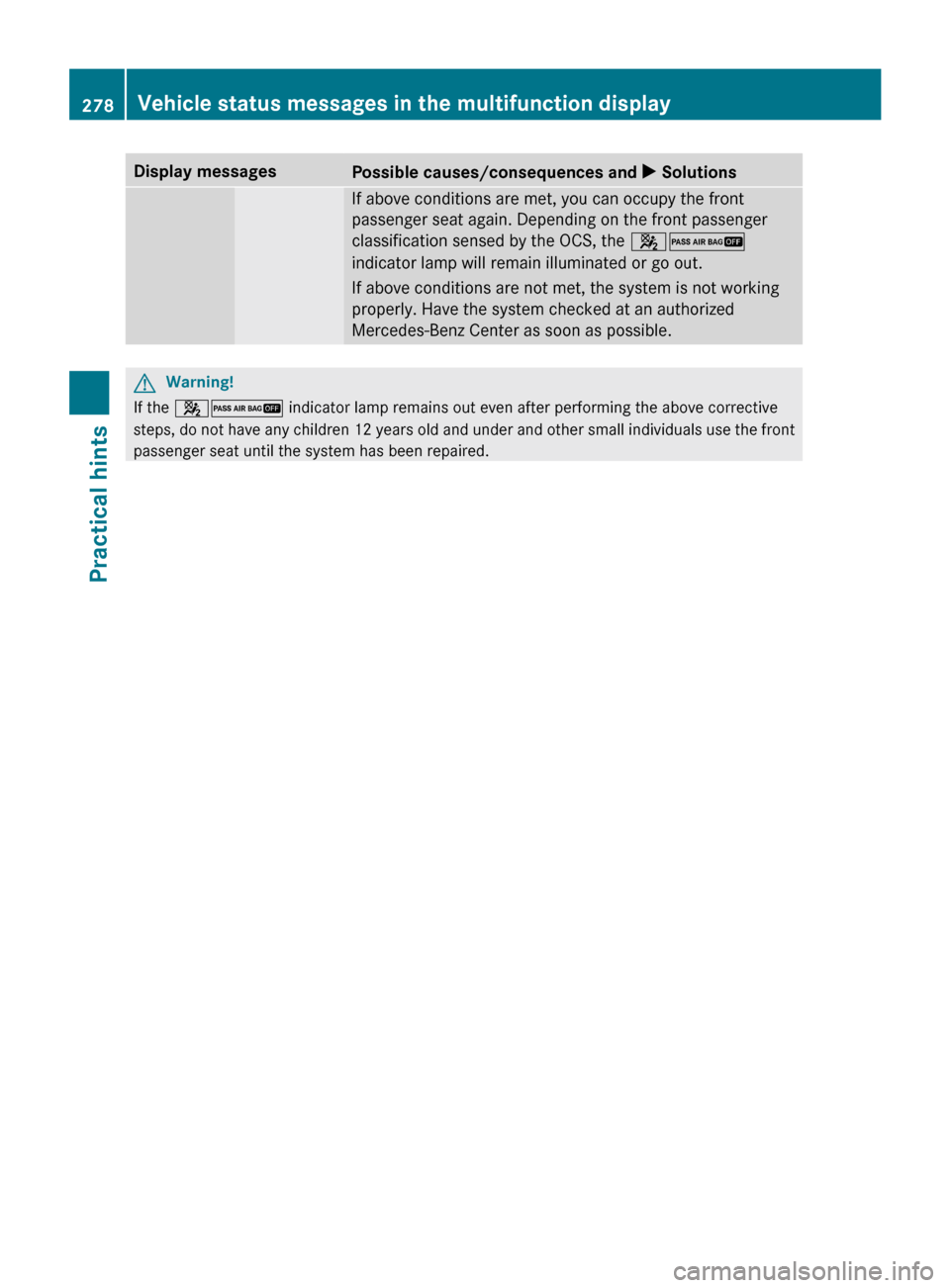
Display messages
Possible causes/consequences and
X Solutions If above conditions are met, you can occupy the front
passenger seat again. Depending on the front passenger
classification sensed by the OCS, the
42
indicator lamp will remain illuminated or go out.
If above conditions are not met, the system is not working
properly. Have the system checked at an authorized
Mercedes-Benz Center as soon as possible. G
Warning!
If the 42 indicator lamp remains out even after performing the above corrective
steps, do not have any children 12 years old and under and other small individuals use the front
passenger seat until the system has been repaired. 278
Vehicle status messages in the multifunction display
Practical hints
251_AKB; 4; 52, en-US
d2ureepe,
Version: 2.11.8.1 2009-03-23T09:22:52+01:00 - Seite 278
Page 282 of 364
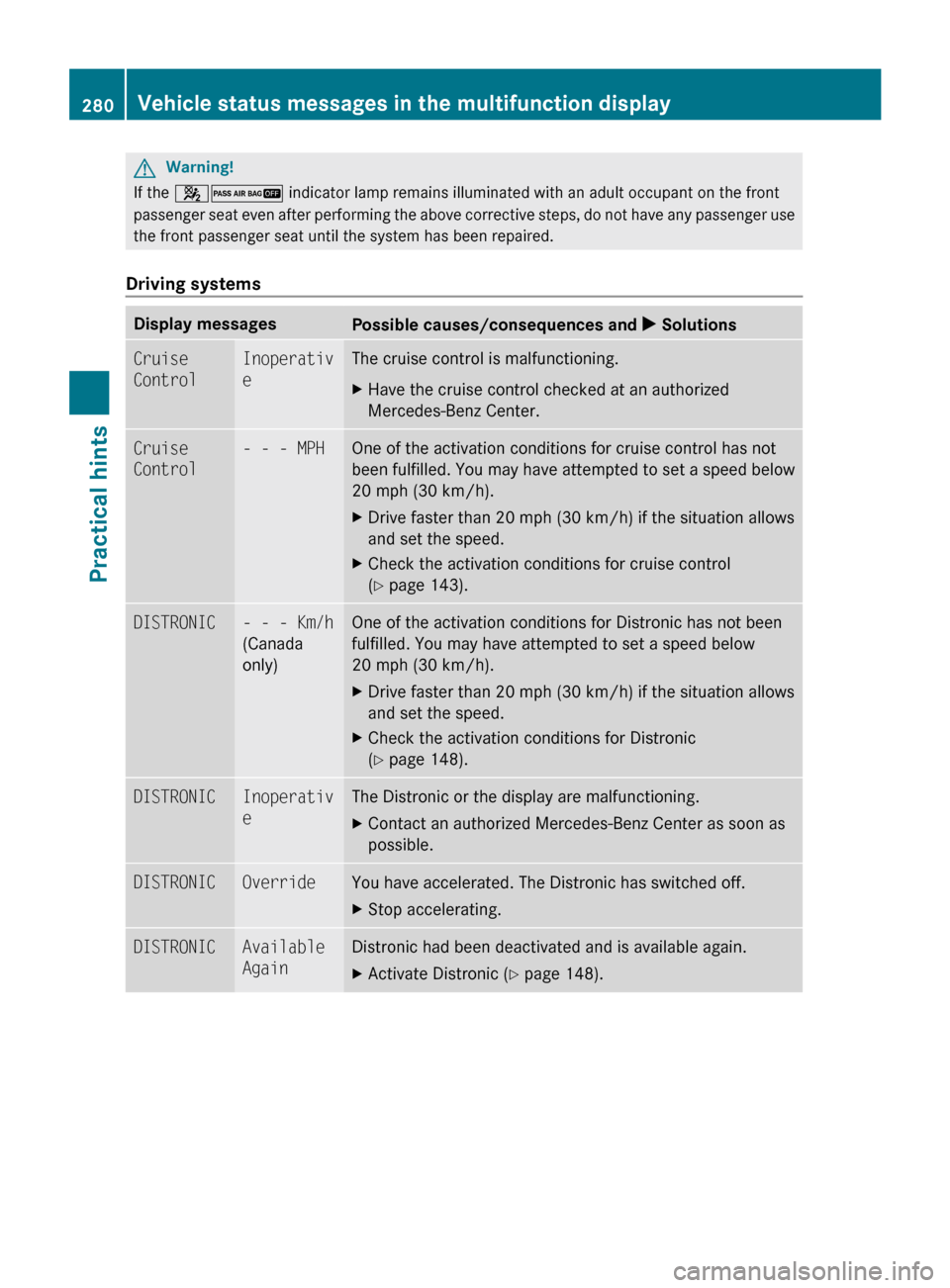
G
Warning!
If the 42 indicator lamp remains illuminated with an adult occupant on the front
passenger seat even after performing the above corrective steps, do not have any passenger use
the front passenger seat until the system has been repaired.
Driving systems Display messages
Possible causes/consequences and
X SolutionsCruise
Control Inoperativ
e The cruise control is malfunctioning.
X
Have the cruise control checked at an authorized
Mercedes-Benz Center. Cruise
Control - - - MPH One of the activation conditions for cruise control has not
been
fulfilled. You may have attempted to set a speed below
20 mph (30 km/h).
X Drive faster than 20 mph (30 km/h) if the situation allows
and set the speed.
X Check the activation conditions for cruise control
(Y page 143). DISTRONIC - - - Km/h
(Canada
only) One of the activation conditions for Distronic has not been
fulfilled. You may have attempted to set a speed below
20 mph (30 km/h)
.
X Drive faster than 20 mph (30 km/h) if the situation allows
and set the speed.
X Check the activation conditions for Distronic
(Y page 148). DISTRONIC Inoperativ
e The Distronic or the display are malfunctioning.
X
Contact an authorized Mercedes-Benz Center as soon as
possible. DISTRONIC Override You have accelerated. The Distronic has switched off.
X
Stop accelerating. DISTRONIC Available
Again Distronic had been deactivated and is available again.
X
Activate Distronic (Y page 148). 280
Vehicle status messages in the multifunction display
Practical hints
251_AKB; 4; 52, en-US
d2ureepe,
Version: 2.11.8.1 2009-03-23T09:22:52+01:00 - Seite 280
Page 283 of 364
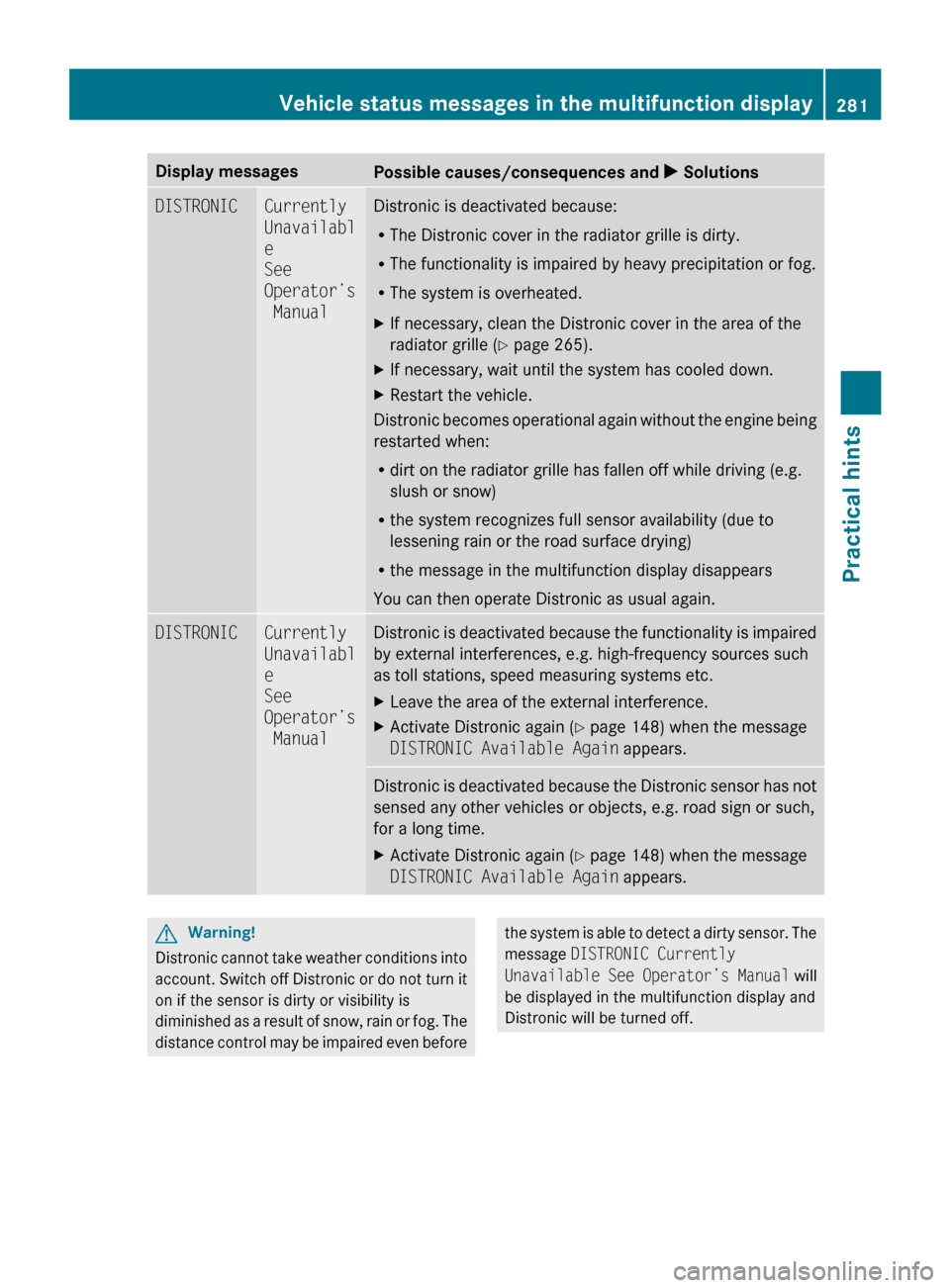
Display messages
Possible causes/consequences and
X SolutionsDISTRONIC Currently
Unavailabl
e
See
Operator’s
Manual Distronic is deactivated because:
R
The Distronic cover in the radiator grille is dirty.
R The functionality is impaired by heavy precipitation or fog.
R The system is overheated.
X If necessary, clean the Distronic cover in the area of the
radiator grille
(Y page 265).
X If necessary, wait until the system has cooled down.
X Restart the vehicle.
Distronic becomes operational again without the engine being
restarted when:
R dirt on the radiator grille has fallen off while driving (e.g.
slush or snow)
R the system recognizes full sensor availability (due to
lessening rain or the road surface drying)
R the message in the multifunction display disappears
You can then operate Distronic as usual again. DISTRONIC Currently
Unavailabl
e
See
Operator’s
Manual Distronic is deactivated because the functionality is impaired
by external interferences, e.g. high-frequency sources such
as toll stations, speed measuring systems etc.
X
Leave the area of the external interference.
X Activate Distronic again (Y page 148) when the message
DISTRONIC Available Again appears. Distronic is deactivated because the Distronic sensor has not
sensed any other vehicles or objects, e.g. road sign or such,
for a long time.
X
Activate Distronic again (Y page 148) when the message
DISTRONIC Available Again appears. G
Warning!
Distronic cannot take weather conditions into
account.
Switch off Distronic or do not turn it
on if the sensor is dirty or visibility is
diminished as a result of snow, rain or fog. The
distance control may be impaired even before the system is able to detect a dirty sensor. The
message
DISTRONIC Currently
Unavailable
See Operator’s Manual will
be displayed in the multifunction display and
Distronic will be turned off. Vehicle status messages in the multifunction display
281
Practical hints
251_AKB; 4; 52, en-US
d2ureepe,Version: 2.11.8.1 2009-03-23T09:22:52+01:00 - Seite 281 Z