2010 MERCEDES-BENZ CLS550 Interior
[x] Cancel search: InteriorPage 6 of 308

1, 2, 3 ...
4-zone automatic climate control see Climate control system
A
ABS (Antilock Brake System) .............58
Indicator lamp ................................
252
Messages in the multifunction
display ................................... 229, 239
Accessory weight .............................. 205
Accidents ........................................... 100
Air bags ........................................... 37
Distance warning function .............137
Emergency calls (Tele Aid) ............. 165
NECK-PRO active front head
restraints ........................................ 50
Active Bi-Xenon headlamps
see Headlamps
Adaptive Brake .................................... 59
Additives Engine oil ....................................... 298
Gasoline ......................................... 299
Address change ................................... 20
Advanced Tire Pressure
Monitoring System (Advanced
TPMS) ................................................. 190
Messages in the multifunction
display ................................... 236, 250
Air bags ................................................ 37
Emergency call upon deployment ..165
Front, driver and passenger ............. 40
Front passenger front air bag off
indicator lamp .......................... 41, 260
Knee bag .......................................... 40
Messages in the multifunction
display ........................................... 230
OCS (Occupant Classification
System) ........................................... 41
Safety guidelines ............................. 39
Side impact ...................................... 41
Window curtain ................................ 41
Air conditioning refrigerant and
lubricant ............................................. 298
Air distribution .................................. 149
Air filter .............................................. 246AIRMATIC DC (Dual Control)
ADS (Adaptive Damping System) ...137
Introduction
................................... 137
Messages in the multifunction
display ........................................... 240
Vehicle level control ...................... 138
Air pressure
see Tire inflation pressure
Air pressure (tires) ............................ 206
Air pump (electric) ............................ 275
Air recirculation mode ......................150
Air volume .......................................... 149
Alarm system see Anti-theft systems
Alignment bolt (vehicle tool
kit) .............................................. 224, 274
Alternator Messages in the multifunction
display ........................................... 245
Alternator (Technical data)
see Vehicle specification
AMG menu ......................................... 113
Anticorrosion/antifreeze ..................301
Antilock Brake System see ABS
Anti-theft systems ............................... 62
Anti-theft alarm system ................... 62
Immobilizer ...................................... 62
Aquaplaning
see Hydroplaning
Armrest, front
Storage compartment ....................158
Armrest, rear
Storage compartment ....................159
Ashtrays ............................................. 162
Aspect ratio (tires) ............................ 206
Audio/DVD menu .............................. 116
Auto-dimming rear view mirrors ........ 84
Automatic central locking ..........71, 123
Automatic headlamp mode ................87
Automatic interior lighting control ....92
Automatic locking when driving ......123
Automatic shift program ..................105
Automatic transmission ................... 101
Automatic shift program ................105
Gear range indicator ......................104
Gear ranges ................................... 1044
Index 219_AKB; 4; 54, en-US
d2ureepe,
Version: 2.11.8.1 2009-05-11T16:21:02+02:00 - Seite 4
Page 8 of 308

Chrome-plated exhaust tip,
cleaning
.............................................. 221
Cigarette lighter ................................ 163
Climate control system
4-zone automatic climate control
.. 143
Air conditioning ............................. 146
Air conditioning refrigerant ............ 298
Air distribution ............................... 149
Air recirculation mode ................... 150
Air volume ..................................... 149
Automatic mode ............................ 146
Deactivating system ......................145
Front defroster .............................. 149
Maximum cooling MAX COOL ........150
Residual heat and ventilation ......... 151
Temperature .................................. 147
Clock ..................................................... 28
Cockpit ................................................. 27
Cold tire inflation pressure ..............206
Collapsible tire (spare wheel) ..........296
Collapsible wheel chock ...................225
COMAND system see separate COMAND system
operating instructions
Combination switch ............................89
Control system .................................. 110
Multifunction display .....................111
Multifunction steering wheel ......... 110
Resetting to factory settings .......... 118
Control system menus ...................... 112
AMG ............................................... 113
Audio/DVD .................................... 116
Distronic ........................................ 117
Navigation ..................................... 117
Settings ......................................... 118
Standard display ............................ 112
Telephone ...................................... 125
Trip computer ................................ 124
Vehicle status message memory ...117
Control system submenus
Convenience .................................. 124
Instrument cluster .........................119
Lighting .......................................... 121
Vehicle ........................................... 123
Convenience submenu
Easy-entry/exit feature .................. 124 Coolant
Anticorrosion/antifreeze ...............301
Capacities ...................................... 297
Checking level ............................... 180
Messages in the multifunction
display ........................................... 243
Warning lamp ................................. 257
Corner-illuminating front fog
lamps .................................................... 91
Cruise control .................................... 127
Activating ....................................... 128
Canceling ....................................... 128
Changing the set speed .................129
Last stored speed .......................... 129
Lever .............................................. 128
Messages in the multifunction
display ........................................... 233
Resume function ............................ 129
Setting current speed .................... 128
Cup holders ........................................ 160
Curb weight ....................................... 206
Customer Assistance Center (CAC) ...22
Customer Relations Department .......22 D
Dashboard see Instrument cluster
Data recording ..................................... 22
Daytime running lamp mode ..............88
Switching on or off ......................... 121
Deep water
see Standing water
Defogging (windshield) .....................150
Defroster Front (Climate control system) ......149
Rear window .................................. 151
Delayed shut-off
Exterior lamps ................................ 122
Interior lighting .............................. 123
Department of Transportation
see DOT
Difficulties
While driving .................................... 99
With starting .................................... 98
Digital speedometer .........................113
Dimensions (vehicle) see Vehicle specification 6
Index 219_AKB; 4; 54, en-US
d2ureepe,
Version: 2.11.8.1 2009-05-11T16:21:02+02:00 - Seite 6
Page 12 of 308

Ignition
........................................... 76, 97
Immobilizer .......................................... 62
Indicator lamps see Lamps, indicator and warning
Infant and child restraint systems
see Children in the vehicle
Inflation pressure
see Tires, Inflation pressure
Inside door handle .............................. 70
Instrument cluster ......................28, 108
Illumination .................................... 109
Lamps ............................................ 251
Multifunction display .....................111
Instrument lighting
see Instrument cluster, Illumination
Instrument panel
see Instrument cluster
Instruments and controls
see Cockpit
Interior lighting
Delayed shut-off ............................ 123
Front ................................................ 91
Front reading lamps ......................... 92
Rear ........................................... 91, 92
Rear reading lamps .......................... 92
Interior rear view mirror .....................84
Auto-dimming rear view mirrors ....... 84
Interior storage spaces
see Storage compartments
Intermittent wiping ............................. 93
Rain sensor ...................................... 93
ISOFIX (Child seat anchors –
LATCH-type)
see Children in the vehicle J
Jack ..................................................... 225
Jump starting ..................................... 280K
Key, Mechanical
Loss of ............................................. 70
Replacing
......................................... 70Unlocking/locking manually ..........
261
Valet locking .................................... 75
Key, SmartKey
Battery check lamp .......................... 69
Checking batteries ........................... 69
Factory setting
........................... 67, 69
Global locking (KEYLESS-
GO) .................................................. 69
Global locking (SmartKey) ................ 67
Global unlocking (KEYLESS-
GO) .................................................. 69
Global unlocking
(SmartKey) ....................................... 67
Important notes on KEYLESS-GO .....68
Locking/unlocking ........................... 66
Loss of ............................................. 70
Messages in the multifunction
display ........................................... 241
Opening, trunk ................................. 72
Opening and closing the power
tilt/sliding sunroof ........................... 96
Opening and closing the windows .... 96
Remote control ................................ 66
Replacing ......................................... 70
Replacing batteries ........................ 264
Restoring to factory setting ....... 67, 69
Selective setting ........................ 67, 69
Starter switch positions ................... 76
KEYLESS-GO
Starter switch positions ................... 76
Kickdown ........................................... 104
Kickdown (manual shift program) ... 108
Kilopascal (air pressure unit) ...........206
Knee bag .............................................. 40 L
Labels
Certification ................................... 288
Emission control information
......... 289
Tire and Loading Information
placard ........................................... 193
Tire inflation pressure ....................185
Lamps, exterior
Exterior lamp switch ........................ 87
Front .............................................. 26710
Index 219_AKB; 4; 54, en-US
d2ureepe,
Version: 2.11.8.1 2009-05-11T16:21:02+02:00 - Seite 10
Page 13 of 308

Messages in the multifunction
display
........................................... 247
Switching on/off .............................. 87
Lamps, indicator and warning
ABS .......................................... 28, 252
Brakes ........................................... 252
Coolant .......................................... 257
Distance warning
lamp .............................. 131, 137, 256
Engine malfunction .................. 28, 257
ESP ®
........................................ 28, 255
Fog lamps ........................................ 89
Front passenger front air bag
off ...................................... 31, 41, 260
Fuel tank reserve ..................... 29, 256
High-beam headlamps ...............28, 90
Instrument cluster .........................251
Low-beam headlamps ................ 28, 87
Low tire pressure/TPMS
malfunction telltale ........................ 259
Seat belt telltale ................28, 48, 253
SRS .......................................... 36, 254
Turn signals ..................................... 28
Language, selecting ..........................120
LATCH-type child seat anchors (ISOFIX) see Children in the vehicle
License plate lamps
Messages in the multifunction
display ........................................... 248
Replacing bulbs ............................. 267
Light alloy wheels, cleaning .............220
Lighter see Cigarette lighter
Lighting ................................................ 86
Daytime running lamp mode ............88
Exterior ............................................ 87
Interior ............................................. 91
Limp-home mode .............................. 108
Load index (tires) ......................202, 206
Loading see Vehicle loading
Locator lighting ................................. 121
Lock button
Outside door handle (KEYLESS-
GO) .................................................. 69Locking the vehicle
KEYLESS-GO .................................... 67
Manually ........................................ 262
SmartKey ......................................... 66
Loss of
Key .................................................. 70
Service and Warranty Information
booklet .......................................... 288
Low-beam headlamps ......................... 87
Exterior lamp switch ........................ 87
Indicator lamp .................................. 28
Replacing bulbs ............................. 267
Switching on .................................... 87
Lubricants .......................................... 296
Luggage box ...................................... 227
Lumbar support ................................... 79 M
Maintenance ........................................ 20
Maintenance System Service indicator display
................215
Service indicator message ............. 214
Service term exceeded ..................215
Manual headlamp mode (Low-
beam headlamps) ................................ 87
Manual shift program .......................107
Maximum engine speed see Vehicle specification
Maximum loaded vehicle weight .....206
Maximum load rating (tires) .............206
Maximum permissible tire
inflation pressure .............................. 207
Mechanical key see Key, Mechanical
Media interface ................................. 158
Memory function ................................. 85
Menus see Control system menus
Minispare wheel
see Spare wheel
Mirrors .................................................. 84
Auto-dimming rear view mirrors ....... 84
Exterior rear view mirror parking
position ............................................ 85
Exterior rear view mirrors ................ 84
Interior rear view mirror ................... 84 Index
11 219_AKB; 4; 54, en-US
d2ureepe,
Version: 2.11.8.1 2009-05-11T16:21:02+02:00 - Seite 11
Page 18 of 308

Technical data (engine)
see Vehicle specification
Technical data (weights)
see Vehicle specification
Tele Aid ............................................... 164
Emergency calls ............................. 165
Information button .........................167
Initiating an emergency call
manually ........................................ 166
Messages in the multifunction
display ........................................... 240
Remote door unlock ...................... 168
Roadside Assistance button .......... 166
Search & Send ............................... 168
SOS button .................................... 166
Stolen Vehicle Recovery Services .. 169
System self-test ............................. 165
Telephone ............................................. 29
Answering/ending a call ................ 126
Hands-free microphone ...................33
Menu ............................................. 125
Operation ....................................... 125
Phone book .................................... 126
Redialing ........................................ 127
Temperature
Coolant .......................................... 109
Interior temperature ......................147
Outside .................................. 113, 120
Tether anchorage points
see Children in the vehicle
Tie-down hooks ................................. 157
Tightening torque Wheels ........................................... 277
TIN (Tire Identification Number) ...... 207
Tire and Loading Information
placard ............................................... 193
Tire and loading terminology ...........205
Tire Identification Number see TIN
Tire inflation pressure
Checking ........................................ 185
Important notes on ........................ 184
Label on the inside of fuel filler
flap ................................................ 185
Placard on driver’s door B-pillar ..... 193
Tire labeling ....................................... 201
Tire load rating .................................. 206Tire ply composition and material
used ....................................................
207
Tire pressure loss warning system .
186
Tire Pressure Monitoring System
(TPMS) ................................................ 188
Messages in the multifunction
display ................................... 236, 250
Tires ........................................... 182, 291
Advanced Tire Pressure
Monitoring System (Advanced
TPMS) ............................................ 190
Air pressure ................................... 183
Care and maintenance ................... 198
Cleaning ......................................... 199
Direction of rotation, spinning .......197
Important notes on tire inflation
pressure ........................................ 184
Inflation pressure ........................... 185
Information placard ....................... 193
Inspection ...................................... 198
Labeling ......................................... 201
Load index ............................. 202, 206
Load rating .................................... 206
Messages in the multifunction
display ................................... 235, 250
MOExtended .................................. 292
Ply composition and material
used ............................................... 207
Problems under-/overinflation ...... 185
Retreads ........................................ 182
Rims and tires (technical data) ...... 291
Rotation ......................................... 200
Service life ..................................... 198
Sizes .............................................. 291
Snow chains .................................. 208
Speed rating .......................... 203, 207
Storing ........................................... 199
Temperature .......................... 184, 200
Terminology ................................... 205
Tire Identification Number ............. 207
Tire pressure loss warning system . 186
Tire Pressure Monitoring System
(TPMS) ........................................... 188
TPMS low tire pressure/
malfunction telltale ........................ 259
Traction ................................. 199, 207
Tread ............................................. 207
Tread depth ........................... 198, 20816
Index 219_AKB; 4; 54, en-US
d2ureepe,
Version: 2.11.8.1 2009-05-11T16:21:02+02:00 - Seite 16
Page 35 of 308
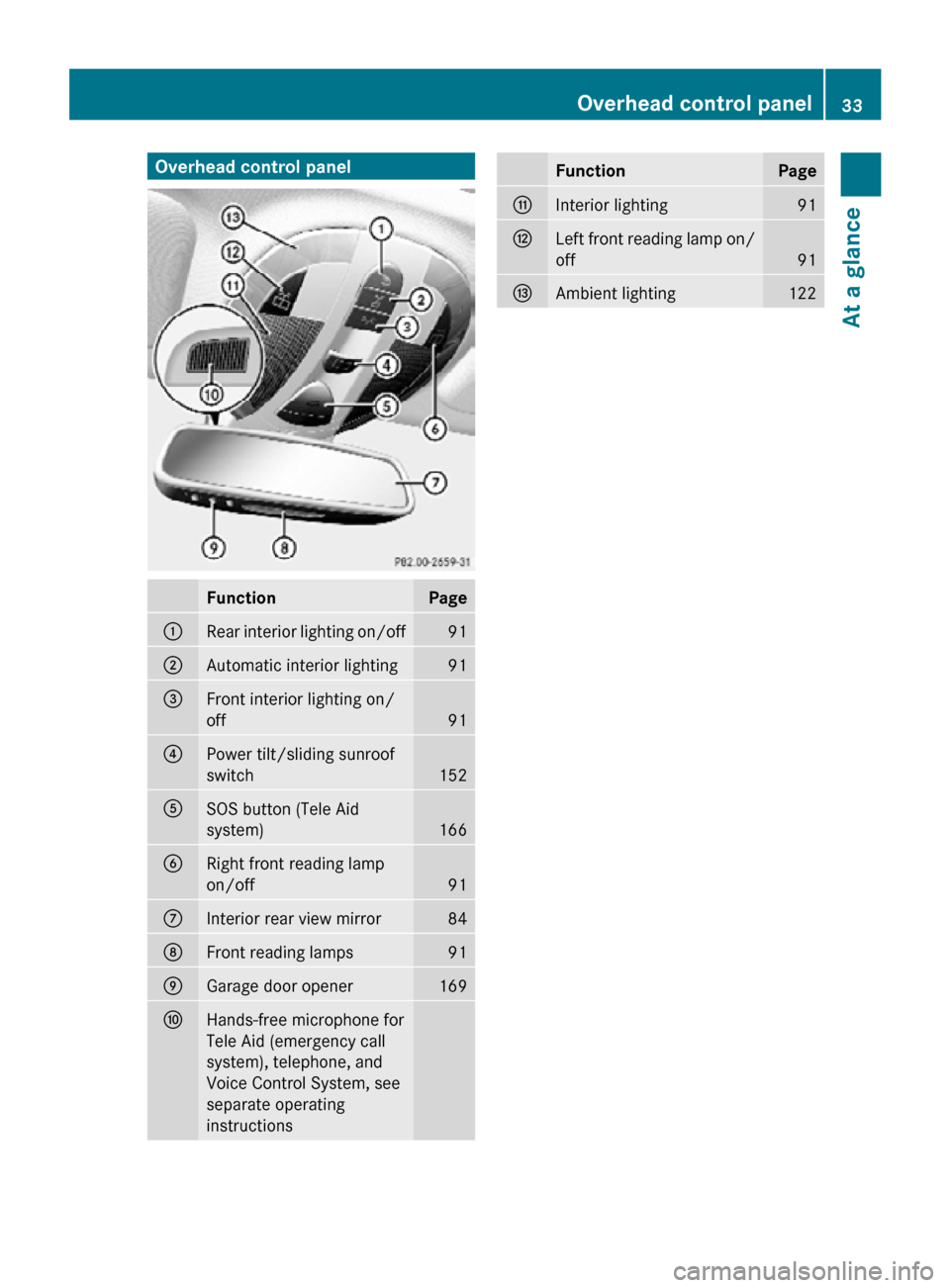
Overhead control panel
Function Page
:
Rear interior lighting on/off 91
;
Automatic interior lighting 91
=
Front interior lighting on/
off
91
?
Power tilt/sliding sunroof
switch
152
A
SOS button (Tele Aid
system)
166
B
Right front reading lamp
on/off
91
C
Interior rear view mirror 84
D
Front reading lamps 91
E
Garage door opener 169
F
Hands-free microphone for
Tele Aid (emergency call
system), telephone, and
Voice Control System, see
separate operating
instructions Function Page
G
Interior lighting 91
H
Left front reading lamp on/
off
91
I
Ambient lighting 122Overhead control panel
33At a glance
219_AKB; 4; 54, en-US
d2ureepe, Version: 2.11.8.1 2009-05-11T16:21:02+02:00 - Seite 33 Z
Page 47 of 308
R
Do not move the front passenger seat
backwards against stiff objects.
R Sit
with the seat belt properly fastened in a
position that is as upright as possible with
your back against the seat backrest.
R While seated, an occupant should not
position him/herself in such a way as to
cause the occupant’s weight to be lifted
from the seat bottom as this may result in
the OCS being unable to correctly
approximate the occupant’s weight
category.
R Read and observe all warnings in this
chapter.
OCS Self-test After turning the SmartKey in the starter
switch to position 1 or 2 or pressing the
KEYLESS-GO start/stop button once or
twice, the 04 indicator lamp
illuminates. If an adult occupant is properly
sitting on the front passenger seat and the
system classifies the occupant as an adult,
the 04 indicator lamp will
illuminate and go out after approximately
6 seconds.
If the seat is not occupied and the system
classifies the front passenger seat as being
empty, the 04 indicator lamp
will illuminate and not go out. G
Warning!
If the 04
indicator lamp does not
illuminate, the system is not functioning. You
must contact an authorized Mercedes-Benz
Center before seating any child on the front
passenger seat.
For more information, see the “Practical
hints” section ( Y page 260). G
Warning!
Never place anything between seat cushion
and child seat (e.g. pillow), since it reduces
the
effectiveness of the OCS. The bottom and
back of the child seat must make full contact with the passenger seat cushion and
backrest.
If necessary, adjust the tilt of the passenger
seat backrest.
An
incorrectly mounted child seat could cause
injuries to the child in case of an accident,
instead of increasing protection for the child.
Follow the manufacturer’s instructions for
installation of child seats. Seat belts
Safety notes The use of seat belts and infant and child
restraint systems is required by law in all 50
states, the District of Columbia, the U.S.
territories and all Canadian provinces.
Even where this is not the case, all vehicle
occupants should have their seat belts
fastened whenever the vehicle is in motion.
i
See “Children in the vehicle”
(Y page 52) for information on
R infants
and children traveling with you in
the vehicle
R restraint systems for infants and children G
Warning!
Always fasten your seat belt before driving off.
Always make sure all of your passengers are
properly
restrained. You and your passengers
should always wear seat belts.
Failure to wear and properly fasten and
position your seat belt greatly increases your
risk of injuries and their likely severity in an
accident.
If you are ever in an accident, your injuries can
be considerably more severe without your
seat belt properly buckled. Without your seat
belt buckled, you are much more likely to hit
the interior of the vehicle or be ejected from
it. You can be seriously injured or killed.
In the same crash, the possibility of injury or
death is lessened if you are properly wearing Occupant safety
45
Safety and security
219_AKB; 4; 54, en-US
d2ureepe, Version: 2.11.8.1 2009-05-11T16:21:02+02:00 - Seite 45 Z
Page 69 of 308
i
USA only:
This device complies with Part 15 of the
FCC Rules. Operation is subject to the
following two conditions:
1.
This device may not cause harmfulinterference, and
2. this device must accept any interference received, including
interference that may cause undesired
operation.
Any unauthorized modification to this
device could void the user’s authority to
operate the equipment.
i Canada only:
This device complies with RSS-210 of
Industry Canada. Operation is subject to
the following two conditions:
1. This device may not cause interference, and
2. this device must accept any interference received, including
interference that may cause undesired
operation of the device.
Any unauthorized modification to this
device could void the user’s authority to
operate the equipment.
Factory setting X
Global unlocking: Press button %.
Unless you open a door or the trunk within
approximately 40 seconds after unlocking
the vehicle:
R The vehicle will be locked again.
R The anti-theft alarm system will be
rearmed.
X Global locking: Press button &.
Selective setting If you frequently travel alone, you may wish
to reprogramm the SmartKey. Pressing
button
%
will then only unlock the driver’s door, interior lockable storage
compartments, and the fuel filler flap.
X
Switching on/off:
Press and hold buttons
% and & simultaneously for
approximately 6 seconds until the battery
check lamp (Y page 69) flashes twice.
The SmartKey will then function as follows:
X Unlocking driver’s door and fuel filler
flap: Press button % once.
X Global unlocking: Press button %
twice.
X Global locking: Press button &. KEYLESS-GO
Vehicles equipped with KEYLESS-GO come
with two SmartKeys with KEYLESS-GO, each
with remote control and a removable
mechanical key.
The KEYLESS-GO function is integrated into
the
SmartKey. The validity of the SmartKey is
checked every time you pull an outside door
handle.
When the SmartKey is valid, your vehicle
unlocks
R the doors
R the trunk lid
R the fuel filler flap
When you open a door, the door window on
that side lowers slightly. Once you close the
door, the door window moves up again.
! A door window will not work if it is blocked
with ice or if the vehicle battery is
discharged. If you cannot shut a door, do
not force it or you could damage the door
or the door window. Fix whatever is
affecting the window before trying to shut
the door. Locking and unlocking
67Controls in detail
219_AKB; 4; 54, en-US
d2ureepe, Version: 2.11.8.1 2009-05-11T16:21:02+02:00 - Seite 67 Z