2010 MERCEDES-BENZ CL550 264
[x] Cancel search: 264Page 12 of 500

Gearshift pattern ...........................
291
Shifting procedure ......................... 293
Transmission position indicator ..... 294
Transmission positions .................. 294
Generator
see Alternator
Global locking/unlocking
see Key, SmartKey
Glove box ........................................... 348
Gracenote ®
Media Database ............ 171
Gross Axle Weight Rating see GAWR
Gross Vehicle Weight
see GVW
Gross Vehicle Weight Rating
see GVWR
GVW (Gross Vehicle Weight) ............394
GVWR (Gross Vehicle Weight
Rating) ................................................ 394H
Hard plastic trim items, cleaning ....409
Hazard warning flasher ....................278
HD Radio™ ......................................... 154
Headlamp cleaning system .............. 278
Headlamps
Active Bi-Xenon headlamps ........... 274
Automatic headlamp mode
............275
Bi-Xenon ........................................ 274
Cleaning lenses ............................. 406
Cleaning system ............................ 278
Daytime running lamp mode ..........276
High-beam flasher .........................278
High-beam headlamps ...................278
Low-beam headlamps .................... 275
Messages in the multifunction
display ........................................... 446
Replacing bulbs ............................. 463
Switch ............................................ 275
Headliner and shelf below rear
window, cleaning and care of ..........409
Head restraints ................................. 264
Adjustment ............................ 264, 267
Folding back .................................. 268
Rear seat head restraints ............... 268
Heated steering wheel ...................... 270Height adjustment
Seats ............................................. 264
Vehicle level control ...................... 318
High-beam flasher ............................. 278
High-beam headlamps ......................278
Indicator lamp .................................. 29
High-performance brake system
.....400
Hill-start assist system ..................... 315
HOLD function ................................... 316
Hood ................................................... 368
Messages in the multifunction
display ........................................... 439
Horn ...................................................... 27
Hydroplaning ..................................... 400 I
Identification labels ..........................480
Identification number, vehicle
(VIN) ................................................... 481
Ignition ....................................... 262, 285
Immobilizer .......................................... 65
Indicator lamps see Lamps, indicator and warning
Infant and child restraint systems
see Children in the vehicle
Inflation pressure
see Tires, Inflation pressure
Infrared reflecting windshield .........364
Inside door handle ......................34, 256
Instrument cluster ......................29, 300
Illumination .................................... 300
Lamps ............................................ 450
Multifunction display .....................203
Instrument lighting
see Instrument cluster, Illumination
Instrument panel
see Instrument cluster
Instruments and controls
see Cockpit
Interior lighting
Emergency lighting ........................ 280
Front .............................................. 279
Front reading lamps ....................... 279
Rear ............................................... 279
Interior rear view mirror ................... 271
Auto-dimming rear view mirrors .... 27210
Index 216_AKB; 3; 90, en-US
d2ureepe,
Version: 2.11.8.1 2009-05-15T11:47:50+02:00 - Seite 10
Page 17 of 500

Rear seat head restraints
see Head restraints
Rear side window
Override switch ................................ 55
Rear view camera .............................. 332
Cleaning the camera lens .............. 407
Rear window defroster ..................... 344
Recommended tire inflation
pressure ..................................... 374, 394
Refrigerant, air conditioning ............ 493
Refueling ............................................ 366
Regular checks .................................. 367
Reminder, Seat belt see Seat belts, Telltale
Remote control
see Key, SmartKey
Remote door lock (Tele Aid) .............359
Remote door unlock (Tele Aid) .........359
Replacing
Key ................................................ 256
Replacing bulbs ................................. 463
Reporting safety defects .................... 23
Research Octane Number see RON
Reserve fuel
Messages in the multifunction
display ........................................... 445
Restraint systems
see Occupant safety
Retaining hook .................................. 348
Rims ........................................... 394, 486
Roadside Assistance ...................21, 356
RON (Research Octane Number) ..... 494
Rubber parts, cleaning ...................... 409 S
Safety Driving safety systems ..................... 56
Occupant safety ............................... 36
Reporting defects
............................23
Safety belts
see Seat belts
Satellite radio .................................... 157
SD card ............................................... 166
Seat belt force limiter ......................... 48
Seat belts ............................................. 45
Automatic comfort-fit feature .......... 49Children in the vehicle
.....................51
Cleaning ......................................... 409
Fastening ......................................... 47
Proper use of ................................... 46
Safety guidelines
............................. 39
Safety notes ..................................... 45
Telltale ..................................... 29, 454
Seat heating ....................................... 269
Seating capacity ................................ 382
Seats .................................................. 264
Adjustment .................................... 264
Drive-dynamic ................................ 199
Heating .......................................... 269
Memory function ........................... 273
Messages in the multifunction
display ........................................... 439
Ventilation ..................................... 269
Selective setting
see Key, SmartKey
Selector lever
see Gear selector lever
Self-test
OCS (Occupant Classification
System) ........................................... 45
Tele Aid .......................................... 354
Service
see Maintenance
Service, parts .................................... 480
Service and warranty information .....20
Service intervals see Maintenance System, Service
indicator message
Service life (tires) .............................. 386
Service menu ..................................... 214
Settings Automatic locking .......................... 193
Automatic mirror folding ................ 192
Display settings (COMAND) ............. 79
Easy-entry/exit feature .................. 190
Factory setting (KEYLESS-GO) ....... 255
Factory setting (SmartKey) ............253
Individual (vehicle) ......................... 214
Interior ambient lighting ................ 192
Language ......................................... 81
Locator lighting .............................. 192
Memory function ........................... 273
Night security illumination ............. 191
Rear window sunshade ..................190 Index
15 216_AKB; 3; 90, en-US
d2ureepe,
Version: 2.11.8.1 2009-05-15T11:47:50+02:00 - Seite 15
Page 52 of 500
If the seat belts do not release:
X
Adjust the seat backrest to the rear until
the seat belt tension is reduced.
The locking mechanism releases.
! When adjusting the seat backrests, make
sure there are no items behind the seats.
Otherwise, you could damage the seats
and/or the items. Correct driver seat adjustment
G
Warning!
In order to avoid possible loss of vehicle
control the following must be done before the
vehicle is put into motion:
R seat adjustment
R head restraint adjustment
R steering wheel adjustment
R rear view mirror adjustment
R fastening of seat belts Steering wheel
G
Observe Safety notes, see page 270.
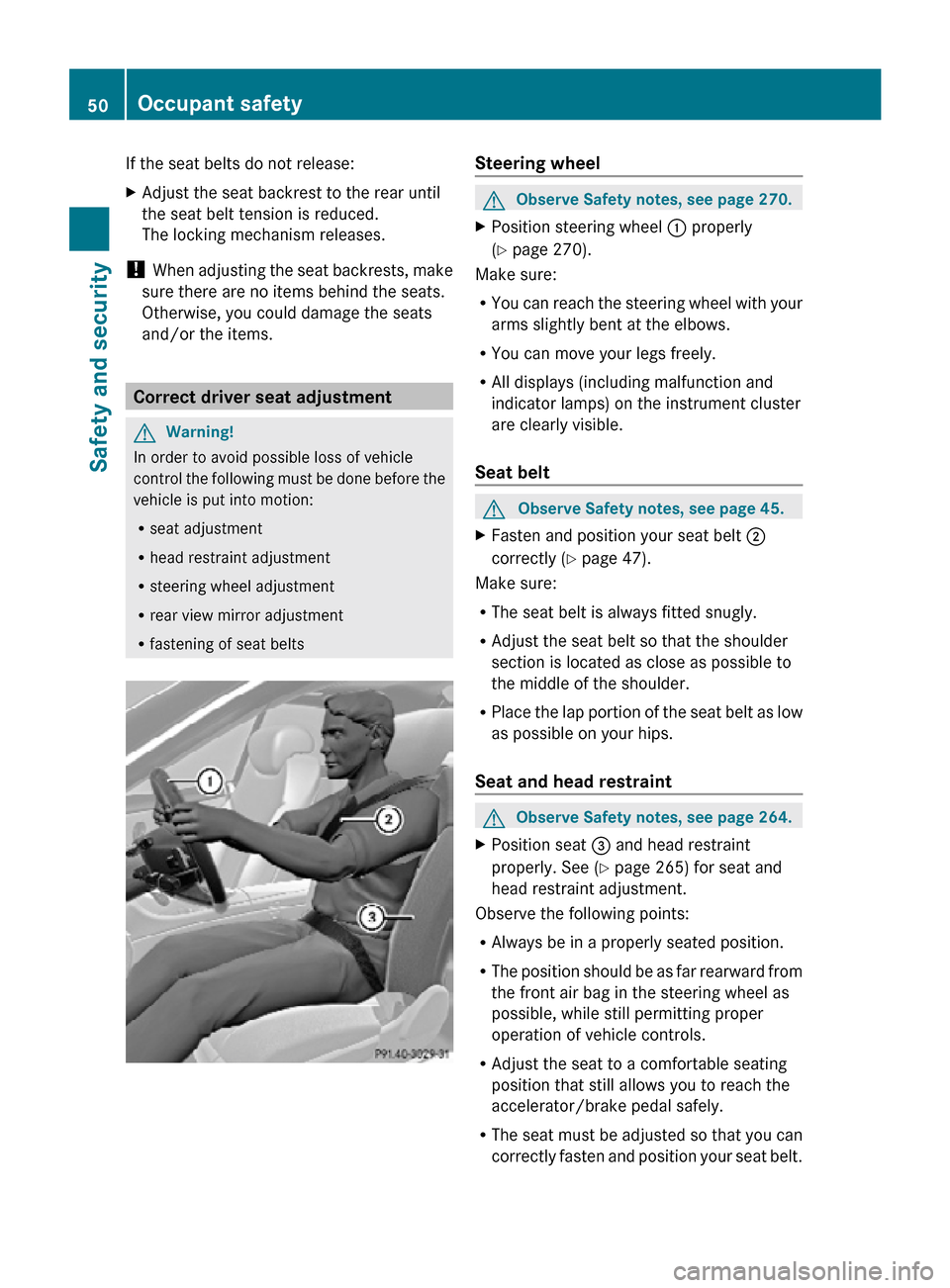
X Position steering wheel : properly
(Y page 270).
Make sure:
R You can reach the steering wheel with your
arms slightly bent at the elbows.
R You can move your legs freely.
R All displays (including malfunction and
indicator lamps) on the instrument cluster
are clearly visible.
Seat belt G
Observe Safety notes, see page 45.
X Fasten and position your seat belt ;
correctly (Y page 47).
Make sure:
R The seat belt is always fitted snugly.
R Adjust the seat belt so that the shoulder
section is located as close as possible to
the middle of the shoulder.
R Place the lap portion of the seat belt as low
as possible on your hips.
Seat and head restraint G
Observe Safety notes, see page 264.
X Position seat = and head restraint
properly. See ( Y page 265) for seat and
head restraint adjustment.
Observe the following points:
R Always be in a properly seated position.
R The position should be as far rearward from
the front air bag in the steering wheel as
possible, while still permitting proper
operation of vehicle controls.
R Adjust the seat to a comfortable seating
position that still allows you to reach the
accelerator/brake pedal safely.
R The seat must be adjusted so that you can
correctly fasten and position your seat belt. 50
Occupant safetySafety and security
216_AKB; 3; 90, en-US
d2ureepe,
Version: 2.11.8.1 2009-05-15T11:47:50+02:00 - Seite 50
Page 200 of 500

X
Changing air flow: Slide ZVÆ or rotate
cVd.
X Confirming selection: Press W.COMAND seats
Operating seats via COMAND
G
Observe Safety notes, see page 264.
i The components and operating principles
of COMAND can be found on ( Y page 69).
The following seat adjustments can be made
via COMAND: Settings
Lumbar support (CL 550 4MATIC)
(Y page 198)
Drive-dynamic multicontour seats
(Y page 199)
Selecting a seat
You must first select the seat for which you
would like to make adjustments. X
Press button T.
The main area is active.
X Switching to the bottom menu line: Slide
ZVÆ. X
Selecting seat: Slide XVY or rotate
cVd.
X Confirming selection: Press W.
Exiting menu There are several ways to exit the seat menu.
X
Press button T again.
or
X Press any shortcut button.
or
X Select another main function from the main
menu line. Lumbar support
(CL 550 4MATIC only) 198
COMAND seatsControl systems
216_AKB; 3; 90, en-US
d2ureepe,
Version: 2.11.8.1 2009-05-15T11:47:50+02:00 - Seite 198
Page 253 of 500
Vehicle equipment ............................
252
Locking and unlocking .....................252
Starter switch positions ................... 262
Seats .................................................. 264
Multifunction steering wheel ..........270
Mirrors ............................................... 271
Memory function .............................. 273
Lighting .............................................. 274
Wipers ................................................ 280
Power windows ................................. 282
Driving and parking .......................... 285
Automatic transmission ................... 291
Transfer case .................................... 299
Instrument cluster ............................300
Driving systems ................................ 301
Climate control system ....................338
Rear window defroster ..................... 344
Power tilt/sliding sunroof ...............345
Loading and storing ..........................347
Useful features ................................. 350 251Controls in detail
216_AKB; 3; 90, en-US
d2ureepe,
Version: 2.11.8.1 2009-05-15T11:47:50+02:00 - Seite 251
Page 266 of 500

i
When you now press the KEYLESS-GO
start/stop button once and the driver’s
door is
open, the power supply is switched
off. Seats
Safety notes
G
Warning!
In order to avoid possible loss of vehicle
control the
following must be done before the
vehicle is put into motion:
R seat adjustment
R head restraint adjustment
R steering wheel adjustment
R rear view mirror adjustment
R fastening of seat belts G
Warning!
Do not adjust the driver’s seat while driving.
Adjusting the seat while driving could cause
the driver to lose control of the vehicle.
Never ride in a moving vehicle with the seat
backrest in
an excessively reclined position as
this can be dangerous. You could slide under
the seat belt in a collision. If you slide under
it, the seat belt would apply force at the
abdomen or neck. That could cause serious
or fatal injuries. The seat backrest and seat
belts provide the best restraint when the
wearer is in a position that is as upright as
possible and seat belts are properly
positioned on the body. G
Warning!
Your seat must be adjusted so that you can
correctly fasten your seat belt. Observe the following points:
R
Adjust the
seat backrest until your arms are
slightly angled when holding the steering
wheel.
R Adjust the seat to a comfortable seating
position that still allows you to reach the
accelerator/brake pedal safely. The
position should be as far back as possible
with the driver still able to operate the
controls properly.
R Adjust the head restraint so that it is as
close to the head as possible. The center of
the head restraint must support the back of
the head at eye level.
R Never place hands under the seat or near
any moving parts while a seat is being
adjusted.
Failure to do so could result in an accident
and/or serious personal injury. G
Warning!
The power seats can be operated at any time.
Therefore, do not leave children unattended
in the vehicle, or with access to an unlocked
vehicle. A child’s unsupervised access to a
vehicle could result in an accident and/or
serious personal injury. G
Warning!
According to accident statistics, children are
safer when properly restrained in the rear
seating positions than in the front seating
position. Thus, we strongly recommend that
children be
placed in the rear seats whenever
possible. Regardless of seating position,
children 12 years old and under must be
seated and properly secured in an
appropriately sized infant restraint, toddler
restraint, or booster seat recommended for
the size and weight of the child. For additional
information, see “Children in the vehicle”.
A child’s risk of serious or fatal injuries is
significantly increased if the child restraints
are not properly secured in the vehicle and/ 264
Seats
Controls in detail
216_AKB; 3; 90, en-US
d2ureepe,
Version: 2.11.8.1 2009-05-15T11:47:50+02:00 - Seite 264