2010 MERCEDES-BENZ C300 4MATIC Program mode
[x] Cancel search: Program modePage 126 of 364
RSETUP (Y page 124)
RRACETIMER (Y page 124)
ROverall analysis (Y page 125)
RLap analysis (Y page 126)
SETUP
XPress button = or ; to select the
AMG menu.
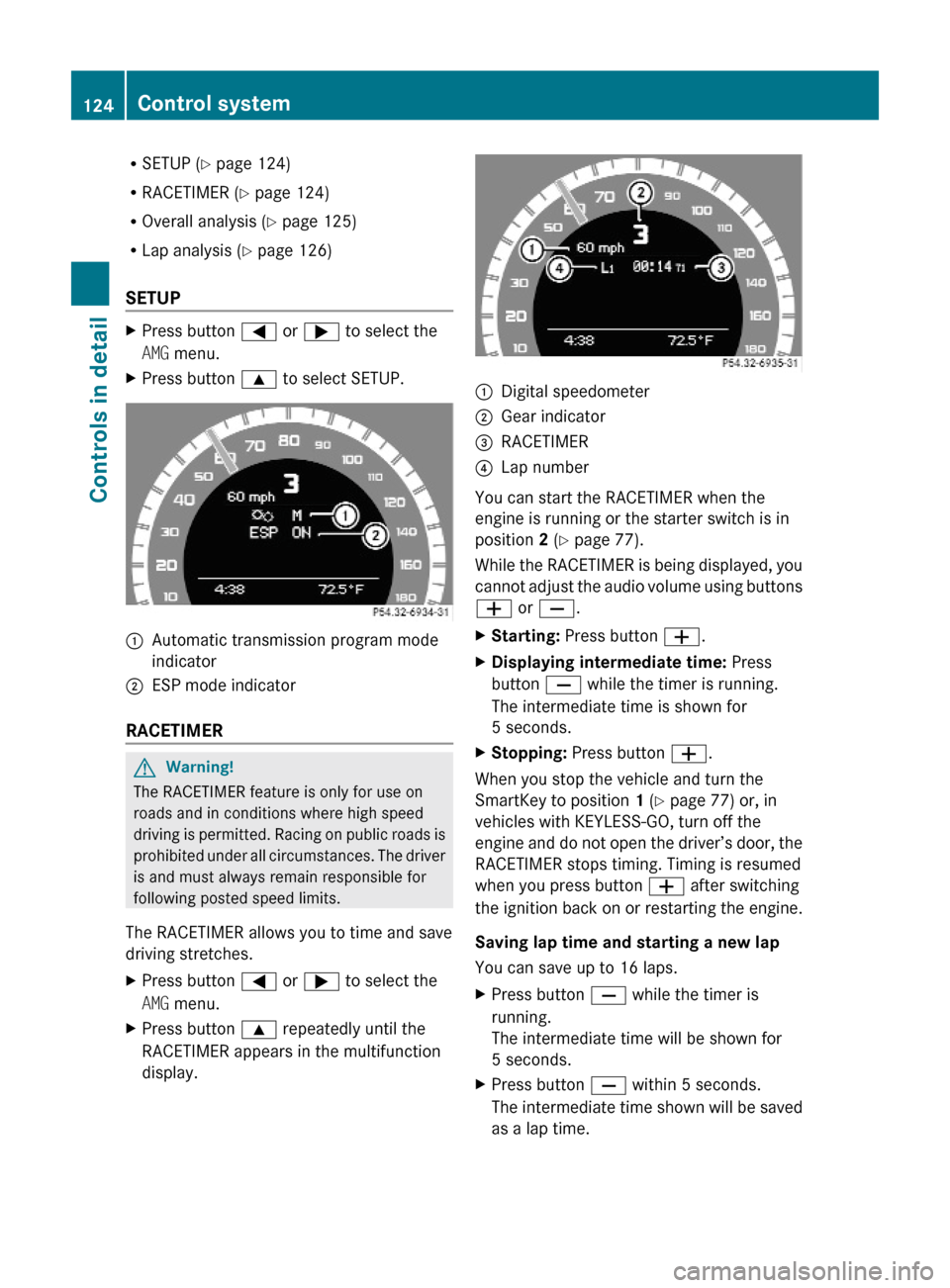
XPress button 9 to select SETUP.:Automatic transmission program mode
indicator
;ESP mode indicator
RACETIMER
GWarning!
The RACETIMER feature is only for use on
roads and in conditions where high speed
driving is permitted. Racing on public roads is
prohibited under all circumstances. The driver
is and must always remain responsible for
following posted speed limits.
The RACETIMER allows you to time and save
driving stretches.
XPress button = or ; to select the
AMG menu.
XPress button 9 repeatedly until the
RACETIMER appears in the multifunction
display.
:Digital speedometer;Gear indicator=RACETIMER?Lap number
You can start the RACETIMER when the
engine is running or the starter switch is in
position 2 (Y page 77).
While the RACETIMER is being displayed, you
cannot adjust the audio volume using buttons
W or X.
XStarting: Press button W.XDisplaying intermediate time: Press
button X while the timer is running.
The intermediate time is shown for
5 seconds.
XStopping: Press button W.
When you stop the vehicle and turn the
SmartKey to position 1 (Y page 77) or, in
vehicles with KEYLESS-GO, turn off the
engine and do not open the driver’s door, the
RACETIMER stops timing. Timing is resumed
when you press button W after switching
the ignition back on or restarting the engine.
Saving lap time and starting a new lap
You can save up to 16 laps.
XPress button X while the timer is
running.
The intermediate time will be shown for
5 seconds.
XPress button X within 5 seconds.
The intermediate time shown will be saved
as a lap time.
124Control systemControls in detail
204_AKB; 5; 23, en-USd2ureepe,Version: 2.11.8.12009-07-16T17:54:06+02:00 - Seite 124
Page 143 of 364
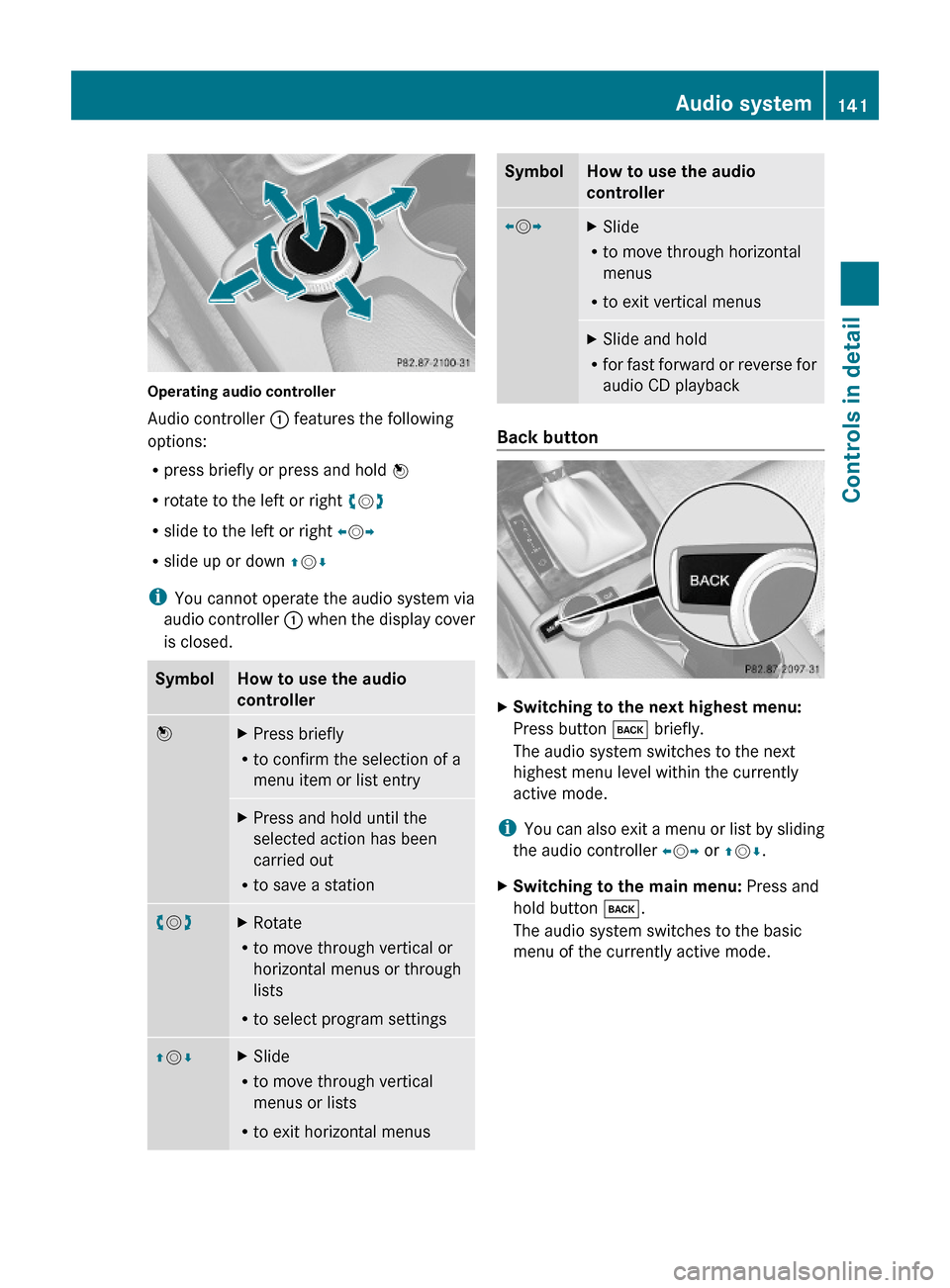
Operating audio controller
Audio controller : features the following
options:
Rpress briefly or press and hold W
Rrotate to the left or right cVd
Rslide to the left or right XVY
Rslide up or down ZVÆ
iYou cannot operate the audio system via
audio controller : when the display cover
is closed.
SymbolHow to use the audio
controller
WXPress briefly
Rto confirm the selection of a
menu item or list entry
XPress and hold until the
selected action has been
carried out
Rto save a station
cVdXRotate
Rto move through vertical or
horizontal menus or through
lists
Rto select program settings
ZVÆXSlide
Rto move through vertical
menus or lists
Rto exit horizontal menus
SymbolHow to use the audio
controller
XVYXSlide
Rto move through horizontal
menus
Rto exit vertical menus
XSlide and hold
Rfor fast forward or reverse for
audio CD playback
Back button
XSwitching to the next highest menu:
Press button k briefly.
The audio system switches to the next
highest menu level within the currently
active mode.
iYou can also exit a menu or list by sliding
the audio controller XVY or ZVÆ.
XSwitching to the main menu: Press and
hold button k.
The audio system switches to the basic
menu of the currently active mode.
Audio system141Controls in detail204_AKB; 5; 23, en-USd2ureepe,Version: 2.11.8.12009-07-16T17:54:06+02:00 - Seite 141Z
Page 156 of 364
If a satellite receiver is not installed or not
properly installed: The message Device
Unavailable will appear.
iIt is also possible to activate the satellite
radio service online. To do so please visit
SIRIUS XM Satellite Radio’s website at
www.sirius.com (USA) or
www.siriuscanada.ca (Canada).
Preview Channel
iIf the satellite radio service has not been
subscribed to, only the preview channel is
available. You cannot tune in another
channel. If you try to do this, the message
Call SIRIUS to activate: appears.
Satellite radio service is activated
The basic satellite radio menu appears. You
will hear the last tuned channel, provided that
it can be received.
Switching on Sat mode
For important subscription information see
“Subscribing to satellite radio” (Y page 153).
XPress button $ on audio control unit
repeatedly until Sat is selected.
The message No Service will appear when
the signal is not available. After the audio
system acquires the signal, the satellite
radio basic menu will appear. The last
tuned station will begin to play.
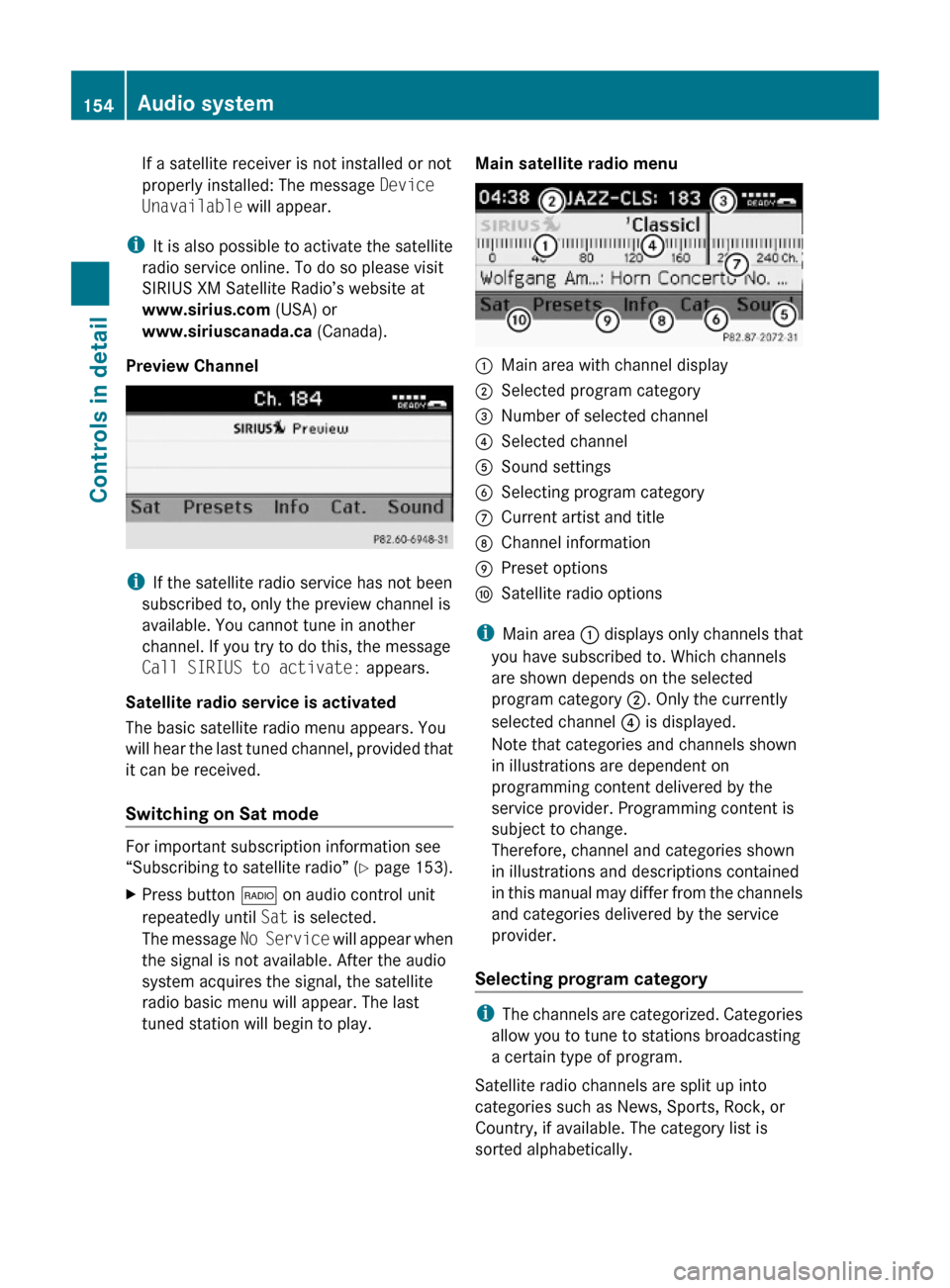
Main satellite radio menu:Main area with channel display;Selected program category=Number of selected channel?Selected channelASound settingsBSelecting program categoryCCurrent artist and titleDChannel informationEPreset optionsFSatellite radio options
iMain area : displays only channels that
you have subscribed to. Which channels
are shown depends on the selected
program category ;. Only the currently
selected channel ? is displayed.
Note that categories and channels shown
in illustrations are dependent on
programming content delivered by the
service provider. Programming content is
subject to change.
Therefore, channel and categories shown
in illustrations and descriptions contained
in this manual may differ from the channels
and categories delivered by the service
provider.
Selecting program category
iThe channels are categorized. Categories
allow you to tune to stations broadcasting
a certain type of program.
Satellite radio channels are split up into
categories such as News, Sports, Rock, or
Country, if available. The category list is
sorted alphabetically.
154Audio systemControls in detail
204_AKB; 5; 23, en-USd2ureepe,Version: 2.11.8.12009-07-16T17:54:06+02:00 - Seite 154
Page 157 of 364
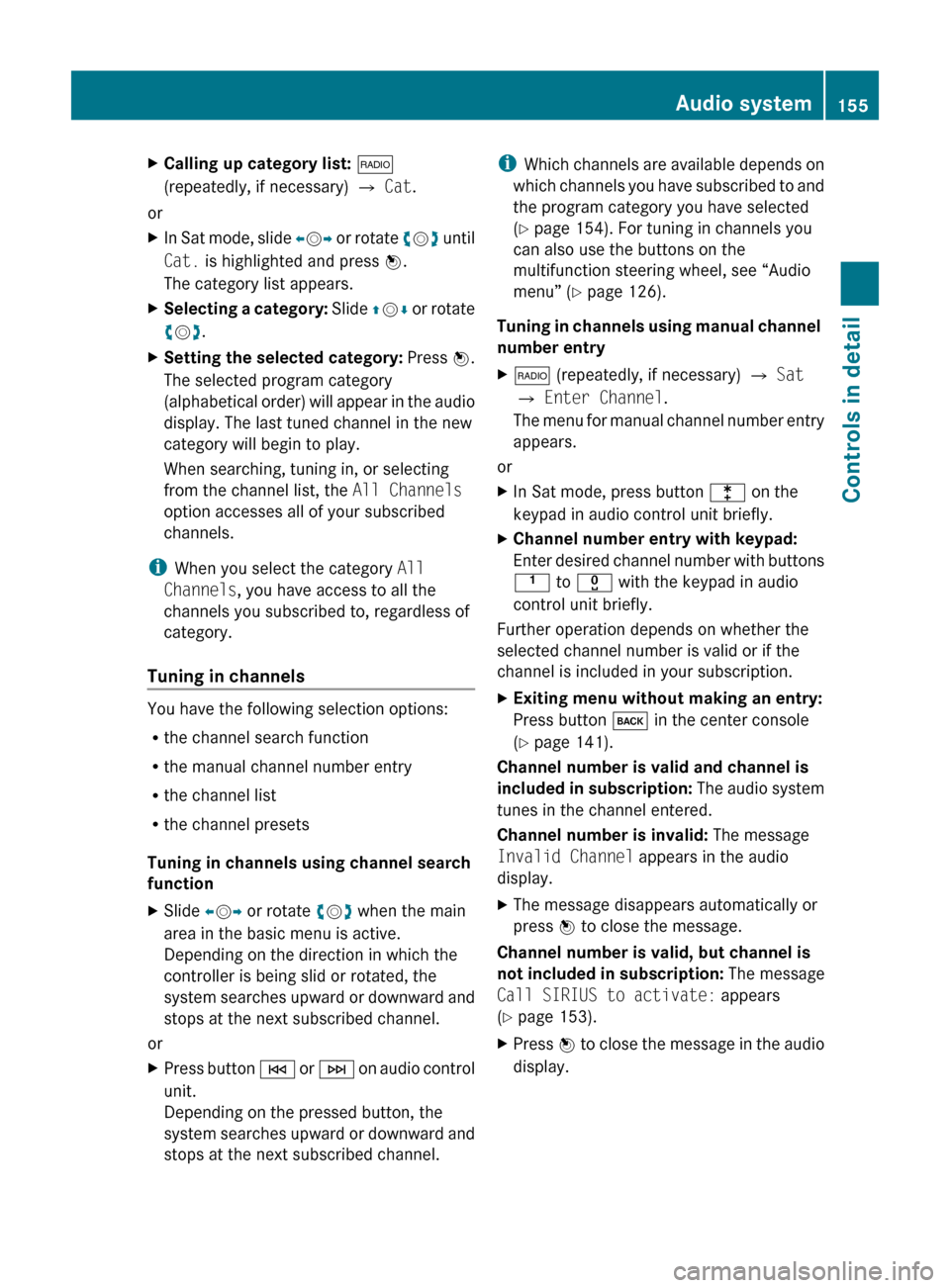
XCalling up category list: $
(repeatedly, if necessary) Q Cat .
or
XIn Sat mode, slide XV Y or rotate cV d until
Cat. is highlighted and press W.
The category list appears.XSelecting a category: Slide ZV Æ or rotate
c V d.XSetting the selected category: Press W.
The selected program category
(alphabetical order) will appear in the audio
display. The last tuned channel in the new
category will begin to play.
When searching, tuning in, or selecting
from the channel list, the All Channels
option accesses all of your subscribed
channels.
i When you select the category All
Channels , you have access to all the
channels you subscribed to, regardless of
category.
Tuning in channels
You have the following selection options:
R the channel search function
R the manual channel number entry
R the channel list
R the channel presets
Tuning in channels using channel search
function
XSlide XV Y or rotate cV d when the main
area in the basic menu is active.
Depending on the direction in which the
controller is being slid or rotated, the
system searches upward or downward and
stops at the next subscribed channel.
or
XPress button E or F on audio control
unit.
Depending on the pressed button, the
system searches upward or downward and
stops at the next subscribed channel.i Which channels are available depends on
which channels you have subscribed to and
the program category you have selected
( Y page 154). For tuning in channels you
can also use the buttons on the
multifunction steering wheel, see “Audio
menu” ( Y page 126).
Tuning in channels using manual channel
number entryX$ (repeatedly, if necessary) Q Sat
Q Enter Channel .
The menu for manual channel number entry
appears.
or
XIn Sat mode, press button l on the
keypad in audio control unit briefly.XChannel number entry with keypad:
Enter desired channel number with buttons
k to x with the keypad in audio
control unit briefly.
Further operation depends on whether the
selected channel number is valid or if the
channel is included in your subscription.
XExiting menu without making an entry:
Press button k in the center console
( Y page 141).
Channel number is valid and channel is
included in subscription: The audio system
tunes in the channel entered.
Channel number is invalid: The message
Invalid Channel appears in the audio
display.
XThe message disappears automatically or
press W to close the message.
Channel number is valid, but channel is
not included in subscription: The message
Call SIRIUS to activate: appears
( Y page 153).
XPress W to close the message in the audio
display.Audio system155Controls in detail204_AKB; 5; 23, en-USd2ureepe,Version: 2.11.8.12009-07-16T17:54:06+02:00 - Seite 155Z
Page 158 of 364
Tuning in channels using the satellite
radio channel list
X$ (repeatedly, if necessary) Q Sat
Q Channel List.
The channel list appears. The dot # in
front of a list entry indicates the currently
selected channel.
XSelect channel by rotating cVd or sliding
ZVÆ.
XPress W to confirm.
iThe contents of the channel list depends
on which channels are included in your
subscription and which program category
you have selected (Y page 154). The
channel list contains only the preview
channel if the satellite radio service has not
been subscribed to.
Tuning in channels using satellite radio
channel presets
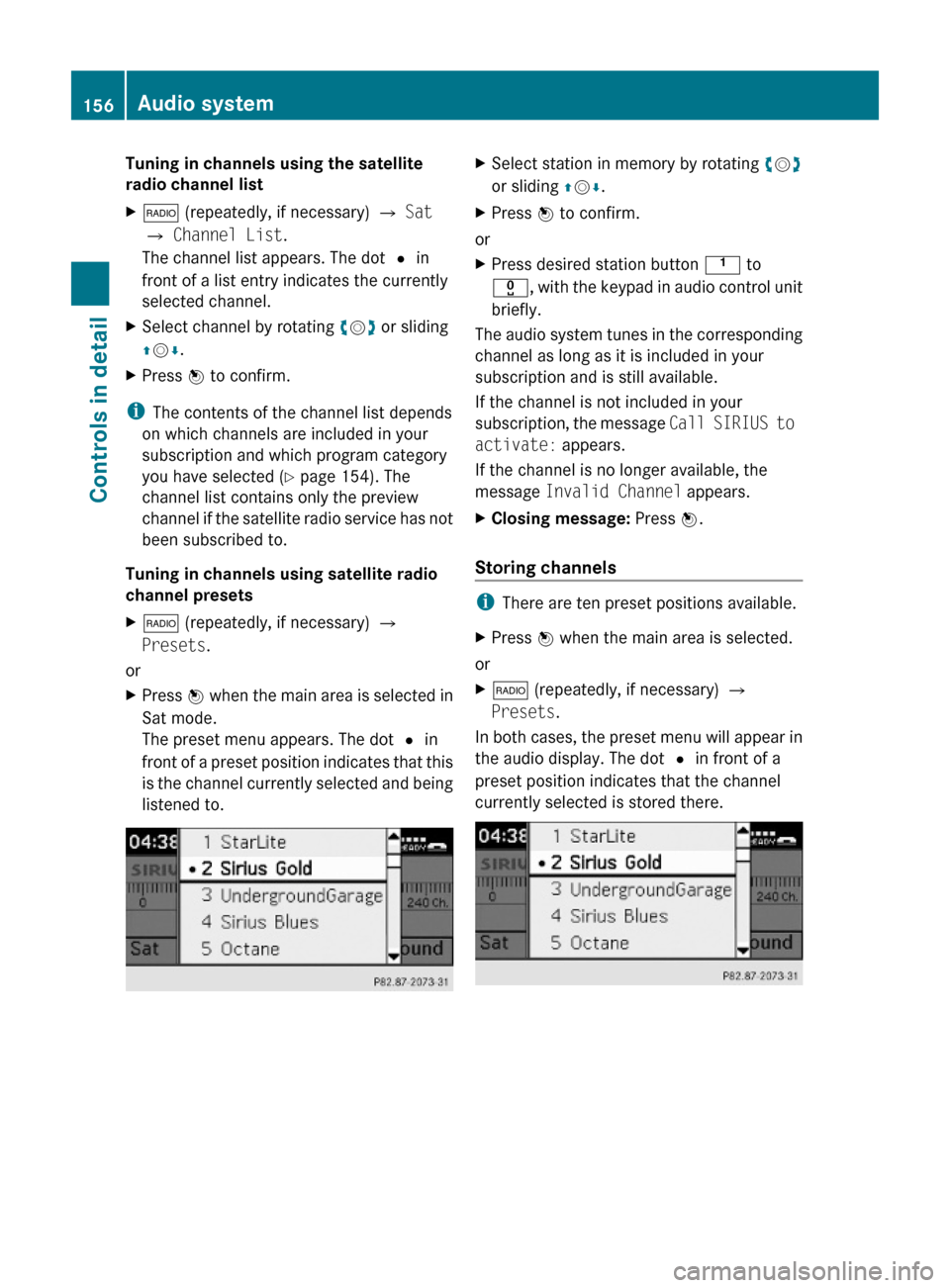
X$ (repeatedly, if necessary) Q
Presets.
or
XPress W when the main area is selected in
Sat mode.
The preset menu appears. The dot # in
front of a preset position indicates that this
is the channel currently selected and being
listened to.
XSelect station in memory by rotating cVd
or sliding ZVÆ.
XPress W to confirm.
or
XPress desired station button k to
x, with the keypad in audio control unit
briefly.
The audio system tunes in the corresponding
channel as long as it is included in your
subscription and is still available.
If the channel is not included in your
subscription, the message Call SIRIUS to
activate: appears.
If the channel is no longer available, the
message Invalid Channel appears.
XClosing message: Press W.
Storing channels
iThere are ten preset positions available.
XPress W when the main area is selected.
or
X$ (repeatedly, if necessary) Q
Presets.
In both cases, the preset menu will appear in
the audio display. The dot # in front of a
preset position indicates that the channel
currently selected is stored there.
156Audio systemControls in detail
204_AKB; 5; 23, en-USd2ureepe,Version: 2.11.8.12009-07-16T17:54:06+02:00 - Seite 156
Page 186 of 364

ground. Observe instructions for towing the
vehicle with all wheels on the ground.
! Only conduct operational or performance
tests on a two-axle dynamometer. If such
tests are necessary, contact an authorized
Mercedes-Benz Center. You could
otherwise seriously damage the brake
system and/or the transfer case which is
not covered by the Mercedes-Benz Limited
Warranty.
iIn winter operation, the maximum
effectiveness of the 4MATIC is only
achieved with winter tires (Y page 252) or
snow chains as required.
Dynamic handling package with sport
driving mode
The most important part of the dynamic
handling package with sport driving mode is
the variable damping system. It adjusts the
damping to the respective driving condition
automatically.
The damping adjustment depends on
Ryour driving style
Rthe road condition
Ryour individual selection, see the following
description
Vehicles with automatic transmission: The
sport driving mode button selects the
automatic shift programs C/S. For
information on the automatic shift programs,
see “Automatic shift programs”
(Y page 111). The automatic transmission
with dynamic handling package with sport
driving mode contains additional steering
wheel gearshift controls, see “One-touch
gearshifting” (Y page 112).
XStart the engine.
Sport driving mode
The firmer suspension tuning in sport driving
mode provides enhanced road contact.
Select this mode for example, on winding
highways.
The setting remains stored until you turn off
the engine.
XPress button ;.
Indicator lamp : comes on. The sport
driving mode is selected. Depending on
engine version, the accelerator pedal may
respond more immediate. In vehicles with
automatic transmission, automatic
program mode S is selected and will be
displayed in the multifunction display
(Y page 112).
Comfort driving mode
Vehicle handling in comfort driving mode is
softer. Select this mode when you prefer a
more comfortable driving style on straight
freeways.
XPress button ;.
Indicator lamp : goes out. The comfort
driving mode is selected. In vehicles with
automatic transmission, automatic
program mode C is selected and will be
displayed in the multifunction display
(Y page 112).
184Driving systemsControls in detail
204_AKB; 5; 23, en-USd2ureepe,Version: 2.11.8.12009-07-16T17:54:06+02:00 - Seite 184
Page 219 of 364
and reverse features as required by U.S.
federal safety standards (this includes any
garage door opener model manufactured
before April 1, 1982). A garage door that
cannot detect an object - signaling the door
to stop and reverse - does not meet current
U.S. federal safety standards.
When programming a garage door opener,
park vehicle outside the garage.
Do not run the engine while programming the
integrated remote control. Inhalation of
exhaust gas is hazardous to your health. All
exhaust gas contains carbon monoxide (CO),
and inhaling it can cause unconsciousness
and possible death.
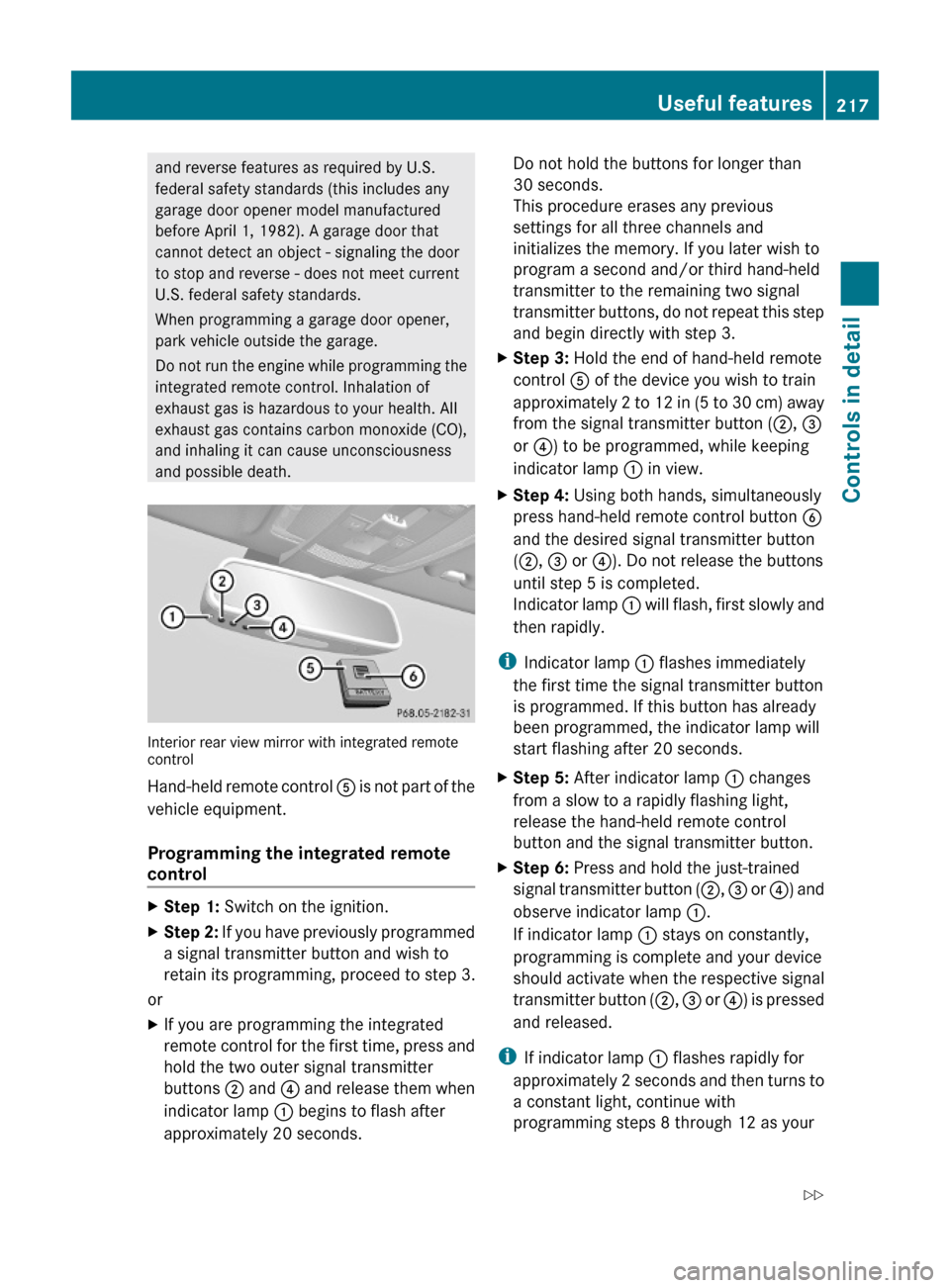
Interior rear view mirror with integrated remotecontrol
Hand-held remote control A is not part of the
vehicle equipment.
Programming the integrated remote
control
XStep 1: Switch on the ignition.XStep 2: If you have previously programmed
a signal transmitter button and wish to
retain its programming, proceed to step 3.
or
XIf you are programming the integrated
remote control for the first time, press and
hold the two outer signal transmitter
buttons ; and ? and release them when
indicator lamp : begins to flash after
approximately 20 seconds.
Do not hold the buttons for longer than
30 seconds.
This procedure erases any previous
settings for all three channels and
initializes the memory. If you later wish to
program a second and/or third hand-held
transmitter to the remaining two signal
transmitter buttons, do not repeat this step
and begin directly with step 3.
XStep 3: Hold the end of hand-held remote
control A of the device you wish to train
approximately 2 to 12 in (5 to 30 cm) away
from the signal transmitter button (;, =
or ?) to be programmed, while keeping
indicator lamp : in view.
XStep 4: Using both hands, simultaneously
press hand-held remote control button B
and the desired signal transmitter button
(;, = or ?). Do not release the buttons
until step 5 is completed.
Indicator lamp : will flash, first slowly and
then rapidly.
iIndicator lamp : flashes immediately
the first time the signal transmitter button
is programmed. If this button has already
been programmed, the indicator lamp will
start flashing after 20 seconds.
XStep 5: After indicator lamp : changes
from a slow to a rapidly flashing light,
release the hand-held remote control
button and the signal transmitter button.
XStep 6: Press and hold the just-trained
signal transmitter button (;, = or ?) and
observe indicator lamp :.
If indicator lamp : stays on constantly,
programming is complete and your device
should activate when the respective signal
transmitter button (;, = or ?) is pressed
and released.
iIf indicator lamp : flashes rapidly for
approximately 2 seconds and then turns to
a constant light, continue with
programming steps 8 through 12 as your
Useful features217Controls in detail204_AKB; 5; 23, en-USd2ureepe,Version: 2.11.8.12009-07-16T17:54:06+02:00 - Seite 217Z
Page 224 of 364
Vehicle equipment
i This Operator’s Manual describes all
features, standard or optional, potentially
available for your vehicle at the time of
purchase. Please be aware that your
vehicle might not be equipped with all
features described in this manual.
The first 1000 miles (1500 km)
The more cautiously you treat your vehicle
during the break-in period, the more satisfied
you will be with its performance later on.
R Drive your vehicle during the first
1 000 miles (1 500 km) at varying but
moderate vehicle and engine speeds.
R During this period, avoid heavy loads (full
throttle driving) and excessive engine
speeds (no more than 2
/ 3 of maximum rpm
in each gear).
R Vehicles with automatic transmission:
- Select C as the preferred shift program
( Y page 111) for the first 1 000 miles
(1 500 km).
- Do not attempt to slow the vehicle down
by shifting to a lower gear using the gear
selector lever.
- Select gear ranges 3, 2 or 1
( Y page 111) only when driving at
moderate speeds (for hill driving).
- Avoid accelerating by kickdown.
R Vehicles with manual transmission:
Shift gears in a timely manner.
After 1 000 miles (1 500 km) you may
gradually increase vehicle and engine speeds
to the permissible maximum.
! Additional instructions for AMG vehicles:
R During the first 1 000 miles (1 500 km),
do not exceed a speed of 85 mph
(140 km/h).
R During this period, avoid engine speeds
above 4 500 rpm in each gear.
R Shift gears in a timely manner.
All of the above instructions, as may apply to
your vehicle type, also apply when driving the
first 1 000 miles (1 500 km) after the engine
or the rear differential has been replaced.
i Always obey applicable speed limits.
At the gas station
Refueling
GWarning!
Gasoline is highly flammable and poisonous.
It burns violently and can cause serious
personal injury.
Never allow sparks, flames or smoking
materials near gasoline!
Turn off the engine before refueling.
Whenever you are around gasoline, avoid
inhaling fumes and any skin or clothing
contact. Extinguish all smoking materials.
Direct skin contact with fuels and the
inhalation of fuel vapors are damaging your
health.
GWarning!
Overfilling of the fuel tank may create
pressure in the system which could cause a
gas discharge. This could cause the gas to
spray back out when removing the fuel pump
nozzle, which could cause personal injury.
GWarning!
C 300 and C 300 Sport with automatic
transmission:
222At the gas stationOperation
204_AKB; 5; 23, en-USd2ureepe,Version: 2.11.8.12009-07-16T17:54:06+02:00 - Seite 222