2010 MAZDA MODEL 3 4-DOOR transaxle
[x] Cancel search: transaxlePage 177 of 504

Black plate (177,1)
Shifting
Manually Shifting up
(M1→M2 →M3 →M4 →M5)
To shift up to a higher gear, tap the shift
lever back (
) once.
NOTElWhen driving slowly, the gears may not
shift up depending on vehicle speed.
lIn manual shift mode, gears do not shift up
automatically. Do not run the engine with
the tachometer needle in the RED ZONE. If
the tachometer needle enters the RED
ZONE, you may feel engine-braking
because the fuel delivery will be stopped to
protect the engine. However, this does not
indicate an abnormality.
lWhen depressing the accelerator fully, the
transaxle will shift to a lower gear,
depending on vehicle speed.
Manually Shifting down
(M5 →M4 →M3 →M2 →M1)
To shift down to a lower gear, tap the shift
lever forward (
) once.
WARNING
Do not use engine braking on slippery
road surfaces or at high speeds: Shifting down while driving on wet,
snowy, or frozen roads, or while
driving at high speeds causes sudden
engine braking, which is dangerous.
The sudden change in tire speed
could cause the tires to skid. This
could lead to loss of vehicle control
and an accident.
NOTE
lWhen driving at high speeds, the gear may
not shift down depending on vehicle speed.
lDuring deceleration, the gear may
automatically shift down depending on
vehicle speed.
lWhen depressing the accelerator fully, the
transaxle will shift to a lower gear,
depending on vehicle speed.
Driving Your Mazda
Starting and Driving
5-17
Mazda3_8BG3-EA-09J_Edition2 Page177
Tuesday, December 8 2009 1:28 PM
Form No.8BG3-EA-09J
Page 178 of 504
Black plate (178,1)
Second gear fixed mode
When the shift lever is tapped back (
)
while the vehicle is stopped or driven at
about 10 km/h (6 mph) or less, the
transaxle is set in the second gear fixed
mode. The gear is fixed in second while in
this mode for easier starting and driving
on slippery roads. If the shift lever is
tapped back (
) or forward () while in
the second gear fixed mode, the mode will
be canceled.
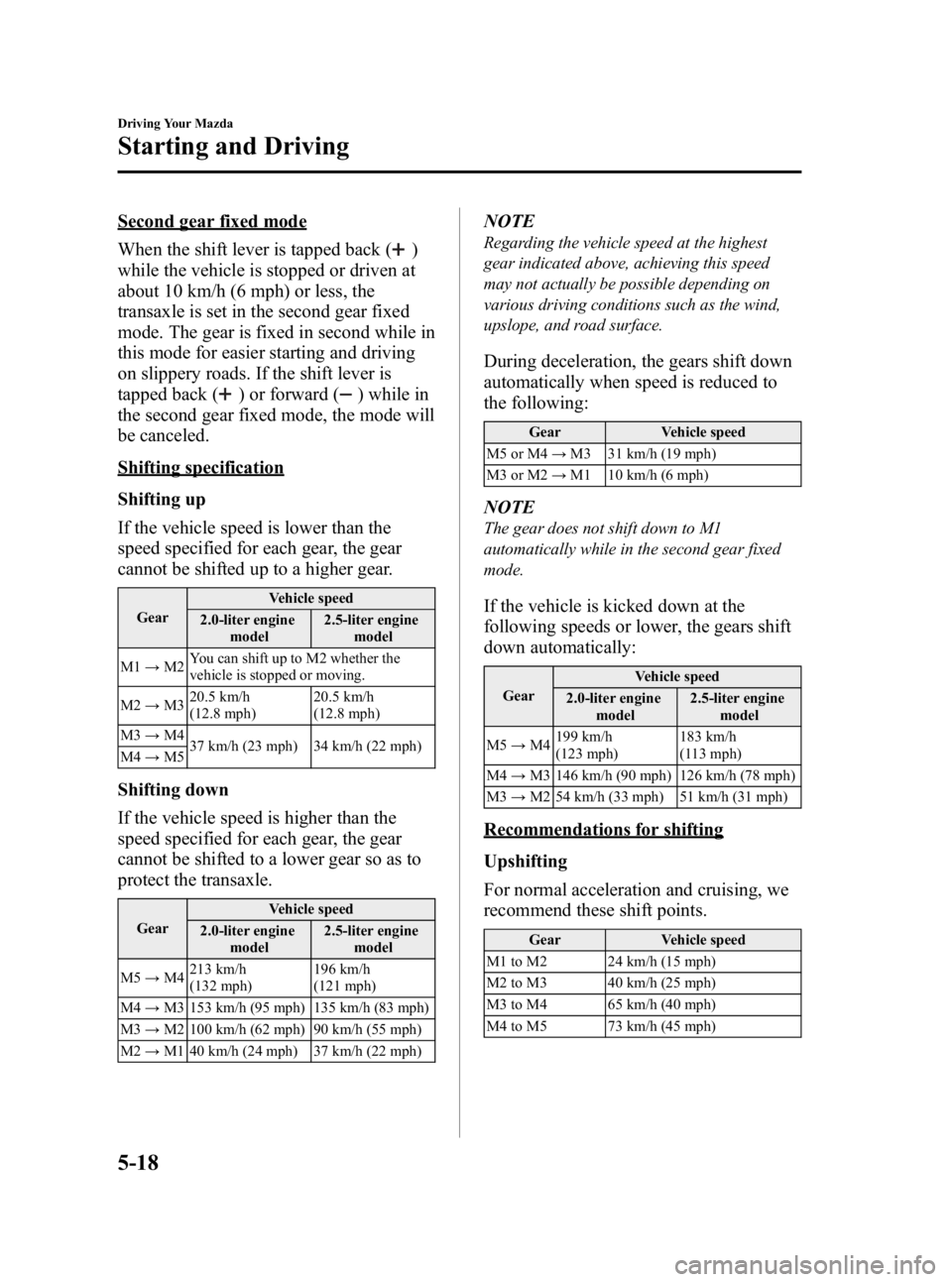
Shifting specification
Shifting up
If the vehicle speed is lower than the
speed specified for each gear, the gear
cannot be shifted up to a higher gear.
Gear Vehicle speed
2.0-liter engine model 2.5-liter engine
model
M1 →M2 You can shift up to M2 whether the
vehicle is stopped or moving.
M2 →M3 20.5 km/h
(12.8 mph) 20.5 km/h
(12.8 mph)
M3 →M4
37 km/h (23 mph) 34 km/h (22 mph)
M4 →M5
Shifting down
If the vehicle speed is higher than the
speed specified for each gear, the gear
cannot be shifted to a lower gear so as to
protect the transaxle.
Gear Vehicle speed
2.0-liter engine model 2.5-liter engine
model
M5 →M4 213 km/h
(132 mph) 196 km/h
(121 mph)
M4 →M3 153 km/h (95 mph) 135 km/h (83 mph)
M3 →M2 100 km/h (62 mph) 90 km/h (55 mph)
M2 →M1 40 km/h (24 mph) 37 km/h (22 mph)
NOTE
Regarding the vehicle speed at the highest
gear indicated above, achieving this speed
may not actually be possible depending on
various driving conditions such as the wind,
upslope, and road surface.
During deceleration, the gears shift down
automatically when speed is reduced to
the following:
Gear Vehicle speed
M5 or M4 →M3 31 km/h (19 mph)
M3 or M2 →M1 10 km/h (6 mph)
NOTE
The gear does not shift down to M1
automatically while in the second gear fixed
mode.
If the vehicle is kicked down at the
following speeds or lower, the gears shift
down automatically:
Gear Vehicle speed
2.0-liter engine model 2.5-liter engine
model
M5 →M4 199 km/h
(123 mph) 183 km/h
(113 mph)
M4 →M3 146 km/h (90 mph) 126 km/h (78 mph)
M3 →M2 54 km/h (33 mph) 51 km/h (31 mph)
Recommendations for shifting
Upshifting
For normal acceleration and cruising, we
recommend these shift points.
Gear Vehicle speed
M1 to M2 24 km/h (15 mph)
M2 to M3 40 km/h (25 mph)
M3 to M4 65 km/h (40 mph)
M4 to M5 73 km/h (45 mph)
5-18
Driving Your Mazda
Starting and Driving
Mazda3_8BG3-EA-09J_Edition2 Page178
Tuesday, December 8 2009 1:28 PM
Form No.8BG3-EA-09J
Page 179 of 504

Black plate (179,1)
Downshifting
When you must slow down in heavy
traffic or on a steepupgrade, downshift
before the engine starts to overwork. This
gives better acceleration when you need
more speed.
On a steep downgrade , downshifting
helps maintain safe speed and prolongs
brake life.
q Driving Tips
WARNING
Do not allow the vehicle to move in
reverse on an up-slope while the
selector lever is in a forward gear
position, or move forward on a down-
slope while the selector lever is in the
reverse position.
Otherwise, the engine will stop,
causing the loss of the power brake
and power steering functions, and
make it difficult to control the vehicle
which could result in an accident.
Passing
For extra power when passing another
vehicle or climbing steep grades, depress
the accelerator fully. The transaxle will
shift to a lower gear, depending on vehicle
speed.
Climbing steep grades from a stop
To climb a steep grade from a stopped
position:
1. Depress the brake pedal.
2. Shift to D or M1, depending on theload weight and grade steepness.
3. Release the brake pedal while gradually accelerating.
Descending steep grades
When descending a steep grade, shift to
lower gears, depending on load weight
and grade steepness. Descend slowly,
using the brakes only occasionally to
prevent them from overheating.
Driving Your Mazda
Starting and Driving
5-19
Mazda3_8BG3-EA-09J_Edition2 Page179
Tuesday, December 8 2009 1:28 PM
Form No.8BG3-EA-09J
Page 185 of 504
Black plate (185,1)
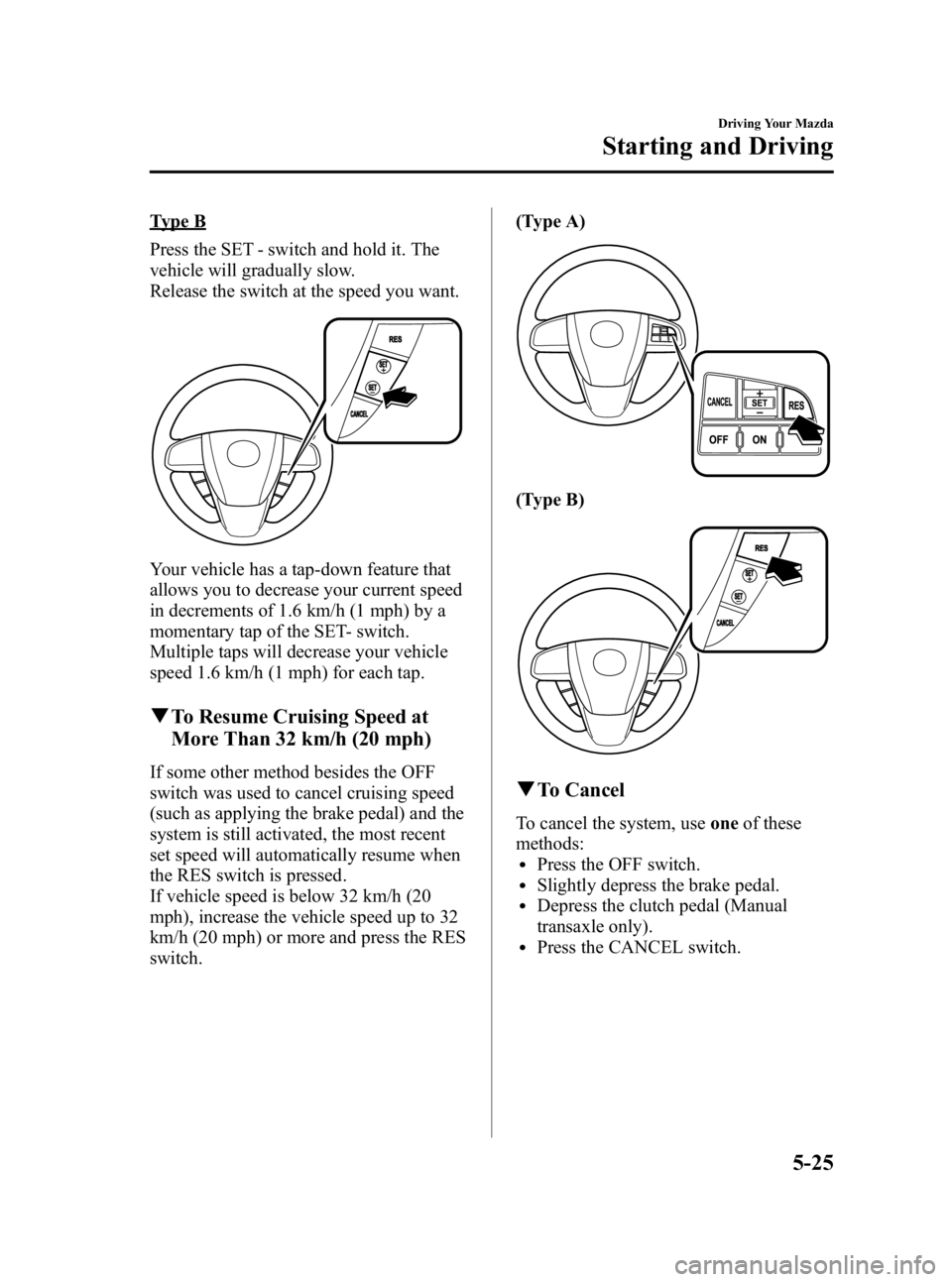
Type B
Press the SET - switch and hold it. The
vehicle will gradually slow.
Release the switch at the speed you want.
Your vehicle has a tap-down feature that
allows you to decrease your current speed
in decrements of 1.6 km/h (1 mph) by a
momentary tap of the SET- switch.
Multiple taps will decrease your vehicle
speed 1.6 km/h (1 mph) for each tap.
qTo Resume Cruising Speed at
More Than 32 km/h (20 mph)
If some other method besides the OFF
switch was used to cancel cruising speed
(such as applying the brake pedal) and the
system is still activated, the most recent
set speed will automatically resume when
the RES switch is pressed.
If vehicle speed is below 32 km/h (20
mph), increase the vehicle speed up to 32
km/h (20 mph) or more and press the RES
switch. (Type A)
(Type B)
q
To Cancel
To cancel the system, use oneof these
methods:
lPress the OFF switch.lSlightly depress the brake pedal.lDepress the clutch pedal (Manual
transaxle only).
lPress the CANCEL switch.
Driving Your Mazda
Starting and Driving
5-25
Mazda3_8BG3-EA-09J_Edition2 Page185
Tuesday, December 8 2009 1:28 PM
Form No.8BG3-EA-09J
Page 202 of 504

Black plate (202,1)
SignalWarning/Indicator Lights Page
Low Fuel Warning Light 5-47
Check Fuel Cap Warning Light5-47
Seat Belt Warning Light/Beep5-47
Door-Ajar Warning Light5-49
Low Washer Fluid Level Warning Light5-49
Automatic Transaxle Warning Light5-49
Tire Pressure Monitoring System Warning Light5-49
KEY Warning Light (Red)/KEY Indicator Light (Green)5-51
Electronic Steering Lock Warning Light5-53
Security Indicator Light5-53
Headlight High-Beam Indicator Light5-53
Shift Position Indicator Light5-54
TCS/DSC Indicator Light5-54
DSC OFF Indicator Light5-54
AFS OFF Indicator Light5-54
Cruise Main Indicator Light (Amber)/Cruise Set Indicator Light (Green) 5-55
5-42
Driving Your Mazda
Warning/Indicator Lights and Beep Sounds
Mazda3_8BG3-EA-09J_Edition2 Page202
Tuesday, December 8 2009 1:28 PM
Form No.8BG3-EA-09J
Page 209 of 504
Black plate (209,1)
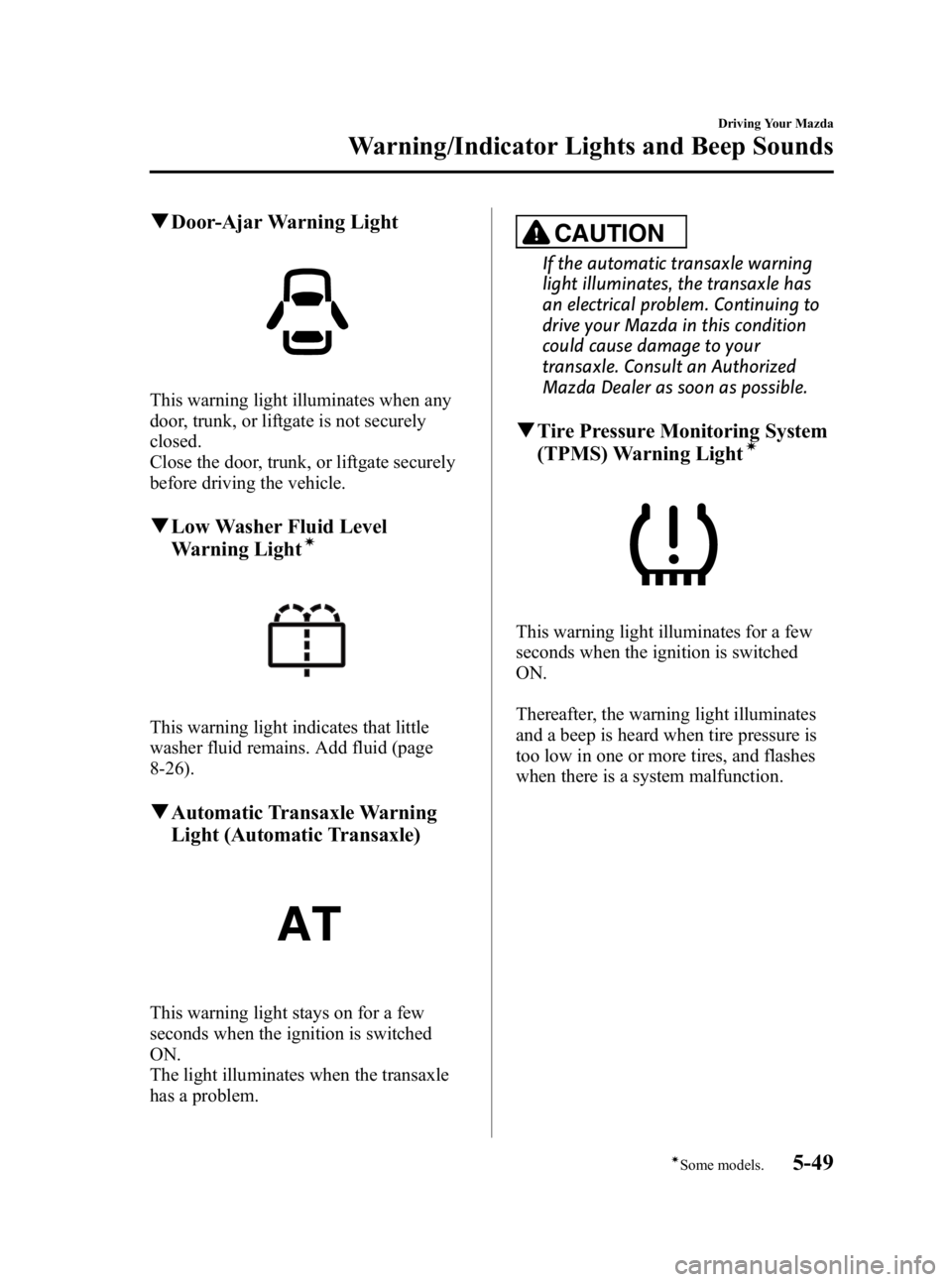
qDoor-Ajar Warning Light
This warning light illuminates when any
door, trunk, or liftgate is not securely
closed.
Close the door, trunk, or liftgate securely
before driving the vehicle.
qLow Washer Fluid Level
Warning Lightí
This warning light indicates that little
washer fluid remains. Add fluid (page
8-26).
qAutomatic Transaxle Warning
Light (Automatic Transaxle)
This warning light stays on for a few
seconds when the ignition is switched
ON.
The light illuminates when the transaxle
has a problem.
CAUTION
If the automatic transaxle warning
light illuminates, the transaxle has
an electrical problem. Continuing to
drive your Mazda in this condition
could cause damage to your
transaxle. Consult an Authorized
Mazda Dealer as soon as possible.
qTire Pressure Monitoring System
(TPMS) Warning Lightí
This warning light illuminates for a few
seconds when the ignition is switched
ON.
Thereafter, the warning light illuminates
and a beep is heard when tire pressure is
too low in one or more tires, and flashes
when there is a system malfunction.
Driving Your Mazda
Warning/Indicator Lights and Beep Sounds
5-49íSome models.
Mazda3_8BG3-EA-09J_Edition2 Page209
Tuesday, December 8 2009 1:28 PM
Form No.8BG3-EA-09J
Page 212 of 504

Black plate (212,1)
WARNING
Do not drive the vehicle with the KEY
warning light illuminated:If the KEY warning light remains
illuminated, do not continue to drive
using the advanced key system. Park
the vehicle in a safe place and use
the auxiliary key to continue driving
the vehicle. Have the vehicle
inspected at an Authorized Mazda
Dealer as soon as possible.
When flashing
lUnder the following conditions, the
KEY warning light (red) flashes to
inform the driver that the push button
start will not switch to ACC even if it
is pressed from off.
lThe advanced key battery is dead.lThe advanced key is not within
operational range.
lThe advanced key is placed in areas
where it is difficult for the system to
detect the signal (page 3-7).
lA key from another manufacturer
similar to the advanced key is in the
operational range.
lUnder the following conditions, the
KEY warning light (red) will flash
continuously when the push button
start has not been pressed off to notify
the driver that the advanced key has
been removed. The KEY warning light
(red) will stop flashing when the
advanced key is back inside the
vehicle:
lThe push button start has not been
pressed off, the driver's door is
open, and the advanced key is
removed from the vehicle.
lThe push button start has not been
pressed off and all the doors are
closed after removing the advanced
key from the vehicle.
NOTE
Because the advanced key utilizes low-intensity
radio waves, the Advanced Key Removed From
Vehicle Warning may activate if the advanced
key is carried together with a metal object or it
is placed in a poor signal reception area.
KEY Indicator Light (Green)
When illuminated
When the brake pedal is depressed with
an automatic transaxle or the clutch pedal
is depressed with a manual transaxle, the
system confirms that the correct advanced
key is inside the vehicle, the KEY
indicator light (green) illuminates, and the
push button start can be pressed to ACC
(page 3-11).
When flashing
When the push button start is pressed off
from ON, the KEY indicator light (green)
flashes for approximately 30 seconds
indicating that the remaining battery
power is low. Replace with a new battery
before the advanced key becomes
unusable.
5-52
Driving Your Mazda
Warning/Indicator Lights and Beep Sounds
Mazda3_8BG3-EA-09J_Edition2 Page212
Tuesday, December 8 2009 1:28 PM
Form No.8BG3-EA-09J
Page 214 of 504

Black plate (214,1)
qShift Position Indicator Light
(Automatic Transaxle)
This indicates the selected shift position.
Gear position indicator
In manual mode, the “M ”of the shift
position indicator illuminates and the
numeral for the selected gear displays in
the gear position indicator.
q TCS/DSC Indicator Lightí
This indicator light stays on for a few
seconds when the ignition is switched
ON. If the TCS or DSC is operating, the
indicator light flashes. If the light stays on, the TCS or DSC may
have a malfunction and they may not
operate correctly. Take your vehicle to an
Authorized Mazda Dealer.
q
DSC OFF Indicator Lightí
This indicator light stays on for a few
seconds when the ignition is switched
ON.
It also illuminates when the DSC OFF
switch is pressed and TCS/DSC is
switched off (page 5-28).
If the light stays on when the TCS/DSC is
not switched off, take your vehicle to an
Authorized Mazda Dealer. The dynamic
stability control may have a malfunction.
qAFS OFF Indicator Lightí
The AFS OFF indicator light illuminates
briefly when the ignition is switched ON,
and then turns off.
Pressing the AFS OFF switch cancels the
AFS function and illuminates the
indicator light.
5-54
Driving Your Mazda
íSome models.
Warning/Indicator Lights and Beep Sounds
Mazda3_8BG3-EA-09J_Edition2 Page214
Tuesday, December 8 2009 1:28 PM
Form No.8BG3-EA-09J