2010 LINCOLN MKZ ignition
[x] Cancel search: ignitionPage 49 of 318

5.Passenger heated seat:Press to control the passenger heated
seat. Refer toHeated and cooled seatsin theSeating and Safety
Restraintschapter for more information.
6.
Passenger cooled seat:Press to control the passenger cooled
seat. Refer toHeated and cooled seatsin theSeating and Safety
Restraintschapter for more information.
7.
Recirculated air:Press to activate/deactivate air recirculation in
the vehicle. Recirculated air may reduce the amount of time needed to
cool down the interior of the vehicle and may also help reduce undesired
odors from reaching the interior of the vehicle. Recirculated air engages
automatically when MAX A/C is selected or can be engaged manually in
any airflow mode except
(defrost). Recirculated air may turn off
automatically in all airflow selections except MAX A/C. When the ignition
switch is turned off and back on, the climate system will return to the
recirculated air mode only if the A/C button LED is illuminated and the
air distribution selection is either
(panel) or(floor/panel).
Recirculation may turn off automatically in some airflow modes to reduce
fog potential.
8. –
+Fan speed control:Press to decrease/increase the fan speed.
Manual fan speed will appear in the touch screen.
9.AUTO:Press to engage full automatic operation. The system will
automatically determine fan speed, airflow distribution, A/C on or off,
and outside or recirculated air, to heat or cool the vehicle to reach the
desired temperature.
10.Driver temperature:Press to increase/decrease the air temperature
for the driver side of the vehicle. This control also adjusts the passenger
side temperature when dual zone operation is disengaged.
11.
Driver cooled seat:Press to control the driver cooled seat.
Refer toHeated and cooled seatsin theSeating and Safety Restraints
chapter for more information.
12.
Driver heated seat:Press to control the driver heated seat.
Refer toHeated and cooled seatsin theSeating and Safety Restraints
chapter for more information.
13.
Power:Press to activate/deactivate the climate control system.
When the system is off, outside air is prevented from entering the
vehicle. The climate status in the touchscreen will also be turned off.
14.
Defrost:Distributes outside air through the windshield
defroster vents and demister vents. Can be used to clear the windshield
2010 MKZ(378)
Owners Guide, 1st Printing
USA(fus)
Climate Controls
49
Page 52 of 318

To aid in side window defogging/demisting in cold weather:
1. Select
.
2. Select A/C.
3. Adjust the temperature control to maintain comfort.
4. Set the fan speed to the highest setting.
5. Direct the outer instrument panel vents towards the side windows.
To increase airflow to the outer instrument panel vents, close the vents
located in the middle of the instrument panel.
REAR WINDOW DEFROSTER
R
The rear defroster control is located on the climate control panel and
works to clear the rear window of fog and thin ice.
The engine must be running to operate the rear window defroster.
Press
Rto turn the rear window defroster on. An indicator light on the
button will illuminate when active. The rear window defroster turns off
automatically after a predetermined amount of time, if a low battery
condition is detected or when the ignition is turned off or to the
accessory position. To manually turn off the rear window defroster at any
time, press the control again.
If your vehicle is equipped with both rear defroster and heated mirrors,
the same button will activate both. Refer toExterior mirrorsin the
Driver Controlschapter.
Do not use razor blades or other sharp objects to clean the inside
of the rear window or to remove decals from the inside or the
rear window. This may cause damage to the heated grid lines and
will not be covered by your warranty.
2010 MKZ(378)
Owners Guide, 1st Printing
USA(fus)
Climate Controls
52
Page 53 of 318

HEADLAMP CONTROL
Turns the lamps off.
Turns on the parking lamps,
instrument panel lamps, license
plate lamps and tail lamps.
Turns the low beam headlamps
on.
Adaptive headlamps (if equipped)
The headlamp beams move in the same direction as the steering wheel
to provide more visibility when driving around curves.
Note:The system has a power-up movement check feature. When the
vehicle is started, the lamps track to the right, then back to center to
alert the driver that the system is working properly. There is a delay of
two to five seconds before the adaptive headlamp system will operate
when the vehicle is driven, as the system is inactive below 3 mph
(5 km/h).
Autolamp control
The autolamp system provides light
sensitive automatic on-off control of
the exterior lights normally
controlled by the headlamp control.
•To turn autolamps on, rotate the
control to
.
•To turn autolamps off, rotate the
control from the autolamp
position.
The autolamp system also keeps the lights on for a predetermined
amount of time after the ignition switch is turned to off. You can change
the amount of time the lamps stay on by using the programming
procedure that follows:
Note:If the vehicle is equipped with autolamps, it will have the
headlamps on with windshield wipers feature.If the windshield
wipers are turned on (for a fixed period of time), the exterior lamps will
turn on with the headlamp control in the Autolamp position.
2010 MKZ(378)
Owners Guide, 1st Printing
USA(fus)
Lights
53
Page 54 of 318

Autolamps - Programmable exit delay
Programmable exit delay allows the length of the autolamp exit delay to
be changed.
To program the auto lamp exit time delay:
1. Start with the ignition in the off position and the headlamp control in
the autolamp position.
2. Turn the headlamp control to off.
3. Turn the ignition switch to on and then back to off.
4. Turn the headlamp control to the autolamp position. The headlamps
will turn on.
5. Wait the desired amount of time for the exit delay you want (up to
three minutes), then turn the headlamp control to off. The headlamps
will turn off.
SeeMessage centerin theInstrument clustersection for more
information.
Fog lamp control
With the ignition on, the fog lamps
can be turned on when the
headlamp control is pulled toward
you and is in any of the following
positions:
•Parking lamps
•Low beams
•Autolamps (when active)
The fog lamp indicator light will
illuminate when the fog lamps have been turned on. The fog lamps will
not operate when the high beams are active.
Daytime running lamps (DRL) (if equipped)
Turns on the front turn lamps.
To activate:
•the ignition must be in the on position,
•the headlamp control is in the off, autolamps or parking lamp position
and
•the transmission must be out of the P (Park) position.
2010 MKZ(378)
Owners Guide, 1st Printing
USA(fus)
Lights
54
Page 58 of 318
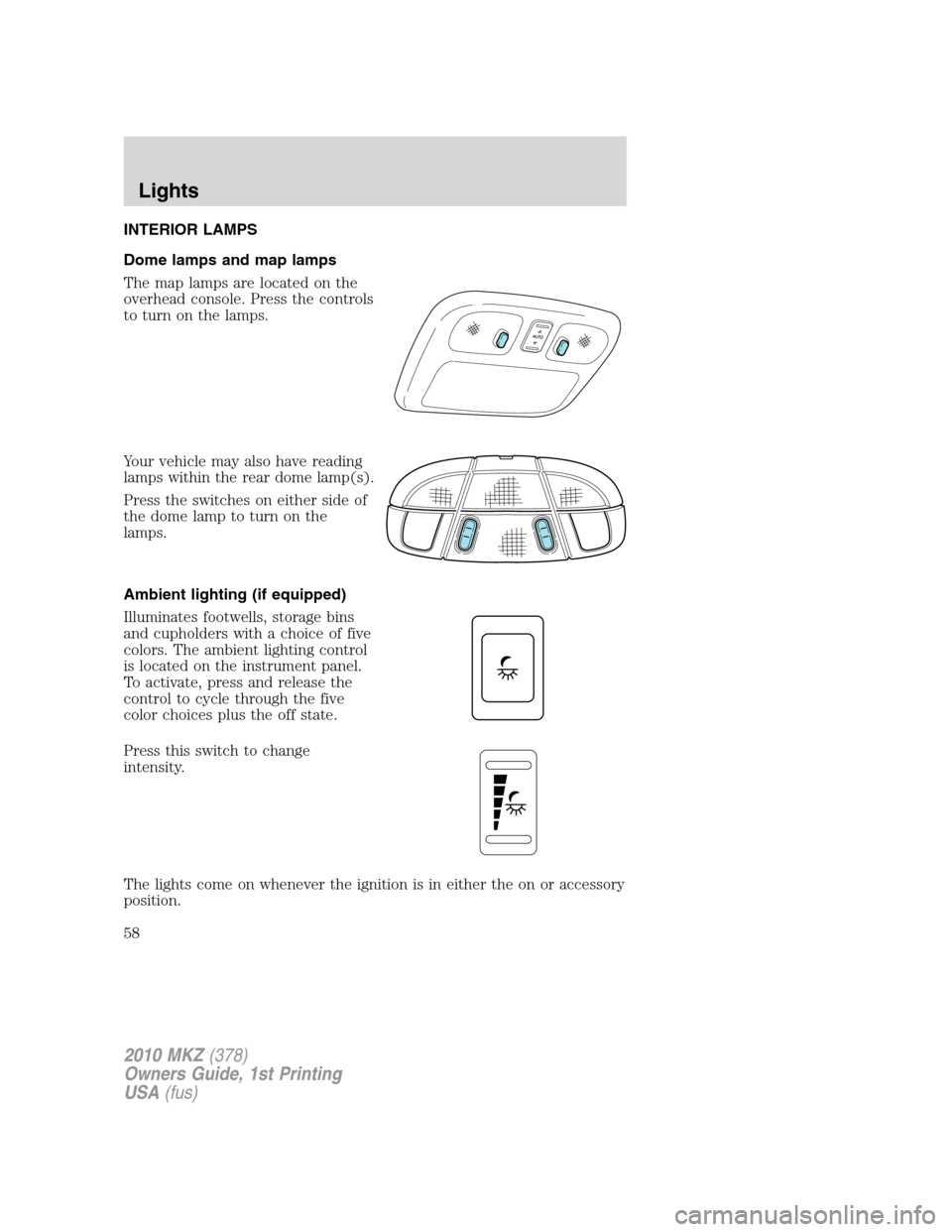
INTERIOR LAMPS
Dome lamps and map lamps
The map lamps are located on the
overhead console. Press the controls
to turn on the lamps.
Your vehicle may also have reading
lamps within the rear dome lamp(s).
Press the switches on either side of
the dome lamp to turn on the
lamps.
Ambient lighting (if equipped)
Illuminates footwells, storage bins
and cupholders with a choice of five
colors. The ambient lighting control
is located on the instrument panel.
To activate, press and release the
control to cycle through the five
color choices plus the off state.
Press this switch to change
intensity.
The lights come on whenever the ignition is in either the on or accessory
position.
2010 MKZ(378)
Owners Guide, 1st Printing
USA(fus)
Lights
58
Page 59 of 318

Welcome and farewell lighting are included in the Lincoln white signature
color. The transition from signature color to ambient occurs when the
key is placed in the ignition and all doors are closed. Farewell lighting
occurs when the key is removed from the ignition and the driver door is
opened.
Note:The ambient color will stay on until after the ignition is placed in
the off position and either of the front doors are opened or the accessory
delay timer expires. At that time, the ambient color changes to the
signature color.
BULB REPLACEMENT
Lamp assembly condensation
Exterior lamps are vented to accommodate normal changes in pressure.
Condensation can be a natural by-product of this design. When moist air
enters the lamp assembly through the vents, there is a possibility that
condensation can occur when the temperature is cold. When normal
condensation occurs, a thin film of mist can form on the interior of the
lens. The thin mist eventually clears and exits through the vents during
normal operation. Clearing time may take as long as 48 hours under dry
weather conditions.
Examples of acceptable condensation are:
•Presence of thin mist (no streaks, drip marks or droplets)
•Fine mist covers less than 50% of the lens
Examples of unacceptable moisture (usually caused by a lamp water
leak) are:
•Water puddle inside the lamp
•Large water droplets, drip marks or streaks present on the interior of
the lens
Take your vehicle to dealer for service if any of the above conditions of
unacceptable moisture are present.
Using the right bulbs
Replacement bulbs are specified in the chart below. Headlamp bulbs
must be marked with an authorized “D.O.T.” for North America and an
“E” for Europe to ensure lamp performance, light brightness and pattern
and safe visibility. The correct bulbs will not damage the lamp assembly
or void the lamp assembly warranty and will provide quality bulb burn
time.
2010 MKZ(378)
Owners Guide, 1st Printing
USA(fus)
Lights
59
Page 66 of 318

Replacing backup lamp/redundant tail lamp
The backup lamp and redundant tail lamps are located in the trunk lid.
Follow the same steps to replace either lamp.
1. Make sure the headlamp switch is
in the off position and open trunk to
access the lamp assembly.
2. Position the decklid trim aside by
removing 3 to 4 pin-type retainers
to expose the lamp assembly.
3. Remove the bulb socket by
rotating it counterclockwise, then
pull it out of the lamp assembly.
4. Pull the bulb from the socket and
push in the new bulb.
5. Install the bulb socket into the
lamp assembly by rotating it
clockwise.
6. Carefully reposition the trim back
to its original position and secure
the retainers.
Replacing high-mount brake lamp bulb
1. Make sure the ignition control is
in the off position.
2. Open the trunk and reach
underneath package tray to locate
lamp assembly.
3. Remove the bulb socket by
rotating it counterclockwise, then
pull it out of the lamp assembly.
4. Pull the bulb straight from the
socket and push in the new bulb.
5. Install the bulb socket into the lamp assembly by rotating it clockwise.
2010 MKZ(378)
Owners Guide, 1st Printing
USA(fus)
Lights
66
Page 71 of 318

degrees between adjacent zones and will become noticeable as the
vehicle crosses multiple zones. A correct zone setting will eliminate this
error. Refer toCompass calibration adjustment.
Compass zone adjustment
1. Determine which magnetic zone
you are in for your geographic
location by referring to the zone
map.
2. Turn ignition to the on position.
3. Press and hold the 7 and 9 radio
preset buttons together for
approximately five seconds until
ZONE XX appears in the CID.
4. Press and release the 7 and 9
radio preset buttons together,
repeatedly until ZONE XX changes
to the correct zone (1–15) in the
CID.
5. The direction will display after
the buttons are released. The zone
is now updated.
Compass calibration adjustment
Perform compass calibration in an open area free from steel structures
and high voltage lines. For optimum calibration, turn off all electrical
accessories (heater/air conditioning, wipers, etc.) and make sure all
vehicle doors are shut.
1. Start the vehicle.
1 2 3
4
5
6 7 8 9 101112 13 14 15
2010 MKZ(378)
Owners Guide, 1st Printing
USA(fus)
Driver Controls
71