Page 23 of 316

DRIVER DOOR AJAR— Displayed when the driver’s door is not
completely closed.
PASSENGER DOOR AJAR— Displayed when the passenger side door
is not completely closed.
REAR LEFT DOOR AJAR— Displayed when the rear left door is not
completely closed.
REAR RIGHT DOOR AJAR— Displayed when the rear right door is
not completely closed.
PARK BRAKE ENGAGED— Displayed when the parking brake is set,
the engine is running and the vehicle is driven more than 3 mph
(5 km/h). If the warning stays on after the parking brake is released,
contact your authorized dealer as soon as possible.
FUEL LEVEL LOW— Displayed as an early reminder of a low fuel
condition.
CHECK BRAKE SYSTEM— Displayed when the brake system needs
servicing. If the warning stays on or continues to come on, contact your
authorized dealer as soon as possible.
BRAKE FLUID LEVEL LOW— Indicates the brake fluid level is low
and the brake system should be inspected immediately. Refer toBrake
fluidin theMaintenance and Specificationschapter.
LIFTGATE AJAR— Displayed when the liftgate is not completely
closed.
LOW TIRE PRESSURE— Displayed when one or more tires on your
vehicle have low tire pressure. Refer toInflating your tiresin theTires,
Wheels and Loadingchapter.
TIRE PRESSURE MONITOR FAULT— Displayed when the Tire
Pressure Monitoring System is malfunctioning. If the warning stays on or
continues to come on, contact your authorized dealer as soon as
possible.
TIRE PRESSURE SENSOR FAULT— Displayed when a tire pressure
sensor is malfunctioning, or your spare tire is in use. For more
information on how the system operates under these conditions, refer to
Tire Pressure Monitoring System (TPMS)in theTires, Wheels and
Loadingchapter. If the warning stays on or continues to come on,
contact your authorized dealer as soon as possible.
Instrument Cluster
23
2010 MKX(mkx)
Owners Guide(own2002), 1st Printing
USA(fus)
Page 24 of 316
CHECK COMPASS MOD— Displayed when the compass is not
operating properly. If the warning stays on or continues to come on,
contact your authorized dealer as soon as possible.
INTKEY COULD NOT PROGRAM— Displayed when an attempt is
made to program a fifth Integrated Key to the Remote Key Entry
System. For more information on Integrated Key, refer toLocks and
Securitychapter in this manual.
Instrument Cluster
24
2010 MKX(mkx)
Owners Guide(own2002), 1st Printing
USA(fus)
Page 25 of 316
AUDIO SYSTEMS
AM/FM In-dash six CD/MP3 satellite compatible sound system
WARNING:Driving while distracted can result in loss of vehicle
control, accident and injury. Ford strongly recommends that
drivers use extreme caution when using any device that may take their
focus off the road. The driver’s primary responsibility is the safe
operation of their vehicle. Only use cell phones and other devices not
essential to the driving task when it is safe to do so.
Accessory delay:Your vehicle is equipped with accessory delay. With
this feature, the window controls, radio and moon roof (if equipped) may
be used for up to ten minutes after the ignition is turned off or until
either front door is opened.
Entertainment Systems
25
2010 MKX(mkx)
Owners Guide(own2002), 1st Printing
USA(fus)
Page 32 of 316

16.ON/OFF/Volume:Press to turn
on/off. Turn to increase/decrease
volume.
If the volume is set above a certain
level and the ignition is turned off, the volume will come back on at a
“nominal” listening level when the ignition switch is turned back on.
17.CD slot:Insert a CD label side
up.
18.LOAD:Press to load a CD.
Press LOAD and a memory preset
to load to a specific slot. Press and
hold to autoload up to six CDs.
Auxiliary input jack (Line in)
WARNING:Driving while distracted can result in loss of vehicle
control, accident and injury. Ford strongly recommends that
drivers use extreme caution when using any device that may take their
focus off the road. The driver’s primary responsibility is the safe
operation of their vehicle. Only use cell phones and other devices not
essential to the driving task when it is safe to do so.
Your vehicle is equipped with an
Auxiliary Input Jack (AIJ). The
Auxiliary Input Jack provides a way
to connect your portable music
player to the in-vehicle audio
system. This allows the audio from a
portable music player to be played
through the vehicle speakers with
high fidelity. To achieve optimal
performance, please observe the
following instructions when
attaching your portable music device to the audio system.
If your vehicle is equipped with a navigation system, refer toAuxiliary
input jacksection in theAudio featureschapter of yourNavigation
systemsupplement.
Entertainment Systems
32
2010 MKX(mkx)
Owners Guide(own2002), 1st Printing
USA(fus)
Page 34 of 316

5. For safety reasons, connecting or adjusting the settings on your
portable music player should not be attempted while the vehicle is
moving. Also, the portable music player should be stored in a secure
location, such as the center console or the glove box, when the vehicle is
in motion. The audio extension cable must be long enough to allow the
portable music player to be safely stored while the vehicle is in motion.
USB port
WARNING:Driving while distracted can result in loss of vehicle
control, accident and injury. Ford strongly recommends that
drivers use extreme caution when using any device that may take their
focus off the road. The driver’s primary responsibility is the safe
operation of their vehicle. Only use cell phones and other devices not
essential to the driving task when it is safe to do so.
Your vehicle is equipped with a USB
port inside your center console. This
feature allows you to plug in media
playing devices, memory sticks, and
also to charge devices if they
support this feature. For further
information on this feature, refer to
Accessing and using your USB
portin theSYNC�supplement or
Navigation systemsupplement.
GENERAL AUDIO INFORMATION
Radio frequencies:
AM and FM frequencies are established by the Federal Communications
Commission (FCC) and the Canadian Radio and Telecommunications
Commission (CRTC). Those frequencies are:
AM: 530, 540–1700, 1710 kHz
FM: 87.7, 87.9–107.7, 107.9 MHz
Radio reception factors:
There are three factors that can affect radio reception:
•Distance/strength: The further you travel from an FM station, the
weaker the signal and the weaker the reception.
•Terrain: Hills, mountains, tall buildings, power lines, electric fences,
traffic lights and thunderstorms can interfere with your reception.
Entertainment Systems
34
2010 MKX(mkx)
Owners Guide(own2002), 1st Printing
USA(fus)
Page 47 of 316

WARNING:Always remember to turn on your headlamps at
dusk or during inclement weather. The Daytime Running Lamp
(DRL) system does not activate the tail lamps and generally may not
provide adequate lighting during these conditions. Failure to activate
your headlamps under these conditions may result in a collision.
PANEL DIMMER CONTROL
Use to adjust the brightness of the
instrument panel and all applicable
switches in the vehicle during
headlamp and parking lamp
operation.
Move the control to the full upright
position, past detent, to turn on the
interior lamps.
Certain displays like the message
center and the climate control unit
do not change with the dimmer control till the dash-mounted sensor
senses full night conditions.
Note:If the battery is disconnected, discharged, or a new battery is
installed, the dimmer switch requires re-calibration. Rotate the dimmer
switch from the full dim position to the full Dome/ON position to reset.
This will ensure that your displays are visible under all lighting
conditions.
AIMING THE HEADLAMPS
The headlamps on your vehicle are properly aimed at the assembly plant.
If your vehicle has been in an accident the alignment of your headlamps
should be checked by your authorized dealer.
Vertical aim adjustment
1. Park the vehicle directly in front of a wall or screen on a level surface,
approximately 25 feet (7.6 meters) away.
Lights
47
2010 MKX(mkx)
Owners Guide(own2002), 1st Printing
USA(fus)
Page 53 of 316
6. Disconnect the electrical
connector from the bulb.
7. Connect the electrical connector
on the new bulb.
WARNING:Handle a halogen headlamp bulb carefully and keep
out of children’s reach. Grasp the bulb only by its plastic base
and do not touch the glass. The oil from your hand could cause the
bulb to break the next time the headlamps are operated.
8. Insert the glass end of the new bulb into the headlamp assembly.
When the grooves in the plastic base are aligned, turn the new bulb
clockwise to install.
9. Install the bulb cover.
Replacing front parking lamp/turn signal bulbs
1. Make sure that the headlamp control is in the off position.
2. Open the hood.
3. Reach over the front bolster.
4. Remove the bulb cover.Note:
The driver side has a side access
bulb cover instead of a back access
bulb cover.
5. Rotate the bulb socket
counterclockwise and remove from
the lamp assembly.
Lights
53
2010 MKX(mkx)
Owners Guide(own2002), 1st Printing
USA(fus)
Page 58 of 316
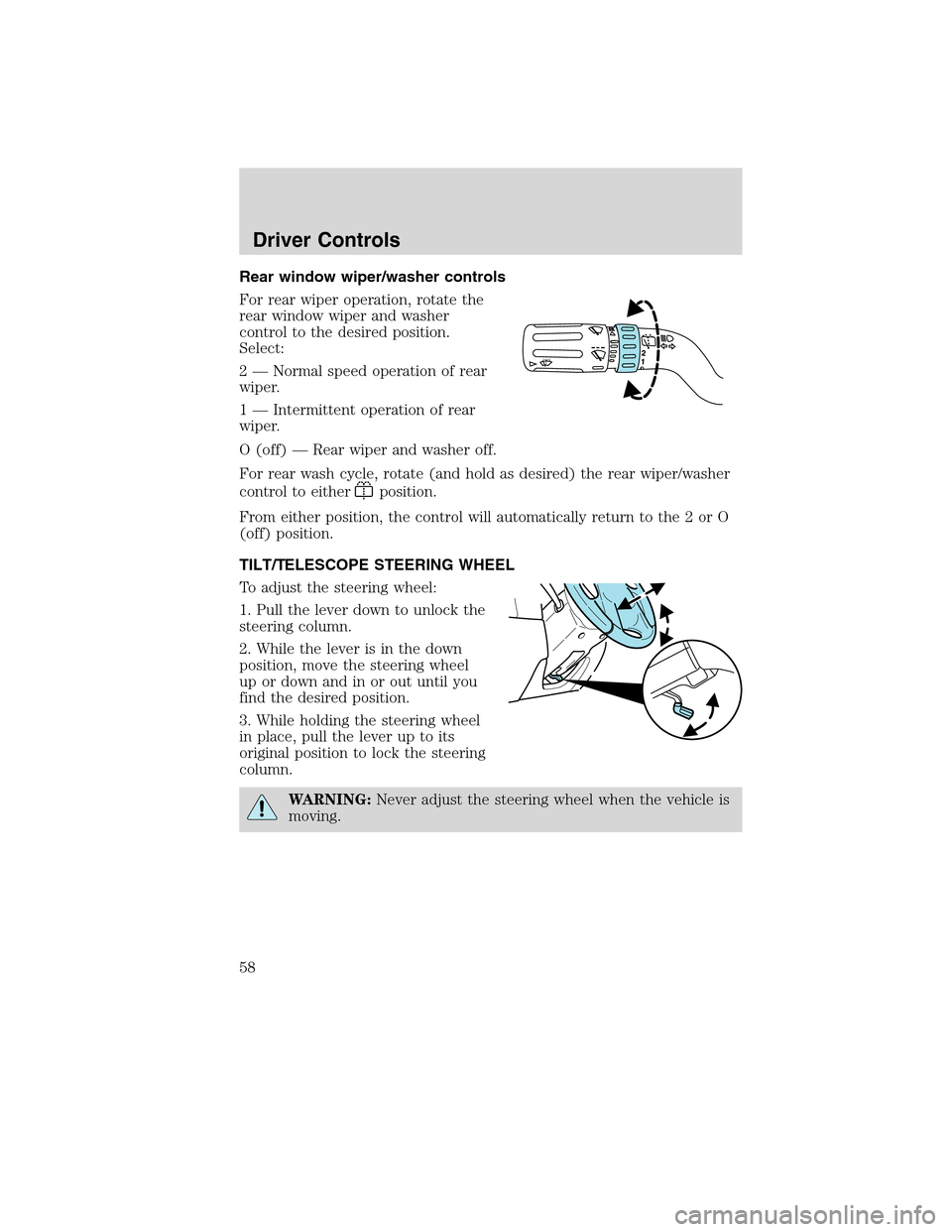
Rear window wiper/washer controls
For rear wiper operation, rotate the
rear window wiper and washer
control to the desired position.
Select:
2 — Normal speed operation of rear
wiper.
1 — Intermittent operation of rear
wiper.
O (off) — Rear wiper and washer off.
For rear wash cycle, rotate (and hold as desired) the rear wiper/washer
control to either
position.
From either position, the control will automatically return to the 2 or O
(off) position.
TILT/TELESCOPE STEERING WHEEL
To adjust the steering wheel:
1. Pull the lever down to unlock the
steering column.
2. While the lever is in the down
position, move the steering wheel
up or down and in or out until you
find the desired position.
3. While holding the steering wheel
in place, pull the lever up to its
original position to lock the steering
column.
WARNING:Never adjust the steering wheel when the vehicle is
moving.
Driver Controls
58
2010 MKX(mkx)
Owners Guide(own2002), 1st Printing
USA(fus)