Page 68 of 358
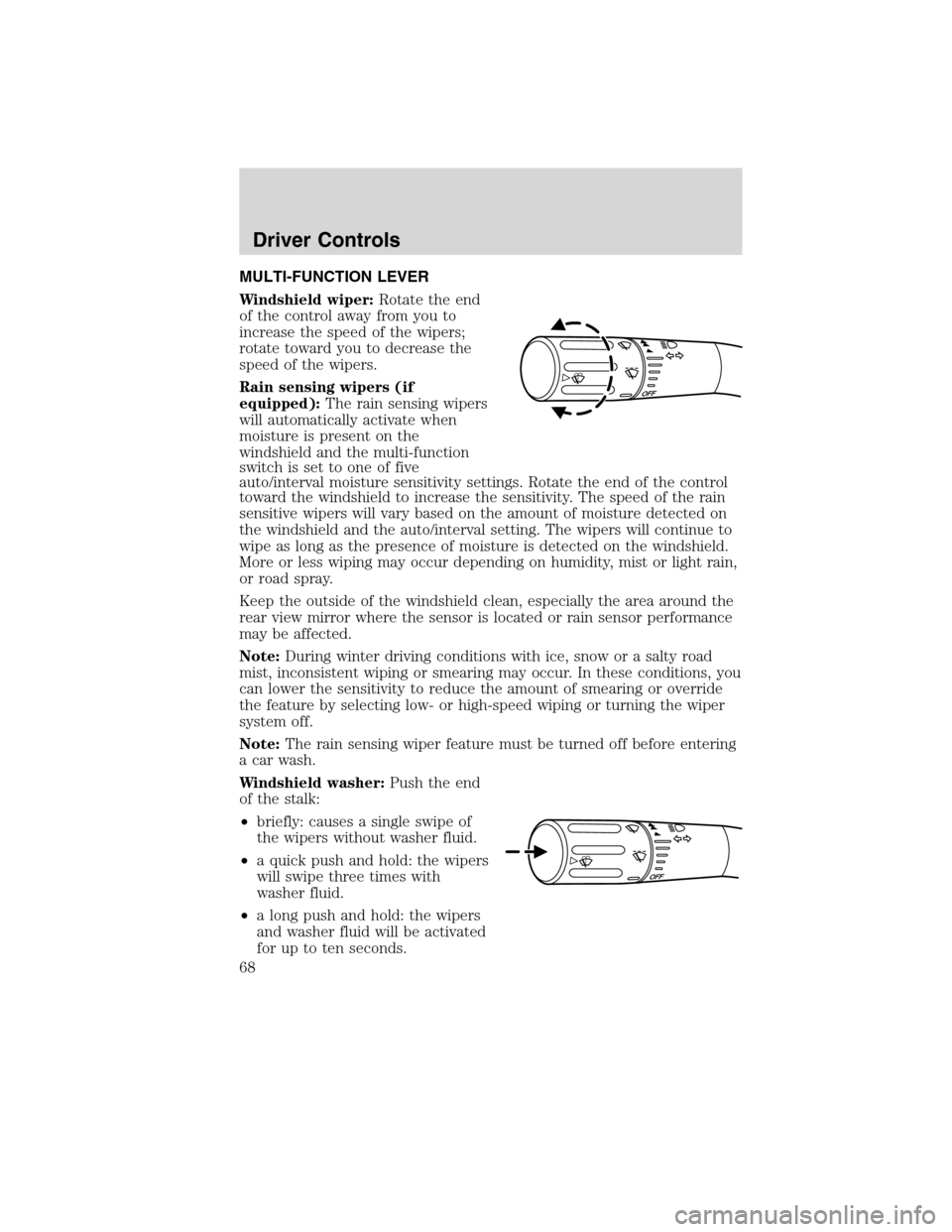
MULTI-FUNCTION LEVER
Windshield wiper:Rotate the end
of the control away from you to
increase the speed of the wipers;
rotate toward you to decrease the
speed of the wipers.
Rain sensing wipers (if
equipped):The rain sensing wipers
will automatically activate when
moisture is present on the
windshield and the multi-function
switch is set to one of five
auto/interval moisture sensitivity settings. Rotate the end of the control
toward the windshield to increase the sensitivity. The speed of the rain
sensitive wipers will vary based on the amount of moisture detected on
the windshield and the auto/interval setting. The wipers will continue to
wipe as long as the presence of moisture is detected on the windshield.
More or less wiping may occur depending on humidity, mist or light rain,
or road spray.
Keep the outside of the windshield clean, especially the area around the
rear view mirror where the sensor is located or rain sensor performance
may be affected.
Note:During winter driving conditions with ice, snow or a salty road
mist, inconsistent wiping or smearing may occur. In these conditions, you
can lower the sensitivity to reduce the amount of smearing or override
the feature by selecting low- or high-speed wiping or turning the wiper
system off.
Note:The rain sensing wiper feature must be turned off before entering
a car wash.
Windshield washer:Push the end
of the stalk:
•briefly: causes a single swipe of
the wipers without washer fluid.
•a quick push and hold: the wipers
will swipe three times with
washer fluid.
•a long push and hold: the wipers
and washer fluid will be activated
for up to ten seconds.
Driver Controls
68
2010 MKS(mks)
Owners Guide(own2002), 1st Printing
USA(fus)
Page 69 of 358

Courtesy wipe feature:One extra wipe will occur a few seconds after
washing the front window to clear any excess washer fluid remaining on
the windshield.
Note:Do not operate the washer when the washer reservoir is empty.
This may cause the washer pump to overheat. Check the washer fluid
level frequently. Do not operate the wipers when the windshield is dry.
This may scratch the glass, damage the wiper blades and cause the wiper
motor to burn out. Before operating the wiper on a dry windshield,
always use the windshield washer. In freezing weather, be sure the wiper
blades are not frozen to the windshield before operating the wipers.
Windshield wiper rainlamp feature
When the windshield wipers are turned on during daylight, and the
headlamp control is in the autolamp position, the exterior lamps will turn
on after a brief delay and will remain on until the wipers are turned off.
POWER TILT/TELESCOPE STEERING COLUMN
The steering column can be
adjusted manually by moving the
four-way rocker adjustment control
located below the turn signal/wiper
control stalk. Hold the control to
adjust.
The telescope function is adjusted
by moving the control toward the
driver to telescope out, and toward
the instrument panel to telescope
in.
The tilt function is adjusted by moving the control up or down.
During easy exit, when you remove the key, the column will move to the
full in and up position. When the key is inserted into the ignition, the
column will return to the previous setting.
WARNING:Never adjust the steering wheel when the vehicle is
moving.
Driver Controls
69
2010 MKS(mks)
Owners Guide(own2002), 1st Printing
USA(fus)
Page 70 of 358
ILLUMINATED VISOR MIRROR
Lift the mirror cover to turn on the
visor mirror lamp.
Slide on rod feature
Rotate the visor towards the side
window and extend it rearward for
additional sunlight coverage.
Note:To stow the visor back into
the headliner, visor must be
retracted before moving it back
toward the windshield.
OVERHEAD CONSOLE
The appearance of your vehicle’s overhead console will vary according to
your option package.
Storage compartment
The storage compartment may be used to store a pair of sunglasses.
Press the release area on the rear edge of the bin door to open the
storage compartment. The door will open to the full open position.
Single bin compartment
Driver Controls
70
2010 MKS(mks)
Owners Guide(own2002), 1st Printing
USA(fus)
Page 71 of 358

Double bin compartment
ELECTRONIC COMPASS
The compass heading is displayed in the Center Integrated Display
(CID).
The compass reading may be affected when you drive near large
buildings, bridges, power lines and powerful broadcast antenna. Magnetic
or metallic objects placed in, on or near the vehicle may also affect
compass accuracy.
Usually, when something affects the compass readings, the compass will
correct itself after a few days of operating your vehicle in normal
conditions. If the compass still appears to be inaccurate, a manual
calibration may be necessary. Refer toCompass calibration
adjustment.
Most geographic areas (zones) have a magnetic north compass point that
varies slightly from the northerly direction on maps. This variation is four
degrees between adjacent zones and will become noticeable as the
vehicle crosses multiple zones. A correct zone setting will eliminate this
error. Refer toCompass zone adjustment.
Driver Controls
71
2010 MKS(mks)
Owners Guide(own2002), 1st Printing
USA(fus)
Page 72 of 358
Compass zone adjustment
1. Determine which magnetic zone
you are in for your geographic
location by referring to the zone
map.
2. Turn ignition to the on position.
3. Press and hold the 7 and 9 radio
preset buttons together for
approximately five seconds until
ZONE XX appears in the CID.
4. Press and release the 7 and 9
radio preset buttons together,
repeatedly until ZONE XX changes
to the correct zone (1–15) in the
CID.
5. The direction will display after
the buttons are released. The zone
is now updated.
Compass calibration adjustment
Perform compass calibration in an open area free from steel structures
and high voltage lines. For optimum calibration, turn off all electrical
accessories (heater/air conditioning, wipers, etc.) and make sure all
vehicle doors are shut.
1. Start the vehicle.
1 2 3
4
5
6 7 8 9 101112 13 14 15
Driver Controls
72
2010 MKS(mks)
Owners Guide(own2002), 1st Printing
USA(fus)
Page 73 of 358

2. To calibrate, press and hold the 7
and 9 radio preset buttons together
for approximately 10 seconds until
CAL appears. Release the buttons.
3. Slowly drive the vehicle in a
circle (less than 3 mph [5 km/h])
until the CAL display changes to the
direction value (N, S, E, W, etc.). It
may take up to five circles to
complete calibration.
4. The compass is now calibrated.
CENTER CONSOLE
Your vehicle may be equipped with a variety of console features. These
include:
1. Cupholders
2. Driver and passenger arm rests
that slide forward or rearward and
also opens the utility compartment
that has an audio input jack, USB
port and power point inside.
Note:Move the arm rests to the
rearward position to open the utility
compartment.
3. Rear power point, heated seat
switches and air vents to the rear seating positions.
4. Power point door and a power rear sunshade control (if equipped).
WARNING:Use only soft cups in the cupholder. Hard objects
can injure you in a collision.
AUXILIARY POWER POINT (12VDC)
Power outlets are designed for accessory plugs only. Do not insert
any other object in the power outlet as this will damage the
outlet and blow the fuse. Do not hang any type of accessory or
accessory bracket from the plug. Improper use of the power
outlet can cause damage not covered by your warranty.
Driver Controls
73
2010 MKS(mks)
Owners Guide(own2002), 1st Printing
USA(fus)
Page 74 of 358

Auxiliary power point can be found in the following location:
•On the center console
•Inside the utility compartment
•On the rear of the center console accessible from the rear seat
Do not use the power point for operating the cigarette lighter element (if
equipped).
To prevent the fuse from being blown, do not use the power point(s)
over the vehicle capacity of 12 VDC/180W. If the power point or cigar
lighter socket is not working, a fuse may have blown. Refer toFuses and
relaysin theRoadside Emergencieschapter for information on
checking and replacing fuses.
To have full capacity usage of your power point, the engine is required to
be running to avoid unintentional discharge of the battery. To prevent
the battery from being discharged:
•do not use the power point longer than necessary when the engine is
not running,
•do not leave battery chargers, video game adapters, computers and
other devices plugged in overnight or when the vehicle is parked for
extended periods.
Always keep the power point caps closed when not being used.
POWER WINDOWS
WARNING:Do not leave children unattended in the vehicle and
do not let children play with the power windows. They may
seriously injure themselves.
WARNING:When closing the power windows, you should verify
they are free of obstructions and ensure that children and/or
pets are not in the proximity of the window openings.
Driver Controls
74
2010 MKS(mks)
Owners Guide(own2002), 1st Printing
USA(fus)
Page 75 of 358

Press and pull the switches to open
and close windows.
•Press down (to the first detent)
and hold the switch to open.
•Pull up (to the first detent) and
hold the switch to close.
Rear Window Buffeting:When one or both of the rear windows are
open, the vehicle may demonstrate a wind throb or buffeting noise. This
noise can be alleviated by lowering a front window approximately two to
three inches.
Express-down (One-touch down, all windows)
Allows the windows to open fully
without holding the control down.
Press the switch completely down to
the second detent and release
quickly. The window will open fully.
Momentarily press the switch to any
position to stop the window
operation.
Express-up (One-touch up, all windows)
Allows the windows to close fully
without holding the control up. Pull
the switch completely up to the
second detent and release quickly.
The window will close fully.
Momentarily press the switch to any
position to stop the window
operation.
Global open windows
You can open the vehicle’s windows, and (if equipped) vent the moon
roof (power shade opens) by using the
control on the remote
transmitter.
Press and hold the
control on the transmitter for at least two
seconds, to begin to open the windows and vent the moon roof (power
shade opens). For the transmitter, pressing either the
orcontrol
on the transmitter will stop all motion.
A
U
T
OA
U
T
O
Driver Controls
75
2010 MKS(mks)
Owners Guide(own2002), 1st Printing
USA(fus)

