2010 LINCOLN MKS warning lights
[x] Cancel search: warning lightsPage 169 of 358

In case there is a problem with the
front passenger sensing system, the
airbag readiness lamp in the
instrument cluster will stay lit.
If the airbag readiness lamp is lit, do the following:
The driver and/or adult passengers should check for any objects that
may be lodged underneath the front passenger seat or cargo interfering
with the seat.
If objects are lodged and/or cargo is interfering with the seat; please take
the following steps to remove the obstruction:
•Pull the vehicle over.
•Switch the vehicle off.
•Driver and/or adult passengers should check for any objects lodged
underneath the front passenger seat or cargo interfering with the seat.
•Remove the obstruction(s) (if found).
•Restart the vehicle.
•Wait at least two minutes and verify that the airbag readiness lamp is
no longer illuminated
•If the airbag readiness lamp remains illuminated, this may or may/not
be a problem due to the front passenger sensing system.
DO NOT attempt to repair or service the system; take your vehicle
immediately to an authorized dealer.
If it is necessary to modify an advanced front airbag system to
accommodate a person with disabilities, contact the Ford Customer
Relationship Center at the phone number shown in theCustomer
Assistancechapter of thisOwner’s Guide.
WARNING:Any alteration/modification to the front passenger
seat may affect the performance of the front passenger sensing
system.
Determining if the system is operational
The supplemental restraint system uses a warning indicator light in the
instrument cluster or a back-up tone to indicate the condition of the
system. Refer to theWarning lights and chimessection in the
Instrument Clusterchapter. Routine maintenance of the airbag is not
required.
Seating and Safety Restraints
169
2010 MKS(mks)
Owners Guide(own2002), 1st Printing
USA(fus)
Page 212 of 358

Low Tire
Pressure
Warning LightPossible
causeCustomer Action Required
Flashing Warning
LightSpare tire in
useYour temporary spare tire is in
use. Repair the damaged road
wheel and re-mount it on the
vehicle to restore system
functionality. For a description of
how the system functions under
these conditions, refer toWhen
your temporary spare tire is
installedin this section.
TPMS
malfunctionIf your tires are properly inflated
and your spare tire is not in use
and the TPMS warning light still
flashes, contact your authorized
dealer as soon as possible.
When inflating your tires
When putting air into your tires (such as at a gas station or in your
garage), the Tire Pressure Monitoring System may not respond
immediately to the air added to your tires.
It may take up to two minutes of driving over 20 mph (32 km/h) for the
light to turn OFF after you have filled your tires to the recommended
inflation pressure.
How temperature affects your tire pressure
The Tire Pressure Monitoring System (TPMS) monitors tire pressure in
each pneumatic tire. While driving in a normal manner, a typical
passenger tire inflation pressure may increase approximately 2 to 4 psi
(14 to 28 kPa) from a cold start situation. If the vehicle is stationary
over night with the outside temperature significantly lower than the
daytime temperature, the tire pressure may decrease approximately 3 psi
(21 kPa) for a drop of 30°F (17°C) in ambient temperature. This lower
pressure value may be detected by the TPMS as being significantly lower
than the recommended inflation pressure and activate the TPMS warning
for low tire pressure. If the low tire pressure warning light is ON, visually
check each tire to verify that no tire is flat. (If one or more tires are flat,
repair as necessary.) Check air pressure in the road tires. If any tire is
under-inflated, carefully drive the vehicle to the nearest location where
air can be added to the tires. Inflate all the tires to the recommended
inflation pressure.
Tires, Wheels and Loading
212
2010 MKS(mks)
Owners Guide(own2002), 1st Printing
USA(fus)
Page 221 of 358

If you use a rental trailer, follow the instructions that the rental agency
gives to you.
Do not attach safety chains to the bumper.
Trailer brakes
Electric brakes and manual, automatic or surge-type trailer brakes are
safe if installed properly and adjusted to the manufacturer’s
specifications. The trailer brakes must meet local and Federal
regulations.
WARNING:Do not connect a trailer’s hydraulic brake system
directly to your vehicle’s brake system. Your vehicle may not
have enough braking power and your chances of having a collision
greatly increase.
WARNING:Do not operate Adaptive Cruise Control (ACC)
when towing a trailer equipped with brakes. Aftermarket trailer
brakes will not function properly when ACC is activated, which may
lead to loss of vehicle control, increasing the risk of serious injury.
The braking system of the tow vehicle is rated for operation at the
GVWR not GCWR.
Trailer lamps
Trailer lamps are required on most towed vehicles. Make sure all running
lights, brake lights, turn signals and hazard lights are working. Do not
connect trailer lamps directly to your vehicle’s tail lamps. This can cause
damage to your vehicle’s electrical system. Contact your authorized
dealer or trailer rental agency for proper instructions and equipment for
hooking up trailer lamps.
Driving while you tow
When towing a trailer:
•Turn off the speed control. The speed control may shut off
automatically when you are towing on long, steep grades.
•Consult your local motor vehicle speed regulations for towing a trailer.
Tires, Wheels and Loading
221
2010 MKS(mks)
Owners Guide(own2002), 1st Printing
USA(fus)
Page 224 of 358

STARTING
Positions of the ignition (if equipped)
If your vehicle is equipped with a push button start system, refer to
Push button start systemin this section for ignition modes.
1. Off— locks the gearshift lever
and allows key removal. This
position also shuts the engine and
all electrical accessories off.
2. Accessory— allows the electrical
accessories such as the radio to
operate while the engine is not
running.
3. On— all electrical circuits operational. Warning lights illuminated. Key
position when driving.
4. Start— cranks the engine. Release the key as soon as the engine
starts.
Starting your vehicle
This system meets all Canadian interference-causing equipment standard
requirements regulating the impulse electrical field strength of radio
noise.
Don’t press the accelerator before or during starting. Only use the
accelerator when you have difficulty starting the engine. For more
information on starting the vehicle, refer toStarting the enginein this
chapter.
To avoid potential transmission damage at extremely cold temperatures
(below -20°F [-30°C]), it is recommended that the vehicle be warmed up
to normal operating temperature before driving at highway speeds above
50 mph (80 km/h). Normal operating temperature is normally reached
after 10 minutes of moderate driving or idling.
WARNING:Extended idling at high engine speeds can produce
very high temperatures in the engine and exhaust system,
creating the risk of fire or other damage.
WARNING:Do not park, idle, or drive your vehicle in dry grass
or other dry ground cover. The emission system heats up the
engine compartment and exhaust system, which can start a fire.
Driving
224
2010 MKS(mks)
Owners Guide(own2002), 1st Printing
USA(fus)
Page 226 of 358

•Make sure the gearshift lever is in
P (Park).
3. Turn the key to 3 (on) without
turning the key to 4 (start).
If your vehicle is equipped with a
push button start system, refer to
Push button start systemin this
section for ignition modes.
Some warning lights will briefly illuminate. SeeWarning lights and
chimesin theInstrument Clusterchapter for more information
regarding the warning lights.
Starting the engine
Note:If your vehicle is equipped with a push button start system, refer
toPush button start systemin this section for starting.
Driving
226
2010 MKS(mks)
Owners Guide(own2002), 1st Printing
USA(fus)
Page 228 of 358
2. Accessory — press and release the START/STOP button without
applying the brake pedal. This allows electrical accessories such as the
radio to operate while the engine is not running. ACCESSORY POWER
ACTIVE and PRESS BRAKE TO START will be displayed in the message
center. Refer toMessage centerin theInstrument Clusterchapter for
more information.
3. On — press and hold the START/STOP button for at least one second
without applying the brake pedal. This will power your vehicle’s electrical
system and the warning lights in the instrument cluster will illuminate,
but the engine will remain off.Note:You cannot immediately start your
vehicle from the on mode. If you would like to start the vehicle and you
are in on mode, you must first switch the vehicle off.
4. Start — press the START/STOP button (for any length of time) while
applying the brake pedal.Note:The indicator light on the start button
will illuminate when the vehicle is in on mode and when the engine is
started.
There may be areas inside your vehicle where the IA key is not detected.
If the message NO KEY DETECTED appears on your message center
when you press the START/STOP button, it may be necessary to move
your IA key to another area within the vehicle. The IA key may not be
detected near the roof (between the driver or passenger sunvisor and
the roof, or in the overhead console area) or in the extreme corners of
the rear package tray, near your audio speakers. It is not recommended
that you stow the IA key in these locations. If you move the IA key to a
location where it has been detected before and you still see the NO KEY
DETECTED message, your IA key’s battery may be low or you may be in
an area with excessive radio frequency interference. If this occurs, you
can use the backup method to start your vehicle (see below).
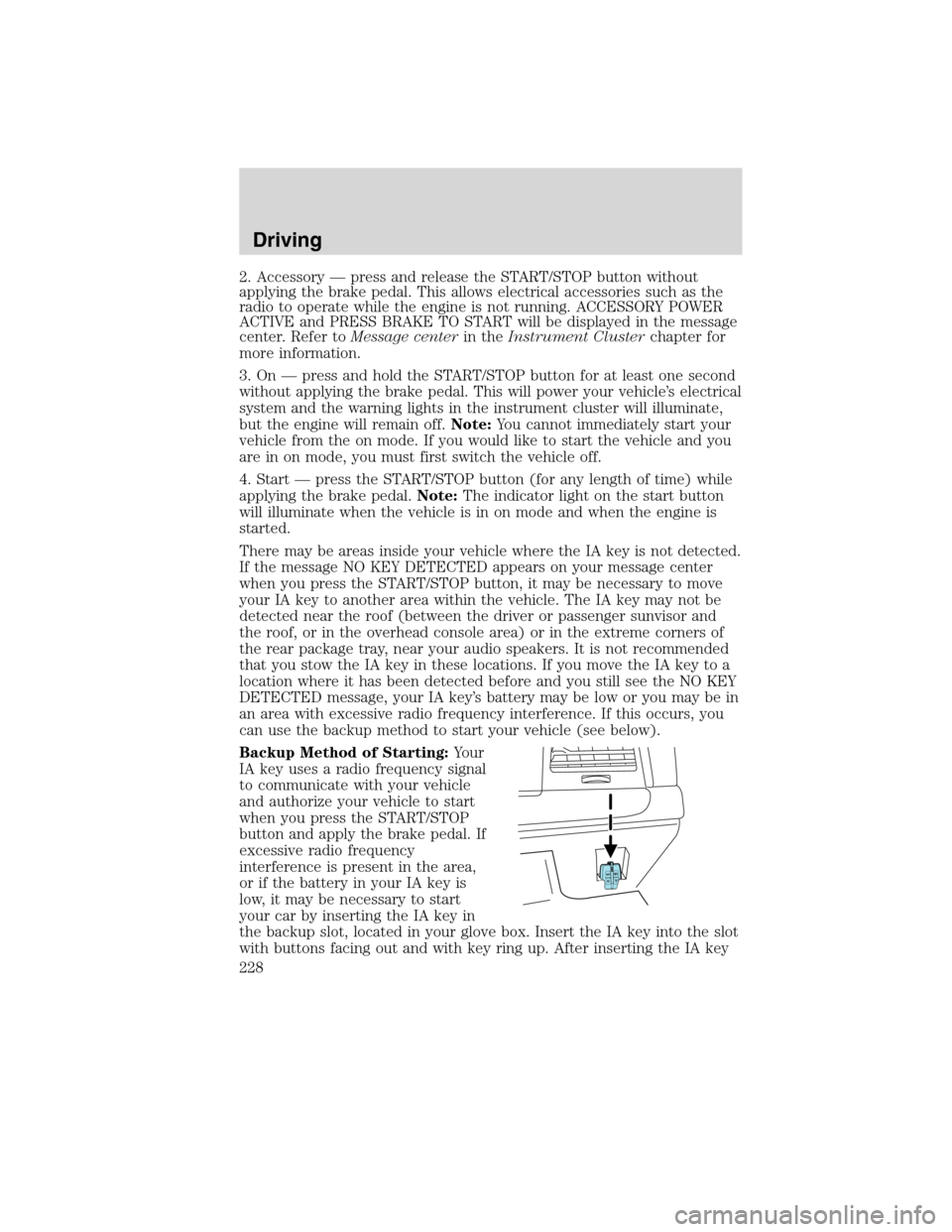
Backup Method of Starting:Your
IA key uses a radio frequency signal
to communicate with your vehicle
and authorize your vehicle to start
when you press the START/STOP
button and apply the brake pedal. If
excessive radio frequency
interference is present in the area,
or if the battery in your IA key is
low, it may be necessary to start
your car by inserting the IA key in
the backup slot, located in your glove box. Insert the IA key into the slot
with buttons facing out and with key ring up. After inserting the IA key
Driving
228
2010 MKS(mks)
Owners Guide(own2002), 1st Printing
USA(fus)
Page 327 of 358

If you have run out of fuel:
•You may need to cycle the ignition from off to on several times after
refueling to allow the fuel system to pump the fuel from the tank to
the engine. On restarting, cranking time will take a few seconds longer
than normal.
•Normally, adding 1 gallon (3.8L) of fuel is enough to restart the
engine. If the vehicle is out of fuel and on a steep grade, more than
1 gallon (3.8L) may be required.
•The service engine soon
indicator may come on. For more
information on the service engine soon indicator, refer toWarning
lights and chimesin theInstrument Clusterchapter.
Refilling with a portable fuel container
With the Easy Fuel™ “no cap” fuel system, use the following directions
when filling from a portable fuel container:
WARNING:Do not insert the nozzle of portable fuel containers
or aftermarket funnels into the Easy Fuel™ system. This could
damage the fuel system and its seal, and may cause fuel to run onto
the ground instead of filling the tank, which could result in serious
personal injury.
WARNING:Do not try to pry open or push open the Easy
Fuel™ system with foreign objects. This could damage the fuel
system and its seal and cause injury to you or others.
When filling the vehicle’s fuel tank from a portable fuel container, use the
funnel included with the vehicle.
1. After lifting the trunk cargo
cover, locate the white plastic
funnel. It is attached to the rear,
lower edge of the spare tire
compartment.
Maintenance and Specifications
327
2010 MKS(mks)
Owners Guide(own2002), 1st Printing
USA(fus)
Page 354 of 358

Engine ........................................343
cleaning ...................................300
coolant .....................................316
fail-safe cooling .......................321
idle speed control ...................314
lubrication specifications .......340
refill capacities ........................340
service points ..................308–309
Engine block heater .................230
Engine oil ..................................311
change oil soon warning,
message center .......................311
checking and adding ..............311
dipstick ....................................311
filter, specifications ........313, 339
recommendations ...................313
refill capacities ........................340
specifications ..........................340
Event data recording ....................7
Exhaust fumes ..........................229
F
Fail safe cooling ........................321
Fleet MyKey programming ......129
Fluid capacities .........................340
Fog lamps ....................................57
Four-Wheel Drive vehicles
driving off road .......................258
Fuel ............................................322
calculating fuel
economy ............................20, 328
cap ...........................................324
capacity ...................................340
choosing the right fuel ...........325
comparisons with EPA fuel
economy estimates .................331
detergent in fuel .....................326
filler funnel .............................326filling your vehicle with
fuel ...........................322, 324, 328
filter, specifications ........322, 339
improving fuel economy ........328
octane rating ...................325, 343
quality ......................................326
running out of fuel .........283, 326
safety information relating to
automotive fuels .....................322
Fuses ..........................................267
G
Garage door opener ....................92
Gas cap (see Fuel cap) ............324
Gas mileage
(see Fuel economy) .................328
Gauges .........................................17
H
Hazard flashers .........................266
Headlamps ...................................56
aiming ........................................62
autolamp system .......................56
bulb specifications ....................65
daytime running lights .............61
flash to pass ..............................61
high beam .................................58
turning on and off ....................56
Heated Seats .....................140–141
Heating
heating and air conditioning
system .................................48, 51
Homelink wireless control
system ..........................................93
Hood ..........................................307
I
Ignition ...............................224, 343
Index
354
2010 MKS(mks)
Owners Guide(own2002), 1st Printing
USA(fus)