Page 212 of 578

211
2-5. Driving information
2
When driving
IS350/250_U
Selecting tire chainsTire chains can be mounted on 16- and 17-inch tires. They cannot be
mounted on 18-inch tires. Use the correct tire chain size when mounting
the tire chains. Chain size is regulated for each tire size. Side chain
(0.12 in. [3 mm] in diameter)
Cross chain
(0.16 in. [4 mm] in diameter)
Regulations on the use of tire chains
● Regulations regarding the use of tire chains vary according to location
and type of road. Always check local regulations before installing
chains.
● Install the chains on the rear tires.
● Retighten the chains after driving 1 /4 1 /2 mile (0.5 1.0 km).
■When driving the vehicle
Accelerate the vehicle slowly and drive at a reduced speed suitable
to road conditions.
■ When parking the vehicle
Park the vehicle and move the shift lever to P (automatic transmis-
sion) or 1 or R (manual transmission) without setting the parking
brake. The parking brake may freeze up, preventing it from being
released. If necessary, block the wheels to prevent inadvertent slid-
ing or creeping.
Page 218 of 578
217
2-5. Driving information
2
When driving
IS350/250_U
NOTICE
■Dinghy towing direction
■To prevent the steering from locking
Ensure the “ENGINE START STOP” switch is in ACCESSORY mode.
Do not tow the vehicle backwards.
Doing so may cause serious damage.
Page 220 of 578

Interior features3
219
IS350/250_U
3-5. Using the interior lightsInterior lights list ..................... 329
• Interior lights ......................... 331
• Personal lights ....................... 331
3-6. Using the storage features
List of storage features ........ 333
• Glove box .............................. 333
• Console boxes ..................... 334
• Overhead console .............. 335
• Cup holders .......................... 336
• Bottle holders/ door pockets......................... 338 3-7. Other interior features
Sun visors ................................. 339
Vanity mirrors ......................... 340
Clock .......................................... 341
Satellite switches ................... 342
Ashtrays.................................... 345
Cigarette lighter .................... 346
Power outlet ............................ 347
Seat heaters ............................ 348
Seat heaters and ventilators .............................. 351
Armrest .................................... 354
Rear sunshade ........................ 355
Trunk storage extension ...... 357
Coat hooks .............................. 358
Floor mat .................................. 359
Trunk features ......................... 360
Garage door opener ............ 363
Compass .................................. 369
Safety Connect ...................... 373
Page 228 of 578

227
3-1. Using the air conditioning system and defogger
3
Interior features
IS350/250_U
■Automatic mode for air intake control (IS350 only)
In automatic mode, the system detects exhaust gas and other pollutants and auto-
matically switches between outside air and recirculated air modes.
■Micro dust and pollen filter
●In order to prevent the windshield from fogging up when the outside air is cold,
the following may occur.
• Outside air mode does not switch to .
• The air conditioning system operates automatically.
• The operation cancels after 1 minute.
●In rainy weather, the windows may fog up. Press .
CAUTION
■To prevent the windshield from fogging up
Do not use during cool air operation in extremely humid weather. The dif-
ference between the temperature of the outside air and that of the windshield can
cause the outer surface of the windshield to fog up, blocking your vision.
NOTICE
■To prevent battery discharge
Do not leave the automatic air conditioning system on longer than necessary when
the engine is off.
Page 308 of 578
307
3-4. Using the hands-free phone system (for mobile phones)
3
Interior features
IS350/250_U
“Setup”
“Security”
“Set PIN”Setting a PIN code
“Phbk Lock”Locking the phone book
“Phbk Unlock”Unlocking the phone book
“Phone
Setup”
“Pair Phone”Registering the mobile phone
to be used
“Connect”Selecting a mobile phone to be
used
“Change Name”Changing the registered name
of a mobile phone
“List Phones”Listing the registered mobile
phones
“Set Passkey”Changing the passkey
“Delete Phone”Deleting a registered mobile
phone
“System
Setup”
“Guidance Vol”Setting voice guidance volume
“Device Name”Displaying the Bluetooth®
device address and name
“Initialize”Initializing the system
First menuSecond menuThird menuOperation detail
Page 309 of 578
308
3-4. Using the hands-free phone system (for mobile phones)
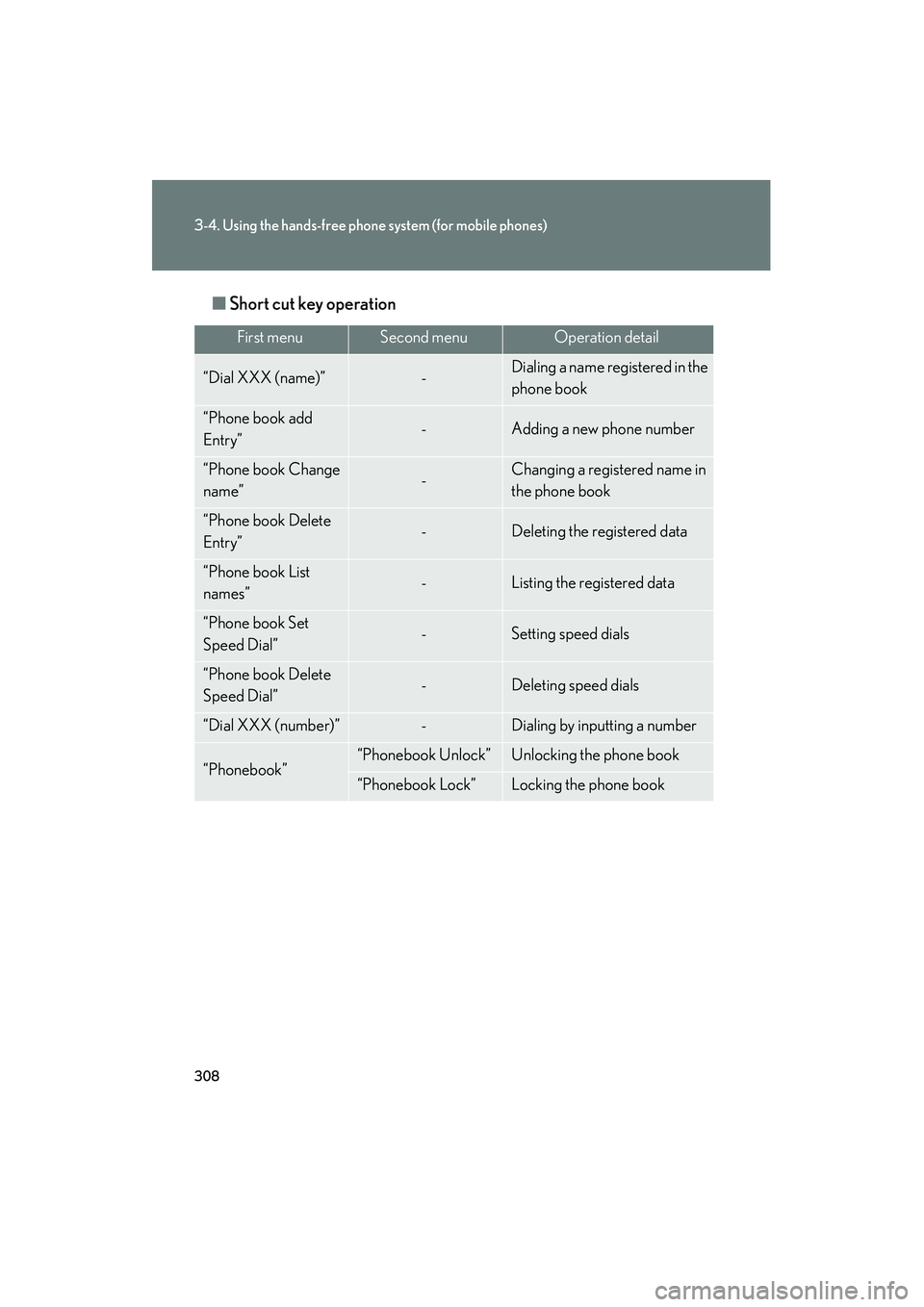
IS350/250_U■
Short cut key operation
First menuSecond menuOperation detail
“Dial XXX (name)”-Dialing a name registered in the
phone book
“Phone book add
Entry”-Adding a new phone number
“Phone book Change
name”-Changing a registered name in
the phone book
“Phone book Delete
Entry”-Deleting the registered data
“Phone book List
names”-Listing the registered data
“Phone book Set
Speed Dial”-Setting speed dials
“Phone book Delete
Speed Dial”-Deleting speed dials
“Dial XXX (number)”-Dialing by inputting a number
“Phonebook”“Phonebook Unlock”Unlocking the phone book
“Phonebook Lock”Locking the phone book
Page 320 of 578
319
3-4. Using the hands-free phone system (for mobile phones)
3
Interior features
IS350/250_U
Security and system setup
■Security setting items an d operation procedures
To enter the menu for each function, follow the steps below using a
voice command or , and :
●Setting or changing the PIN (Personal Identification Number)
1. “Setup” → 2. “Security” → 3. “Set PIN”
● Locking the phone book
1. “Setup” → 2. “Security” → 3. “Phonebook Lock (Phbk Lock)”
● Unlocking the phone book
1. “Setup” → 2. “Security” → 3. “Phonebook Unlock (Phbk
Unlock)”
■ System setup items and operation procedures
To enter the menu for each function, follow the steps below using
, and :
● Setting voice guidance volume
1. “Setup” → 2. “System Setup” → 3. “Guidance Vol”
● Displaying the Bluetooth
® device address and name
1. “Setup” → 2. “System Setup” → 3. “Device Name”
● Initializing the system
1. “Setup” → 2. “System Setup” → 3. “Initialize”
Page 321 of 578
320
3-4. Using the hands-free phone system (for mobile phones)
IS350/250_U
Setting or changing the PIN■ Setting a PIN
Select “Set PIN” using a voice command or , and .
Enter a PIN using a voice command or , and .
When using , and , input the code 1 digit at a time.
■ Changing the PIN
Select “Set PIN” using a voice command or , and .
Enter the registered PIN using a voice command or , and .
Enter a new PIN using a voice command or , and .
When using , and , input the code 1 digit at a time.
Locking or unlocking the phone book
Select “Phonebook Lock (Phbk Lock)” or “Phonebook Unlock
(Phbk Unlock)” using a voice command or , and.
Input the PIN by either of the following methods and select “Con-
firm” using a voice command or , and :
a. Press the talk switch and say the registered PIN.
b. Input a new PIN using , and .
STEP1
STEP2
STEP1
STEP2
STEP3
STEP1
STEP2