Page 166 of 611

164
2-2. Instrument cluster
HS250h_U_75033U(Canada)
■Limitations of brightness adjustment
The brightness of the instrument panel lights is automatically adjusted based on the
light sensor detecting how bright the surroundings are. However, if the instrument
panel brightness has been manually set to either the brightest or dimmest setting,
the automatic adjustment will not be performed.
■Hybrid System Indicator
●By keeping the indicator needle within Eco area, environmentally-friendly driv-
ing can be achieved.
Hybrid Eco area shows that gasoline engine power is not being used very often.*
1
●Charge area indicates regeneration*2 status. Regenerated energy will be used
to charge the hybrid battery.
*
1: The gasoline engine will automatically stop and restart under various condi- tions.
*
2: When used in this manual, “regeneration” refers to the conversion of energy created by the movement of the vehicle into electrical energy.
■Customization
Settings (e.g. Sensitivity of the ambient light sensor used for dimming the meter
lights) can be changed. (Customizable features →P. 5 74 )
NOTICE
■To prevent damage to the hybrid system and its components
A high engine coolant temperature warning light (→ P. 492) is installed instead of
an engine coolant temperature gauge. If the high engine coolant temperature
warning light illuminates or flashes, the vehicle may be overheating. Immediately
stop the vehicle in a safe area ( →P. 5 4 1 ) .
Eco area
Eco Driving Indicator Light comes on
Hybrid Eco area
Eco Driving Indicator Light comes on
Charge area
Eco Driving Indicator Light comes on
Powe r a re a
Eco Driving Indicator Light turns off
Page 167 of 611
165
2-2. Instrument cluster
2
When driving
HS250h_U_75033U(Canada)
Indicators and warning lights
The indicator and warning lights on the instrument cluster and center
panel inform the driver of the status of the vehicle’s various systems.
Instrument cluster
Center panel (without a navigation system)
Center panel (with a navigation system)
Page 169 of 611
167
2-2. Instrument cluster
2
When driving
HS250h_U_75033U(Canada)
*1:These lights turn on when the “POWER” switch is turned to the ON modeto indicate that a system check is being performed. They will turn off after
the hybrid system is on, or after a few seconds. There may be a malfunction
in a system if a light does not come on, or if the lights do not turn off. Have
the vehicle inspected by your Lexus dealer.
*2:The indicator flashes to indicate that the system is operating.
*3:The indicator flashes faster than usual to indicate that the system is operat-
ing.
VSC OFF indicator
( → P. 2 2 6 ) Shift position indicators
(→ P. 1 5 3 )
(if equipped)
“PCS” indicator
(→ P. 2 3 3 )SRS airbag on-off
indicator ( →P. 116)
*1
*1, 3*1
Page 170 of 611

168
2-2. Instrument cluster
HS250h_U_75033U(Canada)
CAUTION
■If a safety system warning light does not come on
Should a safety system light such as the ABS and SRS airbag warning light not
come on when you start the hybrid system, this could mean that these systems are
not available to help protect you in an accident, which could result in death or seri-
ous injury. Have the vehicle inspected by your Lexus dealer immediately if this
occurs.
■Warning lights
Warning lights inform the driver of malfunctions in any of the vehi-
cle’s systems. ( →P. 4 9 2 )
*1: These lights turn on when the “POWER” switch is turned to ON mode
to indicate that a system check is being performed. They will turn off
after the hybrid system is on, or after a few seconds. There may be a
malfunction in a system if a light does not come on, or if the lights do not
turn off. Have the vehicle inspected by your Lexus dealer.
*2: The indicator flashes to indicate a malfunction.
(U.S.A.)(Canada)(U.S.A.)(Canada)
redyellow
(U.S.A.)(Canada)(if equipped)
(if equipped)(if equipped)(if equipped)
(if equipped)(for driver)(for front
passenger)
*1*1*1*1*1*1*1
*1*1*1*1*1, 2
*1*1, 2*2*2*2*1*1
*2
Page 185 of 611
183
2
When driving
HS250h_U_75033U(Canada)
2-3. Operating the lights and windshield wipers
Headlight switch
The headlights can be operated manually or automatically.
Turning the end of the lever turns on the lights as follows:
U.S.A. with daytime running rightThe daytime running
lights turn off.
The headlights, park-
ing lights, daytime
running lights and so
on turn on and off
automatically (when
the “POWER” switch
is in ON mode).
The side marker, park-
ing, tail, license plate,
daytime running lights
and instrument panel
lights turn on.
The headlights and all
the lights listed above
(except daytime run-
ning lights) turn on.
Page 186 of 611
184
2-3. Operating the lights and windshield wipers
HS250h_U_75033U(Canada)
Canada, U.S.A. without daytime running lightVehicles with daytime
running light system:
The daytime running
lights turn on.
The headlights, park-
ing lights, daytime
running lights (if
equipped) and so on
turn on and off auto-
matically (when the
“POWER” switch is in
ON mode).
The side marker, park-
ing, tail, license plate,
daytime running lights
and instrument panel
lights turn on.
The headlights and all
the lights listed above
(except daytime run-
ning lights) turn on.
Page 187 of 611
185
2-3. Operating the lights and windshield wipers
2
When driving
HS250h_U_75033U(Canada)
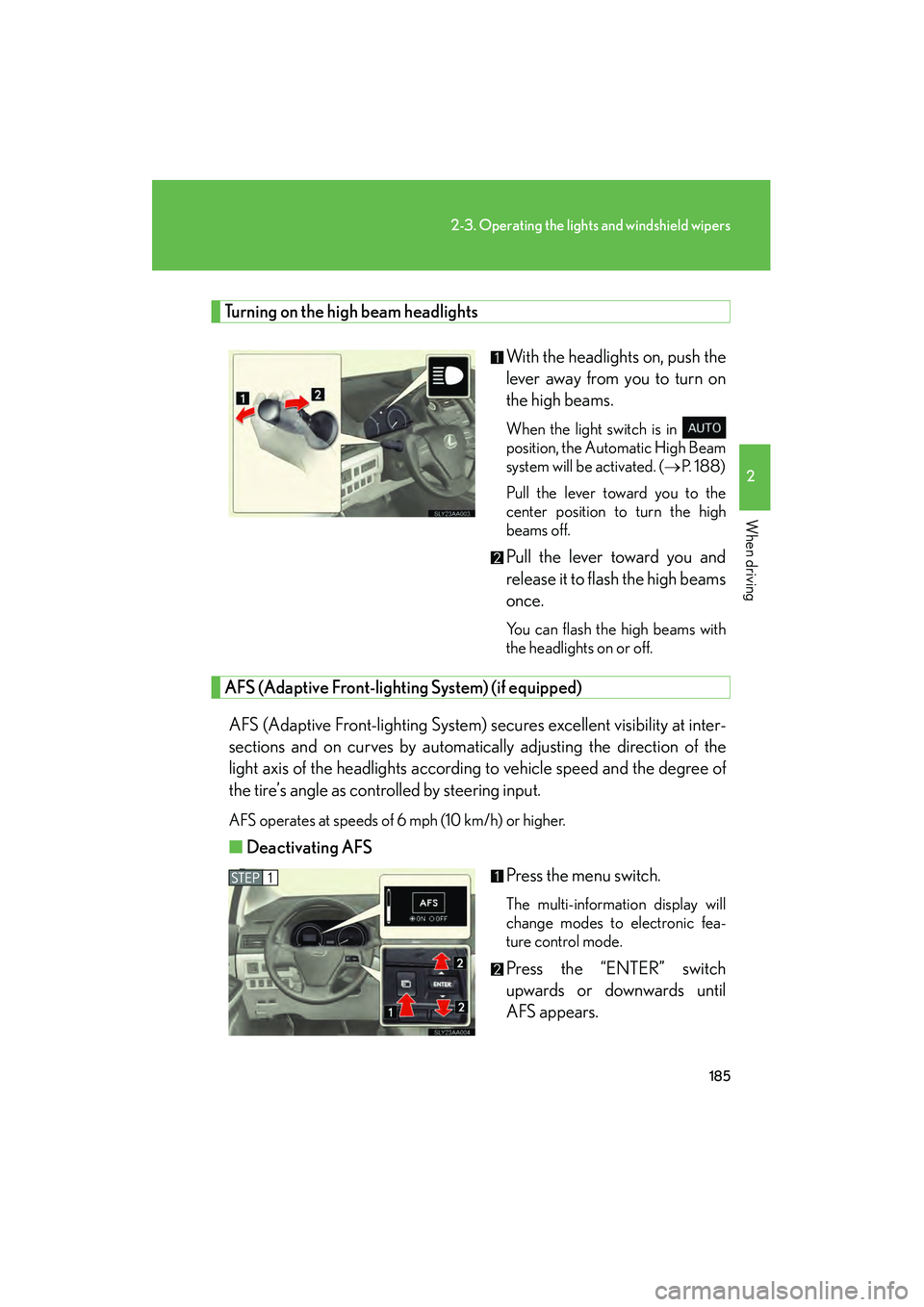
Turning on the high beam headlightsWith the headlights on, push the
lever away from you to turn on
the high beams.
When the light switch is in
position, the Automatic High Beam
system will be activated. (→P. 188)
Pull the lever toward you to the
center position to turn the high
beams off.
Pull the lever toward you and
release it to flash the high beams
once.
You can flash the high beams with
the headlights on or off.
AFS (Adaptive Front-lighting System) (if equipped)
AFS (Adaptive Front-lighting System) secures excellent visibility at inter-
sections and on curves by automatically adjusting the direction of the
light axis of the headlights according to vehicle speed and the degree of
the tire’s angle as controlled by steering input.
AFS operates at speeds of 6 mph (10 km/h) or higher.
■ Deactivating AFS
Press the menu switch.
The multi-information display will
change modes to electronic fea-
ture control mode.
Press the “ENTER” switch
upwards or downwards until
AFS appears.
Page 188 of 611

186
2-3. Operating the lights and windshield wipers
HS250h_U_75033U(Canada)Press the “ENTER” switch to
change to OFF.
The “AFS OFF” indicator will come
on.
Each pressing of the switch turns
AFS on and off.
Press the menu switch to change to
the normal display.
■Daytime running light system (if equipped)
●To make your vehicle more visible to other drivers, the headlights turn on auto-
matically (at a reduced intensity) whenever the hybrid system is started and the
parking brake is released. Daytime running lights are not designed for use at
night.
For the U.S.A.: Daytime running lights can be turned off by operating the switch.
●Compared to turning on the headlights, the daytime running light system offers
greater durability and consumes less electricity, so it can help improve fuel
economy.
■Headlight control sensor
■Automatic light off system
●When the headlights come on: The headlights and tail lights turn off 30 seconds
after a door is opened and closed if the “POWER” switch is turned to ACCES-
SORY mode or turned off. (The lights turn off immediately if on the key is
pressed after all the doors are locked.)
●When only the tail lights come on: The tail lights turn off automatically if the
“POWER” switch is turned to ACCESSORY mode or turned off and the
driver’s door is opened. The sensor may not function properly if an
object is placed on the sensor, or anything
that blocks the sensor is affixed to the wind-
shield.
Doing so interferes with the sensor detecting
the level of ambient light and may cause the
automatic headlight system to malfunction.


