2010 Lexus HS250h light
[x] Cancel search: lightPage 229 of 611
227
2-4. Using other driving systems
2
When driving
HS250h_U_75033U(Canada)■
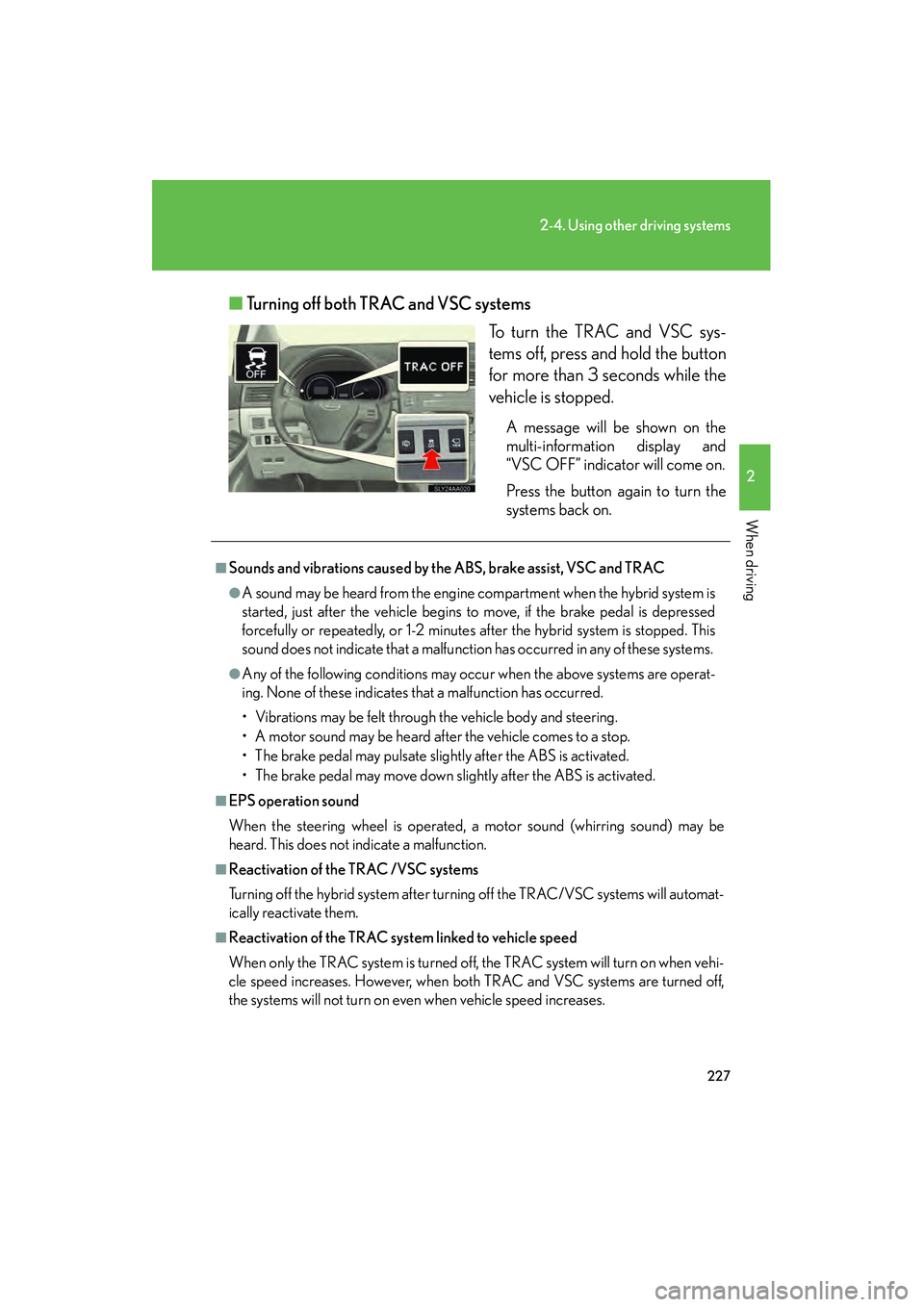
Turning off both TRAC and VSC systems
To turn the TRAC and VSC sys-
tems off, press and hold the button
for more than 3 seconds while the
vehicle is stopped.
A message will be shown on the
multi-information display and
“VSC OFF” indicator will come on.
Press the button again to turn the
systems back on.
■Sounds and vibrations caused by the ABS, brake assist, VSC and TRAC
●A sound may be heard from the engine compartment when the hybrid system is
started, just after the vehicle begins to move, if the brake pedal is depressed
forcefully or repeatedly, or 1-2 minutes after the hybrid system is stopped. This
sound does not indicate that a malfunction has occurred in any of these systems.
●Any of the following conditions may occur when the above systems are operat-
ing. None of these indicates that a malfunction has occurred.
• Vibrations may be felt through the vehicle body and steering.
• A motor sound may be heard after the vehicle comes to a stop.
• The brake pedal may pulsate slightly after the ABS is activated.
• The brake pedal may move down slightly after the ABS is activated.
■EPS operation sound
When the steering wheel is operated, a motor sound (whirring sound) may be
heard. This does not indicate a malfunction.
■Reactivation of the TRAC /VSC systems
Turning off the hybrid system after turning off the TRAC/VSC systems will automat-
ically reactivate them.
■Reactivation of the TRAC system linked to vehicle speed
When only the TRAC system is turned off, the TRAC system will turn on when vehi-
cle speed increases. However, when both TRAC and VSC systems are turned off,
the systems will not turn on even when vehicle speed increases.
Page 230 of 611

228
2-4. Using other driving systems
HS250h_U_75033U(Canada)
■Reduced effectiveness of the EPS system
The effectiveness of the EPS system is reduced to prevent the system from over-
heating when there is frequent steering input over an extended period of time. The
steering wheel may feel heavy as a result. Should this occur, refrain from excessive
steering input or stop the vehicle and turn the hybrid system off. The EPS system
should return to normal within 10 minutes.
CAUTION
■The ABS does not operate effectively when
●Tires with inadequate gripping ability are used (such as excessively worn tires on
a snow covered road).
●The vehicle hydroplanes while driving at high speed on wet or slick road.
■Stopping distance when the ABS is operating will exceed that of normal condi-
tions
The ABS is not designed to shorten the vehicle’s stopping distance. Always main-
tain a safe distance from the vehicle in front of you in the following situations:
●When driving on dirt, gravel or snow-covered roads
●When driving with tire chains
●When driving over bumps in the road
●When driving over roads with potholes or roads with uneven surfaces
■TRAC may not operate effectively when
Directional control and power may not be achievable while driving on slippery road
surfaces, even if the TRAC system is operating.
Do not drive the vehicle in conditions where stability and power may be lost.
■When the VSC is activated
The slip indicator light flashes and a warning buzzer sounds. Always drive carefully.
Reckless driving may cause an accident. Exercise particular care when the indica-
tor light flashes and a buzzer sounds.
■When the TRAC/VSC systems are turned off
Be especially careful and drive at a speed appropriate to the road conditions. As
these are the systems to ensure vehicle stability and driving force, do not turn the
TRAC/VSC systems off unless necessary.
Page 232 of 611

230
2-4. Using other driving systems
HS250h_U_75033U(Canada)
Hill-start assist control
■Hill-start assist control can be operated when
●The shift position is in a position other than P.
●The parking brake is not applied.
●The accelerator pedal is not depressed.
■Hill-start assist control
●While hill-start assist control is operating, the brakes remain automatically
applied after the driver releases the brake pedal. The stop lights and the high
mounted stoplight turn on.
●Hill-start assist control operates for about 2 seconds after the brake pedal is
released.
●If the slip indicator does not flash and the buzzer does not sound when the brake
pedal is further depressed, slightly reduce the pressure on the brake pedal (do
not allow the vehicle to roll backward) and then firmly depress it again. If the sys-
tem still does not operate, check if the operating conditions explained above
have been met.
Hill-start assist control helps to prevent the vehicle from rolling backwards
when starting on an incline or slippery slope.
To engage hill-start assist con-
trol, further depress the brake
pedal when the vehicle is
stopped completely.
A buzzer will sound once to
indicate the system is activated.
The slip indicator will also start
flashing.
Page 234 of 611

232
2-4. Using other driving systems
HS250h_U_75033U(Canada)
Pre-Collision System∗∗
: If equipped
When the radar sensor detects an unav oidable frontal collision, safety sys-
tems such as the brakes and seat belts are automatically engaged to lessen
impact and injuries to occupants as well as vehicle damage.
■ Pre-collision seat belts (front seat belts only)
If the pre-collision sensor detects that a collision is unavoidable, the pre-
collision system will roll up the seat belt before the collision occurs.
The same will happen if the driver makes an emergency braking or loses
control of the vehicle. ( →P. 74 )
However, when the TRAC/VSC systems are disabled, the system will not
operate in the event of skidding.
■ Pre-collision brake assist
When there is a high possibility of a frontal collision, the system applies
greater braking force in relation to how strongly the brake pedal is
depressed.
■Pre-collision braking
When there is a high possibility of a frontal collision, the system warns the
driver using a warning light, warning display and buzzer. If the system
determines that a collision is unavoi dable, the brakes are automatically
applied to reduce the collision speed . Pre-collision braking can be dis-
abled using the pre-collision braking off button.
■ Driver monitor sys tem (if equipped)
When the system determines that there is a possibility of a collision, and
the driver is not facing forward, PCS warnings are given in advance to
warn the driver. If the driver continues to be not facing forward, and a
probable collision is detected, PCS informs the driver of danger by per-
forming slight braking to provide a physically warning (pre-collision alert
braking). (→P. 2 3 4 )
Page 235 of 611

233
2-4. Using other driving systems
2
When driving
HS250h_U_75033U(Canada)
Disabling pre-collision brakingPre-collision braking disabled
Pre-collision braking enabled
The “PCS” warning light will
come on when pre-collision
braking is disabled.
Radar sensorThe radar sensor detects vehicles
or other obstacles on or near the
road ahead and determines
whether a collision is imminent
based on the position, speed, and
heading of the obstacles.
For vehicles equipped with the lane
keeping assist, in addition to the
radar sensor, the vehicle uses a
lane recognition camera in order
to determine whether or not a colli-
sion is likely to occur. (→P. 2 2 4 )
Page 237 of 611

235
2-4. Using other driving systems
2
When driving
HS250h_U_75033U(Canada)
●Pre-collision braking:
• The pre-collision braking off button is not pressed.
• Vehicle speed is greater than about 9 mph (15 km/h).
• The speed at which your vehicle is approaching the obstacle or the vehiclerunning ahead of you is greater than about 9 mph (15 km/h).
●Pre-collision alert braking (vehicle with driver monitor system):
• The pre-collision braking off button is not pressed.
• The system determines that the driver is not facing forward.
• Vehicle speed is greater than about 9 mph (15 km/h).
• The speed at which your vehicle is approaching the obstacle or the vehiclerunning ahead of you is greater than about 24 mph (40 km/h).
■Conditions that may trigger the system even if there is no danger of a collision
●When there is an object by the roadside at the entrance to a curve
●When passing an oncoming vehicle on a curve
●When driving over a narrow iron bridge
●When there is a metal object on the road surface
●When driving on an uneven road surface
●When passing an oncoming vehicle on a left-turn
●When your vehicle rapidly closes on the vehicle in front
When the system is activated in the situations described above, there is also a possi-
bility that the seat belts will roll up quickly and the brakes will be applied with a force
greater than normal. When the seat belt is locked in the retracted position, stop the
vehicle in a safe place, release the seat belt and refasten it.
■Obstacles not detected
The sensor cannot detect plastic obstacles such as traffic cones. There may also be
occasions when the sensor cannot detect pedestrians, animals, bicycles, motorcy-
cles, trees, or snowdrifts.
■When there is a malfunction in the system
Warning lights and/or warning messages will turn on or flash. ( →P. 493, 502, 505)
Page 240 of 611

238
2-4. Using other driving systems
HS250h_U_75033U(Canada)
CAUTION
■When the sensor may not be correctly detecting the vehicle ahead
Apply the brakes as necessary in any of the following situations.
●When water or snow thrown up by the surrounding vehicles hinders the function-
ing of the sensor
●When your vehicle is pointing upwards (caused by a heavy load in the luggage
compartment etc.)
●Vehicles that cut in suddenly
●Vehicles with small rear ends (trailers with no load on board etc.)
●Motorcycles traveling in the same lane
■Handling the radar sensor
Observe the following to ensure the pre-collision system can function effectively:
●Keep the sensor and front grille cover clean at all times.
Clean the sensor and front grille cover with a soft cloth so you do not mark or
damage them.
●Do not subject the sensor or surrounding area to a strong impact.
If the sensor moves even slightly off position, the system may malfunction. If the
sensor or surrounding area is subject to a strong impact, always have the area
inspected and adjusted by your Lexus dealer.
●Do not disassemble the sensor.
●Do not attach accessories or stickers to the sensor, grille cover or surrounding
area.
●Do not modify or paint the sensor and grille cover.
■Determining the direction the driver is facing (vehicles with driver monitor sen-
sor)
The direction the driver is facing may not be determined correctly if the following
conditions exist:
●There is an object between the driver monitor sensor and the driver’s face, such
as when the sensor is blocked.
●A part of the driver’s face is covered.
●The sensor or the driver’s face is exposed to intense light such as sunlight.
●The driving posture is improper.
Page 253 of 611

Interior features3
251
HS250h_U_75033U(Canada)
3-3. Using the Bluetooth® audio
system
Bluetooth
® audio system ...... 311
Using the Bluetooth®
audio system .......................... 314
Operating a Bluetooth
®
enabled portable player..... 319
Setting up a Bluetooth
®
enabled portable player... 322
Bluetooth
® audio system
setup ........................................ 327
3-4. Using the hands-free phone system (for cellular phones)
Hands-free system for cellular phones.................... 328
Using the hands-free system (for cellular
phones) .................................. 332
Making a phone call ............. 340
Setting a cellular phone ....... 345
Security and system setup ....................................... 350
Using the phone book........... 354 3-5. Using the interior lights
Interior lights list .................... 360
• Interior lights ......................... 361
• Personal lights ...................... 361
3-6. Using the storage features List of storage features......... 363
• Glove box .............................. 364
• Console box ......................... 365
• Cup holders .......................... 367
• Bottle holders....................... 369
• Auxiliary boxes .................... 370
3-7. Other interior features Sun visors .................................. 371
Vanity mirrors ......................... 372
Clock ......................................... 373
Power outlets ........................... 374
Seat heaters and ventilators ............................. 375
Armrest ..................................... 377
Rear sunshade ........................ 378
Floor mat .................................. 380
Trunk compartment features ................................... 381
Garage door opener ............ 383
Compass ................................... 391
Safety Connect ...................... 395