2010 Lexus GX460 Front
[x] Cancel search: FrontPage 1 of 94

1
GX460_QG_U (OM60E77U)
The Quick Guide is not intended as a substitute for your Owner’s
Manual. We strongly encourage you to review the Owner’s
Manual and supplementary manuals so you will have a better
understanding of your vehicle’s capabilities and limitations.
Audio System (With Navigation System)
Basic operation ...............................................................................................................................48
Radio ................................................................................................................................................... 49
DVD player/CD player .............................................................................................................. 50
Operating an iPod
®...................................................................................................................... 51
Remote control (steering wheel switches).......................................................................... 52
Audio System (Without Navigation System)
Basic operation ............................................................................................................................... 66
Radio ................................................................................................................................................... 66
CD player.......................................................................................................................................... 67
Operating an iPod
®.....................................................................................................................68
Remote control (steering wheel switches)..........................................................................68
Automatic High Beam .......................................................................................................................33
Crawl Control .......................................................................................................................................30
Cruise Control ....................................................................................................................................... 19
Door Locks .............................................................................................................................................. 81
Dynamic Radar Cruise Control.....................................................................................................20
Eco Driving Indicator Light ............................................................................................................... 18
Engine (Ignition) Switch...................................................................................................................... 14
Four-wheel Drive System.................................................................................................................. 29
Front Air Conditioning System (With Navigation System)
Using the automatic mode........................................................................................................58
Adjusting the temperature........................................................................................................ 58
Using the automatic mode.........................................................................................................59
Adjusting the temperature.........................................................................................................59
Front Air Conditioning System (Without Navigation System)
Using the automatic mode......................................................................................................... 69
Adjusting the temperature......................................................................................................... 69
Using the automatic mode...........................................................................................................71
Adjusting the temperature...........................................................................................................71
Fuel Tank Cap ........................................................................................................................................84
Hands-free System For Cellular Phone (With Navigation System)
Bluetooth
® phone pairing ......................................................................................................... 42
Phonebook transfer ...................................................................................................................... 43
Registering a voice tag ................................................................................................................ 44
Registering a speed dial .............................................................................................................. 45
Calling by name.............................................................................................................................. 46
Calling by speed dial .................................................................................................................... 47
Receiving a call ...............................................................................................................................48
Page 2 of 94
2
GX460_QG_U (OM60E77U)
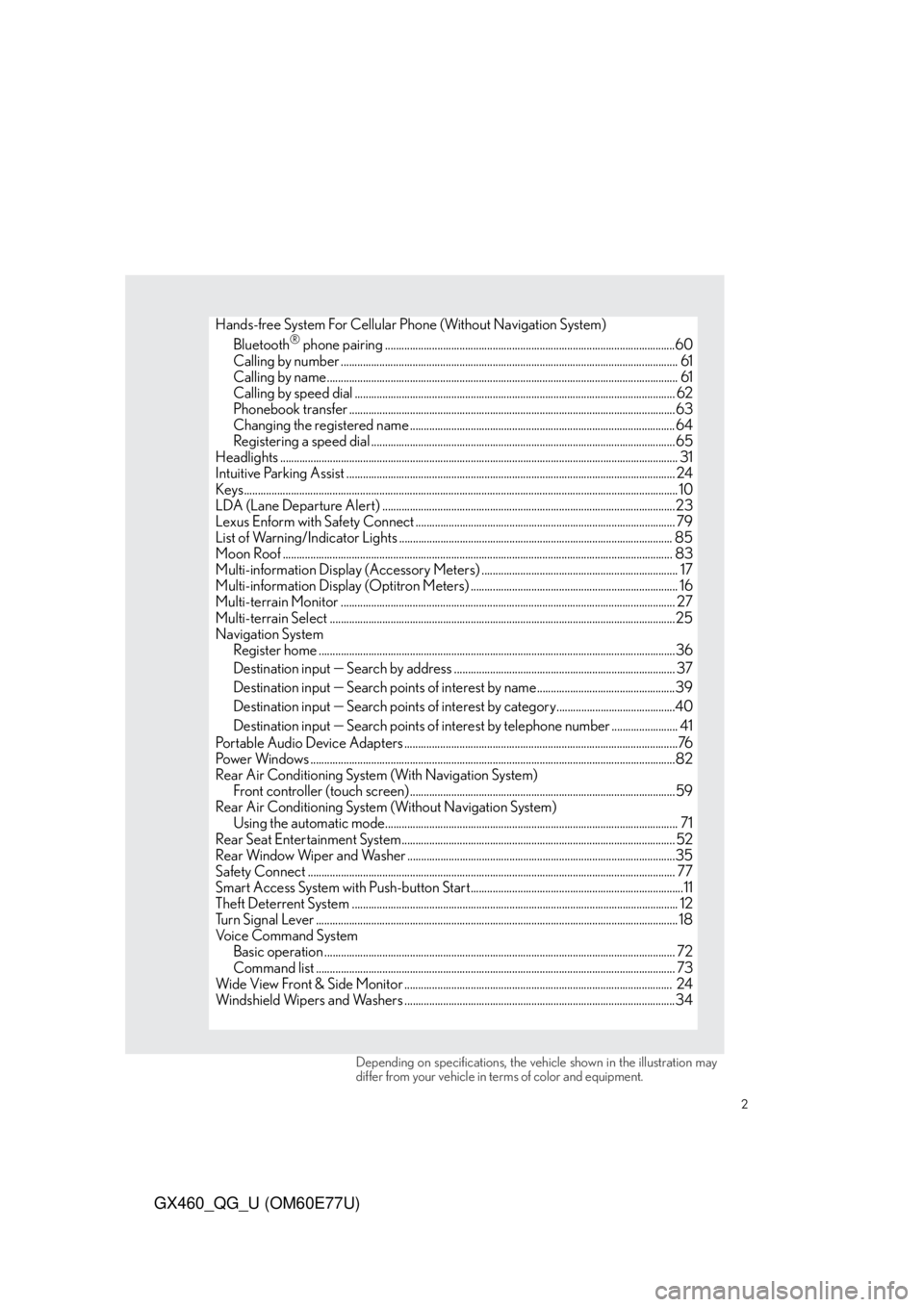
Hands-free System For Cellular Phone (Without Navigation System)
Bluetooth® phone pairing .........................................................................................................60
Calling by number .......................................................................................................................... 61
Calling by name............................................................................................................................... 61
Calling by speed dial .................................................................................................................... 62
Phonebook transfer ......................................................................................................................63
Changing the registered name ................................................................................................ 64
Registering a speed dial ..............................................................................................................65
Headlights ................................................................................................................................................ 31
Intuitive Parking Assist ....................................................................................................................... 24
Keys............................................................................................................................................................. 10
LDA (Lane Departure Alert) ..........................................................................................................23
Lexus Enform with Safety Connect .............................................................................................. 79
List of Warning/Indicator Lights ................................................................................................... 85
Moon Roof ............................................................................................................................................. 83
Multi-information Display (Accessory Meters) ....................................................................... 17
Multi-information Display (Optitron Meters) ........................................................................... 16
Multi-terrain Monitor ......................................................................................................................... 27
Multi-terrain Select .............................................................................................................................25
Navigation System
Register home .................................................................................................................................36
Destination input
Search by address ................................................................................ 37
Destination input
Search points of interest by name..................................................39
Destination input
Search points of interest by category...........................................40
Destination input
Search points of interest by telephone number ........................ 41
Portable Audio Device Adapters ...................................................................................................76
Power Windows ....................................................................................................................................82
Rear Air Conditioning System (With Navigation System)
Front controller (touch screen) ................................................................................................59
Rear Air Conditioning System (Without Navigation System)
Using the automatic mode.......................................................................................................... 71
Rear Seat Entertainment System................................................................................................... 52
Rear Window Wiper and Washer .................................................................................................35
Safety Connect ..................................................................................................................................... 77
Smart Access System with Push-button Start.............................................................................11
Theft Deterrent System ...................................................................................................................... 12
Turn Signal Lever ................................................................................................................................... 18
Voice Command System
Basic operation ............................................................................................................................... 72
Command list .................................................................................................................................. 73
Wide View Front & Side Monitor ................................................................................................. 24
Windshield Wipers and Washers ..................................................................................................34
Depending on specifications, the vehicle shown in the illustration may
differ from your vehicle in terms of color and equipment.
Page 6 of 94

6
GX460_QG_U (OM60E77U)
Audio remote control switches P. 48, 66
Telephone switches*1, *2
Menu switch P. 16
“ENTER” switch
P. 16
Wide view front & side monitor switch P. 24
Horn*1
Talk switch*1, *2
Cruise control switch P. 19, 20
“LDA” switch P. 23
Vehicle-to-vehicle distance button P. 20
: If equipped
*1: Refer to “Owner’s Manual”.
*2: Refer to “Navigation System Owner’s Manual”.
Page 8 of 94

8
GX460_QG_U (OM60E77U)
Shift lever*1
AVS switch*1
Shift lock override button*1
Four-wheel drive control switch
P. 29
Front seat heater/ventilator
switch
*1
AUX/USB adapter P. 76
Height control switch*1
Cup holders*1
Front seat heater/ventilator switch*1
Power outlet*1
Crawl Control switch
DAC switch
*1P. 30
: If equipped
*1: Refer to “Owner’s Manual”.
*2: Refer to “Navigation System Owner’s Manual”.
Page 17 of 94

17
GX460_QG_U (OM60E77U)
Multi-information Display
(Accessory Meters) (If Equipped)
●Clock
Indicates the time.
●Outside temperature
Indicates the outside temperature.
The temperature range that can be displayed is from -40 F (-40 C) to 122 F (50 C).
●Air conditioning system display
●Rear view monitor
Automatically displayed when the shift lever is moved into R.
(Refer to the “Owner’s Manual” or “Navigation System Owner’s Manual”.)
●Multi-terrain Monitor (if equipped)
●Wide view front & side monitor (if equipped)
●Trip information
Displays driving range, fuel consumption and other cruising-related information.
●Intuitive parking assist display (if equipped)
■Switching the display
Items displayed can be switched by press-
ing the “MODE” switch.
“MODE” switch
“RESET” switch
“DISP” switch
Display adjustment switch
The multi-information display presents the driver with a variety of driving-related data
including the current outside air temperature.
Page 24 of 94

24
GX460_QG_U (OM60E77U)
Intuitive Parking Assist (If Equipped)
Press the menu switch.
The multi-information display will
change modes to electronic features
control mode.
Press the “ENTER” switch upwards or
downwards until the Intuitive parking
assist mark appears in the multi-informa-
tion display.
Press the “ENTER” switch to change to
“ON”.
The Intuitive parking assist indicator will
be displayed.
Each pressing of the switch turns the
Intuitive parking assist on and off.
When on, the buzzer sounds to inform
the driver that the system is operational.
Press the menu switch to change to the nor-
mal display.
Wide View Front & Side Monitor(If Equipped)
On/off
The camera image is displayed when the
wide view front & side monitor switch is
pressed.
The distance from your vehicle to nearby obstacles when parallel parking or maneuver-
ing into a garage is measured by the sensors and communicated via the multi-informa-
tion display and a buzzer. Always check the surrounding area when using this system.
This system can display the wide view front monitor and the side monitor.
The wide view front monitor uses a super-wide angle lens to display on screen the areas to
the left and right of the vehicle and the blind spots to the front of the vehicle. This system
helps the driver check for approaching cars, bicycles and pedestrians when at intersections
with poor visibility.
The side monitor uses a camera installed in the passenger’s side outside rear view mirror to
display on screen the area to the right of the vehicle, helping the driver check this area.
Page 28 of 94

28
GX460_QG_U (OM60E77U)
■Switching the image
Select any mode using the Multi-terrain
Select system.
Move the “ENTER” switch upwards or
downwards to select “CAM. POSI-
TION”, and press the “ENTER” switch.
The camera view can be switched by
moving the “ENTER” switch upwards or
downwards.
Each time the switch is operated, the
mark on the multi-information display
will move and the image displayed on
the monitor will switch.
Front monitor*
1
Side-front simultaneous display moni-
tor*
2
Side-rear simultaneous display moni-
tor*
2
Rear monitor*3
*1: Cannot be selected if the shift lever is in R.
*
2: The displayed icon differs in accordance with shift position.
*
3: Cannot be selected if the shift lever is not in R.
Page 32 of 94

32
GX460_QG_U (OM60E77U)
■Turning on the high beam headlights
With the headlights on, push the lever
away from you to turn on the high
beams.
When the light switch is in “AUTO” posi-
tion, the Automatic High Beam system
will be activated.
Pull the lever toward you to the center
position to turn the high beams off.
Pull the lever toward you and release it
to flash the high beams once.
You can flash the high beams with the
headlights on or off.
■AFS (Adaptive Front-lighting System) (if equipped)
AFS (Adaptive Front-lighting System) secures excellent visibility at intersections and on
curves by automatically adjusting the direction of the light axis of the headlights according
to vehicle speed and the degree of the tire’s angle as controlled by steering input.
AFS operates at speeds of 6 mph (10 km/h) or higher.
■Deactivating AFS
Press the menu switch.
The multi-information display will
change modes to electronic features
control mode.
Press the “ENTER” switch upwards or
downwards until “AFS” appears.
Press the “ENTER” switch to change to
“OFF”.
The “AFS OFF” indicator will be dis-
played.
Each pressing of the switch turns “AFS”
on and off.
Press the menu switch to change to the nor-
mal display.