Page 339 of 650
338
3-4. Using the hands-free system (for cellular phone)
GS_G_U (OM30C80U)
January 27, 2010 4:47 pm
Using a Bluetooth® phone
Device name
Bluetooth
® connection status
Help icon
Character deletion
Make a call
To display the screen shown above, press , and touch “Phone” on
the “Information” screen.
GS_U_G.book Page 338 Wednesday, January 27, 2010 4:48 PM
Page 340 of 650
339
3-4. Using the hands-free system (for cellular phone)
3
Interior features
GS_G_U (OM30C80U)
January 27, 2010 4:47 pm
Registering a Bluetooth® phone
You can register up to 4 phones in the system. Display the “Phone” screen. ( →P. 3 3 8 )
To u c h “ Ye s ” .
Input the passcode displayed on
the screen into your phone.
For the operation of the phone, see
the manual that comes with your
cellular phone.
If you want to cancel it, select
“Cancel”.
If a completion message is
displayed, registration is complete.
If an error message is displayed,
follow the guidance on the screen
to try again.
STEP1
STEP2
STEP3
GS_U_G.book Page 339 Wednesday, January 27, 2010 4:48 PM
Page 341 of 650
340
3-4. Using the hands-free system (for cellular phone)
GS_G_U (OM30C80U)
January 27, 2010 4:47 pm
Bluetooth® phone connection
There are two connection methods available — automatic and manual. Automatic When you register your phone,
auto connection will be activated.
Always set it to this mode and
leave the Bluetooth
® phone on the
place where connection can be
established.
When the “ENGINE START
STOP” switch is turned to
ACCESSORY or IGNITION ON
mode, the system will search for a
nearby cellular phone you have
registered. Next, the system auto-
matically connects with the most
recent of the phones connected to
in the past. Then, the connection
result is displayed.
GS_U_G.book Page 340 Wednesday, January 27, 2010 4:48 PM
Page 342 of 650
341
3-4. Using the hands-free system (for cellular phone)
3
Interior features
GS_G_U (OM30C80U)
January 27, 2010 4:47 pm
Manual
When the auto connection has failed or “Handsfree Power” is turned off,
you must connect Bluetooth
® manually.
Display the “Phone” screen. ( →P. 3 3 8 )
Touch “Connect Phone”.
Touch “Handsfree Power”, or
touch the phone to connect.
The “Connect Bluetooth
*” screen
is displayed.
If a completion message is dis-
played, connection is complete.
*: Bluetooth is a registered trade- mark of Bluetooth SIG. Inc.
STEP1
STEP2
STEP3
STEP4
GS_U_G.book Page 341 Wednesday, January 27, 2010 4:48 PM
Page 343 of 650
342
3-4. Using the hands-free system (for cellular phone)
GS_G_U (OM30C80U)
January 27, 2010 4:47 pm
■Reconnecting to the Bluetooth® phone
If the system cannot connect due to poor signal strength with the “ENGINE START
STOP” switch in ACCESSORY or IGNITION ON mode, the system will automat-
ically attempt to reconnect.
If the phone is turned off, the system will not attempt to reconnect. In this case, it
must be connected manually, or the phone must be re-selected or re-entered.
■Connecting the phone while Bluetooth® audio is playing
●Bluetooth® audio will stop temporarily.
●It may take time to connect.
■Help icon
When “?” is displayed on the screen, an explanation of the function can be dis-
played.
To display the explanation of the function, touch “?” and choose the desired func-
tion.
GS_U_G.book Page 342 Wednesday, January 27, 2010 4:48 PM
Page 344 of 650
343
3-4. Using the hands-free system (for cellular phone)
3
Interior features
GS_G_U (OM30C80U)
January 27, 2010 4:47 pm
Making a callOnce the Bluetooth
® phone is registered, you can make a call using the
following procedure:
■ Dialing
Display the “Phone” screen. ( →P. 3 3 8 )
Input the phone number.
To delete the inputted phone num-
ber, touch .
To dial the last inputted phone
number, touch “Redial”.
Touch or press on the steering wheel.
STEP1
STEP2
STEP3
GS_U_G.book Page 343 Wednesday, January 27, 2010 4:48 PM
Page 354 of 650
353
3-4. Using the hands-free system (for cellular phone)
3
Interior features
GS_G_U (OM30C80U)
January 27, 2010 4:47 pm
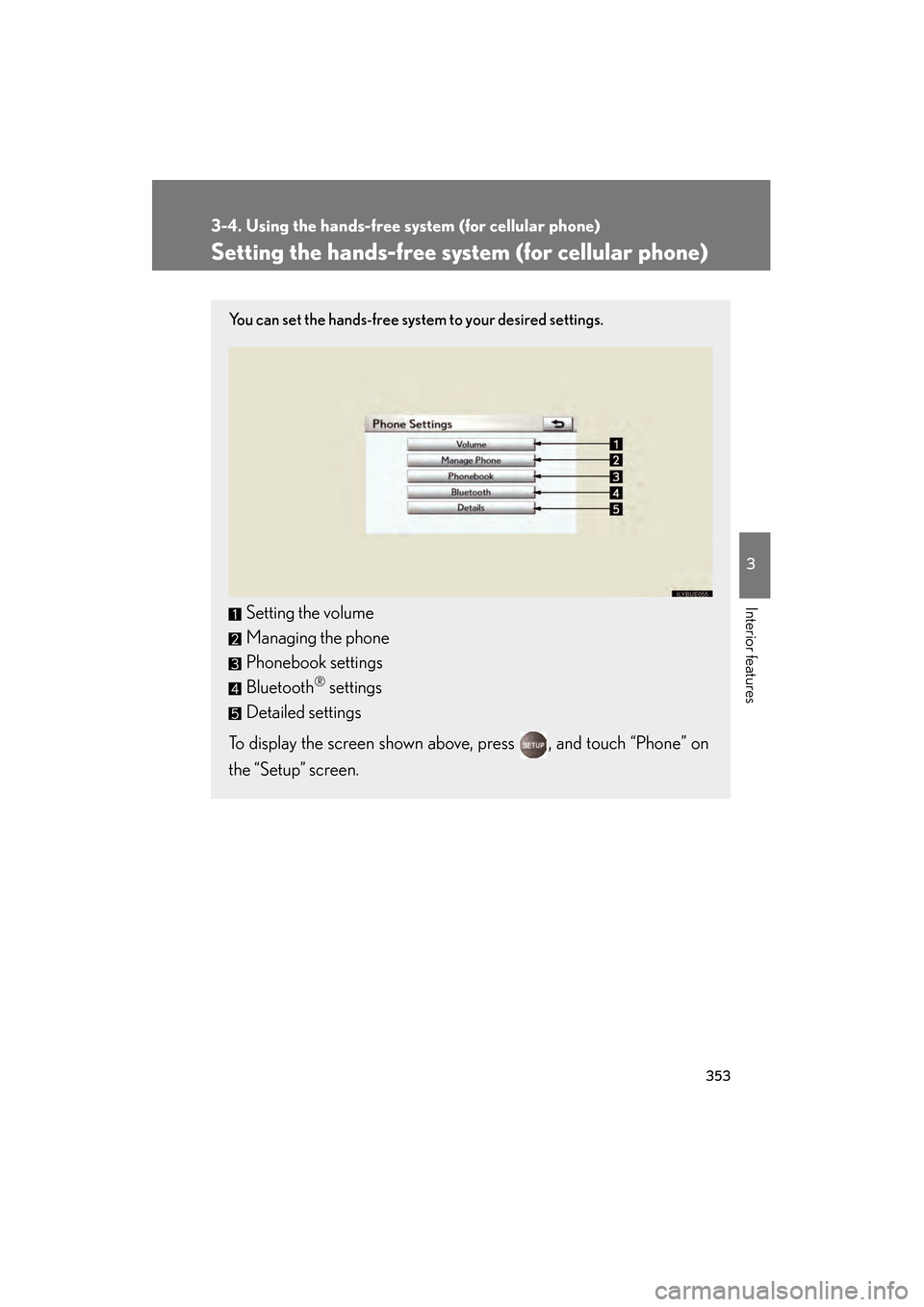
Setting the hands-free system (for cellular phone)
You can set the hands-free system to your desired settings.
Setting the volume
Managing the phone
Phonebook settings
Bluetooth
® settings
Detailed settings
To display the screen shown above, press , and touch “Phone” on
the “Setup” screen.
GS_U_G.book Page 353 Wednesday, January 27, 2010 4:48 PM
Page 356 of 650
355
3-4. Using the hands-free system (for cellular phone)
3
Interior features
GS_G_U (OM30C80U)
January 27, 2010 4:47 pm
Managing the phone■ Registering a Bluetooth
® phone
Display the “Phone Settings” screen. ( →P. 353)
Touch “Manage Phone” on the “Phone Settings” screen.
Touch “(add new)” to register your
cellular phone to the system.
Input the passcode displayed on
the screen into your phone.
For the operation of the phone, see
the manual that comes with your
cellular phone.
If you want to cancel it, select
“Cancel”.
If a completion message is dis-
played, registration is complete.
If an error message is displayed,
follow the guidance on the screen
to try again.
STEP1
STEP2
STEP3
STEP4
GS_U_G.book Page 355 Wednesday, January 27, 2010 4:48 PM